 ChatGPT,
 Claude,
 Gemini,
 Grok — all four for


Key highlights
- Learn what customers expect to find on a junk removal company website before they call or request a quote.
- Understand the core pages your website needs, including your homepage, services page, service areas page and quote request page.
- Get practical junk removal website design tips that improve trust, mobile usability and lead capture.
- See how to explain your services, pricing and pickup process in a way that builds confidence.
- Learn how to optimize your website for local search so nearby customers can find your business.
- Use a simple launch checklist to test forms, phone links, mobile layout and SEO basics before publishing.
When someone looks for a junk removal company, they usually need help soon. They may be clearing out a garage, replacing appliances, preparing a rental property, cleaning up after a renovation or getting rid of bulky items before a move.
In that moment, your website has one job: make it easy for them to decide whether to contact you.
A strong junk removal website should quickly answer the questions customers care about most. What do you remove? Do you serve my area? How do I get a quote? Can I trust your team to handle the job properly?
If your website answers those questions clearly, it can turn local searches into calls, quote requests and booked jobs. If it feels vague, slow or hard to use, visitors may move on to another company.
In this guide, you’ll learn how to build a junk removal company website that is clear, useful and built for local customers.
Quick overview: How to create a junk removal company website
| Step | What to do |
|---|---|
| Choose your domain and hosting | Pick a clear domain name and set up reliable hosting so your site is easy to find, fast and available. |
| Choose how you want to build the site | Use WordPress, a junk removal website template or an AI website builder depending on your time, budget and goals. |
| Create your website structure | Plan your homepage, services page, service areas page, reviews section and quote request page. |
| Add service and location details | Explain what you remove and where you work in clear, local language. |
| Add quote and contact features | Make your phone number, quote button, form and mobile contact options easy to use. |
| Review, test and publish | Check forms, phone links, mobile layout, page speed and business details before going live. |
How to plan your junk removal website?
Before you choose a design or start writing pages, think about the customer landing on your site.
Most visitors are not casually exploring. They are trying to solve a practical problem. They may be moving, renovating, handling an estate cleanout, clearing a storage unit or trying to remove items their regular trash service will not take.
Your website should meet them in that moment and make the next step feel simple.
1. Understand what customers need before they contact you
A potential customer usually wants to know:
- Whether you remove the type of junk they have
- Whether you serve their city or neighborhood
- How your quote process works
- Whether your business looks reliable
- How quickly they can contact you
This is why customer intent matters. A junk removal website is not only about introducing your company. It is about helping a visitor decide, “Yes, this company can help me.”
For example, a homeowner searching for appliance removal does not want to read a long company story before learning whether you remove refrigerators. They want to see the service, the location and the next step.
2. Choose one primary action for your website
Every business website needs a main goal. For a junk removal company, that goal is usually a phone call, quote request or booking request.
You can offer more than one contact option, but one should be the main path. If you prefer to speak with customers before estimating jobs, make the phone number prominent. If you prefer to review details first, make the quote form the main call-to-action. If you offer online scheduling, guide visitors toward booking a pickup.
A website with one clear next step feels easier to use. A website with too many competing buttons can make visitors pause.
How to build a junk removal company website: Step-by-step guide
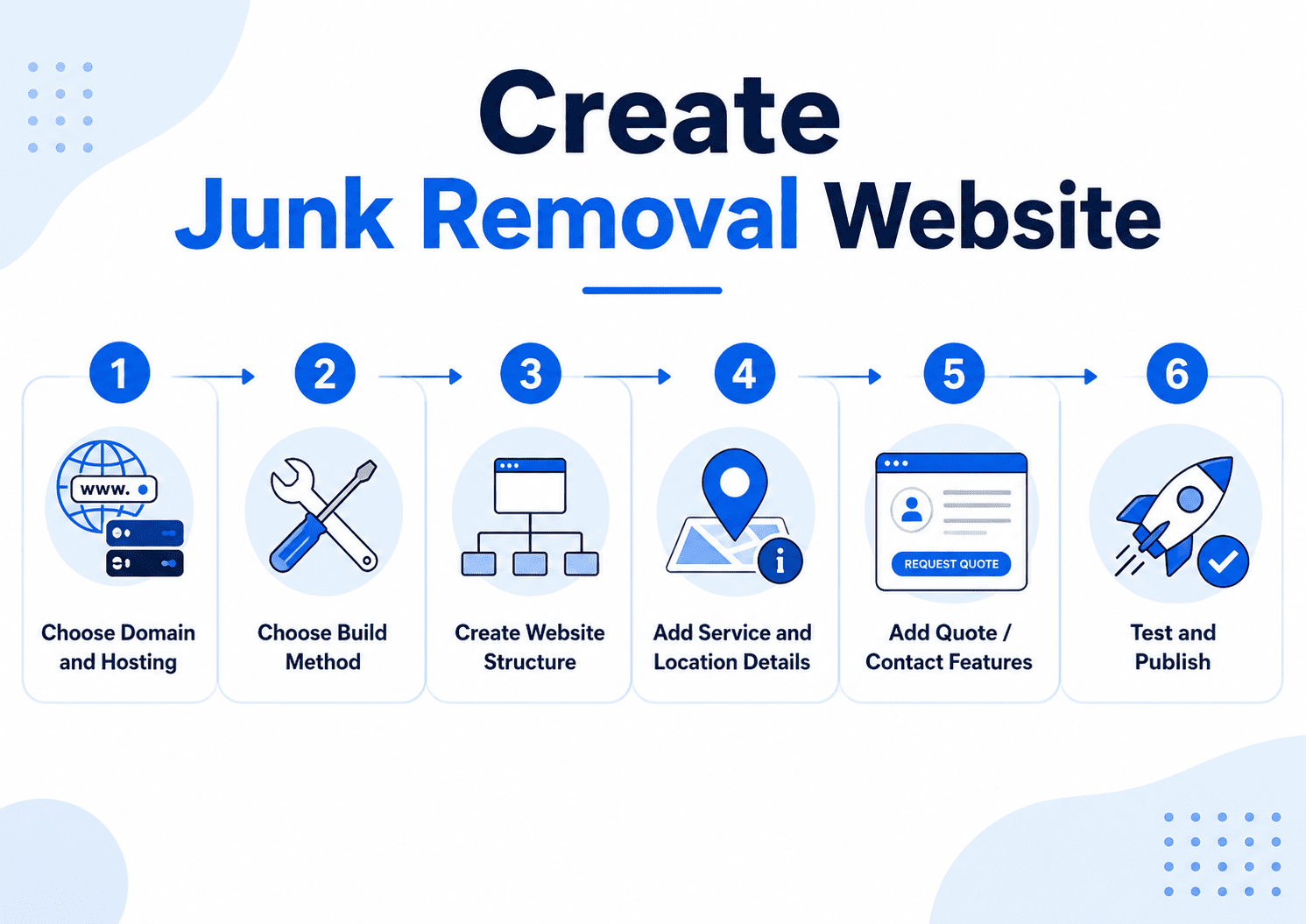
Once you know what your visitors need, you can start building the site itself. The process becomes easier when you break it into practical steps: choose your domain and hosting, pick a building method, create your page structure, add service content and test everything before publishing.
Step 1: Choose your domain and hosting
Start with a clear domain name and reliable hosting. Your domain should be easy to remember, easy to spell and relevant to your junk removal business. A name like “[ClearOutAustin].com” or “[SmithJunkRemoval].com” works well because it connects the service to the business or location.
Try to avoid hyphens, long phrases or unusual spellings. Your domain may appear on trucks, business cards, invoices and local listings, so customers should be able to recognize it quickly.
For hosting, choose a provider that keeps your site fast, secure and available. Bluehost is a good option because you can get both your domain and hosting in one place, with competitive renewal rates and website tools that make it easier to start building.
Read more: How to Choose a Web Hosting Service Provider: Find Your Best Fit
Step 2: Choose how you want to build the site
There are a few ways to build a junk removal business website. The right choice depends on your time, budget and comfort level.
WordPress is a strong option if you want flexibility and long-term control. It allows you to add pages, forms, plugins, SEO tools and new content as your company grows.
A junk removal website template can help if you want a ready-made structure. A template gives you a starting layout, but it still needs to be customized with your services, locations, photos and reviews.
An AI website builder can be useful if you know what your business offers but do not want to start from a blank page. AI can help generate an initial layout and draft content, which you can then edit with your real service details and local information.
Step 3: Create your website structure
You do not need a large website on day one. You need the right pages with the right information.
Start with these core pages:
- Homepage
- Services page
- Service areas page
- Contact or quote request page
- Reviews or testimonials section
This is enough to launch a useful website. You can add more pages later as you learn which services and locations bring in the best leads.
The goal is not to create the biggest site in your market. The goal is to create a website customers can understand and use.
Step 4: Add service and location details
Your services should be specific. “Junk removal” is the broad category, but customers often search by item or situation.
A services page can mention jobs such as:
- Furniture removal
- Appliance removal
- Mattress removal
- Garage cleanouts
- Basement and attic cleanouts
- Yard waste removal
- Office cleanouts
- Construction debris removal
- Estate cleanouts
For each major service, explain what it includes in plain language. A customer should be able to tell whether you handle their job without needing to call for basic information.
Your service areas should be just as clear. Mention the cities, neighborhoods, counties or suburbs you serve, especially on your homepage, service areas page and contact page.
Step 5: Add quote and contact features
Your website should make it easy for visitors to become leads.
A good quote form asks for enough information to start the conversation without overwhelming the customer. In most cases, you need a name, phone number, email, location, description of the junk and preferred pickup timing.
A photo upload field can also be useful. Photos help you understand the job before calling back, and they make the quote process easier for customers who may not know how to describe the amount of junk.
Your phone number should be visible and clickable on mobile. Many junk removal leads happen when someone is ready to talk now, not later.
Step 6: Review, test and publish
Before publishing, test the website like a customer would.
Check that:
- The quote form works
- The phone number is clickable
- CTA buttons go to the right page
- Service areas are accurate
- Pages load properly on mobile
- Business hours and contact details are correct
- Images load quickly
Once the site works, publish it and connect it to your Google Business Profile, social profiles, local directories and offline marketing materials.
6 basic pages you need for a junk removal business website
A strong website starts with a strong page structure. Each page should have a clear purpose. If a page does not help customers understand your business or take action, it probably needs to be improved or removed.
1. Homepage
Your homepage is the first impression. It should quickly communicate what you do, where you work and how to contact you.
A strong homepage usually includes:
- A clear headline
- A short service summary
- Your main service area
- A visible phone number
- A quote request button
- Reviews or trust signals
- Links to your main services
For example, a headline like “Fast junk removal services in Denver” is immediately useful. It tells the visitor what the business does and where it operates.
The homepage should not try to say everything. Think of it as a guidepost. It should point visitors to the right next page, whether that is services, service areas or the quote form.
Read more: How To Create a Homepage and Website Homepage Content
2. Services page
Your services page is where you explain what you remove.
This page should be detailed enough to help customers self-qualify. If someone has an old refrigerator, they should not have to wonder whether “junk removal” includes appliances. If someone needs a rental property cleaned out, they should see cleanouts mentioned clearly.
Group your services in a way that feels natural. For example, you might organize them by residential junk removal, commercial junk removal and specialty cleanouts.
For each service, include a short explanation and a call-to-action. Avoid one-line descriptions. A little detail helps build confidence.
3. Individual service pages
Individual service pages are useful when certain services are important to your business or commonly searched in your area.
You might create separate pages for:
- Furniture removal
- Appliance removal
- Garage cleanouts
- Yard waste removal
- Construction debris removal
- Estate cleanouts
These pages can support local SEO because they match specific customer searches. Someone searching for “garage cleanout services in Phoenix” may be more likely to contact you if they land on a page that directly addresses garage cleanouts.
Make each page genuinely useful. Do not create thin pages that only swap out the service name. Explain what the service includes, what customers can expect and how to request a quote.
4. Service areas page
Your service areas page helps visitors confirm whether you work in their location.
This page can list cities, neighborhoods, suburbs or counties. If you serve a large area, add a short explanation of your coverage and how customers can confirm availability.
For important cities, you may eventually create dedicated location pages. These pages should include more than a city name. Add useful details about the services available there, common job types and how customers in that area can request pickup.
5. Reviews or testimonials section
Reviews are valuable for junk removal because customers are trusting your team to enter their property, remove heavy items and handle the job professionally.
Feature reviews that mention specific strengths, such as:
- On-time arrival
- Careful handling
- Fair pricing
- Friendly crews
- Fast pickup
- Clean results
Specific reviews feel more credible than generic praise. You can include testimonials on your homepage, service pages or a dedicated reviews page.
6. Contact or quote request page
Your contact page should be simple and focused. The visitor has already reached the decision stage, so do not make them work too hard.
Include your phone number, quote form, business hours, service area and expected response time. If customers can upload photos, mention that it helps you provide a more accurate estimate.
Keep the page clean. A crowded contact page can create unnecessary friction.
Read more: How To Create a Contact Us Page the Easy Way
How to design your junk removal website to convert visitors into leads?
Good junk removal website design is not about adding every design trend. It is about helping customers move from search to contact with as little confusion as possible.
Focus on the essentials:
- Keep your phone number visible and clickable on mobile.
- Use one clear CTA, such as “Get a free quote” or “Request pickup.”
- Show your service area near the top of the page.
- Keep service sections short and easy to scan.
- Add reviews, real photos and trust signals where they support a decision.
- Keep navigation simple with pages like Home, Services, Service Areas, Reviews and Contact.
The goal is not to make the site look busy. The goal is to remove friction so customers can contact you quickly.
Customize your website content with real business details
Once your structure and design are in place, make the content specific to your business. This is especially important if you start with a website template or AI-generated draft.
Your website should clearly explain:
- What services you offer
- What items you remove
- Which locations you serve
- How your quote process works
- What customers can expect on pickup day
- Whether you donate, recycle or dispose of items responsibly
For example, instead of saying “We offer appliance removal,” write:
We remove refrigerators, washers, dryers, ovens and other bulky appliances. Share a few details or upload a photo, and we’ll help you schedule a pickup time.
This kind of content is more useful for customers and gives search engines clearer context about your services.
How Bluehost AI Website Builder can help?
Once you have the basics planned, Bluehost AI Website Builder can help you move faster from idea to working website. Instead of starting with a blank page, you can use AI to create an initial version of your site and then shape it around your real business.
For junk removal companies, that means we help make the early website-building process easier by giving you:
- A faster starting point: Generate a first draft of your website so you are not building every section from scratch.
- AI-assisted content creation: Get help drafting page copy, service descriptions and calls-to-action that you can refine for your business.
- Easy customization: Update text, images, sections and layouts so the site reflects your services, service area and brand.
- WordPress flexibility: Build on a platform that gives you room to add pages, publish updates and grow your website over time.
- Connected website essentials: Manage your domain, hosting and website-building tools in one place instead of juggling separate systems.
- Room to grow: As your business expands, you can add new service pages, location pages, photos, reviews and content.
The goal is not to let AI speak for your business. It is to help you get a useful first version in place faster. From there, your local knowledge, customer reviews, real photos and service details make the website trustworthy.
How can you optimize your website for local SEO?
A website is only useful if the right people can find it. Local SEO helps your junk removal website appear when nearby customers search for services you offer.
1. Use city and service keywords naturally
Use phrases that match how customers search, but keep the writing natural.
Examples include:
- Junk removal in your city
- Furniture removal in your city
- Appliance pickup in your city
- Garage cleanout services in your city
- Construction debris removal in your city
Place these phrases in page titles, headings and body copy where they make sense. Do not repeat the same phrase awkwardly. Search engines are better at understanding natural language than they used to be, and readers can spot keyword stuffing quickly.
2. Create helpful service-area pages
Service-area pages can help you reach customers in nearby cities or neighborhoods. But they need to be useful.
A strong location page should explain the services available in that area, mention local context where appropriate and guide visitors toward a quote request. A weak location page only swaps out the city name and repeats the same copy.
If you serve ten cities, you do not need ten thin pages right away. Start with your most important locations and make those pages strong.
3. Connect your website to Google Business Profile
Your Google Business Profile is one of the most important local visibility tools for a junk removal business. Link it to your website and make sure the information matches.
Your business name, phone number, service areas, hours and website URL should be consistent. Add photos regularly and encourage satisfied customers to leave reviews.
Your website and Google Business Profile should support each other. The profile helps customers find you in local search, and the website gives them more detail before they contact you.
4. Add internal links between related pages
Internal links help visitors and search engines understand your site.
Your homepage can link to your services page, service areas page and quote page. Your services page can link to individual service pages. Each service page can link back to the quote form.
This creates a clear path through the site. It also helps important pages receive more visibility.
Common mistakes to avoid
Even a good-looking website can lose leads if it makes basic mistakes. Watch for these issues before publishing.
- Hiding the phone number: Put it in the header, footer and contact page. Make sure it is clickable on mobile.
- Using vague service descriptions: Say what you remove and what types of jobs you handle.
- Not listing service areas: Customers should be able to confirm your coverage area quickly.
- Making quote forms too long: Ask for the basics first. You can gather more details after the initial request.
- Publishing thin location pages: Avoid creating many nearly identical city pages. Focus on quality, local relevance and helpful information.
Launch checklist for your junk removal website
Before you publish, review the site carefully. A small issue like a broken form or wrong phone number can cost real leads.
| Area to check | What to confirm |
|---|---|
| Contact details | Phone number, email address and business hours are correct. |
| Quote form | Form submissions go to the right inbox and include the details you need. |
| Mobile experience | Buttons, phone links and forms work smoothly on a phone. |
| Services | All major junk removal services are listed clearly. |
| Service areas | Cities, neighborhoods or counties are accurate. |
| Trust signals | Reviews, photos and business claims are accurate. |
| SEO basics | Page titles, headings, internal links and Google Business Profile are set up. |
| Page speed | Images are compressed and pages load quickly. |
| Calls-to-action | Every important page gives visitors a clear next step. |
After launch, keep improving the site. Add new photos, publish helpful service content, update reviews and expand location pages as your business grows.
Final thoughts
Building a junk removal company website does not have to be complicated. Start with the basics: a clear domain, reliable hosting, useful service pages, visible contact options and local content that helps customers understand whether you serve their area.
The best junk removal websites make decisions easy. They show what you remove, explain how quotes work, build trust with reviews and photos and make it simple for visitors to call or request pickup.
If you’re ready to create your site, Bluehost AI Website Builder can help you get started faster. Tell us about your junk removal business, services and location, and we’ll help you generate a first draft you can customize with your real service areas, photos, reviews and brand voice.
Start building your junk removal website with Bluehost AI Website Builder today.
FAQs
To build a junk removal company website, start by choosing a domain name and reliable hosting. Then create your core pages, including a homepage, services page, service areas page, reviews section and quote request page. Add clear service descriptions, customer trust signals, local SEO elements and mobile-friendly contact options.
A junk removal website should include a homepage, services page, service areas page, reviews or testimonials section and contact or quote request page. As your business grows, you can add individual service pages for furniture removal, appliance removal, garage cleanouts, yard waste removal and other high-value services.
Good junk removal website design makes it easy for visitors to understand your services, check your service area and request a quote. It should include a clear headline, visible phone number, strong call-to-action, customer reviews, real photos and a mobile-friendly layout.
Yes. AI can help you create a starter website, draft page copy and organize your services. Bluehost AI Website Builder can make the first version easier to build, but you should still customize the site with your real services, photos, service areas, reviews and quote process.
The best website builder for junk removal depends on your needs. If you want flexibility and room to grow, WordPress is a strong option. If you want help getting started faster, an AI website builder can help create a first draft that you can customize for your business.
You can start with one services page, but separate service pages can help as your business grows. Pages for furniture removal, appliance removal, garage cleanouts or construction debris removal can make your site more useful for customers and support local SEO.
You can include general pricing information or explain how your quote process works. If exact pricing depends on volume, labor, location or disposal fees, say that clearly. Customers do not always need a fixed price upfront, but they do want to understand what affects the estimate.
To get more leads, make your phone number easy to find, use clear quote buttons, show customer reviews, list your services and service areas, add real photos and optimize your pages for local search. A fast, mobile-friendly website with a simple quote process is more likely to turn visitors into leads.

Write A Comment