 ChatGPT,
  Claude,
  Gemini,
  Grok — all four for
Reimage Your Server for Ollama Installation
Ollama is a tool that lets you run large language models (LLMs) locally on your own computer, instead of relying on cloud-based AI services. Ollama makes it easy to download, run, and interact with AI models, such as chatbots, entirely offline.
How Ollama works
- Runs AI models locally (Mac, Linux, Windows support)
- No internet required after model download
- Simple command-line interface
- Privacy-friendly (your data stays on your machine)
- Optimized for consumer hardware
What models can Ollama run?
Ollama supports many popular open-source LLMs, for example:
- Llama 2 / Llama 3
- Mistral
- Gemma
- Phi
- Code-focused models (for programming help)
System Requirements
Before deploying, ensure your server meets the requirements below. For a stable production deployment, we recommend using higher specifications than the Approximate Size requirements.
Important:
- Do not purchase a server that only meets Approximate Size requirements. The Approximate Size specifications represent the software's bare survival threshold and do not account for operating system overhead or production workloads. Running with minimal resources can result in severe performance slowdowns, system freezes, or unexpected crashes during traffic spikes.
- For a stable deployment, we recommend allocating additional resources beyond basic installation levels, especially if you plan to store recordings, logs, or other application data.
Recommended Plans:
Ollama AI Model Storage Requirements
Ensure your server has sufficient disk space available to download and store the specific AI models you plan to run locally in Ollama:
| AI Model | Approximate Size | Description |
|---|---|---|
| TinyLlama | 637 MB | The starter model that comes pre-downloaded on first boot. |
| Llama 3.2 | 2 GB | A slightly larger, more capable model example. |
| 7B Parameter Models | 4 – 8 GB | The general disk space range required for standard 7-billion-parameter models. |
How to Reimage Your Server for Ollama Installation
This applies to both VPS and VDS.
- You can install only one application using the one-click installer.
- To change or delete your application, follow the guide: How to Change an Application. Create a backup of your existing applications or templates.
- To keep your current template, install the new application manually using SSH. Follow the same steps for both Self-Managed VPS and Virtual Dedicated Server (VDS). The system automatically selects the recommended operating system for Ollama.
- Log in to your Bluehost Portal.
- In the left-hand menu, click Hosting, then select My Plans.
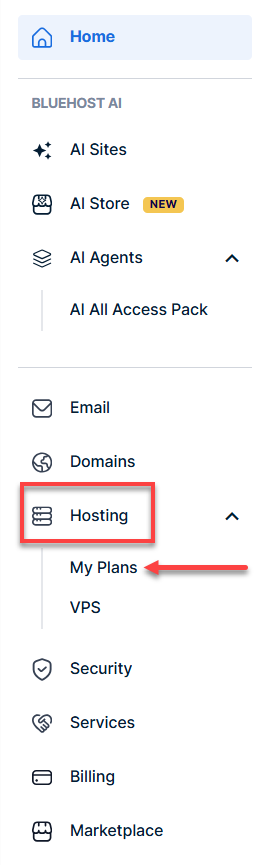
- Click the Manage button on the hosting package you want to reimage.

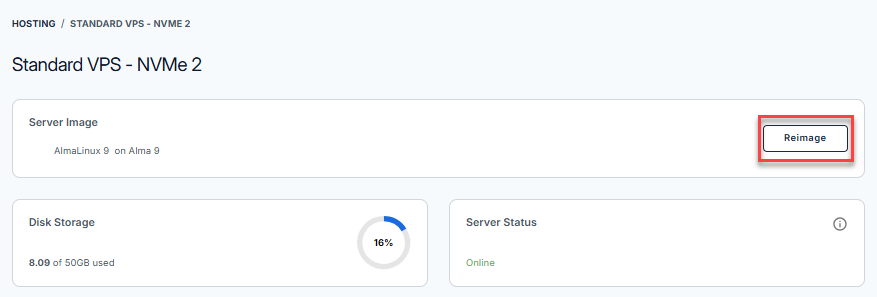
- Navigate to the Server Image section, then click the Reimage button.
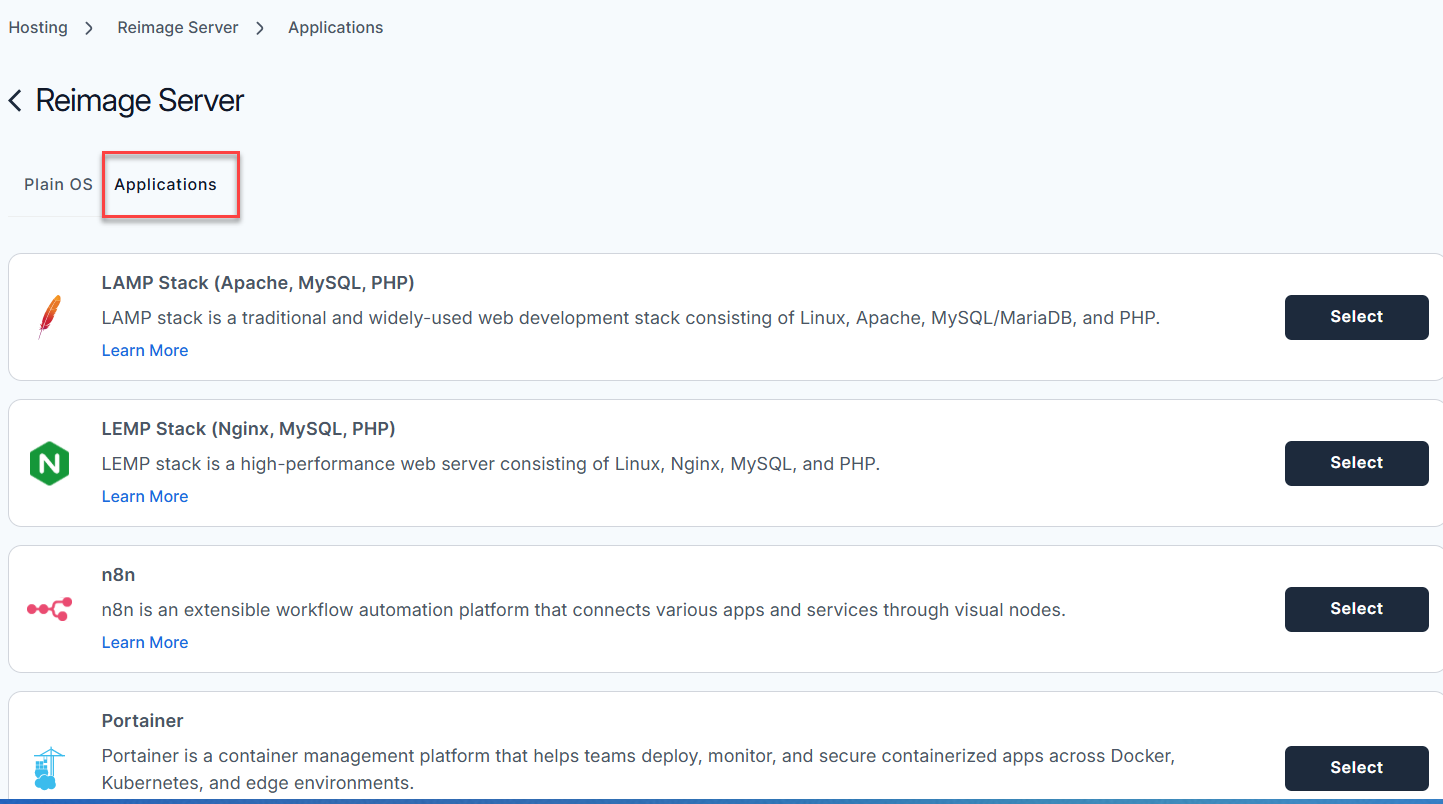
- Select the Applications tab.
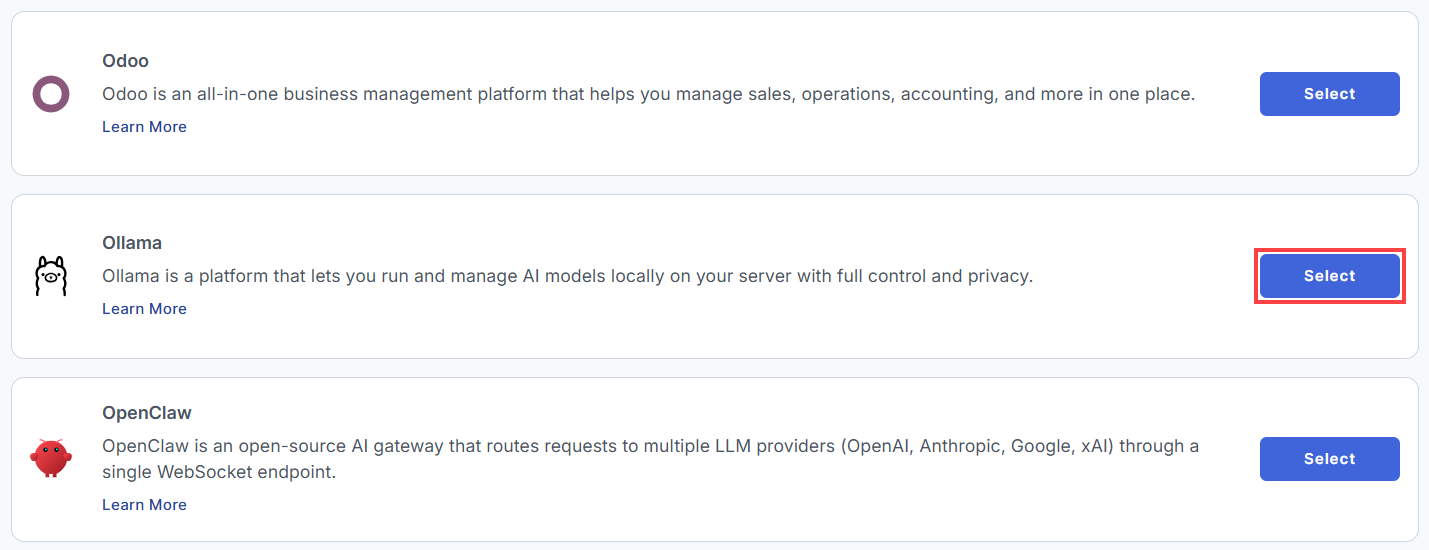
- From the list of available applications, find Ollama and click Select.
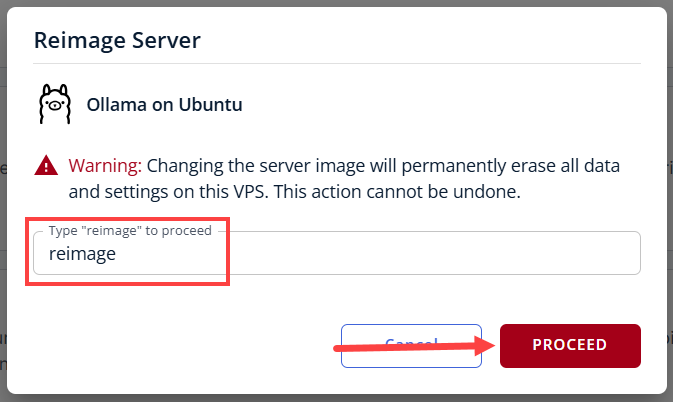
- On the pop-up message, type reimage in the field, then click Proceed.
- Wait a few minutes while the installation completes.

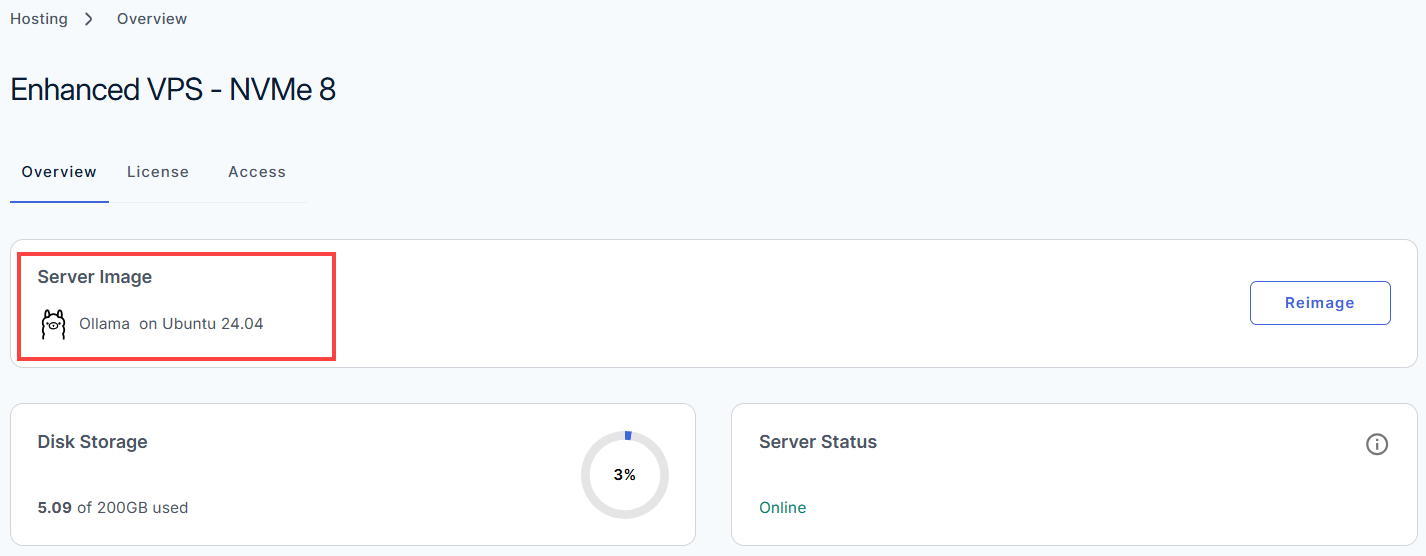
- Once completed, you will see Ollama listed in the Server Image section.
How to Use Ollama
After the installation completes, follow the steps below to set up your application.
- Log in to your Bluehost Portal.
- In the left-hand menu, click Hosting, then select My Plans.
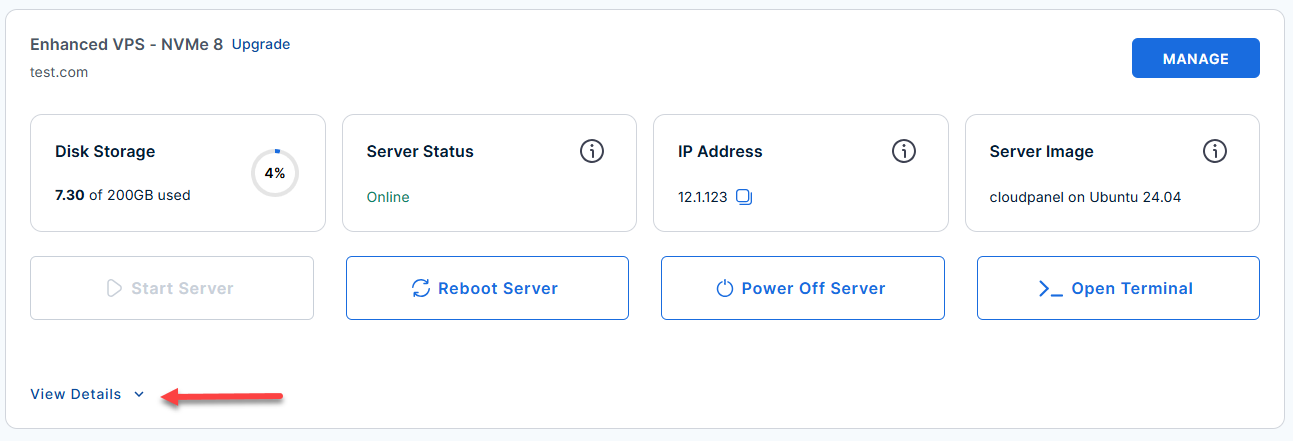
- Locate the server you want to manage, then click View Details in the bottom-left corner to expand the section and access additional server information.
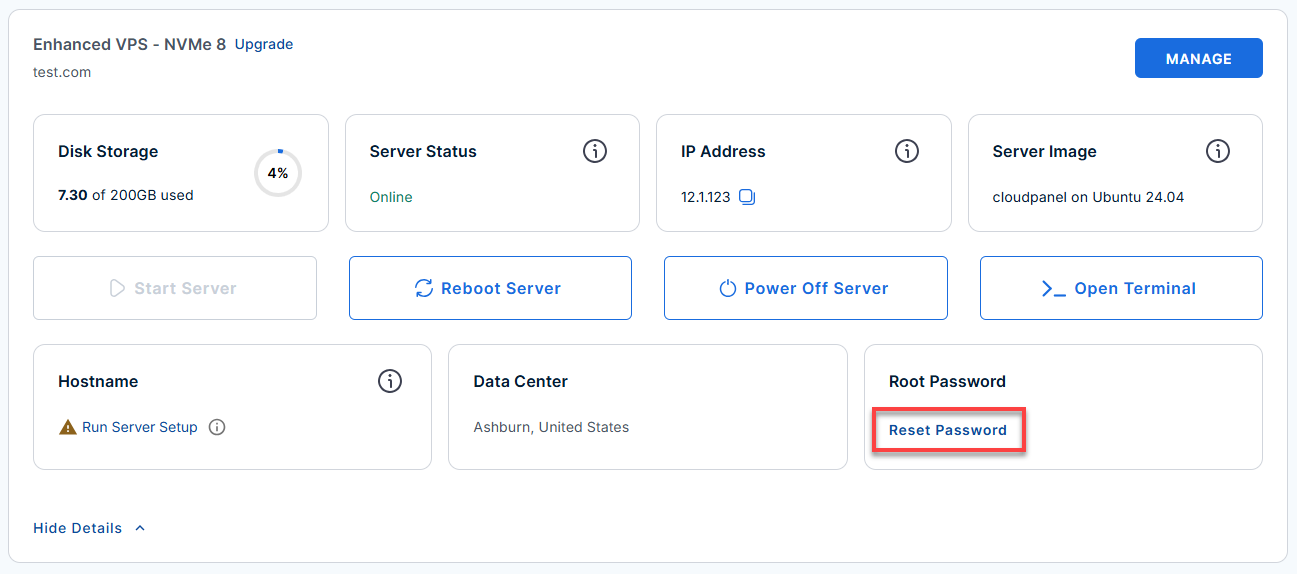
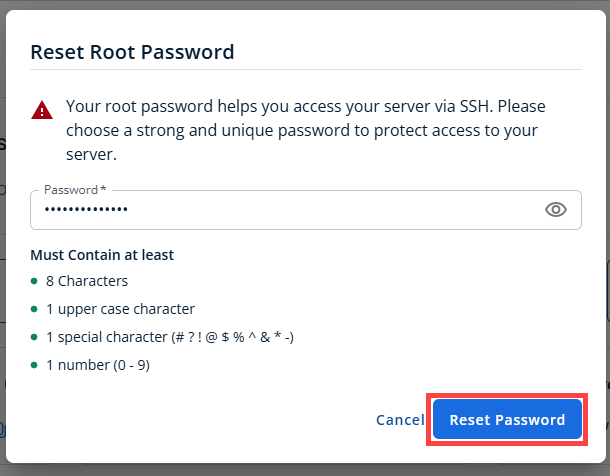
- Click the Reset Password.
- In the pop-up window, type your new root password, then click Reset Password again to confirm and save the changes.
- Connect to your VPS via SSH.
Open your computer's terminal (or an SSH client like PuTTY) and run the following command to log into your server as the administrator, using your server's public IP address:Replaceyour_server_ipwith your actual server IP address.
Follow the prompts and enter the new root password you created in the step above.ssh root@your_server_ipExample Output:
Welcome to Ubuntu 24.04.4 LTS (GNU/Linux 6.8.0-111-generic x86_64) ******************************************************************************** Ollama is running on this server. The UFW firewall is enabled. All ports are BLOCKED except 22 (SSH) and 11434 (Ollama API). API endpoint: http://localhost:11434 Common commands: ollama list # list downloaded models ollama pull llama3.2 # download a model (~2GB) ollama pull tinyllama # download a small starter model (~637MB) ollama run tinyllama # start an interactive chat session REST API examples: curl http://localhost:11434/api/version curl http://localhost:11434/api/tags curl -X POST http://localhost:11434/api/generate \ -d '{"model":"tinyllama","prompt":"Hello","stream":false}' On the server: Models are stored in /var/lib/ollama/.ollama/models Service config: /etc/systemd/system/ollama.service.d/override.conf For more details please see /root/README.md To delete this message of the day: rm -rf /etc/update-motd.d/99-ollama - Check installed and available models via the CLI.
Example Output:ollama list
NAME ID SIZE MODIFIED tinyllama sha256:e5562a3b… 637 MB 3 minutes ago - Pull a model (tinyllama is preinstalled on first boot):
Example Output:ollama pull llama3.2
pulling manifest pulling 2.0 GB model ... success - Start an interactive session with a model:
Example Output:ollama run tinyllama
>>> Hello, how can I help you today? (type /exit to quit) - Remove a model to free up disk space:
Example Output:ollama rm tinyllama
Deleted model 'tinyllama' - Interact with the Ollama REST API
- Check Ollama version:
Example Output:curl http://localhost:11434/api/version
{"version": "0.1.25"} - List available models (tags):
Example Output:curl http://localhost:11434/api/tags
{"models":[{"name":"tinyllama","modified_at":"2024-06-18T10:17:22.093Z"}]} - Generate a non-streaming completion:
Example Output:curl -X POST http://localhost:11434/api/generate \ -H 'Content-Type: application/json' \ -d '{"model":"tinyllama","prompt":"Why is the sky blue?","stream":false}'
{"response":"The sky looks blue because of the way sunlight interacts with Earth's atmosphere...","model":"tinyllama",...} - Start a chat session via API:
Example Output:curl -X POST http://localhost:11434/api/chat \ -H 'Content-Type: application/json' \ -d '{"model":"tinyllama","messages":[{"role":"user","content":"Hello"}]}'
{"message":{"role":"assistant","content":"Hello! How can I help you?"}, ...}
- Check Ollama version:
- Model storage location
Models are stored in/var/lib/ollama/.ollama/modelsBefore pulling large models, make sure you have sufficient disk space (7B models may need 4-8 GB free space).
- Service config and logs
- Service configuration is at
/etc/systemd/system/ollama.service.d/override.conf
- For logs or troubleshooting, see:
cat /root/README.md
- Service configuration is at
Links
Additional Information and Example Documentation Output
You can run cat /root/README.md to see more information and useful commands:
Example Output:
root@12-1-1-123:~# cat /root/README.md
# Ollama

## Description

Ollama is a platform that lets you run and manage AI models locally on
your server with full control and privacy. It makes it easy to
download, deploy, and interact with large language models, enabling
you to build AI-powered applications, automate tasks, and process data
without relying on external services.


## Services

Service    | Ports   | Purpose
-----------|---------|---------
ollama API | 11434   |
OpenSSH    | 22      | SSH

Ports are protected using ufw. Port 11434 is open to allow external API access.


## How-to-use

On first boot the image will automatically pull **tinyllama** (~637 MB) as a starter
model so the API is ready to use without any manual steps.

### Interacting via CLI

SSH into the server and use the `ollama` command:

```bash
ollama list                    # list downloaded models
ollama pull llama3.2           # pull a model (~2 GB)
ollama pull tinyllama          # pull a small model (~637 MB)
ollama run tinyllama           # start an interactive session
ollama rm tinyllama            # remove a model
```

### Interacting via REST API

The API is accessible from outside the server on port 11434:

```bash
# Check version
curl http://localhost:11434/api/version

# List available models
curl http://localhost:11434/api/tags

# Generate a completion (non-streaming)
curl -X POST http://localhost:11434/api/generate \
     -H 'Content-Type: application/json' \
     -d '{"model":"tinyllama","prompt":"Why is the sky blue?","stream":false}'

# Chat endpoint
curl -X POST http://localhost:11434/api/chat \
     -H 'Content-Type: application/json' \
     -d '{"model":"tinyllama","messages":[{"role":"user","content":"Hello"}]}'
```

### Model storage

Models are stored in `/var/lib/ollama/.ollama/models`. Ensure your volume has
sufficient space before pulling large models (7B parameter models are typically 4-8 GB).


## Links

Documentation: [https://docs.ollama.com/](https://docs.ollama.com/)
Summary
Ollama becomes even more powerful when paired with a Bluehost Self-Managed VPS or Virtual Dedicated Server (VDS). Running models on a VPS or VDS gives you dedicated resources, full control over configuration, and the flexibility to scale beyond a local machine—while still keeping your AI environment private. With Ollama deployed on a Self‑Managed VPS or VDS, teams can experiment, prototype, or support internal tools with consistent performance and greater reliability. Together, Ollama and a Bluehost VPS or VDS create a practical path to owning your AI stack—secure, customizable, and built on infrastructure you control.