 ChatGPT,
  Claude,
  Gemini,
  Grok — all four for
 What Is CVV or CVV2? Understanding Credit Card Security Codes
CVV or CVV2 (Card Verification Value) is a security feature used by credit card companies to help prevent fraud during online and manual transactions.
When making a purchase, you may be asked to enter your CVV or CVV2 code. This confirms that you physically have the card in your possession, adding an extra layer of protection against unauthorized use.
Other Names for CVV or CVV2
Depending on the card provider, the CVV or CVV2 may also be referred to as:
- Card Security Code (CSC)
- Card Verification Data (CVD)
- Card Verification Value (CVV / CVV2)
- Card Verification Code (CVC or CVC2)
- Verification Code (V-Code)
- Card Code Verification (CCV)
These terms all refer to the same type of security code used for card authentication.
Where to Find Your CVV or CVV2 Code
The location of your CVV or CVV2 depends on your credit card provider.
Visa and MasterCard
For Visa and MasterCard:
- The CVV or CVV2 is a 3-digit number
- Located on the back of the card
- Found in the signature strip
- It appears as the last three digits after your card number
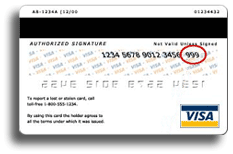
American Express
For American Express:
- The CVV or CVV2 is a 4-digit number
- Located on the front of the card
- Found in the upper right corner above the card number
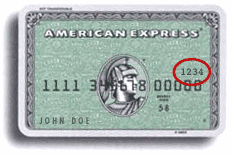
Why CVV or CVV2 Is Required
The CVV or CVV2 is used to:
- Verify that the card is physically in your possession
- Reduce fraud in online and phone transactions
- Add an extra layer of authentication beyond the card number
Because the CVV code is not embossed or stored in the card’s magnetic stripe, it is harder for unauthorized users to obtain.
Why CVV or CVV2 Is Not Stored
For security and compliance reasons:
- The CVV or CVV2 cannot be stored in any billing system, including the Bluehost Portal
- This helps protect your card information from unauthorized access
Why Automatic Payments May Fail
In some cases, automatic payments may not go through even if your card has sufficient funds.
This can happen if:
- Your card issuer requires the CVV or CVV2 for every transaction
- The system cannot store or re-enter the CVV code automatically
What You Can Do
If your auto-payment fails, you can:
- Use a different credit card that allows recurring billing
- Make manual payments each time your invoice is due
Summary
The CVV or CVV2 is a critical credit card security feature that helps protect against fraud during online transactions. It verifies that you have the physical card and adds an extra layer of authentication. Because CVV codes cannot be stored for security reasons, some automatic payments may fail if your card requires the code for every transaction. In such cases, using a different card or making manual payments can help ensure successful billing.
If you need further assistance, Bluehost Chat Support is available 24 hours a day, 7days a week while Bluehost Phone Support is available 7 days a week from 7 am-12 midnight EST.
- Chat Support - While on our website, you should see a CHAT bubble in the bottom right-hand corner of the page. Click anywhere on the bubble to begin a chat session.
- Phone Support -
- US: 888-401-4678
- International: +1 801-765-9400
You may also refer to our Knowledge Base articles to help answer common questions and guide you through various setup, configuration, and troubleshooting steps.