 ChatGPT,
  Claude,
  Gemini,
  Grok — all four for
 Microsoft Customer Agreement (MCA) - Action Required to Avoid Transaction Blocks
Starting January 21, 2026, customers who have not accepted Microsoft’s new Customer Agreement (MCA) will be blocked from performing certain actions in the MSFT Partner Center.
To ensure uninterrupted service, please review this article and complete your acceptance of the MCA if you haven’t done so already.
Impacted Transactions
If you have not accepted the MCA, the following actions will be blocked:
- New purchases of Microsoft products or services
- Adjusting quantities (increases or decreases) of existing subscriptions
- Changing term durations or billing plans
- Upgrading existing subscriptions
These restrictions will be lifted immediately after you accept the MCA.
How to Accept the Microsoft Customer Agreement
Follow these simple steps to accept the MCA directly:
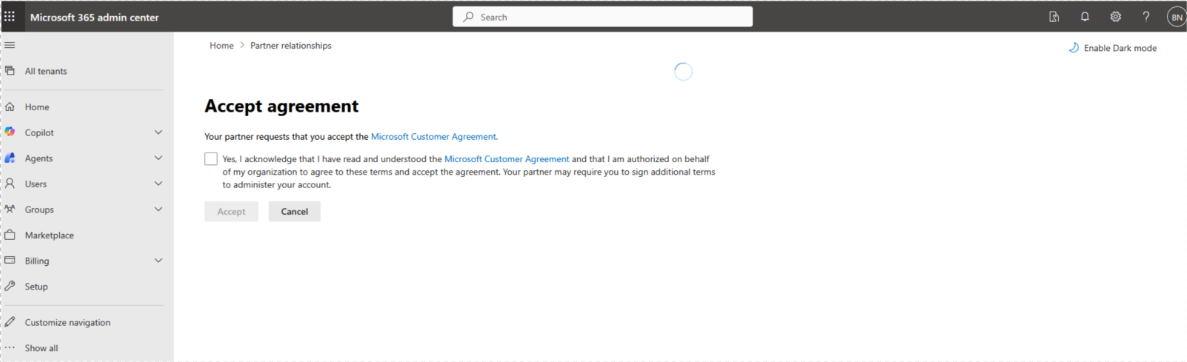
- Use this URL to sign into the Microsoft 365 Admin Center:
https://admin.microsoft.com/AdminPortal/Home?ref=/BillingAccounts/agreement - Sign in with your admin credentials.
- When prompted, review the Microsoft Customer Agreement.
- Check the box to accept the agreement.
- (Optional) To view your partner relationships:
- Navigate to Settings > Partner relationships.
- View a list of partners you work with and select any partner to see detailed information.
- No further action is needed if you have already accepted the MCA.
- Blocks will be automatically lifted once acceptance is confirmed.
Summary
Starting January 21, 2026, customers who haven’t accepted the Microsoft Customer Agreement (MCA) will be blocked from making or modifying purchases in Partner Center. Accept the MCA through the Microsoft 365 Admin Center to restore full functionality. No action is needed if you’ve already accepted it.
If you need further assistance, Bluehost Chat Support is available 24 hours a day, 7days a week while Bluehost Phone Support is available 7 days a week from 7 am-12 midnight EST.
- Chat Support - While on our website, you should see a CHAT bubble in the bottom right-hand corner of the page. Click anywhere on the bubble to begin a chat session.
- Phone Support -
- US: 888-401-4678
- International: +1 801-765-9400
You may also refer to our Knowledge Base articles to help answer common questions and guide you through various setup, configuration, and troubleshooting steps.