 ChatGPT,
  Claude,
  Gemini,
  Grok — all four for
 What is Lighthouse Reporting?
Lighthouse is an open-source tool that audits web pages across key quality areas, including performance, accessibility, best practices, and search engine optimization (SEO). It generates detailed reports with scores and recommendations to help improve the user experience and technical health of a website.
Delivering a fast, accessible, and search-engine-friendly website is essential in modern web development. Lighthouse is one of the most effective tools available to help teams meet these goals. Developed by Google, Lighthouse is an open-source, automated auditing tool that evaluates the overall quality of web pages and provides clear guidance for improvement.
This article explains what Lighthouse is, how it works, what it measures, and how you can use it to optimize your website.
How Lighthouse Works
Lighthouse runs a series of automated tests against a web page and produces a report based on the results. The process typically follows these steps:
- Simulated Page Load
Lighthouse simulates a user visiting the page by loading it in a controlled environment and observing how it behaves during the process. - Data Collection
While the page loads, Lighthouse collects data related to performance, accessibility, SEO, and adherence to best practices. This includes how quickly content appears, how stable the layout is, and whether the page meets accessibility standards. - Report Generation
After testing is complete, Lighthouse generates a report with scores ranging from 0 to 100 for each category. Higher scores indicate better performance and compliance with recommended standards. - Actionable Recommendations
Each report includes specific, actionable suggestions to help improve scores, such as optimizing images, reducing unused JavaScript, or improving text contrast.
Key Metrics Evaluated by Lighthouse
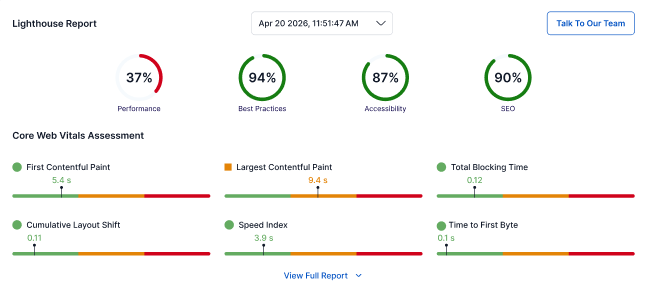
Lighthouse evaluates multiple categories to provide a well-rounded assessment of a web page:
Performance
Measures how quickly a page loads and becomes usable. Key metrics include:
- First Contentful Paint (FCP)
- Largest Contentful Paint (LCP)
- Speed Index (SI)
- Time to Interactive (TTI)
- Total Blocking Time (TBT)
- Cumulative Layout Shift (CLS)
- Time to First Byte (TTFB)
Accessibility
Checks whether the page is usable by people with disabilities. This includes:
- Proper use of ARIA labels
- Color contrast
- Alternative text for images
- Keyboard navigation support
Best Practices
Evaluates whether the site follows modern web development and security standards, such as:
- Use of HTTPS
- Safe JavaScript practices
- Avoidance of deprecated APIs
Search Engine Optimization (SEO)
Assesses basic search engine optimization requirements, including:
- Meta descriptions
- Proper use of headings
- Mobile friendliness
- Crawlability
Benefits of Using Lighthouse
Using Lighthouse offers several advantages for developers and site owners:
- Improved Performance
Addressing Lighthouse recommendations can significantly reduce load times and improve responsiveness, leading to better user experiences. - Enhanced Accessibility
Lighthouse helps identify accessibility issues, making it easier to create inclusive websites that meet legal and ethical standards. - Stronger SEO
Following Lighthouse’s SEO guidance can improve search engine visibility and help attract more organic traffic. - Alignment with Modern Standards
Lighthouse encourages the use of up-to-date web technologies and best practices, improving security and cross-device compatibility. - Clear, Actionable Feedback
Reports focus on specific fixes rather than vague advice, making it easier to prioritize and implement improvements.
How to Use Lighthouse
Lighthouse can be accessed in several ways, depending on your workflow:
- Chrome DevTools
Open your site in Google Chrome, right-click and select Inspect, go to the Lighthouse tab, and click Generate report. - PageSpeed Insights
Visit Google PageSpeed Insights, enter your URL, and view a Lighthouse report along with real-world performance data. - Command Line (Node.js)
Use Lighthouse as a Node module to run audits from the command line, ideal for automation and advanced use cases. - CI/CD Integration
Integrate Lighthouse into your CI/CD pipelines to automatically check performance and quality during deployments.
Summary
Lighthouse is a powerful and practical tool for improving website quality. By providing clear insights into performance, accessibility, SEO, and best practices, it enables developers and site owners to make informed, data-driven improvements. Regularly running Lighthouse audits can help ensure your website delivers a fast, accessible, and high-quality experience for all users.
If you need further assistance, Bluehost Chat Support is available 24 hours a day, 7days a week while Bluehost Phone Support is available 7 days a week from 7 am-12 midnight EST.
- Chat Support - While on our website, you should see a CHAT bubble in the bottom right-hand corner of the page. Click anywhere on the bubble to begin a chat session.
- Phone Support -
- US: 888-401-4678
- International: +1 801-765-9400
You may also refer to our Knowledge Base articles to help answer common questions and guide you through various setup, configuration, and troubleshooting steps.