 ChatGPT,
  Claude,
  Gemini,
  Grok — all four for
 Troubleshooting Common Database Errors
This article covers several common errors that can occur when managing databases in phpMyAdmin.
For steps on how to access phpMyAdmin, please refer to the following article: How to Manage a Database Using PhpMyAdmin. Now that you know how to access phpMyAdmin, let’s take a look at the most common database errors you might run into—and how to fix each one. Let’s get started!
"Table is full" error
1114 (HY000) at line 1234:: The table "abc" is full.
This error can appear for several reasons, including a database that has reached its size limit, a full server disk, or misconfigured database server settings.
To fix this issue, you may want to:
- Fix disk issues
- Fix SQL server settings
- Recreate indexes
"Tables missing" error
Databases created manually in the MySQL Databases section of cPanel start out empty and contain no tables. Because of this, you may see this error when trying to run a search query on a database that has no data or structure yet.
Tables missing. No tables found in the database!
Please ensure that the database you’re working with contains tables.
- If you’re trying to import data into a database, please refer to the instructions in the following article:
-
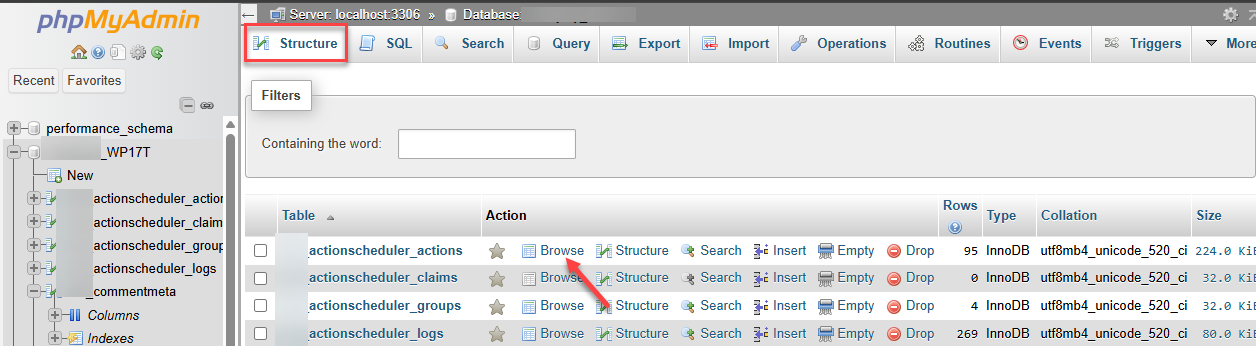
If the database contains tables but they aren’t appearing in phpMyAdmin, try refreshing the page to reload the view. You can also select the Structure tab of your selected database, then click Browse under the Action column.
Error 2002
When opening phpMyAdmin, you may see an error message similar to the one shown below:
#2002 - The server is not responding (or the local MySQL server's socket is not correctly configured)
To continue, we will need to restart your MySQL service. Please contact us via phone or chat to assist you with this.
Error code 1064
Error Code 1064 (42000): You have an error in your SQL syntax. Check the manual that corresponds to your MySQL server version for the right syntax to use near _____
This error appears when the query syntax is incorrect, often caused by misplaced or improper use of quotation marks or backticks.
Please review your query and make sure the quotation marks, single quotes, and backticks are used correctly.
Error code 2013
Error Code 2013: Lost connection to MySQL server during query
This error occurs when the MySQL client loses its connection to the database server, usually because the query takes too long to process and the connection times out.
To fix this issue, you can try increasing the server’s timeout settings. You may also consider optimizing or rewriting your SQL queries to help them run more efficiently.
Error: Packet too large
ERROR: Packet too large
This error often appears together with Error Code 2013: Lost connection to MySQL server during query. It’s usually triggered when a query tries to send more data than the allowed communication packet size.
To resolve this, increase the max_allowed_packet value so it can accommodate the size of your largest BLOB field.
MySQL can't create/write to file
mysql can't create/write to file
This error appears when MySQL is unable to create a temporary file in the system’s temporary directory for storing the result set.
To fix this issue, check the permissions on the tmpdir directory and correct them if needed. Also verify that the directory exists and that the file system isn’t full.
phpMyAdmin is showing a login screen
If clicking the phpMyAdmin button in cPanel takes you to a phpMyAdmin login screen, it means your MySQL and cPanel passwords are out of sync. You can resolve this yourself by simply changing your Bluehost Portal password.
Additional Information
These are only a few of the error codes you might come across when working with databases. While the list can seem overwhelming at first, solutions and documentation are widely available online. For more guidance, you can refer to this support article:
Summary
This article outlines the most common phpMyAdmin database errors and provides straightforward guidance on how to resolve them. It covers issues such as full tables, missing tables, SQL syntax errors, timeout problems, oversized packets, temporary file creation failures, and login screen mismatches. Each error includes its likely causes and recommended fixes, ranging from adjusting server settings and repairing permissions to optimizing queries or resyncing passwords. Additional resources are also provided for users who want more in‑depth troubleshooting help.
If you need further assistance, Bluehost Chat Support is available 24 hours a day, 7days a week while Bluehost Phone Support is available 7 days a week from 7 am-12 midnight EST.
- Chat Support - While on our website, you should see a CHAT bubble in the bottom right-hand corner of the page. Click anywhere on the bubble to begin a chat session.
- Phone Support -
- US: 888-401-4678
- International: +1 801-765-9400
You may also refer to our Knowledge Base articles to help answer common questions and guide you through various setup, configuration, and troubleshooting steps.