 ChatGPT,
  Claude,
  Gemini,
  Grok — all four for
Google Workspace for Healthcare + Bluehost
Secure collaboration solutions for healthcare and life sciences
Securely manage patient data, streamline collaboration and support compliant workflows with Google Workspace.
With Gmail, Google Meet, Google Drive and AI-powered tools, healthcare teams can collaborate efficiently in a secure digital workspace.
Starting at CA$4.91/mo*
Key benefits for healthcare and life sciences teams

Keep care teams in sync without delays
Bring doctors, nurses and
administrators into one shared
workspace where updates, documents
and decisions happen in real time.
Reduce miscommunication and keep
patient care moving without
bottlenecks.


Cut down time spent on admin work
Handle documentation, scheduling and communication from a single platform instead of juggling multiple tools. Free up time for what actually matters, patient care.

Work securely from any location
Give teams access to the tools and information they need across hospitals, clinics and research facilities, while maintaining control over sensitive data.

Move research and projects forward faster
Work on reports, datasets and documentation together in real time, without version conflicts or delays. Keep research and life sciences teams aligned and progressing

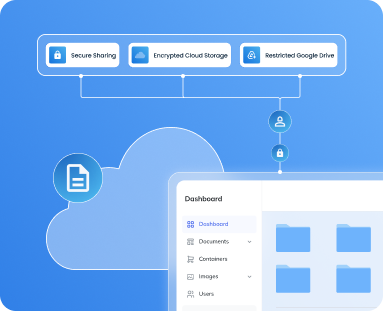
Google Workspace provides secure storage for patient files and medical records
Healthcare organizations must manage patient records carefully. Google Workspace allows teams to store and organize documentation securely while controlling who can access sensitive information.
Controlled access to sensitive files
Patient records stored in Google Drive can be restricted to authorized healthcare staff.
Secure document sharing
Healthcare teams can collaborate on files internally while maintaining permission controls.
Encrypted cloud storage
Files stored in Google Drive are protected using encrypted cloud infrastructure.
Google Workspace HIPAA compliance
Healthcare organizations evaluating collaboration tools often ask whether Google Workspace HIPAA compliant environments are possible for managing sensitive medical information.

Secure storage for patient files
Medical documentation can be stored in Google Drive with controlled access so only authorized healthcare staff can view or edit sensitive files.

Controlled collaboration between teams
Doctors, administrators and researchers can securely share documents, reports and operational files while maintaining permission controls.

Security and compliance controls
Encryption, administrative access settings and monitoring tools help organizations maintain secure environments when handling protected health information.
This is not legal advice. Organizations must evaluate and ensure their own compliance requirements.
Tools that support healthcare collaboration
Google Workspace provides tools that help healthcare teams coordinate care, manage documentation and collaborate across departments.

Gmail for healthcare communication
Healthcare staff can use Gmail to coordinate internally, communicate with teams and manage operational updates across departments.

Google Meet for consultations and care coordination
Medical teams can host virtual consultations, multidisciplinary case discussions and training sessions through secure video meetings.

Google Drive for patient and operational documentation
Healthcare organizations can store clinical reports, operational documents and patient-related files securely while controlling who can access them.

Docs, Sheets and Slides for medical collaboration
Doctors, researchers and administrators can collaborate on treatment plans, research reports and operational presentations in real time.

Google Calendar for scheduling and coordination
Calendar helps healthcare teams manage appointments, meetings, training sessions and departmental schedules.

Gemini AI and NotebookLM for documentation support
AI tools help summarize notes, draft communications and organize research or operational information more efficiently.
Google Workspace plans available through Bluehost
Business Starter
Everything you need for seamless collaboration with a small team
CA$4.98/mo
1VAT not included
1GST not included
For 12 month term
Renews at CA$9.97/mo
- Email matching your domain
- 30GB Drive Cloud Storage per user
- Meet Video Conferencing with up to 100 participants
- Gmail
- Calendar
- Docs, Sheets, & Slides
- Chat Platform
- Gemini AI Assistant in Gmail
- Gemini App
- Gemini Notebook AI Research Assistant
RECOMMENDED
Business Standard
All the essentials, plus large video meetings and extra storage
CA$9.97/mo
1VAT not included
1GST not included
For 12 month term
Renews at CA$19.93/mo
- Email matching your domain
- 2TB Drive Cloud Storage per user
- Meet Video Conferencing with up to 150 participants, breakout rooms, polling and recording
- Gmail
- Calendar
- Docs, Sheets, & Slides
- Chat Platform w/guest access
- Gemini AI Assistant in Gmail, Docs, Sheets, Slides, Drive, Meet, & Chat
- Advanced Gemini App
- Gemini Notebook AI Research Assistant
- Vids AI-Powered Video Creation
Business Plus
Maximum storage, security, video capabilities, and more
CA$15.66/mo
1VAT not included
1GST not included
For 12 month term
Renews at CA$31.32/mo
- Email matching your domain
- 5TB Drive Cloud Storage per user
- Meet Video Conferencing with up to 500 participants, polling, breakout rooms, recording, and attendance tracking
- Gmail
- Calendar
- Docs, Sheets, & Slides
- Chat Platform w/ guest access and theaded rooms
- Gemini AI Assistant in Gmail, Docs, Sheets, Slides, Drive, Meet, & Chat
- Advanced Gemini App
- Gemini Notebook AI Research Assistant
- Vids AI-Powered Video Creation
- Vault Security & Archiving
30-day money-back guarantee
Your satisfaction is our top priority and we're confident you'll be pleased with our services. Still, if you try us and decide your account does not sufficiently meet your needs, you can cancel within 30 days for a refund as follows:
- If you cancel within 30 days you'll receive a full refund on Hosting and/or Solutions attached to your account. The money-back guarantee does not apply to most add-on products, such as domains, given the unique nature of their costs.
- If you cancel within 30 days and your plan includes a free domain, there will be a fee to retain that domain. Bluehost will deduct a non-refundable domain fee from your refund, at the regular cost of your domain.
- Bluehost does not offer any refunds for cancellations that occur after 30 days.
Why choose Google Workspace from Bluehost?
Deploying Google Workspace is easier when your domain, email and collaboration tools are managed in one place. Bluehost helps you get started quickly while providing the support and infrastructure needed to run your business smoothly.
Manage domains, email accounts and collaboration tools from one centralized Bluehost dashboard to simplify administration for your team.
Bluehost provides expert support to help you configure accounts, manage users and resolve issues so your team can stay productive.
As your organization expands, you can easily add users, upgrade plans and scale your Google Workspace environment without disruption

FAQs on Google Workspace for Healthcare
What is Google Workspace for Healthcare?
Google Workspace for Healthcare is a cloud collaboration platform that includes Gmail, Drive, Meet and other tools that help healthcare teams communicate and manage documents securely. Medical professionals can collaborate in real time while keeping files organized in cloud storage. The platform helps streamline communication across departments and locations. Healthcare teams can also manage meetings and schedules using integrated tools like Calendar. This centralized workspace helps organizations improve operational efficiency.
Is Google Workspace HIPAA compliant?
Google Workspace can support HIPAA-compliant environments when organizations configure the required security settings and agreements. The platform includes encryption, administrative access controls and authentication features that help protect sensitive information. Healthcare organizations must configure the appropriate policies to manage protected health information. Many organizations use Google Workspace alongside compliance frameworks to maintain secure environments. Proper configuration ensures that teams can collaborate while maintaining regulatory requirements.
Can patient files be stored in Google Workspace?
Yes, patient documentation can be stored securely in Google Drive. Healthcare organizations can control who can access or edit files using permission settings. This allows medical staff to collaborate on documentation while protecting sensitive records. Files stored in Drive are protected with encryption and secure infrastructure. This helps healthcare teams manage information safely while maintaining efficient collaboration.
Can Google Meet be used for consultations?
Google Meet enables healthcare teams to host video meetings for consultations and collaboration. Doctors and staff can connect from different locations using secure video conferencing. Meetings can be scheduled through Google Calendar for easier coordination. Teams can also use Meet for training sessions or internal meetings. This flexibility supports communication across healthcare organizations.
How does Google Workspace support research teams?
Research teams can collaborate on studies, datasets and reports using tools like Docs, Sheets and Drive. Multiple researchers can work on the same files simultaneously, improving collaboration. Google Drive provides centralized storage for research materials and documentation. Teams can also discuss findings through Google Meet meetings. This environment helps research groups stay organized and productive.
Is Google Workspace secure for healthcare organizations?
Google Workspace includes security features designed to protect sensitive information. These include encryption, user authentication and administrative controls. Administrators can monitor activity and manage user access through the Admin console. These tools help organizations maintain secure collaboration environments. Proper configuration ensures that sensitive healthcare data remains protected.
Can administrators manage user access?
Yes, administrators can manage users and permissions through the Google Admin console. This allows organizations to control who can access specific tools or files. Administrators can create groups, assign roles and update security policies. Access can also be adjusted as teams grow or organizational needs change. This helps healthcare organizations maintain organized and secure systems.
How does Gemini AI help healthcare teams?
Gemini AI helps healthcare teams automate routine tasks and organize information. It can assist with drafting emails, summarizing documents and generating content. This reduces time spent on repetitive administrative work. Teams can use AI insights to review documents more efficiently. These capabilities improve productivity across healthcare organizations.
How does Bluehost help with Google Workspace setup?
Bluehost simplifies the process of deploying Google Workspace for healthcare organizations. It helps configure domains and professional email accounts quickly. Organizations can manage setup through a single platform rather than multiple vendors. Bluehost also provides support to help configure services properly. This makes adopting Google Workspace easier for healthcare teams.
Can Google Workspace scale for large healthcare organizations?
Yes, Google Workspace can scale as healthcare organizations grow. Teams can add new users, expand storage and upgrade plans when needed. The platform supports collaboration across departments and locations. Administrators can manage larger teams using centralized controls. This flexibility makes Google Workspace suitable for both small clinics and large healthcare networks.