 ChatGPT,
  Claude,
  Gemini,
  Grok — all four for
 Difference Between Linux and Windows Hosting
When managing a hosting account, you’ll come across several operating system options for your server. The two platforms you’ll most commonly encounter with Bluehost are Linux and Windows.
Linux and Windows serve as two distinct operating systems for web hosting. Most servers run on Linux because it’s the more widely used platform in the hosting world. Its popularity means it offers many of the tools and features developers typically look for. For that reason, Linux hosting is usually the better choice—unless your site requires software that only works on Windows.
This guide will outline the key distinctions between the two operating systems and highlight the important technical details you should know. To learn more about the different hosting packages that Bluehost offers, check out this link: Hosting Price List.
Please click the links below to jump to a section.
Windows-specific Applications
While Windows can be used for web development, the average hosting customer rarely needs it. People who choose Windows hosting usually have very specific requirements that depend on Windows‑based technologies. For most websites—especially those on shared hosting plans—Linux is more than sufficient and typically the better fit.
Most people who need a Windows server already know they require one, so we won’t go into lengthy explanations. Instead, here’s a list of applications that specifically rely on a Windows environment. If your project doesn’t use any of the tools mentioned, a Linux server should work perfectly well for you.
Windows applications that require a Windows server:
- ASP Classic
- ASP.NET
- MSSQL (Microsoft SQL Server)
- MS Access (Microsoft Access)
- Visual Basic Development
- C#
- Remote Desktop (dedicated server only)
Windows dedicated servers are capable of running a broader range of Windows‑specific software. Some of these programs may require you to purchase separate licenses before installing them on your server.
- Microsoft Exchange (requires license & Installation)
- Microsoft SharePoint (requires license & Installation)
Linux-specific Applications
Although Linux is free and open source, it has long been considered the industry standard and remains the most widely used operating system today. It’s the leading choice for web servers and offers a broad set of features that meet—and often exceed—the expectations of professional web developers.
A Linux server is capable of handling almost anything you might need, and for most beginners, there’s rarely a reason not to use one. However, there are certain tools and applications that specifically require a Linux operating system, which are listed below.
Applications that require a Linux-based server:
- SSH
- Scripts or applications that require specific Apache modules
Control Panels
Windows hosting and Linux hosting use different control panels.
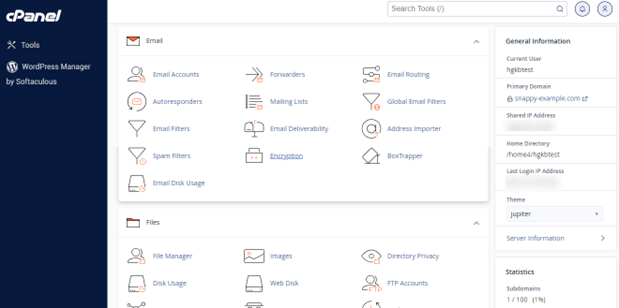
- cPanel is offered on Linux-based hosting plans, including Linux Shared, Reseller, VPS, and Linux Dedicated Servers. It’s widely recognized as a standard control panel in the hosting industry. For more information on this control panel, check this article: How to Log into cPanel via the Bluehost Portal.
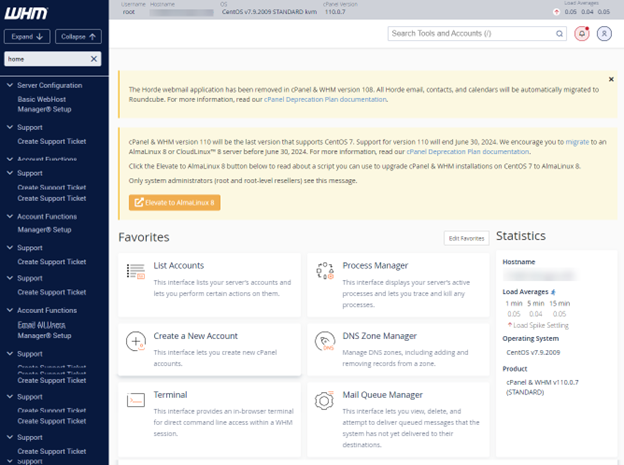
- WHM (Web Host Manager) is available on Reseller, VPS, and Dedicated Hosting.
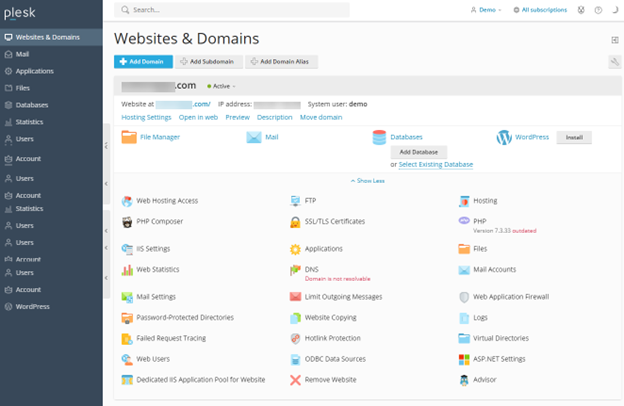
- Plesk is available on Windows Hosting and Dedicated Hosting.
File Names
Another difference between Linux and Windows servers is that Linux files are case sensitive, while Windows files are not.
- On a Linux server, home.html and Home.html are different names.
- On a Windows server, home.html, Home.html, and HOME.HTML are all the same names.
Server Security
Many people believe Linux offers stronger security than Windows, but both operating systems can be equally secure. The real level of protection depends on how the server is configured and how well it’s managed. At Bluehost, all managed servers receive regular security and performance updates and are set up following best‑practice security standards.
Related Topics:
When should you purchase a Linux or Windows Hosting Package?
Bluehost offers both Linux and Windows operating systems on select server plans. The best choice largely depends on the technologies and tools you plan to use. Your primary considerations will typically be the software your site relies on and the type of interface you prefer working with. If your project requires applications like MSSQL or ASP.NET, or if you’re more comfortable using Plesk, then a Windows‑based hosting plan is the better option. On the other hand, if you prefer cPanel and only need tools like MySQL and PHP, a Linux server will be the most suitable choice.
Other important considerations for business users include stability, security, ease of use, required technical expertise, available support, and overall cost.
Does Bluehost offer Windows Hosting?
Yes, Bluehost offers Windows on our Shared and Dedicated hosting packages.
Can I transfer my sites from a Linux Server to a Windows server? And vice versa?
As long as your websites are compatible with the platform of the server you’re moving to, we can help you with the migration process. Please fill out our migration form through your Bluehost Portal to request a migration.
If I use a PC running Windows, do I also have to use Windows Hosting with Bluehost?
You don’t need a Windows hosting plan just because your personal computer runs Windows. The operating system on your home or office computer is independent of the operating system used by your hosting server.
Summary
The article compares Linux and Windows hosting options offered by Bluehost and explains when each operating system is the better fit. Linux is the most widely used platform for web servers and supports popular tools like cPanel, PHP, and MySQL, making it ideal for most users. Windows hosting is needed only for specific Microsoft‑based technologies such as ASP.NET, MSSQL, and Plesk. The guide also highlights differences in file handling, control panels, and security, and notes that website compatibility determines whether sites can be migrated between platforms.