 ChatGPT,
  Claude,
  Gemini,
  Grok — all four for
 Reimage Your Server for DeepSeek Installation
DeepSeek now runs directly on Bluehost Self-Managed VPS and Virtual Dedicated Server (VDS) using a quick one-click installation. This setup keeps your data completely private and lets you talk to the AI through a simple terminal or your own apps. You just choose your server size, click install, and start interacting with your new AI assistant immediately.
System Requirements
Review the hardware specifications below to ensure your infrastructure is properly sized before beginning installation.
- Do not purchase a server that only meets minimum survival specs: Running with only baseline specifications (4 GB RAM, 5 GB Disk, and No GPU / CPU-only) represents the software's bare survival threshold and does not account for operating system overhead (~500 MB idle usage) or Ollama runtime (~150 MB). This can cause severe performance slowdowns, system freezes, or crashes during traffic spikes.
- Bluehost VPS/VDS & GPU Offloading: Bluehost Self-Managed VPS and VDS lack dedicated GPUs (VRAM). While CPU-only mode is supported, running local LLMs without an NVIDIA (CUDA) or AMD (ROCm) GPU results in significantly slower response times. For low-latency production workloads, use a GPU-equipped server or connect your application via API to an external cloud AI provider (like OpenAI or Anthropic).
- Node Resource Baselines: For a stable deployment, we recommend at least 4 vCPUs, 8 GB RAM (for the default model), and 20 GB+ Disk space. Allocate extra storage if you plan to save recordings, logs, or additional application data.
- Model Storage & Memory Scaling: Recommended RAM requirements per model:
- deepseek-r1:1.5b: 8 GB Recommended RAM
- deepseek-r1:7b: 16 GB Recommended RAM
- deepseek-r1:14b: 24 GB Recommended RAM
- deepseek-r1:32b: 64 GB Recommended RAM
- deepseek-r1:70b: 72 GB Recommended RAM
- Memory Error Warning: The default model pre-loaded on first boot is
deepseek-r1:1.5b. Pulling a larger model on a node with insufficient RAM will cause Ollama to return a500 Internal Server Error.
Hosting Options for High-Resource Needs
If your application requires more performance, you can choose between a Self-Managed VPS or a Virtual Dedicated Server (VDS).
Main Benefits of a VDS Server:
- Guaranteed Resources: You get 100% of your CPU, RAM, and storage. Other users cannot slow down your server.
- Better Security: Your server is completely isolated from others, keeping your data safer.
The following node resources outline the baseline hardware needed to run the system smoothly.
Node Resources
Ensure your server meets or exceeds these baseline memory, storage, and processing specifications.
| Resource | Minimum | Recommended |
|---|---|---|
| RAM | 4 GB | 8 GB (default model); see model table below for larger models |
| Disk | 5 GB | 20 GB+ (if pulling multiple or larger models) |
| GPU | None (CPU-only supported) | NVIDIA (CUDA) or AMD (ROCm) GPU for faster inference |
Depending on which model you plan to deploy, system memory requirements will scale accordingly.
RAM Requirements by Model
Refer to the breakdown below to determine the exact RAM required for your selected model size.
RAM figures account for model weights (Q4_K_M quantization), KV cache at default context length, Ollama runtime (~150 MB), and Ubuntu OS idle usage (~500 MB).
| Model | Disk size | Min node RAM | Recommended RAM |
|---|---|---|---|
| deepseek-r1:1.5b | ~1.1 GB | 4 GB | 8 GB |
| deepseek-r1:7b | ~4.7 GB | 8 GB | 16 GB |
| deepseek-r1:14b | ~9.0 GB | 16 GB | 24 GB |
| deepseek-r1:32b | ~20 GB | 32 GB | 64GB |
| deepseek-r1:70b | ~43 GB | 64 GB | 72 GB |
The default model pre-loaded on first boot is deepseek-r1:1.5b. Pulling a larger model on a node with insufficient RAM will cause Ollama to return a 500 Internal Server Error.
How to Reimage Your Server for DeepSeek Installation
This guide walks you through installing and setting up DeepSeek using the Bluehost Portal.
This applies to both VPS and VDS.
- You can install only one application using the one-click installer.
- To change or delete your application, follow the guide: How to Change an Application. Create a backup of your existing applications or templates.
- To keep your current template, install the new application manually using SSH. Follow the same steps for both Self-Managed VPS and Virtual Dedicated Server (VDS). The system automatically selects the recommended operating system for DeepSeek .
- Log in to your Bluehost Portal.
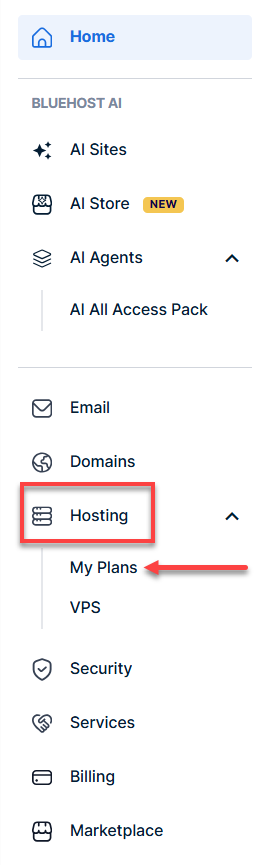
- In the left-hand menu, click Hosting, then select My Plans.
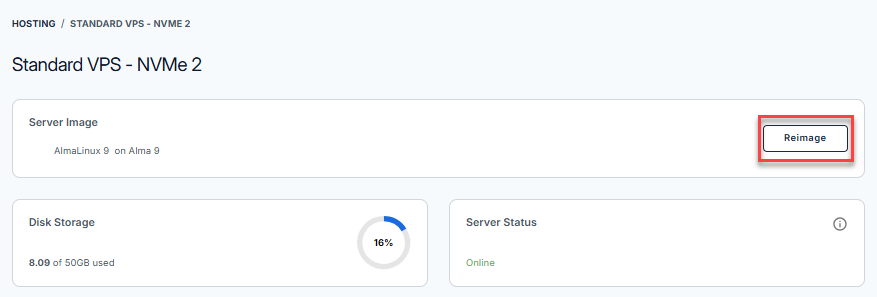
- Click the Manage button on the hosting package you want to reimage.

- Click the Reimage button.
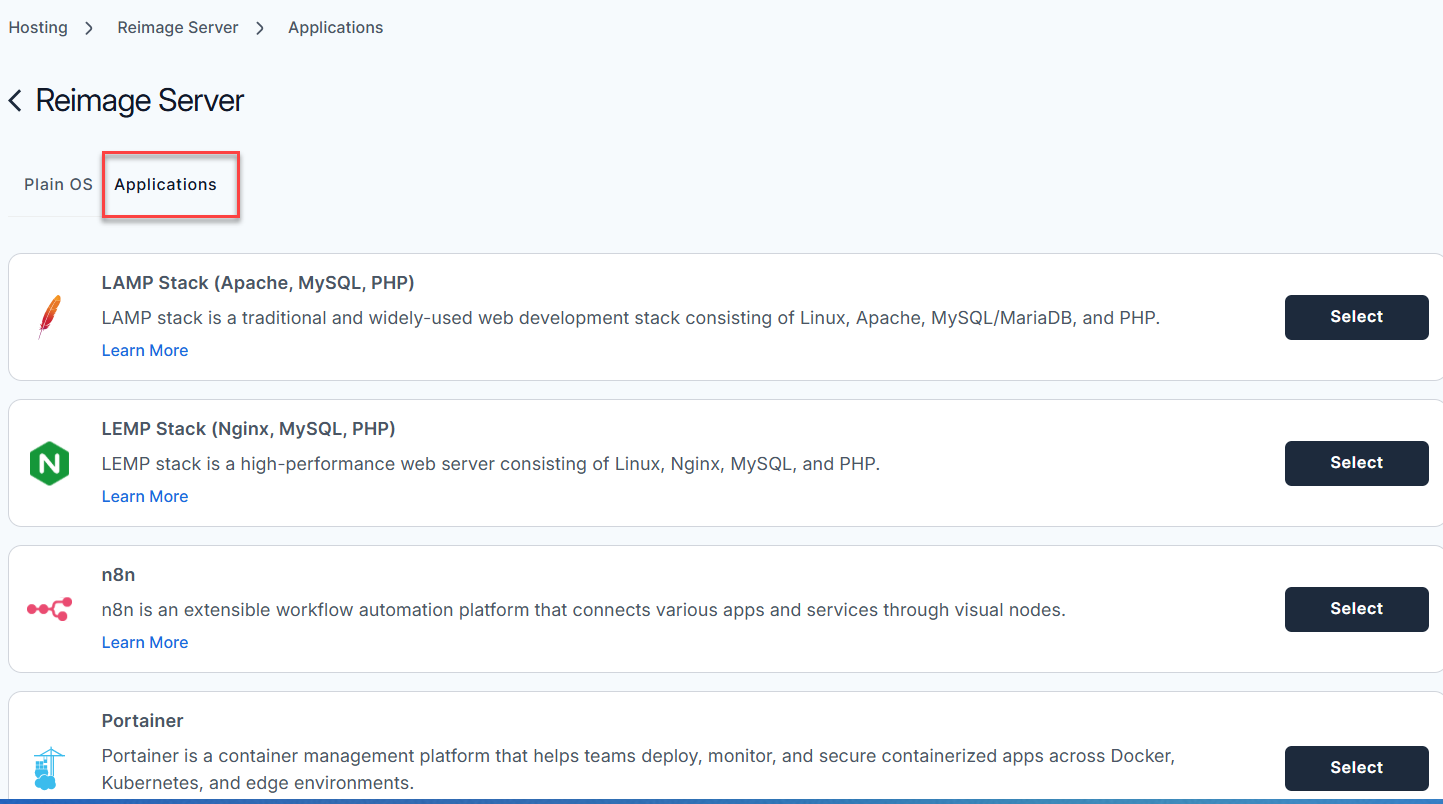
- Select the Applications tab.
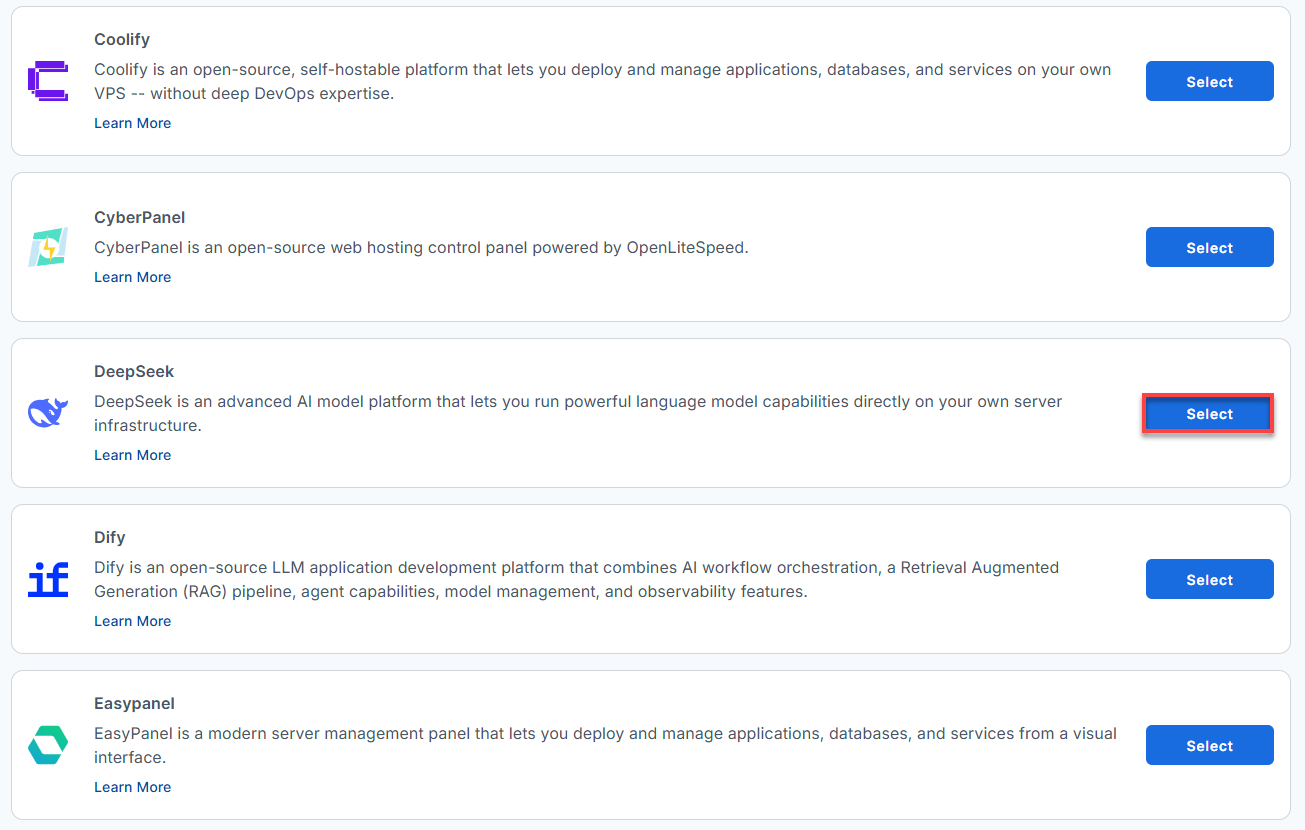
- From the list, find Deepseek and click Select.
- To confirm, please type "reimage" and then click Proceed to start the process.
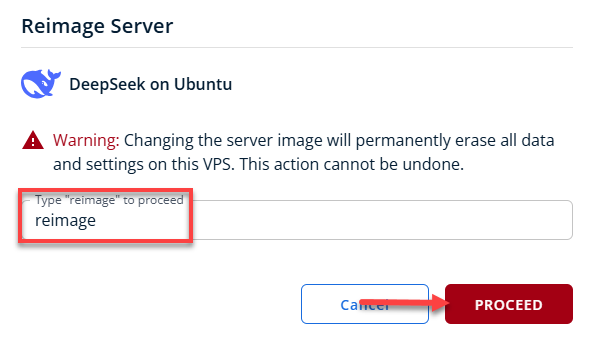
- Wait a few moments while the installation completes.

- Once completed, you will see DeepSeek listed in the Server Image section.
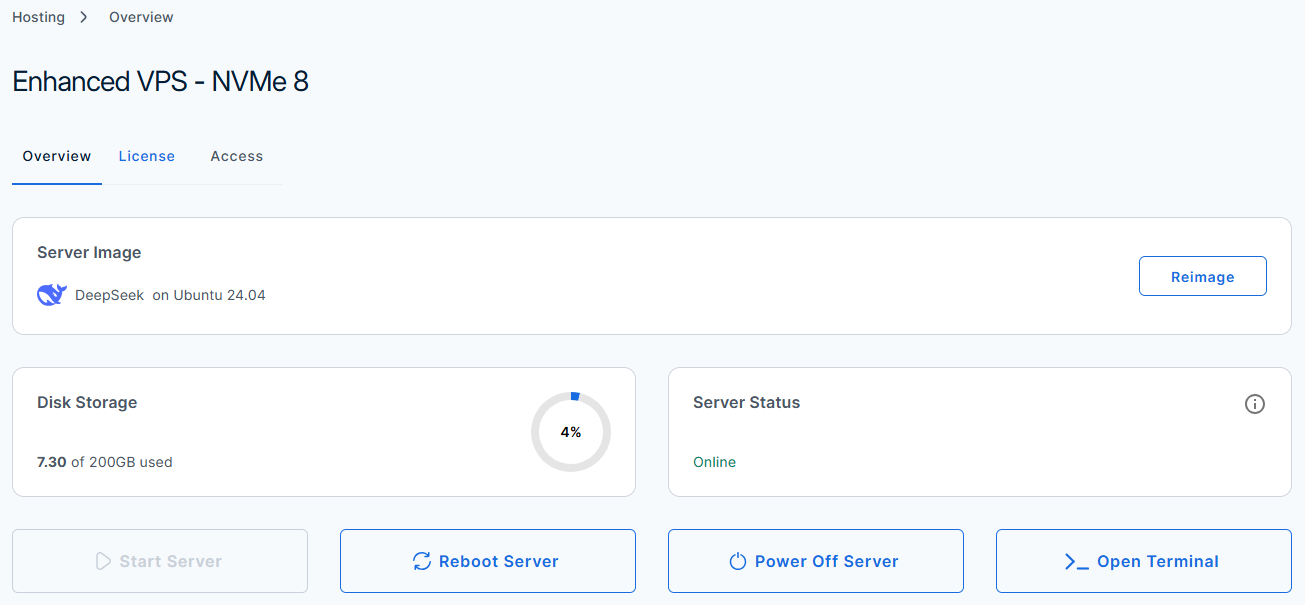
How to Test and Verify Your DeepSeek Setup
Here is how to quickly check your server, run DeepSeek commands, and make sure everything is working safely.
- Log in to your Bluehost Portal.
- In the left-hand menu, click Hosting, then select My Plans.
- Locate the server you want to manage, then click View Details in the bottom-left corner to expand the section and access additional server information.
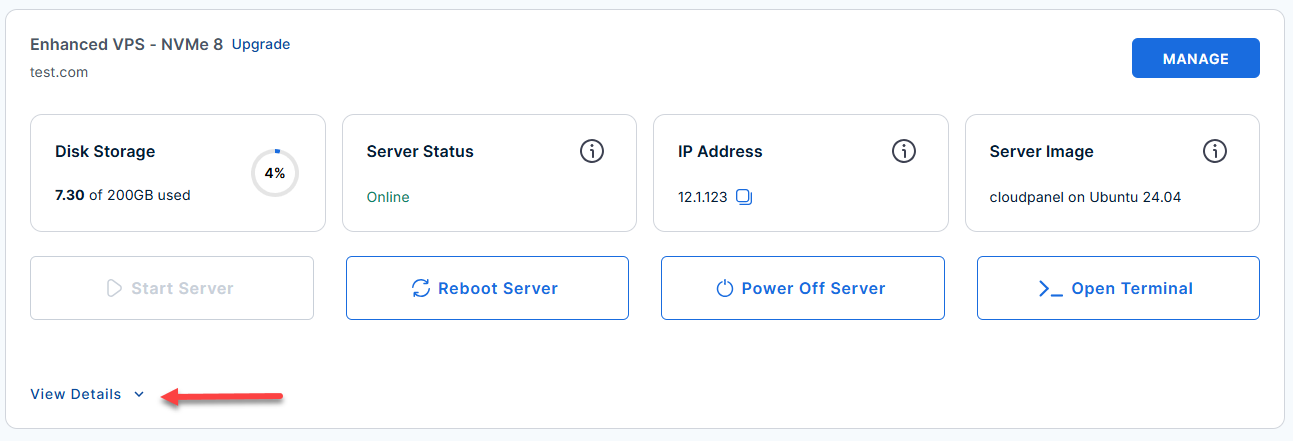
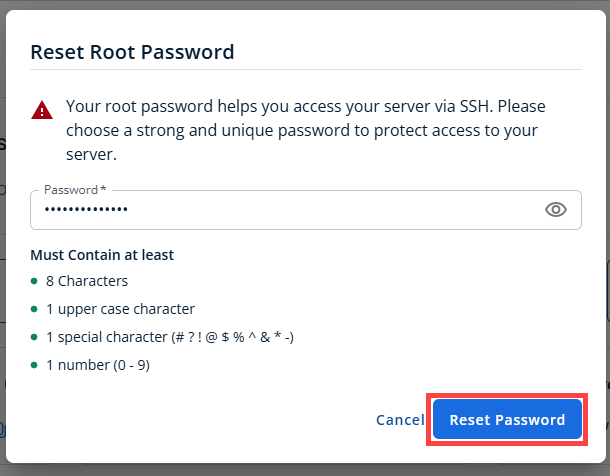
- Click the Reset Password.
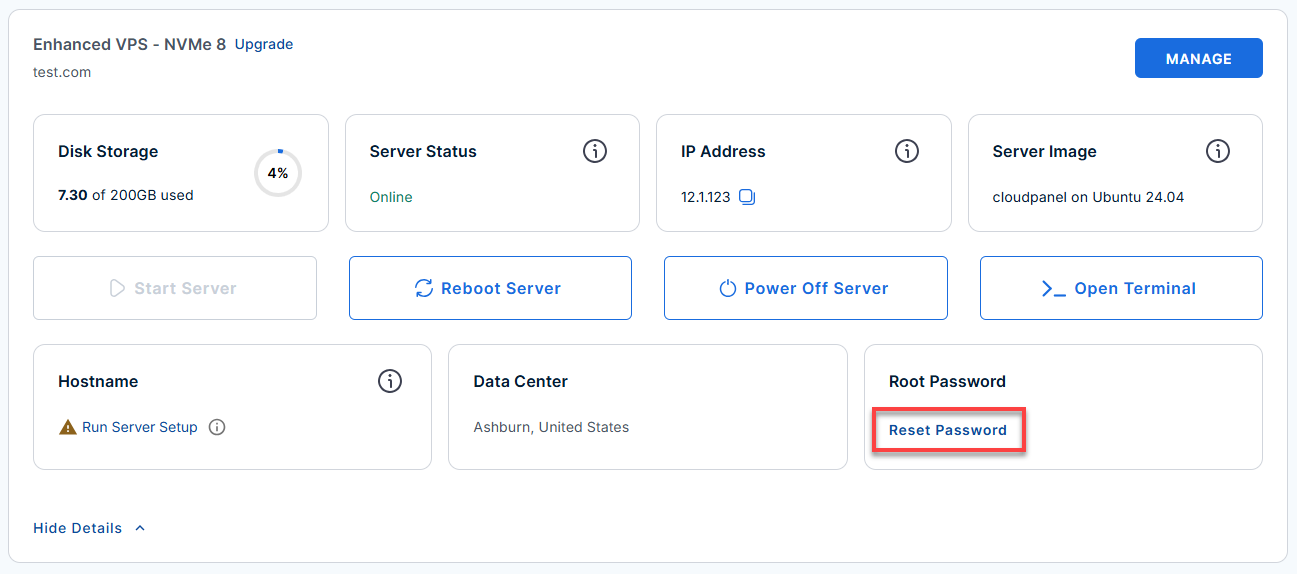
- In the pop-up window, type your new root password, then click Reset Password again to confirm and save the changes.
- SSH into your server: Open your terminal and connect as the root user:
Replace
your_server_ipwith your actual server IP address.ssh root@your_server_ipExample Output
Welcome to Ubuntu 24.04.4 LTS (GNU/Linux 6.8.0-124-generic x86_64) ******************************************************************************** DeepSeek AI Server API : http://123.45.67.89:11434 (Ollama-compatible REST) SSH : port 22 | UFW enabled - all other ports blocked Default model : deepseek-r1:1.5b (~1.1 GB, auto-pulled on first boot) Requirements: RAM : 4 GB minimum for this image (default model: deepseek-r1:1.5b) Larger models need more - see table below Model RAM requirements (minimum node RAM / recommended): deepseek-r1:1.5b -> 4 GB min / 8 GB recommended (default) deepseek-r1:7b -> 8 GB min / 16 GB recommended deepseek-r1:14b -> 16 GB min / 24 GB recommended Quick start: ollama run deepseek-r1:1.5b # interactive chat (default, needs 4 GB RAM) ollama list # list loaded models ollama pull deepseek-r1:7b # larger model (~4.7 GB, needs 8 GB RAM) ollama pull deepseek-r1:14b # pull an even larger model (~9 GB, needs 16 GB RAM) REST API: curl http://123.45.67.89:11434/api/tags curl -X POST http://123.45.67.89:11434/api/generate \ -H 'Content-Type: application/json' \ -d '{"model":"deepseek-r1:1.5b","prompt":"Hello","stream":false}' Service : systemctl status ollama Logs : /var/log/deepseek/deepseek.log Docs : cat /root/README.md ******************************************************************************** To delete this message of the day: rm -rf /etc/update-motd.d/99-deepseek Last login: Tue Jun 9 18:08:22 2026 from 180.190.20.22 - Check the Health of the Ollama Service:
systemctl status ollama
Example Output
root@server-123456:~# systemctl status ollama ● ollama.service - Ollama Service Loaded: loaded (/etc/systemd/system/ollama.service; enabled; preset: enabled) Drop-In: /etc/systemd/system/ollama.service.d └─logging.conf, override.conf Active: active (running) since Tue 2026-06-09 17:22:47 UTC; 54min ago Main PID: 763 (ollama) Tasks: 39 (limit: 19161) Memory: 15.0G (peak: 15.0G) CPU: 7min 58.247s CGroup: /system.slice/ollama.service ├─ 763 /usr/local/bin/ollama serve └─6179 /usr/local/lib/ollama/llama-server --model /usr/share/ollama/.ollama/models/blobs/sha256-aabd4debf0> - Run and Manage DeepSeek Models via CLI:
ollama run deepseek-r1:1.5b
Example Output
root@server-123456:~# ollama run deepseek-r1:1.5b pulling manifest pulling aabd4debf0c8: 100% ▕██████████████████████████████████████████████████████████▏ 1.1 GB pulling c5ad996bda6e: 100% ▕██████████████████████████████████████████████████████████▏ 556 B pulling 6e4c38e1172f: 100% ▕██████████████████████████████████████████████████████████▏ 1.1 KB pulling f4d24e9138dd: 100% ▕██████████████████████████████████████████████████████████▏ 148 B pulling a85fe2a2e58e: 100% ▕██████████████████████████████████████████████████████████▏ 487 B verifying sha256 digest writing manifest success >>> good morning Good morning! 🌞 How can I assist you today? >>> Send a message (/? for help) - Run the Test Suite:
prove /root/app_test/main.t
Example Output
root@server-123456:~# prove /root/app_test/main.t             prove /root/app_test/main.t
/root/app_test/main.t .. ok
All tests successful.
Files=1, Tests=7,  0 wallclock secs ( 0.01 usr  0.01 sys +  0.04 cusr  0.03 csys = 0.09 CPU)
Result: PASS
Additional Information & Example Documentation Output
You can run cat /root/README.md to see more information and useful commands:
Example Output:
Docs    : cat /root/README.md
********************************************************************************
To delete this message of the day: rm -rf /etc/update-motd.d/99-deepseek
Last login: Tue Jun  9 21:26:30 2026 from 123.123.20.22
root@server-123456:~# cat /root/README.md
# DeepSeek

## Description

DeepSeek is an advanced AI model platform that lets you run powerful language model capabilities directly on your own server infrastructure.
It provides access to high-performance AI reasoning and text generation,
allowing you to build applications, automate workflows, and process information with full control over your data and environment.

## Minimum Requirements

### Node resources

| Resource | Minimum | Recommended |
|----------|---------|-------------|
| RAM      | 4 GB    | 8 GB (default model); see model table below for larger models |
| Disk     | 5 GB    | 20 GB+ (if pulling multiple or larger models) |
| GPU      | None (CPU-only supported) | NVIDIA (CUDA) or AMD (ROCm) GPU for faster inference |

> **GPU note:** Ollama automatically offloads model layers to any detected NVIDIA (CUDA)
> or AMD (ROCm) GPU. Without a GPU, inference runs on CPU only - functional but noticeably
> slower, especially for larger models. For production workloads or low-latency responses,
> a GPU-equipped node is strongly recommended.

### RAM requirements by model

RAM figures account for model weights (Q4_K_M quantization), KV cache at default context
length, Ollama runtime (~150 MB), and Ubuntu OS idle usage (~500 MB).

| Model              | Disk size | Min node RAM | Recommended RAM |
|--------------------|-----------|--------------|-----------------|
| deepseek-r1:1.5b   | ~1.1 GB   | 4 GB         | 8 GB            |
| deepseek-r1:7b     | ~4.7 GB   | 8 GB         | 16 GB           |
| deepseek-r1:14b    | ~9.0 GB   | 16 GB        | 24 GB           |
| deepseek-r1:32b    | ~20 GB    | 32 GB        | 32 GB           |
| deepseek-r1:70b    | ~43 GB    | 64 GB        | 64 GB           |

The default model pre-loaded on first boot is `deepseek-r1:1.5b`. Pulling a larger model
on a node with insufficient RAM will cause Ollama to return a `500 Internal Server Error`.

Following installation the virtual machine will have:
* DeepSeek REST API on port 11434 (Ollama-compatible, OpenAI-compatible)
* SSH on port 22

Ports are protected using ufw with default-deny incoming policy.

## Services

Service           | Port  | Protocol | Notes
------------------|-------|----------|------
SSH               | 22    | TCP      | UFW rate-limited
DeepSeek API      | 11434 | TCP      | Ollama runtime, OpenAI-compatible endpoint

## Links

* DeepSeek models on Ollama: https://ollama.com/library/deepseek-r1
* Ollama documentation: https://github.com/ollama/ollama
* Ollama REST API reference: https://github.com/ollama/ollama/blob/main/docs/api.md
* DeepSeek official site: https://www.deepseek.com

## How-to-use

### Interacting via CLI

SSH into the server and use the `ollama` command:

ollama list # list downloaded models
ollama run deepseek-r1:1.5b # interactive chat session (default, needs 4 GB RAM)
ollama pull deepseek-r1:7b # pull a larger model (~4.7 GB, needs 8 GB RAM)
ollama pull deepseek-r1:14b # pull an even larger model (~9 GB)
ollama rm deepseek-r1:1.5b # remove a model

### Interacting via REST API

The API is accessible from outside the server on port 11434:

# List available models
curl http://:11434/api/tags

# Generate a completion (non-streaming)
curl -X POST http://:11434/api/generate \
     -H 'Content-Type: application/json' \
     -d '{"model":"deepseek-r1:1.5b","prompt":"Explain quantum computing","stream":false}'

# Chat endpoint
curl -X POST http://:11434/api/chat \
     -H 'Content-Type: application/json' \
     -d '{"model":"deepseek-r1:1.5b","messages":[{"role":"user","content":"Hello"}]}'

# OpenAI-compatible endpoint
curl -X POST http://:11434/v1/chat/completions \
     -H 'Content-Type: application/json' \
     -d '{"model":"deepseek-r1:1.5b","messages":[{"role":"user","content":"Hello"}]}'

### Model storage

Models are stored in /usr/share/ollama/.ollama/models. Ensure sufficient disk space before pulling large models (7B models require ~4.7 GB, 14B ~9 GB, 32B ~20 GB).

### Service management

systemctl status  ollama       # check service status
systemctl restart ollama       # restart the service
journalctl -u ollama -f        # follow journal logs
tail -f /var/log/deepseek/deepseek.log   # follow file logs (rotated daily, 14 days)

### Running the test suite

prove /root/app_test/main.t

### Security note
The Ollama API on port 11434 is exposed to the network and does not provide authentication by default. Restrict access using cloud firewall/security groups, a reverse proxy with authentication, or deploy only on trusted private networks.
Summary
DeepSeek now runs directly on Bluehost Self-Managed VPS and Virtual Dedicated Server (VDS) using a quick one-click installation. This setup keeps your data completely private and lets you talk to the AI through a simple terminal or your own apps. You just choose your server size, click install, and start interacting with your new AI assistant immediately.