 ChatGPT,
  Claude,
  Gemini,
  Grok — all four for
Reimage Your Server for PaperClip Installation
A Paperclip application is simply a web app that uses a tool called Paperclip to make uploading files like images or documents easier. Instead of building everything from scratch, it helps the app handle uploads smoothly in the background. It can also take care of small things like organizing files and resizing images when needed. In short, it just makes file handling inside an app simpler and more convenient.
How to Reimage Your Server for Paperclip Installation
This guide walks you through installing and setting up Paperclip using the Bluehost Portal.
This applies to both VPS and VDS.
- You can install only one application using the one-click installer.
- To change or delete your application, follow the guide: How to Change an Application. Create a backup of your existing applications or templates.
- To keep your current template, install the new application manually using SSH. Follow the same steps for both Self-Managed VPS and Virtual Dedicated Server (VDS). The system automatically selects the recommended operating system for Paperclip.
- Reimaging to Paperclip will reinstall Ubuntu, permanently deleting all existing applications, configurations, and data on the server.
- If your server is already running Ubuntu 24.04, the system will reinstall the OS, and all existing applications, configurations, and data will be permanently deleted.
- Log in to your Bluehost Portal.
- In the left-hand menu, click Hosting, then select My Plans.

- Click the Manage button on the hosting package you want to reimage.

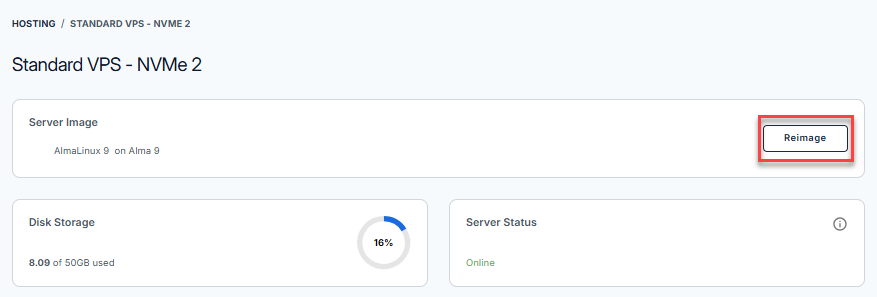
- Click the Reimage button.
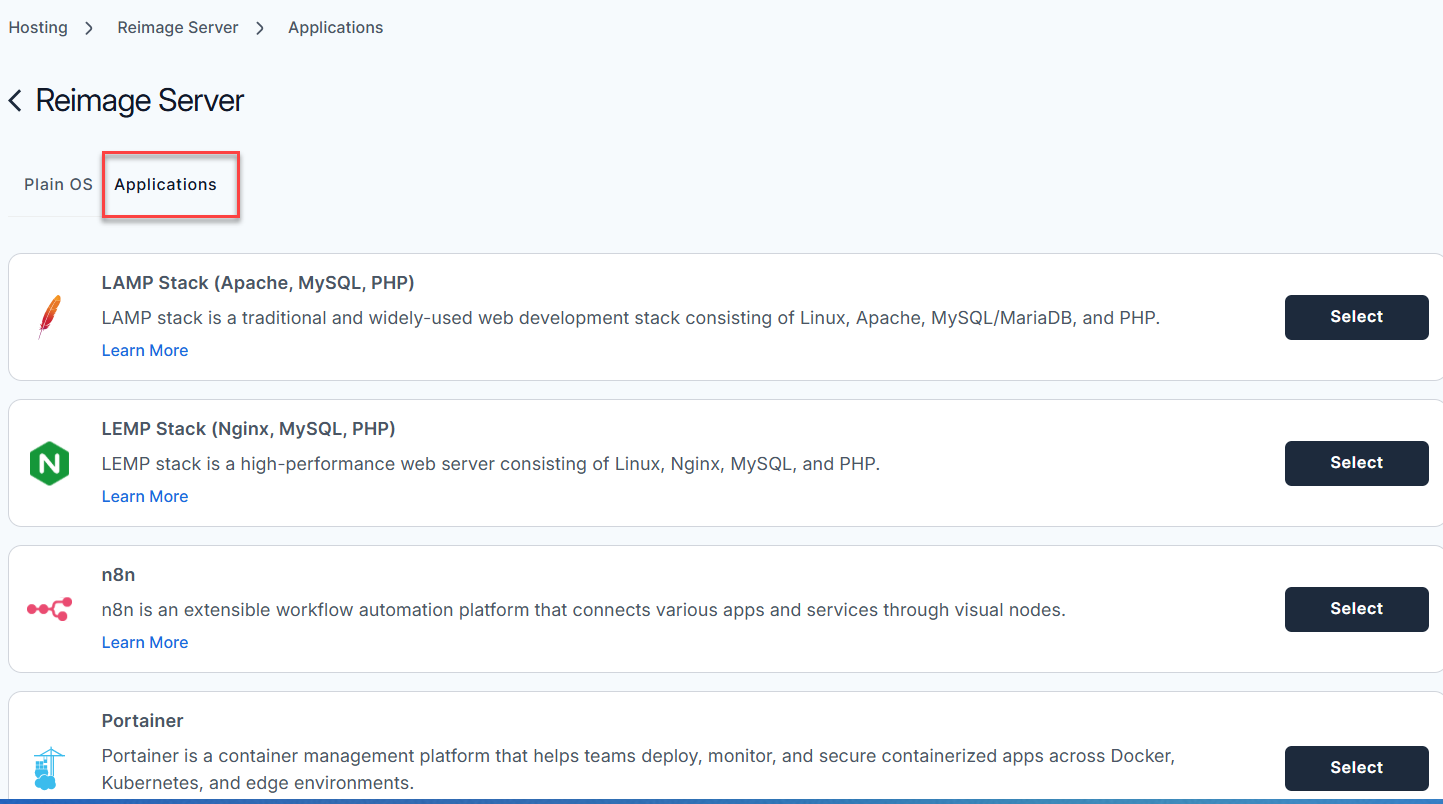
- Select the Applications tab.
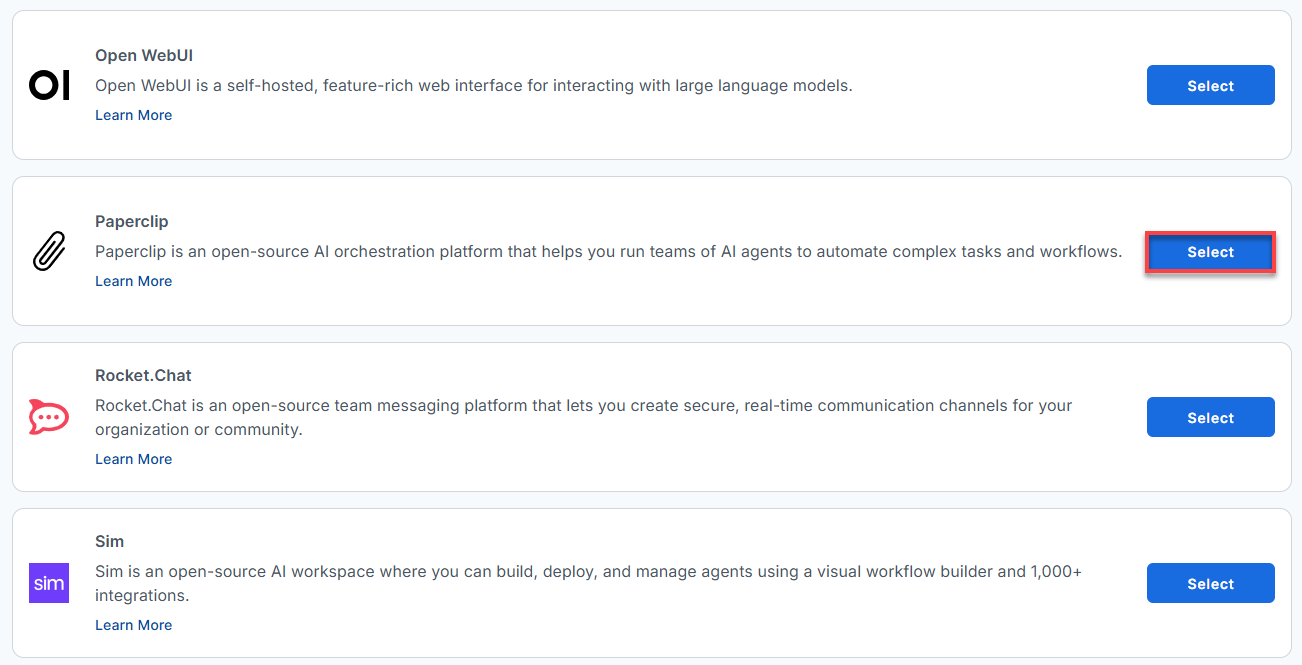
- From the list, find Paperclip and click Select.
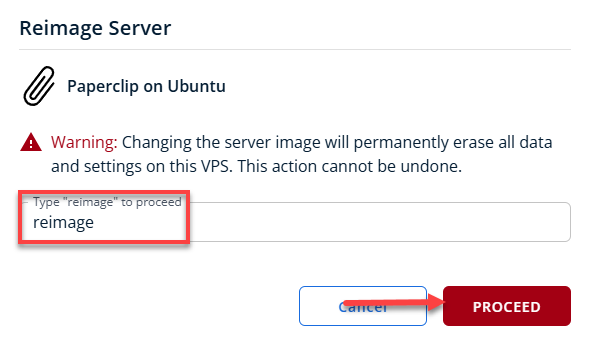
- To confirm, please type "reimage" and then click Proceed to start the process.
- Wait a few moments while the installation completes.

- Once completed, you will see Paperclip listed in the Server Image section.
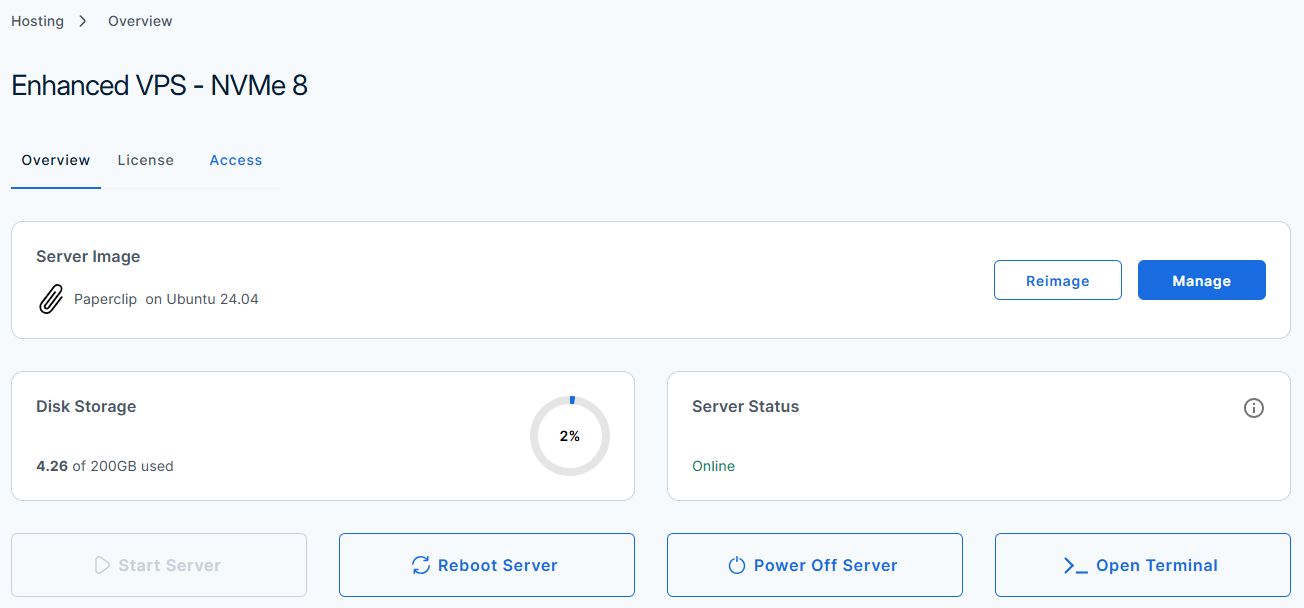
How to Set Up and Configure Paperclip
Welcome to Paperclip! Follow this step-by-step guide to set up your AI orchestration platform, configure your server, and launch your first agent team.
After installation completes:
Step 1: Reset Your Root Password
- Log in to your Bluehost Portal.
- In the left-hand menu, click Hosting, then select My Plans.
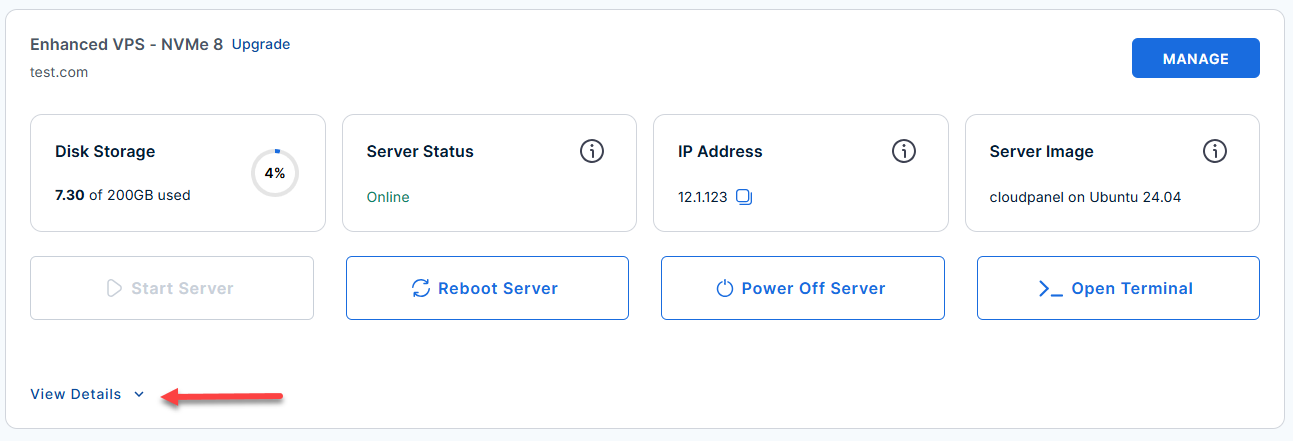
- Locate the server you want to manage, then click View Details in the bottom-left corner to expand the section and access additional server information.
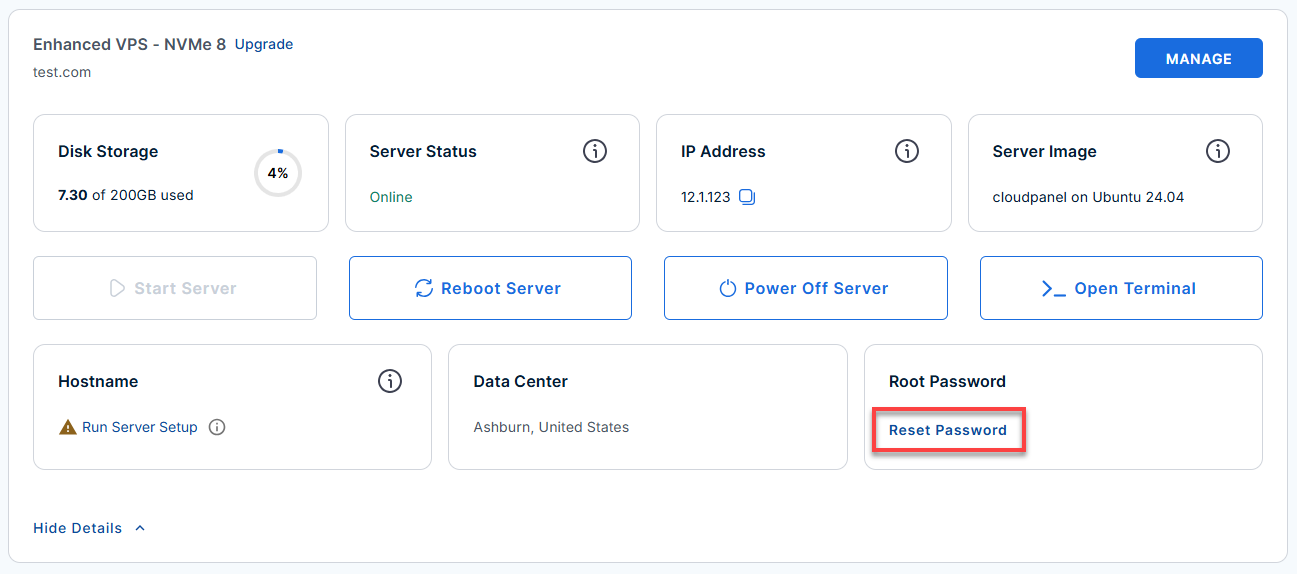
- Click the Reset Password.
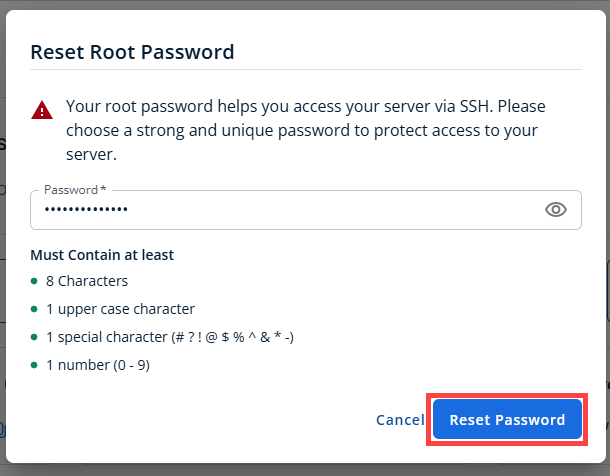
- In the pop-up window, type your new root password, then click Reset Password again to confirm and save the changes.
Step 2: Connect To Your Server Through SSH
Connect to your server via SSH.
Use your server IP and credentials with an SSH client, follow the prompts, and enter your Root Password when asked:
your_server_ip with your actual server IP address.ssh root@your_server_ip
Example Output:
Welcome to Ubuntu 24.04.4 LTS (GNU/Linux 6.8.0-111-generic x86_64)
********************************************************************************

Paperclip AI coding assistant is running on this server.

The UFW firewall is enabled.
All ports are BLOCKED except 22 (SSH) and 3100 (Paperclip).

Web UI:
  http://12.1.1.123:3100

First-time setup (run once after provisioning):

  1. Reload the service (this helps refreshing the env vars):
    systemctl restart paperclip

  2. Configure the server:
    sudo -u paperclip env HOME=/opt/paperclip bash -c "cd /opt/paperclip/app && pnpm paperclipai configure"

    When prompted, use these settings:
      Section          → Server
      Reachability     → Custom
      Port             → 3100
      Auth mode        → Authenticated
      Exposure profile → Public internet
      Bind host        → 12.1.1.123
      Public base URL  → http://12.1.1.123:3100

  3. Bootstrap the CEO account:
    sudo -u paperclip env HOME=/opt/paperclip bash -c "cd /opt/paperclip/app && pnpm paperclipai auth bootstrap-ceo"


Service management:
  systemctl status paperclip        # check service status
  systemctl restart paperclip       # restart the service
  journalctl -u paperclip -f        # follow service logs

File locations:
  Application:  /opt/paperclip/app
  Service unit: /etc/systemd/system/paperclip.service
  Runtime env:  /etc/systemd/system/paperclip.service.d/override.conf

For more details please refer /root/README.md

To delete this message of the day: rm -rf /etc/update-motd.d/99-paperclip
Step 3: Complete the Instance Setup
Once you log in, run these commands to complete the core configuration.
- Restart the Paperclip Service:
Refresh the system environment variables by restarting the service.
systemctl restart paperclip
- Run the Interactive Configuration:
Initialize your server settings by running the configuration wizard.
sudo -u paperclip env HOME=/opt/paperclip bash -c "cd /opt/paperclip/app && pnpm paperclipai configure"
Example Output:
Last login: Tue Jun 23 17:10:23 2026 from 182.74.165.114 root@123456:~# systemctl restart paperclip root@123456:~# sudo -u paperclip env HOME=/opt/paperclip bash -c "cd /opt/paperclip/app && pnpm paperclipai configure" > paperclip@ paperclipai /opt/paperclip/app > node cli/node_modules/tsx/dist/cli.mjs cli/src/index.ts "configure" ██████╗ █████╗ ██████╗ ███████╗██████╗ ██████╗██╗ ██╗██████╗ ██╔══██╗██╔══██╗██╔══██╗██╔════╝██╔══██╗██╔════╝██║ ██║██╔══██╗ ██████╔╝███████║██████╔╝█████╗ ██████╔╝██║ ██║ ██║██████╔╝ ██╔═══╝ ██╔══██║██╔═══╝ ██╔══╝ ██╔══██╗██║ ██║ ██║██╔═══╝ ██║ ██║ ██║██║ ███████╗██║ ██║╚██████╗███████╗██║██║ ╚═╝ ╚═╝ ╚═╝╚═╝ ╚══════╝╚═╝ ╚═╝ ╚═════╝╚══════╝╚═╝╚═╝ ─────────────────────────────────────────────────────── Open-source orchestration for zero-human companies ┌ paperclip configure │ ◆ Which section do you want to configure? │ ● LLM Provider │ ○ Database │ ○ Logging │ ● Server │ ○ Storage │ ○ Secrets └ -
When the wizard prompts you, select or type the following exact settings:
Learn how to configure your Bootstrap admin dashboard for executive access in this setup guide.
- Section: Server
- Reachability: Custom
- Port: 3100
- Auth mode: Authenticated
- Exposure profile: Public internet
- Bind host: Enter your server's IP address
- Public base URL: http://your_server_ip:3100
- Create the Admin (CEO) Account:
Create your primary administrative account by running the bootstrap command.
sudo -u paperclip env HOME=/opt/paperclip bash -c "cd /opt/paperclip/app && pnpm paperclipai auth bootstrap-ceo"
Example Output:
Last login: Tue Jun 23 19:29:23 2026 from 180.190.7.66 root@123456:~# sudo -u paperclip env HOME=/opt/paperclip bash -c "cd /opt/paperclip/app && pnpm paperclipai auth bootstrap-ceo" > paperclip@ paperclipai /opt/paperclip/app > node cli/node_modules/tsx/dist/cli.mjs cli/src/index.ts "auth" "bootstrap-ceo" │ ● Deployment mode is local_trusted. Bootstrap CEO invite is only required for authenticated mode. -
Copy the unique Invite URL from the terminal output. The output will resemble the following format:
> paperclip@ paperclipai /opt/paperclip/app > node cli/node_modules/tsx/dist/cli.mjs cli/src/index.ts "auth" "bootstrap-ceo" │ ◆ Created bootstrap CEO invite. │ │ Invite URL: http://12.1.1.123:3100/invite/pcp_bootstrap_caff3cd4dd81126a9dd0a15ea0040139e5bfb8a2e07ad73f │ │ Expires: 2026-06-26T21:12:13.183Z - Open your preferred web browser and paste the unique invite URL.
- Create your account.
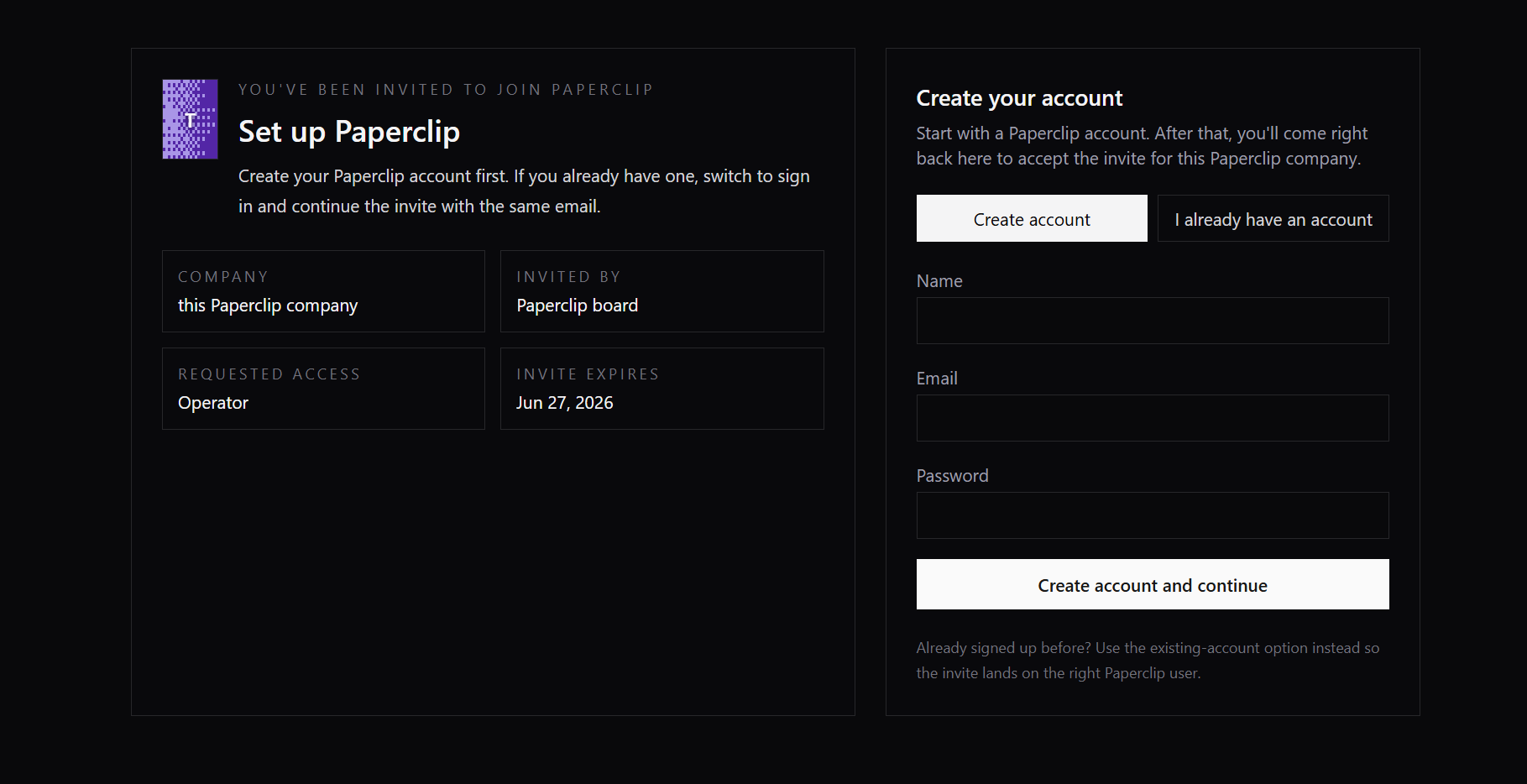
- Fill out the initialization form.

- From here, you can log into your newly created Admin/CEO account and start managing your AI agents.
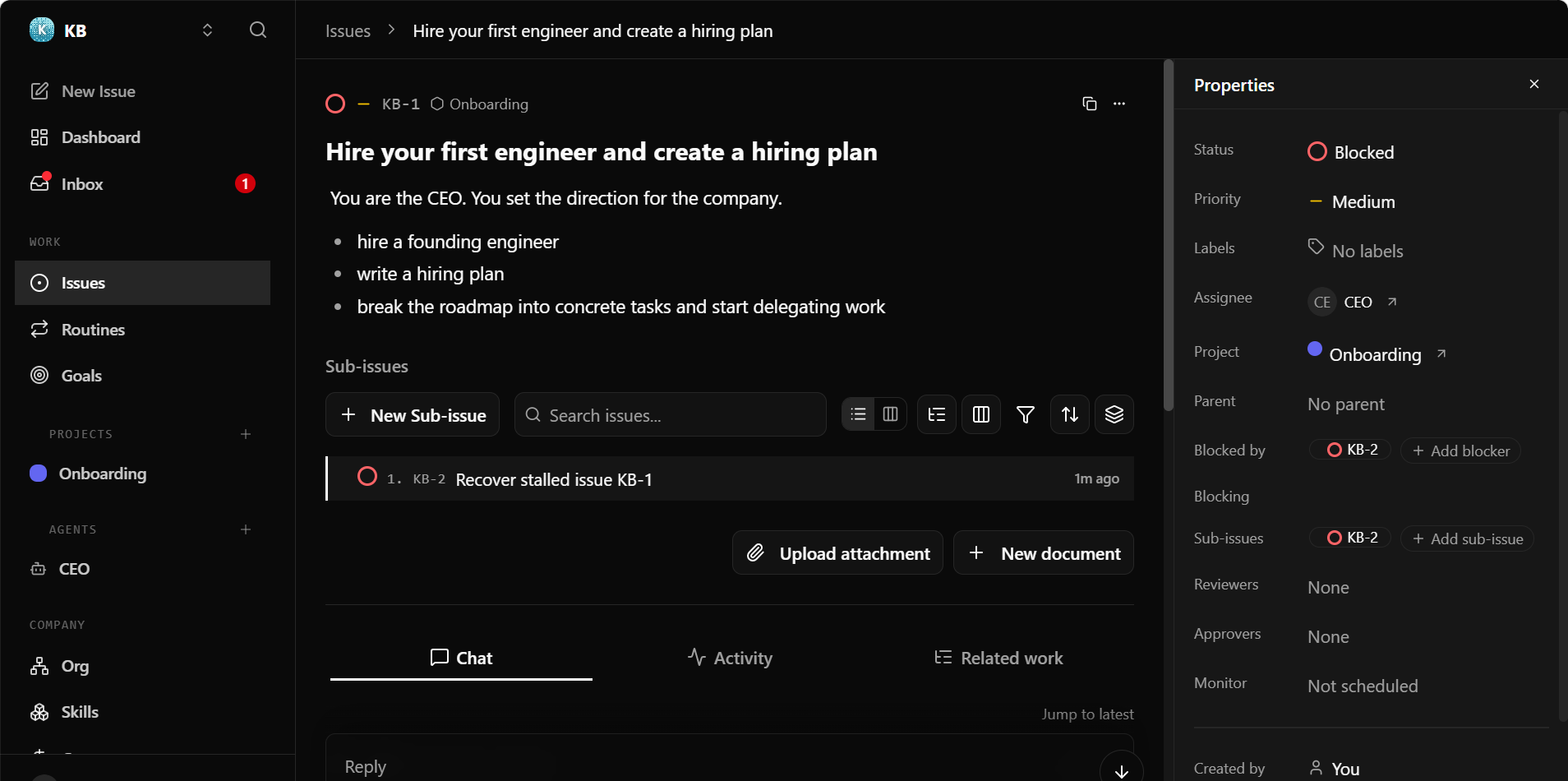
Step 4: Access your Paperclip Dashboard
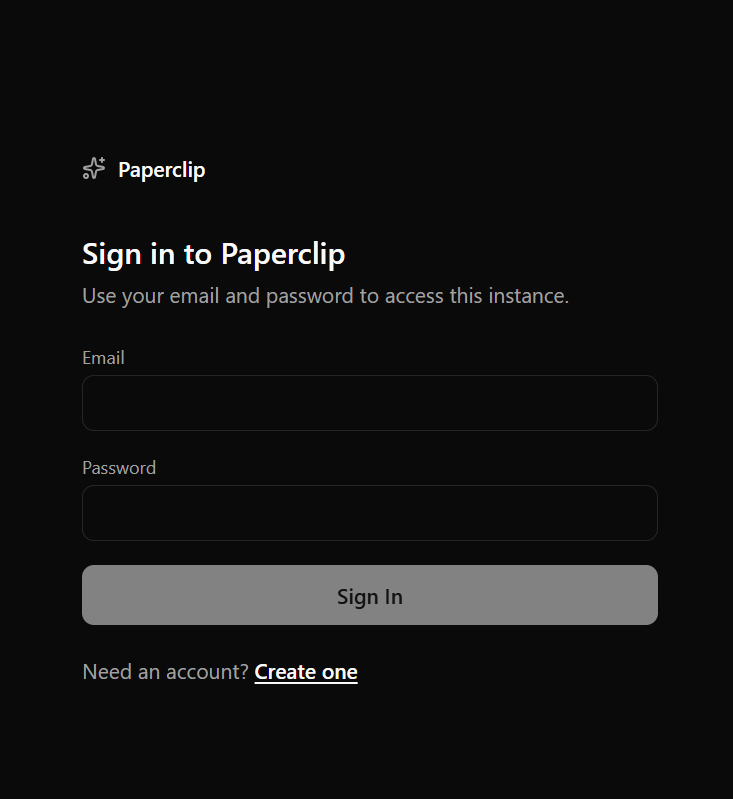
Now that the backend is configured, you can leave the terminal and head to your browser.
- Open your browser and navigate to:
Replace
your_server_ipwith your actual server IP address.http://your_server_ip:3100
- Use the CEO credentials you generated in Step 3 to log in.
Quick Reference Guide
Now that you are up and running, use these quick reference commands to manage and maintain your platform.
Controlling the Service
Use standard system commands to control Paperclip directly from your SSH terminal:
- Check Status:
systemctl status paperclip
- Stop Service:
systemctl stop paperclip
- Start Service:
systemctl start paperclip
- View Live Logs:
journalctl -u paperclip -f
Connecting Your Code Editor
To connect your favorite IDE (VS Code, JetBrains, Neovim, etc.), point your editor's Paperclip extension directly to your server URL:
your_server_ip with your actual server IP address.http://your_server_ip:3100
Updating to the Latest Version
Whenever you want to pull the latest features and updates from the official repository, run the following sequence:
cd /opt/paperclip/app
git pull
pnpm install
systemctl restart paperclip
Additional Information and Example Documentation Output
You can run cat /root/README.md to see more information and useful commands:
root@123456:~# cat /root/README.md
# Paperclip

## Description

Paperclip is an open-source AI orchestration platform that helps you
run teams of AI agents to automate complex tasks and workflows. It
organizes agents into structured roles with shared goals, allowing
them to collaborate and execute tasks turning individual AI tools into
a coordinated system that can manage projects and processes with
minimal manual effort.


## Services

Service       | Ports   | Purpose
--------------|---------|---------
Paperclip     | 3100    | Web UI and API
Paperclip     | 13100   | Paperclip Vite HMR
OpenSSH       | 22      | SSH

All other ports are blocked by UFW.


## What Gets Installed

| Component | Version | Notes |
|-----------|---------|-------|
| Node.js   | 20.x    | Installed via NodeSource |
| pnpm      | latest  | Global package manager |
| Paperclip | latest  | Cloned from `paperclipai/paperclip` |

Paperclip is installed to `/opt/paperclip/app` and runs as the dedicated `paperclip` system user.


## First Boot - How the VM Starts

When the VM is first booted after provisioning, a one-time cloud-init script runs automatically
(`/var/lib/cloud/scripts/per-instance/001_onboot`). It performs the following steps:

1. Detects the server's primary IP address.
2. Generates a random `BETTER_AUTH_SECRET` and writes it (along with `BETTER_AUTH_BASE_URL`) to
  a systemd drop-in at `/etc/systemd/system/paperclip.service.d/override.conf`.
3. Starts the Paperclip service and waits for it to become ready.
4. Runs the following configuration commands as the `paperclip` user:
  ```bash
  pnpm paperclipai allowed-hostname server-ip
  pnpm paperclipai context set --api-base http://server-ip:3100
  pnpm paperclipai onboard --yes
  ```
5. Restarts the service with the updated configuration.

After first boot completes, Paperclip is fully accessible from the server's external IP.

### On instance setup (run once after provisioning):

  1. Reload the service (this helps refreshing the env vars):
  ```bash
    systemctl restart paperclip
  ```

  2. Configure the server:
  ```bash
    sudo -u paperclip env HOME=/opt/paperclip bash -c \
      "cd /opt/paperclip/app && pnpm paperclipai configure"
  ```
    When prompted, use these settings:
      Section            : Server
      Reachability       : Custom
      Port               : 3100
      Auth mode          : Authenticated
      Exposure profile   : Public internet
      Bind host          : $myip
      Public base URL    : http://$myip:3100

  3. Bootstrap the CEO account:
  ```bash
    sudo -u paperclip env HOME=/opt/paperclip bash -c \
      "cd /opt/paperclip/app && pnpm paperclipai auth bootstrap-ceo"
  ```

The one-time script removes itself on completion so it does not re-run on subsequent boots.


## Message of the Day (MOTD)

On every SSH login, the MOTD displays the server IP, port, and useful commands. To remove it:

```bash
rm /etc/update-motd.d/99-paperclip
```


## Firewall

UFW is enabled with the following rules:

| Port | Protocol | Description |
|------|----------|-------------|
| 22   | TCP      | SSH (rate-limited) |
| 3100 | TCP      | Paperclip |


## How to Use

### Connect via SSH

```bash
ssh root@server-ip
```

---

### Access the Web UI

Open a browser and navigate to:

```
http://server-ip:3100
```

Create your admin account on first visit.

---

### Service Management

```bash
# Check service status
systemctl status paperclip

# Start the service
systemctl start paperclip

# Stop the service
systemctl stop paperclip

# Restart the service
systemctl restart paperclip

# Follow live logs
journalctl -u paperclip -f
```

---

### Connecting an Editor

Point your editor's Paperclip extension to the server address:

```
http://server-ip:3100
```

Refer to the [Paperclip documentation](https://github.com/paperclipai/paperclip) for
editor-specific configuration steps (VS Code, JetBrains, Neovim, etc.).

---


## File Locations

| Path | Description |
|------|-------------|
| `/opt/paperclip/app` | Paperclip application source |
| `/opt/paperclip` | Home directory for the `paperclip` system user |
| `/etc/systemd/system/paperclip.service` | Systemd service unit |
| `/etc/systemd/system/paperclip.service.d/override.conf` | Runtime env vars (IP, secrets) |
| `/etc/update-motd.d/99-paperclip` | Login message of the day |


## Updating Paperclip

To pull the latest version of Paperclip:

```bash
cd /opt/paperclip/app
git pull
pnpm install
systemctl restart paperclip
```

## Environment Variables

The service unit sets the following environment variables. Static variables are set in the service
file; runtime variables (IP-dependent or secret) are written to the drop-in override on first boot.

| Variable | Set At | Description |
|----------|--------|-------------|
| `NODE_ENV` | Build time | Node.js environment (`production`) |
| `PORT` | Build time | Port Paperclip listens on (`3100`) |
| `HOME` | Build time | Home directory for the service user (`/opt/paperclip`) |
| `HOST` | Build time | Bind address (`0.0.0.0` - all interfaces) |
| `BETTER_AUTH_SECRET` | First boot | Randomly generated authentication secret |
| `BETTER_AUTH_BASE_URL` | First boot | Server's primary IP address |

To override any variable after first boot:

```bash
systemctl edit paperclip
# Add or change Environment= lines in the [Service] section
systemctl restart paperclip
```

## Links

Documentation: [https://github.com/paperclipai/paperclip?tab=readme-ov-file#what-is-paperclip](https://github.com/paperclipai/paperclip?tab=readme-ov-file#what-is-paperclip)

Manage: [http://{server_ip}:3100](http://{server_ip}:3100)
Summary
A Paperclip application is useful when you want a simple way to handle file uploads, like images or documents, without having to build everything yourself. It manages storing and organizing files in the background, so things just work smoothly for the user.