 ChatGPT,
  Claude,
  Gemini,
  Grok — all four for
 Purchase a Self-Managed VPS with Ghost Installation
Ghost is a versatile publishing platform used across multiple industries for managing content, newsletters, and memberships. It is mainly used for web publishing and can be described as an easy way to add professional publishing capabilities to any website or business. Ghost was first introduced as an open-source blogging platform, but it now offers many more features and use cases.
Why Use Ghost?
Ghost lets you launch a fast website, send beautiful newsletters, and run a paid subscription business from one simple dashboard. Everything you need is built right in, so you can skip confusing plugins and just focus on your writing. Your pages load instantly, your emails reach readers' inboxes, and you keep 100% of your revenue.
Uses of Ghost
There are many applications of Ghost in different fields:
- Premium Memberships: Create exclusive content tiers and lock specific articles behind a paywall to turn occasional readers into paying supporters.
- Integrated Newsletters: Deliver your latest stories directly to subscribers inboxes automatically every time you publish, bypassing social media algorithms.
- Independent Journalism: Launch a fully independent news site or niche magazine with zero platform fees, allowing you to keep 100% of your subscription revenue.
- Corporate Blogs: Build a fast-loading, highly secure company publication that boosts search engine rankings and captures clean marketing leads.
- Content Hubs: Manage a sleek, distraction-free home for podcasts, video series, or text articles without wrestling with clunky website plugins.
This flexibility makes Ghost an excellent choice for creators and companies wanting to grow a professional audience with total peace of mind.
How to Purchase a Self-Managed VPS Hosting with Ghost Installation
To get started with Ghost on Bluehost, you first need to purchase a Self-Managed VPS plan. Follow the steps below:

New to VPS or not sure where to start? No worries! At the top of the Self-Managed VPS purchase page, you’ll see the Pre-configured Setup section. This handy feature is perfect if you’re feeling a bit unsure—just pick the type of project you want, like WordPress Site, AI Agent/Claude Code, Dev/Staging, or eCommerce Store. We’ll take care of the rest by automatically filling in the best plan, operating system, and template for you.
- Super simple for beginners or anyone who just wants a quick setup
- Instantly get the recommended settings for your project
- Skip the guesswork and save time
- You can still customize things later if you want
- In your browser, go to https://www.bluehost.com/vps-hosting.
- Click the Choose Plan button under your preferred VPS hosting plan.
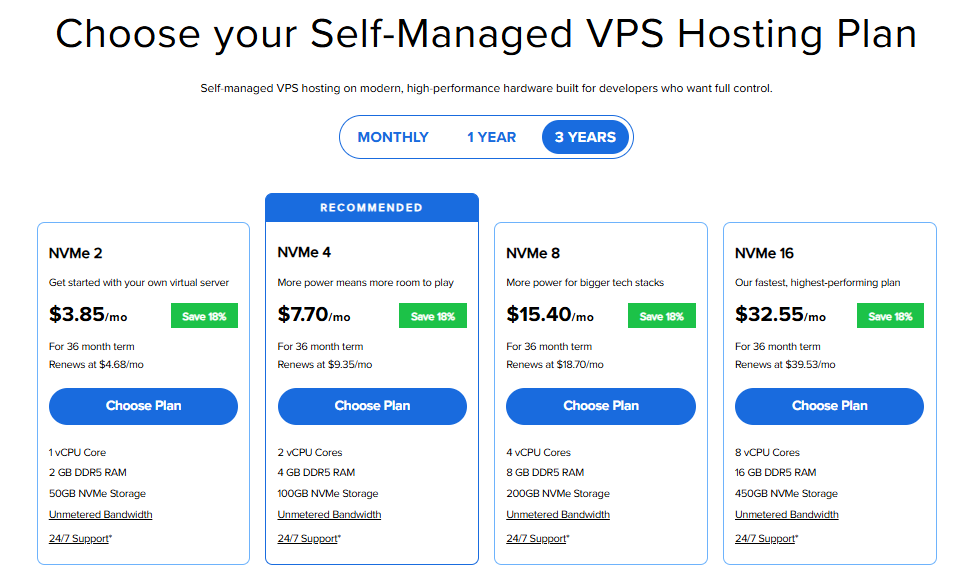
Important: Pricing is subject to change—please visit https://www.bluehost.com/vps-hosting for the current introductory/sign-up offer for Bluehost VPS Hosting. For the most up-to-date renewal pricing, visit your Bluehost Portal Renewal Center.
- Select your preferred Data Center location.

- On the Cart page, you can configure your server to fit your needs in the following section:
- Hardware:
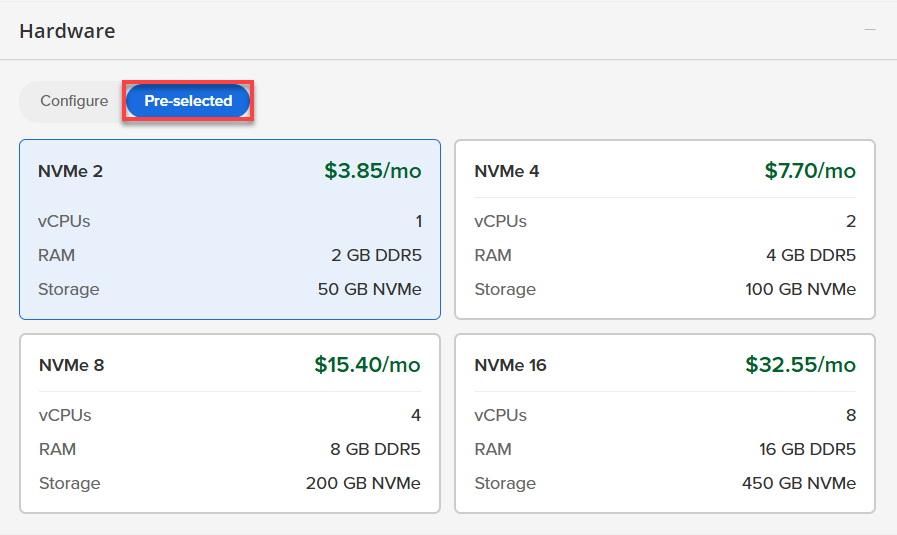
- Pre-selected:
You can select a different Self-Managed VPS plan in this section.
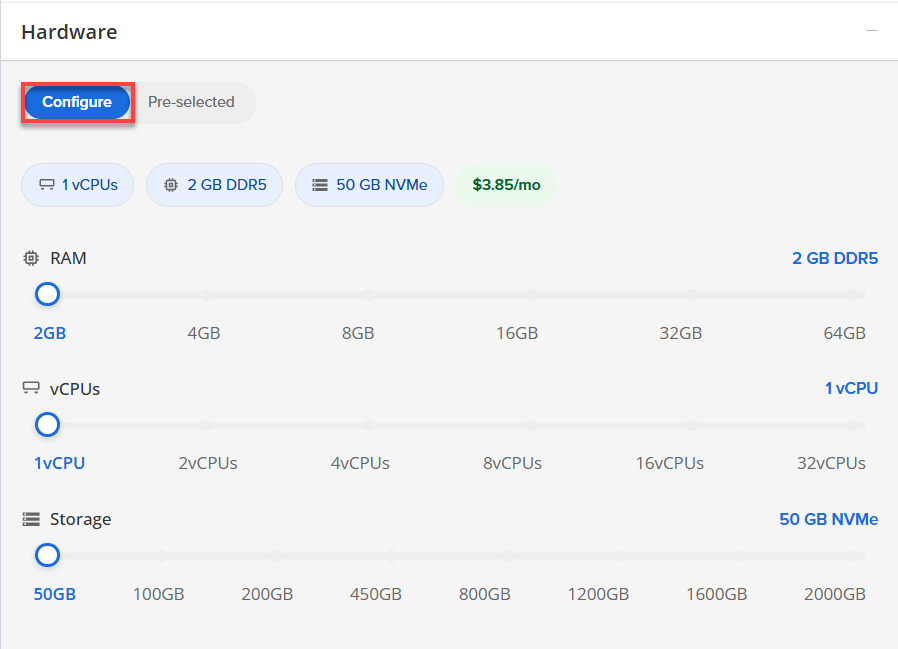
- Configure:
Click Configure to customize your package.
Note that your changes help customize your plan, and the overall cost will adjust accordingly to fit your needs.
- Pre-selected:
- Software:
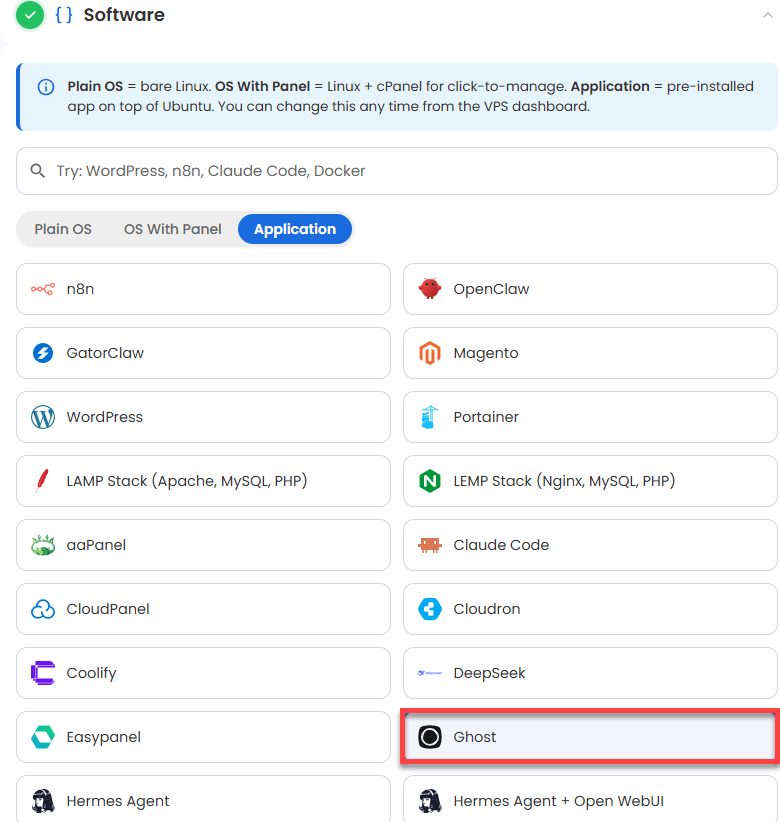
If the selected plan does not meet the app's minimum requirements, the app will be grayed out.
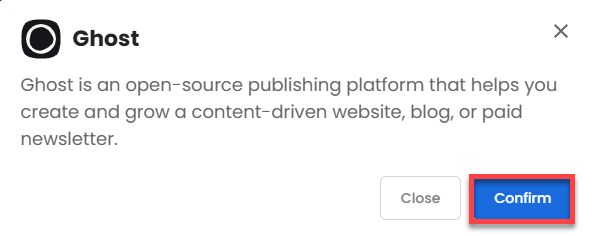
- Click on the Application Tab.
- Choose Ghost.
- Click Confirm to continue.
- Hardware:
- Add-Ons:
- Premium Support:
This service provides you with priority access to our expert team for faster responses and personalized assistance whenever you need it.

- Premium Support:
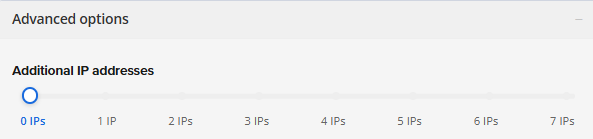
- In the Advanced options:
- Extra IP's: You can add extra IP addresses for an additional fee.
Pricing changes based on how many IPs you add. - Hostname: Assign a custom hostname to easily identify your server. This is optional.
- Extra IP's: You can add extra IP addresses for an additional fee.
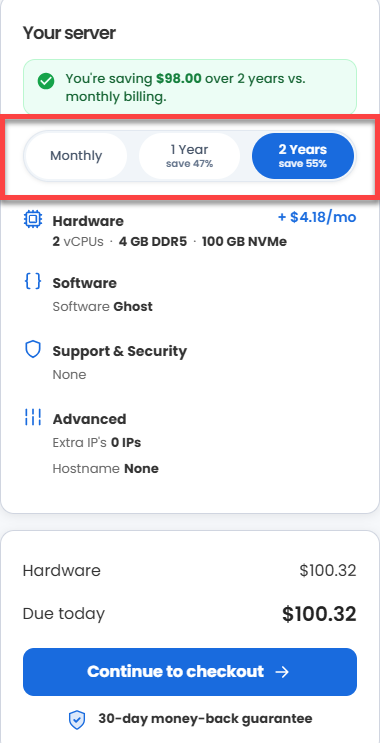
- Select your preferred billing term and view your Order Summary. Click the Continue to Checkout button to proceed.
- Do the following on the Checkout page:
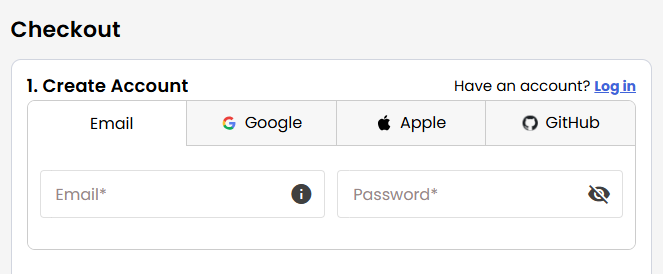
- Create your Bluehost account by using your email address or by connecting with your Google, Apple, or GitHub account — whichever you prefer!
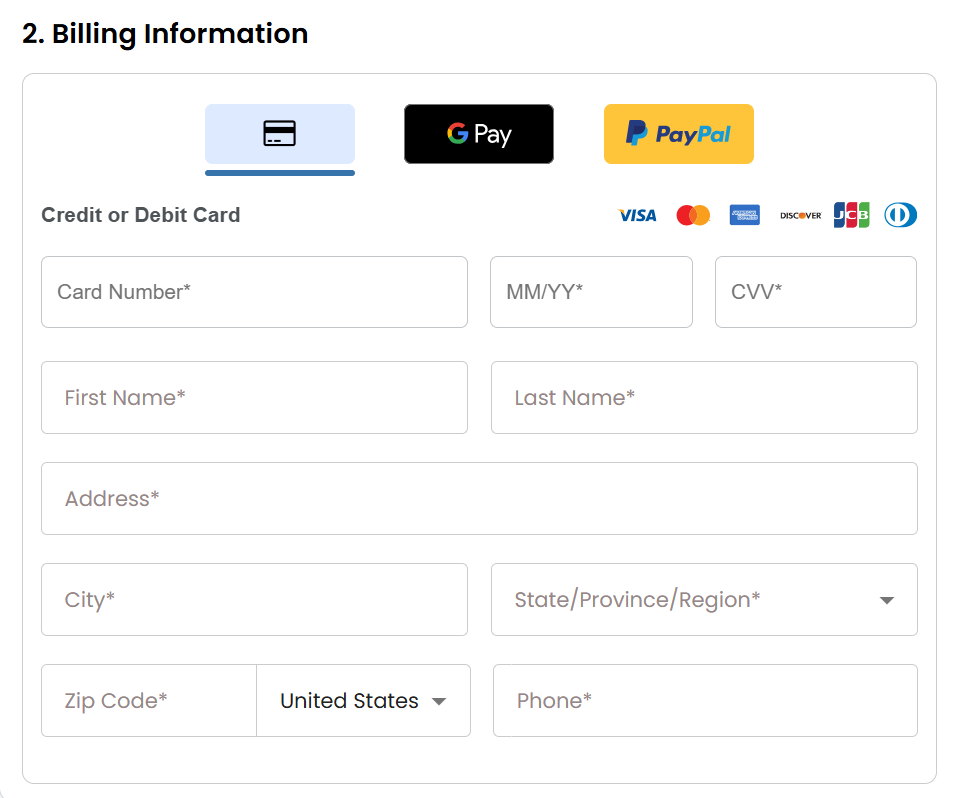
- Select your preferred payment method: credit card, Google Pay, or PayPal. Enter your billing information.
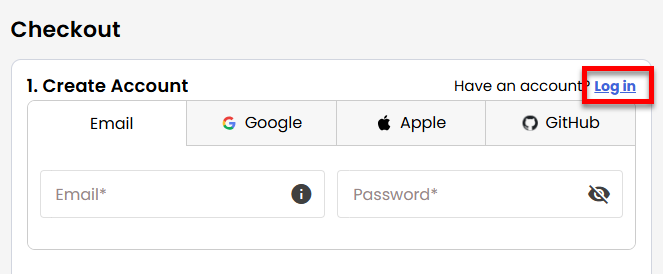
- If you have an account with us, you will see your Bluehost login details when you are logged into your Bluehost Portal. If you are not logged in, please click the Log In link.
- Create your Bluehost account by using your email address or by connecting with your Google, Apple, or GitHub account — whichever you prefer!
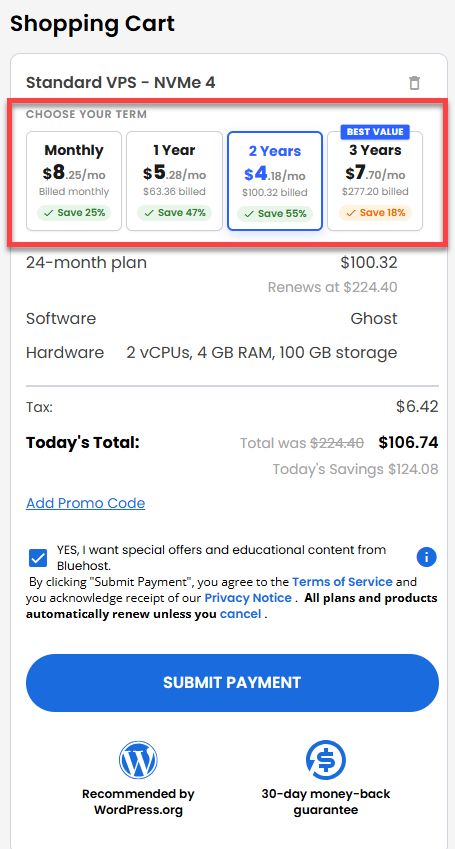
- In the Shopping Cart section, you can still adjust your billing term if needed.
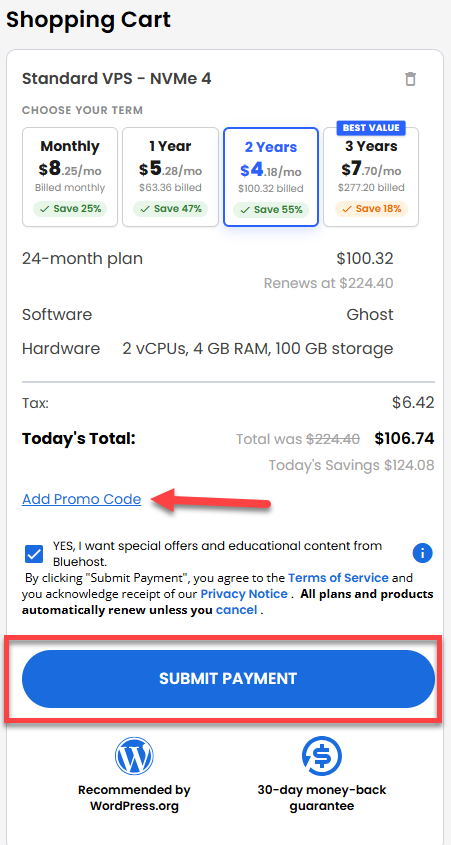
- Review the items in your cart, add a Promo Code if you have one, and then click Submit Payment to complete the purchase.
After completing the purchase, your VPS hosting will begin provisioning. You can access and manage your new VPS hosting in the Hosting tab of your Bluehost Portal.
How to Set Up Ghost
After installation completes:
- Log in to your Bluehost Portal.
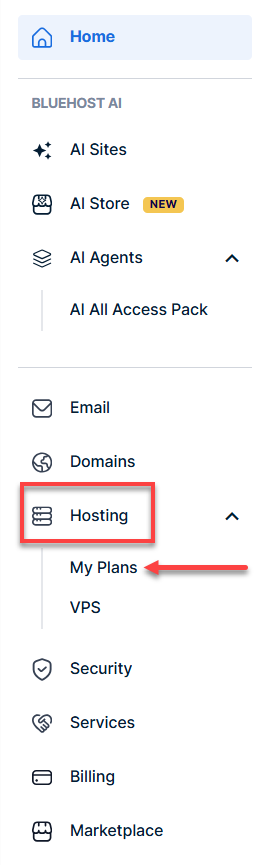
- In the left-hand menu, click Hosting, then select My Plans.
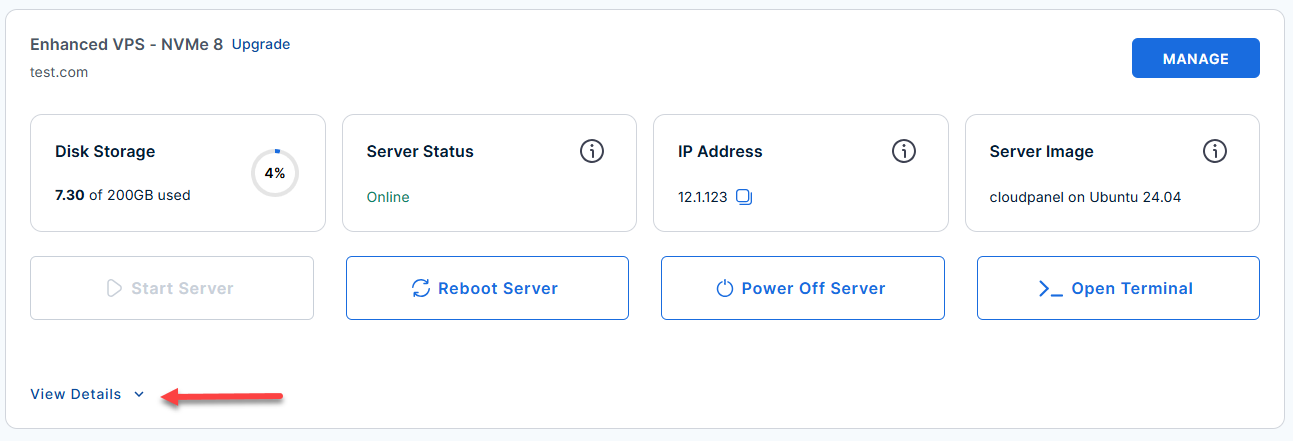
- Locate the server you want to manage, then click View Details in the bottom-left corner to expand the section and access additional server information.
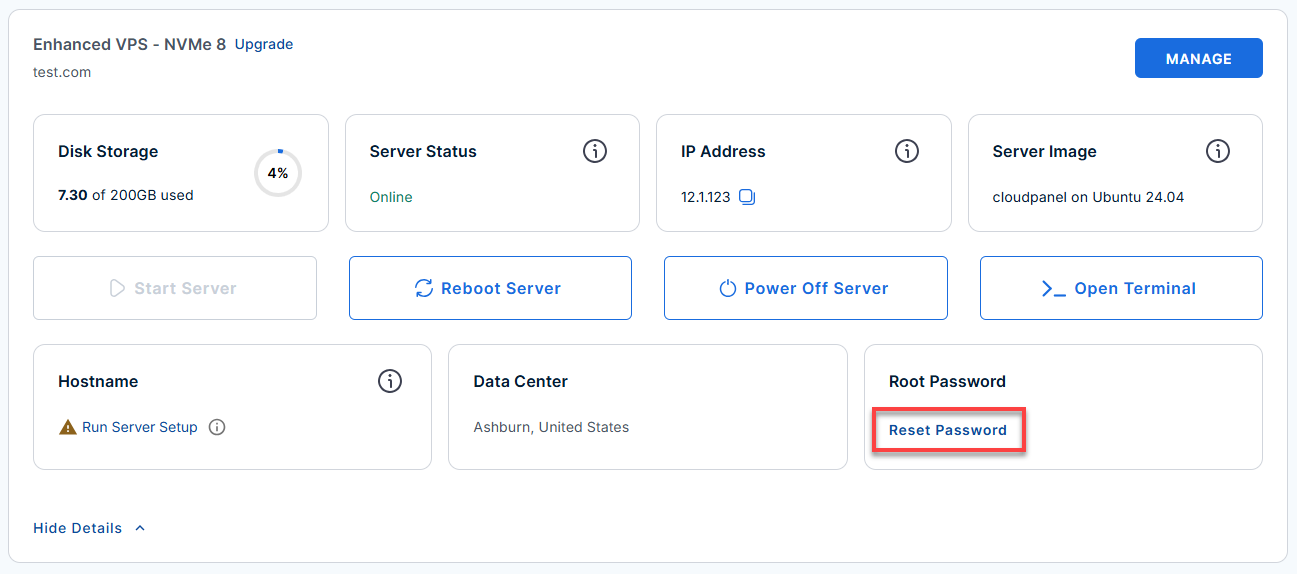
- Click the Reset Password.
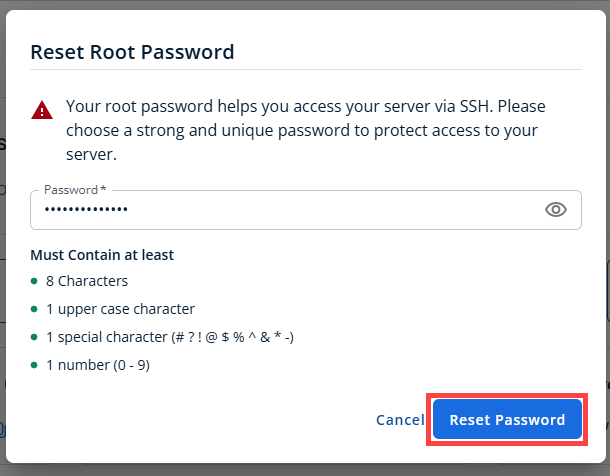
- In the pop-up window, type your new root password, then click Reset Password again to confirm and save the changes.
- Connect to your VPS via SSH.
Use your VPS IP and credentials with an SSH client, follow the prompts, and enter your root password when asked:Replaceyour_server_ipwith your actual server IP address.ssh root@your_server_ipWelcome to Ubuntu 24.04.4 LTS (GNU/Linux 6.8.0-117-generic x86_64) ******************************************************************************** Ghost Publishing Platform Ghost : 6.42.0 Nginx : active MySQL : active Node.js : v22.22.2 Blog : http://12.1.1.110/ Admin : http://12.1.1.110/ghost/ (create your account on first visit) SSH : port 22 | HTTP : port 80 | HTTPS : port 443 (UFW open; add SSL cert to activate) UFW enabled Credentials (generated on first boot): cat /root/.app_passwords Quick start: su - ghostapp # switch to the Ghost service user ghost status # check Ghost process status ghost restart # restart Ghost ghost update # update to latest version Service management: systemctl status nginx # Nginx reverse proxy systemctl status mysql # MySQL database tail -f /var/www/ghost/content/logs/http___*_production.log Enable HTTPS (post-deploy): 1. Point your domain DNS to this server's IP 2. Run the SSL setup script (uses acme.sh bundled with Ghost): bash /opt/ghost/setup-ssl.sh yourdomain.com 3. Update Ghost's URL to match: runuser -l ghostapp -c "ghost config set --dir /var/www/ghost url 'https://yourdomain.com'" 4. ghost restart --dir /var/www/ghost For full details refer: /root/README.md ******************************************************************************** To delete this message of the day: rm -rf /etc/update-motd.d/99-ghost ******************************************************************************** - View your first-boot credentials and URLs:
On first boot,
cloud-initgenerates all credentials (database, URLs) in/root/.app_passwords. Run:cat /root/.app_passwordsExample Output:
ghost_db_user="ghostapp" ghost_db_pass="23682b410ee4c0cf3e0193170930c52abc123" ghost_db_name="ghost_prod" ghost_blog_url="https://12.1.1.110/" ghost_admin_url="https://12.1.1.110/ghost/" # ghost_magic_link: NOT available yet. # Magic links can only be generated AFTER the Setup Wizard is completed # and an admin account exists. To mint one post-setup, run: # # curl -s -X POST http://localhost:2368/ghost/api/admin/authentication/magic-link/ \ # -H "Content-Type: application/json" \ # -d '{"email":"","emailType":"signin"}' # # The link will be emailed to the admin address (if SMTP is configured) # or can be retrieved from the Ghost logs. - Access the Ghost Admin panel in your browser and set up your admin user:
Replace
<server-ip>with your actual server IP address.http://<server-ip>/ghost/- Open this URL in your browser (replace
<server-ip>with your actual server IP from the credentials file). - Follow the on-screen wizard to create your admin account. This is only needed once.
- Open this URL in your browser (replace
- If you want API access, use the Content API endpoint:
curl http://<server-ip>/ghost/api/content/posts/?key=<content-api-key>- Get your Content API key from the Ghost Admin panel.
- Use the Ghost CLI for management (run as the ghostapp user):
- Switch to the Ghost user:
su - ghostapp
- Show Ghost process status:
ghost status
- Restart Ghost:
ghost restart
- Update Ghost to latest version:
ghost update
- Tail the Ghost log:
ghost log
- List all Ghost installations:
ghost ls
- Switch to the Ghost user:
- Service management commands (run as root):
- Ghost systemd unit:
systemctl status 'ghost_*'
- Nginx reverse proxy:
systemctl status nginx
- MySQL database:
systemctl status mysql
- Follow Ghost journal logs:
journalctl -u 'ghost_*' -f
- Follow general Ghost log file:
tail -f /var/www/ghost/content/logs/ghost.log
- Follow production HTTP log file:
tail -f /var/www/ghost/content/logs/http___localhost_production.log
- Ghost systemd unit:
- Run the test suite (advanced):
prove /root/app_test/main.t
Additional Links
Additional Information and Example Documentation Output
You can run cat /root/README.md to see more information and useful commands:
Example Output:
root@server-123456:~# cat /root/README.md
# Ghost

## Description

Ghost is an open-source publishing platform that helps you create and grow a content-driven website, blog, or paid newsletter.

It includes a clean writing editor, built-in SEO tools, membership management, and subscription features, making it a strong choice for independent writers, journalists, and creators who want full ownership of their audience.


## Services

| Service        | Port | Protocol | Notes                                 |
| -------------- | ---- | -------- | ------------------------------------- |
| SSH            | 22   | TCP      | UFW rate-limited                      |
| Ghost / Nginx  | 80   | TCP      | HTTP - Ghost proxied via Nginx        |
| Ghost internal | 2368 | TCP      | Internal only, not exposed externally |


## How-to-use

### First-boot credentials

On first boot `cloud-init` generates all passwords and writes them to
`/root/.app_passwords`. Read them with:

```bash
cat /root/.app_passwords
```

### Accessing Ghost

```bash
# Admin panel (set up your account on first visit)
http:///ghost/

# Ghost Content API
curl http:///ghost/api/content/posts/?key=
```

### Ghost CLI (SSH into server)

```bash
# Run as the ghostapp user
su - ghostapp

ghost status                    # show Ghost process status
ghost restart                   # restart Ghost
ghost update                    # update Ghost to latest version
ghost log                       # tail the Ghost log
ghost ls                        # list all Ghost installations
```

### Service management

```bash
systemctl status 'ghost_*'    # Ghost systemd unit
systemctl status  nginx                       # Nginx reverse proxy
systemctl status  mysql                       # MySQL database
journalctl -u 'ghost_*' -f   # follow Ghost journal
#tail -f /var/www/ghost/content/logs/ghost.log
tail -f /var/www/ghost/content/logs/http___localhost_production.log
 # follow file logs
```

### Running the test suite

```bash
prove /root/app_test/main.t
```


## Links

- Documentation: [https://ghost.org/docs/](https://ghost.org/docs/)
- Ghost CLI reference: [https://docs.ghost.org/ghost-cli](https://docs.ghost.org/ghost-cli)
- Ghost API reference: [https://docs.ghost.org/content-api](https://docs.ghost.org/content-api)
- Ghost GitHub: [https://github.com/TryGhost/Ghost](https://github.com/TryGhost/Ghost)
Summary
Ghost is a powerful and flexible publishing platform that makes it easy to create, manage, and monetize content. With Self-Managed VPS Hosting from Bluehost, you can quickly set up Ghost and take full control of your publishing experience.