



Web hosting is often seen as a one-time setup, but it directly impacts your website’s performance, scalability and reliability. The type of web hosting service you choose determines how well your site handles growth, traffic spikes and overall user experience.
Most beginners start with shared hosting because it’s affordable and easy to manage. However, as web traffic increases, limitations like slower speeds, downtime and restricted server resources become noticeable. This is where cloud hosting offers a more scalable and reliable alternative.
At a high level:
- Shared hosting is built for simplicity
- Cloud hosting is designed for scalability and performance
This guide will help you compare cloud hosting vs shared hosting and choose the right hosting solution for 2026.
What is shared hosting?

If you’re launching a website for the first time, shared hosting is often where your journey begins. It’s one of the most popular web hosting services because it’s simple, affordable and doesn’t require technical expertise.
Shared hosting is a type of traditional web hosting where multiple websites are hosted on a single physical server, sharing the same pool of server resources. Think of it like an apartment building, each website has its own space, but all rely on the same underlying infrastructure.
How shared hosting works?
In a shared hosting environment, your website shares key computing resources, including:
- CPU (processing power)
- RAM (memory)
- Storage (server space)
These resources are distributed among multiple websites on the same server. Your hosting provider handles server management, maintenance, updates, security and uptime, making it a fully managed hosting solution.
This setup makes shared hosting especially beginner-friendly. You can launch your website quickly without dealing with complex server configurations. Most web hosting providers also offer intuitive dashboards, one-click installations and built-in tools to simplify website setup.
Ideal for
Shared hosting is best suited for websites with minimal resource demands. It’s a great choice if you:
- Are starting your first website or blog
- Need a simple and cost-effective web hosting service
- Run a personal project, portfolio or small business site
- Expect low to moderate web traffic
For many users, shared hosting provides everything needed to get online without overcomplicating infrastructure.
Limitations of shared hosting
While shared hosting is a great starting point, it comes with limitations, especially as your website grows:
- Resource contention: Multiple websites share the same physical server, so activity from other sites can affect your performance.
- Limited scalability: You’re restricted by the capacity of a single server.
- Performance inconsistency: Speed may fluctuate depending on overall server usage.
- Restricted control: Limited access to advanced configurations and server management.
Over time, these constraints can impact your website performance, reliability and user experience.
Shared hosting is a cost-effective and beginner-friendly hosting solution, but it relies on a single physical server and shared resources, making it less suitable for high-traffic or growing websites.
What is cloud hosting?
As websites grow and user expectations increase, traditional hosting setups often fall short. This is where cloud hosting stands out, it’s built to handle modern demands like traffic spikes, global audiences and consistent performance.
Cloud hosting is a type of web hosting service where your website is hosted across multiple interconnected servers, instead of relying on a single physical server. This distributed model ensures better access to computing resources, improved reliability and higher uptime.
Also read: What is Cloud Hosting? Understanding the Basics and Beyond
How cloud hosting works?
Unlike traditional setups, cloud hosting uses a network of cloud hosting servers to manage your website. This enables:
- Distributed resources: Your website pulls CPU, RAM and storage from multiple servers, not just one.
- Automatic failover: If one cloud server fails, another instantly takes over, preventing downtime.
- Dynamic resource allocation: Resources scale up or down in real time based on web traffic.
This architecture removes the limitations of a single server and ensures more flexible performance.
Why cloud hosting is built for modern workloads?
Modern websites require speed, reliability and the ability to handle unpredictable demand. Cloud hosting solutions are designed to deliver exactly that:
- Handles traffic spikes: Easily manages sudden increases in visitors without affecting website performance.
- Supports global performance: Uses distributed network infrastructure to serve users efficiently across locations.
- Improves uptime and redundancy: Eliminates dependency on one machine, reducing the risk of server failure.
- Delivers consistent performance: Ensures stable speed using scalable cloud resources.
Also read: Best Cloud Hosting for High Traffic Websites: Top Providers
Cloud hosting leverages cloud computing and multiple virtual servers to deliver scalable, reliable and high-performance hosting, making it the ideal choice for growing websites and businesses.
Now that we’ve seen how cloud hosting supports modern workloads, let’s compare it with shared hosting to understand the key differences.
Shared hosting vs cloud hosting: Core differences
At a glance, shared hosting vs cloud hosting may seem like two ways to achieve the same goal, getting your website online. However, they differ significantly in how they handle performance, scalability, reliability and cost efficiency. Understanding these differences helps you choose the right hosting solution based on your current needs and future growth.
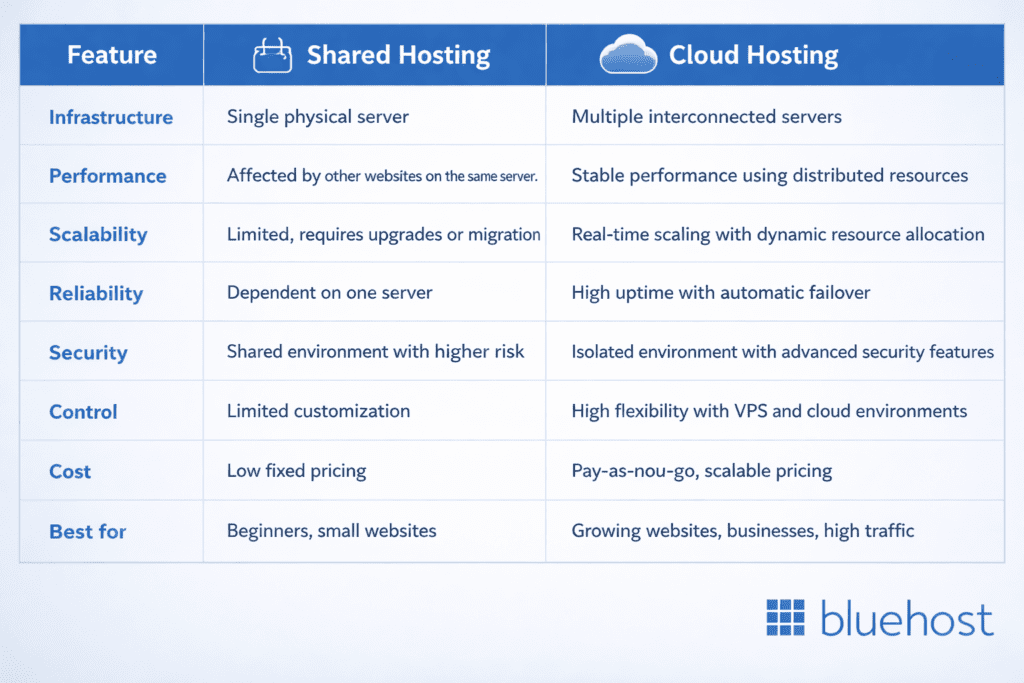
Overall, the table shows that while shared hosting works well for basic, low-traffic websites, cloud hosting provides better scalability, reliability and performance for growing needs. Now, let’s look at each aspect in more detail.
1. Performance
How your hosting handles traffic directly impacts speed and user experience, especially as your site grows.
- Shared hosting: Performance depends on other websites on the same physical server. If one site consumes more server resources, it can slow down others, leading to inconsistent website performance.
- Cloud hosting: Uses multiple interconnected servers, ensuring stable and reliable performance even during traffic spikes.
Insight: Cloud hosting delivers more consistent performance by distributing computing resources.
2. Scalability
As your traffic increases, your hosting environment should be able to grow without disrupting your website.
- Shared hosting: Limited by a single server. Scaling often requires upgrading plans or migrating to another hosting service.
- Cloud hosting: Offers real-time scaling through dynamic resource allocation, allowing your site to grow without disruption.
Insight: Cloud hosting offers scalability without downtime or manual upgrades.
3. Reliability and uptime
Downtime can impact both user trust and business continuity, making reliability a critical factor.
- Shared hosting: Dependent on one physical server. If the server fails, your website goes offline.
- Cloud hosting: Eliminates single points of failure. If one cloud server fails, another takes over instantly.
Insight: Cloud hosting ensures higher uptime and reduces risks from server failure.
4. Control and flexibility
The level of control you need depends on how customized your website or application setup is.
- Shared hosting: Limited customization and minimal control over server management.
- Cloud hosting: Greater flexibility with options like VPS hosting (virtual private server) and customizable configurations.
Insight: Cloud hosting provides the flexibility needed for advanced use cases.
5. Security
Protecting your website and data becomes increasingly important as your online presence grows.
- Shared hosting: Multiple websites share the same server, increasing potential risk from other sites.
- Cloud hosting: More isolated environments with advanced security features from cloud service providers.
Insight: Cloud hosting offers stronger and more layered security.
6. Cost and pricing
Choosing the right hosting also depends on how you balance upfront costs with long-term value.
- Shared hosting: Fixed, low-cost pricing, ideal for beginners.
- Cloud hosting: Flexible pricing based on usage, offering better cost efficiency as your website grows.
Insight: Shared hosting is cheaper upfront, but cloud hosting provides better long-term value.
If you need a simple and affordable web hosting service, shared hosting is a good starting point. But if your focus is on performance, scalability and reliability, cloud hosting is the better long-term hosting solution.
When to choose shared hosting?
Shared hosting is the right choice when you’re just getting started and need a simple, cost-effective web hosting solution. It removes the complexity of server management and allows you to focus on building your website or business.
You should choose shared hosting if you:
- Are launching a new website, blog or personal project
- Expect low to moderate web traffic
- Have a limited budget and want an affordable web hosting service
- Prefer a fully managed environment with no technical setup
For beginners, shared hosting provides everything needed to get online quickly without dealing with complex infrastructure.
Think of shared hosting as your starting point, simple, accessible and easy to manage.
When to choose cloud hosting?
As your website grows, your hosting needs become more demanding. Cloud hosting is designed to support that growth with better performance, scalability and reliability.
You should choose cloud hosting if you:
- Are experiencing growing or unpredictable traffic spikes
- Run a business, eCommerce store or revenue-generating website
- Need consistent uptime and faster website performance
- Plan to scale operations or expand your reach
With access to multiple interconnected servers and scalable cloud resources, cloud hosting ensures your website performs reliably under increasing demand.
Think of cloud hosting as your growth infrastructure, built for scalability and performance.
When should you upgrade from shared to cloud hosting?
There comes a point where shared hosting starts to limit your website’s potential. Identifying these signs early helps you avoid performance issues and lost opportunities.
You should upgrade to cloud hosting if you notice:
- Your website is loading slower than usual
- Web traffic is increasing or becoming unpredictable
- You’re experiencing frequent downtime or server failures
- You need stronger security and more reliable performance
Upgrading at the right time ensures your website can handle growth without compromising user experience.
This is the turning point, moving from shared to cloud hosting helps you scale efficiently, not just stay online.
How Bluehost cloud-backed hosting supports your growth?
Choosing the right hosting provider isn’t just about where you start, it’s about how easily you can scale as your website grows. Bluehost offers a connected ecosystem where all hosting plans, shared, VPS and dedicated, are built on cloud-based infrastructure, ensuring consistent performance, reliability and scalability at every stage.
1. A seamless upgrade path
With Bluehost, you don’t need to switch platforms as your needs evolve. Instead, you get a structured progression:
- Start with shared hosting for simplicity
- Upgrade to VPS hosting for more control and dedicated resources
- Move to dedicated hosting for maximum performance and full server access
If shared hosting begins to limit your website’s growth due to increasing traffic or higher resource demands, you can upgrade to VPS or dedicated hosting, both on a cloud platform and backed by OCI. Starting with VPS hosting is often the best step, as it offers dedicated resources, improved performance and greater flexibility. It allows you to scale your infrastructure without complex migrations or rebuilding your website. As your needs grow, you can seamlessly move to dedicated hosting for even greater control and power.
2. Cloud infrastructure across every plan
Unlike traditional hosting setups, Bluehost integrates cloud technology across its entire product range, shared, VPS and dedicated hosting. This means you benefit from:
- Stable and consistent performance across all hosting tiers
- Better distribution of computing resources
- Improved uptime with reduced risk of server failure
Because Bluehost VPS hosting runs on a cloud-based infrastructure, it offers a more scalable and reliable hosting environment compared to traditional single-server setups.
3. Built for scalability and performance
As your website grows, your hosting adapts without disruption. Bluehost’s infrastructure ensures:
- Seamless scalability with flexible resource allocation
- Performance improvements at every upgrade stage
- Reliable uptime for consistent website performance
The transition between hosting plans is designed to be smooth, allowing you to focus on growing your website instead of managing servers.
Cloud hosting vs shared hosting: Choose scalable hosting for growing websites
Most websites start small, usually on shared hosting and it works well at first. But as web traffic grows, performance, scalability and control can become limiting. Shared hosting is simple and cost-effective, but it relies on a single physical server with limited server resources, which can impact website performance, especially during traffic spikes.
Cloud hosting solves these challenges by using multiple interconnected servers and scalable cloud resources, providing consistent performance, reliability and flexibility.
At a glance:
- Shared hosting helps you get started quickly
- Cloud hosting enables growth without limits
Upgrade to Bluehost VPS hosting to ensure your website scales smoothly with dedicated resources, high performance and reliable uptime, supporting growth today and tomorrow.



Write A Comment