 ChatGPT,
  Claude,
  Gemini,
  Grok — all four for
Bluehost AI Store: How to Build an AI Storefront Website Using Effective Prompts
Before You Begin
- A domain name (included free in most Bluehost plans)
- A basic idea of what you want to sell (products, services, or digital downloads)
- Your business name, tagline, and target audience in mind
Tip: The more you know about your store before you start prompting, the better your AI-generated results will be. Spend 5 minutes jotting down your niche, ideal customer, and top 3 product categories before you open the builder.
Step 1: Generate Your Storefront with Bluehost AI Store
Bluehost's AI Store uses AI to build your entire website from a single prompt. The key is giving it enough context to make smart decisions about layout, colors, and content structure.
How to Get Started with Bluehost AI Store
- In your browser, go to Bluehost.com.
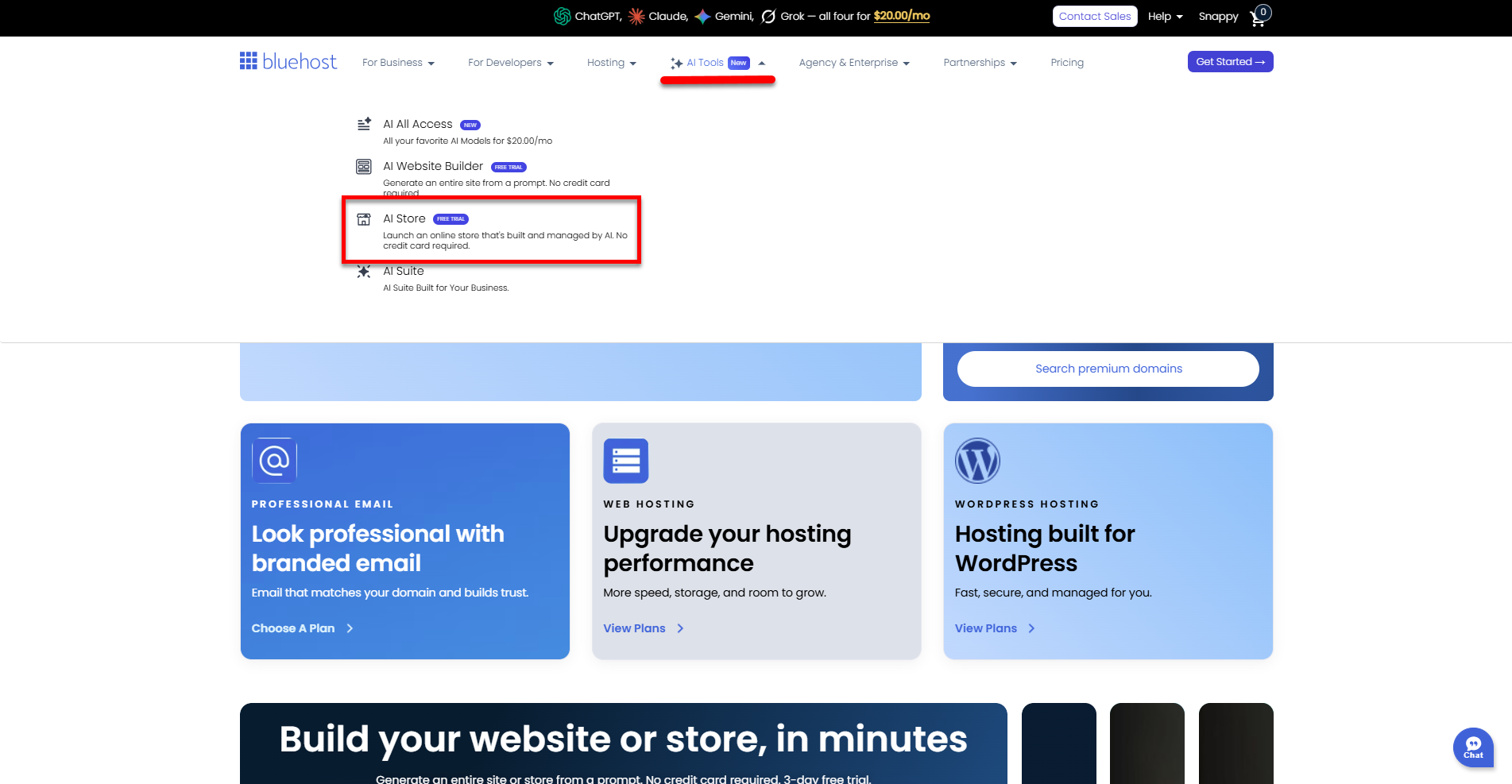
- Click AI Tools in the top menu, then select AI Store.
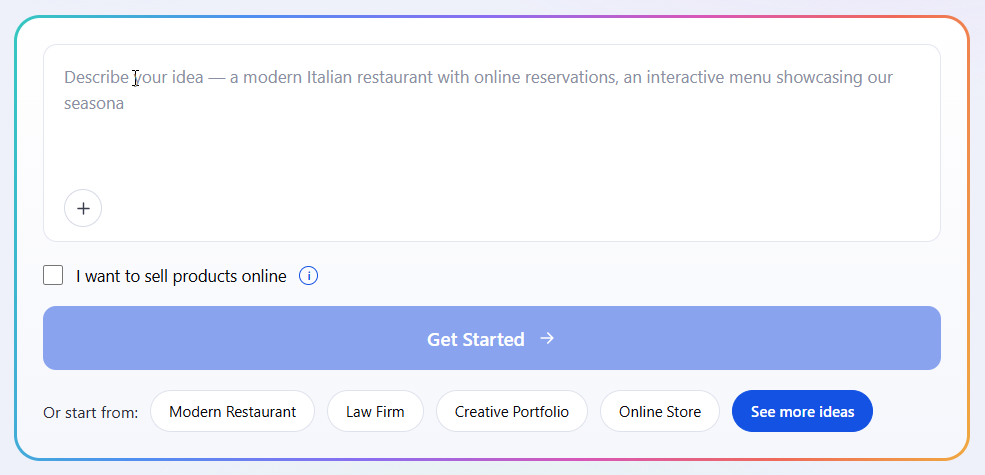
- Use the text box to enter your prompt, then click Get Started.
- Enhance your prompt by clicking the plus icon (+) located at the bottom-left corner of the prompt box to provide visual inspiration:
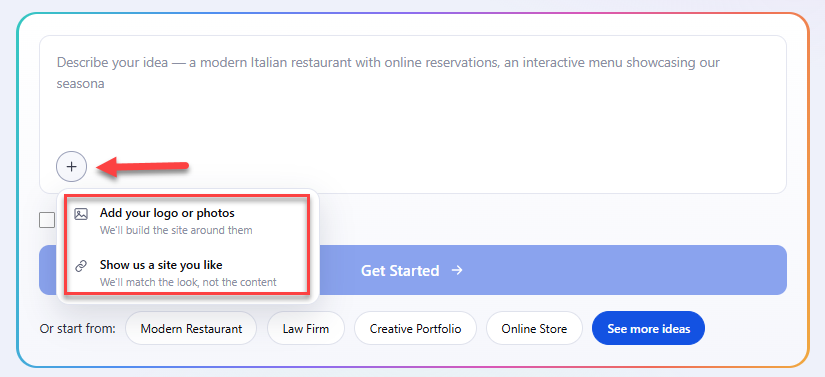
- Add your logo or photos: Upload your custom brand assets so the AI can build your site around them.
- Show us a site you like: Paste the link of a reference website to have the AI match its visual style and design structure without copying the content.
Important: You can upload a maximum of 3 images and provide only 1 reference URL.
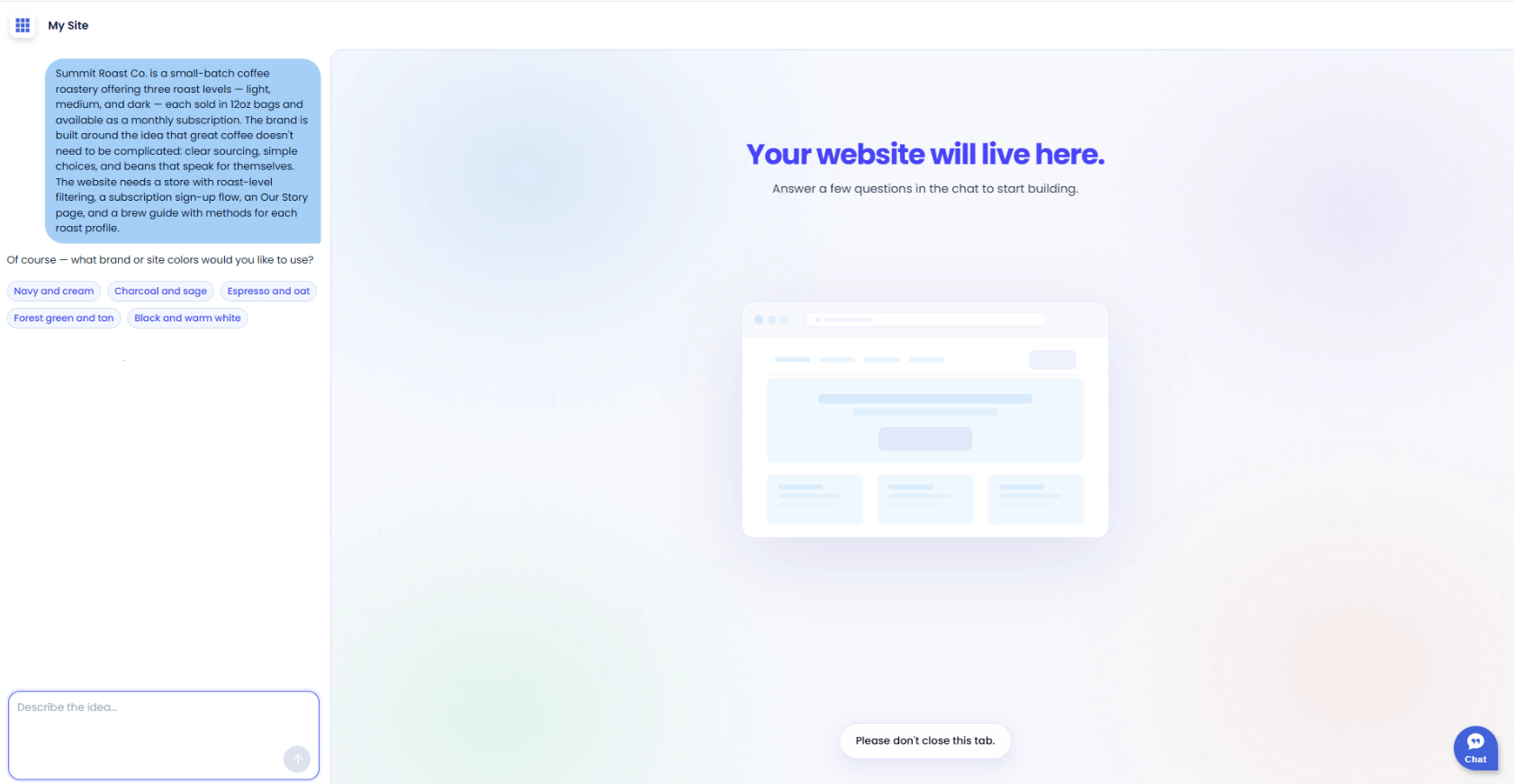
- Follow the onboarding prompts—this is where your first AI interaction begins.
Writing Your First Store Prompt
When Bluehost AI Store asks you to describe your website, be specific. Think of it as briefing a professional web designer.
| Prompt Example | Strength |
|---|---|
| ❌ I want a store that sells candles. | Weak Prompt |
| ✅ Create an online store for a small-batch soy candle brand called Ember & Wick. We sell hand-poured candles in earthy scents like cedar, sandalwood, and amber. Our customers are women aged 25–45 who value sustainability and self-care. Use a warm, minimal design with earth tones—cream, terracotta, and forest green. Include a homepage, shop page, or contact form. | Strong Prompt |
Prompt Formula for Store Generation
| Element | What to Include |
|---|---|
| Business name | The exact name of your store or brand |
| What you sell | Product category, type, and key attributes (handmade, digital, wholesale, etc.) |
| Target customer | Age range, interests, lifestyle, or pain points |
| Design style | Adjectives like minimal, bold, playful, luxury, or specific color palettes |
| Pages needed | Homepage, Shop, About, Blog, FAQ, Contact, Policy pages |
| Tone of voice | Friendly, professional, witty, authoritative, conversational |
Step 2: Write AI-Generated Product Descriptions
Once your storefront structure is live, use AI writing tools (available inside Bluehost AI Store or through WordPress plugins like Bluehost's AI Content Creator) to generate product descriptions that convert.
Product Description Prompt Best Practices
- Always include the product name and category
- Mention 2–3 key features or benefits, not just specs
- Define the tone (warm, technical, playful, premium)
- Specify length—short (50 words), medium (100–150 words), or long-form
- Include a call to action if needed
| Example Prompt | Why It Works |
|---|---|
| Write a 100-word product description for a soy wax candle called "Cedar Rain." It smells like fresh cedar and petrichor. Our brand tone is calm and earthy. End with a call to action encouraging the shopper to add it to their cart. | Specifies product name, scent profile, word count, brand tone, and desired ending action. The AI has everything it needs to write on-brand copy without guessing. |
| Write three short product descriptions (60 words each) for these yoga mat variants: Midnight (black), Desert Sand (tan), and Forest (dark green). Tone is motivating and inclusive. Mention grip, eco-friendly materials, and alignment lines. | Batches multiple variants in one prompt with shared attributes, saving time while keeping descriptions consistent across a product line. |
Step 3: Prompt AI to Set Up Your Store Pages
Beyond the homepage, your storefront needs supporting pages that build trust and answer customer questions. Use AI to draft these quickly.
About Page
Example Prompt: Write an About page for Ember & Wick, a soy candle brand founded in Austin, TX in 2021. We started because we wanted cleaner, longer-lasting candles made without synthetic fragrances. Our founder, Maya, hand-pours every candle in small batches. Tone should be warm, personal, and passionate about sustainability. About 150 words.
FAQ Page
Example Prompt: Generate a FAQ section for an online candle store. Include 8 questions covering: shipping times, returns policy, candle burn times, what makes soy wax different from paraffin, gift wrapping options, wholesale inquiries, ingredients/allergens, and international shipping. Keep answers concise and friendly.
Homepage Hero Section
Example Prompt: Write a homepage hero headline and subheading for Ember & Wick. The headline should be 6 words or fewer and evoke calm and warmth. The subheading should be one sentence (under 20 words) explaining what we sell and our unique value. Include a CTA button label.
Step 4: Optimize Product Images with AI Prompts
If you're using an AI image generator (available through some WordPress plugins or third-party tools connected to your Bluehost site), use descriptive prompts to create lifestyle product photography.
Tip: Even if you use real product photos, you can use AI image tools to generate lifestyle or background images for your homepage banners, blog headers, and social media.
AI Image Prompt Structure
- Subject: What is in the image (the product, a person using it, a scene)
- Style: Photography style—flat lay, lifestyle, studio, editorial
- Lighting: Natural light, warm ambient, bright and airy
- Background: Marble counter, wooden table, neutral linen
- Mood: Cozy, fresh, minimal, luxurious
Example Image Prompt: A flat-lay photograph of three soy wax candles on a marble surface surrounded by dried eucalyptus and small river stones. Natural window light from the left. Warm, minimal aesthetic. Soft shadows. No text.
Step 5: Configure Your AI Store with AI Assistance
Bluehost AI Store (Sell Online) comes with WooCommerce built in—so there's no need to install or connect it separately. Your store is ready to sell from day one. You can use AI chat tools to help you configure settings, understand options, and fill in any gaps the onboarding wizard doesn't cover.
Useful Configuration Prompts to Ask an AI Assistant
- "Walk me through how to set up flat-rate shipping for domestic orders in my AI Store."
- "What tax settings should I configure for a US-based store selling physical goods in multiple states?"
- "Help me write a return and refund policy for a handmade goods store that accepts returns within 14 days."
- "What payment gateways should I consider for a small AI Store? List pros and cons of each."
- "What product attributes should I set up in my AI Store for candles (scent, size, burn time)?"
Tip: Bluehost AI Store's onboarding wizard automates many of these built-in settings. Use AI prompts to fill in the gaps or understand options the wizard doesn't cover.
Step 6: Write SEO Content with AI Prompts
Search engine optimization helps customers find your store organically. Use AI to generate SEO-friendly metadata and blog content.
SEO Meta Descriptions
| Example Prompt | Why It Works |
|---|---|
| Write a 155-character SEO meta description for a product page selling hand-poured soy candles. Include keywords: soy candles, clean burn, natural fragrance. End with a benefit statement. | Sets exact character limit (critical for SEO display), targets specific keywords, and defines the ending structure—reducing the need for manual edits. |
Blog Post Outlines
| Example Prompt | Why It Works |
|---|---|
| Create a blog post outline for the article title: "5 Reasons to Switch to Soy Candles." Include an intro, 5 body sections with subheadings, and a conclusion with a CTA linking to our shop. Audience: eco-conscious home decor shoppers. Tone: informative but conversational. | Structured format request (outline vs. full post) saves time. Specifying audience and CTA keeps the output aligned with business goals. |
Common Prompting Mistakes to Avoid
| Mistake | How to Fix It |
|---|---|
| Being too vague ("make a store for me") | Include your business name, niche, target customer, and design preferences. |
| Skipping tone instructions | Always define voice: friendly, professional, playful, luxury, etc. |
| Asking for everything in one prompt | Break large requests into focused, single-purpose prompts |
| Not specifying length | Tell the AI exactly how long you want the output (word count or sentence count) |
| Accepting the first output without editing | Treat AI output as a strong first draft—always review and personalize |
| Forgetting your audience | Every prompt should anchor to who your customer is |
Quick Reference: Prompt Checklist
Before submitting any AI prompt for your storefront, run through this checklist:
- Business name and niche included?
- Target customer described?
- Design style or tone specified?
- Output length or format defined?
- Specific pages, sections, or product details included?
- CTA or ending instruction provided (if needed)?
20 Vibe-Coding Prompts for Popular Ecommerce Storefronts
How to use these: Paste the prompt as-is into your AI builder, or swap in your own store name, colors, and product details. These are designed as strong starting points—personalize after the first build.
- Fashion & Apparel: Build a modern fashion ecommerce store called "Thread & Form." Clean, editorial layout with a full-width hero image, grid-based shop page, size guide modal, and sticky header. Black and white palette with one accent color (dusty rose). Include a lookbook section and Instagram feed grid at the footer. Mobile first.
- Beauty & Skincare: Create a clean beauty skincare store called "Luma Skin." Soft cream and sage green palette. Include a hero section with a headline and CTA, a "Shop by Skin Concern" filter row, individual product cards with star ratings, an ingredients transparency section, and a quiz CTA ("Find Your Routine"). Minimalist sans-serif font. No clutter.
- Health & Wellness / Supplements: Build a supplements ecommerce site called "Form & Function." Dark navy and white with electric green accents. Homepage should include a bold hero, a "Best Sellers" row, a science/trust section with icons, customer testimonials with photos, a subscribe-and-save toggle on product pages, and a sticky "Add to Cart" bar on mobile.
- Home Decor & Furniture: Create a home decor store called "Cove & Co." Warm, editorial aesthetic—cream, terracotta, and natural wood tones. Features: full-width lifestyle photography hero, room-based shop filter ("Living Room," "Bedroom," "Kitchen"), product pages with zoom-on-hover, a "Style This Room" bundle section, and a newsletter signup with a discount offer.
- Pet Products: Build a premium pet store called "Good Dog Goods." Playful but clean—forest green, white, and warm yellow accents. Include a homepage hero with a lifestyle pet photo, a product category nav (Food, Toys, Grooming, Beds), a "Subscribe & Save 15%" banner, and a "Vet Approved" trust badge section. Fun but polished.
- Sports & Fitness Equipment: Create a fitness gear ecommerce store called "Apex Athletics." Bold, high-energy layout—charcoal, white, and orange. Include a full-screen hero video loop, a featured product with a comparison spec table, an "As Seen In" press section, a workout routine blog teaser, and a loyalty points CTA in the footer. Strong CTAs throughout.
- Eco-Friendly / Sustainable Goods: Build a sustainable lifestyle store called "Earth Standard." Earthy palette—off-white, forest green, and warm brown. Homepage sections: impact counter (e.g., "12,400 plastic bottles replaced"), product grid with sustainability badges, a "How We Source It" transparency section, a certification badge row, and a zero-waste packaging callout.
- Tech Gadgets & Electronics: Create a consumer tech accessories store called "Signal." Dark mode design—near-black background, white text, electric blue accents. Features: animated hero with product highlight, tabbed product specs section, a comparison table for product variants, real-time stock indicators, a What's in the Box collapsible, and a review carousel with verified purchase badges.
- Handmade / Artisan Goods: Build a handmade goods storefront called "Made With." Warm, crafty aesthetic—linen white, ochre, and terracotta. Sections: Featured maker spotlight, a product grid with "handmade in [location]" tags, custom order request form, a story-driven About section, and a "Currently in the Studio" live preview section.
- Jewelry & Accessories: Create a minimalist fine jewelry store called "Auric." Black background, gold typography, editorial product photography. Features: a full-bleed hero with a single product focus, a "Shop the Collection" horizontal scroll row, product pages with model wear photos and a size/fit guide, gift wrapping option at checkout, and a "Build Your Stack" bundle tool.
- Food & Specialty Grocery: Build a specialty food ecommerce store called "Pantry & Co." Warm, deli-inspired—cream, deep red, and olive green. Sections: a "What's Fresh This Week" rotating hero, product cards with flavor profile tags, a recipe blog integration, a subscription box CTA, allergen filter on the shop page, and a local delivery radius checker.
- Baby & Kids Products: Create a baby and kids ecommerce store called "Little Harbor." Soft, safe, playful—pastel blue, yellow, and white. Features: a cheerful animated hero, age-range shop filter (Newborn, 0-2, 3-5, 6+), a "Gift Finder" quiz, safety certifications trust section, gift wrapping and message card options, and a parent review section with photo uploads.
- Subscription Box: Build a subscription box ecommerce site called "The Monthly Edit." Lifestyle-forward design—deep plum, cream, and gold. Homepage: hero with an unboxing video loop, "How It Works" 3-step section, a "Past Boxes" gallery, a pricing plan toggle (monthly/quarterly/annual), a gift subscription CTA, and a countdown timer for the next box cutoff.
- Digital Products & Downloads: Create a digital products store called "Studio Vault" for selling Notion templates, design assets, and printables. Clean, modern—white background, soft gray cards, one bold accent (cobalt blue). Features: instant download product cards with preview lightboxes, a free sample CTA, a license type selector on product pages, and a creator bio/trust section.
- Print-on-Demand / Custom Merch: Build a custom print-on-demand store called "Ink Frame." Bold, expressive design—dark background with vivid product mockups. Features: a product customizer UI (upload image, choose color/size), a "Top Sellers This Week" carousel, a "How It is Made" process section, a live preview mockup on product pages, and a bulk order request form.
- Outdoor & Adventure: Create an outdoor gear store called "Ridgeline Supply." Rugged, nature-inspired—slate gray, forest green, and tan. Features: a hero with a sweeping mountain landscape, a gear-by-activity shop nav (Hiking, Camping, Climbing, Water), a "Gear Up for Your Next Trip" quiz, a product durability/conditions rating system, and a trail report community feed.
- Men's Grooming: Build a men's grooming and lifestyle brand store called "The Ritual." Dark, masculine aesthetic—charcoal, matte black, off-white. Features: a cinematic hero, a "Build Your Routine" product bundle tool, a fragrance/scent profile quiz, a subscription with pause/cancel flexibility, ingredient transparency callouts, and a minimalist checkout flow.
- Home Fitness: Create a home fitness equipment store called "Set." Clean and motivating—white, light gray, and electric yellow. Features: a hero with a workout lifestyle photo, a product category row (Cardio, Strength, Recovery), a space calculator tool ("What fits in your room?"), video product demos, and a training app integration CTA.
- Personalized / Custom Gifts: Build a personalized gifts ecommerce store called "Keepsake Co." Warm, sentimental design—blush, gold, and ivory. Features: a "What Are You Shopping For?" occasion filter (Birthday, Wedding, New Baby, Just Because), a text/name engraving input on product pages, a gift box builder, a delivery date guarantee section, and a customer photo gallery.
- Resale / Recommerce: Create a curated secondhand fashion resale store called "Re-Worn." Trendy, editorial—cream, black, and a pop of mint. Features: a "New Arrivals" drop-style homepage that refreshes weekly, condition grading badges on product cards (Like New, Good, Fair), a seller submission portal CTA, a size-inclusive filter system, and a sustainability impact counter.
Next Steps
- Connect your domain—confirm your custom domain is pointed to your Bluehost site.
- Set up SSL—enable the free SSL certificate in your Bluehost dashboard for secure checkout.
- Add Google Analytics—track traffic and see where customers drop off.
- Launch your first promotion—use AI to draft a promotional email or banner copy.
- Review and personalize all AI content—add your own voice, photos, and brand details.
- Market your website with Yoast SEO—use the built-in Yoast SEO plugin to write SEO titles, meta descriptions, and readability scores for every page and product, so your store ranks higher in search results.
Summary
Learn how to use effective prompts to build, customize, and optimize an AI-powered online store with Bluehost AI Store. This article covers best practices for writing effective prompts for storefront creation, product descriptions, website pages, image generation, store configuration, and SEO content, helping you generate more accurate, on-brand, and conversion-focused results. By providing clear instructions, audience details, tone, and desired outcomes, you can maximize AI performance and launch a professional ecommerce website faster.
If you need further assistance, Bluehost Chat Support is available 24 hours a day, 7days a week while Bluehost Phone Support is available 7 days a week from 7 am-12 midnight EST.
- Chat Support - While on our website, you should see a CHAT bubble in the bottom right-hand corner of the page. Click anywhere on the bubble to begin a chat session.
- Phone Support -
- US: 888-401-4678
- International: +1 801-765-9400
You may also refer to our Knowledge Base articles to help answer common questions and guide you through various setup, configuration, and troubleshooting steps.