 ChatGPT,
  Claude,
  Gemini,
  Grok — all four for
 Understanding TLS for SSL Certificates
TLS, or Transport Layer Security, is a security protocol that helps protect information sent between a website and its visitors. It is commonly used with SSL certificates to create secure HTTPS connections. Even though TLS is the newer and more secure protocol, many people still use the term SSL because it is more familiar.
TLS Explained
TLS helps encrypt data as it travels between a browser and a website. This makes it harder for unauthorized users to view or intercept sensitive information, such as login details, contact form submissions, or payment information.
When a website has a properly installed SSL certificate, visitors usually see:
https://in the website address- A padlock icon in the browser
- Fewer browser security warnings
- A more trusted browsing experience
Bluehost SSL certificates help create a secure connection between your site and visitors, keeping shared information private.
What Is the Difference Between TLS and SSL?
SSL stands for Secure Sockets Layer. TLS is the updated and more secure version of SSL.
Although SSL is the older protocol, the term is still widely used. That is why you may see security settings or articles refer to SSL/TLS. In most cases, when people talk about SSL certificates today, the secure connection is actually using TLS in the background.
Why TLS Matters
TLS is important because it helps protect data and build trust with visitors. It is especially important for websites that collect personal information, process payments, or require users to log in.
TLS can help protect:
- Login credentials
- Contact form details
- Payment information
- Email connections
- Customer account data
- Other sensitive information sent online
For email applications, Bluehost also recommends using secure SSL/TLS settings so email credentials and content are not exposed on public networks.
What TLS Version Should I Use?
Modern websites and email applications should use current, secure TLS versions. Older TLS versions may no longer meet security or compliance expectations, especially for websites that process payments.
If you manage a VPS or Dedicated server and need help reviewing SSL or TLS settings, check your WHM or server SSL configuration. Avoid enabling older TLS versions unless you fully understand the security and compliance risks.
How to Check the TLS Version on Your Website
You can check the TLS version used by your website with an online SSL testing tool. These tools review your domain’s SSL certificate and show which TLS versions are enabled.
Before testing, make sure:
- Your domain points to your Bluehost hosting account.
- Your SSL certificate is installed and active.
- Your website loads using https://.
- You test the correct domain or subdomain.
The test may take a few minutes. After it finishes, look for the configuration or protocol section to see the TLS versions supported by your website.
What If My Website Does Not Show HTTPS?
If your website does not load securely, check your SSL certificate first. A missing, expired, or misconfigured SSL certificate can prevent HTTPS from working correctly.
- Log in to your Bluehost Portal.
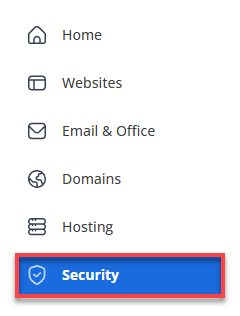
- Click Security on the left-side menu.
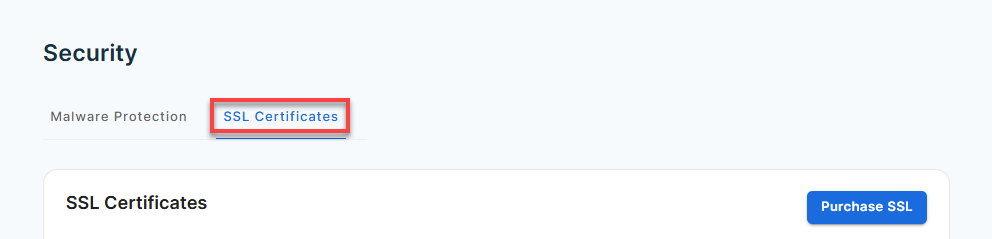
- Click the SSL Certificates tab.
- Select the website you want and click Manage.
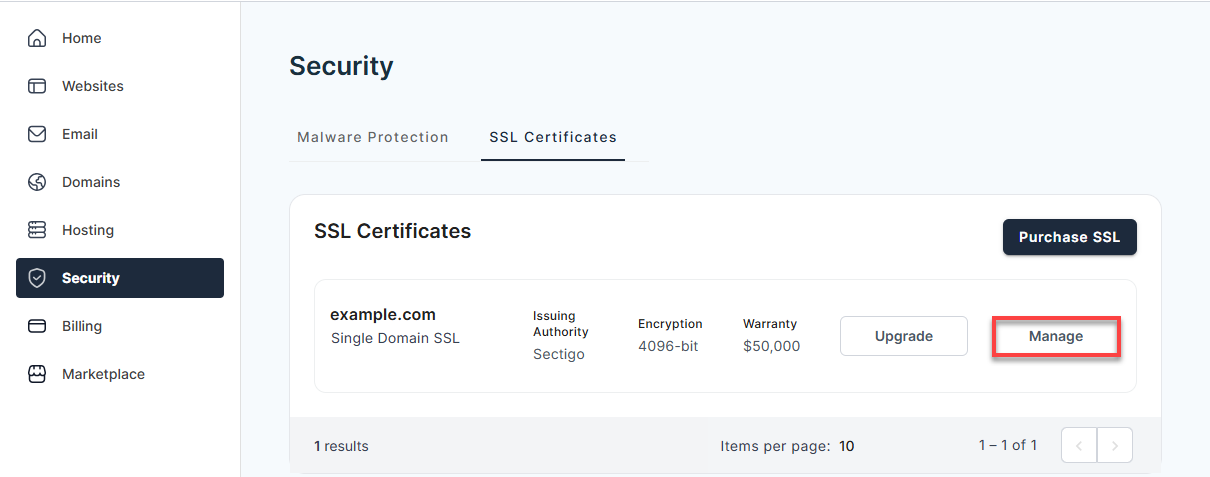
- Confirm that the SSL certificate is active.
After the SSL certificate is active, you may still need to force HTTPS so visitors are redirected to the secure version of your site.
Summary
TLS is the modern security protocol used to protect data sent between websites, browsers, and some email applications. It works with SSL certificates to help create secure HTTPS connections and protect sensitive information.
Although the term SSL is still commonly used, TLS is the newer and more secure protocol behind most modern secure connections. To keep your site protected, make sure your SSL certificate is active, your website loads through HTTPS, and your hosting environment uses current TLS settings.
If you need further assistance, Bluehost Chat Support is available 24 hours a day, 7days a week while Bluehost Phone Support is available 7 days a week from 7 am-12 midnight EST.
- Chat Support - While on our website, you should see a CHAT bubble in the bottom right-hand corner of the page. Click anywhere on the bubble to begin a chat session.
- Phone Support -
- US: 888-401-4678
- International: +1 801-765-9400
You may also refer to our Knowledge Base articles to help answer common questions and guide you through various setup, configuration, and troubleshooting steps.