 ChatGPT,
 Claude,
 Gemini,
 Grok — all four for
JEV on BLUEHOST AI GATEWAY
Make simple AI decisions with Jev in less time and at a lower cost
Stop using full LLM calls for every small decision. Use Jev on Bluehost AI Gateway to classify requests, score leads and check actions with fast, structured answers.
20-200x faster than standard LLM calls
40-400x cheaper than standard LLM pricing
No charge for output tokens
One Gateway key and one bill
What is Jev AI & how does it work?
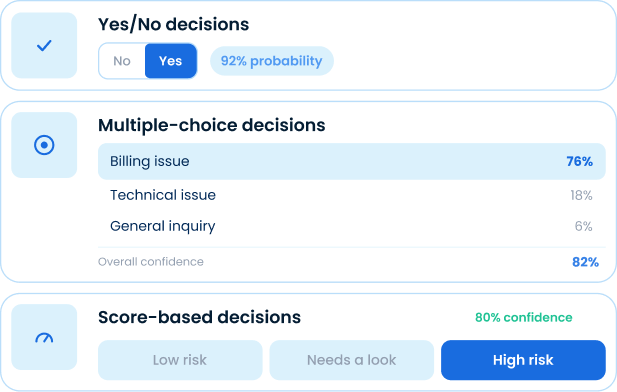
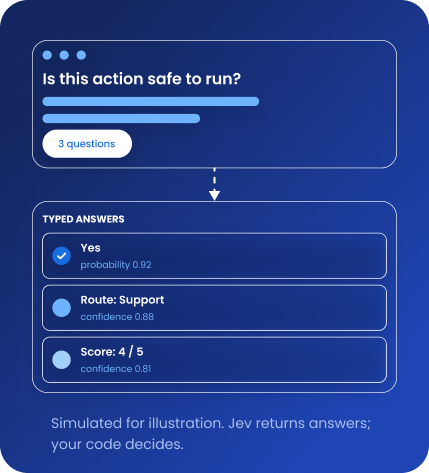
Jev is TypeSafe AI’s decision model, not a chatbot. An LLM gives you a paragraph to interpret, but Jev gives the decision itself: a yes or no, a list pick or a score. Send content with a few questions and Jev answers them in one request.
You can access Jev through Bluehost AI Gateway with AI Credits and one API key, without needing a separate TypeSafe AI account. Jev doesn’t chat, write code or hold conversations. It works alongside your LLM as a decision layer, making quick decisions as your LLM writes.
Choose a plan, add AI Credits and then connect Jev
Pick a self-managed VPS or VDS plan and add AI Credits. Create a Gateway API key and Jev starts making decisions for your code.
NVMe 2
Personal sites, light apps, and dev sandboxes
₹198/mo
1VAT not included
1GST not included
For 24 month term, Due Today: ₹4,752
Renews at ₹444/mo
- 1 vCPU Core
- 2 GB DDR5 RAM
- 50GB NVMe Storage
- Unmetered Bandwidth
- Multiple data centers
RECOMMENDED
NVMe 4
Docker, AI agents, and growing applications
₹396/mo
1VAT not included
1GST not included
For 24 month term, Due Today: ₹9,504
Renews at ₹887/mo
- 2 vCPU Cores
- 4 GB DDR5 RAM
- 100GB NVMe Storage
- Unmetered Bandwidth
- Multiple data centers
NVMe 8
Multi-container production and heavy traffic
₹793/mo
1VAT not included
1GST not included
For 24 month term, Due Today: ₹19,032
Renews at ₹1,773/mo
- 4 vCPU Cores
- 8 GB DDR5 RAM
- 200GB NVMe Storage
- Unmetered Bandwidth
- Multiple data centers
NVMe 16
Heavy AI workloads, large databases, and enterprise stacks
₹1,676/mo
1VAT not included
1GST not included
For 24 month term, Due Today: ₹40,224
Renews at ₹3,748/mo
- 8 vCPU Cores
- 16 GB DDR5 RAM
- 450GB NVMe Storage
- Unmetered Bandwidth
- Multiple data centers
Unmetered Web Hosting
How much bandwidth will my plan include?
Bandwidth is "Unmetered" which means you are not charged according to the amount of bandwidth you typically use in the normal operation of a personal or small business website.
However, we do require all customers to be fully compliant with our Terms of Service and to not exceed 25% or more of system resources for longer than 90 seconds.
What happens if I exceed usage?
If we have concerns about your account's bandwidth utilization, you will receive an email asking you to reduce usage.
It is rare for a customer who is managing a personal or small business website to exceed our usage policies.
Multiple Data Centers
Deploy your VPS closer to your users with multiple data center locations, helping reduce latency and improve performance.
Locations to display:
USA (Virginia)
USA (Arizona)
London
Toronto
Amsterdam
Infrastructure Only Support
We maintain the hardware, network, and virtualization layer. You manage your OS, configurations, and applications.
These Self Managed VPS plans are perfect when you want full control of your server and are comfortable managing your own software, configurations, and applications. If you prefer assisted management, explore our Managed VPS or Dedicated options.
Plan size depends on your app. Add AI Credits at checkout with an eligible AI app, or anytime from the AI Tooling tab in your VPS panel.
AI Credits packs
Prepaid credits you pick at checkout, with no subscription and no auto-renewal. One shared wallet covers your LLM calls and Jev across your self-managed hosting plans.
500 credits
$5.00
1,000 credits
$10.00
5,000 credits
$50.00
10,000 credits
$100.00
Credits are valid for 12 months from your most recent purchase. Non-refundable.
Find your app, then connect it to Jev API
Pick the app you run. Workflow tools need no custom code. Agents reach the Jev
API as a fast checker next to their own LLM.


These eleven apps have a defined way to work with Jev. Other eligible apps
can still use the Gateway for LLM access.
Put Jev to work on everyday AI decisions
Every agent already makes small calls like these, often by asking a full LLM. With Jev, you get the answer directly and your code decides what happens from there.
Why choose Jev on Bluehost AI Gateway?
Make AI agents and workflows more efficient with faster decisions, lower costs and simplified access
to Jev through your existing Bluehost AI Gateway setup.


FAQs: Jev API on Bluehost AI Gateway
How do I get access to Jev?
Jev is available through Bluehost AI Gateway on self-managed VPS and VDS plans. Add AI Credits, generate your API key from the AI Tooling tab and use your Jev AI Gateway access to connect Jev to your AI agents or workflows.
Do I need a separate Jev or TypeSafe AI account?
No. You can access Jev using your existing Bluehost AI Gateway API key and AI Credits balance. There's no need to create a separate TypeSafe AI account or manage another subscription.
Do I need a VPS or VDS to use Jev?
Yes. You need a self-managed Bluehost VPS hosting or VDS plan to buy AI Credits and use Jev through the Gateway. These plans give you control of your operating system, applications and server settings. If you already have an eligible VPS or VDS, open the AI Tooling tab and select Add AI Credits to access Jev using your Gateway API key, without purchasing another hosting plan.
What can I use Jev for?
Jev handles the everyday AI decisions your code would otherwise hard-code, so they run faster and cost less. Common uses include routing support tickets, scoring sales leads, moderating content, verifying agent actions, ranking search results and evaluating AI responses. Send a question, get a typed answer back and use it to decide what happens next.
How do AI Credits work with Jev?
AI Credits are prepaid, starting at $5, with no subscription or automatic renewal. Jev and other AI models share the same balance. AI Credits remain valid for 12 months from your most recent purchase and are non-refundable.
Do I need coding experience to integrate Jev?
It depends on your application. Workflow tools like n8n, Langflow, Dify and Sim can connect through HTTP or API blocks without custom code. AI agents require additional integration to call Jev's API.
Which AI applications support Jev?
Jev has a defined integration approach for 11 applications, including n8n, Langflow, Dify, Sim, Claude Code, OpenClaw, GatorClaw, NanoClaw, Hermes Agent, BMAD and Paperclip. Integration requirements vary and Jev is not automatically enabled in these applications.