 ChatGPT,
  Claude,
  Gemini,
  Grok — all four for
 Reimage Your Server for Odoo Installation
Get started with Odoo quickly and effortlessly using the Bluehost Portal. This guide will walk you through the simple steps to install Odoo on your VPS or VDS and access your dashboard, so you can begin managing your business applications without delay.
How to Reimage Your Server for Odoo Installation
To install Odoo:
This applies to both VPS and VDS.
- You can install only one application using the one-click installer.
- To change or delete your application, follow the guide: How to Change an Application. Create a backup of your existing applications or templates.
- To keep your current template, install the new application manually using SSH. Follow the same steps for both Self-Managed VPS and Virtual Dedicated Server (VDS). The system automatically selects the recommended operating system for Odoo.
- Log in to your Bluehost Portal.
- In the left-hand menu, click Hosting, then select My Plans.
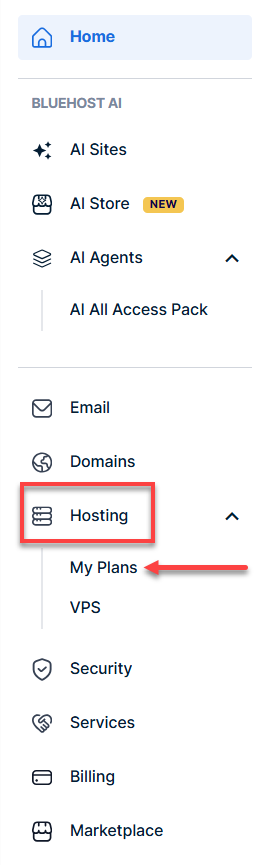
- Click the Manage button on the hosting package you want to reimage.

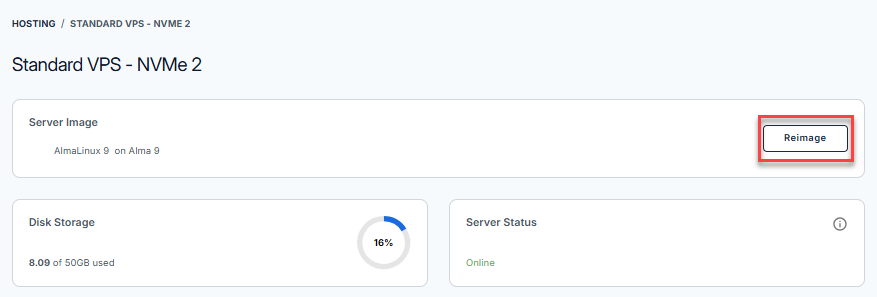
- Click the Reimage button.
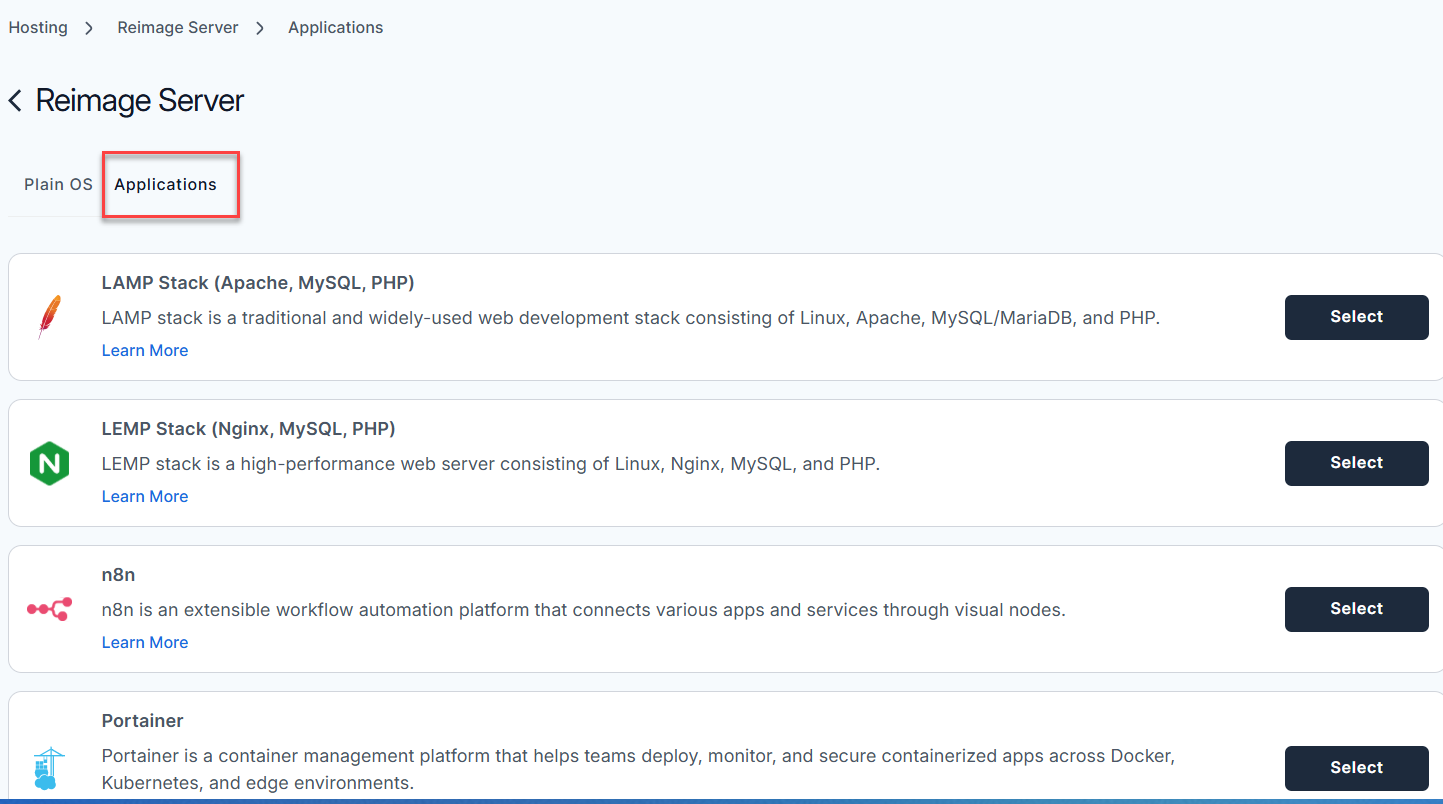
- Select the Applications tab.
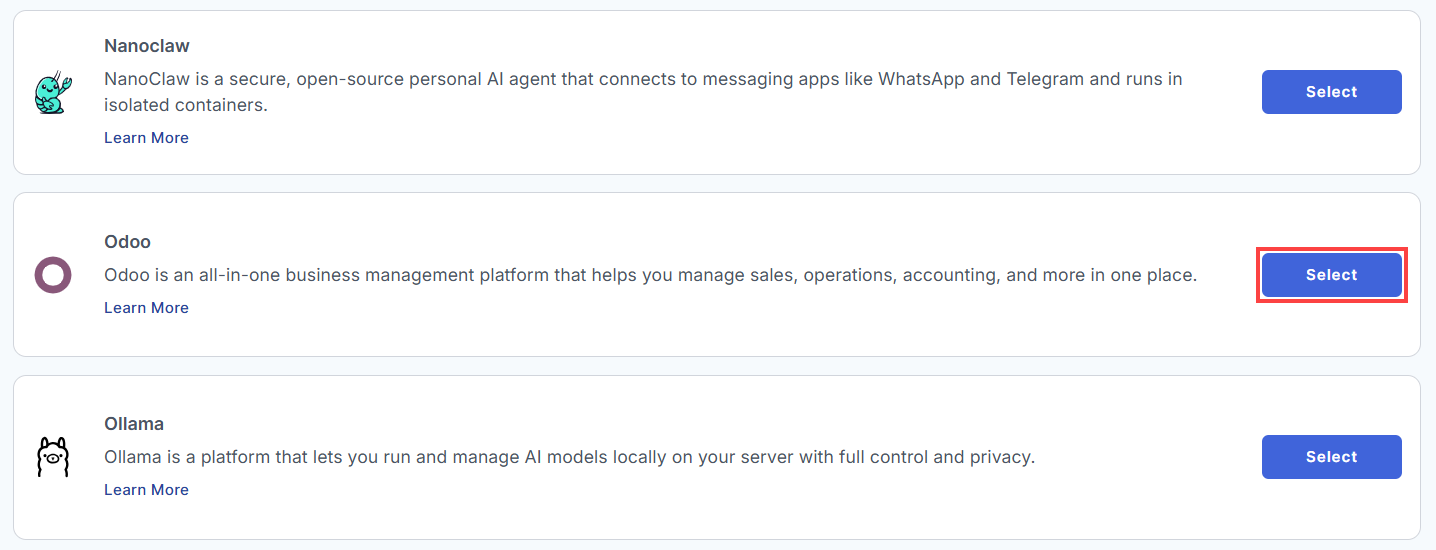
- From the list, find Odoo and click Select.
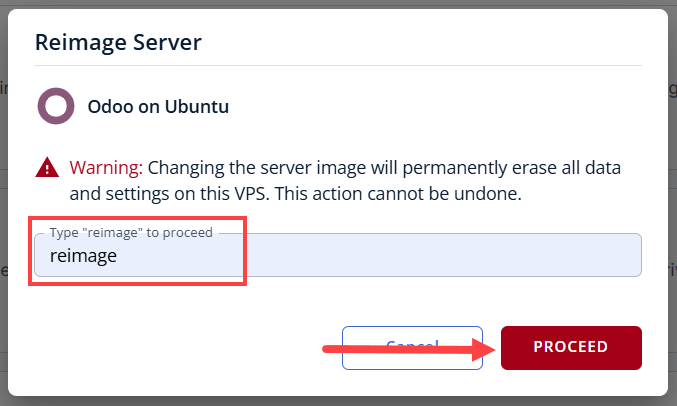
- To confirm, please type "reimage" and then click Proceed to start the process.
- Wait a few moments while the installation completes.

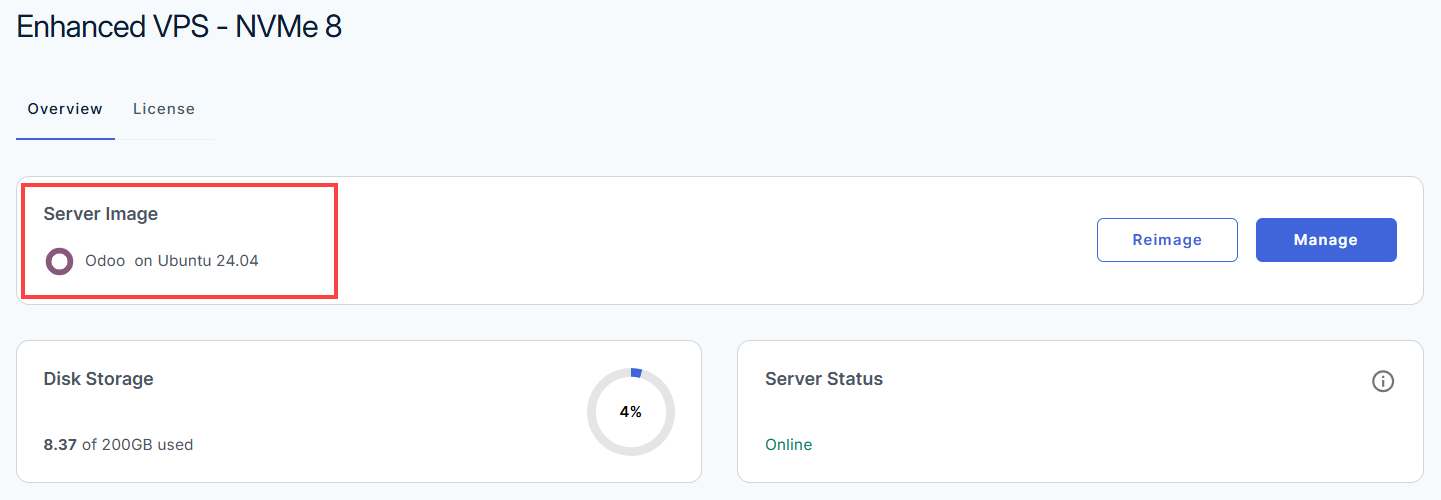
- Once completed, you will see Odoo listed in the Server Image section.
How to Set Up Odoo
Once installation is complete, continue with the steps below to configure and start using the application.
- Log in to your Bluehost Portal.
- In the left-hand menu, click Hosting, then select My Plans.
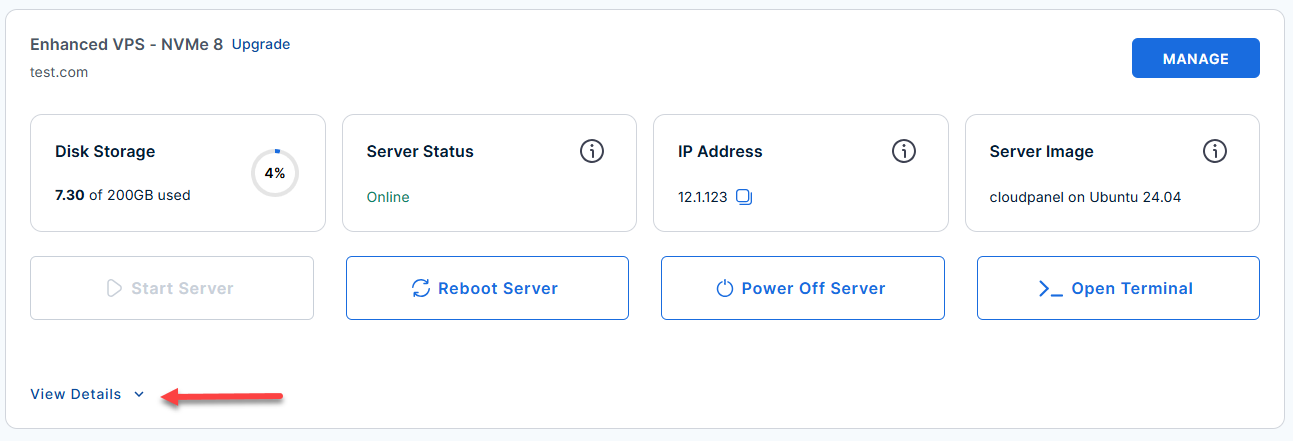
- Locate the server you want to manage, then click View Details in the bottom-left corner to expand the section and access additional server information.
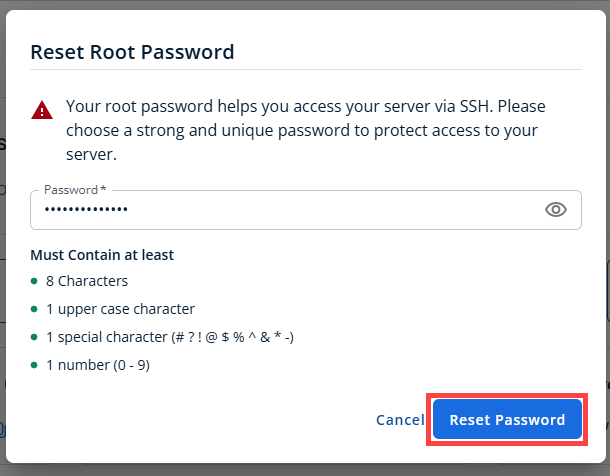
- Click the Reset Password.
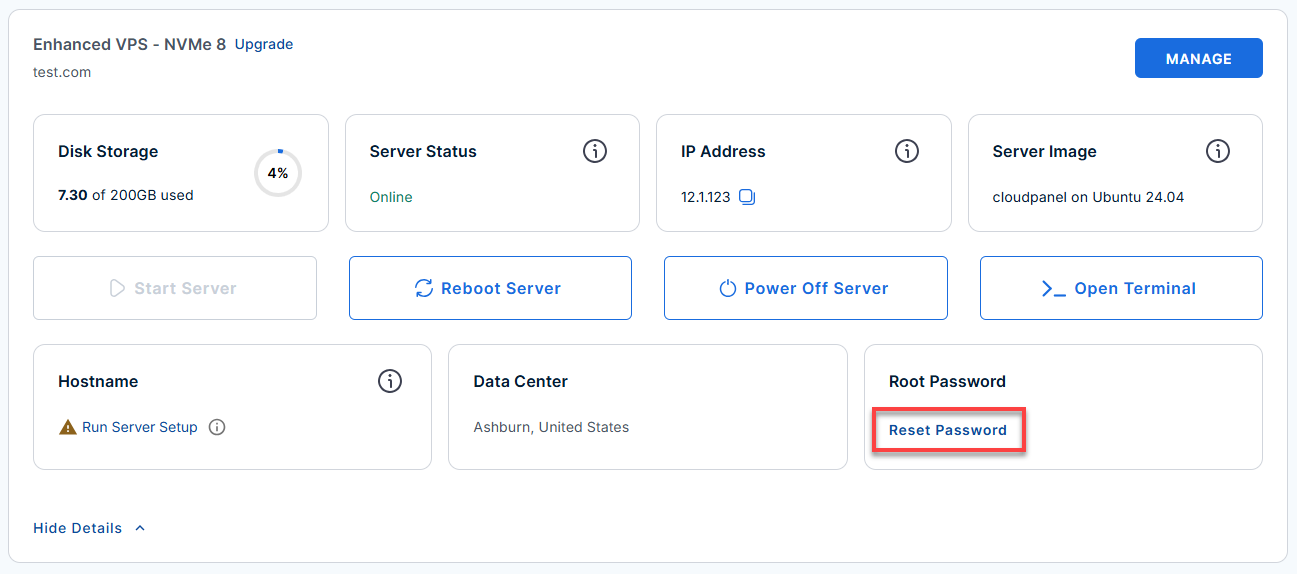
- In the pop-up window, type your new root password, then click Reset Password again to confirm and save the changes.
- Log in to your server via SSH.
When you log in to your server for the first time via SSH, you're greeted with a welcome message that includes all the essential commands and instructions for setting up Odoo. The content looks like this:Replaceyour_server_ipwith your actual server IP address.ssh root@your_server_ipExample Output
Welcome to Ubuntu 24.04.4 LTS (GNU/Linux 6.8.0-111-generic x86_64) ******************************************************************************** Odoo is running on this server. The UFW firewall is enabled. All ports are BLOCKED except 22 (SSH), 80 (HTTP), 443 (HTTPS), and 8069 (Odoo). In a web browser, you can access Odoo at: * Direct Odoo URL: http://50.6.6.130:8069 First-time setup notes: * Odoo will show a "Create Database" screen on first access * The Odoo Master Password is stored in: /root/.app_passwords Use the following guidance on the setup screen: * Master Password: Use the value shown above or retrieve it with: grep ODOO_MASTER_PASSWORD /root/.app_passwords * Database Name: Choose a name such as: odoo_prod * Email: This becomes the first Odoo administrator login * Password: This becomes the first Odoo administrator password * Load Demonstration Data: Leave UNCHECKED for production use Important locations on the server: * Odoo config: /etc/odoo/odoo.conf * Odoo log: /var/log/odoo/odoo.log * Passwords: /root/.app_passwords Helpful commands: systemctl status odoo # Check Odoo service status systemctl restart odoo # Restart Odoo service tail -100 /var/log/odoo/odoo.log # View recent Odoo logs For more details please refer /root/README.md To delete this message of the day: rm -f /etc/update-motd.d/99-odoo - See full server documentation (recommended):
Run the following to view all useful info about your Odoo server:Example Output:cat /root/README.md# Odoo Server Image ## Image contents This template installs and configures: * Odoo 17 from the official GitHub repository (`branch 17.0`) * PostgreSQL local database service * Nginx web server * UFW firewall rules for SSH, HTTP, HTTPS, and Odoo * Python 3 virtual environment under `/opt/odoo/venv` * Odoo config at `/etc/odoo/odoo.conf` * Odoo logs at `/var/log/odoo/odoo.log` * First-boot injection script at `/var/lib/cloud/scripts/per-instance/001_onboot` * App password store at `/root/.app_passwords` ## Services Service | Ports | Purpose ----------- | --------- | ----------------------------------------------------------- Odoo | 8069 | Primary Odoo HTTP interface PostgreSQL | local | Database backend for Odoo Nginx | 80, 443 | Installed and enabled, but Odoo is exposed directly on 8069 OpenSSH | 22 | Remote access Ports are protected using UFW. ## Odoo configuration The default Odoo configuration file is `/etc/odoo/odoo.conf`. Key settings include: * `admin_passwd = CHANGE_ME_ON_FIRST_BOOT` - replaced at first boot by the per-instance cloud-init script * `db_host = False` and `db_port = False` - use local PostgreSQL * `db_user = odoo` * `addons_path = /opt/odoo/odoo-server/addons,/opt/odoo/custom-addons` * `logfile = /var/log/odoo/odoo.log` * `xmlrpc_port = 8069` * `proxy_mode = True` * `data_dir = /opt/odoo/.local/share/Odoo` - First-time browser access: create your Odoo instance and database.
- Open your browser and go to:
Replace
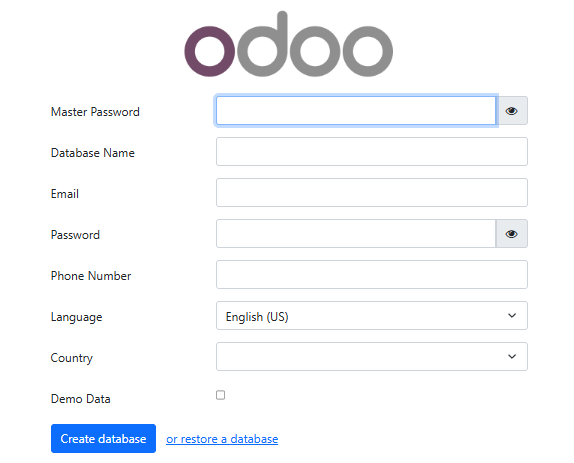
your_server_ipwith your actual server IP address.http://your_server_ip:8069 - On the "Create Database" screen, fill out:
- Master Password: Get the value with
Example Output:grep ODOO_MASTER_PASSWORD /root/.app_passwords
ODOO_MASTER_PASSWORD="w92iq8f9d17b2ab40eaa979cdbe977d89d2285e0" - Database Name: Example:
odoo_prod - Email & Password: These become your Odoo admin login.
- Load Demonstration Data: Leave UNCHECKED for production.
- Click Create database
- Master Password: Get the value with
- Open your browser and go to:
- Check Odoo and related service status:
- Check Odoo:
systemctl status odoo
● odoo.service - Odoo Open Source ERP and CRM Loaded: loaded (/etc/systemd/system/odoo.service; enabled; vendor preset: enabled) Active: active (running) - Check PostgreSQL:
systemctl status postgresql
● postgresql.service - PostgreSQL RDBMS Loaded: loaded (/lib/systemd/system/postgresql.service; enabled) Active: active (exited) - Check Nginx:
systemctl status nginx
● nginx.service - A high performance web server
Loaded: loaded (/lib/systemd/system/nginx.service; enabled)
Active: active (running)
- Check Odoo:
- To verify logs or troubleshoot:
tail -100 /var/log/odoo/odoo.log
2024-06-05 11:53:21,340 340 INFO odoo_prod odoo.addons.base: Base setup ready. 2024-06-05 11:53:21,401 340 INFO odoo_prod odoo.service.server: Server running...journalctl -u odoo -n 100 --no-pager - Show or retrieve the master password:
grep ODOO_MASTER_PASSWORD /root/.app_passwords
ODOO_MASTER_PASSWORD="w92iq8f9d17b2ab40eaa979cdbe977d89d2285e0" - Validation test (optional):
prove /root/app_test/main.t
/root/app_test/main.t .. ok
All tests successful.
Files=1, Tests=8,  1 wallclock secs ( 0.04 usr  0.01 sys +  0.13 cusr  0.04 csys =  0.22 CPU)
Result: PASS
Notes and Links:
- The Odoo master password is the database manager password (for creating/restoring databases), and is different from your Odoo admin login password.
- Odoo runs on port 8069. Nginx is enabled by default; to set up a secure reverse proxy, see Odoo HTTPS Deployment Docs.
- Odoo Documentation
Additional Information and Example Documentation Output
You can run cat /root/README.md to see more information and useful commands:
Example Output:
root@server-123456:~# cat /root/README.md
# Odoo

## Description

Odoo is an all-in-one business management platform that helps you
manage sales, operations, accounting, and more in one place. It offers
a wide range of integrated applications such as CRM, invoicing,
inventory, eCommerce, and HR, allowing you to streamline processes,
improve visibility, and run your entire business more efficiently from
a unified platform.

This install includes Odoo 17 and is configured to use a local
PostgreSQL backend and a Python virtual environment.

The image is built from Ubuntu cloud image sources, installs required
packages, clones the Odoo 17 source tree, creates an isolated virtualenv,
and configures systemd, UFW, and first-boot initialization.

## Image contents

This template installs and configures:

* Odoo 17 from the official GitHub repository (`branch 17.0`)
* PostgreSQL local database service
* Nginx web server
* UFW firewall rules for SSH, HTTP, HTTPS, and Odoo
* Python 3 virtual environment under `/opt/odoo/venv`
* Odoo config at `/etc/odoo/odoo.conf`
* Odoo logs at `/var/log/odoo/odoo.log`
* First-boot injection script at `/var/lib/cloud/scripts/per-instance/001_onboot`
* App password store at `/root/.app_passwords`

## Services

Service     | Ports     | Purpose
----------- | --------- | -----------------------------------------------------------
Odoo        | 8069      | Primary Odoo HTTP interface
PostgreSQL  | local     | Database backend for Odoo
Nginx       | 80, 443   | Installed and enabled, but Odoo is exposed directly on 8069
OpenSSH     | 22        | Remote access

Ports are protected using UFW.

## Odoo configuration

The default Odoo configuration file is `/etc/odoo/odoo.conf`.

Key settings include:

* `admin_passwd = CHANGE_ME_ON_FIRST_BOOT` - replaced at first boot by the
  per-instance cloud-init script
* `db_host = False` and `db_port = False` - use local PostgreSQL
* `db_user = odoo`
* `addons_path = /opt/odoo/odoo-server/addons,/opt/odoo/custom-addons`
* `logfile = /var/log/odoo/odoo.log`
* `xmlrpc_port = 8069`
* `proxy_mode = True`
* `data_dir = /opt/odoo/.local/share/Odoo`

The systemd service unit is `/etc/systemd/system/odoo.service` and starts Odoo
as the `odoo` user from the source tree.

## First boot behavior

On the first boot, the cloud-init per-instance script
`/var/lib/cloud/scripts/per-instance/001_onboot`:

* generates a random `ODOO_MASTER_PASSWORD`
* stores it securely in `/root/.app_passwords`
* updates `/etc/odoo/odoo.conf`
* ensures runtime directories exist and are owned by `odoo`
* waits for PostgreSQL readiness
* restarts Odoo

This guarantees that no master password is baked into the image.

## First-time access (How-to-use)

After the VM boots, access Odoo at:

* `http://:8069`

On the first screen, create the first database using:

* Master Password: value from `/root/.app_passwords`
* Database Name: any name you choose
* Email: Odoo administrator login email
* Password: Odoo administrator login password

## Useful commands

* Check Odoo service:
  `systemctl status odoo`
* Check PostgreSQL service:
  `systemctl status postgresql`
* Check Nginx service:
  `systemctl status nginx`
* View Odoo logs:
  `tail -100 /var/log/odoo/odoo.log`
* View systemd logs:
  `journalctl -u odoo -n 100 --no-pager`
* Show current master password:
  `grep ODOO_MASTER_PASSWORD /root/.app_passwords`

## Validation tests

The template includes a validation script at `/root/app_test/main.t` that checks:

* `postgresql`, `nginx`, and `odoo` are enabled
* `/etc/odoo/odoo.conf` exists
* `/etc/systemd/system/odoo.service` exists
* first-boot script exists and is executable
* Odoo is active and listening on port 8069

## Notes

* The Odoo master password is the database manager password.
* It is different from the Odoo administrator password you create in the UI.
* Nginx is installed and enabled, but this starter image exposes Odoo directly
  on port 8069.
* A reverse proxy can be added later if desired. See https://www.odoo.com/documentation/17.0/administration/on_premise/deploy.html#https for how to do this.

## Links

* Manage: [http://{server_ip}:8069](http://{server_ip}:8069)
* Documentation: [https://www.odoo.com/documentation/17.0/](https://www.odoo.com/documentation/17.0/)root@server-646875:~#
Summary
Installing Odoo on your VPS or VDS is simple with the Bluehost Portal’s one-click installer. Keep in mind that reimaging permanently erases all existing data and settings. After installation, you can open the Odoo dashboard directly from the Bluehost Portal to start using the application. Note that only one application can be installed via the one-click installer, and changing or deleting the application requires following additional steps or manual installation via SSH.