 ChatGPT,
 Claude,
 Gemini,
 Grok — all four for

Key highlights
- Free hosting is a real option for blogs, portfolios and test projects- but ads, subdomains and storage caps make it the wrong fit for anything you’re building to last.
- Only one provider in this list- InfinityFree- gives you 5GB disk space, unlimited bandwidth and zero ads, all permanently free.
- GoDaddy and Squarespace are time-limited trials, not free plans. Your site goes offline if you don’t upgrade.
- Not one of the permanently free plans here gives you a custom domain. You’re on a subdomain until you pay.
- Every provider in this list has a ceiling. When you hit it, Bluehost Web Hosting picks up with a free domain, free SSL and 24/7 support.
You want to get a site online without paying for hosting yet. That’s a valid starting point.
Most articles in this category spend the first 500 words arguing you shouldn’t use free hosting. This one doesn’t. If free hosting fits where you are right now, you’ll find the right option here. If you’ve already outgrown it, the upgrade section tells you exactly when to move and what to look for.
Here’s a full comparison of 10 free website hosting services with actual specs, honest trade-offs and a comparison table before the first review.
What is free website hosting?
Free website hosting gives you server space to put a site on the internet at no cost. Most free plans include a subdomain (like yoursite.[wixsite].com), limited storage and a basic site builder or WordPress setup tool. You get a working site without a credit card, but usually with some combination of ads, resource caps or restricted features.
Free hosting providers offset their costs in a few ways. Some display ads on your site. Some cap your storage or bandwidth to push you toward a paid plan. Some offer a limited trial, not a permanent free tier.
Three types appear in this list:
Permanently free plans: You can host indefinitely at no cost. WordPress.com, Wix, Weebly, InfinityFree, 000WebHost and Freehostia fall into this category.
Credit-based access: You receive a free credit or limited-time tier, then standard pricing applies. Google Cloud ($300 credit, 90 days) and AWS (12-month free tier) work this way.
Free trials: The platform is free for a set window, then requires an upgrade. GoDaddy (30 days) and Squarespace (14 days) work this way.
How do we evaluate free hosting providers?
Picking a free host that becomes a dead end costs you time you won’t get back. We assessed each provider against six criteria:
Storage and bandwidth: Check how quickly you’ll hit the limits and what happens when you do.
SSL certificate: Confirm whether HTTPS is included by default or costs extra.
Custom domain support: Verify whether you can connect your own domain without upgrading.
Ad policy: Check whether the provider displays ads on your site without your consent.
Ease of use and portability: Confirm how quickly a beginner can get live and how cleanly they can move to a paid plan later.
Uptime reliability: Review what each provider’s track record shows.
Which free website hosting providers are worth comparing?
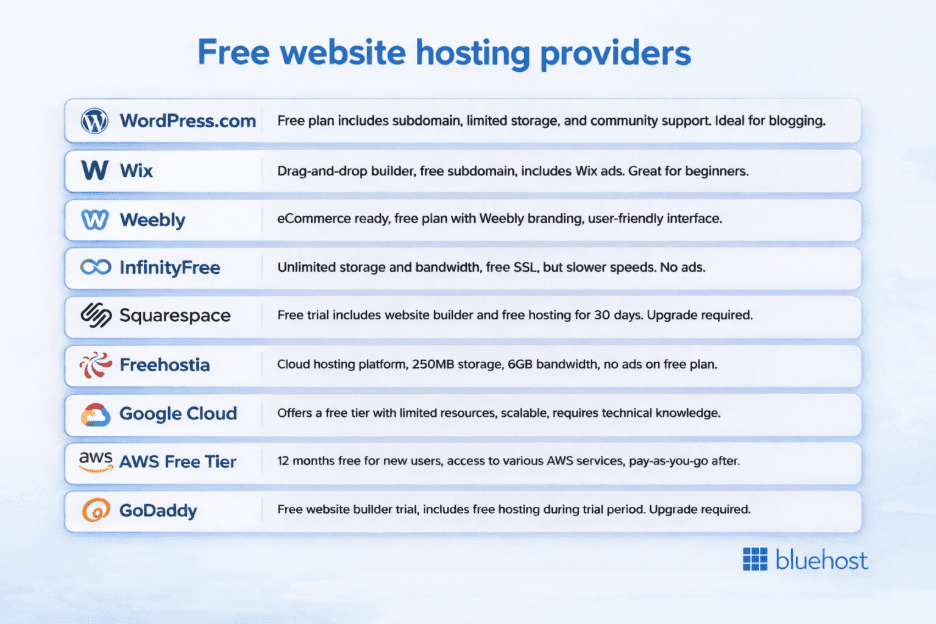
Before the individual reviews, here’s every provider side by side. Use this table to narrow your options by the criteria that matter most. Then read the full review for the providers that fit.
| Provider | Storage | Bandwidth | SSL | Custom domain | Ads on site | Permanently free | Best for |
|---|---|---|---|---|---|---|---|
| WordPress.com | 3 GB | Unmetered | Yes | No (paid) | Yes | Yes | Bloggers |
| Wix | 500 MB | 500 MB/mo | Yes | No (paid) | Yes | Yes | Visual builders |
| Weebly | 500 MB | 500 MB/mo | Yes | No (paid) | Yes | Yes | Simple sites |
| InfinityFree | Unlimited | Unlimited | Yes | Yes (own domain) | No | Yes | Developers |
| Freehostia | 250 MB | 6 GB/mo | No (paid) | Yes (5 domains) | No | Yes | Small sites |
| Google Cloud | Credits-based | $300 credits | Yes | Yes | No | Partial (90 days) | Students/devs |
| AWS Free Tier | Limited | Limited | Yes | Yes | No | Partial (12 mo) | Developers |
| GoDaddy | Trial only | — | Yes | Yes | No | No (30-day trial) | Platform testers |
| Squarespace | Trial only | — | Yes | Yes | No | No (14-day trial) | Design testers |
Each review below covers what the provider actually gives you, its honest limitation and the one scenario where it wins.
Which free website hosting services are worth using in 2026?
1. WordPress.com- best for bloggers who want a managed start
Starting a content site from scratch has more friction than most people expect. WordPress.com removes that friction. You can have a live site in under 30 minutes with no server configuration and no technical knowledge required.
What you get: 1 GB storage, a WordPress.com subdomain, access to free templates and core blogging tools. SSL is included. There’s no bandwidth cap on the free tier.
What you don’t get: Custom domain support, plugin installation or full theme customization. WordPress.com controls what you can install on the free plan. Ads appear on your site.
One thing worth knowing: WordPress.com and WordPress.org are different products. WordPress.com is a managed, hosted service. WordPress.org is open-source software. You install it on your own hosting through Bluehost WordPress Hosting or another provider. If you want to migrate to self-hosted WordPress later, the process is possible but takes extra steps. The deeper you build into WordPress.com’s ecosystem, the more friction there is to leave.
Best for: New bloggers who want to start writing immediately without any setup overhead.
2. Wix- best for beginners who prioritize design over flexibility
You want a good-looking site fast. Wix’s free plan gets you from zero to a live, professional-looking page in under 20 minutes with no code and no configuration.
What you get: 500 MB storage, 1 GB monthly bandwidth, a Wix.com subdomain and hundreds of mobile-responsive templates. SSL is included.
What you don’t get: A custom domain, the ability to remove Wix branding or storage beyond 500 MB. Image-heavy sites will hit that storage ceiling fast.
One thing worth knowing: Migrating away from Wix to another platform is difficult. Wix uses a proprietary builder. Your content won’t export cleanly to WordPress or other hosts. If long-term portability matters, factor that in before you build.
Best for: Visual builders, portfolio owners and event sites that need a polished design with minimal effort.
3. Weebly- best for simple, static sites
You need a basic site: a contact page, a few sections and not much else. Weebly’s free plan handles that without asking you to learn anything technical.
What you get: 500 MB storage, 500 MB monthly bandwidth, a Weebly.com subdomain and a library of pre-designed templates. SSL is included.
What you don’t get: A custom domain, an ad-free experience or access to the full theme and app library. Weebly’s free plan is stripped-down by design. It shows you the platform but doesn’t run a fully featured site.
One thing worth knowing: Weebly’s eCommerce tools on paid plans are competitive. If you’re testing a product idea now and plan to sell later, starting on Weebly is a reasonable path.
Best for: First-time site owners who need the simplest possible setup to test an idea or publish a static presence.
4. InfinityFree- best for developers who need real resources at no cost
Most free hosting plans cap storage and bandwidth. InfinityFree doesn’t. This is the only provider in this list with unlimited disk space and unlimited bandwidth on a permanently free plan with no ads.
What you get: Unlimited storage, unlimited bandwidth, free SSL, custom domain support and a cPanel interface. You can connect your own domain. That removes the subdomain credibility problem that limits most free plans.
What you don’t get: A beginner-friendly setup experience or live customer support. Setup assumes comfort with FTP, cPanel and database configuration. Community forums are the primary support resource.
One thing worth knowing: InfinityFree throttles CPU usage on the free tier. High-traffic sites will hit performance limits even with unlimited bandwidth.
Best for: Developers, hobbyists and technically capable users who want real hosting without a price tag.
6. Freehostia- best for hosting multiple small sites at no cost
Most free hosting plans let you host one site. Freehostia lets you host up to five domains on its free plan. For someone running several small, low-traffic projects, that flexibility is unusual at this price.
What you get: 250 MB disk space, 6 GB monthly bandwidth, support for up to five hosted domains and no ads. Freehostia uses clustered hosting technology. It distributes load across multiple servers for better reliability than standard shared hosting.
What you don’t get: SSL on the free plan. Without HTTPS, browsers flag your site as “Not Secure.” That hurts trust and search visibility.
Best for: Users managing multiple small static sites who don’t yet need SSL or significant storage.
7. Google Cloud- best for students building technical skills
Every CS student eventually needs to build something with real infrastructure. Google Cloud’s $300 free credit for new users gives you enterprise-grade tools to work with at no upfront cost.
What you get: $300 in free credits usable within the first 90 days. Full access to Google Cloud’s global infrastructure, custom domain support, SSL and granular configuration options.
What you don’t get: A beginner-friendly setup experience. Google Cloud is built for developers and engineers. Setup requires comfort with cloud infrastructure, command-line tools and billing configuration.
One thing worth knowing: Once the $300 credit runs out (or after 90 days), costs apply unless your usage stays within Google’s always-free tier limits. Set a budget alert before you start.
Best for: CS students and developers who want hands-on cloud infrastructure experience without paying.
8. Amazon Web Services (AWS)- best for developers learning at scale
You need real cloud experience for your resume. AWS Free Tier gives you 12 months of free access to core services at no cost. The same infrastructure powers Netflix, Airbnb and thousands of enterprise systems worldwide.
What you get: 12 months of access to core AWS services within free tier limits. Those include EC2 compute, S3 storage and CloudFront CDN. Custom domain support and SSL are both included.
What you don’t get: A gentle learning curve. AWS is not designed for beginners. Setup requires time investment in learning the platform. After 12 months, standard pricing kicks in. Budget alerts are essential.
Best for: Developers who want AWS experience and are prepared to invest time in learning the platform.
9. GoDaddy- free trial, 30 days (not permanently free)
This is a trial, not a permanently free plan. Your site requires a paid upgrade after 30 days to stay live.
You want to evaluate a platform before committing. GoDaddy’s website builder gives you 30 days to test whether it fits your workflow. The drag-and-drop interface is beginner-friendly and the pre-configured templates cover most common use cases.
What you get: 30 days of access to GoDaddy’s website builder, SSL and a polished editing experience.
One thing worth knowing: GoDaddy uses a proprietary builder. Migrating away from it to WordPress or another platform later is not straightforward. Test that migration path during the trial before committing. [VERIFY: confirm current GoDaddy paid plan pricing]
Best for: Beginners who want to evaluate a fast, simple platform before deciding where to build permanently.
10. Squarespace- free trial, 14 days (not permanently free)
This is a trial, not a permanently free plan. Your site won’t go public until you choose a paid plan.
Designers, creative agencies and professional brands often make Squarespace their first choice. The 14-day trial lets you test whether the design quality justifies the upgrade cost before you commit.
What you get: 14 days to build and test your site with the full Squarespace editor. Templates are professional-grade and mobile-optimized.
One thing worth knowing: Your site is private during the trial. No visitor can access it until you go paid. Paid plans start at $16/mo [VERIFY: current Squarespace pricing].
Best for: Designers and creatives who want to evaluate Squarespace’s design capabilities before committing.
What’s the difference between free and paid website hosting?
Free and paid hosting both get a site online. The gap shows up in three places.
Resource caps: Most free plans limit storage (250 MB–3 GB) and bandwidth (500 MB–6 GB monthly). When you hit those limits, your site slows down or goes offline. Paid plans remove those ceilings.
Branding and ads: WordPress.com, Wix and Weebly insert ads on your free plan. You don’t control what they say or who they target. Paid plans remove the ads and give you full control over every element on the page.
Performance under load: Free hosting shares server resources across thousands of accounts. Traffic spikes can slow your load time significantly. Paid hosting on dedicated infrastructure handles traffic without degradation.
On performance alone, the difference is measurable. Bluehost Web Hosting runs on Oracle Cloud Infrastructure with a Speed Index of 1.90s and an FCP of 0.68s. Free shared hosting can’t reach those numbers under real traffic load.
The full gap becomes clear in the upgrade section below: email accounts, backups, plugin access, default SSL and eCommerce support.
When does free hosting stop working for your site?
Free hosting stops working when your site outpaces what a shared, resource-capped plan can deliver. Six specific triggers tell you that point has arrived.
1. Your site is slow under normal traffic
Free plans share server resources with hundreds of other sites. When traffic increases, load times climb. Consistent 3-second-plus load times mean your hosting is the bottleneck, not your content.
2. You need a custom domain
A subdomain (yoursite.[wixsite].com) signals a free plan to every visitor. Search engines can index subdomains but the domain authority you build won’t transfer when you move to a custom domain. Start on your own domain as soon as your site is serious.
3. You don’t have SSL
Without SSL, browsers mark your site “Not Secure.” That kills conversions and damages search rankings. Freehostia and 000WebHost don’t include SSL on free tiers. If you’re on one of those plans, this alone is reason to move.
4. The ads don’t match your brand
Provider-inserted ads are out of your control. They can promote competitors, unrelated products or low-quality offers. For any business or monetized site, that’s not an acceptable trade-off.
5. You’ve hit your storage or bandwidth cap
When you hit the limit, your site goes offline or degrades until the month resets. A business site going down mid-month isn’t recoverable with a different free plan.
6. You need plugins, eCommerce or custom integrations
Free hosting rarely supports WooCommerce, advanced plugins or custom integrations. If your site needs to sell, take payments or run any custom logic, free hosting is the wrong platform.
When any of these apply, the right move is a paid plan, not a different free plan.
Ready to move off free hosting? Bluehost Web Hosting includes one-click WordPress installation.
How do you get a free domain name?
Most free hosting plans include a subdomain, not a custom domain. A subdomain looks like [yoursite].[wixsite].com. The provider’s name is in it, not yours.
A full custom domain [yoursite].com typically costs $10–15/year to register. There are two ways to get one without paying separately.
Through a paid hosting plan: Many hosting providers bundle a free domain for the first year. Bluehost Web Hosting includes a free domain with every plan. You claim it during signup, it connects automatically and you own the domain, not the hosting provider.
Through a free domain registrar: Services like Freenom have historically offered free .tk and .ml domains. These are limited, low-credibility extensions and not recommended for anything professional.
For any site you’re taking seriously, the paid hosting bundle is the better path. The domain cost is covered, the connection is automatic and you keep the domain if you ever switch hosts.
Final thoughts
Free hosting delivers exactly what it promises: a zero-cost way to get a site online. For personal blogs, student projects and early-stage ideas, the providers in this list give you a real starting point.
The ceiling shows up when your site needs to perform under real conditions. Custom domain, consistent uptime, eCommerce, plugin access and email, none of those are available on a free plan. Working around those limits costs more time than the upgrade would have.
When that point arrives, that’s where Bluehost Web Hosting picks up. The plan comes with a 30-day money-back guarantee so the switch carries no risk. Over 5 million websites run on Bluehost’s infrastructure. No long-term contract required to start.
Get started with Bluehost Web Hosting.
FAQs
Free website hosting gives you server space to publish a site at no cost. Most free plans include a subdomain, limited storage and a basic setup tool. The trade-off is usually ads on your site, resource caps or limited customer support.
WordPress.com, Wix, Weebly, InfinityFree and Freehostia do not require a credit card to sign up. GoDaddy and Squarespace are free trials. You may need a payment method on file before the trial ends. Always check the signup flow before assuming a plan is permanently free.
Most free plans lock you to a provider subdomain. InfinityFree and Freehostia let you connect your own domain on the free tier. WordPress.com, Wix and Weebly require a paid upgrade to use a custom domain.
WordPress.com, Wix and Weebly display ads on free plans. InfinityFree, 000WebHost, Freehostia, Google Cloud and AWS do not. If ad-free hosting matters to you, InfinityFree is the strongest permanently free option.
WordPress.com, Wix, Weebly, InfinityFree, Google Cloud and AWS include SSL on free plans. Freehostia and 000WebHost do not. A site without SSL shows “Not Secure” in browsers. This affects both visitor trust and search rankings.
Most providers throttle your site or take it offline until the monthly bandwidth resets. For any site where downtime costs you business, bandwidth caps are a real operational risk. InfinityFree’s unlimited bandwidth removes this concern on the free tier.
No. Free hosting shares server resources across thousands of accounts. Downtime is unpredictable, performance under traffic is inconsistent and there’s no contractual uptime guarantee. For a business site, paid hosting with a 99.9% uptime guarantee is the minimum.
Upgrade when your site needs a custom domain, SSL, consistent uptime under real traffic, eCommerce support or plugin access. Most sites outgrow free hosting within 6–12 months of consistent publishing.
WordPress.com offers a free managed WordPress plan. For self-hosted WordPress (WordPress.org), InfinityFree supports PHP and MySQL on the free tier. For the full WordPress experience with plugins, themes, performance and expert support, Bluehost WordPress Hosting is the recommended next step.

Write A Comment