


Key highlights
- Learn how to create a website that keeps visitors engaged from the first second.
- Discover how to design a fast, mobile-friendly and responsive layout.
- Understand how to structure content, navigation and visuals for a user friendly experience.
- Explore techniques to boost search engine ranking and drive more conversions.
- Get actionable tips to build an accessible, organized and visually appealing website.
A website has only five seconds to impress. In those five seconds, a visitor silently judges: Is this for me? Can I find what I’m looking for? Should I stay… or bounce?
That tiny moment decides whether you gain a potential customer or lose them to your competitor.
A user friendly website doesn’t beg people to stay – it naturally convinces them. It adapts to different screen sizes and loads fast on mobile devices. Offers simple navigation, a clear structure, a visually appealing design and accessibility features that make every visitor feel welcome. It understands user behavior before they even click.
User friendliness isn’t a “nice-to-have.” It’s your key to better search engine ranking, higher conversions and a brand identity that builds trust instantly.
This guide will help you understand what makes a website user friendly and show you how to build one (step by step) so your visitors don’t leave… they explore.
Checklist – Is your website truly user friendly?
Before improving your website, let’s see how it performs today. If you can confidently check most of these, you’re on the right track:
| Check | Key element | What to look for |
|---|---|---|
| ☐ | Navigation | Simple menus, pages easy to find, users reach info in 1–2 clicks |
| ☐ | Mobile friendly | Works smoothly on mobile devices, responsive layout, easy tap buttons |
| ☐ | Fast loading speed | Pages load under 3 seconds, optimized images and content |
| ☐ | Clean visual design | Visually appealing, consistent branding, avoids clutter |
| ☐ | Accessibility | Readable text, good color contrast, accessible on different web browsers |
| ☐ | Clear calls to action | CTAs are visible, guide users to next steps (buy, sign up, contact) |
| ☐ | Organized content | Descriptive headings, spaced correctly, easy to scan quickly |
If you don’t own a website or have missed a few checks, don’t worry. This guide is for you. Let’s start by understanding what a user-friendly website is.
What does “user friendly” actually mean – Key characteristics
A user friendly website isn’t just visually appealing; it’s designed to make life easier for your visitors. In fact, according to Site Qwality, 53% of mobile users abandon a site that takes more than 3 seconds to load. This shows just how crucial speed, accessibility and usability are in today’s digital world.
Here are the key characteristics that make a website truly user friendly:
- Fast loading speed: Pages should load quickly to keep visitors engaged and reduce bounce rates.
- Responsive and mobile friendly design: Works seamlessly across different devices, screen sizes and mobile phones.
- Intuitive navigation: Clear menus, descriptive headings and a logical site structure help users find what they need.
- Clear content structure: Content should be organized logically, with well-spaced sections and easy-to-read text.
- Visual appeal and consistent branding: A clean layout, harmonious color scheme and consistent brand identity enhance user satisfaction.
- Accessibility features: Supports all users with readable text, proper contrast and browser compatibility.
- Optimized content and clear calls to action: Guides users toward actions, improves website usability and boosts engagement.
By understanding these characteristics, you now know what makes a website user friendly. The next step is learning how to apply these principles practically. So, let’s explore a step-by-step guide to building a user friendly website with Bluehost.
User-friendly website elements (what every site needs)
Beyond the foundational elements, several critical components ensure your website truly serves users effectively. A user-friendly interface requires simple and intuitive design that includes functional search capabilities—allowing visitors to find specific content quickly through clear search bars with filters. Trust signals like security badges, customer testimonials and contact information build credibility instantly. Well-designed forms with minimal required fields and clear labels reduce friction during conversions.
Error handling also matters significantly for user experience and SEO performance. Create custom 404 pages that guide users back to relevant content instead of dead ends. Effective internal linking allows search engines to crawl seamlessly and gives more information about what the content is intended to rank for, so implement breadcrumb navigation and related content suggestions. Quick wins include adding a prominent search function, displaying security certificates visibly, and testing all forms for mobile usability to ensure every visitor can complete their intended actions smoothly.
How to build a user friendly website with Bluehost – Step by step guide
Creating a user friendly website doesn’t have to be complicated – especially when you have the right tools. Bluehost provides a reliable, beginner-friendly platform that simplifies every step of the process. From fast, mobile-compatible hosting to built-in accessibility features and optimized site speed, we ensure your website performs well for users and search engines alike.
With Bluehost, you can focus on designing a site that delights your target audience without worrying about technical hurdles. Let’s break down a step-by-step approach to building a website that’s fast, responsive, accessible and visually appealing.
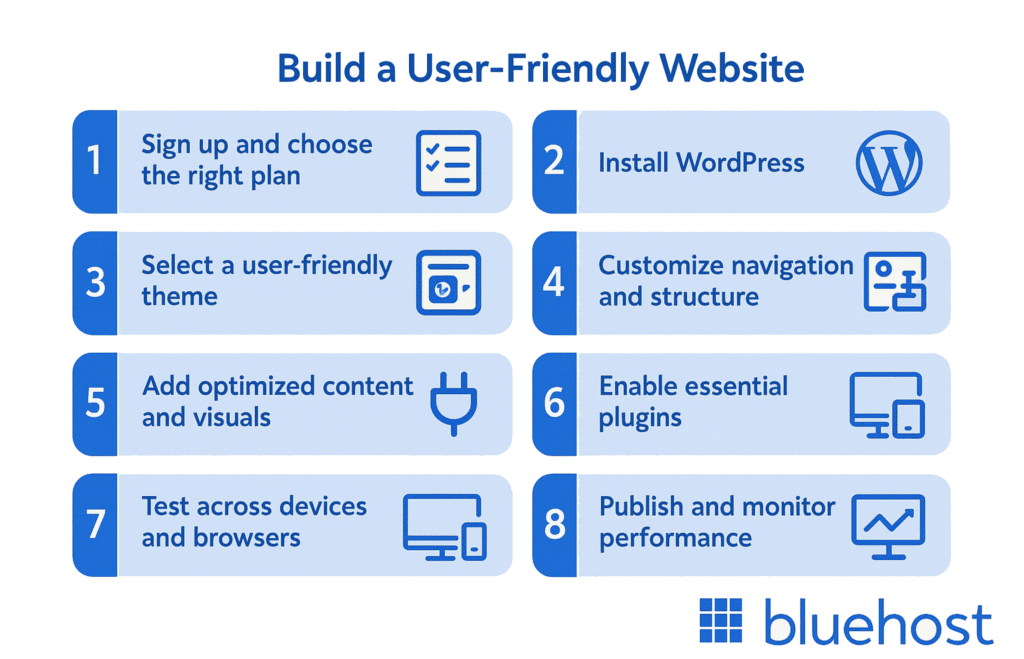
Step 1: Sign up and choose the right plan
Select a Bluehost plan that fits your current needs and can scale seamlessly as your website grows. With multiple features, we provide the flexibility to expand your site as your business grows. Add more pages, handle increased traffic and maintain a user friendly experience for your site visitors and potential customers with our plans.
Read more: Bluehost Pricing | View the Cost of All Hosting Plans
Step 2: Install WordPress
Use Bluehost’s one-click WordPress installation to set up your website quickly. WordPress makes it easy to create a responsive layout, optimize content and add accessibility features.
Read more:How to Install WordPress Using the Account Manager
Step 3: Select a user-friendly theme
Pick a mobile-friendly, visually appealing theme that adapts to different screen sizes. Ensure it supports clear navigation and consistent branding for a professional look.
Also read:How to Choose WordPress Theme in 2025: A Beginner Guide
Step 4: Customize navigation and structure
Organize your home page and menus logically. Use descriptive headings, well-spaced sections and clear calls to action for a smooth user friendly experience.
Also read:How to Add Navigation Menu in WordPress (Beginner’s Guide)
Step 5: Add optimized content and visuals
Upload high-quality images and optimized content. Maintain a clear structure, avoid clutter and use a friendly website design that guides users naturally.
Read more:SEO Content Optimization Guide: Steps, Tools and Tips for 2025
Step 6: Enable essential plugins
Add plugins to improve website usability, mobile site performance and accessibility. Examples include SEO plugins, caching and event registration forms.
Step 7: Test across devices and browsers
Check your website on different devices, screen sizes and web browsers. Ensure buttons, menus and responsive design work seamlessly.
Step 8: Publish and monitor performance
Go live and track user satisfaction, bounce rates and loading speed. Use this feedback to continuously enhance your user-friendly website.
By following these steps, you can create a user friendly website that not only looks great but also performs well.
But building a user friendly site is only the first part of the journey. To truly succeed, you need to understand why user friendliness matters for SEO and conversions. Especially how it directly impacts your search engine ranking and ability to attract potential customers.
Why user friendly website is essential for SEO and conversion?
A user friendly website is more than a good design – it’s a key driver of SEO performance and business growth. Sites that are fast, responsive and easy to navigate signal value to search engines while guiding site visitors toward meaningful actions.
SEO impact:
Google evaluates user behavior, including time on page, bounce rates and navigation ease. A site with clear menus, logical structure and a responsive layout rank higher, especially in mobile-first indexing. Sites loading in 1 second see up to 3x higher conversions and user retention than those loading in 5 seconds.
Conversion impact:
A user friendly site reduces friction with intuitive navigation, descriptive headings and clear calls to action. Visitors are more likely to register, buy or engage with a great experience. While cluttered, slow or confusing sites lose potential customers.
To fully leverage these SEO and conversion benefits, you can follow a few proven best practices. These tips will help you create a truly user friendly website that keeps visitors engaged and drives results.
Best practices for creating a user friendly website design
Creating a user friendly website requires careful attention to the website’s usability, visual appeal and responsive design. Here are key practices to follow:
1. Ensure fast loading speed
Optimize images, use caching and minimize heavy scripts. Faster load time improves user satisfaction, reduces bounce rates and boosts search engine ranking.
2. Design for mobile devices and different screen sizes
Implement a responsive layout so your mobile site automatically adjusts. Ensure images automatically reformat, buttons are easy to tap and content is readable across mobile phones and web browsers.
3. Organize website structure logically
Use clear menus, navigation bars and descriptive headings. Spaced sections, tab arrangements and a well-structured home page help site visitors find information quickly.
4. Create a visually appealing and consistent brand identity
Maintain a clean color scheme, consistent brand identity and uncluttered web design. A friendly website with high-quality images and clear calls encourages users to engage.
5. Enhance accessibility
Include accessibility features, readable text, proper contrast and compatibility with different devices. Accessible websites expand reach and improve user friendliness.
6. Optimize content and user flow
Use optimized content, clear calls and intuitive navigation to guide potential customers. Structured content reduces confusion, sets clear expectations and drives more sales.
7. Test across platforms and browsers
Check your user friendly site on different devices, screen sizes and web browsers. Ensure a seamless user friendly experience and fix issues before going live.
By applying these key elements, you create a user friendly website that enhances user satisfaction, improves search engine ranking and encourages visitors to take action.
Make your website user-friendly (quick wins you can do today)
Ready to transform your website’s user experience without starting from scratch? These proven quick wins can be implemented today to deliver immediate improvements for both visitors and search engines.
- Simplify your main navigation menu: Remove unnecessary items and use clear, descriptive labels that visitors understand instantly. This reduces decision fatigue and helps users find what they need faster, lowering bounce rates.
- Add a prominent call-to-action above the fold: Place your most important CTA button where visitors see it immediately without scrolling. Clear visibility increases conversion rates and guides users toward your primary business goal.
- Compress large images and optimize file sizes: Use tools like TinyPNG or built-in WordPress plugins to reduce image file sizes by 60-80% without quality loss. Faster loading speeds improve user satisfaction and boost search engine rankings.
- Increase font size and improve color contrast: Make body text at least 16px and ensure sufficient contrast between text and background colors. Better readability keeps visitors engaged longer and makes your site accessible to more users.
- Fix broken links and update outdated content: Run a quick audit to identify and repair non-working links throughout your site. This improves user experience and prevents search engines from penalizing your site for poor maintenance.
- Shorten contact forms to essential fields only: Reduce form fields to name, email, and message for better completion rates. Fewer barriers mean more leads and inquiries from potential customers.
- Add an FAQ section to key pages: Address common visitor questions directly on relevant pages with clear, helpful answers. This reduces support requests while improving search visibility for question-based queries.
10 common mistakes you should avoid when creating a user friendly website
Even the best intentions can backfire if your website usability is overlooked. Here are common pitfalls that reduce user friendliness:
- Slow loading speed that frustrates site visitors
- Poor mobile compatibility and non-responsive layout
- Cluttered home page or overwhelming web design
- Confusing navigation bar or unclear menus
- Lack of descriptive headings and poorly spaced tab arrangements
- Inconsistent brand identity or messy color scheme
- Ignoring accessibility features for accessible websites
- Using low-quality images that don’t automatically reformat
- Unoptimized content that fails to guide potential customers
- Failing to test across different devices and web browsers
Avoiding these mistakes ensures your user friendly site keeps visitors engaged, enhances user satisfaction and improves search engine ranking.
User-Friendly Website Examples
Effective user friendly websites share common patterns that prioritize usability and drive conversions across different industries. Here are proven examples of how various site types create seamless experiences for their visitors.
An eCommerce product page excels with prominent “Add to Cart” buttons, clear pricing displays and customer review sections that build trust. Local service businesses succeed by featuring prominent contact information, simple appointment booking forms and local trust badges like certifications. Restaurant websites convert visitors through easily accessible menus, one-click online ordering and clear location details with operating hours. SaaS signup pages remove friction with progressive form fields, clear value propositions and free trial offers prominently displayed. Blog websites keep readers engaged through intuitive category navigation, related post suggestions and newsletter signup forms positioned strategically. Nonprofit donation pages increase contributions by showing donation impact clearly, offering multiple giving options and displaying security badges for payment processing.
Each pattern focuses on reducing user effort while guiding visitors toward desired actions. Whether it’s simplified navigation, strategic CTA placement or mobile-optimized layouts, these elements work together to create user friendly experiences that naturally boost engagement and conversion rates across your website.
Final thoughts
A user friendly website is more than a design choice – it’s your ticket to happier site visitors, better search engine ranking and higher conversion rates.
We at Bluehost make building a friendly website easy and stress-free. With tools that ensure mobile compatibility, fast loading speed and a responsive layout, you can focus on what matters most: connecting with your target audience.
Don’t just make your website – create an experience that users love. Start your website with Bluehost today and watch your online presence and results soar!
FAQs
What is a user friendly website?
A user friendly website is designed for easy navigation, fast loading speed, mobile compatibility and accessible content that enhances user satisfaction.
Why is user friendliness important for SEO?
Search engines prioritize sites with strong website usability, fast load times and a responsive layout, improving search engine ranking and visibility in search results.
How can I make my website mobile friendly?
Implement a responsive design that adapts to different screen sizes and mobile devices. Also ensure images automatically reformat and delivers a seamless user friendly experience.
What key elements make a website user friendly?
Clear navigation bars, descriptive headings, uncluttered web design, consistent branding, high-quality images and optimized content are essential for a friendly website.
How does a user friendly site improve conversions?
A site with intuitive navigation, clear calls and a structured layout guides site visitors to take action, increasing potential customers and more sales.
How do I test my website for usability?
First, check your site on different devices and web browsers for usability. Then test navigation, loading speed and ensure all accessibility features work properly to ensure it is user friendly.
Can Bluehost help me create a user friendly website?
Yes! At Bluehost, we provide scalable plans, responsive themes, built-in mobile compatibility and tools to enhance website usability and user friendliness, making it easier to engage your target audience.


Write A Comment