 ChatGPT,
 Claude,
 Gemini,
 Grok — all four for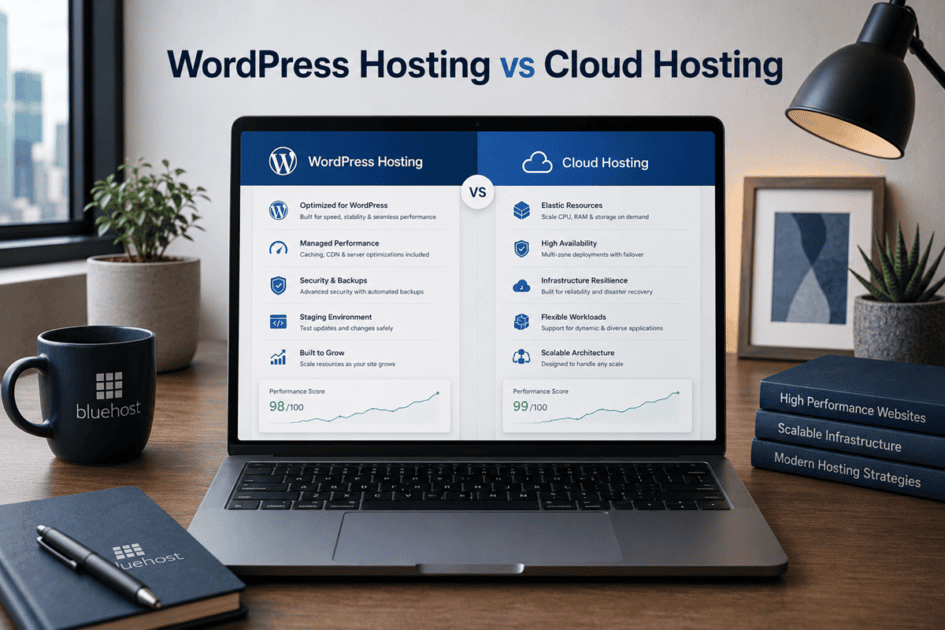
Key highlights
- Understand the key differences between WordPress hosting vs cloud hosting and how the two hosting approaches can also work together.
- Learn how WordPress hosting focuses on WordPress-specific performance, management and maintenance, while cloud hosting focuses on infrastructure flexibility and resilience.
- Compare both options across performance, scalability, security, management, technical control and pricing.
- Identify which hosting option better fits your website based on platform, traffic, workload, resource needs and technical requirements.
- See how Bluehost combines cloud-backed infrastructure with hosting environments designed for different website and business needs.
A website may start with simple needs, but those needs can change as traffic grows, new features are added and the site becomes more important to your business. The hosting environment that worked at launch may not always be the best fit later.
This is where understanding WordPress hosting vs cloud hosting becomes useful. WordPress hosting is designed around running and managing WordPress websites, while cloud hosting describes an infrastructure model that can support changing resource needs. The two can also overlap, which often makes the comparison confusing.
That’s why this guide breaks down WordPress hosting vs cloud hosting in simple terms. We’ll explain what each option means, highlight its strengths and limitations and compare factors such as performance, scalability, management and cost. By the end, you’ll understand which approach better matches your website’s goals.
WordPress hosting vs cloud hosting at a glance
At a high level, WordPress hosting and cloud hosting describe different parts of the hosting experience.
WordPress hosting focuses on how an environment is configured and managed for WordPress. Cloud hosting focuses on the infrastructure used to deliver hosting resources across connected systems.
| Factor | WordPress hosting | Cloud hosting |
| What it describes | Platform-specific optimization and management | The underlying infrastructure model |
| Primary focus | Simplifying the setup and management of WordPress sites | Availability, resource flexibility and infrastructure resilience |
| Platform support | Designed specifically for WordPress | Can support different websites, platforms and applications |
| Infrastructure | Can run on shared, cloud-based or other infrastructure | Uses connected or distributed cloud resources |
| Management | Usually includes WordPress-specific tools and support | Can be managed or self-managed |
| Resource growth | Commonly handled through plan or product upgrades | Resources may be adjusted more flexibly |
| Best suited for | Users who want a WordPress-focused hosting experience | Sites with changing resource needs or more complex workloads |
These concepts are not mutually exclusive. A WordPress service can run on cloud infrastructure, combining WordPress specifications and tools with the flexibility and resilience of a cloud environment.
With that distinction in mind, it helps to look at what WordPress hosting changes for the website owner.
What is WordPress hosting?
WordPress hosting is a hosting environment built around the performance, security and operational requirements of WordPress websites. Rather than treating WordPress as another application installed on general-purpose hosting, the hosting stack and management experience are designed around how WordPress sites are deployed, cached, updated and maintained.
Depending on the provider and plan, WordPress hosting can run on shared, virtualized, cloud-based or other infrastructure. What defines it is the WordPress-specific optimization and management layer built on top of that infrastructure.
This can make WordPress hosting particularly valuable when WordPress is central to your website or business operations and you want the hosting environment to handle more of the platform-level work.
How does WordPress hosting work?
WordPress hosting combines the underlying hosting infrastructure with tools and configurations designed specifically for the WordPress application.
Depending on the service, this can include:
- WordPress-optimized performance: Caching and server configurations can be designed around how WordPress processes and delivers website content.
- Managed platform maintenance: WordPress updates, backups and other routine maintenance may be handled through the hosting environment.
- Safer development workflows: Staging environments can let teams test website changes before publishing them to the live site.
- WordPress-focused security: Providers may include protections and monitoring designed around common WordPress security requirements.
- Integrated site management: WordPress-specific dashboards and tools can make it easier to manage sites, plugins, updates and other ongoing operations.
The result is an environment where the infrastructure and WordPress management layer work together, reducing the amount of platform configuration that site owners or development teams need to handle independently.
What are the pros and cons of WordPress hosting?
The main advantage of WordPress hosting is not simply easier setup. It is having an environment designed specifically to operate and maintain WordPress websites.
| Pros | Cons |
|---|---|
| Platform-optimized environment: Infrastructure and tools are configured around WordPress requirements. | WordPress-specific: The environment is designed primarily for WordPress workloads. |
| Reduced operational overhead: Updates, caching, backups and other tasks may be managed by the provider. | Server-level control can vary: Fully managed plans may restrict lower-level server configuration. |
| WordPress-focused performance: Caching and platform configurations can improve how efficiently WordPress content is delivered. | Resources remain plan-dependent: CPU, memory, storage and other resources depend on the hosting service you choose. |
| Safer website management: Staging, backups and managed workflows can reduce risk when making site changes. | Scaling models differ: Growing websites may need to move to a higher plan or a more resource-intensive hosting environment. |
| Specialized support: Support teams and tools can be better aligned with WordPress-specific issues. | Less suitable for mixed workloads: Projects that need to run unrelated applications alongside WordPress may require a more flexible environment. |
For businesses running WordPress, these capabilities can reduce infrastructure management while providing a hosting environment better aligned with the way the CMS operates.
Who is WordPress hosting best for?
WordPress hosting is particularly useful when WordPress is a core part of your website, content operation or digital business and you want the hosting environment to manage more of the platform layer for you.
It can be a strong fit for:
- Blogs and content websites
- Portfolios
- Local business websites
- Professional service websites
- Membership sites
- New and growing WordPress projects
The right WordPress hosting plan should therefore be evaluated not only by storage or the number of websites it supports, but also by its performance resources, management capabilities, security tooling, development workflow and ability to support the website as its operational requirements grow.
What is cloud hosting?
Cloud hosting is an infrastructure model that uses connected computing resources to deliver websites and applications. Instead of relying entirely on one physical server, cloud environments use interconnected systems to provide hosting resources.
This architecture can support changing resource needs, improve infrastructure resilience and help maintain availability as workloads grow.
Cloud hosting describes how the underlying infrastructure delivers resources. It does not necessarily determine how your website is managed or which platform you use. How resources are allocated and scaled depends on the provider and the hosting offering.
Also read: What is Cloud Hosting? The Complete Beginner’s Guide
How does cloud hosting work?
Cloud hosting distributes hosting resources across connected infrastructure rather than depending entirely on one physical machine. This allows the environment to use available computing resources as workload demands change.
Depending on the provider and architecture, cloud environments can support flexible resource allocation and greater resilience. The exact experience depends on how the infrastructure is designed and managed.
This is why cloud hosting can support websites with changing traffic, resource-intensive workloads and evolving infrastructure needs.
What are the pros and cons of cloud hosting?
Cloud hosting can give websites more flexibility as their resource needs change. Its connected infrastructure can also reduce dependence on a single physical server.
However, cloud hosting is not automatically unlimited or self-scaling. Specific cloud hosting offerings may provide automatic scaling based on their infrastructure and configuration.
| Pros | Cons |
| Flexible resources: Supports changing workload requirements as demand evolves. | Management complexity: Some cloud environments require more technical expertise. |
| Greater resilience: Connected infrastructure can reduce reliance on a single physical server. | Variable pricing: Costs can depend on resources, plans and usage. |
| Scalable infrastructure: Supports growing resource requirements as workloads expand. | Provider dependency: Performance and resilience depend on the provider’s infrastructure design. |
| Workload flexibility: Can support websites, applications and more complex workloads. | Management differences: Cloud services can range from managed to self-managed. |
Cloud hosting is not automatically unlimited or self-scaling. The actual experience depends on how the provider designs and manages the environment. This keeps the section aligned with the brief while making the pros and cons easier to compare.
Also read: 10 Key Benefits of Cloud Hosting for Businesses in 2026
Who is cloud hosting best for?
Cloud hosting can be a strong fit for websites and applications with changing or demanding resource requirements.
It may be particularly useful for:
- Websites experiencing unpredictable traffic
- eCommerce stores with seasonal demand
- High-traffic business websites
- Resource-intensive applications
- Businesses planning long-term growth
- Teams that need greater infrastructure flexibility
The right choice ultimately depends on your workload, resource requirements and preferred level of management.
Also read: Small Business Cloud Hosting: A Guide to Scalable Cloud-Powered Performance
Key differences: Cloud hosting vs WordPress hosting
The difference between these hosting approaches is not simply where a website is stored. Cloud hosting describes how infrastructure and resources are delivered, while WordPress hosting describes how an environment is optimized and managed for WordPress.
| Factor | Cloud hosting | WordPress hosting |
| What it describes | The infrastructure used to deliver hosting resources | The way a hosting environment is optimized for WordPress |
| Primary focus | Availability, resource flexibility and resilience | Simplified WordPress setup and management |
| Platform support | Can support different websites, applications and hosting products | Designed specifically for WordPress websites |
| Infrastructure | Uses connected or distributed cloud resources | Can use shared, cloud-based or other infrastructure |
| Performance approach | Depends on architecture, configuration and allocated resources | May include caching and tools tailored to WordPress |
| Scaling | Resources may be adjusted across the cloud environment | Commonly handled through plan or product upgrades |
| Management | Can range from self-managed to fully managed | Usually includes WordPress-specific management tools |
| Security | Depends on the provider, service and management level | May include protections designed around WordPress |
| Technical control | Can range from restricted managed services to advanced server access | Managed plans may limit server-level changes |
| Pricing | May depend on the plan, resources or usage | Commonly based on fixed hosting plans |
Neither option is automatically better for every website. WordPress hosting may provide the tools and managed experience that a blog, business site or growing store needs. Cloud hosting may become more relevant when the underlying infrastructure must support changing resource demands, greater resilience or more complex workloads.
The comparison becomes most useful when you apply these differences to the way your own website operates.
Which hosting option should you choose?
The right choice depends on your website platform, resource requirements, technical experience and management preferences.
Choose WordPress hosting when
WordPress hosting may be the better fit when:
- Your website is built with WordPress
- You want a streamlined setup process
- You prefer the provider to manage routine platform updates
- You want caching and security tools designed around WordPress
- You want WordPress-specific customer support
- Your website has relatively clear resource requirements
- You do not need to configure the server environment independently
This option can suit blogs, portfolios, business websites, membership sites and online stores that want a platform-specific hosting experience.
Choose cloud hosting when
Cloud hosting may be more suitable when:
- Your resource requirements change frequently.
- Traffic increases sharply during campaigns or seasonal periods.
- Infrastructure resilience is important to your operations.
- You need to support different platforms or applications.
- You want more flexibility in how resources are allocated.
- You are considering a cloud service that provides the level of technical control your team requires.
- Your website has complex or resource-intensive functionality.
The exact experience will depend on whether the cloud hosting service is managed or self-managed.
How Bluehost combines WordPress hosting with cloud infrastructure?
At Bluehost, every hosting environment is backed by cloud infrastructure. The underlying platform varies based on the hosting experience, workload and level of performance or control you need.
Our Shared Hosting, Managed WordPress Hosting, VPS Hosting and Dedicated Hosting run on Oracle Cloud Infrastructure (OCI). Our Agency Hosting run on WP Cloud, providing isolated infrastructure designed for high-performance workloads.
This means cloud infrastructure is built into your hosting foundation, regardless of which Bluehost hosting option you choose.
Which Bluehost hosting option is right for your needs?
Because every Bluehost hosting environment is cloud-backed, the decision comes down to the resources, control, management and workload requirements you have.
| What you need | Hosting option | Cloud infrastructure |
| Straightforward hosting for standard website needs | Shared Hosting | OCI |
| Managed hosting for WordPress websites | Managed WordPress Hosting | OCI |
| Multi-site management and agency-focused workflows | Agency Hosting | WP Cloud |
| Greater control and dedicated virtual resources | VPS Hosting | OCI |
| Dedicated resources for demanding workloads | Dedicated Hosting | OCI |
Ultimately, cloud infrastructure is the foundation, while your hosting choice should reflect the resources, control and management your website requires.
Final thoughts
WordPress hosting and cloud hosting describe different parts of the hosting experience. WordPress hosting focuses on tools and management built around WordPress, while cloud hosting describes the infrastructure that delivers hosting resources.
The two can work together, so the right choice depends on your website’s traffic, resource requirements, technical needs and preferred level of management.
At Bluehost, cloud infrastructure supports our hosting portfolio, with different environments designed for different workloads and hosting experiences. Whether you need a straightforward website setup, managed WordPress hosting, greater server control or agency-focused multi-site management, you can choose an environment that fits your needs.
Choose the Bluehost hosting environment that supports your website today and gives you room to grow tomorrow.
FAQs
WordPress hosting is optimized specifically for running and managing WordPress websites. Cloud hosting describes an infrastructure model that delivers resources through connected cloud systems. A WordPress hosting service can also use cloud infrastructure.
Yes. WordPress can run on cloud infrastructure. Managed WordPress hosting combines the flexibility and resilience of cloud systems with tools, security and support designed specifically for WordPress.
Not universally. WordPress hosting may be a better fit for users who want a streamlined and managed WordPress experience. Cloud hosting may be more suitable when a site needs greater infrastructure flexibility, fault tolerance or support for changing workloads.
Hosting type alone does not determine speed. Website performance depends on the infrastructure, server configuration, available resources, caching, CDN, website code and other factors. Both WordPress and cloud hosting can provide strong performance when configured appropriately.
Cloud hosting can be useful for WooCommerce stores with high traffic, growing transaction volumes or unpredictable demand. A smaller or growing store may still perform well on a suitable WordPress Hosting plan. The right choice depends on the store’s activity and resource requirements.
WordPress cloud hosting runs WordPress on cloud-based infrastructure while providing platform-specific management. It can combine distributed resources and fault tolerance with managed updates, caching, security and WordPress support.
Yes. Bluehost uses cloud-backed infrastructure across its hosting portfolio. Our WordPress Hosting runs on Oracle Cloud Infrastructure (OCI) while providing a managed environment optimized for WordPress. This gives you access to cloud-backed infrastructure without requiring you to configure or manage the underlying cloud resources yourself.

Write A Comment