 ChatGPT,
 Claude,
 Gemini,
 Grok — all four for
Key highlights
- AI web design uses artificial intelligence to turn your business details, prompts and preferences into an initial website design.
- The process follows a clear sequence: describe your business, answer guided questions, review a design direction and watch the site get built automatically.
- Not all AI builders work the same way – agentic builders keep refining through conversation after the build; template generators stop at the first output.
- AI handles layout, typography, color and starter copy – you bring your business details, goals and brand assets.
- With Bluehost AI Website Builder, you build and preview your complete site free for 14 days before purchasing a plan.
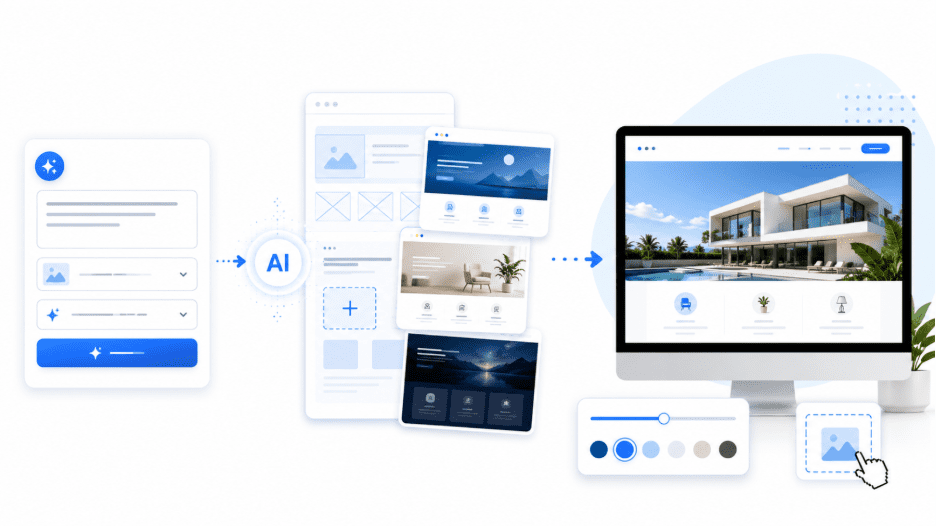
Building a website used to mean hiring a developer, waiting weeks for a first draft and paying before you saw a single page. So how does AI web design work, and does it actually change that? It does, and the shift starts with a single prompt. You describe your business, answer a few guided questions and watch a site take shape in real time.
This guide breaks down what the technology does under the hood and how to figure out whether it fits what you need.
What does AI web design actually mean?
AI web design refers to the use of artificial intelligence to automate or assist in creating a website’s layout, structure, copy and visual style. Instead of building a site manually or hiring someone to do it, you describe what you need and the AI handles the construction.
It helps to know that AI web design splits into two distinct categories:
- AI tools for designers are assistants built into professional design software. They help with image generation, layout suggestions and code snippets – speeding up the work of someone who already knows how to design.
- AI builders for non-designers automate much of the initial design process. You describe your business, the AI interprets your input and a site gets built from that description. You do not need to work in Figma, write CSS or set up a WordPress theme manually
Knowing which type you’re dealing with matters. An AI tool for designers won’t build your site for you. An AI builder for non-designers will, and that’s a fundamentally different kind of product. This article focuses on the second category.
How does AI web design work, step by step?
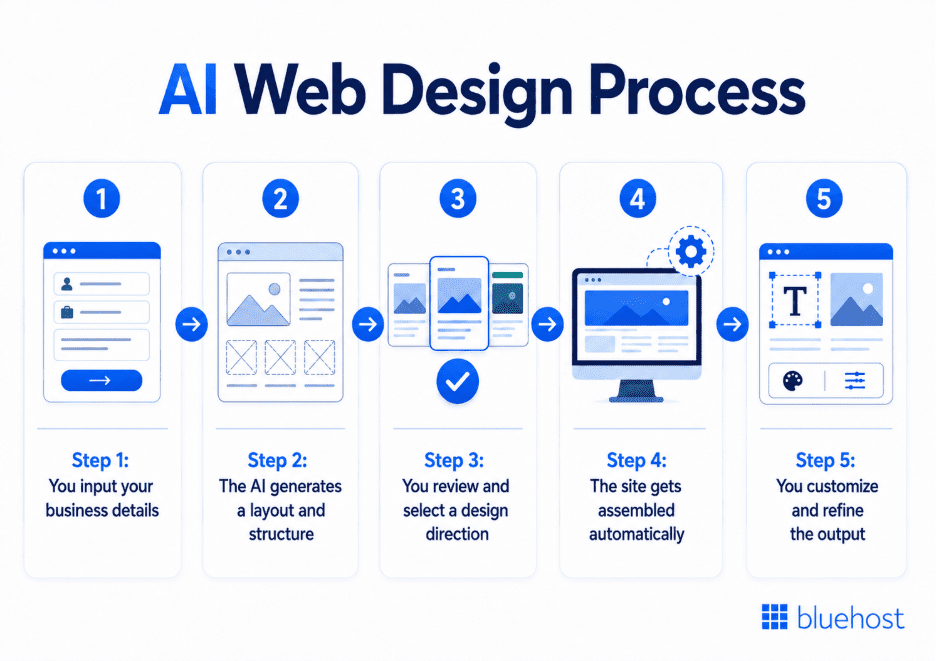
The process varies slightly across tools, but the core workflow follows the same logic. You provide the input, the AI does the construction and you refine the output until it reflects what you actually need.
Step 1: You input your business details
Everything starts with a description of your business. Most AI builders ask you to type a short prompt – what your business does, who it serves and what you want the site to accomplish. Some tools offer a prompt gallery with pre-written examples to remove the blank-page problem. The more specific your input, the more accurate the output.
Step 2: The AI generates a layout and structure
The AI reads your prompt and determines what kind of site to build. It decides on the page structure, section order, color palette and typography based on your input and industry context. Some tools ask a short series of guided questions at this stage to fill in details your prompt didn’t cover – things like brand name, visual style and color preferences.
Step 3: You review and select a design direction
Before the build starts, many AI builders present two or three design directions for you to choose from. Each option reflects your inputs but takes a different visual approach. You pick the one that fits and the build begins.
Step 4: The site gets assembled automatically
The AI builds every page and section based on your chosen direction. Depending on the tool, this can take anywhere from a few seconds to a few minutes. The output includes a full page structure, placeholder and starter copy written to match your industry and a layout ready for your real content.
Step 5: You customize and refine the output
The first build is a starting point, not a finished site. From here you swap in your real copy, upload brand assets and adjust any sections that need changing. More advanced AI builders let you continue refining through conversation – you describe what you want changed and the AI updates the site in real time.
What kinds of websites can you build with AI?
AI builders handle most standard marketing and content-focused site types well. If you’re a small business owner, freelancer or content creator, the output covers the majority of what you need to get a professional site live without touching code or a design tool. Most site types that rely on clear structure, a few key pages and a contact form are well within reach.
- Small business and service sites: Present your services, team and contact details to local or online customers in a professional format.
- Portfolio sites: Give creatives, photographers and consultants a clean way to display past work and attract new clients.
- Blogs and content sites: Built around a standard post layout with category pages and a readable content structure.
- Simple eCommerce stores: Product listings, a shopping cart and checkout work well for small catalogs with a focused product range.
- Restaurant and local-business sites: Menu display, location info, opening hours and reservation links are a natural fit for the format.
- Landing pages: Single-purpose pages for promotions, lead capture or event sign-ups come together quickly.
- Booking or appointment sites: Service-based businesses can present availability and let visitors request appointments directly.
AI builders are weaker when requirements step outside standard site structures. Complex custom functionality, large eCommerce catalogs with hundreds of product variants and bespoke web applications still need a developer. For those projects, AI can assist with parts of the process, but the build itself requires hands-on development work.
What does AI handle – and what does it not?
Understanding where AI adds value and where it needs your input helps you get better results from the start.
AI handles the parts of web design that are technical and time-consuming for most business owners:
- Layout and page structure: Home, about, services and contact pages built and arranged automatically
- Color palette and typography: Selected based on your industry, brand inputs and visual style preferences
- Starter copy: Placeholder content written to match your business type and tone
- Basic SEO setup: Meta titles, descriptions and page structure optimized for search from the start
- Domain suggestions: Contextual recommendations based on your business name at the point of publish
What AI cannot do is replace the knowledge only you have about your business:
- Final copy: AI writes a starting point, not a finished brand voice. Your real messaging needs to come from you.
- Brand assets: Logos, product photos and team images need to be sourced and uploaded manually.
- Business-specific details: Pricing, service descriptions, opening hours and team names are yours to add.
- Custom functionality: Anything beyond a standard marketing or portfolio site will need additional tools or development.
Think of AI as handling the build so you can focus on the content. The site goes up faster; the details that make it yours still require your input.
How is an agentic AI builder different from older site generators?
Not all AI web design tools work the same way. The gap between first-generation AI builders and the current agentic generation is significant – and worth understanding before you choose a tool.
Early AI website builders followed a simple pattern. You answered a short quiz, the tool matched your answers to a pre-built template and you were dropped into a drag-and-drop editor to finish the job manually. The AI’s role ended at the template. Everything after that was on you.
Agentic AI builders work differently. The AI doesn’t hand off to a manual editor after the first build – it stays in the process as a working collaborator. You continue refining through conversation: describe what you want changed, and the site updates in real time. The agent shows its work at every step and remains available through the full lifecycle of the site, not just the initial setup.
The practical difference comes down to two things:
- What happens after the build: First-generation tools stop at a template. Agentic builders keep working – every edit request is handled through conversation, not menus.
- How specific the output is: Template-based tools produce generic starting points. Agentic builders interpret your prompt, ask targeted questions and construct something specific to your business before you touch a single setting.
For business owners who want more than a generic template they have to rebuild from scratch, the agentic model is the meaningful upgrade. Bluehost AI Website Builder follows this model – the conversational AI agent builds your site, shows its work in real time and stays available for refinements after the build is complete.
Can AI web design replace a professional web designer?
This is one of the most searched questions around AI in web design – and the honest answer is: it depends on what you need a designer for.
For straightforward marketing sites, portfolio pages and small business websites, AI builders are now a viable starting point. The build quality has reached a level where most business owners can get a professional-looking site live without hiring anyone. The main advantage is speed: AI can reduce the time it takes to create a first version.
Where professional designers still add value that AI cannot replicate:
- Complex UX and user research: Understanding how a specific audience navigates a product and designing for that behavior requires human judgment.
- Brand systems: A cohesive visual identity across every touchpoint, from the website to packaging to social, needs strategic thinking AI doesn’t yet replicate.
- Custom functionality: Anything that requires bespoke development, integrations or unique interaction design sits outside what AI builders currently handle.
The more realistic picture is this: AI has lowered the barrier to getting a good-enough first site live. For most small business owners, that threshold is sufficient. For businesses with complex needs, a designer still earns their fee – but increasingly, they are using AI as part of their own workflow rather than competing against it.
AI does not replace design thinking. It removes the technical barrier between having an idea and getting it online.
How to design a website with AI – your starting checklist
The quality of what an AI builder produces depends heavily on what you bring to it. Arriving prepared makes the difference between a generic output and a site that actually reflects your business.
Before you start, have these ready:
- A one-sentence business description: What you do, who you serve and what makes you different. This is your prompt and the AI builds from it.
- A sense of your visual style: Minimal, bold, elegant, modern, rustic. You don’t need a mood board; a single word is enough to guide the AI’s design choices.
- The pages you need: Home, about, services and contact covers most small business sites. Know this before you start so you can confirm the structure the AI proposes.
- Any brand assets you have: Logo files, product photos or team images. You won’t need them during the build but you’ll upload them during the refinement stage.
- A domain name in mind: Or willingness to let the AI suggest one at checkout based on your business description.
One thing worth knowing before you start: with Bluehost AI Website Builder you don’t need a credit card to begin. The Build-to-Buy model means your site is fully built and ready to preview before you choose a plan or enter any payment details. The 14-day free trial gives you time to build, refine and decide.
Final thoughts
AI web design has moved well past the era of picking a template and manually filling in the blanks. The current generation of agentic builders constructs a site from your description, asks the right questions to make it specific to your business and keeps refining through conversation after the build is complete.
For small business owners, freelancers and anyone who needs a professional online presence without the cost or timeline of hiring an agency, that shift matters. The barrier to getting a good site live is lower than it has ever been.
The starting point is simpler than most people expect. Describe your business, answer a few guided questions and watch the site take shape. Bluehost AI Website Builder follows the build-to-buy model – your site is fully built and ready to preview before you commit to a plan or enter your card details.
Start your 14-day free trial at Bluehost, no credit card required.
FAQS
AI is taking over production-level work – building templates, generating layouts and writing starter copy. Designers who focus on brand strategy, user research and complex functionality are far less exposed. Most working designers already use AI as part of their workflow.
For standard marketing and portfolio sites, AI builders already handle most of the build. For complex UX, custom functionality and brand systems, human expertise still leads. AI handles the technical execution; design thinking remains a human skill.
Traditional web design involves a designer in Figma, a developer writing code and a CMS managing content – a process that takes weeks. AI compresses much of that process into a guided flow, where the builder generates the first version and lets you refine the site before publishing.
Web design covers layout and user experience. Web development covers the code underneath. AI builders handle design without code knowledge. Developer-focused AI tools generate and debug the code itself. For non-technical users, AI builders are the relevant category.
No. You describe your business, answer a few guided questions and the site gets built automatically. The AI handles the technical work; you bring the business knowledge.

Write A Comment