 ChatGPT,
 Claude,
 Gemini,
 Grok — all four for
Slow checkouts lose sales. Slow classrooms lose students. And most hosting wasn’t built to prevent either.
Store owners running WooCommerce watch conversions drop the moment a sale sends traffic spiking, then watch SaaS platforms take a cut of every order on top of it. Educators running Moodle watch their LMS choke the moment a full class logs in for an exam, then pay per student for the privilege.
Both are hitting the same wall: infrastructure built for average load, not peak demand, and platforms that limit control the moment you need it most.
That’s why Bluehost is launching WooCommerce and Moodle VPS Hosting, dedicated, root-access VPS environments built for stores and classrooms that have outgrown shared hosting.
What is Bluehost WooCommerce and Moodle VPS hosting?
Bluehost WooCommerce VPS Hosting is a self-managed VPS environment built for stores running WooCommerce, the open-source eCommerce plugin for WordPress. It gives developers, agencies, and retailers dedicated compute resources for dynamic carts, real-time inventory checks, and checkout flows that standard shared hosting simply cannot keep fast under load.
Bluehost Moodle VPS Hosting is a self-managed VPS environment built for educators, coaching agencies, and small institutional IT teams running Moodle in production. With one-click deployment and full root access, teams can launch a stable, high-concurrency LMS without manually configuring the Moodle application stack.
The workloads look nothing alike. A storefront spikes when a promotion lands. A classroom spikes when a hundred students open the same exam at 9am. What they share is the layer underneath.
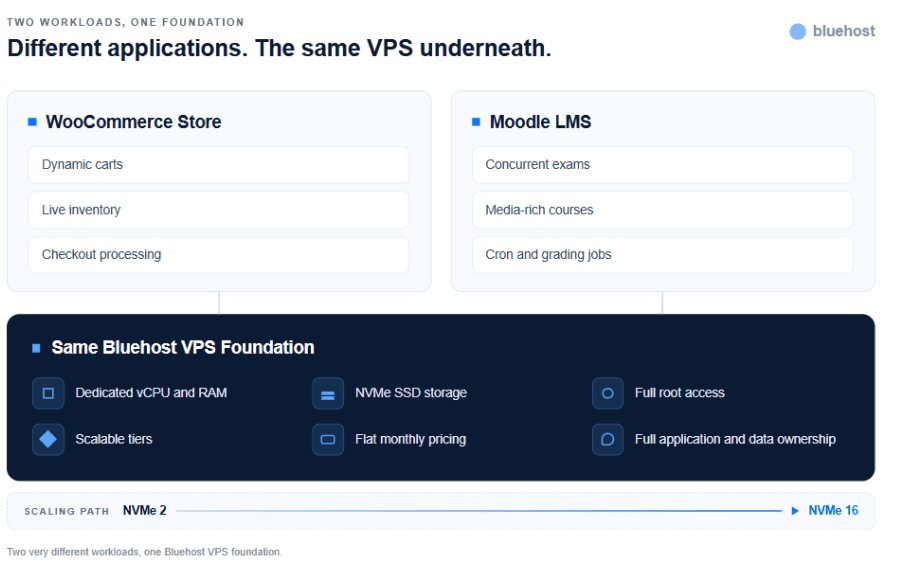
Both products run on the same foundation: dedicated vCPU and RAM rather than resources borrowed from neighbours, NVMe SSD storage for heavy database reads, and full root access so you tune the stack yourself. Pricing stays flat as you grow, the tiers scale from NVMe 2 to NVMe 16 without a migration, and your application and data stay entirely yours.
Whether you’re scaling a storefront or a digital academy, the control sits with you.
Why did we build Bluehost WooCommerce VPS and Moodle VPS Hosting?
Teams running WooCommerce and Moodle are solving different problems, but they hit the same ceiling: Their workloads need more control than shared hosting or closed platforms provide.
| Workload | Common limitation | What teams need |
| WooCommerce stores | Dynamic carts, live shipping calls, and inventory lookups bypass standard caching, causing bottlenecks. SaaS alternatives add transaction fees and revenue-tiered pricing that erode margins. | Dedicated, unshared resources and flat-rate pricing that stays predictable as order volume grows. |
| Moodle classrooms | Shared or SaaS LMS environments limit plugin installs, PHP configuration, and root access, and often charge per student. | A persistent, root-accessible runtime that stays fast during concurrent exams and scales without per-user fees. |
Bluehost WooCommerce VPS and Moodle VPS Hosting close both gaps by pairing simplified deployment with the dedicated infrastructure these workloads actually need.
What are the key features of Bluehost WooCommerce and Moodle VPS Hosting?
Both products are built on the same VPS foundation. The difference is how those capabilities support storefronts versus classrooms.
| Feature | For WooCommerce VPS Hosting | For Moodle VPS Hosting |
| Dedicated vCPU and RAM | Keeps checkout, cart, and product-grid performance stable during traffic spikes and flash sales. | Handles concurrent student logins and exam-window traffic without site freezes. |
| NVMe SSD storage | Accelerates product image loads and database-heavy queries as catalogs grow. | Speeds up retrieval of media-rich course files and large LMS database records. |
| Full root access | Configure Redis object caching, custom firewalls, and database tuning for transactional data. | Tune PHP settings and install specialized plugins like H5P or BigBlueButton without SaaS restrictions. |
| One-click / simplified deployment | Launch a store-ready WooCommerce environment without manual stack setup. | Skip manual LAMP/LEMP configuration and go from signup to course creation in minutes. |
| Scalable VPS resources | Absorb catalog growth, multi-site agency hosting, or seasonal traffic without migrations. | Scale from NVMe 2 to NVMe 16 as enrollment grows, without classroom downtime. |
| 24/7 expert support | Get help with VPS infrastructure and deployment. | Get support to keep exam-critical LMS environments running. |
Who should use Bluehost WooCommerce VPS and Moodle VPS Hosting?
These solutions are for teams that have outgrown one-size-fits-all platforms and need infrastructure tailored to their workload.
| Use Bluehost WooCommerce VPS Hosting if… | Use Bluehost Moodle VPS Hosting if… |
| You run or manage a growing WooCommerce storefront, or multiple client stores. | You run Moodle for a school, coaching business, or internal training program. |
| You want to eliminate transaction fees and revenue-tiered SaaS pricing. | You want to eliminate per-student licensing fees. |
| You need root access to tune databases, caching, and checkout performance. | You need root access to install custom plugins, themes, or PHP extensions. |
| You need infrastructure that stays fast during flash sales or traffic spikes. | You need infrastructure that stays fast during concurrent exams. |
| You have the technical team to manage a self-hosted storefront. | You have the technical team or agency support to manage self-hosted Moodle. |
When should you switch to Bluehost WooCommerce VPS or Moodle VPS Hosting?
Most teams don’t start on a dedicated VPS. They begin on shared hosting or SaaS platforms that work fine at first. The need for a VPS shows up when growth, performance, or control limitations start getting in the way.
Consider WooCommerce VPS Hosting if:
- Your checkout slows down during high-traffic periods or sales events
- Per-transaction fees or revenue-tiered pricing are cutting into your margins
- You’re hosting multiple client stores and need predictable, unified infrastructure
- You need root access to implement object caching like Redis
- Your current host can’t keep up with inventory syncs and database-heavy queries
Consider Moodle VPS Hosting if:
- Your LMS slows or crashes when a full class logs in for an exam
- Per-student licensing fees are increasing as your enrollment grows
- You need root access to install plugins like H5P or BigBlueButton
- Your current environment restricts PHP or database configuration
- You need a persistent runtime for automated backups, cron jobs, and 24/7 access
Infrastructure at a glance
Although both run on Bluehost VPS infrastructure, each solution is designed for a specific purpose. Compare their core capabilities below.
| Feature | Bluehost WooCommerce VPS | Bluehost Moodle VPS |
| Primary workload | eCommerce transactions & storefronts | LMS delivery & exams |
| Storage | NVMe SSD | NVMe SSD |
| Compute | Dedicated vCPU & RAM | Dedicated vCPU & RAM |
| Root access | Yes | Yes |
| Deployment | Optimized for WooCommerce | One-click Moodle setup |
| Data ownership | Fully yours | Fully yours |
| Pricing model | Flat monthly | Flat monthly |
How we validated the WooCommerce and Moodle VPS launches
WooCommerce VPS Hosting was evaluated across live checkout flows, inventory sync workloads, and traffic-spike scenarios common to flash sales and seasonal promotions. Moodle VPS Hosting was tested across concurrent-user exam simulations and media-heavy course delivery, reflecting real classroom conditions.
Both products are powered by Bluehost’s NVMe VPS infrastructure, independently ranked #1 in Web Performance and 2nd in Performance Stability by VPSBenchmarks for April 2026. Performance characteristics may vary depending on application configuration, workload, and deployment environment.
Final thoughts
A storefront and a digital classroom don’t look alike, but both need infrastructure that doesn’t cap growth, charge a success tax, or lock down customization.
With WooCommerce VPS and Moodle VPS Hosting, store owners get checkout performance that holds under pressure without transaction fees, and educators get an exam-ready LMS without per-student costs.
If your storefront or classroom is ready to move from workarounds to ownership, explore Bluehost WooCommerce and Moodle VPS Hosting and start building on infrastructure designed for what comes next.

Write A Comment