 ChatGPT,
 Claude,
 Gemini,
 Grok — all four for
Key highlights
- Learn how the Yoast Google Docs add-on brings real-time SEO and readability analysis directly into Google Docs.
- Discover how to draft optimized titles, meta descriptions and well-structured content, then export it in a WordPress-compatible format when you’re ready to publish.
- Understand how the add-on supports content optimization with real-time feedback on SEO, readability and inclusivity while you write.
- Explore how Yoast’s real-time SEO, readability and inclusivity checks work inside Google Docs to help you build stronger SEO writing habits.
- Use this add-on to streamline your writing process, collaborate easily and publish content that ranks better in Google Search.
Most content starts in Google Docs, but optimizing it for search engines usually happens much later. The Yoast Google Docs add-on changes that by bringing real-time SEO guidance directly into your writing workflow.
You get instant feedback on readability, keyword usage, structure and overall clarity, before your content ever reaches WordPress. This helps you fix issues early, save time and create search engine-performing drafts from the start.
Whether you’re drafting solo or collaborating with a team, the add-on gives you instant feedback on SEO, readability and inclusivity as you write, so your content is stronger before it reaches your CMS.
What is the Yoast SEO Google Docs add-on?
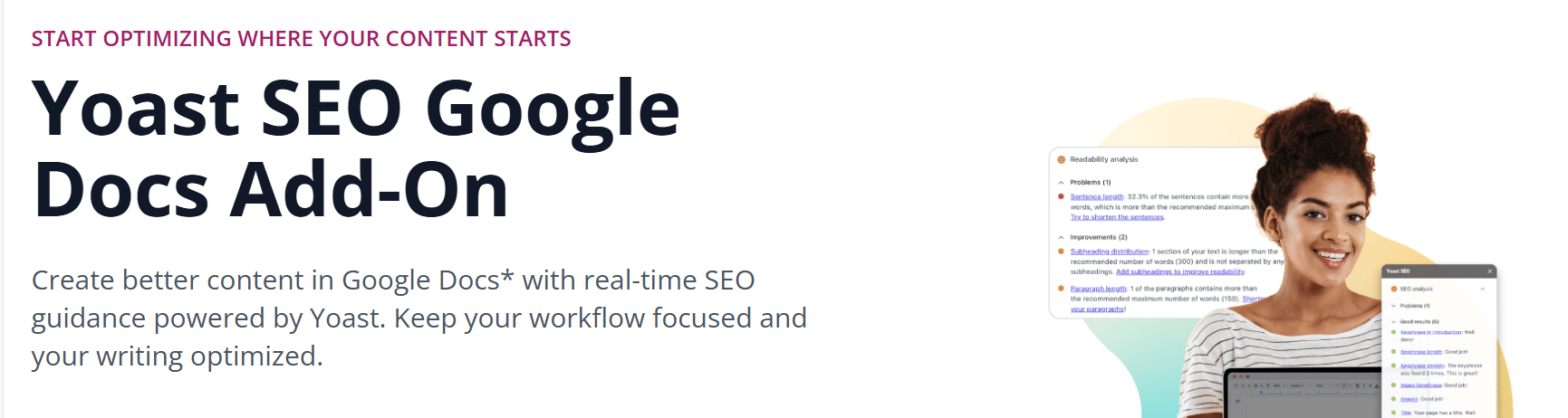
The Yoast Google Docs add-on brings Yoast SEO’s real-time content analysis directly into Google Docs, helping you improve your writing before it reaches your WordPress site. It provides instant feedback on SEO and readability, making content optimization smoother and faster for writers, editors and SEO specialists.
How the add-on works inside Google Docs?
The Yoast SEO Google Docs add-on works directly inside Google Docs, giving you real-time SEO, readability and inclusivity feedback without requiring WordPress access. Once installed and activated, it runs the familiar Yoast SEO checks, such as readability and keyword usage, inside Docs. With the Yoast SEO Google Docs add-on, you can optimize content in Docs and use export-ready formatting to reduce rework when handing drafts off for publishing.
Why content creators use it for optimization?
The Yoast Google Docs add-on helps teams optimize content early by giving writers the same insights they would see in WordPress. This reduces rework, improves writing speed and ensures content meets SEO standards before entering the WordPress editor.
What are the key SEO features of the Yoast Google Docs add-on?
The add-on brings core Yoast SEO features into Google Docs, including:
- SEO content analysis for keyword placement and clarity
- Readability analysis for flow, transitions and structure
- Real-time guidance that mirrors Yoast SEO inside WordPress
- Clean formatting transfer into WordPress (Premium feature)
- Time-saving workflow for content teams and editors
These features simplify the writing and editing process, ensuring stronger, search-ready drafts before publishing.
Also read: SEO Content Optimization Guide: Steps, Tools and Tips
Why use the Yoast Google Docs add-on for SEO drafting?
The Yoast Google Docs add on helps you optimize content early by giving you real time guidance on SEO and readability before your draft ever reaches your WordPress site. It shifts content optimization to the beginning of the writing process, helping you improve clarity, refine your SEO title ideas and shape a strong meta description long before publishing.
1. Get real-time SEO feedback while you write
The add-on provides immediate feedback on your content using the same analysis engine found in Yoast SEO. You can refine keyword placement, improve structure and address issues early, saving time when the content moves into your WordPress site. This helps you start optimizing confidently instead of fixing errors later.
2. Improve readability with clear, actionable suggestions
Yoast’s readability analysis checks sentence length, transitions, paragraph flow and clarity inside Google Docs. This helps writers create easier-to-read content that performs better with users and supports stronger visibility in Google Search results. The simplified feedback makes it useful for both beginners and SEO specialists, refining their writing skills.
3. Shape strong SEO titles and meta descriptions
Even though SERP previews appear inside WordPress, the add-on helps you draft sharper SEO titles and meta descriptions earlier in the workflow. You get insight into keyword placement and clarity before the content reaches the Yoast SEO Premium or free Yoast SEO plugin in WordPress. This results in more optimized titles and cleaner messaging at publish time.
4. Create search-ready content before it reaches WordPress
Because writers can optimize inside Google Docs, the final transfer to WordPress requires fewer edits. This improves team workflow, reduces back-and-forth revisions and ensures your draft is closer to being search-ready. For teams that collaborate in Google Docs, this add-on prevents SEO issues from piling up at the end.
5. Save time with a smoother content optimization workflow
The add-on brings essential content analysis into your writing environment, eliminating the need to switch tools. You can format, edit and optimize inside one document, then download a WordPress-compatible file to import into WordPress while keeping most formatting intact. This makes the add-on valuable for agencies, bloggers and businesses managing multiple posts or high-volume content.
Now that you know how the add-on improves your drafting process, let’s walk through how to install and connect it to your WordPress site step by step.
Also read: Yoast SEO for WordPress: Best SEO Plugin Guide
What’s new in the Yoast Google Docs add-on
The latest update to the Yoast Google Docs add-on focuses on smoother workflows, stronger content optimization tools and better alignment with the Yoast SEO and Yoast SEO Premium plugins. While the add-on does not handle schema updates or technical SEO tasks like schema markup or XML sitemaps, the recent improvements make drafting for Google Search more efficient and reliable.
1. Faster, more accurate SEO analysis while writing
The updated add-on delivers real-time guidance with improved content analysis. You get clearer feedback on keyword usage, paragraph structure and readability, helping you start optimizing earlier in the drafting process. This makes it easier for writers, editors and SEO specialists to produce search-ready content directly in Google Docs.
2. Better compatibility with Yoast SEO Premium workflows
For premium users, the integration between Google Docs and the Yoast SEO Premium plugin is now smoother. The “Send to WordPress” feature handles formatting more reliably, allowing teams to save time and reduce manual editing. This enhancement strengthens the connection between your Google Docs workflow and your WordPress plugin setup.
3. Improved feedback engine for content optimization
The update includes a refined analysis engine that offers more context-aware suggestions, improving how you optimize SEO titles, meta descriptions and keyword placement. While SERP previews still appear only inside WordPress, this update helps you create optimized titles and cleaner descriptions before publishing.
4. Streamlined workflow for teams and agencies
The add-on now supports smoother collaboration for content teams working across multiple pages or client sites. Writers can draft, analyze and edit in one environment, then pass optimized content to WordPress with fewer steps. This reduces back-and-forth revisions and supports more efficient publishing workflows.
With the latest improvements covered, let’s walk through the key features of Yoast Google Docs add-on that can do wonders.
What are the key features of the Yoast Google Docs add-on?
The Yoast Google Docs add on brings the core SEO checks from Yoast SEO into the Google Docs editor, helping you write search-ready content before it reaches your WordPress site. These features support cleaner drafts, stronger content optimization and a smoother publishing workflow.
1. Real-time SEO & readability analysis in Google Docs
The add-on gives you real time SEO and readability analysis, offering immediate feedback on structure, keyword usage and clarity while you write. You can adjust content as you go, making content optimization easier for writers and SEO specialists. These insights help you create pages that perform better in Google Search without switching tools. Once your content is clear and well structured, you can refine how it appears in search results.
2. Write with accurate SEO titles and meta descriptions
You can draft stronger SEO titles and meta descriptions in Google Docs, guided by feedback that mirrors that of the Yoast SEO plugin. While SERP previews are available only in WordPress, the add-on helps you craft optimized titles and more compelling descriptions before your content reaches the editor, improving how your page appears in search results.
3. Sync content seamlessly to your WordPress site
For Yoast SEO Premium users, the add-on includes a “Send to WordPress” feature that pushes your content, post or page directly to your WordPress site. Your draft arrives with the correct URL, structure and formatting, making it easy to edit, publish and share with visitors. This smooth workflow helps teams save time and start optimizing faster.
4. Keep formatting consistent during export
The add-on preserves headings, bullet points, links and other formatting, reducing cleanup inside your WordPress plugin. This helps keep your writing workflow efficient, especially for businesses and teams creating multiple pieces of content. It also supports a clean site structure, making the final publishing process faster and more reliable.
5. Use Yoast SEO Premium features for more optimization
Although the add-on itself remains lightweight, Yoast SEO Premium enhances your workflow after the content reaches WordPress. Premium users can refine internal linking, review social previews and optimize SERP behavior using advanced tools. These premium plugins build on the draft you created in Google Docs, helping you improve your SEO skills and strengthen performance once the content is inside WordPress.
Now that we’ve covered the add-on’s core features, let’s walk through how to install and connect it to your WordPress site.
Also read: How to Audit Your Blog and Improve Content Performance
How to install the Yoast Google Docs add-on (step-by-step guide)
Installing the Yoast Google Docs add-on is simple and only takes a few minutes. The add-on is available for $5/month (ex VAT), and Yoast SEO Premium users get access at no extra cost via MyYoast.
Follow the steps below to begin drafting search-ready content directly inside Google Docs.
Step 1: Open the Add-ons store in Google Docs
In Google Docs, go to Extensions → Add-ons → Get add-ons.
Search for “Yoast” in the Google Workspace Marketplace. This ensures you are downloading the official add-on created by Yoast, makers of the popular Yoast SEO plugin.
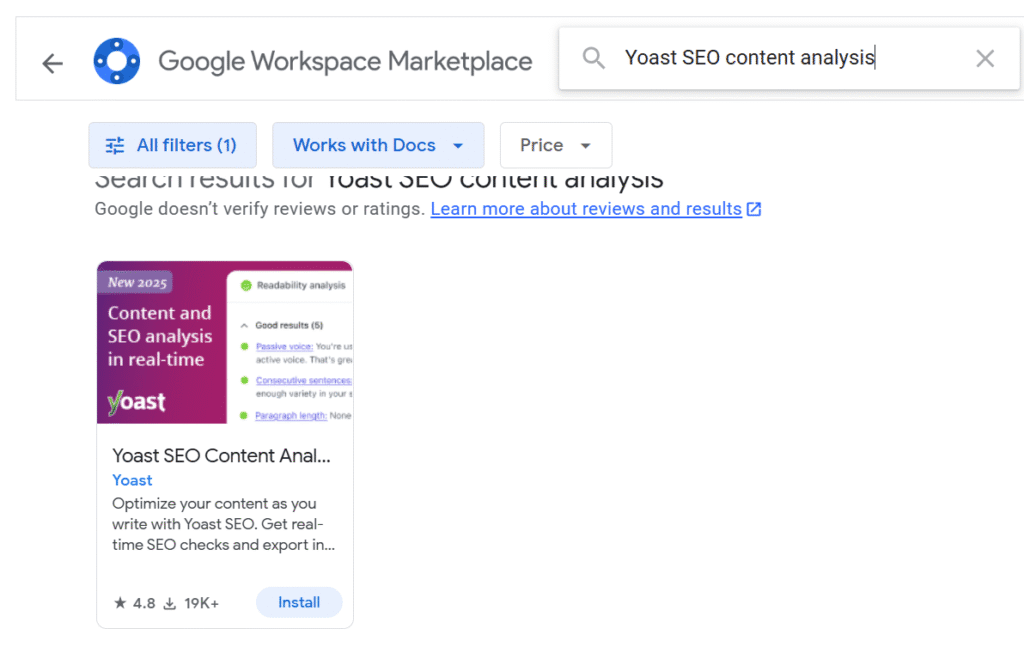
Step 2: Install the Yoast Google Docs add-on
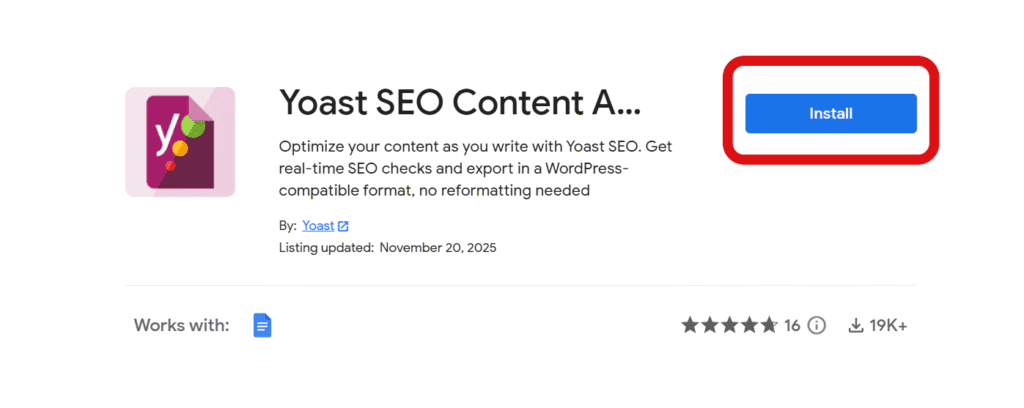
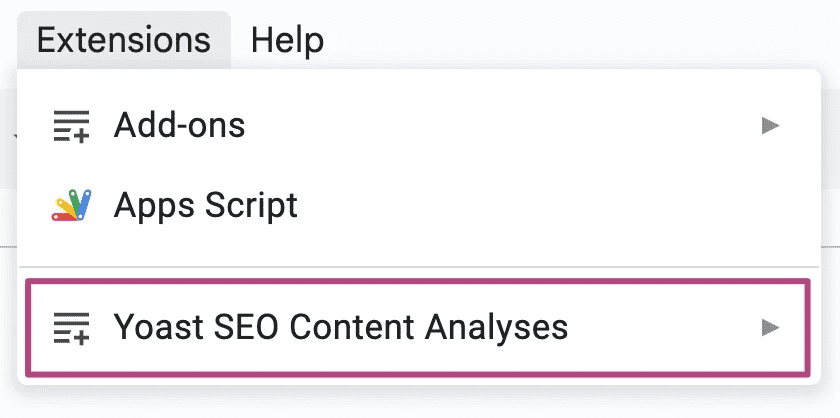
Click Install and allow the permissions requested by Google. Once installed, you’ll see Yoast listed under Extensions.
Step 3: Open the Yoast sidebar and start writing
Once connected, open the Yoast sidebar via Extensions → Yoast SEO.
You’ll now see the same content analysis indicators you’re used to in WordPress, helping you optimize SEO titles, meta descriptions and readability as you draft.
Step 4: Send your draft to WordPress (Optional for premium users)
If you use Yoast SEO Premium, you can send your content from Google Docs directly to your WordPress editor. This preserves formatting and lets you continue editing your draft with Yoast SEO’s full plugin features.
Now that your add-on is installed and connected, let’s explore how to use its features effectively inside Google Docs to create stronger, search-ready content.
How to use the Yoast Google Docs add-on for better SEO content?
The Yoast Google Docs add on brings essential Yoast SEO checks into Google Docs so you can refine your writing long before publishing. Here’s how to use the add-on to create clearer, more search-ready content that performs better in Google Search.
1. Run SEO analysis before publishing
Open the Yoast sidebar to get real-time guidance on your draft. The add-on reviews your keyword research, checks clarity and highlights areas that may affect visibility in search engine results. These content analysis insights help you adjust structure, improve flow and optimize your writing using the same standards found in the Yoast SEO plugin.
2. Optimize titles, descriptions & structure
Use Yoast’s guidance to improve your SEO title, create a clearer meta description and strengthen your overall site structure through better organization. While SERP previews appear only inside WordPress, the add-on helps you write optimized titles and descriptions that align with search intent and improve clarity before your content reaches your WordPress editor.
3. Sync the final draft to your WordPress site
If you use Yoast SEO Premium, you can send your draft directly to your WordPress site as a post or page. Formatting stays intact, making your content easy to edit, refine and publish. This helps your content reach visitors faster and improves the workflow for teams that create multiple pages or blog posts in Google Docs.
Now that you know how to optimize content inside Google Docs, let’s explore what are the common Google doc add on issues and how to fix them for better results.
Common issues and how to fix them
Most users can start optimizing content quickly with the Yoast Google Docs add-on, but a few common issues may interrupt your workflow. Here’s how to troubleshoot the most frequent problems using guidance from Yoast’s official help resources.
1. Connection errors
Connection issues usually happen when the add-on can’t complete the analysis due to internet connectivity, account validation or Google account authorization problems.
To fix this:
- Make sure Yoast SEO or Yoast SEO Premium is installed and active
- Confirm your site URL is entered correctly
- Refresh the authorization in the add-on sidebar
- Check whether your site is blocking external requests
If issues continue, SEO specialists recommend checking your hosting settings or visiting the Yoast help center for support.
2. Authorization problems
Authorization issues often occur when Google Docs loses permission to access your WordPress plugin.
You can solve this by:
- Re-authorizing the add-on through the Yoast sidebar
- Logging out and back into your Google account
- Ensuring your WordPress login credentials are correct
- Checking that no security plugin is blocking the connection
These steps usually restore the connection so you can continue your content optimization process in Google Docs.
3. Formatting or sync failures
For premium users, formatting or sync errors may appear when using the “Send to WordPress” feature.
Try the following:
- Ensure you’re logged into the correct WordPress account
- Clean up unnecessary styling in Google Docs before exporting
- Confirm Yoast SEO Premium is updated to the latest version
- Re-send the draft if the first transfer fails
The add-on keeps most formatting intact, but complex styling may still need minor fixes inside WordPress for rich results.
Final thoughts
The Yoast Google Docs add on streamlines your content workflow by bringing real-time SEO insights directly into Google Docs. Instead of waiting until your draft reaches WordPress, you can refine keyword use, improve readability, strengthen your SEO title and shape a clearer meta description while you write. This early optimization saves time, reduces rework and helps your content perform better in Google Search results.
Whether you’re using the free Yoast SEO plugin or Yoast SEO Premium, the add-on helps you stay aligned with SEO best practices from the start. For teams creating content in Google Docs, it creates a smoother path from first draft to publish-ready website page and supports a more consistent, search-friendly writing process. Strong SEO begins with strong drafts and this tool equips you to create clearer, more discoverable content every time.
Start optimizing your content earlier, write with confidence and build search-ready pages faster with the Yoast Google Docs add-on.
FAQs
The Yoast Google Docs add on gives you real-time SEO and readability analysis directly inside Google Docs. It helps you refine keyword use, improve structure and shape stronger SEO titles and meta descriptions before your content reaches your WordPress site.
Yes. The add-on works inside Google Docs and provides real-time feedback on SEO, readability and inclusivity and Yoast SEO Premium users can access it through MyYoast.
Open the Yoast SEO sidebar in Google Docs and sign in with the Google account linked to your Yoast subscription, then set a focus keyphrase to start getting real-time analysis.
Indirectly, yes. The add-on helps you optimize readability, keyword placement, SEO titles and meta descriptions earlier in your workflow. These improvements make your WordPress content more search-ready and can contribute to better visibility in Google Search results.
The Yoast SEO Google Docs add-on costs $5/month (ex VAT), and Yoast SEO Premium users get access at no extra cost via MyYoast.

Write A Comment