 ChatGPT,
 Claude,
 Gemini,
 Grok — all four for
Key highlights
- Final major WordPress release of 2025 – focused on collaboration, editing experience and developer tooling.
- Refined site editor with advanced customization and design control.
- Expanded Command Palette and Notes feature for real-time content collaboration.
- Multiple templates per slug and safer theme switching for block and classic themes.
- New Abilities API and enhanced Interactivity API for automation and richer front-end interactions.
- Compatibility with PHP 8.5 for improved performance and future-readiness.
- Accessibility upgrades, faster load times and enhanced overall stability.
The wait is over! WordPress 6.9 is here, wrapping up 2025 with a focus on collaboration, performance and developer tooling. After extensive beta testing and community input, it refines existing tools and adds new APIs to simplify workflows for both creators and developers.
This release post introduces the Abilities API, expands the Interactivity API and ensures full compatibility with PHP 8.5, keeping WordPress aligned with the latest web standards.
Overall, WordPress 6.9 prioritizes reliability over reinvention, giving website builders a stable, future-ready foundation. It’s a release that truly strengthens the WordPress core.
In this post, we’ll explore the WordPress 6.9 release news and its key features. We will also see how you can get involved and how you need to prepare your WordPress site for the final update of the year.
TL;DR – WordPress 6.9 highlights
- Final major release of 2025 (Dec 2)
- Focus on editing, collaboration and developer capabilities
- Enhanced site editor and Command Palette
- New Abilities API and Interactivity API for developers
- Faster performance and improved accessibility
- Reliable, future-ready foundation for 2026
WordPress 6.9 release date and milestones
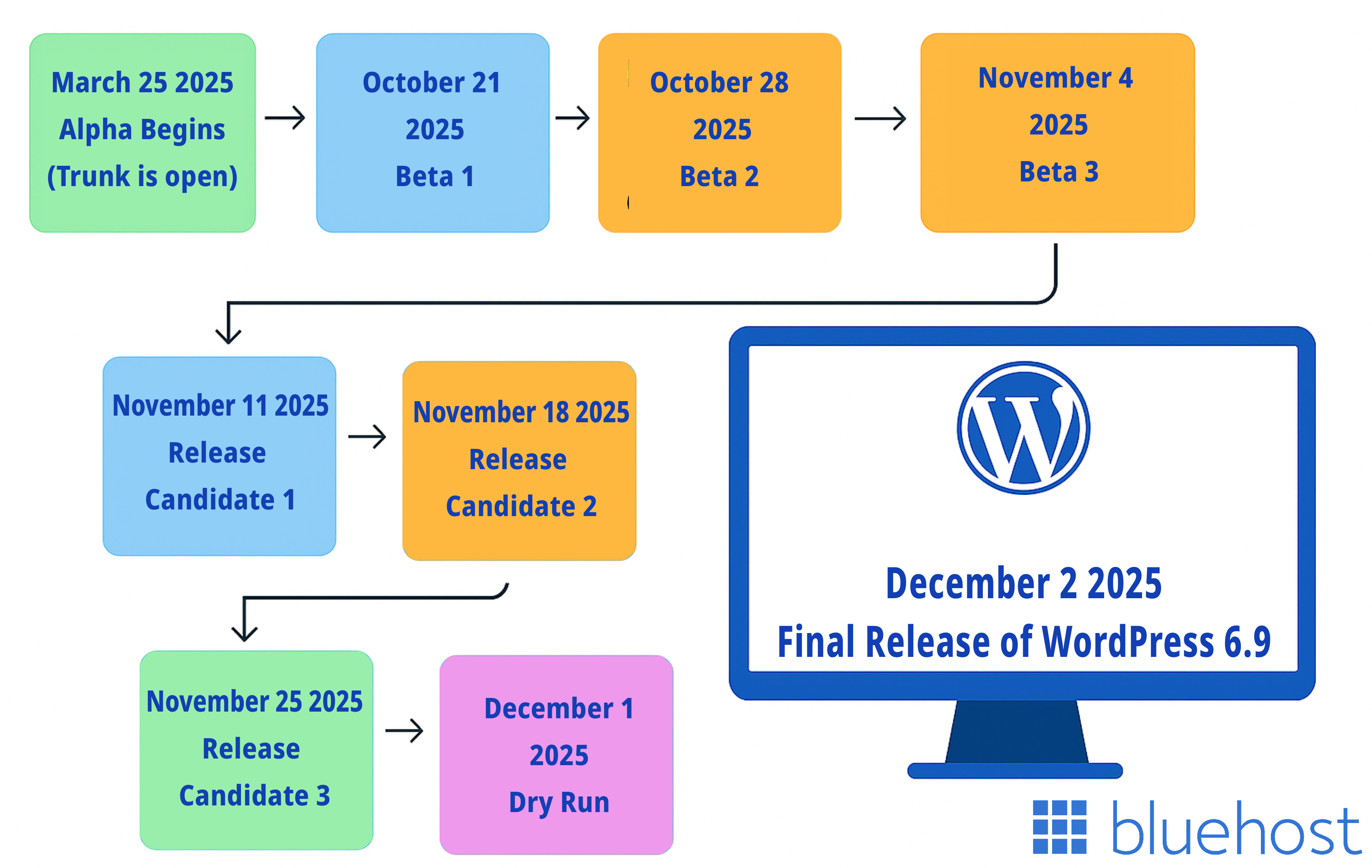
Here’s the official WordPress 6.9 release schedule, as shared by the core development team:
- March 25, 2025 – Alpha begins (Trunk is open)
- October 21, 2025 – Beta 1
- October 28, 2025 – Beta 2
- November 4, 2025 – Beta 3
- November 11, 2025 – Release Candidate 1
- November 18, 2025 – Release Candidate 2
- November 25, 2025 – Release Candidate 3
- December 1, 2025 – Dry run & 24-hour code freeze
- December 2, 2025 – Final release of WordPress 6.9
Schedule breakdown:
- Alpha to Beta release: Early preview and testing beta phase, enabling developers and beta testers to experiment and report bugs.
- Release Candidates (RCs): Core code is locked; the focus shifts to bug fixes, compatibility and stabilization.
- Dry Run & Final Release: Final checks before rollout. For site owners, this is the time to verify hosting compatibility, update themes and plugins and prepare for an upgrade.
What’s new in WordPress 6.9 features?
WordPress 6.9 focuses on editor polish, collaboration, developer tooling and stability. Below are the confirmed and broadly reported highlights – with quick notes on what you should test or expect.
1. Editor & collaboration enhancements
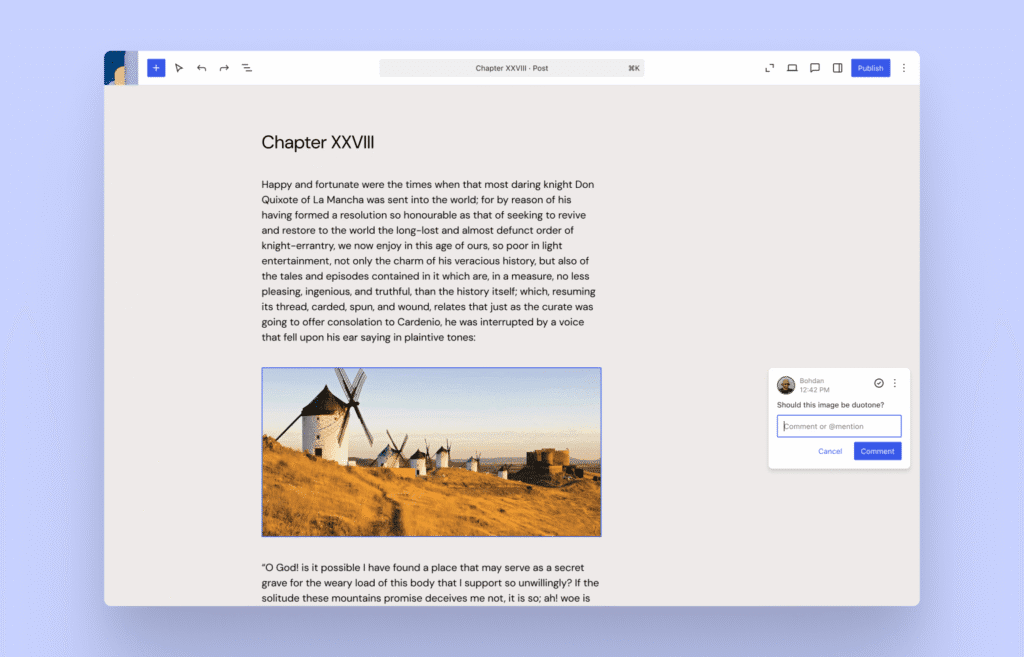
- Notes feature (block-level commenting)
Editors and core contributors can leave comments tied to individual blocks (block-level commenting), making internal review and content collaboration far easier. Use case: Content and design teams can leave targeted feedback without external tools.
- Expanded Command Palette
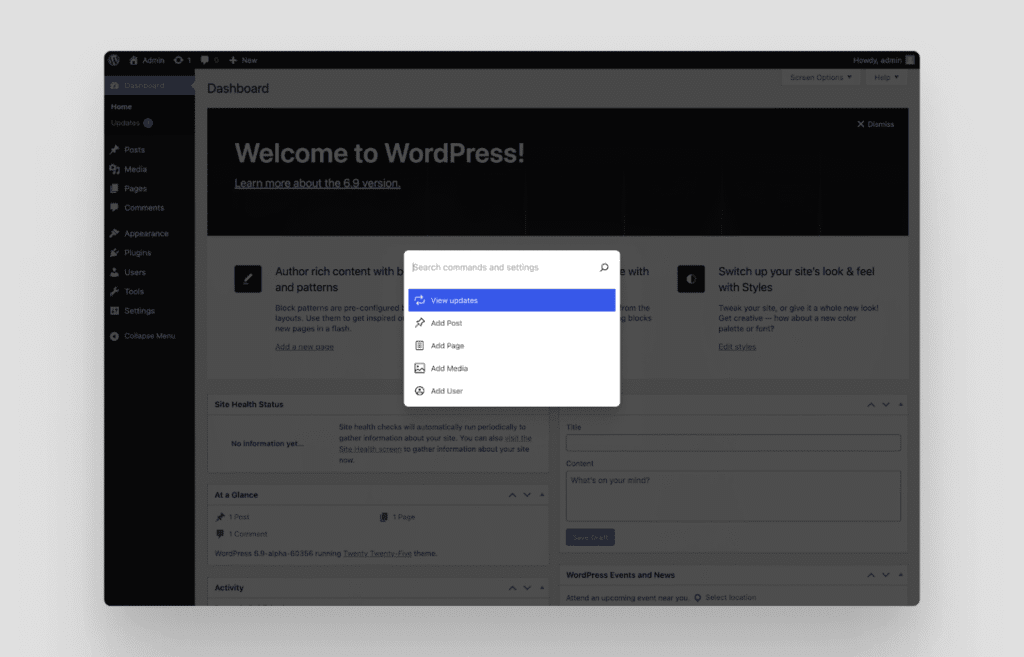
The Command Palette is available more widely (Editor + Dashboard), enabling faster actions and instant search across the admin UI. This accelerates common workflows.
Test: Use the palette to jump to templates, run commands or open settings to measure time savings for common tasks.
- New and improved block editing
Creating engaging layouts just got easier. WordPress 6.9 introduces fresh options like the Accordion and Time-to-Read blocks, making long-form content more structured and reader-friendly. You’ll also notice smoother controls for typography, spacing and alignment – helping you design with more precision and less effort.
2. Template and theme management upgrades
WordPress 6.9 brings major flexibility to how templates are created, edited and managed – making design workflows more intuitive for both developers and content teams.
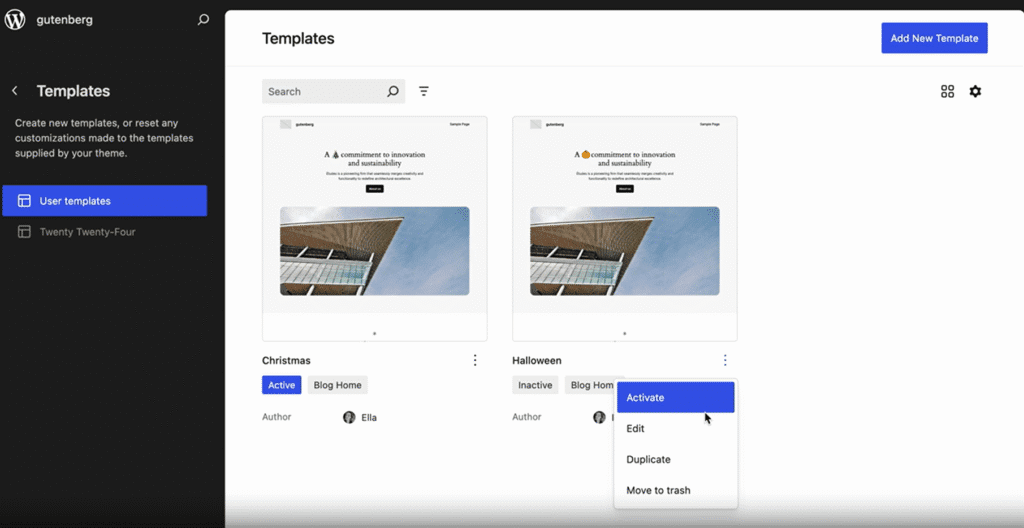
- Multiple templates per slug
You can now create and store multiple templates for the same page type (slug). For example, a blog post can have separate templates for guest authors, featured stories or sponsored posts. This allows teams to experiment with layouts without overwriting existing ones.
- Draft templates
Templates can now be saved as drafts before going live. This gives designers the ability to test layouts, review them internally and publish when ready – similar to how content drafts work in the block editor.
- Safer theme switching
Switching themes is now much safer. WordPress 6.9 retains custom templates and design settings during a theme switch, reducing the risk of losing layouts or custom styling. This feature especially benefits sites transitioning from classic to block themes.
Pro tip: If you manage multiple WordPress sites, test theme changes in a staging environment first to ensure all templates and customizations remain intact.
Also read: How to Manage WordPress Themes and Plugins
3. Developer & API enhancements
WordPress 6.9 strengthens developer capabilities with new APIs and improved interactivity tools designed for automation, integration and advanced site behavior.
- Abilities API (new)
A major addition in WordPress 6.9, the Abilities API provides a structured way for developers to register callable functions and expose them for automation or external tools. It lays the groundwork for AI integrations, scripting and third-party service connections.
Test: Developers should experiment with the Abilities API package in local/dev environments to plan integrations and automation scripts.
- Interactivity API improvements
The Interactivity API receives updates that simplify building dynamic, app-like experiences. Blocks can now handle richer client-side interactions and load assets more efficiently, improving front-end performance without heavy custom code.
Test: Plugin and theme developers should test interactive patterns (for example, lazy loading scripts/styles for blocks) to ensure compatibility and performance.
- Block bindings & callable capabilities
Enhancements in block bindings allow plugins and external applications to interact with WordPress more seamlessly. This helps automate content updates, data synchronization and external API integrations.
4. Performance, hosting impact & future-proofing
WordPress 6.9 introduces several under-the-hood improvements that enhance speed, stability and compatibility.
- Performance optimizations
6.9 continues incremental performance work: editor responsiveness, caching gains and reduced server round-trips. In editing flows, it focuses on many fixes that landed between Beta 1 and Beta 2 (dozens of editor fixes).
- PHP 8.5 compatibility
WordPress 6.9 is fully compatible with PHP 8.5, releasing later in November 2025. Running your site on PHP 8.5 ensures better performance, enhanced security and long-term support for upcoming WordPress versions.
- Hosting readiness
To achieve the best results, ensure your hosting setup meets the latest WordPress requirements: PHP 8.2+ and MySQL 8.0+ with sufficient memory allocation. Using modern caching and CDN layers further boosts site performance.
5. Accessibility & site-editor refinements
Improvements focused on keyboard navigation, ARIA/screen-reader support and clearer focus styles to make the Site Editor more accessible. This improves compliance and the overall user experience for contributors.
Test: Run accessibility checks (keyboard navigation, NVDA/VoiceOver tests) in staging for key admin tasks like template editing and block insertion.
6. Beta & testing notes (practical)
The 6.9 Beta releases are live. Beta 1 and Beta 2 include many editor fixes and feature tweaks. Beta testing is the right time to test plugin/theme compatibility and to file Trac tickets for regressions.
Action:
- Install the WordPress Beta Tester plugin to access beta builds safely on a staging environment (not a live site).
- Test plugins, themes and custom blocks for regressions or styling inconsistencies.
- Report issues through WordPress Trac or participate in Dev Chats and Bug Scrubs to follow progress.
Pro tip: Avoid installing prerelease versions on production WordPress websites. Always test in staging first to ensure stability before the final rollout.
Quick summary for site owners & developers
- Site owners: Test critical flows (checkout, forms, logins) on staging; ensure hosting runs PHP 8.3/8.4 and has recent backups.
- Developers: Experiment with the Abilities API and Interactivity API early; update plugin/theme tests to account for multiple templates per slug and block-level collaboration features.
- Agencies: Use the new template management to create variant templates per client/slug and adopt Notes for internal reviews.
Hosting and site-readiness checklist
Before upgrading to WordPress 6.9, make sure your hosting setup meets the latest technical standards. This ensures your site runs smoothly, remains secure and fully supports WordPress 6.9 features.
| Area | What to check | Why it matters | Bluehost advantage |
|---|---|---|---|
| Recommended requirements | PHP 8.3+, MySQL 8.0+/MariaDB 10.6+, 512MB+ memory, CDN enabled | Ensures top compatibility and performance with WordPress 6.9 | Bluehost runs modern PHP versions by default, offers built-in CDN and optimized server configurations |
| Staging and backups | Test upgrades in staging and back up site files and database | Prevents downtime or data loss during updates | 1-click staging and automatic backups |
| Theme and plugin compatibility | Verify that all themes and plugins are updated before upgrading | Avoids potential breakages or slowdowns | Bluehost’s managed WordPress tools flag outdated plugins and ensure compatibility |
| Performance monitoring | Check page load speed, caching and resource usage post-upgrade | Detects performance issues early | Integrated caching and analytics dashboard |
| Migration and readiness | If using older PHP or WordPress versions, upgrade stack first | Reduces migration errors and ensures smooth updates | Guided migration tools and expert support |
Pro tip: Always test upgrades in staging first, then push live during low-traffic hours.
With Bluehost’s WordPress hosting, you get an environment that’s already optimized for new releases like WordPress 6.9. You get to experience automated updates, advanced caching and compatibility support for the latest PHP versions and much more.
It’s built to handle performance spikes, simplify maintenance and ensure your site remains future-ready as WordPress continues to evolve. Get started with Bluehost today and experience seamless WordPress 6.9 compatibility from day one.
Upgrade-risk management: How to safely roll out WordPress 6.9
Upgrading to WordPress 6.9 is generally smooth but skipping a few precautions can lead to avoidable issues like downtime or broken layouts. Here’s how to manage the process safely.
Common upgrade risks
- Plugin or theme conflicts: Older extensions may not yet support WordPress 6.9 or PHP 8.4.
- Caching or CDN errors: Outdated cache files can cause pages to display incorrectly.
- Performance regressions: Large sites may experience temporary slowdowns during reindexing or plugin initialization.
- Live site disruptions: Directly upgrading on production servers can result in errors visible to visitors.
Safe upgrade practices
- Test first, deploy later: Always perform the upgrade on a staging site to identify potential conflicts.
- Back up completely: Create a full backup of your database and site files before updating.
- Deactivate non-essential plugins: This reduces the risk of unexpected crashes during the upgrade.
- Monitor post-upgrade performance: Use your hosting dashboard or tools like Jetpack to track uptime, load times and server response.
- Schedule upgrades during off-peak hours: Choose a time when traffic is low to minimize user disruption.
With Bluehost WordPress hosting, you can use built-in 1-click staging, automatic backups and real-time monitoring to handle updates securely. The platform also supports automatic WordPress core, plugin and theme updates, so your site always runs on the latest version with minimal manual effort.
Final thoughts
The WordPress 6.9 release wraps up 2025 with major improvements in collaboration, editing experience and developer flexibility. Scheduled for December 2, 2025, it strengthens WordPress’s foundation with refined APIs, enhanced accessibility and full compatibility with PHP 8.5 – ensuring better performance and future readiness for every site.
As always, WordPress’s evolution is powered by its open-source community. If you’d like to contribute, explore the Make WordPress Core handbook and join the discussions shaping upcoming releases.
If you’re planning to upgrade, Bluehost provides full WordPress 6.9 compatibility, staging environments, automatic backups and optimized hosting. We help you transition confidently and unlock the best of WordPress 6.9.
Get your site ready for WordPress 6.9 with Bluehost – where powerful hosting meets effortless upgrades.
FAQs
The final release is set for December 2, 2025, following beta releases and release candidates that focused on bug fixes, testing and performance stabilization.
It focuses on editing, collaboration and developer capabilities, introducing the Abilities API, upgrades to the Interactivity API and better template and pattern management.
The new Abilities API provides developers with a more unified way to manage permissions and capabilities across plugins, themes and custom roles.
The Site Editor now includes smoother navigation, enhanced accessibility and refined design tools, helping users customize templates and patterns more easily.
Yes. WordPress 6.9 is fully compatible with PHP 8.5, ensuring better security, speed and compatibility with modern hosting environments.
No. Instead of introducing a new theme, this release focuses on improving block-based and classic theme performance through refined APIs.
You can safely test 6.9 using the WordPress Beta Tester plugin. Select the “Bleeding Edge” channel to preview new features on a staging site.
Visit Make WordPress Core to join development, testing, documentation or design discussions – everyone is welcome to contribute.
Ensure your hosting supports PHP 8.5 and automatic WordPress updates. Bluehost provides one-click updates, PHP 8.5 support and staging tools to simplify the upgrade process.
After updating, review your plugins, themes and custom code for compatibility, clear caches and test key site functions to ensure smooth performance.
Yes. The official WordPress Developer Blog and Core Dev Notes provide in-depth details on APIs, hooks and technical changes introduced in 6.9.

Write A Comment