 ChatGPT,
 Claude,
 Gemini,
 Grok — all four for

Key highlights
- Understand what structured data in SEO is and how Yoast SEO automatically generates schema markup for WordPress websites.
- Learn the core differences between Yoast SEO and Schema Pro, including how each plugin approaches schema markup and which one aligns with your site’s goals.
- Compare Yoast SEO vs Schema Pro to see when a dedicated schema plugin might be necessary.
- Discover why most WordPress sites rely on Yoast SEO’s built-in schema graph instead of adding extra plugins.
- Uncover which is the best schema markup plugin for WordPress so you can make a confident, data-backed decision to strengthen your site’s SEO performance.
If you’ve been investing time and effort into SEO, you already know that getting on the first page of Google is only half the battle. The real win comes when your listing stands out with star ratings, FAQ dropdowns, breadcrumbs or recipe details appearing directly in the search results. These eye-catching enhancements are powered by structured data, and in 2026, they are no longer optional for competitive websites.
Structured data tells search engines exactly what your content means not just what it says. When implemented correctly, it unlocks rich snippets that can dramatically boost your click-through rate, even if your ranking stays the same. And for WordPress users, two plugins dominate this space: Yoast SEO and Schema Pro.
Yoast SEO is one of the most installed WordPress plugins in history, with over 5 million active users. It automatically generates a fully connected schema graph that helps search engines understand how every part of your website relates.
Schema Pro, built by the team behind the Astra theme, focuses exclusively on creating structured data markup for specific page types.
So which one should you use? That depends on your goals, your experience level, and how much control you want over your schema output. In this in-depth comparison, we’ll break down both plugins across every dimension that matters so you can make the right call for your site.
Quick comparison table: Yoast vs Schema Pro
This comparison table provides a snapshot of how Yoast SEO and Schema Pro stack up against each other for WordPress sites in 2026. By evaluating core metrics like supported schema types and pricing, you can identify which tool fits your specific workflow and technical needs.
| Feature | Yoast SEO | Schema Pro |
|---|---|---|
| Primary focus | Complete SEO suite with built-in schema | Dedicated structured data plugin |
| Schema types | 14+ core types connected in schema graph | 10+ schema templates |
| Automation | Fully automated schema graph generated sitewide with minimal configuration | Medium-high – rule-based mapping |
| Page builder support | Works with all themes and builders automatically | Direct field mapping for some builders |
| Additional SEO features | Content analysis, redirects, internal linking, XML sitemaps | Schema markup only |
| Pricing (annual) | $118.80/year | ~$69/year unlimited sites |
| Bundled with Bluehost | Yes | No |
| Best for | Businesses and creators who want full SEO automation | Developers needing advanced schema control |
Yoast vs Schema Pro: Which plugin handles structured data better?
Determining the winner in structured data management requires looking beyond basic feature lists to see how each tool handles code generation. Here’s how these plugins generate JSON-LD and integrate with modern editors to maximize your visibility in search results.
1. Schema types & coverage
Yoast automatically generates a connected schema graph for your entire website, covering the most common use cases such as articles, breadcrumbs, authors and organizations. For most blogs, publishers and business websites, this automated setup is more than enough to qualify for rich results without additional configuration.
Schema Pro extends schema coverage further with templates for niche use cases like recipes, courses and job listings. However, most websites rarely require these specialized schemas, and Yoast’s automated schema graph already covers the most common SEO-driven content types.
Winner: Depends on needs. Yoast for automated schema setup, Schema Pro for niche schema templates.
2. Ease of use & setup
Yoast integrates seamlessly into your existing WordPress dashboard. Its setup wizard walks you through configuration in minutes, and once active, it works largely in the background, automatically applying schema to your content without requiring manual input on each page or post. For beginners, this is a massive advantage.
Schema Pro requires a bit more upfront configuration, but its interface is clean and logical. You set up schema rules globally (e.g., apply Product schema to all WooCommerce product pages) or override settings on individual pages via a meta box. It’s more powerful, but does have a steeper initial learning curve.
Winner: Yoast SEO. Its automated configuration makes structured data implementation effortless for most websites.
3. Automation vs. manual control
Yoast’s greatest strength is its automation. Once configured, it intelligently generates schema markup across your entire site based on content type, site settings and user roles with minimal ongoing effort required from you. It’s a set-it-and-mostly-forget-it solution.
Schema Pro takes a different approach: it gives you control. You can map specific database fields to schema properties, override global settings per post, and fine-tune exactly what data gets sent to search engines. This level of control is useful for developers working with custom fields or specialized schema requirements. However, for most website owners, Yoast’s automated schema generation removes the need to manually configure structured data at all.
Winner: Yoast for automation and simplicity, Schema Pro for advanced customization.
4. Compatibility with page builders & themes
Yoast works with virtually every WordPress theme and page builder, but its schema integration with third-party tools is relatively shallow. It applies schema based on post type and template, but doesn’t deeply interact with page builder content structures.
Schema Pro includes deeper integrations with some page builders, allowing schema fields to be mapped from builder elements. It integrates deeply with Elementor, Beaver Builder, Divi and naturally with the Astra theme ecosystem. If your site is built on a page builder, Schema Pro can pull in content from those elements more effectively.
Winner: Schema Pro for page builder users.
5. Performance & site speed
Both plugins output schema in JSON-LD format, which Google recommends and which has no meaningful impact on page rendering. Yoast tends to load a broader set of schema scripts site-wide, while Schema Pro applies markup more surgically only on pages where you’ve set up rules. For speed-conscious site owners, Schema Pro’s targeted approach has a slight edge, though the real-world difference is negligible for most sites.
Winner: Tie
6. Pricing
Yoast SEO offers a solid free tier that covers schema basics. Yoast Premium costs $118.80/year for a single site a fair price for a full-featured SEO suite, though it adds up quickly if you manage multiple websites.
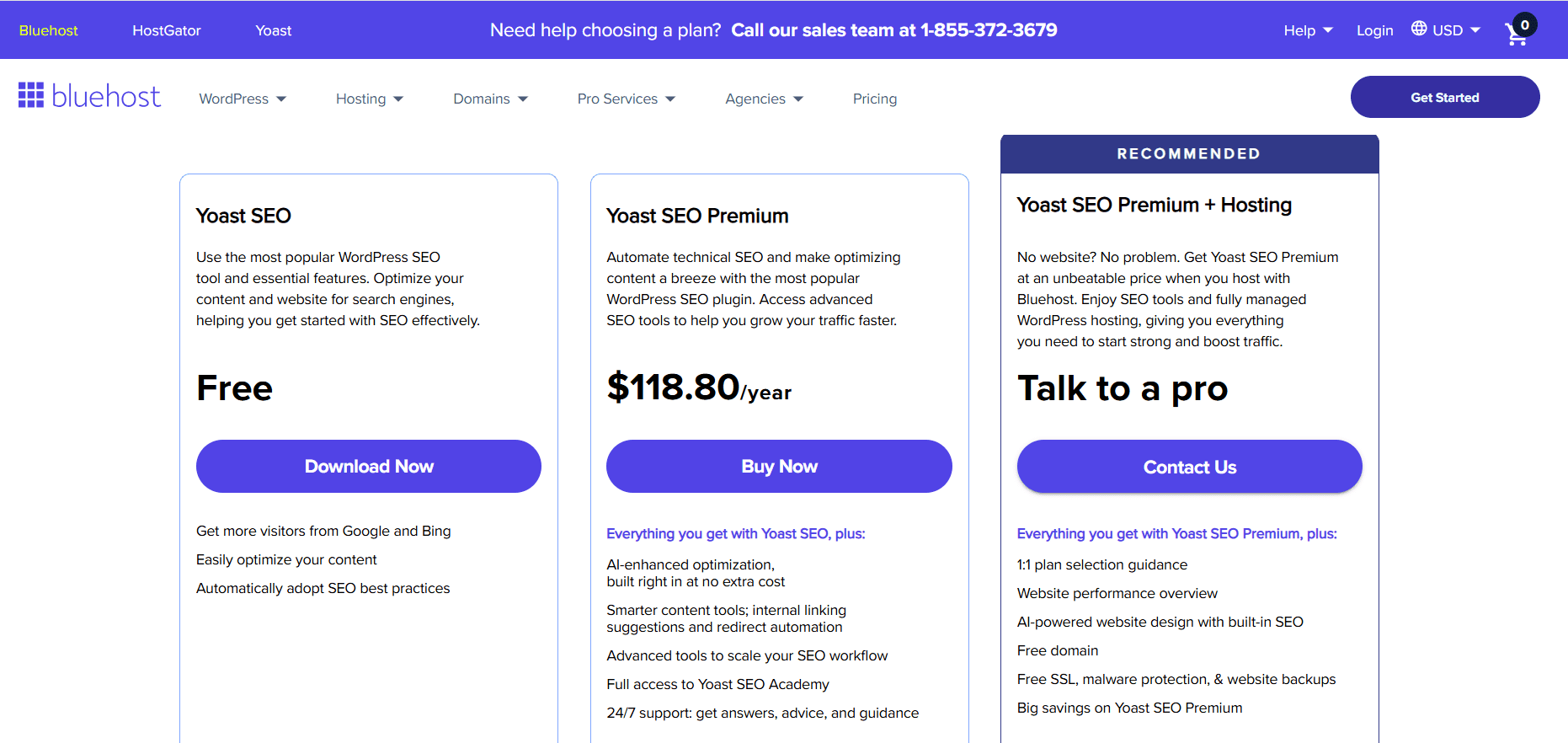
Schema Pro costs approximately $69/year for unlimited sites. However, Yoast SEO Premium includes a full SEO toolkit including technical SEO automation, internal linking guidance, redirects and AI optimization features in addition to schema markup.

7. Updates & support
Yoast has a large, dedicated team that consistently updates the plugin in response to Google algorithm changes and WordPress core updates. With over 5 million active users, their update cycle is reliable and well-documented.
Schema Pro is actively developed by Brainstorm Force, a reputable team with a strong track record. Their documentation is thorough, and their support is responsive. However, Yoast’s sheer size gives it a slight edge in update frequency and community resources.
Winner: Slight edge to Yoast for update reliability.
How we tested and reviewed these schema plugins
To provide an accurate Yoast SEO vs Schema Pro comparison we evaluated both tools across three critical areas: valid JSON-LD output, overall ease of use and direct performance impact. We installed each plugin on identical staging sites to see how they handled generating rich snippets for complex content like recipes and products. Next we ran their markup through Google’s Rich Results Test to verify that search engines could parse the data without errors.
Because site speed is crucial for SEO we measured the performance impact of both tools using high-performance hosting environments backed by a 99.9% Uptime Guarantee. This ensured our speed results were highly accurate and not skewed by server lag. By looking at the true difference between Yoast and Schema Pro in real-world conditions you can build with confidence and choose the structured data solution that best fits your technical needs.
Also read: Yoast vs All in One SEO: The 2025 Breakdown You Need Before Choosing
Can you use both together?
Not if you’re using Yoast SEO. Many website owners wonder whether they need additional plugins to handle structured data, but Yoast SEO already has you covered and requires no extra tools.
Yoast SEO is a comprehensive, all-in-one SEO plugin that handles everything from on-page optimization to structured data output, all from a single unified dashboard. That means no plugin conflicts, no duplicate JSON-LD output and no unnecessary complexity cluttering your WordPress setup.
Here’s what Yoast SEO manages for you out of the box:
- Meta tags and titles, XML sitemaps, readability analysis, redirect management and full schema/structured data output, automatically generated and correctly formatted for search engines.
- Getting your schema set up in Yoast is straightforward. Simply navigate to SEO then Search Appearance and Yoast will handle your structured data configuration from there. No third-party plugin needed.
- For serious SEOs managing established websites, keeping everything under one robust plugin isn’t just simpler, it’s smarter. Yoast SEO eliminates the risk of schema conflicts that come with running multiple plugins, giving you cleaner output and more reliable results.
Yoast SEO isn’t just an on-page SEO tool. It’s a complete SEO solution and for most websites, it’s the only plugin you’ll ever need.
The best WordPress schema plugins overview
With so many WordPress schema plugins on the market, finding the right one for your site can feel overwhelming. This guide cuts through the noise and compares the best options so you can focus on what matters most growing your rankings.
Why compare Schema plugins?
- Evaluating the best WordPress schema plugins ensures you select a platform that meets your site’s specific technical demands
- Avoid paying for features you don’t need or missing out on critical markup
- Taking a step back to assess your unique goals prevents costly mistakes in the yoast vs schema pro debate
Core differences between Yoast and Schema Pro
- The key difference often comes down to the specialized requirements of your business
- Brick-and-mortar stores may need specialized local SEO features to dominate regional search results
- Online retailers may require advanced WooCommerce integrations to display real-time product inventory
- Focusing on your exact technical requirements helps clarify which tool will drive more traffic to your content
Making the right choice early
- Comparing Yoast vs Schema Pro pricing ensures your structure remains error-free for years to come
- Making the right choice early is the best way to prevent technical debt as your website scales
- Switching SEO platforms later can lead to broken rich snippets and temporary drops in search visibility
- Carefully analyzing Yoast SEO vs Schema Pro alongside your long-term business roadmap keeps your backend organized
Use case scenarios: Which plugin should you choose?
The right plugin ultimately depends on your specific situation. Here’s a clear breakdown:
- Bloggers & content creators: Yoast SEO. The free tier covers Article schema, breadcrumbs and author markup. Simple, effective, zero cost.
- eCommerce stores: Yoast SEO Premium. Yoast’s WooCommerce SEO integration automatically adds structured data for products, pricing and reviews while also optimizing product pages for search engines..
- Restaurants & local businesses: Yoast SEO Premium. With the included Local SEO plugin, automated business schema, multi-location management and Google Maps integration, it delivers strong local search visibility without extra setup complexity.
- News & media sites: Yoast SEO Premium. The built-in News SEO plugin, optimized XML News sitemaps and advanced NewsArticle schema make it a natural fit for publishers targeting Google News visibility.
- Freelancers & consultants: Yoast SEO. Built-in SEO analysis, schema markup and content optimization make it ideal for personal brand websites.
- Agencies managing multiple client sites: Yoast SEO Premium. With real-time SEO guidance, AI optimization tools, redirect management and 24/7 expert support, it standardizes SEO workflows across client projects efficiently.
- Advanced SEOs who want control: Yoast SEO Premium. Automated technical SEO, built-in schema handling, AI-powered optimization and granular content analysis give professionals both control and scalability without plugin stacking.
- Online course creators & niche schema users: Schema Pro. Course and Review schema can be added quickly to improve visibility in search results, helping smaller creators compete without needing a full SEO automation suite.
Final verdict
Yoast SEO wins for: Businesses and creators who want a complete SEO ecosystem, including AI-powered optimization, technical SEO automation, News SEO, Local SEO and Video SEO all in one plugin. It’s ideal for content creators, eCommerce brands, publishers, local businesses and growing marketing teams that need scalability without juggling multiple tools. When bundled with Bluehost hosting, it becomes a powerful, cost-effective foundation for a high-performance WordPress site.
Schema Pro wins for: Users who primarily need structured data without a full SEO suite. Freelancers, consultants, small course creators, event organizers and developers who want focused schema control, dynamic field mapping and lightweight implementation may prefer its dedicated approach.
Our recommendation: If you’re building a serious content platform, scaling an online store or running a professional website, buy Yoast SEO from Bluehost. If your goal is to add advanced structured data to a simpler site without additional SEO features, Schema Pro is a strong complementary option. For most WordPress websites, Yoast SEO alone provides everything needed to implement structured data and optimize search performance. Schema Pro may be useful for developers who require highly specialized schema configurations.
Launch your WordPress site, get Yoast SEO on Bluehost activated in minutes and start showing up in Google’s rich results.
Our pick for the best WordPress schema plugin
When comparing Yoast SEO vs Schema Pro, the decision comes down to overall SEO strategy rather than site size. Schema Pro is built specifically for structured data implementation, offering granular schema control and dynamic field mapping. However, Yoast SEO Premium delivers a complete SEO ecosystem that goes far beyond schema markup. It includes automated technical SEO, AI-powered title and meta description suggestions, internal linking guidance, redirect management and integrated Local, News and Video SEO features.
In terms of value, Yoast SEO offers greater long-term scalability by eliminating the need for multiple SEO plugins. It prepares your site for search engines from day one and continues to optimize as you grow. Schema Pro is ideal when structured data customization is the primary requirement, but for most professional websites, Yoast provides a stronger all-in-one foundation.
Also read: Best WordPress SEO Plugins: Top 15 Picks for 2026
Final thoughts
Structured data is one of the most underleveraged SEO opportunities for WordPress site owners. A well-implemented schema strategy can make your listings stand out in search results with stars, FAQs, prices, and rich snippets that attract clicks and boost visibility.
For most website owners, Yoast SEO provides everything you need to implement structured data effortlessly. Its automated schema output, combined with full SEO features—like content analysis, redirects and internal linking—gives you a complete SEO ecosystem without juggling multiple plugins. When bundled with Bluehost, setting up Yoast SEO is seamless, letting you activate a high-performance SEO foundation in minutes.
The key takeaway? Don’t wait. Every day your pages go live without optimized schema is a missed opportunity in the SERPs. With Yoast SEO on Bluehost, you get powerful, automated SEO and schema markup in one click, so your content is always ready for Google’s rich results.
Launch your WordPress site the smart way. Get Yoast SEO on Bluehost today and start showing up in Google’s rich results instantly.
FAQs
No. Yoast provides a complete automated schema foundation suitable for the vast majority of WordPress websites. When evaluating Yoast SEO vs Schema Pro, you will find that Schema Pro is necessary for advanced dynamic field mapping and custom post types.
The main difference between Yoast and Schema Pro is their level of specialization and automation for structured data. Yoast serves as an all-in-one foundational SEO tool that provides basic schema markup through a simple configuration wizard and post-level meta boxes. In contrast, Schema Pro is a specialized powerhouse that automatically maps existing database fields to complex schema properties across your entire website.
Yoast vs Schema Pro pricing differs significantly based on features and their respective licensing models. Yoast offers a free foundational version with premium upgrades available for advanced features strictly on a per-site basis. Conversely, Schema Pro is a premium-only plugin that frequently offers unlimited-site licenses, making it highly cost-effective for developers and agencies managing multiple domains. When evaluating your budget, the best choice depends entirely on whether you need a single-site general SEO tool or a scalable structured data solution for a large portfolio.
No, WordPress core does not automatically add comprehensive JSON-LD schema markup to your website. While it provides basic HTML structure, it completely lacks the detailed backend code required to earn rich snippets like star ratings or product prices in search results. You must use dedicated tools to generate this markup effectively. By utilizing automated tools in the Yoast vs Schema Pro ecosystem, you can establish a professional foundation and ensure search engines understand your specific content categories perfectly.

Write A Comment