 ChatGPT,
 Claude,
 Gemini,
 Grok — all four for

Key highlights
- Understand the key differences between URL Rating and Domain Rating in Ahrefs and know which metric matters most for your specific SEO goals.
- Learn how to check your URL Rating using an online checker and interpret the score to evaluate the strength of individual pages on your site.
- Explore proven strategies to improve your URL Rating by building high-quality backlinks that pass link equity directly to your target pages.
- Uncover how Domain Rating is calculated and why a high DR does not always guarantee strong rankings for every page on your website.
- Know how to use both metrics together to prioritize link-building efforts, spot SEO gaps and make smarter decisions about your content strategy.
If you use Ahrefs for SEO, you’ll see two authority metrics everywhere: Domain rating (DR) and URL rating (UR). At first glance, they look similar. Both use a 0–100 logarithmic scale and both measure backlink authority. But they answer very different questions.
Confusing the two leads to bad SEO decisions, wasted link-building efforts and inaccurate competitor analysis.
Domain rating (DR) and URL rating (UR) are both Ahrefs-native metrics, both designed to measure backlink-based authority. The difference is the level they operate at. DR measures the strength of an entire website’s backlink profile. UR measures the strength of a single page’s backlink profile. Understanding that distinction and knowing how to use each metric strategically is what separates SEOs who guess from those who execute with precision.
In this guide, you’ll get a full breakdown of URL rating vs domain rating, how Ahrefs calculates DR and UR, a feature-by-feature comparison of the two metrics. We will also discuss the tools available to check it.
What is domain rating (DR) in Ahrefs?
Domain Rating is Ahrefs’ proprietary metric that measures the overall strength of a website’s backlink profile on a scale from 0 to 100. The higher the number, the more authoritative the domain is considered to be and the more capable it is of passing link equity to the pages it contains.
How Ahrefs calculates DR?
DR is calculated using three core factors:
- Number of referring domains: Unique websites linking to your domain, not total backlinks.
- Authority of linking domains: A DR 80 link passes far more authority than a DR 10 link.
- Outbound link distribution: If a domain links to thousands of sites, each link passes less equity.
The logarithmic scale
DR is logarithmic, not linear. Moving from DR 10 to DR 20 is relatively easy. Moving from DR 60 to DR 70 requires an enormous amount of additional backlink authority. Moving from DR 80 to DR 90 is the domain of Wikipedia, major national news outlets and decades-old institutional websites. This is why you should always compare DR within your specific niche. A DR 40 is dominant in a local plumbing market and barely competitive in the personal finance space.
DR benchmark reference
- DR 0–20: New or underdeveloped site with minimal backlinks
- DR 21–40: Growing site with some link acquisition
- DR 41–60: Established site with solid backlink profile
- DR 61–80: High-authority site- well-known brand or niche leader
- DR 80+: Major authority- large media outlets, established brands
Also read: How Much Is My Domain Worth? Quick Valuation Guide
What is URL rating (UR) in Ahrefs?
URL Rating measures the backlink strength of a specific individual page (URL) on a 0–100 logarithmic scale. Where DR is about the whole website, UR zooms in to ask: “How strong is this particular page’s link profile?”
How Ahrefs calculates UR
UR is calculated based on backlinks pointing directly to that specific URL not the domain, not the homepage, but that exact page. It also factors in the quality of those backlinks (including the UR of the pages linking to it) and critically, the internal links pointing to that page from other pages on the same domain, while Ahrefs states that only followed links pass UR.
This last point is hugely underappreciated. Internal linking is one of the most powerful and controllable ways to improve URL Rating and most site owners barely think about it.
URL rating vs domain rating: Key differences
Understanding the practical differences between UR and DR determines how you approach link building, competitor analysis, content strategy and SERP targeting. Here’s a side-by-side breakdown:
| Factor | URL rating (UR) | Domain rating (DR) |
|---|---|---|
| Scope | Single page | Entire domain |
| Influenced by | Page-level backlinks + internal links | Domain-wide backlink profile |
| Speed of change | Faster responds to page-specific activity | Slower requires site-wide changes |
| Primary use case | Evaluate individual page strength | Assess overall site authority |
| Best applied to | Content targeting, link building ROI | Competitor analysis, site acquisitions |
| Mirrors Google’s logic | Closely (page-level, like PageRank) | Loosely (domain-level proxy only) |
When DR matters more
DR is the right metric when you’re evaluating a domain as a whole when you’re considering a site acquisition, prospecting for link building targets, benchmarking your site against competitors in aggregate, or assessing whether a new domain has a history of authority building.
When UR matters more
UR is the right metric when you’re trying to rank a specific page. Before targeting a keyword, check the UR of the pages currently ranking in the top five. That number tells you the real bar you need to clear. If the top results have UR 35–45, a well-linked page on a mid-DR domain can compete. If the top results have UR 65+, you need a serious link building campaign targeting that specific URL.
Also read: Internal Linking for SEO: Boost Rankings in WordPress
URL rating vs domain rating: Feature-by-feature comparison
Before diving into strategy, it helps to see both metrics broken down across every dimension that matters to an SEO practitioner. Here is a comprehensive feature-by-feature comparison:
Measurement scope: URL Rating measures the authority of a single, specific one page URL. Domain rating measures the authority of the entire website as one consolidated entity. This is the most fundamental difference between the two: one is granular, one is broad.
What influences the score: UR is shaped by the backlinks pointing directly to that page, the UR of those linking pages, the follow/nofollow ratio of inbound links and the internal links flowing to that page from elsewhere on the same site. DR is shaped by the total number of unique referring domains pointing to the website, the DR of those linking domains and how many outbound links each linking domain distributes across other sites (equity dilution).
Speed of change: UR responds relatively quickly. Earn three strong backlinks to a specific article and you may see UR movement within weeks. DR changes slowly because it reflects the backlink profile of an entire domain. Isolated campaigns rarely move it. Meaningful DR growth typically requires months of sustained, site-wide link acquisition.
How it’s calculated: Scale and model
| Feature | URL rating (UR) | Domain rating (DR) |
|---|---|---|
| Scale | 0–100 logarithmic | 0–100 logarithmic |
| Unit measured | Individual page/URL | Entire domain |
| Core input | Page-level backlinks + internal links | Unique referring domains site-wide |
| Link quality weighting | Yes, UR of linking pages matters | Yes, DR of linking domains matters |
| Internal links counted | Yes, significant factor | No, external links only |
| Nofollow links | Partially weighted | Partially weighted |
| Speed of change | Faster (page-specific) | Slower (site-wide) |
| Closest Google equivalent | PageRank (page-level) | Domain Authority (approximation) |
| Primary SEO use | Page ranking potential | Site-level benchmarking |
| Best for | Keyword targeting, link ROI | Competitor analysis, prospecting |
| Affected by new content | Only if linked | No, unless links are built to it |
| Actionable via internal linking | Yes, directly | No, internal links don’t move DR |
Internal links: The key differentiator This row in the table deserves special emphasis. Internal links directly affect UR but have no impact on DR. This means you can meaningfully improve a page’s UR through your own site architecture, at zero cost and with no external dependencies. DR cannot be improved this way it only responds to external referring domains. This makes UR the more actionable of the two metrics for most SEO campaigns.
Relationship to Google’s ranking systems: UR is the closer approximation of how Google actually evaluates individual pages. Google’s original PageRank algorithm is page-level by design it calculates the authority of each URL independently based on the links pointing to it. DR has no direct equivalent in Google’s systems; it’s a useful third-party proxy for understanding a site’s overall link footprint, but Google does not assign a single authority score to entire domains the way Ahrefs’ DR does.
When a high score in one does not guarantee the other: A website can have DR 70 and still have dozens of pages with UR 5 or below pages that were never linked to internally or externally. Conversely, a DR 25 site can have a single resource page with UR 55 if that page attracted consistent editorial links over time. High DR creates potential; high UR on the right pages creates actual rankings.
How to check URL rating and domain rating in Ahrefs: Step-by-step
Ahrefs is the native home of both UR and DR. Here is exactly how to find each metric, whether you’re checking your own site, a competitor or a specific page you want to outrank.
How to check domain rating (DR) in Ahrefs
Step 1: Log in to your Ahrefs account Go to app.ahrefs.com and sign in. You’ll land on the Ahrefs dashboard.
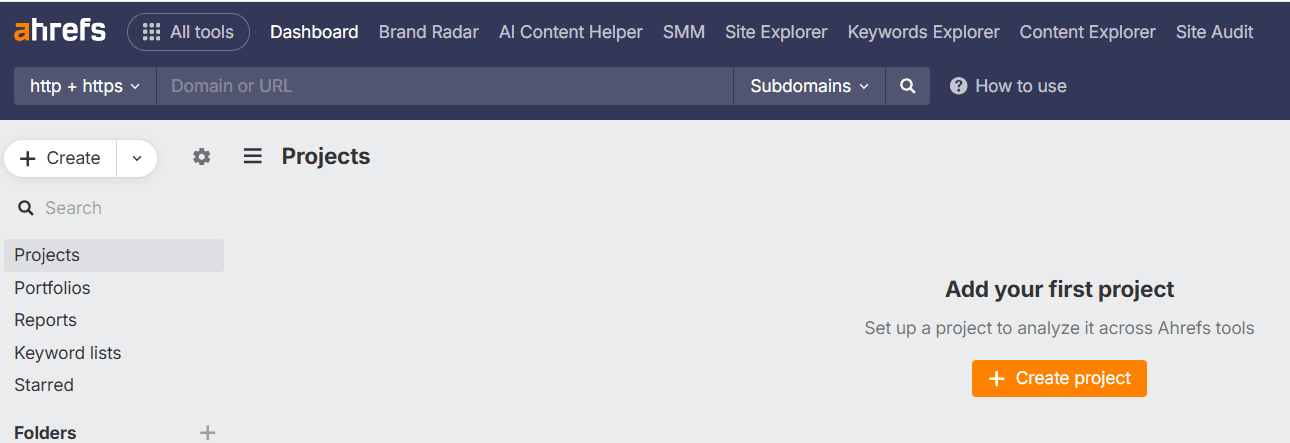
Step 2: Open Site Explorer Click on “Site Explorer” in the top navigation bar. This is the primary tool for all backlink and authority analysis in Ahrefs.
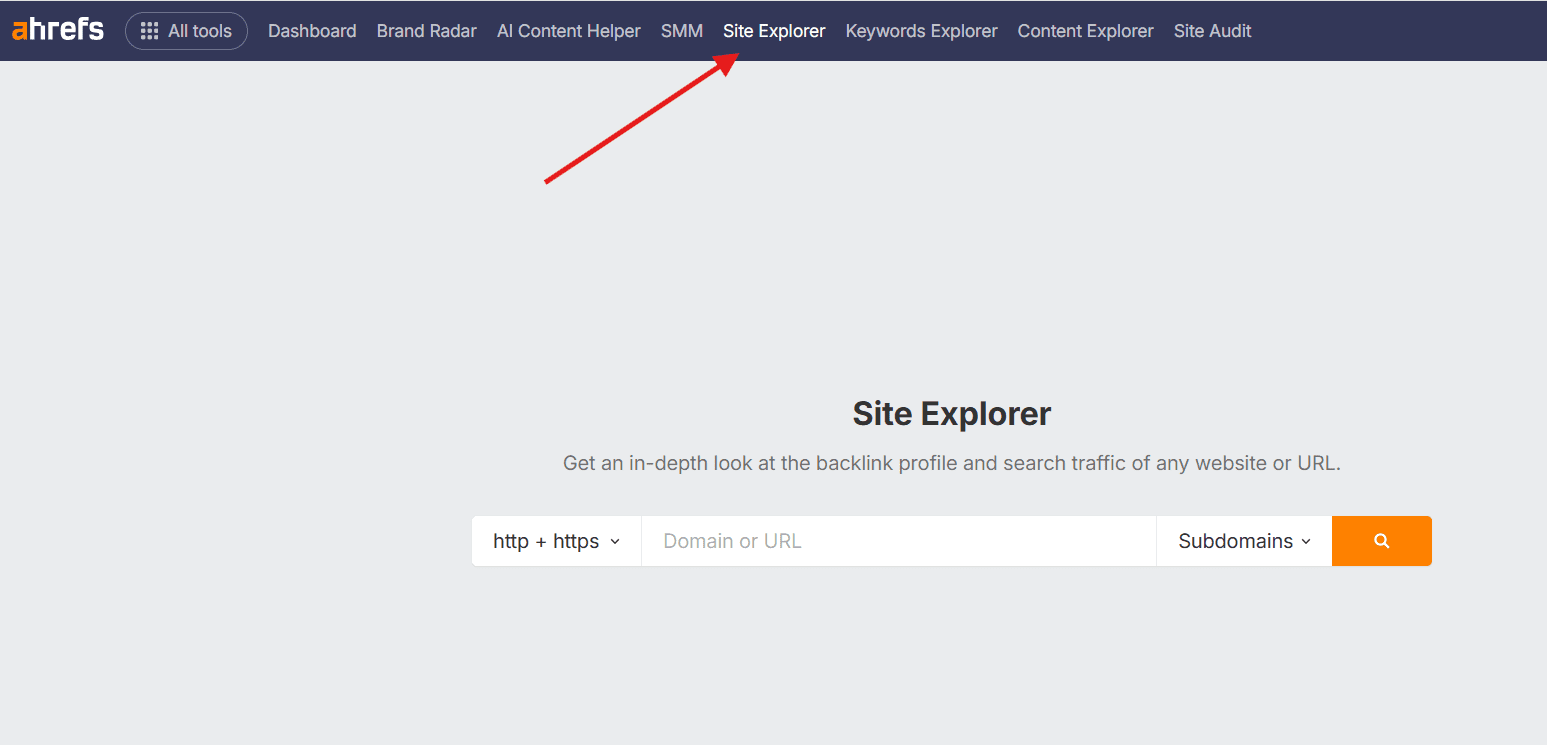
Step 3: Enter the domain you want to check Type the domain into the search bar for example, [yourwebsite].com. Make sure the dropdown to the left of the search bar is set to “Domain” (not “Exact URL” or “Prefix”). This ensures Ahrefs evaluates the entire domain rather than a single page.
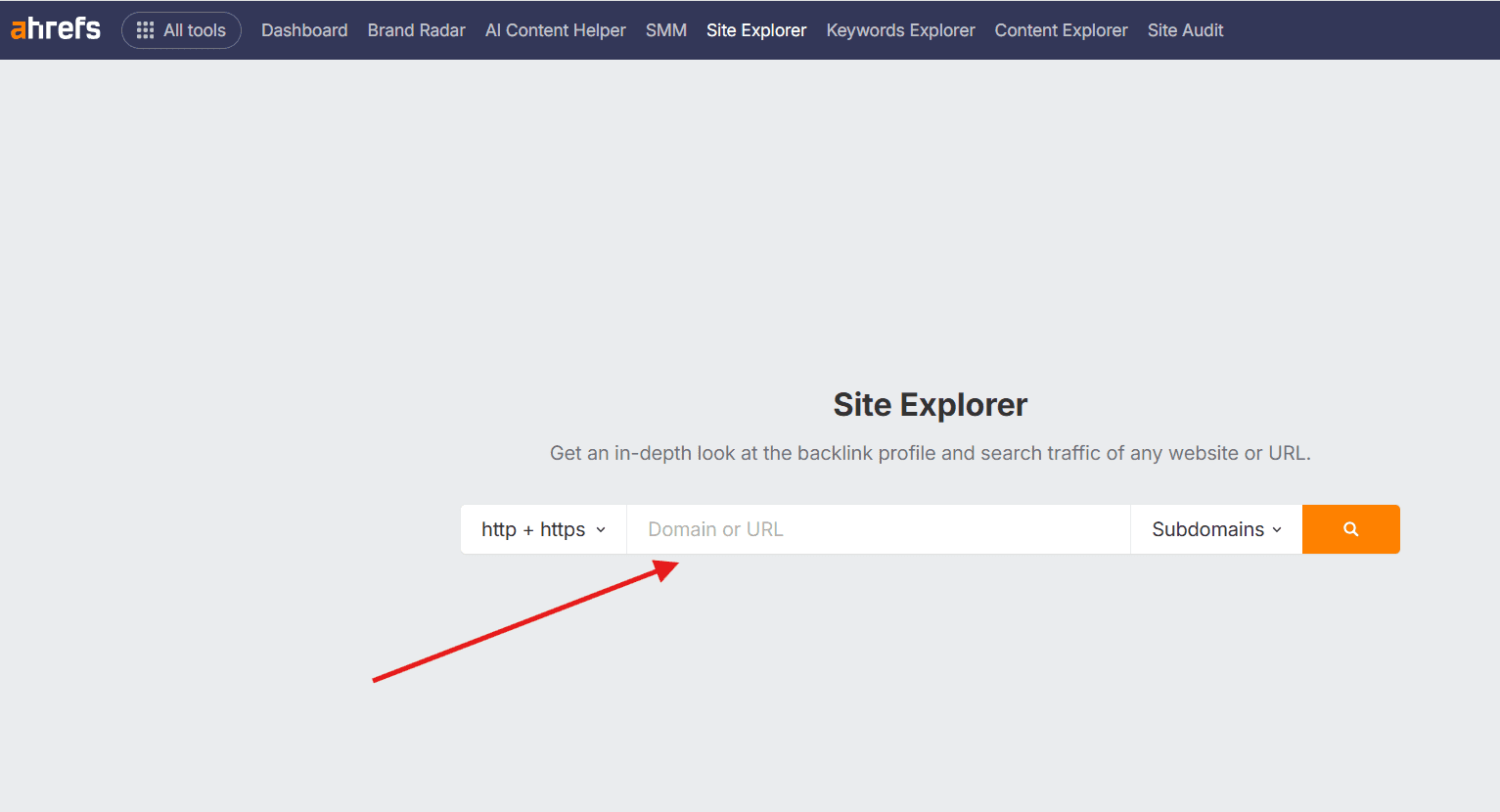
Step 4: Hit Search Press Enter or click the search icon. Ahrefs will load the Site Explorer overview for that domain within a few seconds.
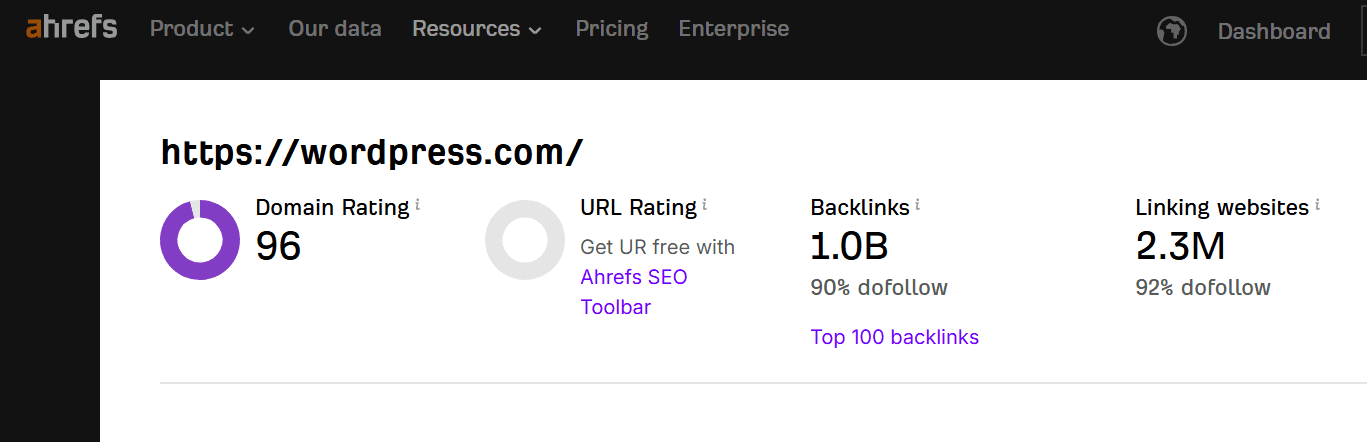
Step 5: Read the DR score The Domain Rating score appears prominently in the top-left area of the overview dashboard, displayed as a large number alongside a circular gauge. You’ll also see the number of referring domains and backlinks directly below it, which gives you context for what’s driving the DR.
How to Check URL Rating (UR) in Ahrefs
Step 1: Open site explorer: From the Ahrefs dashboard, click “Site Explorer” in the top navigation the same tool used for DR.
Step 2: Enter the specific page URL: Paste the full URL of the page you want to evaluate into the search bar for example, yourwebsite.[com]/blog/your.[article]. This must be the complete URL, including the path. Change the dropdown to “Exact URL,” so Ahrefs analyzes only that specific page and not the entire domain.
Step 3: Hit search: Press Enter. Ahrefs loads the overview for that specific URL.
Step 4: Read the UR score: The URL Rating appears in the top-left of the overview, directly below the domain’s DR. It’s displayed as a separate number with its own gauge. You’ll see UR alongside the number of referring domains pointing specifically to that page which is the primary driver of the score.
Step 5: Analyse the backlink profile of that page: In the left-hand sidebar, click “Backlinks” under the Backlink Profile section. This shows every external link pointing to that specific URL, along with the UR of each linking page. This is where you can assess link quality and identify gaps versus competitors.
Step 6: Check internal links to the page (optional but important): Check internal links to the page (optional but important) In Ahrefs, use the Internal links report in Site Explorer or the Site Audit tool to see which internal pages are linking to your target URL.
How to improve URL rating of your webiste?
Improving URL Rating is more targeted than improving Domain Rating. Instead of building the general authority of your entire site, you’re funneling link equity to a specific page. Here’s how to do it effectively:
1. Build high-quality backlinks directly to the specific page
The most direct path to higher UR is earning backlinks that point to your target URL, not your homepage, not a category page, but the specific page you want to rank. This means your link-building outreach needs to be page-specific.
Guest posting with deep links is one of the most reliable methods. When contributing to external publications, request that your contextual link points directly to your target URL. Editors often default to homepage links; always specify the page you want linked.
Digital PR and data-driven content are among the highest-leverage UR builders. Original research, proprietary statistics, surveys, or industry reports attract editorial links that point directly to the source URL. One strong data piece linked by ten publications can push a page’s UR from 20 to 45.
Broken link building is another targeted approach. Find broken links on relevant sites that used to point to content similar to yours, reach out to the site owner and suggest your URL as the replacement. The link lands exactly on your target page.
2. Use internal linking strategically
Internal linking is the most underused lever in UR building and it costs nothing. Every link from another page on your site to your target URL passes PageRank-like equity from that page’s UR to your target page.
Start by identifying your highest-UR pages. These are the link magnets on your site the pages that have accumulated the most external backlinks. Add contextual internal links from those pages to your target URL using relevant, descriptive anchor text.
Audit your orphan pages, pages with no internal links pointing to them. These pages have artificially deflated UR because no equity reaches them from the rest of the site. A single internal link from a well-linked page can meaningfully move their UR.
Build topic clusters and content hubs. Create supporting content that naturally links back to your pillar page. Five supporting articles each linking to one pillar page create a concentrated flow of internal equity, systematically lifting the pillar’s UR over time.
3 Prioritize link quality over quantity
One link from a UR 70 page is worth more to your target URL’s rating than twenty links from UR 10 pages. When evaluating link prospects for a specific page, filter by the UR of the linking page not just the DR of the linking domain.
It’s also worth auditing existing backlinks to your target page for toxic or spammy links. Low-quality links can depress UR by consuming link equity without contributing meaningful authority. If you’re dealing with manipulative backlinks, try to remove them at the source first and use Google’s Disavow Links tool only when necessary, such as for unnatural links that have caused or could cause a manual action.
If you have multiple URLs covering the same topic (duplicate content, old URL structures or thin variations), consolidate them with 301 redirects to your canonical target URL. This concentrates all historical link equity into one URL and typically produces a noticeable UR lift.
4 Create link-worthy content on the target page
Sometimes the fastest path to improving UR is giving people a stronger reason to link to that specific page. Consider upgrading the page with original data or a proprietary study, adding an interactive tool or calculator, building an embedded resource like a template or checklist or updating outdated statistics so your page remains the most current and citable source on the topic. Links are earned by content that is genuinely worth citing. When you improve the page itself, your outreach converts at a higher rate and organic link earning accelerates.
Also read: Off Page SEO Checklist – Complete 2026 guide
Common misconceptions about UR and DR
Clearing up these misconceptions will save you wasted budget and misdirected effort:
- High DR means all my pages will rank: Every page must earn its own UR. A DR 80 domain with a brand-new, unlinked page will still have a UR of 0–5 on that page. DR does not automatically lift page-level authority.
- UR doesn’t matter if DR is high: Google ranks pages, not domains. A high DR means your site has strong potential, but each competitive page still needs sufficient UR to outrank equivalent-quality content on competing sites.
- I should always target high-DR sites for link building: The DR of the domain matters less than the UR of the specific page linking to you. A link from a UR 60 page on a DR 40 domain outperforms a link from a UR 12 page on a DR 75 domain.
- UR and DR are Google metrics: They are Ahrefs’ proprietary scores. They are not used by Google directly. However, they correlate strongly with organic ranking performance because they approximate the same signals backlink quantity, quality and equity flow that Google’s own systems evaluate.
- Nofollow links don’t affect UR: ‘Nofollow links don’t pass UR.’ Ahrefs says it respects the nofollow attribute and that only followed links pass URL Rating.
Want expert SEO without the learning curve? Meet Bluehost Full Service + SEO

Understanding UR and DR is one thing acting on them consistently is another. Building page-level authority requires ongoing backlink outreach, strategic internal linking, content optimization and continuous monitoring. For most small business owners, that’s a full-time job on top of running a business.
Bluehost Full Service + SEO is a fully managed solution that combines custom WordPress website design, expert SEO support, ongoing site maintenance, SEO-friendly content, monthly on-page SEO assistance, local citation link building and dedicated human support in one package.
No juggling multiple vendors. No surprise fees. No bots. Just real experts actively improving your site’s authority and rankings month after month.
Bluehost builds SEO into the service itself with measurable outcomes, proactive updates and a team that owns your results. For businesses ready to stop guessing and start ranking, it’s the most direct path forward.
Ready to turn authority metrics into real rankings? Let Bluehost Full Service + SEO handle the strategy, optimization and growth while you focus on running your business.
UR and DR Benchmarks: What’s a “Good” Score?
Context determines whether a UR or DR score is competitive. These benchmarks provide a reference framework:
| Score | What it means |
|---|---|
| 0–10 | New or poorly linked page- minimal authority |
| 11–25 | Some links acquired, limited competitive strength |
| 26–40 | Decent page authority- competitive in lower-difficulty niches |
| 41–60 | Strong, competitive page- can rank for mid-difficulty keywords |
| 61–80 | Very authoritative page- typically ranking for high-volume terms |
| 81–100 | Exceptional authority- Wikipedia articles, major news pages |
Final thoughts
Within Ahrefs, Domain Rating and URL Rating answer different questions. DR answers: “How authoritative is this website’s overall backlink profile?” UR answers: “How authoritative is this specific page?” Both questions matter, but when it comes to actual ranking performance, it’s the page-level answer that determines your results.
The most effective SEO strategies use both Ahrefs metrics together. They grow site-wide DR through consistent, high-quality link acquisition over time, while actively managing UR at the page level through targeted outreach, strategic internal linking and content that earns links organically.
Start with an audit in Ahrefs. Check the UR of your most important pages. Identify where you’re under-linked relative to the pages ranking above you. Map your highest-UR pages and find internal linking gaps to your priority content. Then build a targeted plan not just to grow your domain, but to build the authority of the specific pages that drive the most business value.
For businesses that would rather focus on running their company than navigating Ahrefs metrics and executing SEO campaigns, Bluehost Full Service + SEO handles all of it so you can focus on your business while the experts focus on your rankings.
FAQs
What is a good URL Rating in Ahrefs?
A UR of 40+ is generally considered competitive for most mid-difficulty keywords. For high-competition terms, top-ranking pages often have UR of 55–70 or higher. Always compare against the actual pages ranking for your target keyword rather than using an absolute threshold.
Is Domain Rating a Google ranking factor?
No. Domain Rating is Ahrefs’ proprietary metric not a signal used by Google’s algorithm. It correlates with ranking ability because it approximates backlink authority, which does influence Google, but DR itself is a third-party approximation, not a direct input.
Can a low DR site outrank a high DR site?
Yes, and it happens regularly. If a page on a DR 35 site has accumulated significant page-level backlinks (resulting in high UR), it can outrank pages on DR 70+ domains that have low UR on that specific page. Google ranks pages, not domains.
How often does URL Rating update in Ahrefs?
Ahrefs updates its index continuously, but displayed UR scores typically refresh within a few days to a couple of weeks of new backlinks being acquired or lost. Major movements in UR can sometimes take a few weeks to fully reflect after a link building campaign.
What’s the difference between URL Rating and Moz Page Authority?
Both measure page-level link authority on a 0–100 logarithmic scale, but they use different algorithms, different link indices and different weighting factors. UR (Ahrefs) and PA (Moz) often correlate directionally but will show different absolute scores for the same page. Choose one as your primary benchmark and use it consistently.

Write A Comment