 ChatGPT,
 Claude,
 Gemini,
 Grok — all four for
Key highlights
- Learn what SEO meta tags are and how they directly influence your site’s visibility in search engine results pages.
- Understand how the Yoast SEO plugin for WordPress makes title tag optimization straightforward with built-in, easy-to-use tools.
- Explore SEO title tag best practices that improve your click-through rates and signal relevance to search engines.
- Know how to configure Yoast SEO title and meta tag settings so your content aligns with what both readers and search algorithms are looking for.
- Uncover actionable strategies to optimize meta tags with Yoast SEO and give your content a stronger chance of ranking higher in search.
If you have ever searched for something on the internet and wondered why certain results appear at the top while others get buried on page five. Here, the answer often comes down to something most website owners overlook: title tags and meta descriptions. These two small pieces of HTML carry enormous weight in determining how your content performs in search engine results pages.
Growing your audience online takes more than just publishing great content. You need your site to be relevant, readable and built for search engines from the ground up. That is exactly the challenge Yoast SEO Premium, available through Bluehost, is designed to solve. It gives you all the tools and guidance you need to improve the relevance and readability of your site content, boost your performance and rank higher in search results.
Backed by a team of SEO experts, Yoast SEO is loaded with features to help users of all experience levels get ahead of the competition. Whether you are just launching your first site or scaling an established one, this guide will walk you through everything you need to know about optimizing your meta tags and using Yoast SEO to grow your traffic.
What is SEO meta tags?
Before diving into tactics, it helps to understand the basics. Meta tags are snippets of HTML code that live in the head section of a web page. They do not appear as visible content on the page itself, but they communicate critical information to search engines and browsers about what your content is and who it is for.
There are several types of meta tags, but two are especially important for SEO:
- Title tags: The clickable headline that appears in search engine results pages and browser tabs
- Meta descriptions: The short paragraph of text displayed below the title in search results
Other meta tags include the meta robots tag, which tells search engines whether to index a page or follow its links, and canonical tags, which help prevent duplicate content issues. However, title tags and meta descriptions have the most direct impact on your click-through rate and overall visibility in search.
Think of your title tag as the headline on a magazine cover. It needs to grab attention, communicate value and include words your target audience is already typing into Google. Your meta description is the short teaser that convinces someone to click through and read more.
Together, these two elements form your content’s first impression in search results. Getting them right is one of the highest-leverage activities you can do to grow your organic traffic. It is also one of the first things Yoast SEO helps you get right.
Also read: SEO Settings Every WordPress Site Should Enable in 2026
Why title tags matter more than you think?
Title tags are one of the most significant on-page SEO factors. Search engines use them to understand what a page is about, which directly influences how and where that page ranks. But their importance goes beyond rankings.
Your title tag is also what users see before they ever visit your site. It shapes their first impression and determines whether they click through or scroll past. A well-crafted title tag can dramatically improve your click-through rate, which in turn signals to search engines that your content is relevant and worth ranking higher.
The anatomy of a great title tag
An effective title tag typically includes:
- The target keyword, placed as close to the beginning as possible
- A clear indication of what the user will get from the page
- A length between 50 and 60 characters to avoid being cut off in search results
- Your brand name at the end, separated by a pipe or dash
Example: “Yoast SEO Premium Guide for WordPress | YourBrand”
Avoid keyword stuffing. Search engines are sophisticated enough to recognize when titles are artificially packed with keywords and may penalize your rankings accordingly. Focus on writing titles that are clear and compelling for human readers while including your target phrase naturally.
Yoast SEO’s built-in SEO analysis checks whether your focus keyword appears in your title tag and flags it immediately if it is missing, so you never publish a page without this critical element in place.
Understanding meta descriptions and their role in SEO
Meta descriptions do not directly influence search engine rankings the way title tags do. However, they have a significant indirect effect. A well-written meta description increases click-through rates, and higher click-through rates are a signal that search engines use to evaluate the relevance and quality of your content.
The ideal meta description is between 120 and 155 characters long. It should summarize the content of the page in a compelling way and include a call to action where appropriate. Think of it as your elevator pitch for that specific page.
Common meta description mistakes to avoid
- Leaving the meta description blank and letting search engines auto-generate one
- Using the same meta description across multiple pages
- Writing descriptions that do not match the actual content of the page
- Exceeding 155 characters so the text gets cut off in results
- Using passive language that fails to motivate users to click
When a search engine detects a meta description that closely matches a user’s search query, it may bold certain words within the description, making your listing stand out even more. This is another reason to write descriptions that naturally incorporate the keywords your audience is already searching for.
How Yoast SEO simplifies meta tag optimization?

Yoast SEO is the most popular WordPress SEO plugin in the world. It has earned that reputation by making complex SEO tasks accessible to users of all experience levels. From the moment you install it on your WordPress site, you gain a dedicated panel below every post and page editor where you can customize your title tag and meta description with ease.
1. The snippet editor
The snippet editor is one of Yoast’s most useful features. It gives you a live preview of how your title tag and meta description will appear in Google search results before you publish. You can see exactly how your listing will look to a potential visitor and make adjustments on the spot.
The editor also includes a character counter that changes color based on the length of your inputs. Green means you are within the optimal range. Orange or red signals that you need to trim or expand your text. This simple visual feedback removes guesswork entirely.
2. SEO and readability analysis
Beyond the snippet editor, Yoast SEO analyzes your content and provides instant feedback through two powerful tools. The SEO analysis checks whether your focus keyword appears in your title tag, meta description, headings and body content at an appropriate density. The readability analysis evaluates sentence length, paragraph structure, use of transition words and other factors that affect how easy your content is to read and follow.
Both analyses use a traffic light system. Green means you are performing well. Orange signals room for improvement. Red means something needs attention before you publish. For website owners who want to improve the relevance and readability of their content, this real-time feedback is invaluable.
3. Social media previews
Yoast SEO also helps you generate optimized SEO titles for social platforms and lets you preview exactly how posts will look before they go live. Consistent, well-crafted social previews reinforce your brand and drive more clicks from social traffic as well as organic search.
Yoast SEO Premium: Advanced tools to grow your traffic faster
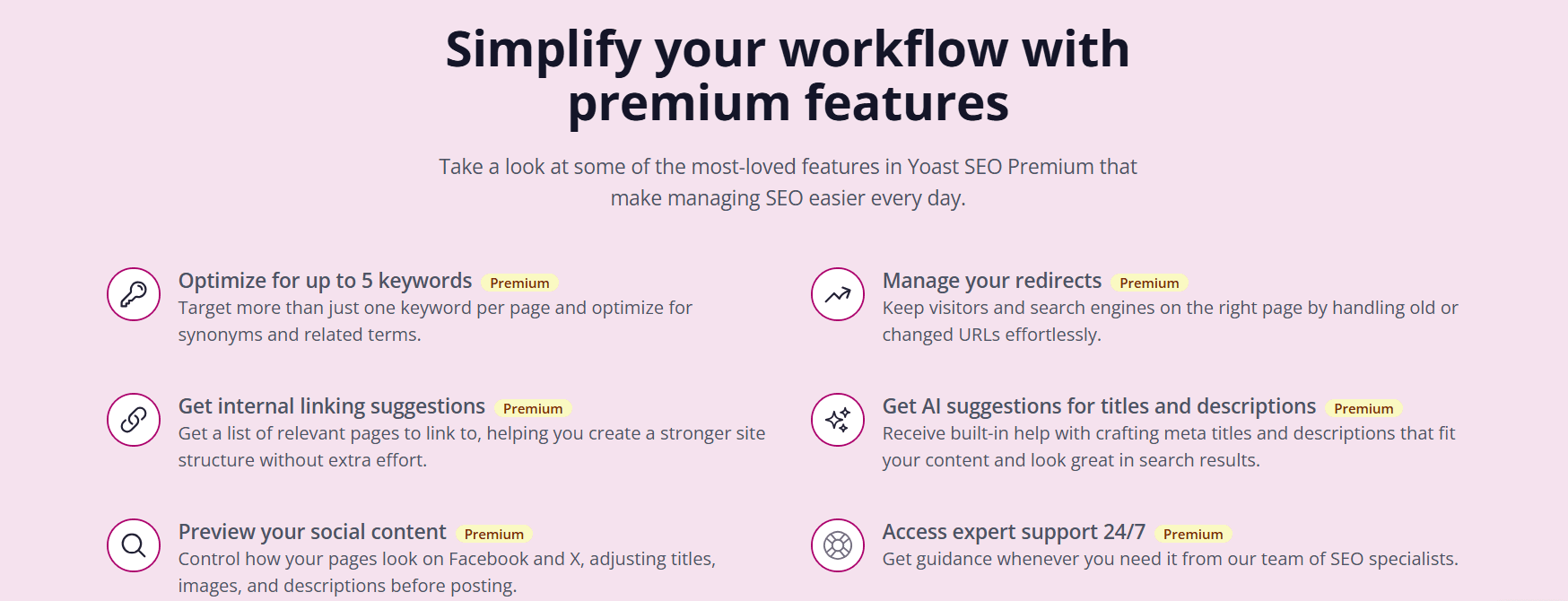
The free version of Yoast SEO covers the essentials and is a great starting point. But if you are serious about growing your organic traffic and want to save time on repetitive tasks, Yoast SEO Premium is where the real power lives.
1. Smart AI tools built right in
One of the standout features of Yoast SEO Premium is its built-in AI tools, included at no extra cost. These tools can automatically generate meta descriptions and title suggestions based on your content. Instead of staring at a blank field trying to craft the perfect description, you get a strong AI-generated starting point that you can refine to match your voice and goals. For websites with large content volumes or teams that publish frequently, this is a significant time-saver.
2. Internal linking suggestions
Internal links are one of the most underutilized SEO strategies. They help search engines understand the structure and hierarchy of your site while keeping visitors engaged and exploring more of your content. Yoast SEO Premium automatically surfaces relevant internal link suggestions as you write, making it easy to build a strong internal linking structure without manually digging through your archive.
3. Redirect manager
Every time you change a URL or delete a page, you risk sending visitors and search engine crawlers to a 404 error page. These dead ends hurt your SEO and frustrate your audience. Yoast SEO Premium includes a redirect manager that highlights dead links and 404 pages and automates redirect creation so your traffic flows smoothly and your rankings stay protected.
4. Multi-keyword and synonym optimization
The free version of Yoast SEO lets you optimize for one focus keyword per page. Premium unlocks the ability to target multiple related keywords and their synonyms. This is especially valuable for long-form content that covers a topic from multiple angles. By optimizing for related terms you increase your chances of ranking for a wider range of search queries.
5. Structured data and rich results
Yoast SEO Premium automatically adds structured data to your site, giving you a better chance of earning rich results in Google such as star ratings, FAQ dropdowns and other visually enhanced listings. These features require no coding knowledge and are handled entirely by the plugin.
6. XML sitemaps
Yoast SEO automatically generates and updates your XML sitemap every time you publish new content. This ensures search engine crawlers find and index your latest posts as quickly as possible, keeping your site competitive in real time.
7. Breadcrumb SEO
Yoast SEO makes your breadcrumbs SEO-friendly, helping search engines understand your site structure and hierarchy. This can contribute to better rankings and can also generate breadcrumb trails directly in your search listings.
8. llms.txt support
Yoast SEO Premium includes tools to prepare your website for the future of search with llms.txt support. This feature ensures your site is properly understood and represented by AI-powered tools like ChatGPT and Gemini, positioning your content for visibility as AI search continues to grow.
9. Full access to Yoast SEO Academy
Yoast SEO Premium includes full access to Yoast SEO Academy, an online learning platform with structured courses covering SEO fundamentals and advanced tactics. Whether you are just getting started or looking to sharpen your skills, the Academy gives you the knowledge to optimize consistently and confidently.
10. 24/7 expert support
When you run into questions or hit a roadblock, Yoast SEO Premium gives you round-the-clock access to real SEO experts. This personal support sets Yoast apart from other plugins and ensures you always have guidance when you need it most.
Ready to grow your traffic faster? Bluehost offers Yoast SEO Premium bundled with fast, secure WordPress hosting, a free domain and SSL, so you can launch and optimize from day one.
Optimizing meta descriptions in Yoast SEO
Meta descriptions deserve just as much care as your title tags. Here is how to optimize them effectively:
1. Write a unique description for every page
Never leave your meta description blank. When you do, search engines pull a random snippet from your page content, which is rarely as compelling as a purposefully written description. Yoast SEO reminds you to complete this field before publishing.
2. Include your focus keyword naturally
When your focus keyword appears in the meta description and matches the user’s search query, Google may bold it in the results. This makes your listing more eye-catching and can improve your click-through rate. Yoast’s SEO analysis checks for this and flags it if the keyword is absent.
3. Add a clear call to action
The best meta descriptions do not just describe a page. They invite readers to take action. Phrases like “Learn how to,” “Discover the best” or “Get started today” give readers a reason to click. Yoast SEO Premium’s AI tools can help you craft descriptions with built-in calls to action, so you get great copy faster.
4. Stay within the character limit
Keep your meta descriptions between 120 and 155 characters. Yoast SEO’s visual indicator confirms when you are in the optimal range. Too short and you miss an opportunity to communicate value. Too long and the text gets cut off in results.
Title tag optimization best practices with Yoast SEO
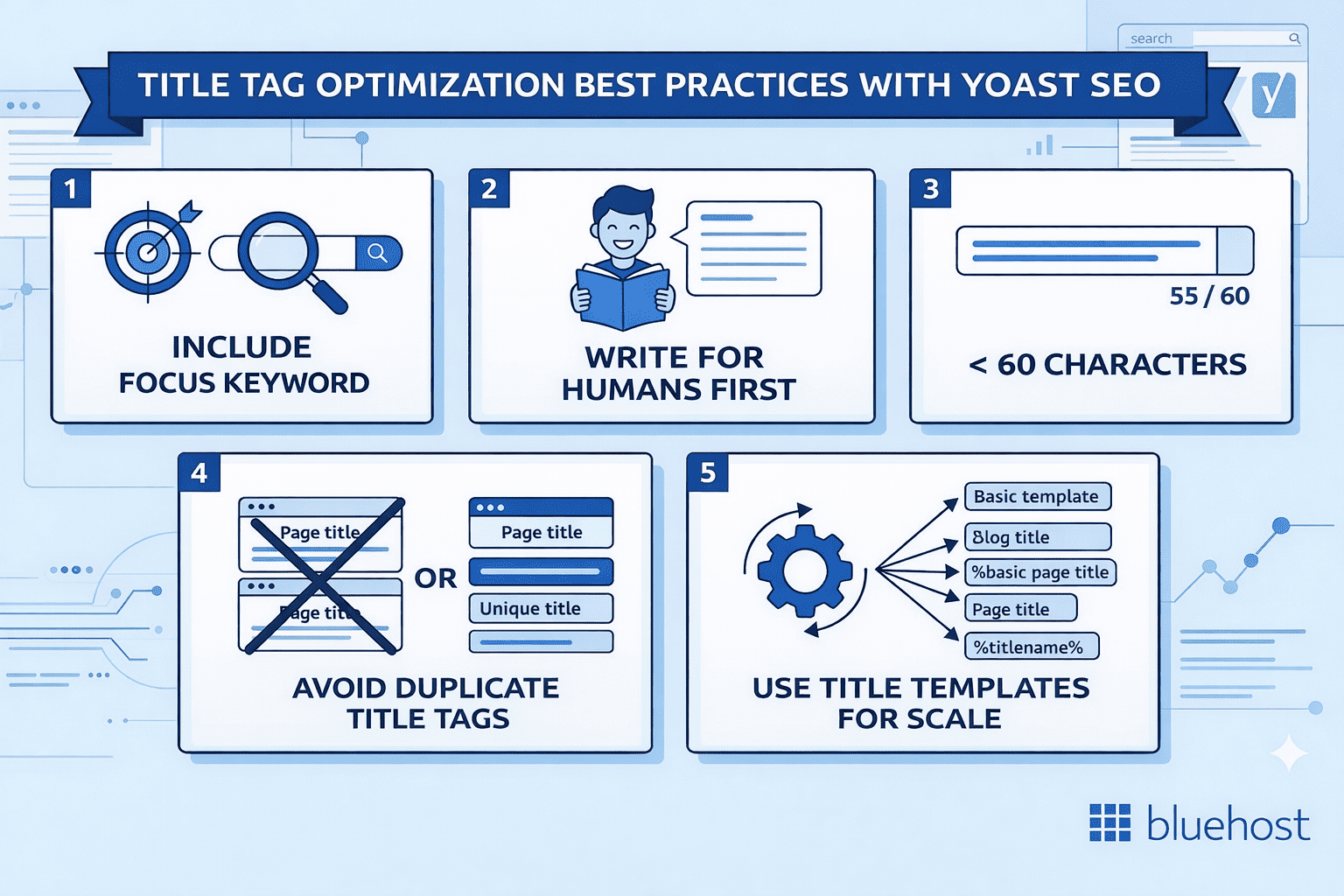
Having the right tool is only half the battle. Here are the title tag best practices to follow when using Yoast SEO:
1. Always include your focus keyword
Your focus keyword should appear in your title tag. Yoast SEO flags this immediately if it is missing. Place the keyword as close to the beginning of the title as possible since search engines give more weight to words that appear earlier.
2. Write for humans first
Titles that are purely optimized for algorithms often feel awkward and put real readers off. Always prioritize clarity and readability. A title that resonates with a human reader will naturally perform better because it drives clicks, which in turn improves your ranking signal.
3. Keep it under 60 characters
Google typically displays the first 50 to 60 characters of a title tag. Anything beyond that gets cut off with an ellipsis. Yoast SEO’s snippet editor shows you exactly how your title will appear in results and alerts you when it is too long.
4. Avoid duplicate title tags
Every page on your site should have a unique title tag. Duplicate titles confuse search engines and can suppress rankings for both affected pages. Yoast SEO makes it easy to set custom titles for each page and will notify you when one has not been set.
5. Use title templates for scale
Yoast SEO allows you to create title templates at the site level so you do not have to manually craft every title from scratch. Templates automatically pull in variables like the page title and site name. This is especially useful for large sites and for category or tag archive pages.
Why buy Yoast SEO Premium through Bluehost?
For website owners looking to improve their visibility online and drive more traffic, there is no better combination than Yoast SEO Premium paired with Bluehost hosting. Here is why buying Yoast SEO Premium through Bluehost makes sense:
1. Everything under one roof: Managing your hosting and your SEO tool from the same platform simplifies your workflow and means a single point of contact for any issues.
2. Unbeatable bundled pricing: Bluehost offers Yoast SEO Premium at a significantly lower price when bundled with a hosting plan, giving you everything you need to start strong and boost traffic from day one.
3. Recommended by WordPress.org: Bluehost is one of the most trusted names in web hosting, officially recommended by WordPress.org and used by millions of site owners worldwide.
4. Fast and secure WordPress infrastructure: Bluehost’s hosting is built for WordPress performance, ensuring your site loads quickly and stays protected so search engines and visitors always get the best experience.
5. A complete SEO foundation in one place: Bluehost handles the technical side of your site with speed, uptime and security while Yoast SEO Premium makes sure your content is optimized to rank. Together they cover every layer of SEO.
6. Seamless setup with no technical hassle: Yoast SEO Premium is available directly through the Bluehost Portal Marketplace, so you can purchase and activate it in a few clicks without managing a separate account or third-party plugin vendor.
7. 24/7 expert support included: Between Bluehost’s round-the-clock hosting support and Yoast SEO Premium’s built-in expert support, you always have help available when you need it.
What you get with Yoast SEO Premium plus Bluehost hosting
When you choose the Yoast SEO Premium plus Hosting package through Bluehost, you receive everything in Yoast SEO Premium and much more:
- One-on-one plan selection guidance from a real expert
- A website performance overview to keep your site fast and healthy
- AI-powered website design with built-in SEO from the start
- A free domain name to establish your brand online
- Free SSL certificate to secure your site and build visitor trust
- Malware protection to keep your site safe from threats
- Automatic website backups so you never lose your work
- Big savings on Yoast SEO Premium compared to purchasing separately
Site speed is an important ranking factor on its own, so hosting on a reliable platform like Bluehost gives you a head start before you even publish your first post. This is exactly the kind of strong SEO foundation that helps website owners of all experience levels get ahead of the competition.
Stop leaving traffic on the table.Visit Bluehost and ask about the Yoast SEO plus Hosting bundle.
Choosing the right Yoast SEO plan
Yoast SEO offers options for every stage of your website journey:
1. Yoast SEO (Free)
The free version covers the essentials and is a strong starting point for anyone new to SEO. You get content optimization for a single focus keyword, SEO and readability analysis, automatic sitemaps and support for over 20 languages. It helps you get more visitors from Google and Bing and automatically adopts SEO best practices across your site.
2. Yoast SEO Premium
At $118.80/year, Yoast SEO Premium unlocks the full suite of advanced tools: AI-powered optimization, internal linking suggestions, redirect automation, multi-keyword targeting, social previews, Yoast SEO Academy access and 24/7 expert support. This is the plan for website owners who want to scale their SEO workflow and grow traffic faster.
3. Yoast SEO Premium plus Bluehost Hosting
This is the recommended option for anyone building a new site or ready to upgrade their hosting. You get all of Yoast SEO Premium’s features bundled with fully managed WordPress hosting from Bluehost at a price that beats buying each separately. Talk to a pro at Bluehost to get started.
Your SEO meta tag optimization checklist
Use this checklist to make sure you are getting the most out of Yoast SEO on every page you publish:
- Set a unique title tag for every page with your focus keyword near the beginning
- Keep title tags between 50 and 60 characters
- Write a compelling meta description for every page between 120 and 155 characters
- Include your focus keyword naturally in the meta description
- Add a clear call to action to every meta description
- Use Yoast SEO’s snippet editor to preview your listing before publishing
- Check SEO analysis and readability analysis scores before going live
- Set up title templates for archive and category pages
- Use Yoast SEO Premium’s AI tools to speed up title and description creation
- Enable the redirect manager to protect your SEO when URLs change
- Use internal linking suggestions to strengthen your site structure
- Activate structured data for rich results in Google
- Keep your XML sitemap active so new content gets indexed fast
Final thoughts
Title tags and meta descriptions may be small in size, but they carry enormous weight in determining whether your content gets found online. They are the gateway between your site and the people searching for what you offer. Getting them right means more visibility, more clicks and more growth.
Yoast SEO makes the process straightforward for users at every level. Whether you are using the free version to cover the basics or upgrading to Yoast SEO Premium for AI tools, redirect management, internal linking suggestions and round-the-clock expert support, you will have everything you need to improve the relevance and readability of your site and rank higher in search results.
And when you pair Yoast SEO Premium with Bluehost hosting, you are setting yourself up for success from the very start. Fast managed WordPress hosting, a free domain, built-in security and significant savings on the world’s most popular SEO plugin. That is a combination designed to help any website owner grow their audience online and get ahead of the competition.
FAQ
SEO meta tags are HTML elements that provide search engines with essential information about a webpage’s content. They are critical for improving search visibility and click-through rates by defining how your website snippets appear in results.
Current SEO title tag best practices include keeping titles between 50-60 characters and placing primary keywords at the beginning. Ensure every page has a unique, descriptive title that encourages clicks and matches user search intent.
Yoast SEO title tag optimization improves rankings by helping you craft keyword-rich titles that meet search engine requirements. Better titles increase click-through rates, which signals higher relevance to search engines and helps boost your overall visibility.
Yes, Yoast SEO can automatically manage title and meta tags using dynamic variables and global templates. This ensures consistent branding and optimized metadata across your entire site without requiring manual input for every single published page.
To optimize meta tags with Yoast SEO, navigate to the SEO settings box below your content editor. Here, you can customize the SEO title and meta description while using the preview tool to ensure ideal length.

Write A Comment