 ChatGPT,
 Claude,
 Gemini,
 Grok — all four for

Key highlights
- Discover the top AI tools for business productivity in 2026, including options for writing, research, design, automation and coding.
- Learn how to choose AI tools that fit your business goals, workflows and team needs without adding more complexity.
- Know what to look for in an AI platform, including model flexibility, team access, privacy options and manageable pricing.
- Avoid common mistakes like choosing hype over fit, paying for too many tools or overlooking privacy and team adoption needs.
- Explore how Bluehost AI All Access Pack helps businesses bring core AI capabilities into one simpler, more practical setup.
AI tools are everywhere right now. But the real challenge is not finding a tool. It is choosing a setup that actually saves time, fits your workflow and does not turn into a stack of subscriptions your team struggles to manage.
Businesses rarely need just one capability. They may need help writing content, summarizing research, creating presentations, streamlining admin work or improving customer communication. The problem is that these tasks often push teams toward multiple tools, multiple logins and multiple bills.
This guide will help you cut through the noise and choose AI tools that make sense for your business in 2026. We’ll break down how to choose the right AI tools for your business, what features matter most and how to build a setup that helps your team work smarter in 2026.
Why AI tools matter for businesses in 2026?
Not long ago, advanced technology tools often felt built for enterprises with bigger budgets, larger teams and dedicated specialists. That is no longer the case. Today, businesses can use AI to support day-to-day work in ways that feel practical and accessible, whether that means drafting content, organizing ideas, speeding up research or handling repetitive tasks more efficiently. That shift matters because businesses do not always have extra time or extra headcount to solve every challenge manually.
- Speed up common tasks like writing emails, summarizing information, brainstorming ideas and creating presentations.
- Automate or simplify repetitive tasks that take time away from higher-impact work.
- Use AI to organize information, compare options and turn scattered inputs into clearer next steps.
- Handle more work without immediately adding more tools, staff or operational complexity.
- Use AI to support planning, content, research and communication in a more structured way.
- Help businesses stay focused on strategy, customers and growth instead of getting stuck in routine tasks.
Also read: AI in web development: How AI is transforming the industry
Top AI tools for business productivity in 2026
The best AI tools for business are not always the ones with the longest feature list. The right choice depends on what your team needs help with, whether that is writing, research, customer communication, design, automation, coding or internal productivity.
Here is the top list of AI tools for businesses in 2026.
1. Bluehost AI All-Access Pack
Bluehost AI All-Access Pack is a strong choice for businesses, agencies and teams that want access to multiple leading AI models from one dashboard. Instead of switching between separate accounts, subscriptions and workflows, teams can use ChatGPT, Gemini, Claude and Grok in one place. This makes it useful for businesses that want flexibility without creating AI tool sprawl.
It can support everyday business tasks such as content creation, research, brainstorming, campaign planning, presentation building and comparing responses across different models. The model comparison feature is especially helpful when teams want to evaluate which AI response works best for a specific task.
At Bluehost, we also offer AI All-Access Pack Privacy+ for businesses that need stronger privacy controls for more sensitive workflows.
Key features include:
- Add privacy when it matters: Use Privacy+ features for sensitive or confidential business work.
- Access AI in one place: Use leading models, research, content and presentation tools from one dashboard.
- Pick the right model faster: Switch between ChatGPT, Gemini, Claude and Grok.
- Simplify costs with one plan: Reduce the need for multiple standalone AI subscriptions.
- Make team access easier: Assign seats, manage access and support team or client workflows.
Best for: Businesses that want multiple leading AI models, team access and privacy options in one dashboard.
2. ChatGPT
ChatGPT is one of the most versatile AI tools for business because it can support everyday tasks across writing, planning, research, customer communication and productivity. Businesses can use it to draft emails, create outlines, summarize information, brainstorm ideas, build content briefs, review copy and support internal workflows.
It works well as a general-purpose AI assistant for teams that want a flexible tool they can apply across departments. Depending on the plan, businesses can also access advanced models, shared workspaces and admin controls for more structured team use.
Key features include:
- Draft content faster: Create emails, blogs, outlines, social posts and customer replies.
- Summarize information: Turn long documents, notes or research into clear takeaways.
- Support brainstorming: Generate ideas for campaigns, products, workflows and strategy.
- Assist daily workflows: Help with planning, checklists, templates and internal communication.
- Enable team use: Use business-focused plans for shared access and workspace controls.
Best for: All-around business productivity, writing, brainstorming, research and everyday AI assistance.
3. Claude
Claude is a useful AI assistant for businesses that work with long documents, detailed writing or complex information. It can help teams review reports, summarize research, improve proposals, draft policies, organize ideas and refine long-form content.
It is especially helpful when businesses need clear explanations, structured summaries or polished written outputs. Claude can support teams that handle client documents, internal planning materials, knowledge-heavy tasks or content that requires a more thoughtful tone.
Key features include:
- Review long documents: Summarize reports, proposals, research and internal materials.
- Improve business writing: Refine tone, structure and clarity in longer drafts.
- Support research tasks: Turn complex information into clear summaries and insights.
- Organize ideas: Convert notes, briefs and scattered thoughts into structured outputs.
- Draft professional content: Create policies, client documents, reports and planning materials.
Best for: Coding support, complex analysis, long documents and polished business writing.
4. Gemini
Gemini is a practical AI tool for businesses that already use Google Workspace or need AI support across everyday productivity tasks. It can help teams draft emails, summarize documents, analyze information, support meetings and create content inside familiar Google tools.
It is especially useful for businesses that want AI to fit into existing workflows instead of adding another separate platform. Teams can use Gemini to speed up writing, organize information and work more efficiently across Gmail, Docs, Sheets, Meet and other connected apps.
Key features include:
- Work inside Google tools: Use AI support across Gmail, Docs, Sheets, Meet and more.
- Draft and summarize faster: Create emails, documents and summaries with less manual effort.
- Support meetings: Capture key points, notes and follow-up items more easily.
- Analyze business information: Work through data, documents and project details faster.
- Improve team productivity: Keep AI assistance close to daily collaboration workflows.
Best for: Google Workspace productivity, multimodal tasks, document support and business data analysis.
Also read: Gemini vs ChatGPT AI traffic: What the shift means for brands
5. Grok
Grok is an AI assistant from xAI that can help businesses with quick answers, content ideas, coding support and research on fast-moving topics. It is useful for teams that need fresh context, real-time information and a conversational tool for exploring ideas quickly.
Businesses can use Grok to track trends, summarize current discussions, generate drafts, brainstorm campaigns and support technical tasks. It can be especially helpful for teams that work with timely topics, social conversations or fast-changing industry updates.
Key features include:
- Research current topics: Explore fast-moving trends, news and industry conversations.
- Generate content ideas: Brainstorm campaigns, posts, angles and messaging quickly.
- Support writing tasks: Draft summaries, outlines, captions and business copy.
- Assist with coding: Help with code explanations, technical questions and troubleshooting.
- Explore real-time context: Use fresh information to support timely decisions and planning.
Best for: Real-time research, trend tracking, current events and fast-moving business topics.
6. Perplexity
Perplexity is an AI-powered research tool that helps businesses find quick answers with visible sources. It is useful for teams that need to research topics, compare information, understand market trends or gather context before creating content or making decisions.
Businesses can use Perplexity for competitor research, industry updates, customer questions, content planning and early-stage strategy work. It works especially well when teams want source-backed answers instead of relying only on general AI-generated responses.
Key features include:
- Research with sources: Get answers with citations that make information easier to verify.
- Compare topics faster: Review products, competitors, trends or market questions.
- Support content planning: Find angles, facts and context for blogs, guides and campaigns.
- Track industry updates: Explore current topics and changes in your market.
- Speed up decision-making: Gather useful context before choosing a direction.
Best for: Source-backed research, market discovery, competitor analysis and fact-checking.
7. Canva
Canva is a useful AI design tool for businesses that need professional-looking visuals without a full design team. It helps businesses create social media graphics, presentations, ads, flyers, videos, brand assets and other marketing materials quickly.
It is especially helpful for teams that want to keep design work simple, consistent and on-brand. Canva’s AI features can support design generation, copy suggestions, image editing and faster content production for everyday marketing needs.
Key features include:
- Create visuals faster: Design social posts, ads, flyers, banners and presentations.
- Support brand consistency: Use templates and brand kits to keep designs aligned.
- Generate design ideas: Get AI-powered layouts, graphics and creative suggestions.
- Edit images easily: Resize, adjust and improve visuals without advanced design skills.
- Build marketing assets: Create videos, pitch decks, logos and campaign materials.
Best for: AI-powered design, branded visuals, presentations and marketing content creation.
Also read: 10 Ways to Make Money on Canva: A Complete Guide for Creators
8. Notion AI
Notion AI is useful for businesses that need to organize notes, projects, documents and internal knowledge in one workspace. It helps teams summarize information, draft content, answer questions from existing docs and turn scattered ideas into clearer plans.
It is especially helpful for teams that already use Notion for project management, content calendars, meeting notes or company wikis. Businesses can use it to reduce time spent searching, rewriting and organizing information across daily workflows.
Key features include:
- Summarize team notes: Turn meetings, briefs and project updates into clear takeaways.
- Draft documents faster: Create plans, outlines, updates and internal content.
- Search internal knowledge: Find answers from existing workspace information.
- Organize project details: Structure tasks, notes and ideas into usable workflows.
- Support team collaboration: Keep notes, documents and AI assistance in one place.
Best for: Knowledge management, internal documentation, meeting notes and team planning.
9. Zapier
Zapier is useful for businesses that want to connect apps and automate repetitive tasks without heavy technical setup. It helps teams move information between tools, trigger actions automatically and reduce manual work across sales, marketing, support and operations.
It is especially helpful for businesses that use multiple platforms for leads, emails, forms, customer data, task management or notifications. Teams can use Zapier to create workflows that keep everyday processes moving with less manual follow-up.
Key features include:
- Connect business apps: Link tools for email, CRM, forms, calendars and project management.
- Automate repetitive tasks: Trigger actions like task creation, alerts or follow-up emails.
- Route leads faster: Send form fills or inquiries to the right tool or team.
- Reduce manual updates: Move data between systems without copying and pasting.
- Build workflows easily: Create automations without advanced coding knowledge.
Best for: Workflow automation, app integrations, lead routing and repetitive task management.
10. GitHub Copilot
GitHub Copilot is an AI coding assistant that helps developers and technical teams write, review and improve code faster. It can suggest code, explain snippets, support debugging and help with repetitive development tasks.
It is especially useful for businesses that build websites, apps, internal tools or software products. Technical teams can use it to speed up everyday coding work, improve developer productivity and reduce time spent on routine implementation.
Key features include:
- Suggest code faster: Get code completions and function suggestions while developers work.
- Support debugging: Help identify issues, explain errors and suggest possible fixes.
- Explain code clearly: Break down unfamiliar code, logic or technical snippets.
- Improve documentation: Draft comments, summaries and technical notes.
- Speed up development: Reduce repetitive coding work across common programming tasks.
Best for: Developer productivity, code generation, debugging and software development workflows.
What are the types of AI tools businesses can use?
AI tools are not limited to one job. They can support different parts of a business, from content and research to customer communication and AI-powered workflow tools. For businesses juggling a lot at once, that flexibility is part of what makes AI so useful. Here’s how AI tools are transforming key areas of day-to-day business operations.
1. AI tools for writing and content
AI writing and content tools help businesses create blog posts, website copy, emails, write product descriptions and social content more efficiently. They are especially useful for turning ideas into first drafts, rewriting copy and keeping content production moving when time is limited. For businesses, these tools can reduce the time spent on repetitive writing tasks and help teams create content more consistently across channels.
Tools like ChatGPT and Grok can help generate ideas, build first drafts and adapt content for different formats. Claude can also be useful when the goal is clear, polished writing with more structure and precision.
Also read: How to Make AI Content Undetectable in 2026
2. AI tools for research and summarization
AI research and summarization tools help businesses gather information, pull out key points and make long or complex content easier to work with. They can be useful for affordable market research tools, competitive analysis, document summaries and quick planning support. For teams, this can save time when reviewing reports, comparing options or turning information into clear next steps.
Gemini is especially useful for distilling complex topics and summarizing detailed information, while ChatGPT and Claude can also help organize findings into a more usable format.
3. AI tools for design and presentation
AI design and presentation tools help businesses create visual content, branded graphics, pitch decks and polished presentations with less manual effort. They can speed up creative work for teams that need professional-looking assets without relying on a full design workflow. This makes them useful for marketing materials, sales presentations, internal updates and client-facing content.
ChatGPT, Gemini and Grok can all help shape presentation flow and draft content, while the right setup can make it easier to move from rough notes to something more polished.
Also read: AI in Graphic Design: How It’s Transforming Creativity in 2026
4. AI tools for meeting and note-taking
AI meeting, transcription and note-taking tools help capture conversations, organize takeaways and reduce manual note-taking. They are commonly used to transcribe meetings, summarize discussions and pull out action items automatically. For busy teams, these tools can make it easier to stay focused during calls and keep track of decisions afterward.
ChatGPT, Gemini and Claude can all help clean up notes, create summaries and highlight next steps after a call or discussion.
5. AI tools for customer support and communication
AI customer support and communication tools help businesses respond faster and more consistently across customer touchpoints. They can support chat responses, email drafting, internal knowledge lookup and routine customer communication. For businesses, this can improve responsiveness without putting more pressure on already stretched teams.
ChatGPT and Claude are useful here because they can help create clear, professional responses, while Gemini can help summarize longer customer conversations or support materials.
Also read: ChatGPT for SEO: Powerful Prompts & Optimization Tips 2026
6. AI tools for automation and workflow
AI automation and workflow tools help businesses reduce repetitive work by connecting tasks, systems and processes. They are often used to route information, trigger follow-ups, update records and streamline routine workflows. This can help businesses save time on admin-heavy work and keep operations moving with less manual effort.
ChatGPT and Claude are often useful for this kind of structured support, especially when teams need help turning inputs into usable outputs more quickly.
7. AI tools for coding and technical assistance
AI coding and technical assistant tools help with writing code, debugging, editing technical content and speeding up development tasks. They can support teams creating WordPress websites with AI, updating digital experiences or handling technical projects more efficiently. Even for businesses without large engineering teams, these tools can be useful for faster problem-solving and more efficient technical work.
Claude is especially useful for coding and tasks that require precision, while ChatGPT can also support development work, troubleshooting and technical explanations.
Also read: How to Use AI to Create an Online Store That Sells in 2026 (No Coding)
8. AI tools for data analysis
Data analysis AI tools help businesses turn raw reports, spreadsheets and trends into faster, clearer insights without needing a dedicated analyst or complex software. For businesses, that means spending less time staring at numbers and more time acting on what they reveal.
- Sales trends: Spot which products or services are performing well so you can focus effort where it matters most.
- Customer behavior: Understand how customers engage with your business to target your audience with AI and retention.
- Campaign reporting: Summarize marketing performance quickly so you can adjust spend and strategy faster.
- Forecasting: Use past data to anticipate demand, manage inventory or plan with more confidence.
- Summarizing large datasets: Turn lengthy exports or reports into a short, usable summary without reading every row.
ChatGPT and Gemini are both useful for interpreting data, spotting patterns and turning numbers into plain language your team can act on.
9. AI tools for building agents
AI agents are tools that can handle multi-step tasks automatically with less manual input at each stage. Unlike a basic chatbot that responds to a single prompt, an agent can follow a sequence, qualify and score leads, retrieve information from an internal knowledge base, trigger a follow-up and log the outcome without someone managing each step manually.
Agent-building tools make sense for businesses when the same multi-step workflow repeats regularly. Common use cases include lead qualification, internal knowledge retrieval, follow-up sequences and repetitive admin tasks like routing requests or updating records. If your team only needs help with occasional, one-off tasks, a simple chatbot or prompt interface is usually enough. Agent tools deliver the most value when workflow volume, consistency and human oversight of automated processes all matter to how your business operates.
How to choose the right AI tool for your business?
Choosing the right AI tools for your business starts with understanding what you need them to do. Some tools are better for content, others for research, support or technical work. The goal is to choose tools that fit your workflow, support your team and deliver real value as your business grows.
1. Start with your business goals
Before choosing an AI tool, get clear on what your business actually needs. The right fit should support a specific goal and make everyday work easier, not add more complexity.
Start by asking:
- Does this tool fit into how my business already works?
- What problem am I trying to solve?
- Do I need help with content, research, support or productivity?
- Am I trying to save time, cut costs or improve consistency?
- Will one person use this or does the whole team need access?
2. Look beyond the monthly price
A low monthly price can look appealing, but it does not always reflect the full cost. Businesses often end up paying for multiple tools to handle different tasks, which can add up quickly.
Ask before choosing an AI tool:
- Am I paying for one tool or a growing stack of subscriptions?
- Does this price cover everything I need?
- Will I need other tools for writing, research, support or technical work?
- What is the total cost of using this long-term?
3. Choose tools your team can use
The best AI tool is not just powerful. It also needs to be easy for your team to use in everyday work. If a tool takes too long to learn or adds friction to simple tasks, it is less likely to be adopted and used consistently.
For businesses, ease of use matters just as much as features. Look for tools with a simple interface, minimal setup and a workflow that feels intuitive for both technical and non-technical users. The easier a tool is to start using, the faster your team can get value from it.
4. Protect sensitive business data
Privacy matters when your team is working with customer details, internal information or sensitive business content. That could include client briefs, patient intake details, legal documents, financial records, sales notes or internal strategy plans. Before choosing an AI tool, make sure you understand how prompts and inputs are handled and whether the tool offers the level of protection your business needs.
This is especially important if your business involves services related to healthcare, legal and finance-adjacent businesses, where data sensitivity is often part of everyday work. For finance-focused teams that need added protection, Bluehost offers Privacy+ for finance teams, which is designed to support higher-trust workflows with features such as prompt sanitization, encrypted conversations and private access patterns.
5. Use the right model for the task
Different AI models have different strengths. One may be better for writing and brainstorming, while another is better for research, analysis or precision-focused work. Choosing the right model for the task can save time and lead to more useful results.
For example, ChatGPT and Grok can support content creation, Gemini can help with research and summaries and Claude can be useful for structured writing, coding and detail-heavy tasks.
6. Pick tools that can grow with you
An AI tool should fit your business now and continue to work as your team and workflows expand. Look for tools that offer:
- Team access so more than one person can use the tool easily
- Seat management so you can add, remove or assign users as needed
- Admin visibility so you can track usage and manage access
- A consistent workflow that still works as the business expands
What to look for in a smarter AI setup?
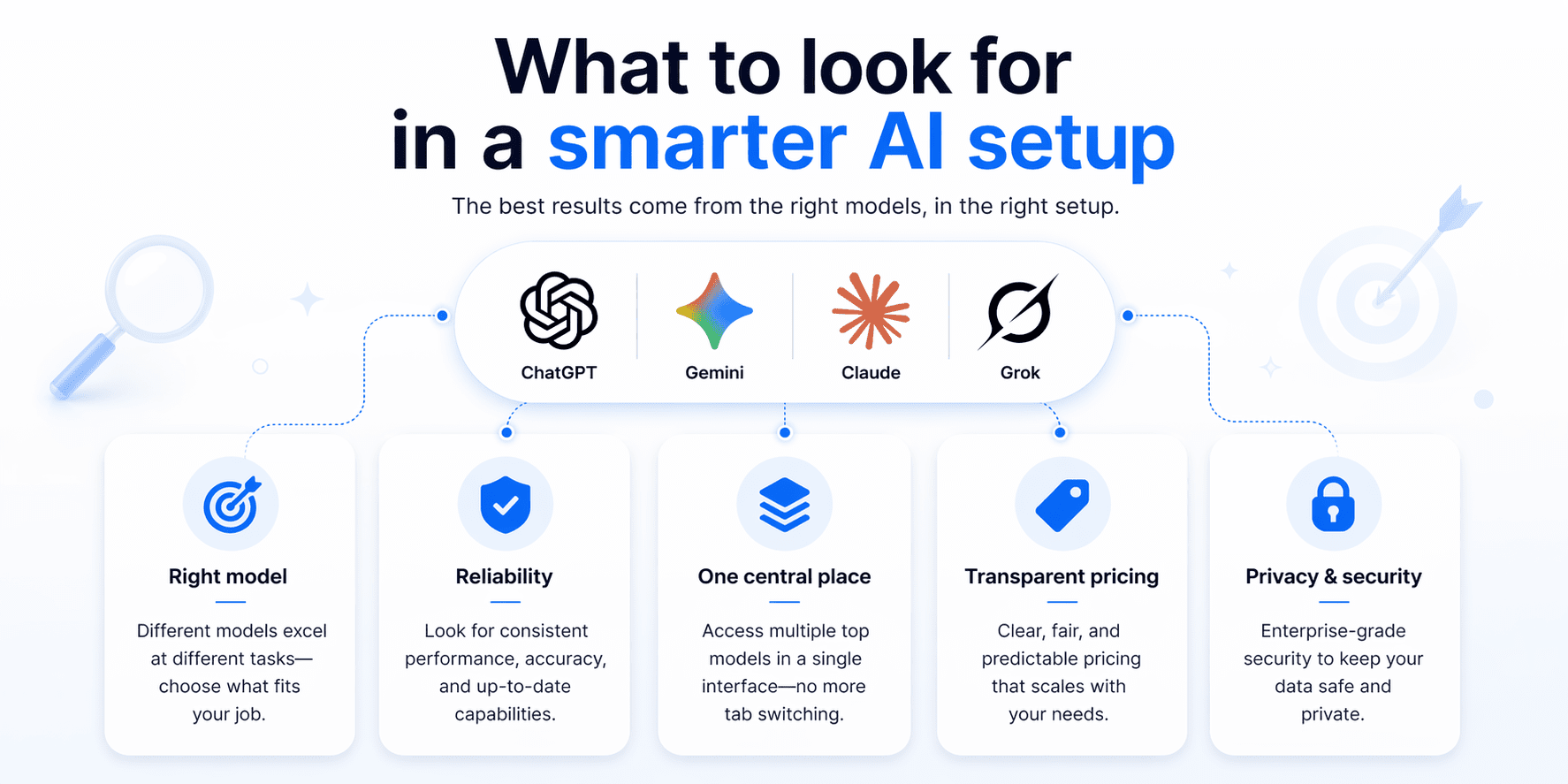
Once your business starts using AI for more than one task, the setup matters just as much as the tools themselves. A smarter AI setup should help you keep work organized, choose the right model for the job and manage access, privacy and cost without adding more complexity.
1. Bring tools into one place
A smarter AI setup should bring key tools into one place because using separate platforms for different tasks can quickly create extra work. When writing, research, support and other tasks happen across multiple tools, it becomes harder to stay organized, manage access and keep workflows efficient.
Bringing tools into one place helps reduce switching between platforms, keeps work more connected and makes AI easier to manage across the business. For businesses, that often means less friction, better visibility and an easier-to-maintain setup over time.
2. Use the right model for the job
Your AI setup should give you the flexibility to choose the right model for the task at hand. Different models are better suited to different kinds of work, whether that is content creation, research, coding or more precisely, structured tasks. That flexibility can help your team get better results, reduce rework and make AI more useful across the business.
3. Simplify team access
As more people start using AI across the business, access can get messy fast. Different logins, unclear permissions and disconnected tools can create confusion for teams that just need to get work done. A simpler setup makes it easier to give the right people access, support collaboration and keep usage organized.
4. Add privacy where needed
Not every task carries the same level of risk. Drafting a social post is very different from working with client information, internal strategy documents or sensitive records. Privacy options matter because they give businesses more control over how AI is used across different kinds of work.
5. Choose pricing you can manage
AI costs are easier to justify when they stay predictable. The problem is that one tool often turns into several and monthly subscriptions can add up before a business realizes how much it is actually spending. A setup with manageable pricing makes it easier to control costs and avoid unnecessary overlap.
Common mistakes to avoid when choosing AI tools for business
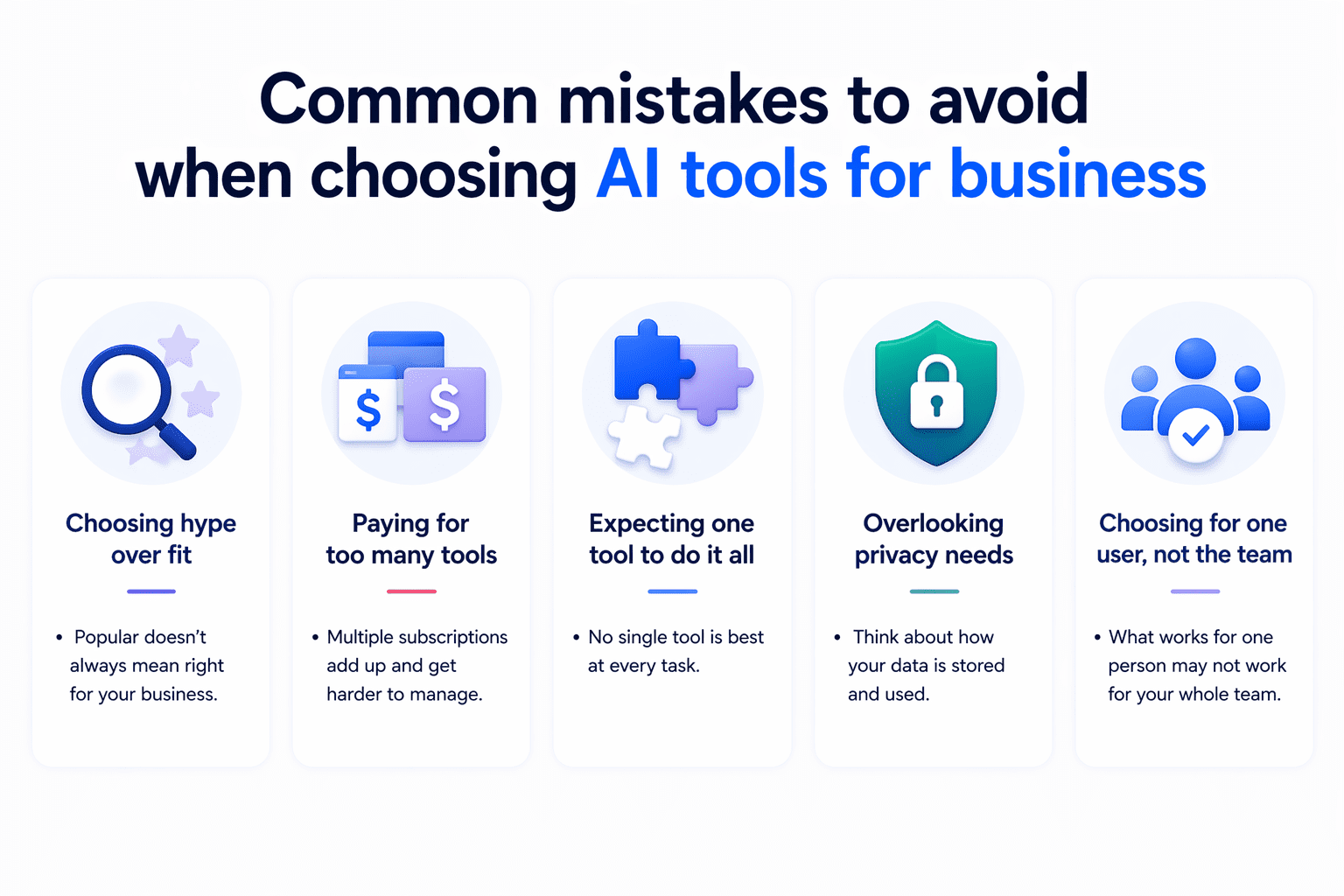
Choosing AI tools can feel overwhelming, especially when every platform promises to save time and improve productivity. But for businesses, the wrong setup often creates more complexity instead of less. Here are some of the most common mistakes to avoid.
- Choosing hype over fit: A tool may be popular, but that does not mean it is the right fit for your business. What matters most is whether it supports the kind of work your team actually needs help with, whether that is content creation, research, customer communication or day-to-day productivity.
- Paying for too many tools: It is easy to add one tool for writing, another for research and another for support without realizing how quickly costs can build up. Over time, separate subscriptions can become harder to manage and less cost-effective than expected.
- Expecting one tool to do it all: Not every AI tool is equally strong at every task. One may be better for writing, while another is better for research, coding or more precise work. Relying on one tool for everything can lead to weaker results and more time spent reworking the output.
- Overlooking privacy needs: Privacy often gets ignored until a business starts using AI for more sensitive work. If your team handles client information, internal plans or confidential documents, it is important to think about how data is handled before adopting a tool.
- Choosing for one user, not the team: A tool that works well for one person may not work as well for a team. As more people start using AI, things like access, collaboration and workflow consistency become much more important. Choosing with the whole team in mind can help avoid friction later on.
How Bluehost helps simplify AI tools for businesses?
Bluehost has long been a trusted partner for businesses building online. As officially recommended by WordPress recommended and trusted by more than 5 million WordPress users, Bluehost is already a familiar platform for businesses that want to launch, grow and manage their online presence.
With Bluehost AI All Access Pack, Bluehost brings that same practical approach to AI by putting key capabilities in one place, so teams can access multiple models, manage costs more easily and keep everyday work simpler.
- Access AI in one place: Instead of piecing together separate tools for different tasks, AI All Access Pack brings key AI capabilities into one dashboard. It combines access to leading models with built-in features that support research, content creation and presentations, giving businesses a more streamlined way to work.
- Pick the right model faster: AI All Access Pack makes it easier to switch between ChatGPT, Gemini, Claude and Grok, so businesses can choose the best fit based on the task, not just the subscription they happen to have. It also supports model comparison, which helps users review responses side by side and move forward with more confidence.
- Simplify costs with one plan: AI All Access Pack is positioned to solve the cost and clutter of managing multiple standalone AI subscriptions. Bundling premium AI access into one dashboard, it gives businesses a more streamlined way to manage spend while still getting broad model access and core AI functionality.
- Make team access easier: AI All Access Pack is built for teams and agencies, not just individual users. Its Account Management Dashboard supports seat assignment and access management, making it easier to organize team use, enable client access and maintain a more consistent workflow as the business grows.
- Add privacy when it matters: For businesses handling more sensitive work, AI All Access Pack includes higher-tier privacy features such as prompt sanitization, end-to-end encryption, user-specific PIN protection and Incognito Mode. That gives businesses a more secure way to use AI when the work involves confidential or sensitive information.
Compare AI All Access Pack plans and features
To make adoption simpler, AI All Access Pack is available in two plan options built around different business needs. Both plans bring ChatGPT, Gemini, Claude and Grok into one dashboard, giving teams access to multiple leading models without managing separate subscriptions. The difference comes down to privacy and control. AI All-Access Pack is designed for everyday business use, while Privacy+ adds stronger protections for teams handling more sensitive information.
| Plan | Price | What’s included | Best for |
|---|---|---|---|
| AI All-Access Pack | $20/mo | Access to ChatGPT, Gemini, Claude and Grok, plus model switching, Research Agent, Presentation Builder, Article Writer and the Account Management Dashboard | Businesses and agencies that want broad AI access in one place without managing multiple subscriptions |
| AI All-Access Pack Privacy+ | $25/mo | Everything in AI All-Access Pack, plus Privacy Model, end-to-end encryption, user-specific PIN protection and Incognito Mode | Businesses that need stronger privacy and security for more sensitive workflows |
What stands out most is that AI All Access Pack starts at just $20 per month, giving businesses access to multiple leading models and core AI features in one place. Instead of paying for separate AI subscriptions across different tools, teams can use one dashboard to reduce subscription clutter and get broader value from a single plan.
Note: Pricings are as of Apr 2026. For the latest pricing and offerings, please check the Bluehost Pricing page.
Final thoughts
Choosing AI tools for your business is not about chasing every new platform. It is about finding a setup that helps your team work smarter, stay organized and manage costs without adding more complexity. For many businesses, that means looking beyond individual tools and focusing on a solution that brings the right capabilities together in one place.
That is the idea behind our AI All Access Pack. The goal is to make AI easier to use, easier to manage and more practical for the way teams work. With access to powerful AI tools like ChatGPT, Gemini, Claude and Grok in one dashboard, AI All Access Pack gives businesses the flexibility to use the right model for the task at hand.
For businesses that handle sensitive or confidential work, AI All Access Pack Privacy+ adds stronger privacy-focused features to support safer AI use.
Explore Bluehost AI All Access Pack to help your team access leading AI models and get more done faster from one place.
FAQs
The best AI tools for business depend on the task. Some AI tools are stronger for writing and marketing, while others are better for research, coding, data analysis, customer support or creative work. Many businesses benefit from using more than one AI model so they can choose the right tool for each job instead of relying on a single platform.
Businesses use AI tools for marketing, sales, customer service, operations, finance, research and internal communication. Common use cases include creating blog drafts, writing ad copy, summarizing documents, building reports, organizing ideas, forecasting demand and improving team productivity.
Start by identifying the business problem you want to solve. If you need content support, look for strong writing features. If you need research or analysis, choose tools that can summarize, compare and cite information. For businesses that want access to multiple leading models in one place, AI All Access Pack is the practical choice that brings together tools for different types of work in a single dashboard.
Businesses do not always need more than one AI tool, but using multiple AI models can be helpful. One model may be better for writing, another for research and another for technical or accuracy-focused tasks. A multi-model setup can give teams more flexibility without forcing them to manage separate subscriptions.
AI tools can be safe for business use, but businesses should understand how each platform handles prompts, files and sensitive information. Teams should avoid entering confidential customer, financial, legal or health-related data unless the tool provides appropriate privacy and security controls. For teams that need added protection, AI All Access Pack Privacy+ includes features such as prompt sanitization and other privacy-focused controls for more sensitive workflows.
Yes, AI tools can help small teams save money by reducing time spent on repetitive work, speeding up content and research tasks and lowering the need for multiple disconnected tools. The biggest savings usually come from better productivity, fewer manual processes and more efficient use of team capacity.

Write A Comment