 ChatGPT,
 Claude,
 Gemini,
 Grok — all four for

Advertisers who rely on older Google Ads reports may need to review their historical data before a new reporting limit takes effect.
Starting June 1, 2026, Google Ads will limit access to older granular reporting data. Hourly, daily and weekly reporting data will only be available for 37 months. Monthly, quarterly and annual reporting data will remain available for 11 years, according to Google’s Ads Help documentation. After those retention periods expire, the data will no longer be accessible through the Google Ads interface or APIs.
The change does not remove all historical Google Ads reporting. It mainly limits access to older data at the hourly, daily and weekly level.
That distinction matters. Advertisers may still be able to view older monthly or annual totals. However, they could lose the detailed daily and weekly data needed to investigate seasonality, budget changes, campaign issues or performance spikes from more than three years ago.
Google has also listed a shorter window for reach and frequency metrics.
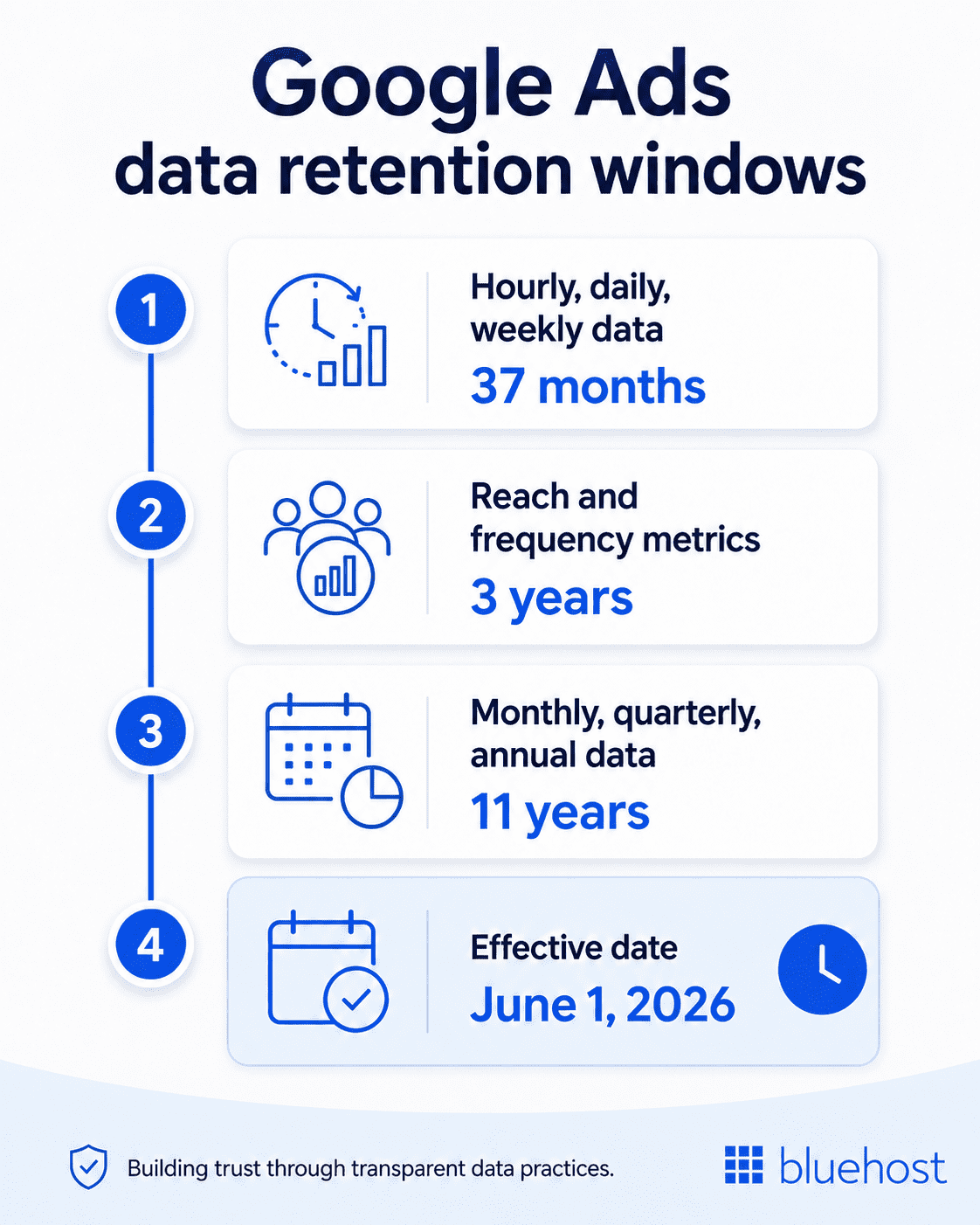
These metrics will only be available for 3 years and include unique users, average impression frequency per user and frequency distribution metrics such as 1+, 2+, 3+, 4+, 5+ and 10+.
What data will become harder to access?
The practical impact depends on how advertisers use historical reports.
High-level data will remain available for longer. That means advertisers can still review monthly, quarterly and annual performance trends within Google’s 11-year window.
The bigger change is for granular reporting. If a team wants to review campaign performance by day, week or hour beyond 37 months, that level of detail will no longer be available inside Google Ads once the policy takes effect.
For example, a monthly report may show that conversions dropped in a specific month. A daily report can show whether that drop followed a budget change, a holiday period, a landing page issue, a promotion ending or a short competitive spike.
That is why the change matters for advertisers who use Google Ads reports for more than basic performance summaries.
Why the change matters for advertisers
The new retention window is most likely to affect advertisers, agencies and analysts who depend on long-term performance comparisons.
Retailers may need daily performance data to compare Black Friday or holiday campaigns across several years. Franchise and multi-location businesses may need older market-level reports to understand how different regions performed over time. Agencies may need granular historical data for audits, renewals, client reviews or year-over-year planning.
Under the new policy, those deeper cuts may not be available unless the data has already been exported and stored elsewhere.
The change could affect:
- Year-over-year campaign analysis
- Seasonal reporting
- Budget planning and forecasting
- Client reporting for agencies
- Franchise and multi-location performance reviews
- Historical audits
- Custom dashboards
- API-based reporting workflows
The key issue is not the loss of all historical data. It is the loss of older detail. Monthly and annual summaries may still be available, but older daily, weekly and hourly views will have a shorter shelf life.
API, scripts and BigQuery users face added reporting changes
The change also affects teams using automated reporting systems.
Google’s Ads Developer Blog says that starting June 1, 2026, Google Ads API and Google Ads Scripts queries requesting granular segments such as segments.date or segments.week for ranges older than 37 months will return a date range error. To retrieve older data, queries will need to use monthly, quarterly or yearly segments instead. Google also recommends exporting granular historical data before the deadline if advertisers need to keep it.
That means reporting systems built around older daily or weekly data may need updates.
A dashboard that pulls five years of daily campaign data may stop returning the expected results. A script that retrieves older week-by-week performance may need to be adjusted. A client report that depends on older granular data may show gaps unless that data has already been saved elsewhere.
BigQuery users should also review their setup. Google says BigQuery Data Transfer Service connectors for Google Ads and Search Ads 360 will stop populating backfill runs for dates older than 37 months from the current date. Data already transferred and stored in BigQuery will remain in the tables with no impact.
For advertisers already using BigQuery, the takeaway is clear: check whether important historical backfills are complete before the June 1, 2026 deadline.
What advertisers should do before June 1, 2026
Advertisers who need older daily, weekly or hourly data should export it before it falls outside Google’s 37-month window.
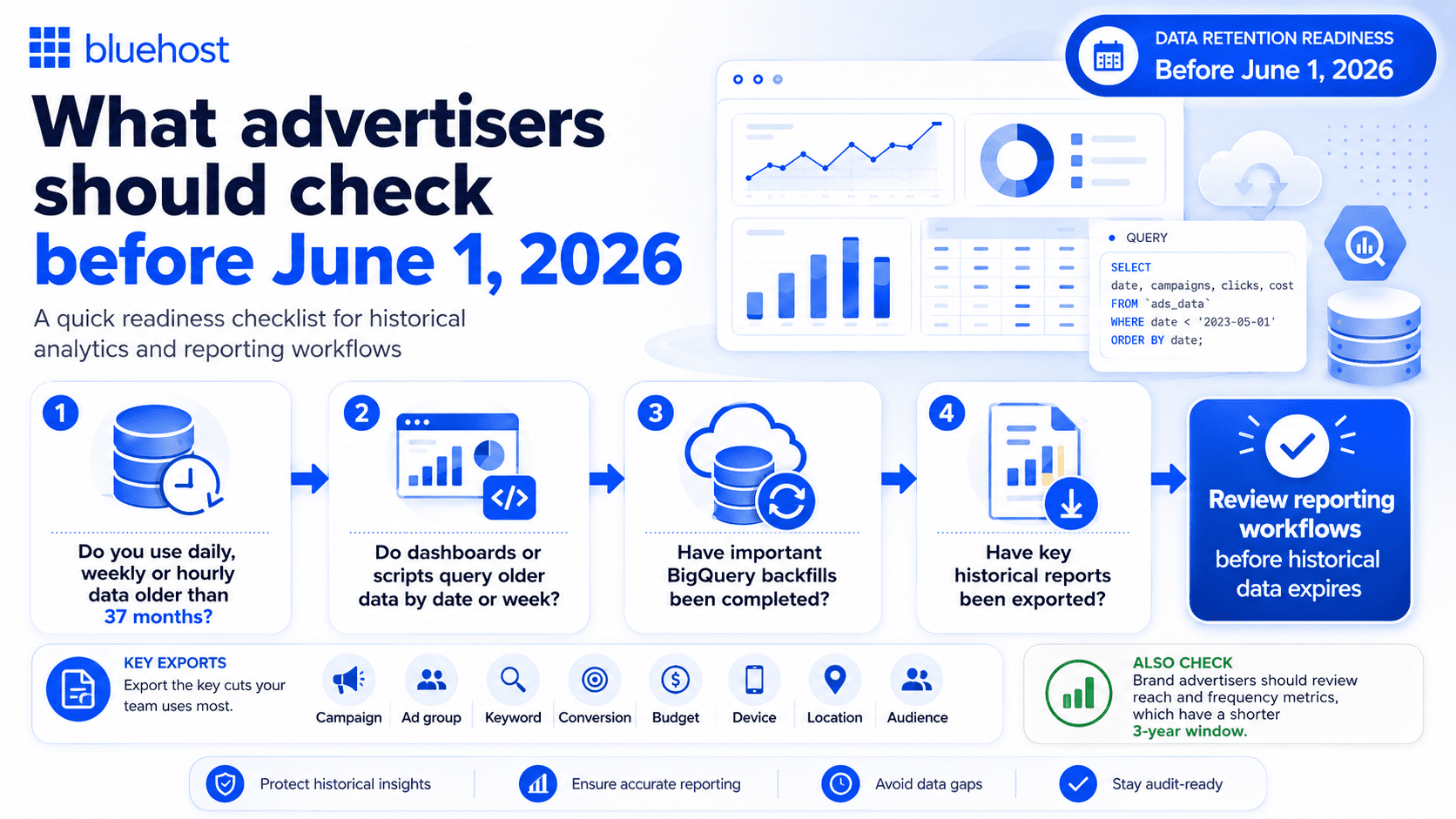
- Start by identifying reports that rely on granular data older than 37 months, especially for audits, forecasting, dashboards, agency reporting and client reviews.
- Then export the key cuts your team uses most: campaign, ad group, keyword, conversion, budget, device, location and audience data. Brand advertisers should also review reach and frequency metrics, which have a shorter 3-year window.
- Teams using automated reports should check dashboards, scripts and API workflows that query older data by date or week. These may need updates before the policy takes effect.
- Finally, store critical historical data outside Google Ads if it needs to remain available long term, whether in BigQuery, a cloud database or a BI system.
The goal is simple: keep access to the historical detail your team may need after Google’s retention limits apply.
The bottom line
Google Ads is shortening access to older granular reporting data.
Starting June 1, 2026, hourly, daily and weekly reporting data will only be available for 37 months. Monthly, quarterly and annual data will remain available for 11 years. Reach and frequency metrics will have a shorter 3-year window.
For advertisers who only review recent performance, the impact may be limited.
For teams that depend on older daily, weekly or hourly reports, the change is more serious. The most important step is to identify which historical data still matters and export it before it becomes unavailable.
Source note
This article is based primarily on official Google documentation, including the Google Ads Help documentation and the Google Ads Developer Blog announcement related to upcoming reporting data retention changes. Any discussion around advertiser impact, reporting workflows or recommended actions represents editorial interpretation of the announced policy changes.

Write A Comment