 ChatGPT,
 Claude,
 Gemini,
 Grok — all four for

Key highlights
- See how AI is reshaping law firm workflows, so attorneys spend less time on manual document review.
- Discover how AI streamlines the process of reviewing case law and surfaces relevant insights to help legal teams work more efficiently.
- Explore how generative AI handles drafting, contract analysis and deposition prep without adding friction to your process.
- Understand the real efficiency and compliance impact of AI in legal services before your firm deploys any automated tools.
- Learn what AI adoption looks like for small law firms, covering budget priorities, client data protection and system integration.
Attorneys often work far more hours than they ultimately bill to clients. The Thomson Reuters 2026 State of the Legal Market report found that administrative and non-billable work eats up a large share of a lawyer’s day, time that could go toward client strategy or new matters. That gap is exactly where AI for law firms has started to make a real difference.
The tension is obvious. You want the speed and leverage that AI for law firms offers, but you also handle privileged information that cannot end up training a public chatbot.
One careless copy-and-paste into a free tool could be treated as disclosing client data to an outside party. So the question is not just whether to adopt AI, but how to do it without compromising confidentiality.
Below you will learn what these tools genuinely do for legal work, how generative models differ from older software.
We will also explore how to compare an AI legal assistant against your needs and how to keep case details secure while you do it.
What is AI and why it matters for law firms?
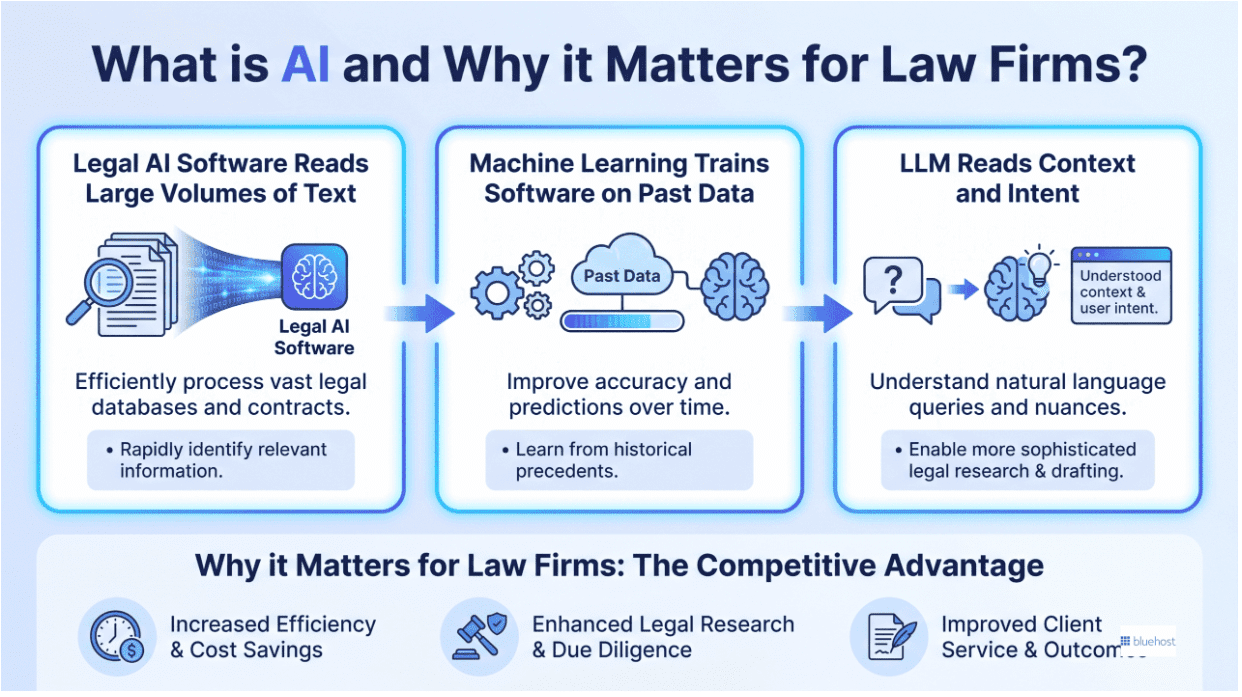
AI for law firms is less about replacing legal expertise and more about reclaiming the hours that quietly vanish each week. Here’s what the technology actually does and why it matters right now.
- Legal AI software reads large volumes of text, understands language in context, and generates new content from its training, making contract review, case law research and drafting far less time-consuming.
- Machine learning trains software on past data to identify patterns, and in legal work that typically means flagging which contract clauses carry elevated risk across thousands of prior agreements.
- Unlike basic machine learning, a large language model (LLM) reads context and intent, producing fluent text, so LLM-powered tools can summarize depositions or compare legal arguments across multiple jurisdictions.
- Clients ask for cost certainty more often now, and that pressure lands directly on research, intake and drafting time that rarely gets billed at full rate anyway.
- When routine tasks take less time, more of your working day opens up for strategic counsel, the kind of work clients actually pay for and value most.
6 everyday ways lawyers are using AI
Most lawyers now use AI across a handful of repeated task types rather than in isolated experiments. The table below maps all six common use cases, what the technology actually does in each one and where attorney judgment remains the deciding factor.
| Use case | What AI does | Time saved or benefit | Attorney oversight needed |
| Legal research | Scans case law and surfaces relevant precedents across multiple jurisdictions. | Cuts multi-hour database searches to minutes | Verify every citation against the primary source before relying on it. |
| Document and contract review | Flags risky clauses, missing provisions and inconsistencies across large document sets. | Faster processing of high-volume contract stacks | Sample AI-flagged items and confirm each finding before finalizing any agreement. |
| Drafting and correspondence | Generates first drafts of motions, demand letters and routine client communications. | Reduces blank-page time on standard documents | Full review required before anything is filed or sent to a client. |
| Billing and time capture | Logs activity in the background and drafts invoice line items automatically. | Recovers billable time lost to manual entry gaps | Confirm all entries match actual work before invoices go out. |
| Client intake and scheduling | Collects matter details, answers initial questions and books consultations. | Frees front-office capacity for higher-value work | Review all intake data before opening a new matter. |
| Due diligence and eDiscovery (electronic discovery) | Sorts, tags and groups large document sets by relevance and privilege markers. | Processes in hours what manual review takes days to complete | Attorney must make final privilege calls and approve all productions. |
What AI can actually do for law firms today?
Forget the hype for a moment. The practical value of AI in the legal industry comes down to a handful of repeatable tasks where speed and consistency matter more than judgment. Here is where firms see returns first.
1. AI for legal research and case preparation
Manual research means hours of reading through case law, statutes and prior rulings to find what supports your argument. AI for legal research flips that. Modern tools scan large bodies of case law and surface analogous decisions across multiple jurisdictions in minutes rather than days.
Picture a litigator who needs precedent on a narrow contract dispute spanning three states. Instead of running separate AI-powered legal research queries and reading each result, a legal AI tool can pull comparable rulings, summarize the reasoning and flag conflicts between jurisdictions.
2. Document review and contract analysis
Large language models read contracts the way a careful associate would, only quicker. They identify risky clauses, point out missing provisions and catch inconsistencies that are easy to miss after the tenth agreement of the day.
In a merger due diligence sprint or a stack of commercial leases for a real estate practice, this matters. Artificial intelligence for law firms can sort hundreds of documents, highlight unusual indemnity language and group similar terms for comparison.
3. Secure AI deployment and data protection
Implementing artificial intelligence within a legal practice requires strict guardrails to protect client confidentiality. The Bluehost Privacy+ for legal firms addresses these critical privacy requirements in three main ways:
- Data isolation protocols designed to reduce the risk of AI models from training on confidential client discovery documents and proprietary legal research
- Secure drafting tools in the Bluehost AI All-Access Privacy+ that help attorneys generate client communications while reducing exposure of sensitive legal data
- Automated intake assistants that schedule consultations safely, which serves as a core recommendation in our complete guide to AI for law firms seeking optimized workflows
For small law firms, a secure AI environment helps you work within your ethical obligations while reducing exposure to digital threats. Protecting client data directly preserves the professional trust that legal practices depend on daily.
Also read: Is ChatGPT private? What businesses need to know in 2026
How generative AI is changing legal services?
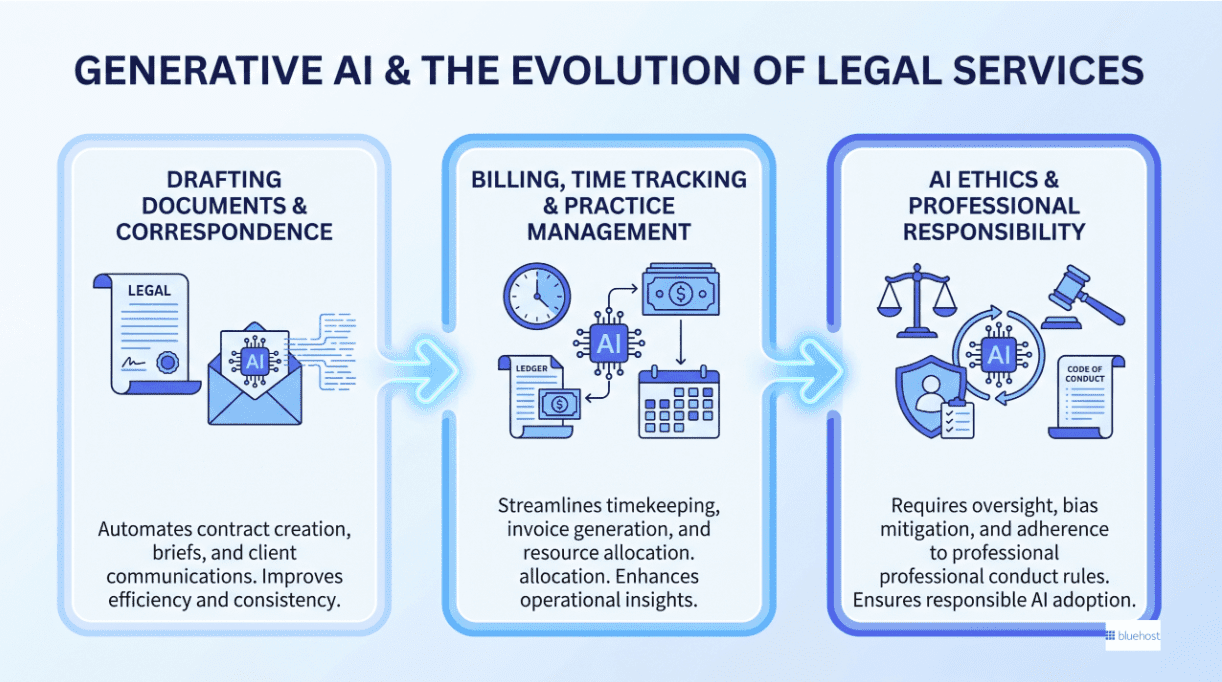
The shift from search-based software to generative models is the biggest change in legal technology in years. Generative AI for lawyers does more than retrieve information. It produces original drafts, summaries and analysis you can shape, which reframes how AI in legal services fits into daily practice.
1. Generative AI vs. traditional legal software
Older legal databases work on keywords. You type a term, the system returns documents containing that term and you sift through the results. Generative models built on GPT-class and Claude-class technology work differently: they understand context. Ask one to explain how a clause exposes your client to liability, and it responds with reasoning, not just a list of matches.
What that means for your workload is fewer mechanical lookups and more finished starting points. The tool drafts, compares and explains, then hands you something to refine instead of raw search hits to interpret yourself.
2. Drafting legal documents and correspondence
Demand letters, motion outlines, settlement agreements and routine correspondence all start with a blank page, and that page is where generative AI saves the most time. The model produces a first draft in your preferred structure, and you edit from there.
McKinsey Global Institute research on knowledge work has tied generative AI to significant productivity gains for exactly this kind of drafting-heavy task.
One rule is non-negotiable. Any document sent to a client or filed with a court needs full attorney review. The draft is a head start, not a final product and the lawyer remains accountable for every word.
3. Billing, time tracking and practice management
Revenue leaks when billable minutes go unrecorded. AI-powered time capture runs in the background, logging activity as you work so fewer tasks slip through unbilled. Paired with automated invoice generation and payment reminders, it tightens the gap between work done and money collected.
For firms that routinely under-bill because nobody remembered to log a phone call, that recovered time adds up quickly across a month.
4. AI ethics and professional responsibility for attorneys
The ABA Model Rules of Professional Conduct already shape how you can use these tools. Competence and confidentiality both apply: you are expected to understand the technology you deploy and to protect client information while using it.
State bar guidance on AI is still taking shape, so check your local bar association’s current position before rolling out anything client-facing. Treating that review as part of due diligence keeps your firm on solid ground.
Types of AI used in the legal industry
Different forms of AI in legal services support different parts of a firm’s workflow, from sorting information to producing supervised drafts.
| Type | What it does | Legal task fit | Strength | Main risk | Control needed |
| Machine learning | Finds patterns in past data. | Predicts matter outcomes or flags review priority. | Good for repeatable classification. | Biased training data can skew results. | Test outputs against known matters. |
| Natural language processing | Reads and interprets human language. | Extracts names, dates and clauses. | Handles large text sets quickly. | May miss legal nuance. | Require attorney sampling. |
| Large language models | Predict and generate text from context. | Summarizes memos and compares arguments. | Strong at synthesis. | Can invent facts. | Verify citations and sources. |
| Generative AI | Creates new text or outlines. | Supports generative AI for lawyers drafting first passes. | Reduces blank-page time. | Overreliance weakens review. | Keep lawyer approval mandatory. |
| Automation | Runs rules-based tasks. | Routes intake, reminders and approvals. | Consistent process handling. | Bad rules repeat mistakes. | Audit workflows regularly. |
How to choose the best AI legal assistant for your practice?
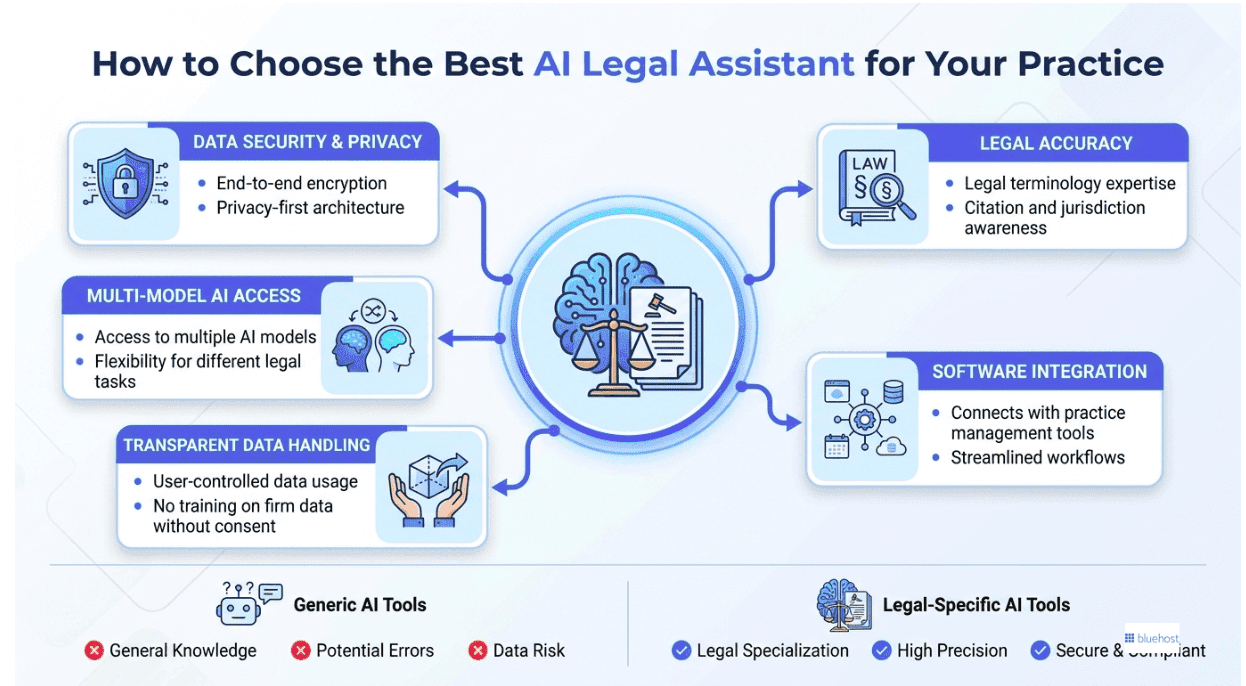
Picking the right tool is where commercial decisions get real. The best AI legal assistant for your firm balances accuracy, security and cost against the way you actually work. Start with features, then weigh general tools against legal-specific platforms.
Before you compare brands, get clear on what separates a serious legal tool from a generic one. Prioritize these five in order:
- Data encryption and a privacy-first architecture that protects every prompt
- Accuracy with legal language, citation formats and jurisdictional nuance
- Integration with the practice management software you already run
- Transparent data handling, with no training on your inputs unless you consent
- Access to more than one underlying AI model rather than a single locked provider
That last point matters more than it first appears. Different models excel at different tasks, and being able to switch keeps you from outgrowing your tool in six months.
General-purpose AI tools vs. legal-specific AI platforms
Many firms assume they need a dedicated legal platform. That is not always true. General-purpose models now handle a wide range of legal tasks well when paired with good prompting and proper privacy controls. Here is how the two approaches compare.
| Factor | General-purpose AI | Legal-specific platform |
| Cost | Lower, often one flat fee | Higher, frequently per-seat |
| Flexibility | Broad across many task types | Narrow but deep in legal work |
| Legal accuracy | Strong with skilled prompting | Strong out of the box |
| Data privacy controls | Varies by tier and provider | Usually built for legal compliance |
| Integration depth | General connectors | Native practice management links |
What small law firms should prioritize when budgeting for AI
Budget discipline beats feature collecting. A single subscription that includes several models costs far less than paying for each tool separately. Weigh privacy controls above feature count when your work centers on confidential client data. And while you are still testing, favor trial periods and monthly billing over annual contracts so you can change course without penalty.
Secure AI for law firms: protecting client data and case details
For law firms, adopting artificial intelligence is not only about productivity. It also requires careful consideration of client confidentiality, data handling practices and ethical obligations to ensure sensitive information remains protected.
Why legal AI needs a different security standard
Attorney-client privilege creates a risk that ordinary businesses never face: inadvertent disclosure. Public AI tools may use whatever you type to improve their models unless you opt out or use a protected tier.
Pasting a client memo into a standard free chatbot could be treated as handing that information to a third party, which is exactly the kind of exposure privilege is meant to prevent.
The ABA’s Formal Opinion 477R on transmitting confidential information over the internet set the tone here, reminding attorneys that storing or sending client data through outside services demands real diligence. The ABA Formal Opinion 512 (July 2024) extends that framework directly to generative AI, making attorney oversight of these tools a matter of professional responsibility.
What to look for in a privacy-first AI setup for your firm
You do not need to be a security engineer to vet a vendor. Ask whether the tool offers these four protections:
- A sanitization step that scrubs sensitive details from prompts before they reach the model
- A written guarantee that your inputs are never used for training
- Encrypted transmission and storage for every prompt and response
- An audit trail so you can log what was asked and what came back
If a vendor cannot answer those questions clearly, treat that as your answer. Confidential work deserves a tool that documents how it handles data.
Also read: 10 Best Secure AI Tools for Business Protection in 2026
How does Bluehost AI All-Access Privacy+ address legal privacy concerns?
Once you understand what matters in a legal AI tool, stronger privacy controls, transparent data handling and flexibility across use cases, narrowing down your options becomes much easier. For firms handling privileged communications, client records and case materials, Bluehost Privacy+ for legal firms is designed to support AI adoption without treating sensitive legal work like ordinary prompt data.
Privacy+ adds safeguards intended for document-heavy legal workflows, helping firms use AI more confidently for drafting, summarization, research support and internal reviews. Key capabilities include:
- Prompt sanitization: With Bluehost GPT Privacy Mode, sensitive client and matter details are identified and sanitized before prompts are processed, reducing exposure risks during AI-assisted work.
- Encrypted conversations: Prompts and responses are handled using encryption, providing an additional layer of protection for confidential discussions.
- Access to multiple leading AI models: Legal teams can use ChatGPT, Claude, Gemini and Grok from a single dashboard, making it easier to choose the model best suited for drafting, summarization or research tasks.
- Privacy-focused controls: Privacy+ is designed to support high-trust legal workflows by combining context sanitization, encrypted handling and private access patterns in one workspace.
- Centralized AI management: Instead of switching between multiple subscriptions and interfaces, firms can manage AI-assisted legal work from a single environment built for document-sensitive teams.
Bluehost AI All-Access Privacy+ is available as a standalone subscription, so firms do not need a Bluehost hosting plan to use it.
For legal teams exploring AI while prioritizing confidentiality, it may be worth considering as a way to balance productivity gains with stronger privacy controls.
How to get started with AI at your law firm?
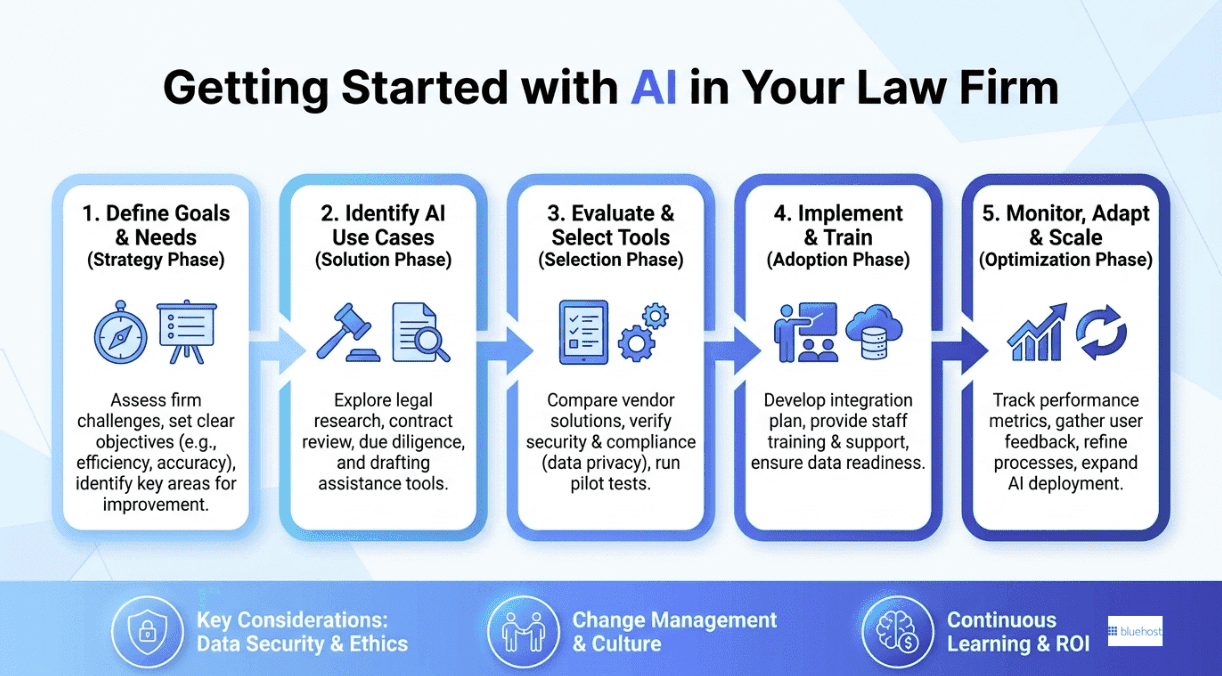
Knowing what AI can do is the easy part. Actually rolling it out without creating chaos? That takes a bit more intention. Whether your firm has three attorneys or thirty, the sequence below keeps things focused and avoids the most common mistakes teams make when they move too fast.
1. Start with a time audit, not a gut feeling
Before you buy anything or sign up for anything, spend two weeks tracking where non-billable hours actually go. Research, drafting, intake emails, scheduling: all of it. Most attorneys are surprised by the results.
You think you spend an hour on research; the log says three. The audit turns vague frustration into a concrete target, and that target is what drives every decision after this.
2. Pick one use case and commit to it
Resist the urge to automate everything at once. Look at your audit results and find the single task that eats the most time. Maybe it’s drafting routine client letters. Maybe it’s the first pass on contract review.
Whatever it is, start there and only there. Firms that try to do five things simultaneously end up doing none of them well, and attorneys get frustrated fast when tools feel half-baked.
3. Choose a tool that fits your obligations
Not every AI tool is built with legal ethics in mind. Before you hand client data to any platform, consider how it stores, processes and retains that information.
Look for tools with clear data processing agreements, the ability to opt out of model training and explicit policies around privilege. If the vendor can’t answer those questions directly, that’s your answer.
4. Invest real time in teaching your team to prompt
The gap between a mediocre AI output and a genuinely useful one is almost always the prompt. A few hours of training here pays off for months. Attorneys who learn to give the model proper context, a defined role and a clear output format get dramatically better results than those who treat it like a basic search engine. It’s a skill. Treat it like one.
5. Measure what actually changes over 90 days
Give any new tool a full 90-day window before you decide whether it earns a permanent spot in your workflow. Track three numbers: hours saved per attorney each month, the share of previously lost billable time you recover and your client intake conversion rate.
Returns tend to compound over time because as your team gets sharper at prompting, output quality improves without any added cost. You can’t manage what you don’t measure, and a clear baseline makes that final call easy.
Final thoughts
AI does not replace legal judgment. It removes repetitive administrative work, giving attorneys more time to focus on strategic decisions, client counsel and case outcomes. Firms seeing the greatest benefits are often those that start with a single high-value use case, measure its impact and maintain strong safeguards around client information.
With the right AI tools in place, law firms can improve efficiency without compromising confidentiality.
For firms looking to adopt AI while keeping privacy top of mind, Bluehost Privacy+ for legal firms may be worth exploring. It offers encryption and an added layer of isolation from standard session logging, helping organizations use AI tools with greater control over sensitive information.
FAQs
Yes, when you use a secure AI tool for law firms rather than a free public chatbot. The risk comes from tools that may train on your inputs, which could expose privileged information. Choose an option with a no-training guarantee, encryption and a sanitization step that removes sensitive data before prompts reach the model.
The best AI tools for small firms are usually a single subscription that bundles several leading models with privacy controls, rather than multiple separate tools. That approach keeps costs predictable and lets you test different models on research, drafting and intake before committing to a workflow.
No. AI handles repeatable tasks like research, first drafts and document review, but it cannot exercise legal judgment, advise clients or take responsibility for a filing. It changes how legal work gets done by removing routine effort, leaving strategy, ethics and final decisions firmly with the attorney.
Treat AI output as a starting point and verify every citation against the primary source before relying on it. Use the tool to surface relevant case law and summarize reasoning quickly, then confirm the holdings yourself. That habit captures the speed benefit while keeping a licensed attorney accountable for accuracy.
Attorneys commonly use AI models for law firms such as ChatGPT, Claude vs Gemini for law firms for drafting and research, alongside legal-specific platforms from established providers for citation-heavy work. Many firms now favor consolidated subscriptions that combine several models with a privacy layer, which reduces both cost and the number of vendors they need to manage.

Write A Comment