 ChatGPT,
 Claude,
 Gemini,
 Grok — all four for
According to Google’s Chrome UX Report, just 55.9% of websites pass all three Core Web Vitals as of the most recent 2026 data. One of the most common reasons websites fail is page speed. That means many site owners may be losing rankings, traffic and revenue because their web hosting setup can no longer support their website performance needs.
Hosting is not a one-time decision. The shared hosting plan that worked when you launched your website may become a limitation as your traffic grows, your transactions increase or your campaigns start driving real volume.
This is usually when people start comparing VDS vs shared hosting. Should you stay on a shared hosting environment, or move to a VDS virtual dedicated server with your own dedicated resources?
This guide breaks down VDS vs shared hosting across resource allocation, performance, security, scalability, control and cost, so you can choose the right hosting solution for your website.
Before we compare the key differences in detail, let’s quickly understand what shared hosting and VDS hosting mean.
What is shared hosting?
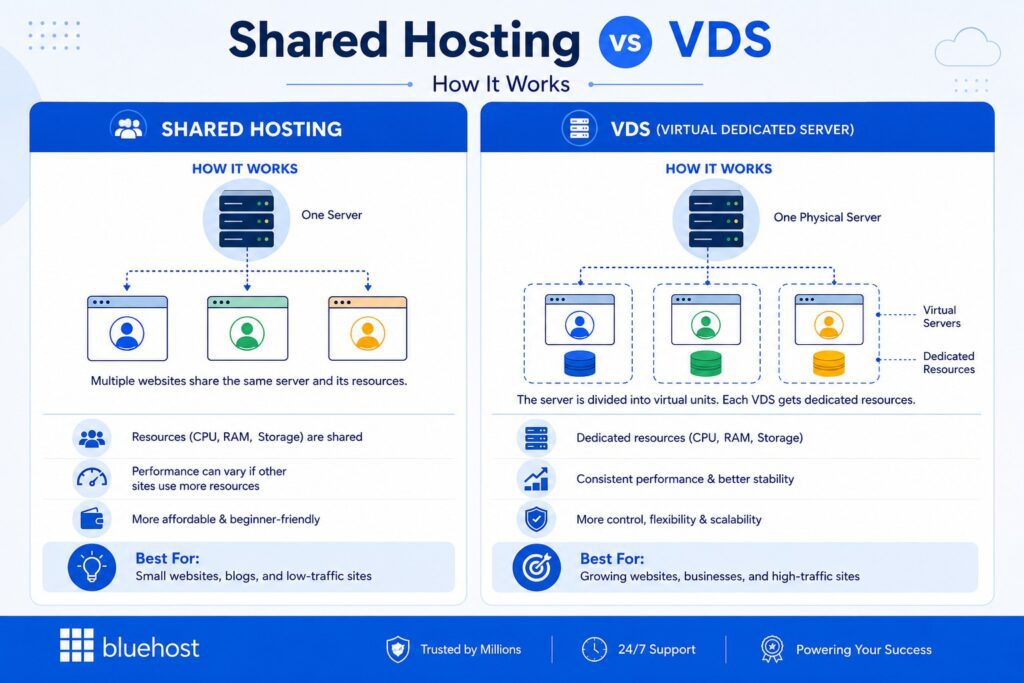
Shared hosting is a web hosting solution where multiple websites use the same physical server and share the same server resources, such as CPU, RAM and disk space.
It is affordable, beginner-friendly and easy to manage, which makes it a good choice for small websites, blogs, portfolios and basic business sites. But because multiple websites use shared resources on the same server, your site may slow down if other users consume too much processing power, memory or bandwidth.
What is VDS hosting?
VDS stands for Virtual Dedicated Server. VDS hosting gives your website dedicated resources inside a virtualized server environment.
With VDS hosting, CPU, RAM, storage and other allocated resources are reserved for your own virtual server. Unlike shared hosting, your website does not compete with multiple websites for the same server resources. This helps improve consistent performance, security isolation and control over your hosting environment.
A VDS uses virtualization technology to create multiple virtual servers on a single physical server. Each virtual server operates independently, giving users more control over server settings, custom software and server management.
Also read: What Is VDS Hosting? Bluehost Virtual Dedicated Servers Explained
Now that the terms are clear, let’s compare VDS vs shared hosting across the factors that matter most.
VDS vs shared hosting: The core differences at a glance
At a high level, the difference between VDS and shared hosting comes down to resource ownership. Shared hosting keeps costs low by placing multiple websites on the same server, while VDS hosting gives your website dedicated virtual server resources for better performance, control and scalability.
Use the table below to quickly compare both hosting options before we break down each difference in detail.
| Feature | Shared hosting | VDS hosting |
| Resources | Shared with other websites on the same server | Dedicated virtual server resources |
| Performance | Can fluctuate based on server usage | More stable and predictable |
| Security | Shared server environment | Stronger isolation |
| Control | Limited server customization | More server-level control |
| Scalability | Limited upgrade flexibility | Easier to scale resources |
| Cost | Lower starting cost | Higher cost, more power |
| Best for | Blogs, portfolios and small websites | Growing businesses, eCommerce, apps and production workloads |
The table above is your starting point. The sections below explain why each of these differences matters in practice and which hosting solution you should choose.
What do these differences mean for your website?
The table above highlights the key differences between VDS and shared hosting. But what do those differences actually mean in practice? The answer depends on how important performance, control, scalability and reliability are to your website and business goals.
1. Resource allocation
One of the biggest advantages of VDS hosting is that your website gets dedicated virtual server resources.
With shared hosting, multiple websites use the same pool of CPU, memory and storage resources. This keeps costs low, but performance can fluctuate if other websites on the server experience traffic spikes or consume excessive resources.
With VDS hosting, CPU, RAM and storage are allocated specifically to your virtual server environment. This helps deliver more consistent performance, especially for growing websites, online stores and applications where speed directly affects user experience and conversions.
Verdict: Choose shared hosting for basic resource needs. Choose VDS hosting when your website needs dedicated resources, better resource allocation and more predictable performance.
2. Performance and speed
Shared hosting can perform well for small websites. But as your traffic grows, performance can become less consistent.
If another website on the same server receives a traffic spike or uses too many resources, your site may also slow down. This is often called the noisy neighbor effect.
VDS hosting helps reduce this issue by giving your website dedicated and isolated resources. Bluehost VDS Hosting includes dedicated CPU, DDR5 memory and NVMe storage for websites and applications where performance needs to stay reliable.
Better website performance can also support stronger user experience, lower bounce rates and better conversion opportunities.
Verdict: Shared hosting is enough for small, low-traffic websites. VDS hosting is better when speed, stable performance and user experience directly affect your business.
3. Security and isolation
Security depends on how much isolation you need
Shared hosting can be secure when managed by a reputable hosting provider. However, it is still a shared environment where multiple websites exist on the same physical server.
VDS hosting provides stronger isolation because your virtual server operates independently from other virtual servers. This gives businesses greater control over security settings, firewall configurations, access controls and server-level protections.
For websites that handle customer accounts, online payments or sensitive business data, this additional isolation can be valuable.
Verdict: Shared hosting is suitable for standard websites. VDS hosting is stronger for businesses that need better isolation, full control and more security flexibility.
4. Scalability
Scaling becomes easier as your website grows
Shared hosting is often a great starting point for new websites, blogs and small business sites. But as traffic, databases and applications grow, resource limitations can become more noticeable.
VDS hosting is designed to scale more easily. You can increase CPU, RAM and storage resources as your requirements grow, helping your website handle larger workloads without requiring a complete hosting migration.
This makes VDS a stronger long-term option for websites that expect traffic growth, seasonal spikes or increasing business demands.
Verdict: Shared hosting works for early-stage websites. VDS hosting is better if you expect traffic growth, larger workloads or future expansion.
5. Customization and control
Shared hosting is simple because most server maintenance and server management tasks are handled by your web hosting provider. But that also means you have limited control over the hosting environment.
VDS hosting gives you more freedom to configure server settings, install custom software and manage advanced workloads. Bluehost VDS Hosting includes full root access and SSH access, which is useful for developers, agencies and businesses that need a custom server setup.
Verdict: Shared hosting is better if you want simplicity. VDS hosting is better if you need root access, custom software, advanced server settings or more control over your server environment.
6. Cost and value
The real question is value, not cost
Shared hosting usually has the lowest upfront cost, which makes it an attractive option for smaller websites with modest resource requirements.
VDS hosting costs more because it provides dedicated resources, stronger isolation and greater control. The additional investment often makes sense when website performance, uptime and scalability directly impact revenue, customer experience or business operations.
Rather than asking which option is cheaper, it is often more useful to ask which option best supports your website’s current needs and future growth.
Verdict: Shared hosting wins on upfront cost. VDS hosting offers stronger long-term value when performance, reliability and control affect your business.
Shared hosting vs VDS hosting: Which one should you choose?
Before choosing between shared hosting and VDS hosting, think about where your website is today and where it is headed next. Shared hosting works well when your needs are simple and your traffic is still manageable. VDS hosting makes more sense when performance, control and scalability start becoming business priorities.
Use the table below to quickly decide which hosting option fits your current website needs.
| Choose shared hosting if… | Choose VDS hosting if… |
| You are launching a new website. | Your website traffic is growing. |
| Your traffic is low or moderate. | Your current hosting feels slow or limited. |
| You want the most affordable hosting option. | You need dedicated resources for better performance. |
| You do not need advanced server control. | You need better security, scalability and control. |
| You run a blog, portfolio or basic business website. | You run an eCommerce store, business website, application or production workload. |
| Simplicity and low cost matter more than advanced customization. | Your website has become important to your business and downtime or slow performance can affect revenue, leads or customer experience. |
In short, shared hosting is the right choice when you need a simple and affordable way to get online. VDS hosting is the better choice when your website needs dedicated resources, stronger performance, more control and room to scale.
Signs you have outgrown shared hosting
Shared hosting works well when your website is small and traffic is predictable. But as your site grows, you may start noticing performance, control or reliability issues that a basic shared environment can no longer support.
You may have outgrown shared hosting if:
- Your website slows down during campaigns, sales or traffic spikes.
- You regularly hit CPU, memory or bandwidth limits.
- Your online store checkout, login pages or database-heavy pages feel slow.
- You see frequent server errors, downtime or 503 issues.
- You need custom software, advanced server settings or background processes.
- Your Core Web Vitals remain poor even after optimizing images, caching and plugins.
- Your website now supports revenue, leads, customer accounts or business-critical workflows.
If these problems are becoming common, VDS hosting may be the better next step. It gives your website dedicated resources, stronger isolation and more control, so your hosting environment can keep up with your growth.
How can you move from shared hosting to VDS without breaking your website?
Migration is one reason many website owners stay on shared hosting longer than they should. The concern is understandable. No one wants downtime, lost data or SEO issues.
The good news is that moving from shared hosting to VDS can be smooth when it is planned properly.
A typical migration includes:
| Step | What happens |
| Choose the right VDS plan | Pick a plan based on your traffic, storage, database size and future growth. |
| Back up your website | Save your files, databases and key server settings before moving anything. |
| Move files and databases | Transfer your website content to the new VDS environment. |
| Test the migrated site | Check pages, forms, checkout, logins and key features before launch. |
| Update DNS records | Point your domain to the new server while keeping the old site live during propagation. |
| Confirm the move | Once everything works on VDS, you can close the old hosting setup. |
A proper migration helps reduce downtime, protect data and preserve SEO. To avoid ranking issues, keep the same URLs, check redirects and test for broken pages after the move.
Also read: The Ultimate Website Migration Checklist: SEO-Friendly Site Transfer
Bluehost helps simplify this process with migration support, transfer tools and 24/7 expert assistance, so you do not have to manage every technical step alone.
Why is Bluehost VDS built for this upgrade?
If your website has outgrown shared hosting, you need more than a bigger plan. You need dedicated resources, stronger isolation, better control and room to scale.
Bluehost VDS Hosting is built for growing websites, eCommerce stores, applications and production workloads that need more consistent performance than shared hosting can provide.
With Bluehost VDS Hosting, you get:
- Dedicated vCPU resources to support more predictable performance.
- DDR5 RAM to help improve application response times.
- NVMe SSD storage for faster file reads, database queries and data-heavy tasks.
- Full root and SSH access to configure your server environment and install custom software.
- Unmetered bandwidth to support growing traffic.
- One IPv4 address for your VDS environment.
- Flexible scaling so you can upgrade resources as your website or application grows.
- Continuous production uptime to support website and application availability.
- 24/7 infrastructure-level support when you need help with your hosting environment.
These features make Bluehost VDS a strong next step for websites that need more speed, control and reliability than shared hosting can offer.
Ready to move beyond shared hosting?
Shared hosting is a good starting point for small websites. But when your traffic grows, performance slows down or you need more control, VDS hosting becomes the better fit.
With Bluehost VDS Hosting, you get dedicated resources, stronger isolation, full root access and scalable infrastructure built for growing websites, eCommerce stores and production workloads.
Explore Bluehost VDS Hosting and give your website the performance, control and room to grow it needs.
FAQs
No. VDS hosting is virtualized, which means your server runs on shared physical hardware but gets dedicated virtual resources. Dedicated hosting gives you an entire physical dedicated server. VDS offers many dedicated server benefits, such as stronger isolation, better control and more consistent performance, but usually at a lower cost than a physical dedicated server.
The main difference is resource allocation. In many VPS hosting setups, resources may be shared or overcommitted across multiple users. This can cause performance to fluctuate during heavy server usage.
With VDS hosting, CPU, RAM and storage are dedicated to your virtual server environment. This helps deliver stable performance, especially for production websites, eCommerce stores and resource intensive applications. For more information, check out our guide: Virtual Dedicated Server Hosting: The Upgrade Path Between VPS and Dedicated Servers
Yes. You can run WordPress on a VDS, and it can be a strong option for growing WordPress websites.
With VDS hosting, you get more resources and control than shared hosting. This makes it easier to support caching, database optimization, custom server settings and higher traffic levels.
Not if the migration is done correctly. To protect SEO, keep the same URLs, preserve redirects, maintain your site structure and test for broken pages after migration.
A faster and more stable hosting environment can also support better user experience and Core Web Vitals over time.
Yes, VDS hosting is usually more expensive than VPS hosting because it provides dedicated virtual resources instead of shared or overcommitted resources.
For small websites or development projects, VPS hosting may be enough. For production websites, eCommerce stores and applications where consistent performance matters, VDS can offer better long-term value.
VDS hosting gives you more control than shared hosting, so some server administration skills can be helpful. This is especially true if you want to install custom software, configure server settings or manage advanced applications.
However, a good hosting provider can help with infrastructure-level support, migration guidance and basic hosting services, making the move easier for growing businesses and technical teams.

Write A Comment