 ChatGPT,
 Claude,
 Gemini,
 Grok — all four for
Key highlights
- Choose shared hosting for brochure sites, campaign pages or nonprofits under 500 daily visitors.
- Check for free SSL, daily backups and malware scanning before you commit to a plan.
- Avoid free-tier hosting if your launch date can’t wait weeks for nonprofit approval.
- Get a 99.99% uptime SLA and free SSL on every Bluehost shared hosting plan.
- Upgrade to VPS hosting once traffic, storage or transactions outgrow your shared plan.
Shared hosting for nonprofits works well as a starting point, as long as your traffic and donation volume stay inside a shared plan’s limits. Larger organizations running high-traffic campaigns or several connected tools need more room than a shared plan provides.
This guide covers when shared hosting fits, what to check before you sign up and when it’s time to move to something bigger.
Is shared hosting right for a nonprofit website?
Shared hosting works well for most small nonprofits: a brochure site, a campaign page or a simple donation page. It handles fewer than 500 daily visitors comfortably, with a working domain, basic security and reliable uptime. Larger campaigns or high-traffic pushes need more room than a shared plan provides.
Shared hosting starts to strain once you’re running several microsites, processing high donation volume directly on-site or seeing traffic spikes above 1,000 visitors a day. Media-heavy pages, like video-based fundraising content, also outgrow shared resources faster than text-based sites.
Key ideas:
- Shared hosting fits single-site nonprofits with steady, moderate traffic.
- Multiple microsites, high-volume donations or media-heavy pages need more than shared hosting offers.
What does a nonprofit actually need from a hosting plan?
Beyond handling traffic, a nonprofit hosting plan has to protect donor data and stay manageable without a dedicated IT team. Names, emails and payment details passed through your donation tool need a secure connection and up-to-date security patching.
Note: Hosting security covers your site’s connection and server, not the payment processor itself. Pair your host’s SSL certificate with a trusted donation platform for full protection.
- Free SSL certificate, active by default
- Daily or weekly automatic backups
- Security patches applied without manual updates
That’s the baseline. What trips nonprofits up is deciding whether “free” gets them there.
Is free hosting worth it for a nonprofit?
Free hosting can work for a nonprofit, but it usually comes with trade-offs that paid plans don’t have. Some providers offer free hosting to verified 501(c)(3) organizations, though approval can take a few weeks and often applies only to a basic shared plan. Support response times, backup frequency and uptime guarantees are usually lighter on free tiers than on paid ones.
Paid shared hosting removes the application step and adds backups, security scanning and support as standard. For a nonprofit that needs its donation page live during a time-sensitive campaign, waiting weeks for a free-tier approval can cost more than the plan would have.
Pro tip: If your nonprofit’s site needs to be live before a specific campaign date, budget a few dollars a month for a paid plan rather than risk a free-tier approval delay.
What should nonprofits look for in a web hosting provider?
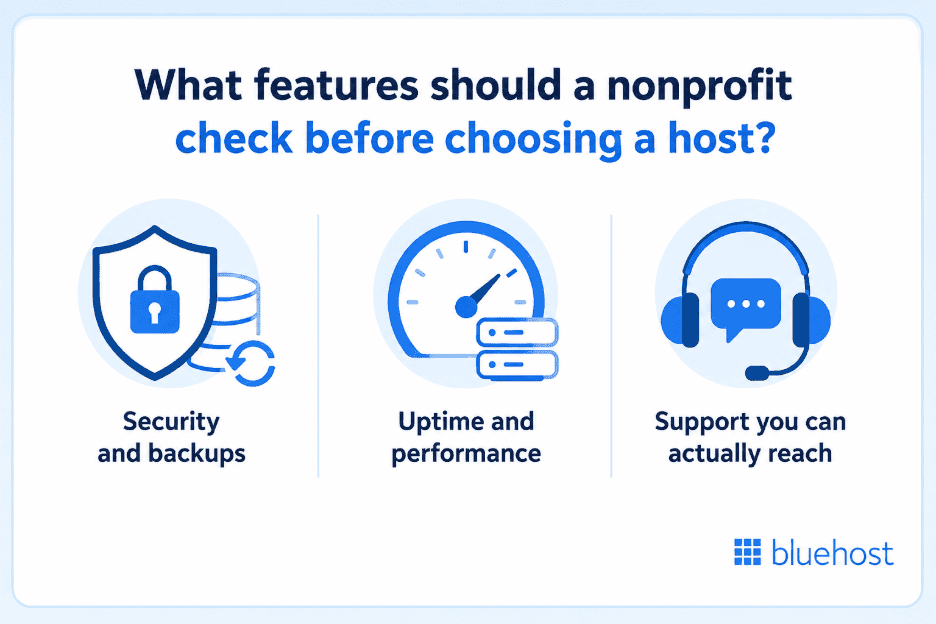
Beyond price, four features decide whether a host holds up for a nonprofit site: security, backups, uptime and support you can reach quickly. The table below breaks down what each one does and why it matters for a donor-facing site.
| Feature | What it does | Why it matters |
| SSL certificate | Encrypts data between your site and visitors | Protects donor information during checkout |
| Automatic backups | Saves a copy of your site on a set schedule | Restores your site fast if something breaks |
| Uptime SLA | Guarantees your site stays live | Keeps donation pages accessible during campaigns |
| Malware scanning | Checks for and removes threats | Prevents downtime and data breaches |
| 24/7 support | Connects you to a real person by chat or phone | Solves problems fast without in-house IT |
Security and backups
A nonprofit site handling donor names and payment details needs SSL active by default, not as an add-on. Bluehost includes a free SSL certificate and real-time malware scanning on every shared hosting plan, so security runs in the background without extra setup.
Backups matter just as much as prevention. If a plugin conflict or bad update takes your site down, a recent backup gets you back online in minutes instead of days.
Uptime and performance
Uptime guarantees tell you how often your host commits to keeping your site live. Bluehost backs shared hosting plans with a 99.99% uptime SLA, which matters most during high-traffic moments like year-end giving campaigns.
Support you can actually reach
Small nonprofit teams rarely have in-house IT, so support response time becomes part of your hosting decision, not an afterthought. Bluehost offers 24/7 support by chat or phone, with an average response time under two minutes.
Best for: Nonprofits without dedicated technical staff who need security and troubleshooting handled without a learning curve.
When does a nonprofit outgrow shared hosting?
A nonprofit outgrows shared hosting when traffic, storage or transaction volume consistently pushes past a shared plan’s limits. Traffic spikes during a single campaign don’t count. Repeated slowdowns across normal weeks do.
Three signals point to an upgrade:
- Your site sees over 1,000 daily visitors on a regular basis
- You’re running multiple microsites or apps from one account
- Your donation platform processes a high volume of transactions directly on-site
Any one of these on its own may still fit a shared plan. Two or more together usually mean it’s time to move. VPS hosting gives a nonprofit dedicated resources instead of a shared pool, which keeps performance steady even during your biggest campaigns.
How do you choose the right shared hosting plan for your nonprofit?
Match your plan to your site’s size and traffic pattern first, then compare what’s included at each price point. A checklist beats a features list here, since most hosts bundle similar-sounding items with different limits.
Before you sign up, confirm the plan includes:
- Free SSL certificate and daily backups as standard, not paid add-ons
- A published uptime SLA, not just a general uptime claim
- Support available by chat or phone, not email-only
- Enough storage and bandwidth for your traffic pattern, including campaign spikes
- A clear upgrade path to VPS if your nonprofit grows
If your nonprofit is building out donation functionality directly on your site, it’s worth reading up on how to set up a donations block before you finalize your hosting choice, since some setups need more resources than others.
Ready to get your nonprofit’s site live? Bluehost Web Hosting includes free SSL, automated backups and a 99.99% uptime SLA on every plan, backed by 24/7 human support.
Final thoughts
Shared hosting gives most nonprofits everything a donor-facing site needs at the lowest starting cost: security, reliable uptime and a setup simple enough to manage without an IT team. The plan matters less than matching it to your actual traffic and growth pattern.
Start with the checklist above, confirm what’s included versus what costs extra and revisit your plan once your traffic or transaction volume outgrows it. A hosting decision made once, with the right criteria, saves you from switching providers mid-campaign later.
Your nonprofit’s mission deserves a host that won’t go down when donors show up. Bluehost Web Hosting plans start with real human support available 24/7, so help is there the moment you need it, not after a support ticket queue.
FAQs
Yes, as long as the plan includes an active SSL certificate, regular backups and malware scanning by default. These features protect donor data without requiring a dedicated IT team to manage them.
Shared hosting works for any type of site and splits server resources across many accounts. Managed WordPress hosting is optimized specifically for WordPress sites, with features like automatic updates and WordPress-specific support built in.
Some providers offer free hosting to verified 501(c)(3) organizations, though approval can take a few weeks and support is often lighter than on paid plans. A low-cost paid plan usually gets a site live faster and with more reliable support.
Shared hosting plans typically range from around $2 to $10 per month, depending on the provider and included features. Look at what’s bundled, such as SSL and backups, rather than comparing price alone.
Upgrade when your site regularly sees over 1,000 daily visitors, runs multiple microsites or processes high donation volume directly on-site. VPS hosting gives dedicated resources that keep performance steady during campaigns.
No specific plan type is required, but a nonprofit site benefits most from a host that includes security, backups and support as standard rather than paid add-ons.

Write A Comment