 ChatGPT,
 Claude,
 Gemini,
 Grok — all four for
Key highlights
- Managed WordPress hosting ROI helps you determine whether the additional hosting investment creates more financial value than it costs.
- Look beyond the monthly hosting fee. Include the value of time saved, services or tools replaced, technical risk reduced and the business value of website availability.
- Calculate your break-even point to understand how much time managed hosting needs to save before the additional investment pays for itself.
- Use your own website, sales and operational data instead of relying on generic industry averages.
- Managed WordPress hosting may deliver stronger ROI as your website becomes more important to lead generation, bookings, sales and day-to-day business operations.
- The goal is not to prove that managed hosting is always the right option. It is to determine whether it makes financial sense for your specific business.
Managed WordPress hosting usually requires a larger investment than a basic hosting setup. Calculating your managed WordPress hosting ROI helps you determine whether that additional cost creates enough measurable business value to justify the investment.
A better question is: what does your website actually cost you to operate?
You may be paying for separate backup, security or performance tools. You may spend hours handling updates and troubleshooting. A website problem may require emergency technical support. And if your website generates leads, bookings or sales, downtime can interrupt real business activity.
Managed WordPress hosting ROI helps you put a financial value on those factors.
At its simplest:
Managed WordPress hosting ROI = the financial value created by managed hosting compared with the additional amount you spend on it.
This guide will help you calculate that value using your own numbers so you can decide whether managed WordPress hosting makes financial sense for your small business.
What does ROI mean for managed WordPress hosting?
Return on investment, or ROI, measures how much value an investment creates relative to its cost.
For managed hosting, you can use:
Managed WordPress hosting ROI (%) = (Total measurable benefits − Incremental managed hosting cost) ÷ Incremental managed hosting cost × 100
The difficult part is not the formula. It is deciding what belongs in “net value.”
For a small business website, a practical model is:
Total measurable benefits = Time value saved + external costs replaced + expected technical risk reduction + measurable website availability value
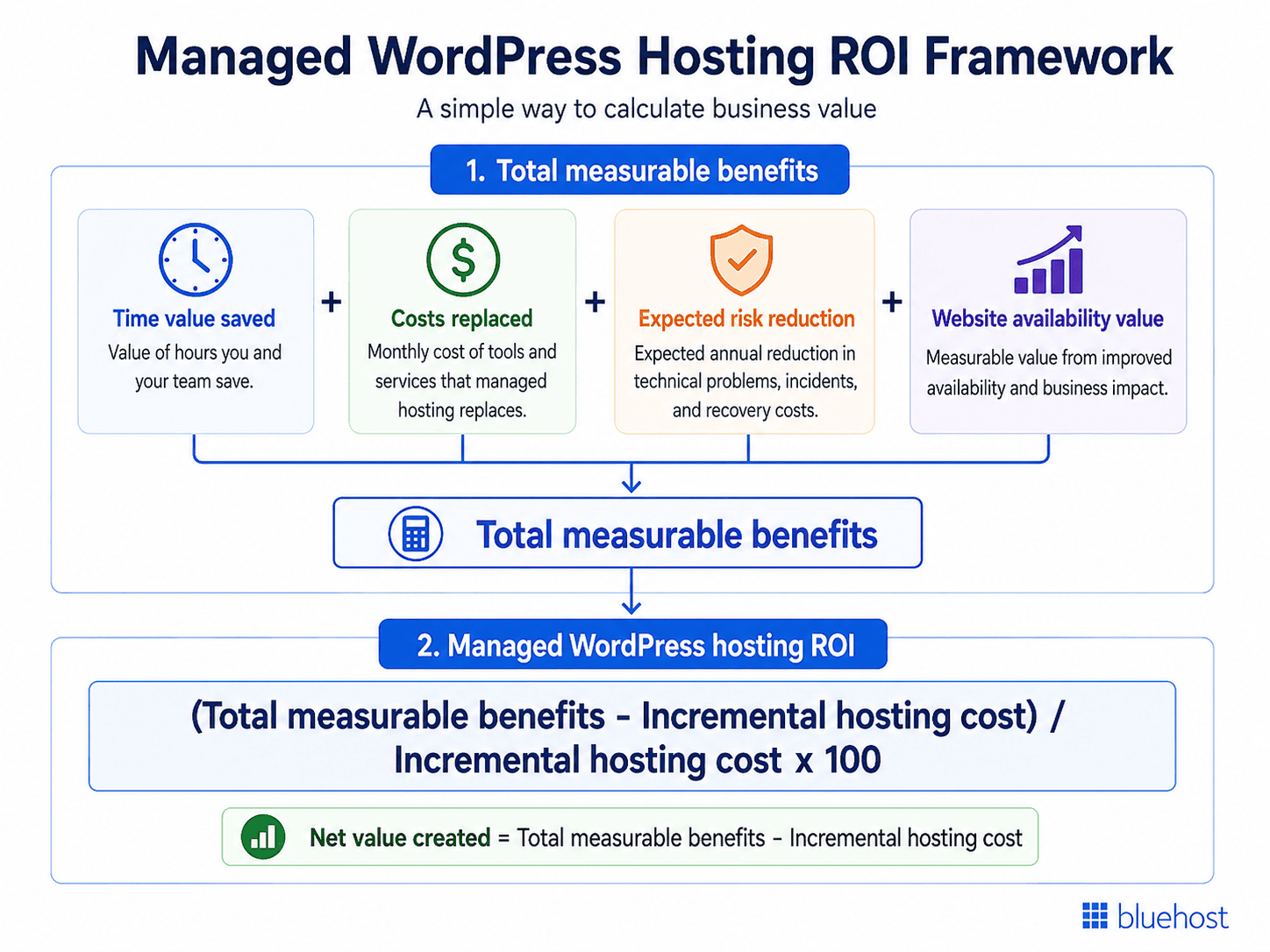
You are essentially answering five questions:
| ROI input | What you need to calculate |
|---|---|
| Additional hosting cost | How much more will managed hosting actually cost? |
| Time saved | How much business time could you realistically reclaim? |
| Tools and services replaced | Which existing expenses could genuinely disappear? |
| Technical risk | What do website problems currently cost your business? |
| Website availability | What business activity depends on your website remaining available? |
Your numbers do not need to be perfect.
They should be realistic enough to help you compare your current setup with the managed hosting option you are considering.
Now that the basic formula is clear, you can work through each input individually rather than trying to estimate ROI all at once.
How to calculate managed WordPress hosting ROI: Step-by-step guide
Calculating managed WordPress hosting ROI becomes much easier when you break it into smaller decisions.
Start with what you know today: what you spend, how much time you use managing your site and which other tools or services support it. Then estimate the less predictable factors, such as technical risk and the value of keeping your website available.
The following steps take you through the calculation in that order.
Step 1: Calculate your real additional hosting cost
Start by calculating how much more managed hosting will actually cost you. Do not simply compare two advertised hosting prices.
Your current website setup may include other recurring expenses such as:
- Backup services
- Security tools
- CDN or performance services
- Website monitoring
- Maintenance plans
- Developer retainers
- Technical support
If your managed hosting plan genuinely replaces one of those expenses, include the saving.
Use:
Incremental hosting cost = Managed hosting cost − Current hosting cost
Keep any tools or services that managed hosting replaces separate for now. You will add those savings as benefits in Step 3. This prevents you from counting the same expense twice.
Only subtract expenses you realistically expect to stop paying. This gives you a more accurate baseline for the rest of your ROI calculation.
Once you know the true additional cost, the next question is whether managed hosting gives enough time back to offset some or all of that investment.
Step 2: Calculate the value of the time you could save
Hosting has a cost that does not appear on your monthly invoice: your time.
Running a small business website can involve tasks such as:
- Installing and monitoring updates
- Managing backups
- Troubleshooting errors
- Investigating plugin conflicts
- Monitoring security notifications
- Checking site availability
- Contacting technical support
- Restoring a website after something goes wrong
Each individual task may seem small.
The financial impact becomes clearer when you look at how much time they consume over an entire month or year.
Start by estimating how many hours you spend each month on website maintenance and technical troubleshooting that could reasonably be reduced by managed hosting.
Then calculate:
Monthly time value = Hours saved per month × Value of one business hour
How should you value one hour of your time?
You do not necessarily need to use your salary or hourly wage.
Instead, think about opportunity cost.
What would you reasonably be doing with that hour if you were not troubleshooting your website?
You might be:
- Serving a customer
- Following up on a lead
- Preparing a proposal
- Managing your team
- Improving your product
- Creating a marketing campaign
- Working on another revenue-producing task
Suppose you estimate that one productive hour is worth $60 to your business.
If managed hosting saves you two hours each month:
2 hours × $60 = $120 per month in time value
This does not mean every business will save two hours. Use your own estimate based on the work you currently perform.
Once you have a value for your time, you can turn that number into a simple break-even test. This shows how much time managed hosting needs to save each month before the additional investment effectively pays for itself.
Calculate your managed hosting break-even point
A break-even calculation can make the decision much easier.
It tells you how much time managed hosting needs to save before its additional cost is recovered.
Use:
Remaining monthly cost to recover = Incremental managed hosting cost − Monthly savings from genuinely replaced tools or services
Break-even hours per month = Remaining monthly cost to recover ÷ Value of one business hour
Consider a hypothetical example.
Suppose your incremental managed hosting cost is $60 per month, and managed hosting replaces $20 per month in tools or services.
Your remaining monthly cost to recover is therefore $40.
You estimate that an hour of your time is worth $80.
$40 ÷ $80 = 0.5 hours
Your break-even point is 30 minutes per month.
In this example, if managed hosting reliably saves more than half an hour of valued business time each month, the time-saving component alone could offset the additional hosting investment.
Now change the value of your time to $25 per hour:
$40 ÷ $25 = 1.6 hours
The same hosting investment now needs to save about 1 hour and 36 minutes per month before time savings alone reach break-even.
This is why the financial value of managed hosting differs from one business to another.
Time is only one part of the calculation, however. Your hosting setup may also replace expenses that currently sit elsewhere in your technology stack.
Step 3: Add the cost of tools and services you can genuinely replace
Managed hosting plans can include capabilities that might otherwise require separate tools or services.
These may include areas such as:
- Backups
- Malware scanning
- Security protection
- Caching
- CDN services
- Monitoring
- Site staging
- Technical support
However, an included feature does not automatically equal a financial saving.
You can count it as a direct saving only if it replaces something you currently pay for or were reasonably planning to purchase.
For example, if you currently spend $15 each month on a backup service and your new hosting setup allows you to cancel it:
Monthly saving = $15
If you never paid for a backup solution in the first place, you have gained functionality, but you have not reduced an existing $15 expense.
Use a simple worksheet:
| Current expense | Monthly cost | Can managed hosting replace it? | Monthly saving |
|---|---|---|---|
| Backup service | $___ | Yes / No | $___ |
| Security tool | $___ | Yes / No | $___ |
| CDN/performance service | $___ | Yes / No | $___ |
| Maintenance service | $___ | Yes / No | $___ |
| Technical support | $___ | Yes / No | $___ |
| Total monthly savings | $___ |
This prevents you from giving every hosting feature an arbitrary dollar value just to make the ROI look stronger.
After you account for recurring expenses, look at the less predictable side of website ownership: what happens financially when something goes wrong.
Step 4: Estimate the cost of technical problems
Website problems rarely happen on a predictable schedule. You may go months without an issue and then lose several hours dealing with a failed update, a plugin conflict or a website recovery.
That makes technical risk harder to include in an ROI calculation, but you can still estimate it.
A useful starting point is expected cost.
Expected annual risk cost = Probability of an incident × Estimated financial impact
Suppose you believe a particular website problem has roughly a 20% chance of happening during the next year.
If resolving the problem would cost approximately $500 in technical assistance and lost working time:
20% × $500 = $100
Your expected annual exposure would be $100.
That does not mean you will definitely lose $100. It gives you a probability-adjusted figure you can use when comparing hosting options.
However, you should not count the entire $100 as a managed hosting benefit.
For your ROI calculation, you need to estimate how much of that expected loss managed hosting could reasonably reduce.
Use:
Expected risk reduction = Current expected loss − Expected loss with managed hosting
For example, if your current expected annual loss is $100 and you reasonably estimate that managed hosting could reduce it to $50:
$100 − $50 = $50
Your estimated annual risk-reduction benefit would be $50.
You can apply the same approach to issues such as:
- Broken updates
- Emergency developer work
- Failed backups or recovery
- Security incidents
- Website outages
- Lost staff time
Do not assume managed hosting eliminates every technical problem. It does not.
Only include the portion of risk that the hosting environment could reasonably influence.
Also watch for double counting. If your estimate for a technical incident already includes revenue lost during website downtime, do not count that same potential loss again when calculating website availability in the next step.
With technical risk accounted for, you can look at another potential source of business value: keeping your website available when customers need it.
Step 5: Estimate what website availability is worth
For some businesses, the immediate financial impact of a website outage may be limited. For others, their website is constantly generating leads, accepting bookings or processing transactions.
If your website directly contributes to your business, availability can be included in your ROI model.
For a lead-generation website
Use:
Expected hourly website contribution value = Leads per hour × Lead-to-customer conversion rate × Average contribution value per customer
Consider a hypothetical example.
Your website generates an average of 0.5 leads per business hour.
Around 20% of those leads eventually become customers.
Suppose an average new customer contributes $500 in gross profit or contribution value to your business.
0.5 × 20% × $500 = $50
That gives you an expected contribution value of approximately $50 per hour of website activity.
It does not mean one hour of downtime automatically creates a $50 loss. It gives you an estimate of the contribution value potentially exposed while your website is unavailable.
For an appointment or booking website
You can use:
Bookings generated per hour × Average contribution value per booking
For an online store
Start with:
Average gross profit or contribution value generated during the affected period
If you only have revenue or booking-value data, apply a realistic gross margin or contribution margin before treating it as downtime value.
Whenever possible, use data from your own analytics, CRM, booking platform or eCommerce reporting.
Your actual website data will almost always produce a more useful ROI estimate than a generic statistic about what downtime supposedly costs the average business.
Once you know what an hour of website activity may be worth, estimate only the downtime that managed hosting could reasonably help reduce.
Use:
Estimated annual availability benefit = Expected annual downtime hours reduced × Estimated hourly contribution value
For example, if an hour of website activity represents an estimated $50 in contribution value and you reasonably expect your hosting setup to reduce one hour of financially relevant downtime over a year:
$50 × 1 hour = $50
Your estimated annual availability benefit would be $50.
Do not assume every possible hour of downtime will be prevented. If you cannot reasonably estimate how much downtime could be reduced, leave this benefit out rather than guessing.
Availability can often be connected directly to business activity. Performance is more complicated, so it should be treated more cautiously.
Step 6: Include performance carefully
Website performance can contribute to the business case for managed hosting, but it needs to be handled carefully in an ROI calculation.
Hosting is only one part of website performance.
Other factors include:
- Your theme
- Plugins
- Images
- Third-party scripts
- Page design
- Caching configuration
- CDN setup
- Traffic quality
- Conversion experience
For that reason, you should not assume that switching hosting automatically produces a specific increase in leads, sales or revenue.
Measure the outcome instead. Compare relevant performance before and after the hosting change.
Then review business metrics such as:
- Leads
- Form submissions
- Bookings
- Conversion rate
- Completed purchases
- Revenue
If the data shows a measurable improvement and you can reasonably attribute part of it to your hosting change, you may decide to include that value in your ROI calculation.
If you cannot establish that relationship confidently, leave it out.
A conservative ROI estimate based on measurable data is more useful than an impressive number based on assumptions.
At this point, you have all the major inputs. The final step is to bring them together into one financial picture.
Step 7: Calculate your managed WordPress hosting ROI
You can now combine the different parts of the calculation using one consistent timeframe.
Because technical risk and website availability are easier to estimate annually, convert the monthly figures from the earlier steps into annual values before completing your final ROI calculation.
Use this worksheet:
| Annual ROI input | Your amount |
|---|---|
| Annual incremental managed hosting cost | $___ |
| Annual value of business time saved | $___ |
| Annual savings from tools and services replaced | $___ |
| Expected annual technical risk reduction | $___ |
| Estimated annual website availability benefit | $___ |
| Other annual defensible benefits | $___ |
| Total annual measurable benefits | $___ |
| Annual net value created | $___ |
First, calculate your net value:
Annual net value created = Total annual measurable benefits − Annual incremental managed hosting cost
Then calculate ROI:
Managed WordPress hosting ROI (%) = Annual net value created ÷ Annual incremental managed hosting cost × 100
For any monthly input, convert it to an annual value before adding it to the worksheet: Annual value = Monthly value × 12.
Using the same timeframe for all costs and benefits helps prevent monthly and annual figures from being mixed in the final calculation.
The goal is to determine whether it is financially appropriate for your business. To see how the calculation works from start to finish, consider a simple small-business example.
Managed WordPress hosting ROI example for a small business
Consider a hypothetical professional services company.
Its website generates inquiries, supports existing customers and plays an important role in how prospective clients evaluate the business.
The owner is considering switching from a more hands-on hosting environment to managed WordPress hosting.
Suppose:
- The managed hosting plan costs $50 more per month than the current hosting plan.
- Managed hosting could save the owner 1.5 hours per month, and one productive business hour is valued at $60.
- The new setup could replace $20 per month in existing backup and security services.
- The business estimates that managed hosting could reduce its expected annual technical risk by $180.
- It also estimates an annual website availability benefit of $120 based on the contribution value associated with downtime that the hosting environment could reasonably help reduce.
First, convert the monthly figures to annual values:
- Annual incremental managed hosting cost: $50 × 12 = $600
- Annual value of time saved: 1.5 hours × $60 × 12 = $1,080
- Annual savings from tools and services replaced: $20 × 12 = $240
- Expected annual technical risk reduction: $180
- Estimated annual website availability benefit: $120
The annual ROI calculation now looks like this:
| Annual ROI input | Hypothetical amount |
|---|---|
| Annual incremental managed hosting cost | $600 |
| Annual value of business time saved | $1,080 |
| Annual savings from tools and services replaced | $240 |
| Expected annual technical risk reduction | $180 |
| Estimated annual website availability benefit | $120 |
| Total annual measurable benefits | $1,620 |
| Annual net value created | $1,020 |
First, calculate the annual net value:
$1,620 − $600 = $1,020
Then calculate the ROI:
$1,020 ÷ $600 × 100 = 170%
Under these assumptions, the additional managed hosting investment would generate an estimated 170% ROI.
That does not mean managed WordPress hosting produces a 170% return for every small business. The result depends entirely on the costs and measurable benefits used in the calculation.
Change the assumptions and the result changes:
| Scenario | Annual measurable benefits | Annual incremental cost | Annual net value | Estimated ROI |
| Conservative | $780 | $600 | $180 | 30% |
| Base case | $1,620 | $600 | $1,020 | 170% |
| Higher-value case | $2,220 | $600 | $1,620 | 270% |
Testing more than one scenario can help you avoid making a decision based on a single optimistic estimate.
If the owner spends very little time maintaining the website, cannot eliminate existing tools and faces limited financial impact from technical problems or downtime, the return could be significantly lower.
That is exactly why your own business data matters.
A realistic calculation is not only about identifying potential benefits. It is also about knowing which numbers should and should not-be included in your ROI model.
What should you leave out of your ROI calculation?
A reliable financial decision depends just as much on what you exclude as what you include.
1. Do not count the same benefit twice
Suppose an included backup feature lets you cancel a $15 monthly service. You can count the $15 saving.
Do not count the same backup feature again as another $15 of security value unless you can identify a separate and measurable financial benefit.
2. Do not assume every website problem will happen
Risk should be probability-adjusted. A potential $1,000 incident does not automatically mean managed hosting creates $1,000 of value every year.
3. Do not count all website revenue as protected revenue
If your website generates $10,000 each month, that does not mean hosting is directly responsible for protecting all $10,000.
Calculate only the portion of activity reasonably exposed to a hosting-related problem.
4. Do not assign fictional prices to unused features
A feature is not a direct saving simply because another company sells something similar separately.
Count it when it replaces an actual or reasonably expected expense.
5. Do not assume a performance improvement automatically increases sales
Measure what changes before assigning a financial value. These safeguards may produce a smaller ROI percentage, but they also make the result much more useful.
Even with a careful calculation, not every business will arrive at a positive number. Understanding when ROI may be weak is part of making the right decision.
When can managed WordPress hosting ROI be low or negative?
Managed hosting does not automatically create strong financial returns for every website. The ROI may be lower if your website has little impact on sales, leads, bookings or customer activity.
You may also see limited financial benefit when:
- You already spend very little time maintaining your website.
- You are comfortable handling technical tasks yourself.
- An existing employee already manages the site efficiently.
- Your current tools and services will remain in place after switching.
- Website downtime has little effect on business operations.
- You do not need many of the additional capabilities included in the managed environment.
- The additional hosting investment is greater than the operational value you expect to recover.
This distinction is important:
Having more hosting features does not automatically mean having positive hosting ROI. The financial value depends on how those capabilities affect your particular business.
Once you know which factors matter financially, you can evaluate a specific hosting solution against those inputs instead of comparing providers only by price or feature count.
How Bluehost WordPress Hosting can fit into your ROI calculation
Once you know what creates financial value for your business, you can evaluate a hosting solution against those specific requirements.
At Bluehost, our WordPress Hosting brings key parts of running a WordPress site into one managed, scalable environment. Core capabilities include managed updates, backups, security, caching, CDN, staging and 24/7 support, while additional features and resources vary by plan.
From an ROI perspective, the value is not in the feature list alone. It is in whether those capabilities help you save time, reduce separate tools or services and simplify ongoing website management.
For example:
- Managed updates can reduce routine maintenance effort.
- Built-in security and backup capabilities can simplify parts of your existing technology stack.
- Static and object caching, CDN and NVMe storage provide a stronger performance foundation.
- WordPress staging lets you test changes before moving them to your live site.
- 24/7 WordPress support gives you another resource when technical questions or issues arise.
As your website grows, those benefits may become more valuable too. The key is to connect them back to your own costs, time savings and operational needs.
Compare our WordPress Hosting with the total cost of your current setup, including hosting, tools, maintenance time and technical support.
If the measurable value exceeds the additional investment, you have a stronger financial case for moving to managed WordPress hosting.
Explore Bluehost WordPress Hosting to find a setup that fits your website today and gives you room to grow.
Five numbers to calculate before making your decision
You do not need an elaborate financial model to start. Fill in these five numbers:
| Question | Your number |
|---|---|
| How much more will managed hosting cost each month? | $___ |
| How many hours could it realistically save each month? | _ hours |
| What is one hour of that time worth to your business? | $___ |
| How much could you stop paying for external tools or services? | $___ |
| What reasonable financial exposure do website problems create? | $___ |
If the measurable monthly value consistently exceeds the additional hosting investment, you have a credible financial case.
If it does not, continuing with your current setup may make more sense for now.
You can revisit the calculation as your website and business grow. Those numbers provide a much stronger basis for your decision than simply choosing the hosting option with the lowest monthly price.
Final thoughts
Managed WordPress hosting ROI helps you look beyond price and focus on the value your hosting can create through time savings, stronger site management and reduced operational effort.
If the numbers support moving to managed hosting, Bluehost WordPress Hosting gives you a premium, scalable foundation with managed updates, built-in security, backups, performance tools and WordPress-focused support brought together in one platform.
That means you can spend less time coordinating separate hosting tools and more time focusing on your website and business growth.
Explore our Bluehost WordPress Hosting plans, compare the resources that match your needs and choose a setup that supports your website today while giving you room to scale as your business grows.
FAQs
Calculate your total measurable benefits, including time saved, expenses replaced, expected technical risk reduction and measurable availability value. Subtract the incremental managed hosting cost, then divide that net value by the incremental cost and multiply by 100.
Managed WordPress hosting ROI (%) = (Total measurable benefits − Incremental managed hosting cost) ÷ Incremental managed hosting cost × 100
It can be when the additional cost is outweighed by time savings, reduced maintenance, consolidated tools or lower technical overhead. The answer depends on how important your website is to your business and how much effort it currently requires to manage. For business-critical or growing websites, these measurable savings can make managed hosting worth the additional cost.
You may benefit from managed hosting if your website generates leads, sales or bookings, requires regular maintenance or is becoming more important to daily operations. If your site is simple and requires little technical attention, the financial benefit may be lower. Your website’s business value and your own time commitment should guide the decision. For more guidance, see our guide to the best WordPress Hosting for Small Business in 2026.
Common benefits include less hands-on maintenance, managed updates, security and backup capabilities, performance tools and access to WordPress-focused support. For ROI, focus on benefits that create measurable value – for example, reducing maintenance time, replacing a separate service or helping simplify your existing website management setup.
Shared hosting generally provides server resources while leaving more website maintenance and optimization to you. Managed WordPress hosting typically adds WordPress-specific management, such as updates, security, backups, performance optimization and specialized support. That added management usually comes at a higher cost, so the ROI depends on how much time and technical effort it saves you. For a deeper comparison, read our guide to shared hosting vs. WordPress hosting.
Managed WordPress hosting costs vary by provider, plan resources and included services. For an ROI calculation, the advertised price is less important than the incremental cost over your current setup. Compare the hosting difference after accounting for tools or services the managed plan could genuinely replace rather than evaluating the monthly hosting fee in isolation.
Consider switching host when website maintenance starts taking meaningful time away from your business, your site becomes important to leads or revenue or your traffic and technical requirements are growing. A useful financial trigger is when the value of time, tools and technical effort you could save begins to outweigh the additional hosting investment.
Look beyond the feature count. Consider how the plan handles updates, backups, security, performance, staging, support and scalability, then identify which capabilities solve real needs for your website. For ROI, prioritize features that can reduce an existing cost, save valuable time or support your website as its traffic and business importance grow. Explore WordPress hosting plans today.

Write A Comment