 ChatGPT,
 Claude,
 Gemini,
 Grok — all four for
Key highlights
- Learn to describe your gaming site in a prompt so artificial intelligence (AI) drafts the right pages.
- Discover how a logo, your own images and an inspiration site shape the look of your draft.
- Know which invented stats, wrong schedules and broken links to catch when you review an AI draft.
- Explore edit requests that change colors, images and sections while you keep control of the result.
- Add Twitch, YouTube and Discord embeds correctly, then publish your gaming site to your own domain.
To make a gaming website with AI, describe your site in a prompt and add your logo so an AI website builder can draft it. Then review the draft, refine it with edit requests, add your stream or Discord embeds and publish it to your own domain.
This guide shows gamers, streamers, esports team and clan organizers, game reviewers and indie developers how to make a gaming website with AI. You’ll work through 8 steps that end with a live site you can keep updated.
The AI handles the first draft, and you stay in charge of the facts, the look and what goes live. You’ll also learn which gaming features you add yourself and which mistakes to avoid before launch.
What does AI do when it builds a gaming website?
AI drafts the structure, copy, layout and imagery of your site from the brief you give it. You supply the facts, your brand assets, the gaming integrations and the final approval before anything goes live.
What the AI handles vs what you handle: Each row covers one part of a gaming site. The middle column shows the AI’s first pass, and the last column shows your job.
| Area | What the AI handles | What you handle |
|---|---|---|
| Page structure | Drafts pages and sections from your prompt | Confirms the pages match your plan |
| Copy | Writes a first draft of headlines and text | Adds your voice and checks each fact |
| Design | Matches the look to your prompt and inspiration site | Supplies your logo and brand colors |
| Images | Places imagery and swaps images when you ask | Adds your own captures and checks usage rights |
| Gaming integrations | Drafts the page that will hold them | Adds official Twitch, YouTube and Discord embed code |
| Domain and publishing | Builds the draft you review | Chooses the domain and approves publishing |
The AI gives you a working start, while the details fans check most stay in your hands. Schedules, rosters, stream links and game facts need your review.
How to make a gaming website with AI in 8 easy steps
The steps below show how to make a gaming website with AI one decision at a time.
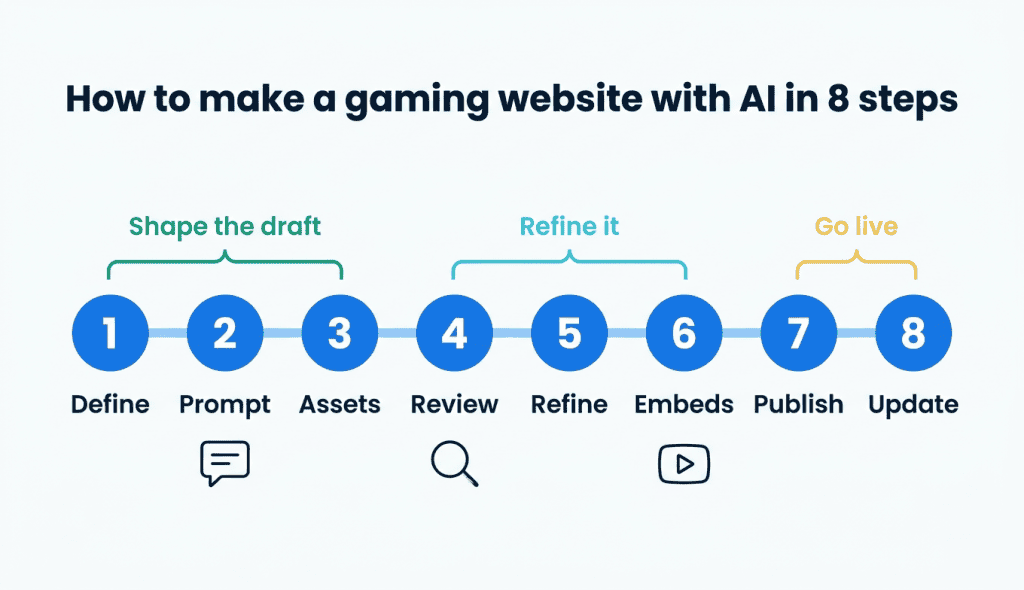
Steps 1 through 3 shape the draft, steps 4 through 6 refine it and steps 7 and 8 take it live and keep it current.
1. Define your gaming site in one sentence
Start with one sentence that names your site type, game or genre, audience and the main action you want visitors to take. That sentence becomes the core of your prompt in Step 2.
A clear sentence keeps the AI from guessing. These examples show the formula for four common gaming sites.
- Streamer hub: A home base for my [genre] streams where viewers check my schedule and join my Discord.
- Esports or clan site: A site for [YourClan], a competitive [genre] team, where players see our roster and apply to join.
- Review blog: A blog where I review [genre] games for casual players and help them pick what to play.
- Indie game showcase: A page for my game [YourGame] where players watch the trailer and join the mailing list.
2. Write a prompt that describes your gaming site
A useful prompt covers who you are, what you play or make and who the site is for. It also names the pages, features, tone and colors you want.
Bluehost AI Website Builder starts from a plain-language prompt, so you can describe your site the way you’d explain it to a friend.
Copy one of the prompts below and swap the bracketed placeholders for your own details. Each one follows the same formula.
Streamer hub prompt:
Build a website for [YourName], a variety streamer who plays [genre] games on Twitch three nights a week for teens and adults. Include a home page, stream schedule, about page and contact page for sponsors. Add a section for my Discord invite. Use a dark theme with [color] accents and a friendly, upbeat tone.
Esports clan prompt:
Create a website for [YourClan], a competitive [genre] team recruiting new players in [region]. The audience is players who want to join a ranked team. Include a roster page, match schedule, recruitment form and team rules page. Use [color] and black with a confident, welcoming tone.
Indie game showcase prompt:
Make a website for [YourGame], a [genre] game by solo developer [YourName]. The audience is players and press who want to learn about the game. Include a game page with a trailer section, a devlog, a press kit page and a mailing list sign-up. Use a pixel-art style with [color] highlights and a warm, curious voice.
Pro tip: Be specific about your schedule, genre and colors. A specific prompt gets you a more specific draft, which means fewer edits later.
3. Add your logo, images and an inspiration site
Your own assets help the draft look like your brand from the first version. In Bluehost AI Website Builder, you can upload a logo or images and share a site you like. The builder matches that site’s layout, color and tone without copying its text or images.
Use your own screenshots, clips and captures where you can, since publisher rules for game art vary and can change. Check each publisher’s current policy before you add their screenshots, footage or logos.
4. Review the first draft before you change anything
Read the whole draft before you request edits, since AI can invent details that sound right. Google’s guidance on AI content notes that generative models predict a likely sequence of words rather than retrieve facts. Google says those outputs may contain inaccuracies, so fact-check them manually before you publish.
The same review applies to titles, meta descriptions, structured data and image alt text. Use this checklist on your draft, since it covers the gaming details fans tend to notice first.
- Names and game titles: Confirm your gamer tag, team name and game titles are spelled correctly.
- Schedules and rosters: Check stream days, match times, time zones and player names.
- Links: Click each social, store and Discord link to confirm it opens the right page.
- Invented achievements or stats: Delete any rankings, follower counts or wins you didn’t provide.
- Placeholder text: Replace sample copy and bracketed text with your own words.
- Image fit: Make sure each image matches your games, brand and audience.
- Mobile view: Preview the site on a phone, since many fans may arrive from Discord.
5. Refine the draft with AI edit requests
Once the facts are right, shape the design and copy with plain-language edit requests. You can ask the AI to change images, colors or sections. You can also fine-tune details manually in the editor.
Short requests that name one change are easier to check. Try requests like these and adapt them to your site.
- Design: “Make the top banner darker with neon green accents.”
- Schedule: “Add a schedule section for Tuesday, Thursday and Saturday at 7 p.m. Eastern.”
- Voice: “Rewrite the About section in a casual, friendly voice.”
Ask the AI for big changes, like a new color scheme or section, and make small fixes like a typo by hand. AI edits are limited per plan, so batch related changes into one clear request.
Also read: Get practical tips for refining an AI-built draft so the site sounds like you.
6. Add gaming features the AI can’t generate
AI drafts the pages, while live streams and server widgets come from each platform’s official embed code. Check whether your builder offers an embed or custom-code block, then paste the code each platform provides.
Each platform sets its own rules, and a missing setting can stop an embed from working. Some depend on HyperText Transfer Protocol Secure (HTTPS), the secure connection shown by the padlock in your browser.
| Feature | What you need | Watch-outs |
|---|---|---|
| Twitch stream embed | Your site must use HTTPS, and you must set the parent parameter to your domain, per the Twitch embed requirements | A missing parent shows a playback error, and Twitch can revoke embeds that don’t follow its rules |
| YouTube video embed | An iframe embed code with a player at least 200×200 pixels, per the YouTube embed parameters | With autoplay on, playback and data collection start on page load |
| Discord server widget | Turn on the server widget in your server settings and optionally pick an invite channel, per the Discord server widget docs | Point the invite to a channel with clear rules |
Test each embed on your live domain after you publish, since the Twitch parent value has to match the address visitors use.
7. Connect your domain and publish
The Bluehost AI Website Builder free trial uses a temporary domain, so pick your own address when you’re ready to share the site.
When you publish, your site goes live on your custom domain with hosting included. Paid plans include Secure Sockets Layer (SSL), weekly backups, plus malware detection and removal. SSL turns on the HTTPS connection your Twitch embed needs.
Pick a domain that’s short, easy to say and close to your gamer tag, channel or team name. Avoid putting a game’s title or trademark in it, since that can suggest an official connection.
Your extension, the part after the dot, also sends a signal. Gaming brands often pick one of three extensions.
- .gg: It’s popular with gaming and esports brands because “GG” means “good game,” as in [yourclan].gg.
- .com: It’s widely recognized and works for any type of gaming site.
- .tv: It suits streamers and video creators, as in [yourname].tv.
Check that matching handles are open on Twitch, YouTube and Discord. When you’ve settled on a name, search for your domain to check availability.
Also read: These tips for picking a domain cover what to do when your first choice is taken.
8. Keep your AI-built site fresh after launch
An AI-built site stays useful when your schedule, roster and posts stay current. Use edit requests to update stream times, add new players or post a match recap. Review each change before it goes live.
Search engine optimization (SEO) helps fans find your pages in search results. Paid plans come with Yoast SEO Premium pre-installed. If you’re new to search, these beginner SEO fundamentals explain how ranking works.
Google’s guidance from Step 4 also warns against scaling content without adding value. Using generative AI to create many pages without adding value for users may violate Google’s spam policy on scaled content abuse. Add a few useful pages, like a tier list you wrote, instead of dozens of thin ones.
Common mistakes when building a gaming website with AI
These six mistakes tend to show up when a review step gets skipped. Check for each one before and after you publish.
- Writing a vague prompt: A one-line request like “make a gaming site” gets you a generic draft.
- Publishing without a fact-check: Invented stats, wrong times or broken links go live under your name.
- Using publisher assets without checking: Game logos and footage may break a publisher’s rules, so read its current policy first.
- Generating lots of thin pages: Near-empty pages give visitors little reason to stay or return.
- Skipping the mobile check: Fans arriving from Discord on a phone may hit cramped menus or cut-off embeds.
- Forgetting to test embeds on the live domain: A Twitch embed with the wrong
parentvalue shows a playback error.
Final thoughts
Treat the AI draft as a starting point you shape with your own facts, assets and embeds. Your next step is to write your one-sentence site description, then expand it into a full prompt.
With Bluehost AI Website Builder, you start from a plain-language prompt and edit with AI requests or by hand. You publish to your own domain with hosting included, and real people are available 24/7 if you get stuck. Describe your gaming site in Bluehost AI Website Builder to build your first draft.
FAQs
Yes, AI can build the first draft of your gaming website from a plain-language description. It creates the pages, copy and layout you work from. You still decide what goes live by checking facts, adding your own captures and pasting in official stream embeds.
No, you don’t need to code to make a gaming website with AI. You describe the site in plain language and change it through edit requests or manual editing. Adding a Twitch or YouTube embed is mostly copying and pasting a snippet, and basic HyperText Markup Language (HTML) helps you spot a broken one.
Yes, you can keep editing your gaming website after the AI builds the first version. Plan seasonal updates, like a new roster or tournament schedule, as one clear request and save tiny fixes for manual edits. Before you share an updated page, preview on a phone and desktop.
Yes, as long as your builder lets you place Twitch’s official embed code on a page. The AI drafts the page around the stream, and you supply the embed from Twitch. Before you publish, confirm your builder offers an embed or custom-code block, then check that the stream plays on your live domain over HTTPS.
No, AI-generated content isn’t bad for SEO by itself when it’s accurate and helpful to visitors. Problems start when a site publishes unreviewed claims or piles of thin pages. Add what only you can offer, like match results, tier list reasoning or stream highlights, then give each page a clear title and description.
Yes, in some cases, but each publisher sets its own rules for screenshots and footage. Those rules can change, so read the publisher’s current policy before you upload images to your builder. Follow any credit or labeling requests the policy includes, and contact the publisher if the rules are unclear.

Write A Comment