 ChatGPT,
 Claude,
 Gemini,
 Grok — all four for
Key highlights
- Learn how to use an AI website builder after the first draft is created.
- Understand which website edits are worth using AI credits for and which ones are better handled manually.
- See how to refine copy, pages, sections, images and CTAs so your site feels more complete and business-ready.
- Get tips for giving clearer AI edit requests based on your goal, audience, tone and desired outcome.
- Learn how to keep improving your AI-built website after launch with updated offers, new pages and refreshed content.
An AI website builder can create a website quickly. That part is exciting.
But real value comes from what you do next.
Because let’s be honest, the first version of any website, AI-made or not, is rarely the final version.
So, how do you use an AI website builder the right way? You start with the draft, then shape it with purpose. The goal is not to let AI do everything for you. It is to use AI where it saves time and helps you build a clearer, more useful website.
In this guide, we’ll walk through how to use an AI website builder, how AI credits fit into the editing process and how to keep improving your site after it goes live.
Quick overview: How to use an AI website builder?
An AI website builder makes it easier to move from idea to draft. But using it well means knowing how to review, refine and improve that draft.
- Create your first website draft.
- Review what needs to improve.
- Use AI edits for bigger changes like new pages, rewritten copy, new sections or image updates.
- Make small manual edits yourself when that is faster.
- Keep refining the site until it supports your business goal.
- Connect your domain and publish.
- Continue using AI to update the site as your business grows.
The simple rule: Use AI for the changes that would take time to think through, write or build manually.
Why AI website builders change the process?
Traditional website builders usually start with decisions: Choose a template, plan the pages, write the copy, pick images and adjust the layout before the site feels ready.
AI website builders shift the process from manual building to guided refining.
You do not have to figure out every section from scratch. The AI gives you a starting point, then you shape it through edits. You can make the message clearer, add missing pages, change the tone, update images and improve calls to action as you go.
For example, if the first draft has a generic homepage, you can ask AI to make the headline more specific, add a services section and adjust the CTA toward quote requests.
That is the real shift: You are no longer building from a blank screen. You are improving a working draft.
But the final judgment still comes from you. AI can speed up the process, but your website still needs to be accurate, helpful and clear for real visitors.
How do you use an AI website builder?
Using an AI website builder should not feel like a long technical process. The goal is simple: Create a site, improve the parts that matter and publish when it is ready to support your business.
Here is how to think about the process.
1. Create the first website draft
Start by giving the builder enough information to create the first version of your site.
You do not need a perfect prompt. You just need enough detail to explain your business, audience and goal.
For example, a custom furniture business could start with:
Create a website for my custom furniture business in Austin. I want to show my portfolio, explain my services and collect quote requests from homeowners and small businesses.
That gives your builder a clear starting point. From there, the focus should shift from creating something to making it useful.
2. Decide what needs the biggest improvement
Once the site exists, resist the urge to tweak everything at once.
Start with one question: What change would make this website more useful right now?
That could be a clearer homepage message, a stronger call to action, a missing service page, a better image, a contact form or a section that helps visitors trust your business.
For example, if the homepage says, “Quality solutions for your home,” it may sound polished, but it does not say much. A stronger request would make the headline specific to your business, audience and offer.
This helps you focus on meaningful edits instead of making random changes.
3. Use AI for bigger edits that need structure or direction
AI is most useful when the task takes time to plan, write or organize.
Use AI for edits such as:
- Rewriting important page copy
- Adding service, product or portfolio sections
- Creating new service or landing pages
- Improving calls to action
- Adjusting image or design direction
- Drafting blog or FAQ content
These changes move the website forward. You are not using AI for every tiny fix. You are using it to build the parts that make the site more complete and useful.
4. Make small manual edits yourself
Not every change needs AI. If you can fix something in a few seconds, just fix it.
Manual edits are better for typos, phone numbers, email addresses, business hours, button text, address updates, one-word changes and small formatting fixes.
For example, if the button says “Contact us” and you want it to say “Request a quote,” that may be a quick manual edit.
A good rule: If the edit is simple and factual, handle it manually.
5. Review the site before moving forward
After each major edit, review the website like a visitor.
Ask yourself:
- Is the message clear?
- Are the pages useful?
- Is the next step obvious?
- Does the tone sound like your business?
- Are the images and sections relevant?
- Would a visitor know how to contact you, book, buy or request a quote?
This keeps your edits tied to business value, not just appearance.
Then decide what comes next: Publish the site, make another AI edit or save smaller changes for manual updates.
How AI credits fit into the website-building process?
Once your website draft is ready, AI credits help you keep improving it without handling every larger update manually.
Think of credits as support for the parts of website building that usually take more time: Writing, restructuring pages, refining your message, adjusting the site’s direction or expanding the website after launch.
The goal is not to spend credits on every small change. It is to use them where they can save time and help you make the website better.
| Use AI credits for | Why it is worth using credits |
| Rewriting key page copy | Helps make your message clearer, more specific and more persuasive. |
| Building out core pages | Helps turn a basic draft into a fuller, more useful website. |
| Adding trust-building sections | Helps create testimonials, FAQs, process steps or proof points. |
| Improving conversion paths | Helps guide visitors toward booking, buying, contacting you or requesting a quote. |
| Aligning tone across pages | Helps your site sound consistent, whether you want it warmer, more professional or more local. |
| Refreshing visual direction | Helps replace generic visuals or adjust the look when the site feels off-brand. |
| Expanding content after launch | Helps you add helpful resources, updates or customer-question content over time. |
| Creating campaign pages | Helps build focused pages for seasonal offers, promotions or new services. |
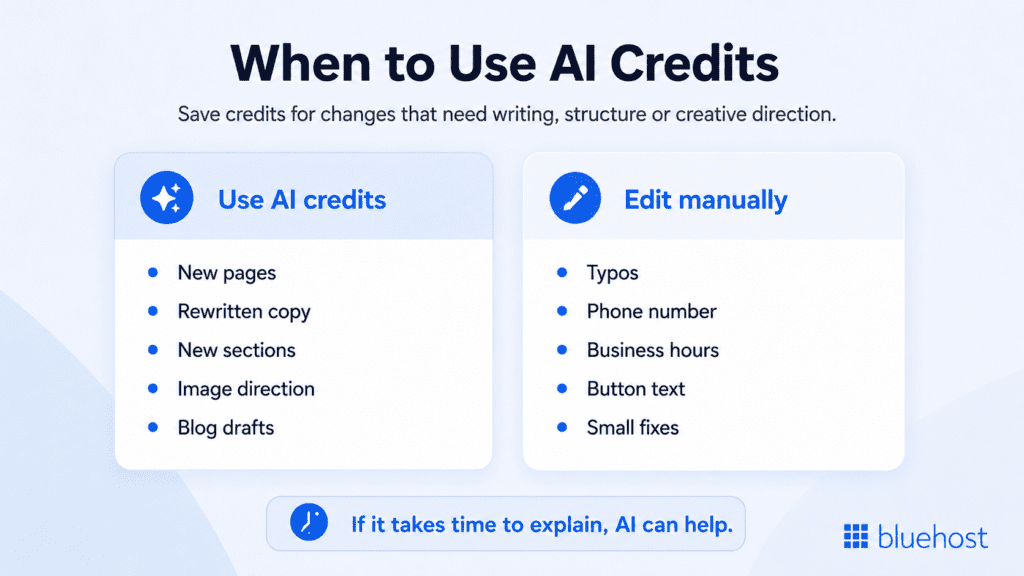
Some edits are still better handled manually. If you need to fix a typo, update your phone number, change business hours, correct an address or edit one button label, a manual update is usually faster.
A simple credit rule
Use credits when the edit helps your website become more complete, persuasive or useful.
Save manual edits for small corrections where you already know the exact change.
For example, creating a new service page is a good use of credits. Changing your phone number is not. Rewriting a homepage section so it speaks more clearly to your audience is a good use of credits. Fixing a spelling error is not.
When extra credits can help
Extra credits are most useful when you are making several meaningful updates, not just one quick change.
They can help you keep momentum when you are expanding the site, improving multiple pages, building campaign content or continuing to update the website after launch.
The goal is not to use AI for everything. It is to use credits where they help you move faster, improve the website and avoid getting stuck on bigger edits.
How to get better AI edits?
The quality of your edits depends on the quality of your instructions. You do not need to write like a prompt engineer. You just need to be clear.
Here is how to get better results.
1. Say what the section is supposed to do
Start by clarifying the purpose of the section.
For example, do you want it to explain a service, build trust, answer a common question, compare options or encourage visitors to request a quote?
A clear request might be: “Rewrite this section so visitors understand why our custom furniture costs more than mass-produced furniture.”
That gives the AI a specific job.
2. Say who the content is for
The same page can sound very different depending on the audience.
Copy for first-time homeowners should not sound the same as copy for corporate buyers. A page for budget-conscious shoppers will need a different angle than a page for premium clients.
Add context like:
- Homeowners comparing options
- Local customers looking for fast service
- Parents researching tutoring support
- Small business owners comparing web design services
- Shoppers looking for handmade products
When your request includes the audience, the output usually becomes more relevant.
3. Say what tone you want
Tone matters. Add tone direction before asking for a rewrite.
You can ask for a tone that feels:
- Warm
- Professional
- Friendly
- Premium
- Local
- Reassuring
- Conversational
- Confident
- Simple and direct
For example: “Make the tone warm, confident and professional without sounding too salesy.”
That is much clearer than “make it sound good.”
4. Give examples when possible
If you like one section but not another, say so.
You might ask the AI to make a services page sound more like the homepage intro or to keep the tone conversational while making the call to action stronger.
Examples help the AI stay consistent. They also reduce back-and-forth because the AI has a style to match.
How to keep your AI-built website useful after launch?
Once the website is live, the AI builder can still help.
That is one of the best reasons to use AI in the first place. Your website does not have to become frozen in time. As your business changes, your website can change too.
1. Update offers or business details
If your services, hours, pricing or offers change, update the site.
You might refresh the homepage for a seasonal offer, update your hours before a holiday or add a new service area.
2. Add new services or products
When your business grows, your website can grow with it.
You can use AI to add a new service page, create product descriptions or build a new landing page for a specific offer.
3. Refresh pages based on customer questions
Your customers will tell you what your website is missing.
If people keep asking the same questions, add those answers to your site.
For example:
- Do you serve my area?
- How long does the service take?
- What is included?
- Do you offer delivery?
- Can I request a custom quote?
Those questions can become FAQs, service page sections or blog topics.
4. Create supporting content
You can also use AI to add helpful blog or resource content.
This can support long-term visibility when the content answers real customer questions. Google’s SEO Starter Guide notes that site owners should make content helpful for users and easy for search engines to understand, which is a useful standard for AI-assisted content too.
This is where the right website builder makes a difference. If your AI tool only helps with one part of the process, you may still need separate tools for editing, publishing, hosting or ongoing updates.
A smoother option is to use a builder that keeps those steps connected. With Bluehost AI Website Builder, you can start with your website idea, shape the draft with AI, make updates through conversation and move toward publishing with domain and hosting support in the same place.
Build, edit and publish with Bluehost AI Website Builder
With Bluehost AI Website Builder, we help you move from “I need a website” to “my website is live” without jumping between separate tools.
You can use the editing ideas from this guide and adapt them to your business, brand voice and audience. A local service business, online store or portfolio site may start with the same type of request, but the final details should sound like your brand and answer what your customers need to know.
Here’s what we help you do in one flow:
- Build with AI: Start from your website idea and let our AI help create the site structure, copy and design direction.
- Edit through conversation: Ask for bigger changes like updated copy, new sections, added pages or image changes.
- Personalize your site: Adjust the AI output so it fits your brand, audience and business goals.
- Publish with less setup: Move from website creation to domain, hosting and publishing support in one place.
- Keep improving: Use AI to update pages, refresh content or add new sections as your business grows.
The goal is simple: We help you use AI not just to create a website, but to keep improving it until it is ready to work for your business.
Final thoughts
Using an AI website builder is not about accepting the first version and calling it done. It is about moving faster from “I need a website” to “this site is ready to work for my business.”
Use AI credits for the changes that make the biggest difference: Stronger copy, new pages, better sections, image updates and content that helps visitors take action. Handle the small edits yourself, keep improving what matters and publish when the site is clear, useful and ready for real customers.
Ready to build and refine your website faster? Start your free trial with Bluehost AI Website Builder and turn your idea into a live website using AI.
FAQs
AI credits are usually used for AI-powered actions inside a website builder, such as rewriting copy, creating pages, adding sections, generating content or changing images.
Use them for edits that save time or require creative help. Good examples include rewriting important website copy, creating service pages, adding FAQs, generating product descriptions, changing image direction or drafting blog content. For small fixes like typos, phone numbers or business hours, manual edits are usually faster.
Simple updates are usually better handled manually. These include fixing typos, updating phone numbers, changing business hours, correcting addresses, editing short button text or removing a sentence.
Yes. Many AI website builders can help create new pages, such as service pages, product pages, portfolio pages, FAQs, contact pages, landing pages or blog posts.
Give the AI details about your audience, tone, services and business personality. Instead of asking it to “make this better,” ask for a specific tone, such as warm, professional, friendly, premium, local or conversational.
Yes. AI can help you create stronger calls to action based on your website goal. For example, it can suggest CTAs for booking calls, requesting quotes, viewing products, scheduling appointments or contacting your business.
If you run out of AI credits, you may still be able to make manual edits, depending on the builder. For more AI-assisted changes, you may need additional credits or a plan that includes more AI edits.
Yes. You can use AI to update offers, add new pages, refresh copy, improve CTAs, create blog content or answer common customer questions as your business changes.

Write A Comment