 ChatGPT,
 Claude,
 Gemini,
 Grok — all four for
Key highlights
- Understand how security cloud data with VPS servers improves control, data protection and reliability compared to shared hosting environments.
- Learn how SSH key authentication, disabling password login and restricting root access strengthen VPS security and prevent brute force attacks.
- Explore how firewall rules, internal firewall setup and web application firewall help block unwanted traffic and automated attacks.
- Uncover how regular security patches, security updates and monitoring login attempts protect your VPS server from security vulnerabilities and breaches.
- Know how to choose a secure VPS hosting provider with dedicated resources, strong server security and advanced control panel access to protect sensitive data.
Why VPS security matters?
VPS hosting gives you full control over your server environment, but that control also introduces direct security responsibility. Unlike shared hosting, where the hosting provider manages most security layers, a VPS server requires you to configure and maintain your own security measures.
Because your server runs on public IP addresses and allows SSH access, it can become visible to automated attacks, brute force attempts, and unauthorized login activity. These attacks often target weak password authentication, default SSH ports, outdated software and misconfigured firewall rules.
Without proper VPS security, even a well-configured server can be exposed to security vulnerabilities, remote code execution risks, and potential data breaches.
This is what makes VPS security critical in real-world environments:
- You manage your own operating system and server software, including security updates
- You control user accounts, root access and user permissions
- You define firewall rules and regulate incoming traffic
- You are responsible for protecting sensitive data, stored data and database credentials
In simple terms, VPS hosting shifts security from the provider to you. The flexibility it offers is powerful, but only when combined with the right security measures and ongoing maintenance. Now that you understand why VPS security matters, let’s look at the biggest security risks that can impact your VPS server.
What are the biggest VPS security risks you should know?
VPS servers are powerful but exposed. Without proper VPS security, they can become easy targets for automated attacks, unauthorized access and serious security breaches. Because every virtual private server is assigned public IP addresses and allows direct SSH access, attackers continuously scan for weak configurations, outdated software and open entry points. To better understand how these risks impact your VPS server, let’s break down the most common VPS security threats.
What are the most common VPS security threats?
Understanding these risks helps you proactively protect your server security and sensitive data. The following threats highlight the most common vulnerabilities that attackers target in VPS environments.
- Brute force attacks – Attackers attempt repeated login attempts using different password combinations. Weak password login and poor password authentication significantly increases the chances of successful brute force attacks.
- Automated attacks on SSH service – Bots scan servers using the default SSH port and try to gain SSH access using common credentials. This is one of the most frequent attack patterns on VPS hosting environments.
- Remote code execution (RCE) – Security vulnerabilities in server software or installed software can allow attackers to execute malicious code remotely, giving them control over your VPS server.
- Outdated software and missing security patches – Running outdated software without applying security patches exposes your system to known exploits and security vulnerabilities.
- Unauthorized root access and privilege misuse – Misconfigured root logins, excessive root privileges or unrestricted root access can allow attackers to take full control of your secure server.
Now that you understand the common threats, it is important to know why VPS servers are frequent targets for these attacks.
Also read: VPS Hosting with Root Access: Ultimate Guide for 2026
Why are VPS servers frequent targets?
VPS hosting environments are attractive because they combine accessibility with control. This creates multiple entry points if not secured properly.
- Public IP addresses make virtual servers easy to discover
- Default SSH listening port enables predictable attack patterns
- Weak firewall configuration allows unwanted traffic
- Poorly managed service configuration files expose vulnerabilities
In simple terms, the same flexibility that makes VPS hosting powerful also increases exposure if security measures are not properly configured. Now that you understand why VPS servers are frequently targeted, let’s look at what happens if VPS security is compromised.
How to secure cloud data with VPS servers? (Step-by-step)
Securing cloud data with VPS servers requires a layered approach. You must combine access control, firewall configuration, system updates and monitoring to build a secure VPS environment.
Follow these proven VPS security steps to protect your server and sensitive data.
Step 1: Set up SSH key authentication
Start by replacing password authentication with SSH key authentication. Passwords are vulnerable to brute force attacks. SSH key based authentication uses a secure SSH key pair instead.
- Generate a public key and private key
- Add the public key to your VPS server
- Keep the private key secure on your system
Once configured, disable password login and enforce disabling password authentication. This ensures that only authorized users can gain SSH access.
Also read: How to Generate an SSH Public or Private Key
Step 2: Change default SSH port
The default SSH port (22) is a common target for automated attacks.
- Open the service configuration file using sudo nano
- Change the default SSH listening port to a custom port
- Restart the SSH service using sudo systemctl
This reduces automated attacks scanning for open SSH ports.
Step 3: Disable root login
Direct root logins increase the risk of full server compromise.
- Disable root login in your SSH configuration
- Avoid direct root access
- Use a standard user account with controlled user permissions
This limits root privileges and protects your secure server.
Also read: VPS Hosting with Root Access: Ultimate Guide
Step 4: Configure firewall rules
A proper firewall configuration helps control incoming traffic and block unwanted traffic.
- Set up firewall rules to allow only required ports
- Restrict access to specific IP addresses
- Use an internal firewall for additional protection
You can also implement a web application firewall to secure your web hosting environment.
Step 5: Apply security patches and updates
Outdated software creates security vulnerabilities.
- Update your operating system regularly
- Apply security patches to server software
- Remove outdated or unused installed software
Regular security updates protect your VPS server from known exploits.
Step 6: Monitor login attempts
Tracking login attempts helps detect threats early.
- Monitor repeated failed login attempts
- Identify brute force attack patterns
- Block suspicious IP addresses
This prevents successful brute force attacks and unauthorized access.
Step 7: Use secure file transfer protocol (SFTP)
Avoid unencrypted file transfers.
- Use secure file transfer protocol (SFTP) over SSH service
- Ensure all file transfers are encrypted

This protects sensitive data during transfer.
Also read: WordPress SFTP 101: Easy Setup Guide for Secure Website Access
Step 8: Manage user accounts and permissions
Control who can access your server.
- Create separate user accounts
- Assign proper user permissions
- Restrict access based on roles
This improves overall server security and reduces internal risks.
Step 9: Review system settings and configuration files
Misconfigured systems can expose vulnerabilities.
- Audit configuration files regularly
- Optimize system settings
- Monitor disk space and remove unused services
This keeps your VPS server clean and secure. Following these steps creates a strong VPS security foundation and helps protect your data from evolving security risks. Now that you have secured your VPS server step by step, let’s look at long-term VPS security practices to maintain protection over time.
What are the best VPS security practices for long-term protection?
Setting up a VPS server securely is only the first step. Long-term VPS security depends on how consistently you maintain, monitor and update your environment. A secure VPS is not static. It evolves with new security risks, software updates and changing access patterns.
When you run a virtual private server, you control everything from user accounts to server software. This makes ongoing security measures essential for protecting sensitive data, stored data and system integrity.
1. Keep your system updated and eliminate outdated software
One of the most common causes of security vulnerabilities is outdated software. Attackers often exploit known issues in older versions of server software and operating systems. Make it a routine to apply security updates and security patches across your system. Review installed software regularly and remove anything unnecessary. Keeping your environment clean reduces attack surfaces and improves overall server security.
2. Restrict access and reduce exposure
Not every service on your VPS server needs to be publicly accessible. Limiting exposure is one of the most effective ways to reduce security risks. Restrict SSH access to specific IP addresses wherever possible. Tighten firewall rules to control incoming traffic and block unwanted traffic. If needed, use VPN software to create a private access layer instead of exposing services directly to the internet.
3. Protect sensitive data and credentials
Data protection goes beyond access control. Sensitive data like database credentials, API keys and stored data must be handled carefully. Avoid storing credentials in plain text within configuration files. Use secure methods to manage secrets and ensure only authorized user accounts have access. Encrypt sensitive data wherever possible to prevent unauthorized use even if access is compromised.
4. Monitor activity and detect threats early
A secure server is one that is constantly observed. Monitoring helps you identify suspicious behavior before it becomes a serious issue. Track login attempts, especially repeated failed login attempts. Watch for unusual SSH access patterns or unexpected changes in system behavior. Early detection helps prevent brute force attacks and reduces the chances of successful breaches.
5. Optimize user permissions and access control
Managing user permissions correctly is critical for long-term VPS security. Avoid granting unnecessary root privileges. Use role-based access through controlled user accounts. Restrict access to only what is required for each user. This reduces the risk of internal misuse and limits damage if an account is compromised.
6. Maintain backups for reliable data protection
Even with strong security measures, failures can happen. Backups act as your safety net. Regularly back up your stored data and critical configurations. Store backups outside the same server to ensure recovery in case of security breaches or system failure. Reliable backups are a key part of any secure VPS strategy.
Long-term VPS security is about consistency. Small actions like updating software, monitoring logs and managing access can prevent major security issues over time. Now that you understand how to maintain a secure VPS environment, let’s compare VPS hosting with shared hosting to see which offers better security and control.
Also read: VPS Security Tips to Harden and Protect Your Server
VPS security vs shared hosting: Which is safer?
VPS hosting is generally more secure than shared hosting because it offers isolated environments, dedicated resources and full control over server security.
In shared hosting, multiple websites run on the same server. This increases the risk of cross-site contamination and security breaches. In contrast, a virtual private server provides isolation, allowing you to implement custom VPS security measures.
VPS hosting vs shared hosting: Security comparison
| Feature | VPS hosting | Shared hosting |
| Environment | Isolated virtual servers | Same server shared by multiple users |
| Resources | Dedicated resources (CPU, RAM, disk space) | Shared resources across accounts |
| Access control | Full root access and user permissions | Limited access, no root privileges |
| Security control | Custom firewall rules, SSH access, system settings | Limited control over security measures |
| Risk level | Lower risk if properly configured | Higher risk due to shared environment |
| Data protection | Strong control over sensitive data and stored data | Dependent on hosting provider |
| Customization | Full control over server software and configuration files | Minimal customization options |
Also read: VPS vs Shared Hosting: Which Option Is Best for You?
Why VPS hosting offers better security?
VPS hosting provides a more secure environment because it gives you full control over how your server is configured and protected. Unlike shared hosting, where security is managed at a platform level, a virtual private server allows you to define your own VPS security measures based on your specific needs.
With VPS hosting, your environment is isolated from other users. This reduces the risk of cross-site contamination and security breaches that are common in shared hosting setups. More importantly, you can actively manage how your server handles access, traffic and data protection.
Here’s how VPS hosting improves server security in practice:
- You control firewall configuration and can adjust firewall rules to manage incoming traffic and block unwanted traffic
- You can restrict SSH access, change the SSH port and manage user accounts with defined user permissions
- You can apply security patches and security updates instantly without waiting for a hosting provider
- You can secure database credentials, stored data and other sensitive data based on your own security policies
This level of control makes VPS hosting a strong choice for applications that require consistent performance and higher levels of data protection.
When shared hosting may still work
While VPS hosting offers better security, shared hosting can still be suitable for certain use cases.
Shared hosting works well for:
- Small websites with low traffic and minimal security requirements
- Users who do not want to manage server software, configuration files or system settings
- Projects that do not handle sensitive data or require advanced VPS security measures
However, shared hosting limits your ability to control server security. You cannot configure firewall rules, manage SSH access or apply custom security measures at the server level.
As your application grows or begins handling sensitive data, these limitations become critical. This is where VPS hosting becomes essential. It gives you the flexibility, dedicated resources and control needed to build a secure server environment. Now that you understand how VPS compares to shared hosting, let’s look at how to choose a secure VPS hosting provider for maximum protection.
Also read: When to Upgrade to VPS Hosting: 7 Signs You’re Ready
How to choose a secure VPS hosting provider?
Choosing a secure VPS hosting provider is one of the most important decisions for protecting your data, applications and infrastructure. While VPS security depends on how you configure your server, the hosting provider defines the foundation on which everything runs.
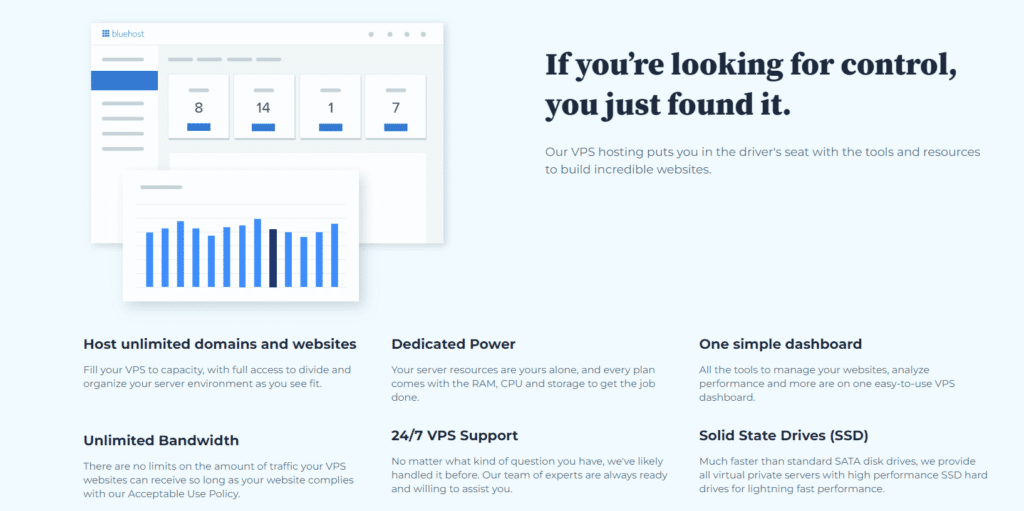
A reliable VPS hosting provider does not replace your responsibility. Instead, it gives you the right environment, tools and flexibility to implement strong server security and data protection practices.
What features should a secure VPS hosting provider offer?
A secure VPS environment starts with the right infrastructure. When evaluating a hosting provider, focus on features that directly impact security, control and performance. Look for providers that offer:
- Dedicated resources and isolated virtual servers: Ensures your VPS server is not affected by other users, unlike shared hosting environments.
- Strong control panel and server management tools: Helps you manage system settings, configuration files, user accounts and access controls efficiently.
- Flexible IP address management: Allows you to monitor public IP addresses and restrict access to specific IP addresses when needed.
- Built-in SSL and encryption support: Protects sensitive data and secures communication across your web hosting environment.
- 24/7 support and monitoring: Helps you respond quickly to security risks, server issues and unexpected downtime.
Why infrastructure quality matters for VPS security?
The quality of your hosting provider directly impacts how secure and stable your VPS server remains.
A strong infrastructure ensures:
- Faster deployment of security patches and system-level updates
- Stable performance with optimized server software
- Reduced risk from infrastructure-level vulnerabilities
This makes it easier to maintain a secure VPS environment without performance trade-offs.
What should you verify before choosing a VPS hosting provider?
Beyond features, you should evaluate how much control and flexibility the provider actually gives you. Ask these practical questions:
- Can you configure firewall rules and manage firewall configuration easily?
- Do you have full control over SSH access, SSH port settings and root access?
- Can you manage the operating system, installed software and system settings without restrictions?
- Are security updates and server configurations easy to apply and monitor?
- Do you have visibility into login attempts and server activity?
These factors determine how effectively you can implement VPS security measures in real-world scenarios.
How Bluehost supports secure VPS hosting?
We at Bluehost design our VPS hosting to support both performance and security without adding unnecessary complexity.
- Premium infrastructure with dedicated resources for consistent performance
- An intuitive control panel to manage system settings, user permissions and access
- Built-in capabilities to configure firewall rules and monitor server activity
- 24/7 support to assist with server-level concerns and infrastructure issues
This allows you to focus on securing your VPS server while running on a reliable and scalable environment. Choosing the right hosting provider sets the foundation for VPS security. However, real protection comes from how you configure, monitor and maintain your server over time.
Now that your infrastructure is in place, let’s explore the essential tools and commands that help you secure your VPS server efficiently.
What tools and commands help secure a VPS server?
Securing a VPS server is not just about knowing best practices. You also need the right tools and commands to apply those changes at the system level. Since a virtual private server gives you full control over the operating system and server software, these tools help you directly manage configuration files, services and overall server security.
Understanding how to use these commands ensures your VPS security measures are not just planned but properly implemented.
1. Edit configuration files using sudo nano
Most VPS security settings are controlled through configuration files. This includes SSH access, root login behavior and password authentication settings.
Using sudo nano, you can safely edit these files and apply security changes.
For example, to update SSH settings:
sudo nano /etc/ssh/sshd_config With this, you can:
- Change the SSH port from the default SSH port
- Disable password authentication and enforce SSH key authentication
- Disable root login and limit root access
This step is essential for controlling how users connect to your VPS server.
2. Manage services using sudo systemctl
After updating configuration files, changes do not apply automatically. You need to restart the relevant services.
The sudo systemctl command helps you manage system services, including the SSH service.
Example:
sudo systemctl restart ssh You can use this command to:
- Restart the SSH service after configuration changes
- Enable or disable services
- Ensure system settings are applied correctly
This keeps your server running with updated security configurations.
3. Configure firewall rules with built-in tools
Firewall configuration is critical for managing incoming traffic and blocking unwanted traffic. Using tools like UFW or iptables, you can define strict firewall rules that protect your VPS server from automated attacks.

You should:
- Allow only required ports and services
- Restrict access to specific IP addresses
- Block unnecessary traffic and unused ports
A properly configured firewall acts as your first line of defense.
4. Monitor disk space and system health
System performance directly impacts server security. If your server runs out of disk space or resources, it may fail to apply security updates or handle processes properly.
To maintain stability:
- Check disk space regularly
- Remove unnecessary files, logs and unused data
- Ensure enough resources are available for updates and services
A stable system is easier to secure and maintain.
5. Use logs for monitoring login attempts
Logs give you visibility into what is happening on your VPS server.
By monitoring logs, you can:
- Track login attempts and repeated failed login attempts
- Detect brute force attack patterns
- Identify suspicious IP addresses and unusual access behavior
This helps you respond quickly before security risks turn into breaches.
6. Manage installed software and updates
Keeping your environment clean reduces security vulnerabilities.
You should:
- Audit installed software regularly
- Remove unused tools and services
- Apply security patches and updates to server software
Outdated software is one of the most common entry points for attackers, so keeping everything updated is critical. These tools give you direct control over your VPS server and help enforce strong VPS security practices at every level.
Secure your VPS with confidence
Securing cloud data with VPS servers starts with control and continues with consistent action. A virtual private server gives you dedicated resources and flexibility, but VPS security depends on how well you manage access, updates and configurations.
Using SSH key authentication, disabling password login and applying security patches helps protect your VPS server from brute force attacks and security vulnerabilities. Over time, monitoring login attempts, managing user permissions and maintaining firewall rules ensure long-term data protection.
Choosing a secure VPS hosting provider strengthens your foundation, but real security comes from how you configure and maintain your server. Start with Bluehost VPS hosting and build a secure, scalable environment designed to protect your data.
FAQs
Use SSH key authentication, disable password login, configure firewall rules and apply regular security updates to protect your VPS server and sensitive data.
SSH key authentication uses a public key and private key pair to allow secure SSH access without password authentication.
Disable password login, change the default SSH port, limit login attempts and restrict access to specific IP addresses. your VPS.
Yes. VPS hosting offers isolated virtual servers, dedicated resources and full control over server security compared to shared hosting.
Disabling root login prevents unauthorized access and reduces the risk of attackers gaining full root privileges.

Write A Comment