



Key highlights
- Comprehensive all-in-one solution tailored for content creators to build, manage and monetize their online presence.
- Includes powerful site-building tools like AI onboarding, WonderBlocks and a staging environment for seamless website creation.
- Robust monetization features such as memberships, online courses, affiliate programs and flexible subscription options.
- Integrated engagement and marketing tools including CreativeMail email campaigns, customizable forms and social media login support.
- Advanced SEO and performance enhancements with Yoast SEO, NVMe storage, free SSL, automatic updates and traffic spike protection.
You often find building a loyal audience, managing a website, and monetizing your passion challenging. Building an audience is hard enough without getting bogged down by technical headaches.
Many content creators struggle with content strategy, audience engagement and revenue generation. You might wonder how to turn your creative content efforts into income without becoming a tech expert.
Bluehost WordPress eCommerce Essentials offers an all-in-one solution specifically designed for content creators like you. Recognized as the best content creator for eCommerce hosting, this package streamlines your content creation process. It increases audience engagement and monetizes your content creation easily.
With intuitive AI tools, eCommerce Essentials supports your eCommerce business success. The platform works for bloggers creating written content, YouTubers doing video editing and video creation, podcasters and educators using social media platforms who want to focus on creating content, not coding.
How does eCommerce Essentials help content creators?
Creating content and growing your online presence is exciting. With the right content creation tools, managing your website becomes much easier. That’s where eCommerce Essentials makes a difference.
This package includes everything you need to monetize your content marketing, engage your audience and build loyal followers. As the easiest content creator for eCommerce platform, you can focus on what you do best. You create high quality content and share it while Bluehost provides the technical support with data driven insights.
eCommerce Essentials helps you take your content creation WordPress experience to the next level. The tools work whether you’re just starting or looking to expand your reach.
Who benefits most from eCommerce Essentials?
This solution boosts your online presence and helps you monetize your content. It makes growing your brand and connecting with your audience simpler through social media platforms. The package works especially well for:
- Bloggers: Creating written content and monetizing through memberships
- YouTubers: Producing video content and selling exclusive materials
- Podcasters: Sharing content ideas through audio formats
- Influencers: Building presence on social media platforms with engaging social media posts
- Online educators: Teaching through online courses
- Digital storytellers: Crafting high-quality content
The simple yet powerful tool features help you monetize content across different platforms. They build a loyal audience and manage your website without technical headaches. Unlike similar tools, this is why it’s rated as the best content creator for eCommerce solution.
How do eCommerce Essentials and Premium compare?
Bluehost offers two powerful WordPress solutions: eCommerce Essentials and eCommerce Premium. The Essentials package covers hosting, security and setup tools basics. The Premium solution adds advanced features to scale faster. It improves customer experience and streamlines marketing efforts.
If you’re deciding between the two, the table below highlights how they compare:
| Feature | eCommerce Essentials | eCommerce Premium |
|---|---|---|
| Core features | ||
| Hosting & Free Domain | ✓ Yes (First year) | ✓ Yes (First year) |
| AI-Powered Onboarding | ✓ Yes | ✓ Yes |
| WonderBlocks | ✓ Included | ✓ Included |
| Staging environment | ✓ Yes | ✓ Yes |
| SEO & marketing | ||
| Yoast SEO | ✓ Complete (Video & News SEO) | ✓ Complete (Video & News SEO) |
| Email marketing | ✓ Creative Mail | ✓ Advanced email tools |
| Monetization options | ||
| Subscription services | ✓ YITH Subscriptions | ✓ Enhanced subscription tools |
| WooCommerce Paid Courses | ✓ Basic | ✓ Advanced |
| Payment processing | ✓ PayPal/Stripe | ✓ Multiple payment gateways |
| Store management | ||
| Product management | Basic features | ✓ Advanced (comparison, filters) |
| YITH Membership/Affiliates | ✓ Basic | ✓ Complete suite |
| Best For | Content creators, bloggers, beginners | Online stores, merchants, growing businesses |
| Pricing (36-month term) | $14.99/mo (renews at $21.99/mo) | $21.99/mo (renews at $30.99/mo) |
Note: Pricing plans show $9.99/mo for the standalone plan and are accurate as of Jan 2026. Marketplace add-on pricing may vary. For accurate pricing, visit the official website.
If you’re a content creator focused primarily on monetizing through memberships, courses and digital products, the Essentials plan provides everything you need. This is the easiest content creator for eCommerce option for beginners.
However, if you’re looking to scale your WooCommerce store with smarter features, Premium offers additional tools for a more robust eCommerce operation.
Why should you choose Bluehost eCommerce Essentials?
eCommerce Essentials does more than just help you build a website. The platform streamlines creation, management and monetization of your online content. The package includes four main categories of tools:
- Site building tools: Create and manage your website with AI onboarding, WonderBlocks and staging environment
- Monetization tools: Generate income with membership features, online courses and payment processing
- Engagement tools: Connect with your audience through email marketing and simplified login options
- SEO and performance tools: Boost visibility and ensure your site runs smoothly
Each tool integrates seamlessly with WordPress, creating a complete ecosystem for every WordPress content creator. Let’s explore these tools in detail.
What content creation tools are included in eCommerce Essentials?
eCommerce Essentials comes packed with powerful content creation tools designed specifically for content creators. Each tool solves common challenges you face when building and monetizing your online presence.
1. Cutting-edge site-building tools
Staging environment: You can test any update or change on a duplicate version of your site. This keeps your live site running smoothly while you experiment with new features or designs. You prevent errors that might drive visitors away.
Also read: What is a Staging Site and Do You Need One in 2026?
InstaWP Migration tool: Moving your existing website becomes hassle-free with this specialized tool. You keep all your content, settings and design elements intact during the transfer. The process works without technical headaches or downtime.
WonderBlocks: You can create stunning pages without hiring a designer. These pre-designed content blocks let you drag and drop elements with high-quality images to create professional layouts. Each block adapts perfectly to your brand colors and style. This mobile responsive builder ensures your site looks great on all devices.
WonderHelp AI: Get immediate answers to your WordPress questions right within your dashboard. This AI-powered assistant finds solutions based on your specific setup. You solve problems quickly without searching through forums or documentation.
2. Powerful monetization tools
YITH Membership: Create different membership tiers with varying access levels to your premium content. You can set up automatic billing cycles for recurring revenue. The system handles member management, access control and content restrictions automatically.
Example: As a blogger, you could create a members-only section where subscribers access behind-the-scenes content or unique downloadable resources.
WooCommerce Paid Courses: Build professional online courses with lessons, quizzes and certificates. You can drip content over time or offer it all at once. The platform tracks student progress and manages enrollments for you. Perfect for creating training videos and educational materials.
Example: As a digital marketing coach, you could offer courses to help others grow their online presence. You turn your knowledge into a revenue stream.
PayPal/Stripe integration: Process payments securely with trusted payment gateways. You get real-time transaction notifications and automatic payment reconciliation. The system works globally with multiple currencies.
Example: Podcasters can easily sell merchandise or exclusive content using payment systems their audience already trusts.
YITH WooCommerce Affiliates: Manage your own affiliate program where partners earn commissions for referrals. You can set custom commission rates and cookie durations. The tool provides affiliates with tracking links and performance dashboards.
Example: YouTubers can have other creators promote their eBooks or courses. This increases traffic through trusted recommendations.
Also read: Affiliate Payouts Demystified: Optimize Your Earnings
YITH Subscriptions: Offer subscription-based products or services with flexible billing cycles. You can create free trials, setup fees and limited-time offers. The system handles automatic renewals and payment processing.
Example: A fitness coach could offer monthly workout plans with a 7-day free trial. New subscribers get instant access and payments renew automatically each month.
3. Engagement and marketing tools
CreativeMail: Design email marketing campaigns that match your website branding. You can segment your audience based on behavior and preferences. The platform provides data-driven insights to track open rates, clicks and conversions. This content marketing approach keeps you connected.
Example: A YouTuber could send weekly updates about new videos, blog posts or special offers through automated email marketing campaigns.
Jetpack Forms: Create custom forms to collect information from visitors. You can design contact forms, surveys or registration forms without coding. All submissions get stored securely and can trigger automated responses.
Example: Digital storytellers can quickly gather contact details from visitors to distribute newsletters or content updates.
YITH Email Templates: Customize all transactional emails sent from your website. You can add your logo, colors and personalized messages to order confirmations and welcome emails. Every communication maintains your professional brand image.
YITH Easy Login: Let visitors register and log in using their social media accounts. This removes the barrier of creating yet another username and password. You increase registration rates and gather valuable user data.
Example: Bloggers offering premium content can streamline user registration, making it quick and hassle-free for new subscribers.
4. SEO and performance features
Yoast SEO: Optimize your content for search engines with step-by-step guidance. The tool shows exactly what to improve to rank higher in search results. You attract more visitors without becoming an SEO expert.
Example: Bloggers can optimize posts for specific keywords, increasing their chances of appearing in relevant search results.
Yoast Video SEO: Help your videos appear in Google search results and boost page speed by optimizing video loading times.
Example: Vloggers can ensure their video content previews show up in Google search, driving more traffic to their website.
NVMe storage: Your website loads faster with this advanced storage technology. Pages appear almost instantly for your visitors. You provide a smoother user experience that keeps people on your site longer.
Free SSL certificate: Protect visitor data with bank-level encryption. The “https” and padlock icon in browsers builds trust with your audience. You meet security requirements for taking payments online.
Managed WordPress & PHP updates: Keep your site secure and fast with automatic platform updates. The system applies these updates during low-traffic periods. You get the latest trends in features and security patches without manual maintenance.
Traffic spike protection: Your site stays online even during sudden popularity surges. The system automatically scales resources when you need them most. You never miss out on opportunities when your content goes viral.
Each tool integrates seamlessly with the others, creating a complete ecosystem for content creation and monetization. You save time and money compared to purchasing these premium plugins separately.
Why is Bluehost the ultimate choice for WordPress content creation?
Many creator packages exist, but eCommerce Essentials stands out with its seamless WordPress integration. It offers user-friendly features and exceptional support:
24/7 expert support: Focus on your content while Bluehost handles technical challenges. Our support team is available around the clock to solve any issues. The Bluehost digital marketing support features extend to phone consultations.
Seamless WordPress integration: All plugins and tools work together effortlessly. This reduces the hassle of managing multiple platforms and ensures optimal performance and security. Every WordPress content creator benefits from the curated plugin ecosystem. Built-in project management tools help coordinate your content creation process efficiently.
Scalability: Add new features or expand your website’s functionality easily as your audience and content grow. The platform grows with your success. Whether you’re the best content creator for eCommerce in your niche or just starting out, the infrastructure scales with you.
How to access eCommerce Essentials from Bluehost website
Step 1: Go to the WooCommerce Hosting page
Step 2: Under “eCommerce Essentials,” click “Choose Plan” and select your term length:
- 36 months: $9.99/mo (Best value – Save 55%)
- 12 months: $13.99/mo (Save 36%)
Step 3: Choose your free domain or transfer existing domain
Step 4: Complete checkout with payment information
Step 5: Access your Bluehost dashboard and follow AI onboarding
Note: With this package, you get complete WordPress hosting features optimized for content creators.
How to access eCommerce Essentials from Bluehost Marketplace
If you already own a hosting service with Bluehost, here’s how you can add this package to your existing website:
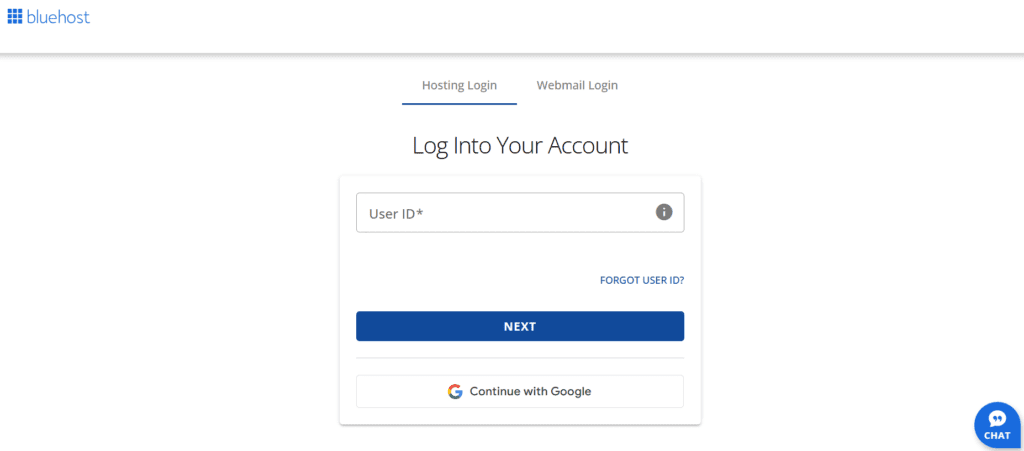
Step 1: Log in to your Bluehost Account Manager.
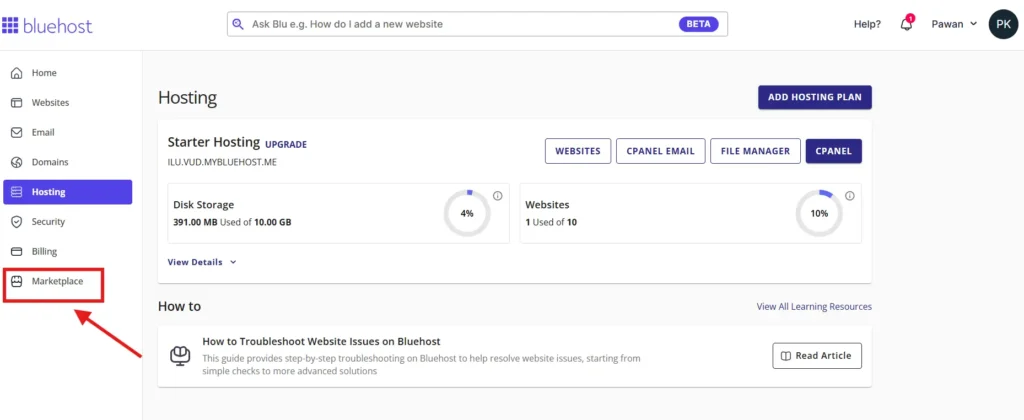
Step 2: Choose ‘Marketplace’ from the left navigation panel.
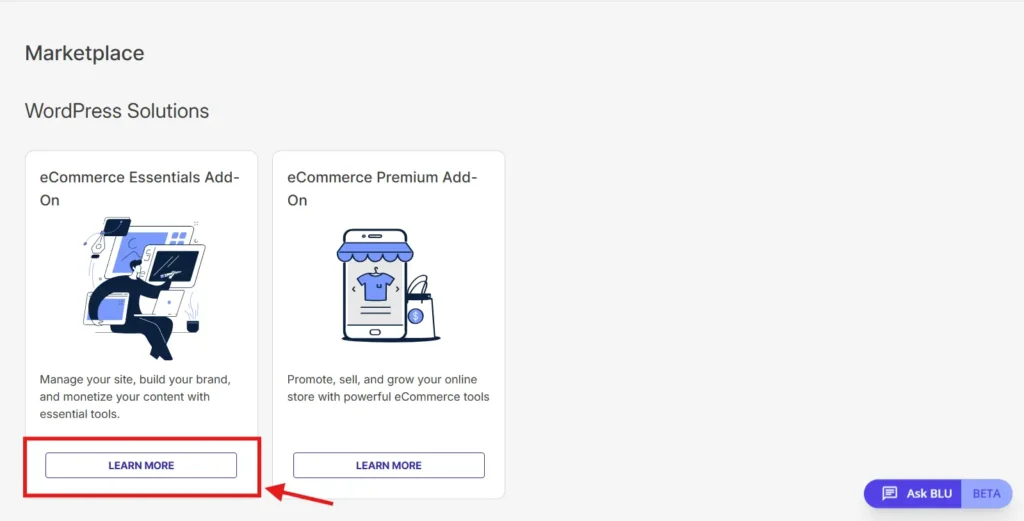
Step 3: Click on ‘Learn More’ for the eCommerce Essentials Add-On.
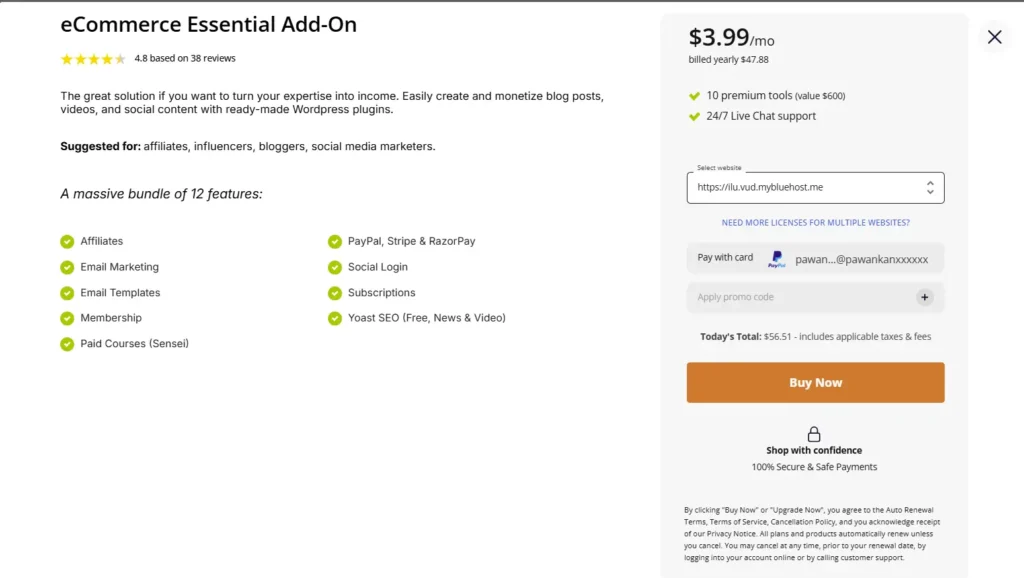
Step 4: Select your website, check your payment option, apply a promo code (if any) and click on ‘Buy Now.’
Important: The eCommerce Essentials package comes in two versions:
- Standalone hosting plan ($9.99/mo): Includes WordPress hosting + all eCommerce features (recommended for new customers)
- Marketplace add-on: Adds eCommerce features to your existing Bluehost hosting plan (hosting not included)
What makes eCommerce Essentials worth the investment?
Bluehost eCommerce Essentials provides a powerful tool for establishing a professional, scalable online presence. The package gives you the tools and flexibility needed to succeed. From easy site design to comprehensive analytics, it covers everything. This makes it the easiest content creator for ecommerce upgrade path for current Bluehost customers.
Ready to monetize your passion? Get started with eCommerce Essentials today and transform your content into a thriving online business.
FAQs
Yes, WordPress allows you to change themes at any time. Your content, plugins and settings remain intact. WonderBlocks ensures your layouts work across different themes.
No. All features use visual interfaces and drag-and-drop tools. The AI assistant guides you through setup, making this the easiest content creator for eCommerce platform for non-technical users.
The package applies to 1 website per license. Your hosting plan supports multiple websites, but each additional site requires a separate eCommerce Essentials license at $9.99/mo.
Full refund of hosting and eCommerce Essentials fees if you’re unsatisfied within 30 days. Domain registration fees are non-refundable as per ICANN policy.
No, you cannot directly upgrade. You would need to purchase Premium separately. Choose carefully based on your revenue goals and feature needs.
Yes. Use the InstaWP Migration Tool to move your site to Bluehost, then add the eCommerce Essentials package through the Marketplace. Migration takes 1-3 hours with zero downtime.
PayPal, Stripe and Razorpay come pre-integrated. You can add other gateways through WooCommerce extensions. All major credit cards and digital wallets are supported.
CreativeMail integrates with your site to send automated campaigns. YITH plugins track customer behavior. Yoast SEO optimizes content. All tools share data for unified marketing insights and social media marketing integration.
Yes. Multi-currency support through payment gateways, CDN for global performance and WooCommerce’s built-in tax calculators make international sales seamless.
Absolutely. WooCommerce handles both product types. Set up shipping for physical items while digital products deliver automatically upon purchase.



Write A Comment