 ChatGPT,
 Claude,
 Gemini,
 Grok — all four for
Key highlights
- Learn the hosting traits that matter in a traffic spike: resources, scaling, attack protection, uptime and support.
- Compare hosting options for scaling resources up or down as traffic fluctuates.
- Discover options across budget self-managed servers and fully managed tiers, with renewal and add-on costs explained.
- Know why load testing and a change freeze belong on your calendar well before the sale starts.
The best hosting for Black Friday traffic gives your store allocated processing power and memory plus a fast way to add capacity before the peak. It should also include distributed denial-of-service (DDoS) protection and a clear uptime commitment. For stores outgrowing shared hosting, that points to a virtual private server (VPS) or a cloud server.
Holiday shopping can bring sharp increases in visitors and transactions over a short period. Adobe’s Cyber Monday 2025 data shows US online shoppers spent $16 million every minute between 8 and 10 pm on Cyber Monday 2025. For this year, Adobe’s 2026 holiday forecast puts Black Friday 2026 US online spend at $12.9 billion.
This guide is for store owners moving off shared hosting and for teams working with a developer. It compares seven named providers on the same criteria, including Bluehost VPS Hosting, so you can match each option to how your store grows.
Comparing the best hosting providers for Black Friday traffic
This table shows how each provider adds CPU, RAM or more servers when traffic spikes. It also lists DDoS coverage, uptime and support, key details if something breaks at peak.
| Provider | Management | Starting price (term) | How it scales for a spike | DDoS protection | Uptime guarantee | Support |
| Bluehost VPS Hosting | Self-managed | $4.69/mo (24-mo; renews $5.69) | Add CPU, RAM and disk with no rebuild | Included, network-level | 99.99% | Infrastructure-only |
| DigitalOcean Droplets | Unmanaged | $4/mo (no term) | Autoscale pools plus load balancers; resize needs power-off | Free, layers 3 and 4 | 99.99% per Droplet | Free 24/7 tickets; paid plans |
| Akamai Cloud (Linode) | Unmanaged (managed add-on) | $5/mo (hourly) | Warm resize up or down; NodeBalancers | Included | 99.99% | 24/7 ticket, phone and email |
| Vultr Cloud Compute | Self-managed | $5/mo (hourly) | Upgrade-only resize; load balancers | Paid add-on | 100% network and host node | Tickets |
| Liquid Web VPS Hosting | Self or fully managed | Managed $36/mo for 2 months, then $72/mo | Scale up or down from dashboard | Included | 99.99% (VPS page) | 24/7 phone, chat and email |
| InMotion Hosting Self-Managed VPS | Self-managed | From $13.99/mo (24-mo; renews $26.99) | Upgrade or downgrade with zero downtime | Always-on | 99.99% | 24/7 for hardware, network and data center |
| Hostinger VPS Hosting | Self-managed | $6.49/mo (24-mo upfront; renews $11.99) | Plan upgrade up to KVM 8; extra servers manual | Wanguard filtering | 99.9% (hosting agreement) | 24/7 chat (general) |
Note: Pricing is as of October 2026. For the latest pricing and offerings for each tool, visit the provider’s website directly.
Scaling method and support scope separate these options more than entry price does. That gap matters most if you plan to resize close to the sale.
1. Bluehost
Bluehost VPS Hosting, you get allocated CPU, RAM and NVMe storage on AMD EPYC hardware, along with full root access. You can upgrade your resources as your store grows without rebuilding your server, helping you prepare for increased holiday traffic.
Key features
- Scalable plans: Choose from four NVMe plans offering up to 8 vCPUs, 16 GB RAM and 450 GB storage.
- High-traffic workloads: Our NVMe 8 plan includes 4 vCPUs, 8 GB RAM and 200 GB storage.
- Flexible upgrades: Increase CPU, RAM and storage while retaining your server, IP addresses and data.
- Security and reliability: Benefit from DDoS protection, a dedicated IP address, a 99.99% uptime guarantee and 24/7 infrastructure monitoring.
- Unmetered bandwidth: Get unmetered bandwidth, subject to our Terms of Service.
- Global data centers: Choose from nine data center locations to stay closer to your customers.
- Store applications: Install WordPress, WooCommerce or Magento using our available one-click installation options.
Black Friday offer
This Black Friday, we’re offering up to 25% extra off eligible products purchased on 12-month terms. Choose a one-year VPS plan and explore additional savings on eligible products, such as AI All-Access Pack and AI Website Builder, through the Buy More, Save More section at checkout. Our promotion runs through November 30, 2026.
Best for: Stores outgrowing shared hosting that want flat-rate pricing and a quick upgrade path before Cyber Week.
2. DigitalOcean
DigitalOcean Droplets are unmanaged cloud servers billed per second, with a monthly cap on bundled plans. You run the server and DigitalOcean supplies the pieces for scaling out.
Key features
- Autoscaling: Droplet autoscale pools add or remove servers based on resource utilization to respond to changing demand.
- Load balancing: Distribute incoming traffic across multiple Droplets to support application availability during traffic spikes.
- Uptime commitment: DigitalOcean commits to 99.99% monthly uptime for each individual Droplet.
- DDoS protection: Always-on protection helps defend against network-layer DDoS attacks at layers 3 and 4.
- Global data centers: DigitalOcean operates 16 data centers across 13 regions, with availability varying by product.
Best for: Teams that can configure a pool and load balancer to absorb short peaks.
Watch for:
- Resizing a single Droplet requires powering it off, with about one minute of downtime per GB of used disk.
- Backups cost 20% (weekly) or 30% (daily) of the Droplet price.
- Free support is ticket-based with a response target under 24 hours; paid plans respond faster.
- DDoS protection doesn’t cover application-layer (layer 7) attacks.
3. Akamai Cloud (Linode)
Linode compute now runs under Akamai Cloud. Instances are unmanaged by default, billed hourly and resizable in either direction.
Key features
- Shared CPU: Support development, testing and lighter workloads with shared CPU resources.
- Dedicated CPU: Run CPU-intensive applications on dedicated CPU resources for consistent performance.
- Two-way resizing: Resize your Linode instance up or down as traffic and resource needs change.
- Warm resize: Keep your instance running during migration, followed by a reboot, with IP addresses and data preserved.
- NodeBalancers: Distribute incoming traffic across multiple instances to support availability and handle growing demand.
- 24/7 support: Access assistance through support tickets, phone and email.
- DDoS protection: Included protection helps defend Compute services against distributed denial-of-service attacks.
Best for: Stores that want extra capacity only for Cyber Week and prefer to pay by the hour.
Watch for:
- A resize ends in a reboot, so schedule it outside your busiest hours.
- Akamai positions Shared CPU plans for workloads that aren’t resource-intensive.
- The optional Managed Service costs $100 per instance per month.
- Support excludes application configuration and backups are a paid add-on.
4. Vultr
Vultr Cloud Compute instances are self-managed and show an hourly price on every plan. Vultr pitches that hourly model for scaling up during traffic spikes.
Key features
- Shared CPU: Regular Performance instances combine shared CPU resources and SSD storage for lighter workloads.
- NVMe storage: High Performance instances offer AMD or Intel CPUs with NVMe SSD storage.
- Scale-out tools: Distribute traffic with load balancers and deploy across 33 cloud data center regions.
- Uptime commitment: Vultr’s 100% uptime guarantee covers network and host node availability, subject to its SLA terms.
- Content delivery: Vultr CDN is available as a separate service to cache and deliver content closer to visitors.
Best for: Stores selling across regions that want servers close to shoppers.
Watch for:
- Resizing is upgrade-only, so you can’t shrink the same instance after the sale.
- DDoS protection is a $10/mo add-on per instance and backups add 20%.
- Bandwidth beyond your quota is billed at $0.01/GB.
5. Liquid Web
Liquid Web offers VPS plans as self-managed or fully managed. Fully managed plans cover system and control panel updates, firewall setup and PHP support.
Key features
- Managed services: Get support for server setup, security patches, software updates and ongoing monitoring.
- No-downtime scaling: Scale up server resources without downtime or manual migration, according to Liquid Web’s managed VPS page.
- DDoS protection: Included protection helps defend your server against distributed denial-of-service attacks.
- Content delivery: Cloudflare CDN is available on managed plans to support content delivery.
- Uptime commitment: Managed VPS includes a server uptime guarantee and real-time monitoring.
- 24/7 support: Access technical assistance by phone, chat and email.
Best for: Owners who want an expert to call during the rush.
Watch for:
- Managed pricing sits well above the $5/mo self-managed starting price.
- The promotion applies to new accounts only and doesn’t cover upgrades of existing servers.
- The self-managed tier doesn’t include technical support.
6. InMotion
InMotion Hosting Self-Managed VPS runs on hardware InMotion owns, in facilities it operates. Pricing is fixed monthly instead of hourly metering.
- Key featuresDedicated resources: Run websites and applications with allocated vCPU, RAM, NVMe storage and dedicated IP addresses.
- Zero-downtime resizing: Upgrade or downgrade through the Account Management Panel without downtime, according to InMotion.
- Bandwidth options: Unmetered bandwidth is available on higher-tier VPS configurations.
- DDoS protection: Always-on protection is included to help defend against distributed denial-of-service attacks.
- Uptime commitment: InMotion lists a 99.99% uptime guarantee for its self-managed VPS hosting.
Best for: Stores that want the spike-month bill to match a quiet month.
Watch for:
- 24/7 support covers hardware, network and data center only and backups are your job.
- InMotion runs three data centers: Los Angeles, Ashburn and Amsterdam.
- InMotion doesn’t currently offer a public application programming interface (API) for provisioning.
7. Hostinger
Hostinger VPS Hosting offers self-managed KVM plans with 4 GB of RAM at the entry tier. All plans are paid upfront.
Key features
- Entry plan: KVM 1 includes 1 vCPU, 4 GB RAM, 50 GB NVMe and 4 TB bandwidth.
- DDoS filtering: Wanguard filtering screens out harmful traffic.
- Backups: Free weekly backups come with manual snapshots.
- Locations: Data centers operate in 9 countries, including the US.
- Automation: A public API is available with all VPS plans.
Best for: Stores that can estimate peak needs and buy one right-sized server in advance.
Watch for:
- KVM 8 is the top plan, so beyond it you buy more VPS plans and split the load manually.
- Upgrades can take up to 10 minutes, though files and configurations stay unchanged.
- The 99.9% uptime guarantee comes from Hostinger’s general hosting agreement.
- 24/7 live chat covers general questions such as billing, while server management stays with you.
How to choose hosting that holds up on Black Friday
Choosing high-traffic hosting for Black Friday comes down to a few decisions made in order. Work through them with your developer if you have one, since they apply to most eCommerce setups.
- Start from last year’s peak: Size for concurrent visitors and orders per hour in your busiest window rather than monthly visits.
- Pick the hosting type: Shared hosting means sharing server resources with other websites. Recognizing the signs you’ve outgrown shared hosting helps you decide when to upgrade to a VPS.
- Match scaling to your traffic: A VPS upgrades vertically while cloud autoscaling adds servers, as this guide to VPS vs cloud hosting explains.
- Decide who manages the server: Self-managed plans cost less but leave updates and fixes to you or your developer.
- Plan the scale-up and the scale-down: Confirm resize downtime and direction before November so you aren’t stuck with a larger bill.
- Check DDoS scope and support hours: Know whether protection covers network floods only and who answers at 9 pm on Cyber Monday.
- Compare total cost: Add term length, renewal rates and paid add-ons such as backups, DDoS protection and load balancers.
Once you’ve chosen a Bluehost VPS plan that fits your needs and budget, follow these steps to claim your Black Friday offer.
How to claim your Bluehost Black Friday offer?
Bluehost Black Friday offer lets you save on VPS hosting and eligible add-on products. Follow these steps to choose your plan, apply the available discounts and complete your purchase before the promotion ends.
Step 1: Visit the VPS Hosting page
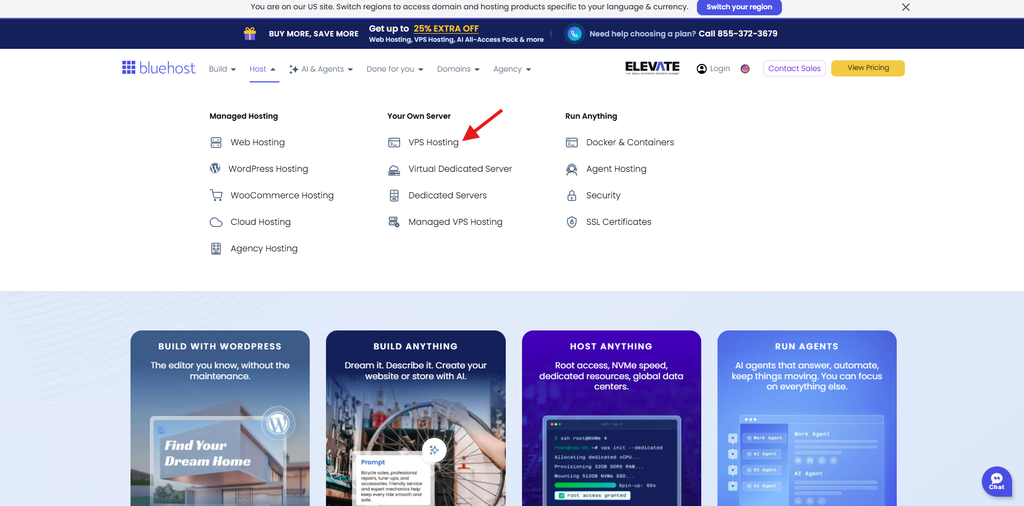
On the Bluehost website, open Host in the navigation bar and select VPS Hosting.
Step 2: Choose your VPS plan
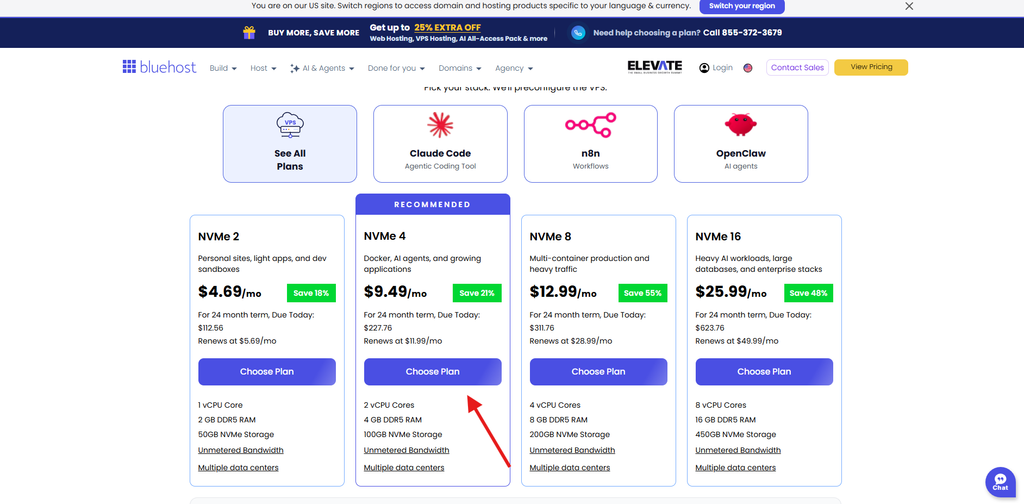
Compare the available plans and click Choose Plan under the option that fits your needs.
Step 3: Configure your server
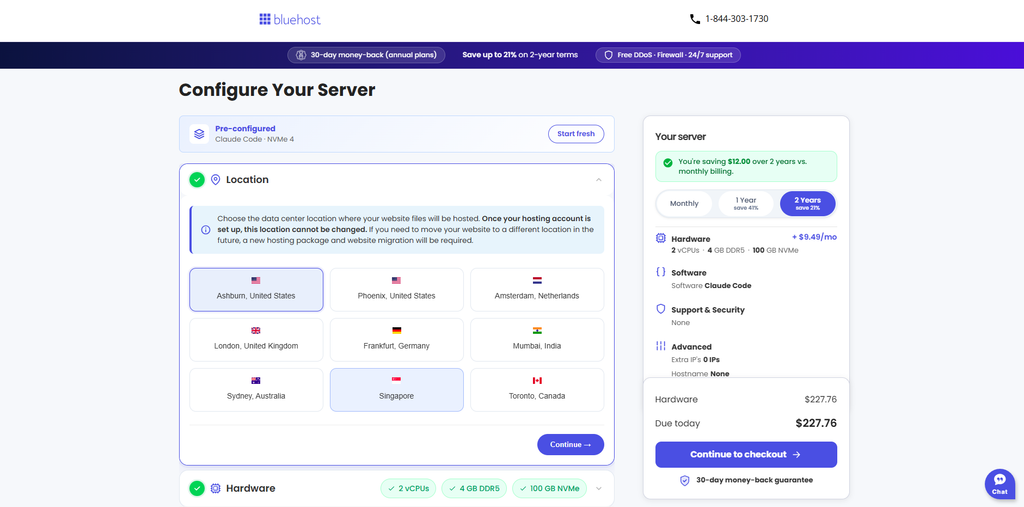
Select your preferred data center location, hardware plan and application. Choose 1 Year (12 months) as your billing term to qualify for the holiday offer. Then click Continue to checkout.
Step 4: Explore “Buy More, Save More”
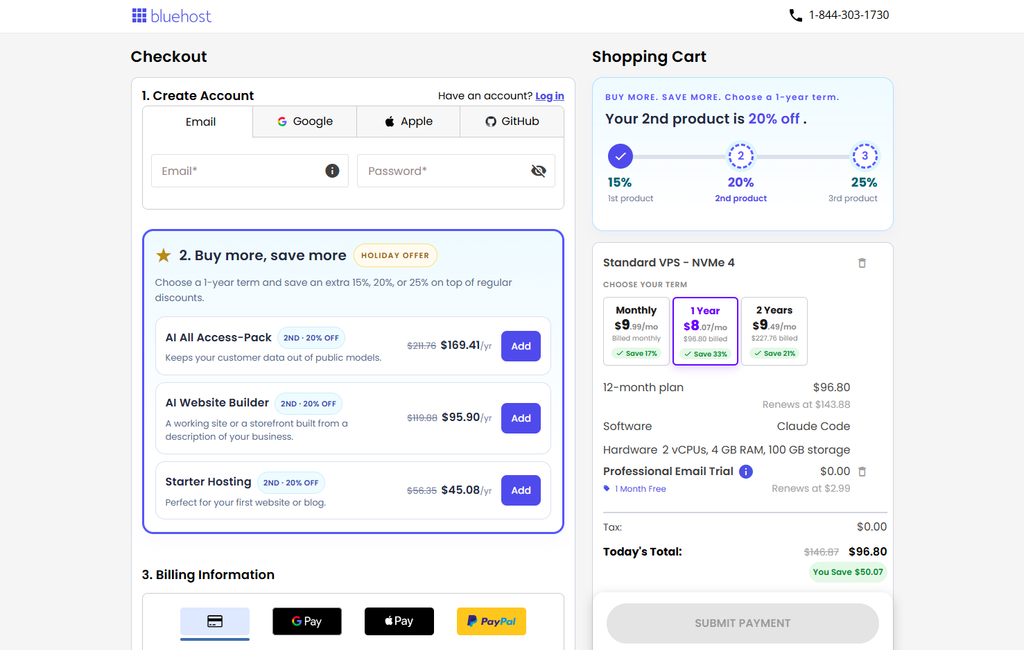
At checkout, find the Buy More, Save More section. Add eligible products available in your cart, such as AI All-Access Pack or AI Website Builder, to unlock additional savings.
| Eligible product | Extra discount shown |
| First product | 15% off |
| Second product | 20% off |
| Third product | 25% off |
Each eligible product must be purchased on a 12-month term to qualify.
Step 5: Review your savings and complete checkout
Create an account or log in. Review your selected products, subscription terms, discounts and renewal prices. Enter your billing details and click Submit Payment to complete your purchase.
The holiday promotion runs through November 30, 2026, so review the available offers and complete your purchase before the deadline.
Final thoughts
A self-managed VPS with allocated resources is the practical step for a store leaving shared hosting before Cyber Week. Developer-led teams expecting short bursts can weigh autoscale pools and owners without technical help can weigh fully managed plans. Whichever you pick, size from last year’s peak, then upgrade and load test before your freeze.
Prepare your store for Black Friday traffic with reserved CPU and RAM, upgrades that preserve your data and network-level DDoS protection. Explore Bluehost VPS Hosting plans, backed by a 99.99% uptime guarantee, and get set up before the holiday rush.
FAQs
Yes, a VPS sized for your peak can handle Black Friday traffic for many small and midsize stores. Base the plan on last year’s busiest hour, then load test it. If one server can’t keep up on its top tier, you’ll need multiple instances behind a load balancer or a cloud autoscaling setup.
Load test several weeks before Black Friday so you can fix bottlenecks and retest before your change freeze. Adobe forecasts Cyber Monday on November 30 this year, which places all of Cyber Week in late November. Retest after any upgrade to confirm the new capacity works.
No, a CDN alone doesn’t prevent crashes, though it reduces load by serving images, scripts and other static files from its own network. Cart, checkout and account pages are typically dynamic, so those requests usually still reach your server. Pair a CDN with enough server capacity, page caching and a checkout load test.
Upgrade before the sale, ideally before your change freeze, so you have time to load test the new capacity. Some resizes involve a reboot or power-off and you don’t want either during peak hours. After upgrading, review your web server, database and cache settings so they use the added CPU and RAM.
The best Black Friday hosting deals balance promotional price, term length, renewal rate and enough capacity for your peak. An undersized discounted plan may still struggle when shoppers arrive.
Budget for the plan you need at peak, plus renewal rates and add-ons. Entry self-managed VPS plans in this comparison cost a few dollars a month on long terms, while fully managed tiers cost several times more. Also factor in backups, DDoS add-ons and load balancers.

Write A Comment