


Key highlights
- Understand what DNS records are and how they connect your domain to the right server.
- Learn the main types of DNS records, including A, AAAA, CNAME, MX, TXT, NS and SOA.
- Explore how DNS records route traffic, handle lookups and keep your website and email online.
- Discover how to update DNS records and how long it takes for DNS records to update.
- Manage domains effortlessly with Bluehost WordPress hosting and set up, edit and verify your DNS settings in minutes.
Imagine typing your favorite website into a browser and watching it appear instantly.
Feels effortless, right?
Behind that speed and precision lies something extraordinary: DNS records, the silent connectors that guide every click, email and search to the right place.
They work quietly in the background, keeping websites accessible, emails deliverable and every online request on the right path.
In this blog, we’ll explore what are DNS records for a website, how they work and why they’re essential for a stable online experience.
You’ll also learn what are the different types of DNS records, how to manage them and how long it takes for DNS records to update once changes are made.
Let’s learn!
TL;DR
- DNS records connect your domain to the correct server, ensuring your website and email function properly.
- The main types of DNS records include A, AAAA, CNAME, MX, TXT, NS, SOA, PTR and SRV, each serving a unique purpose.
- DNS records manage web traffic and email delivery by directing requests to the correct destinations.
- You can easily manage your DNS settings with Bluehost WordPress hosting, making updates and adjustments simple.
- Updating DNS records promptly ensures faster propagation and accurate connections to your website and services.
- Implementing DNSSEC adds an extra layer of security, helping prevent data tampering and spoofing attacks.
What are DNS records for a website?
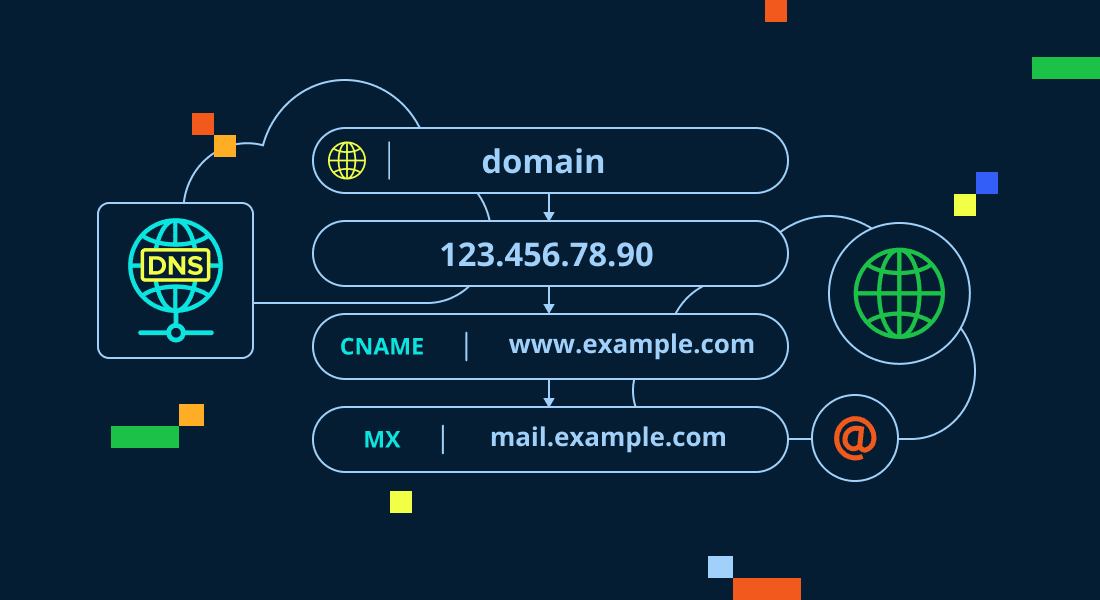
DNS records for a website are settings that connect your domain name to its web server and email services. They store essential information like your website’s IP address, mail server details and other service configurations.
When someone enters your domain in a browser, the DNS resolves it to an IP address so the correct site loads. This process, called a DNS lookup, ensures users reach your website quickly and reliably.
Each DNS record defines how traffic moves, from your website to your email server, keeping your online presence running smoothly.
In short: DNS records for a website act as a digital map that directs visitors, manages email routing and ensures consistent website performance.
Also read: What is DNS (Domain Name System) and How Does it Work?
How do DNS records work?
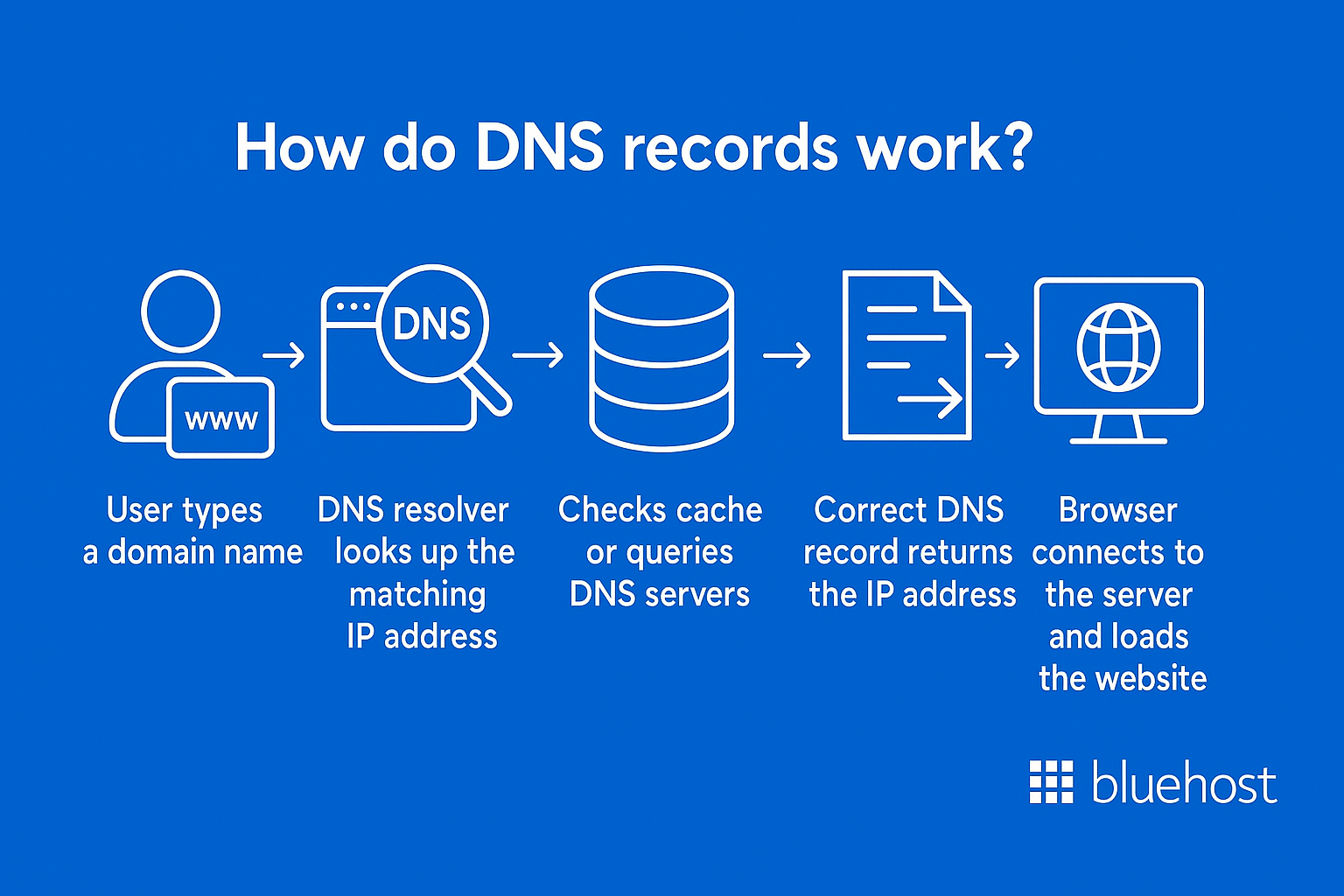
DNS records work like digital directions that guide browsers and servers to the correct online destinations.
When a user enters a domain name, the Domain Name System (DNS) looks up the corresponding IP address in its database.
Here’s how it unfolds:
- The request leaves the user’s device and goes to a recursive DNS server (usually managed by an internet provider).
- If the record isn’t cached, the request moves through root name servers and authoritative DNS servers until the correct record type is found.
- The DNS server then returns the corresponding IP address, directing the browser to the website’s hosting server.
This entire process happens in milliseconds. Properly configured DNS records ensure your website, emails and connected apps resolve without errors or downtime.
In short: DNS records translate human-readable domain names into machine-readable IPs, making the web fast, accessible and reliable.
Find and register a domain with Bluehost
Before DNS records can do their job, you need a domain name that points to the right place. That starts with finding and registering a domain that fits your brand.
With the Bluehost domain search tool, you can quickly check domain availability, explore extensions and register your chosen name in just a few clicks. Once your domain is live, Bluehost automatically creates the basic DNS records you need, so your website and email can start working together.
Using Bluehost, you can:
- Search for domain names and see instant availability.
- Register your domain and connect it to hosting in one flow.
- Let Bluehost set up the core DNS records for you, then fine-tune them later in the DNS editor.
- Manage your domains and DNS from the same, simple control panel.
This way, you don’t just understand how DNS records work in theory; you can put them into action with a domain that’s ready to go.
Why are DNS records important for a website?
DNS records are vital for keeping your website online, responsive and secure.
They form the communication bridge between your domain name and its web server, ensuring that every connection points to the right place.
Here’s why DNS records are important for a website:
- Ensure website accessibility: Every time someone types your domain name, a DNS query locates your IP address so your site loads correctly.
- Maintain reliable email delivery: Proper MX records ensure messages reach the correct mail server without delays or errors.
- Support specific services: Records like TXT, CNAME and SRV help verify ownership, manage specific services and connect third-party tools.
- Strengthen website security: Features such as DNS Security Extensions (DNSSEC) protect your data and prevent spoofing attacks.
- Improve website performance and uptime: Well-configured DNS records ensure faster load times, fewer errors and stable performance across networks.
In short: DNS records for a website are the foundation of a strong online presence. They keep your domain, email and services running smoothly, connecting users to your business every time.
Simplify WordPress site management with Bluehost WordPress hosting
Managing a WordPress website shouldn’t be complicated or time-consuming. With Bluehost WordPress hosting, the focus stays on delivering a fast, secure and reliable site—while the platform handles much of the ongoing maintenance behind the scenes.
Bluehost WordPress hosting is built to support WordPress websites with performance-optimized infrastructure and a managed environment designed for growth. From automatic updates to built-in security and scalability, the platform helps reduce the technical overhead involved in running a WordPress site.
With Bluehost WordPress hosting, you benefit from:
- A managed WordPress platform that takes care of core updates and platform optimization
- High-performance infrastructure, including multi-layer caching and global CDN delivery
- Built-in security features such as free SSL, daily backups and malware detection and removal
- Auto-scalability to support traffic growth and unexpected spikes
- WordPress-specific support to help address platform and performance-related issues
As your site grows, Bluehost WordPress hosting provides the reliability and scalability needed to support long-term success—without adding unnecessary complexity to site management.
Get started with Bluehost WordPress hosting and build your WordPress site on a strong, dependable foundation.
What are the different types of DNS records?
Now that we have understood what are DNS records and their basics, let’s learn about the different types of DNS records.
Each DNS record type plays a critical role in how your domain name connects users to your website and services.
Understanding the different types of DNS records helps you maintain speed, reliability and security across your online presence.
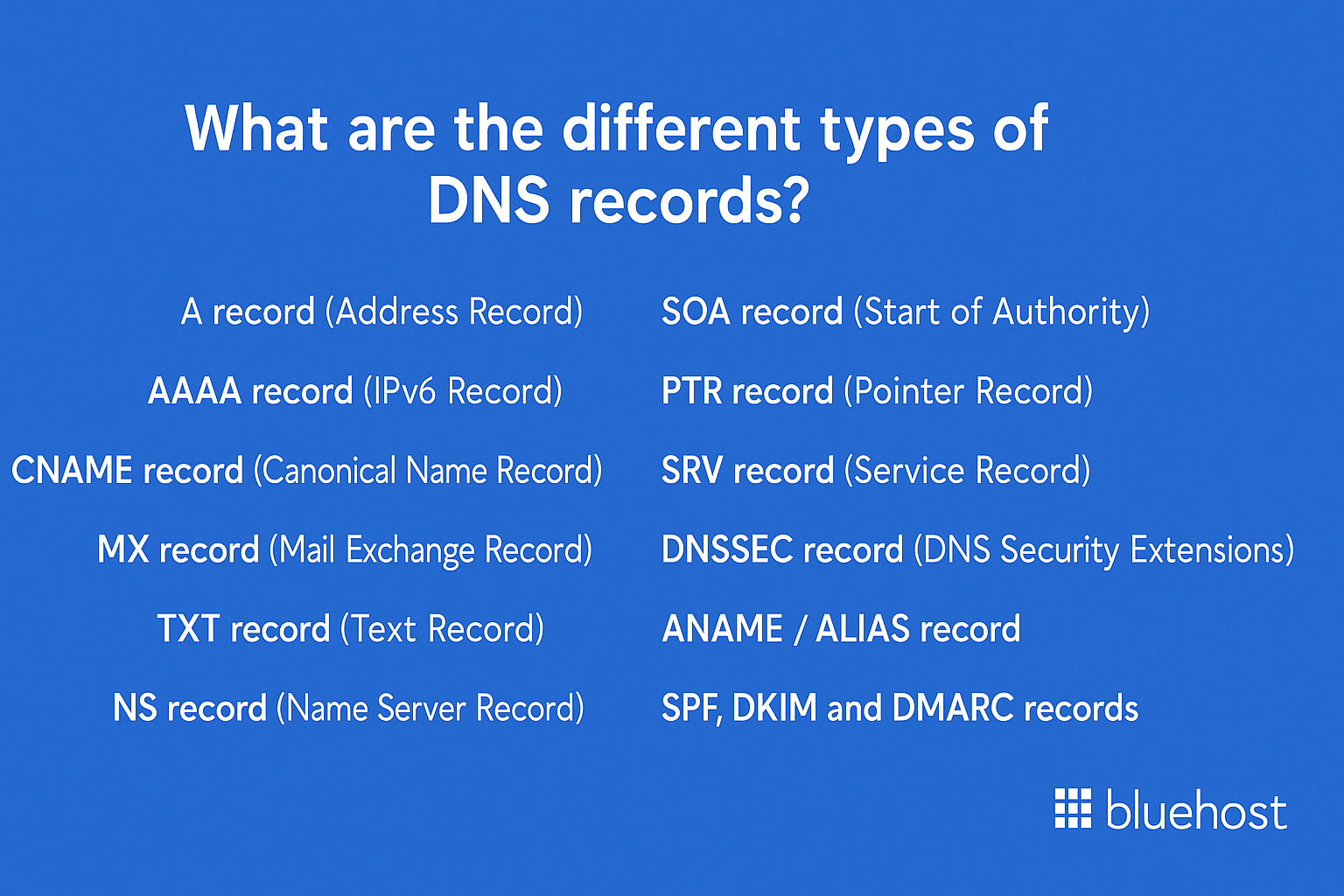
- A record (Address Record)
- AAAA record (IPv6 Record)
- CNAME record (Canonical Name Record)
- MX record (Mail Exchange Record)
- TXT record (Text Record)
- NS record (Name Server Record)
- SOA record (Start of Authority)
- PTR record (Pointer Record)
- SRV record (Service Record)
- DNSSEC record (DNS Security Extensions)
- ANAME / ALIAS record
- SPF, DKIM and DMARC records
Now, let’s explore each of these in detail.
1. A record (Address Record)
The A record is one of the most fundamental DNS record types. It connects your domain name to an IPv4 address, guiding browsers and devices to the correct web server.
Without it, your site wouldn’t appear when users type your domain name.
Key points:
- Directs your domain to the correct hosting server.
- Must be updated when switching hosts or servers.
- Ensures your website remains accessible and consistent.
Keeping your A record accurate improves uptime, reduces downtime risk and ensures smooth user experiences.
2. AAAA record (IPv6 Record)
The AAAA record performs the same role as an A record but uses an IPv6 address instead of IPv4.
As the internet transitions to IPv6, this record supports modern connectivity and scalability for your domain.
Key points:
- Uses IPv6 addressing to ensure modern network compatibility and dual-stack reachability.
- Ensures compatibility with next-generation networks.
- Enhances compatibility on IPv6-enabled networks.
Having an AAAA record future-proofs your website as more devices and ISPs adopt IPv6.
3. CNAME record (Canonical Name Record)
A CNAME record creates an alias that points one domain or subdomain to another.
It’s often used for subdomains like “blog.[example].[com]” or “shop.[example].[com],” reducing the need for repetitive updates across records.
Key points:
- Simplifies DNS management for multiple subdomains.
- Prevents manual updates across duplicate entries.
- Ideal for integrating third-party services like CDNs.
With CNAME records, managing redirects and brand consistency across services becomes effortless.
4. MX record (Mail Exchange Record)
MX records manage email routing by directing messages to the right mail servers. They are vital for ensuring that business or personal emails are delivered correctly.
Key points:
- Ensures reliable delivery for domain-based emails.
- Works with SPF, DKIM and DMARC for security.
- Required for platforms like Google Workspace or Outlook.
Misconfigured MX records can lead to lost or rejected emails, so they must always be tested after updates.
5. TXT record (Text Record)
TXT records are text-based entries used to verify domain ownership and secure email communications.
They can store human-readable information that third-party services reference.
Key points:
- Used for SPF, DKIM and DMARC verification.
- Confirms ownership for Google or Microsoft accounts.
- Strengthens your domain’s trust and reputation.
Correct DNS TXT records protect against spoofing and phishing attempts, building credibility for your brand.
6. NS record (Name Server Record)
NS records tell the Internet which name servers are authoritative for your domain. These define where DNS lookups are directed and how they are managed.
Key points:
- Critical for pointing your domain to the right DNS host.
- Must always point to active, authoritative servers.
- Incorrect entries can cause your website to go offline.
When migrating domains or hosting, updating NS records ensures your domain stays online during the transition.
7. SOA record (Start of Authority)
The SOA record defines who manages your DNS zone and how often data should refresh across servers.
It’s like the administrative blueprint for your domain.
Key points:
- Lists the primary name server and admin contact.
- Stores the zone serial and timers (refresh, retry, expire) plus a minimum value used for negative-caching TTL.
- Keeps DNS zones synchronized between servers.
The serial number is especially important when you have multiple DNS servers, because secondary name servers use it to detect changes and pull updated zone data.
Proper SOA records maintain DNS consistency and help prevent record conflicts or propagation delays.
8. PTR record (Pointer Record)
A PTR record performs a reverse DNS lookup, linking an IP address back to a domain name. It’s essential for validating email servers and reducing spam risks.
Key points:
- Provides reverse DNS verification for outgoing mail.
- Required by many email providers for sender trust.
- Helps prevent blacklisting and spam rejection.
PTR records can only be added by whoever controls the IP address, often the hosting provider or ISP.
Setting up PTR records enhances your domain’s credibility in email communications.
9. SRV record (Service Record)
SRV records define where to find servers for specific services like VoIP, SIP or chat. They specify the target host, port and protocol details.
Key points:
- Enables automated service discovery.
- Improves connectivity for communication tools.
- Supports load balancing for complex systems.
Businesses using cloud-based services often rely on SRV records to streamline integrations and ensure reliability.
10. DNSSEC record (DNS Security Extensions)
DNSSEC records secure your domain by validating DNS responses through cryptographic signatures.
They protect against data tampering and redirection attacks.
Key points:
- Adds digital signatures for verification.
- Prevents spoofing and DNS hijacking.
- Boosts trust and strengthens site security.
On top of DNSSEC, Bluehost WordPress hosting gives you free SSL to encrypt traffic between your site and visitors and SiteLock (available on select plans) to scan for malware and vulnerabilities.
Together, these tools create layered protection that starts with DNS and extends all the way to your WordPress site.
Implementing DNSSEC is a best practice for organizations prioritizing data security and customer trust.
11. ANAME / ALIAS record
An ANAME or ALIAS record works like a CNAME record, but it supports your root (apex) domain, where CNAMEs aren’t allowed.
These are not standard DNS record types defined in the core DNS specifications.
They are provider-specific pseudo-records that your DNS provider interprets and converts into standard records behind the scenes.
Key points:
- Connects root domains to other hostnames.
- Ideal for CDNs and global load balancing.
- Ensures consistent routing at the apex level.
Adding an ANAME record provides flexibility for domains using dynamic infrastructure or multi-server setups.
12. SPF, DKIM and DMARC records
These DNS TXT records enhance your domain’s email security and authentication. They verify that messages are sent from trusted servers.
Key points:
- SPF records authorize legitimate mail servers.
- DKIM adds a public key signature to verify integrity.
- DMARC enforces policies for unauthenticated emails.
Setting up SPF, DKIM and DMARC ensures safe email delivery and helps prevent phishing or spoofing attempts.
Now that we have understood the different types of DNS records, let’s take a look at a few less commonly used DNS records.
What are some of the less commonly used DNS records?
Beyond the popular records like A, MX and CNAME, there are several less commonly used DNS records that serve specialized purposes.
These different types of DNS records enhance security, improve automation and manage advanced configurations for enterprise and global-scale domains.
- CAA record (Certification Authority Authorization)
- DNAME record (Delegation Name Record)
- NAPTR record (Naming Authority Pointer)
- CERT record (Certificate Record)
- DS record (Delegation Signer Record)
1. CAA record (Certification Authority Authorization)
A CAA record defines which certificate authorities (CAs) can issue SSL or TLS certificates for your domain.
It prevents unauthorized certificate issuance and strengthens website security.
Key points:
- Restricts which certificate authorities can issue SSL certificates for your domain.
- Protects against the creation of fraudulent or unauthorized certificates.
- Supports automated certificate management for HTTPS.
Using a CAA record is a best practice for businesses that want full control over their site’s encryption and digital identity.
2. DNAME record (Delegation Name Record)
The DNAME record creates an alias for an entire domain subtree, redirecting all its subdomains to another domain.
It’s useful for large-scale migrations and domain restructures.
Key points:
- Redirects all subdomains to another domain.
- Simplifies managing large domain hierarchies.
- Useful when merging multiple domain structures.
By using a DNAME record, administrators can efficiently migrate hundreds of subdomains without manually editing each entry.
3. NAPTR record (Naming Authority Pointer Record)
A NAPTR record provides flexible mappings between domain names and services. It’s often used for applications like VoIP or ENUM (telephone-to-domain lookups).
Key points:
- Enables dynamic DNS resolution for advanced communication systems.
- Common in VoIP and SIP services.
- Works with SRV records for detailed service mapping.
NAPTR records make service discovery more adaptive, improving automation across communication platforms.
4. CERT record (Certificate Record)
The CERT record stores encryption certificates and authentication keys directly in DNS. It helps verify the authenticity of websites, emails and digital signatures.
Key points:
- Stores public key certificates within the DNS zone.
- Strengthens identity verification for secure transactions.
- Works alongside DNS Security Extensions (DNSSEC) for added protection.
While CERT records aren’t common, they’re powerful tools for enterprises needing advanced security and cryptographic trust.
In fact, many domains never use CERT records at all, because certificate management usually happens at the web server, CDN or application level rather than inside DNS.
5. DS record (Delegation Signer Record)
A DS record links a child domain to its parent in the DNSSEC chain of trust. It verifies the authenticity of DNS data between zones.
Key points:
- Supports secure delegation in DNSSEC-enabled zones.
- Ensures data integrity and prevents spoofing.
- Helps maintain trust across subdomain hierarchies.
Adding a DS record is crucial for domains that use DNSSEC, ensuring each zone is securely verified and linked.
How to manage/update DNS records with Bluehost?
Managing DNS records correctly keeps your website, email and services online without interruption.
It ensures smooth traffic routing, secure data handling and reliable domain connectivity.
Bluehost offers two options to manage/update DNS records:
- Through the Bluehost hosting dashboard (Domains tab / Advanced DNS)
- Through cPanel (Zone Editor)
When you use the Bluehost hosting dashboard, you can manage DNS from the same place you manage your domains, without opening cPanel.
If you are not very familiar with cPanel, staying inside the Bluehost dashboard can feel simpler and more convenient.
We will dive into both methods.
Method 1: Through the Bluehost hosting dashboard (Domains tab / Advanced DNS)
This method keeps everything inside your Bluehost account interface, so you don’t have to switch to cPanel.
How to edit an existing DNS record?
- Log in to your Bluehost Account Manager
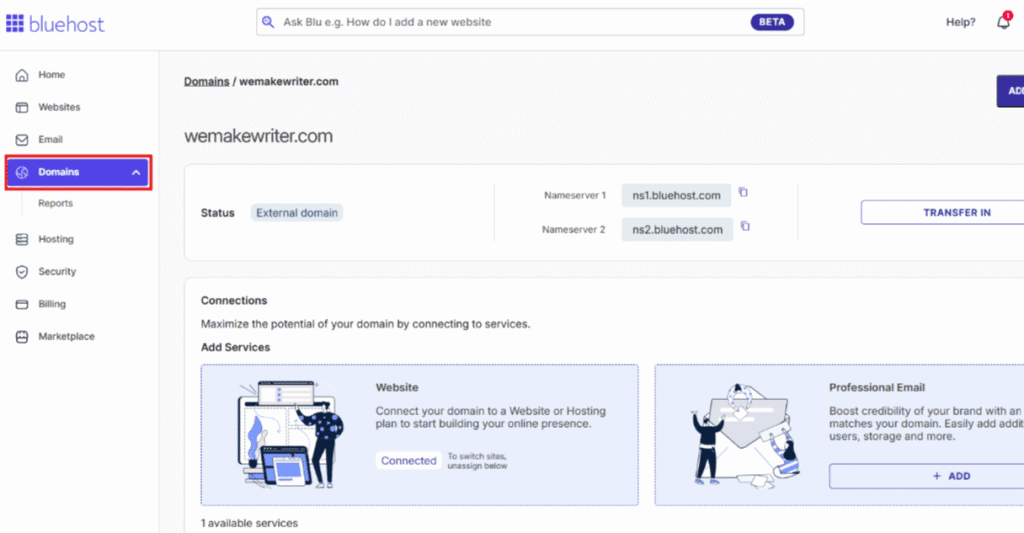
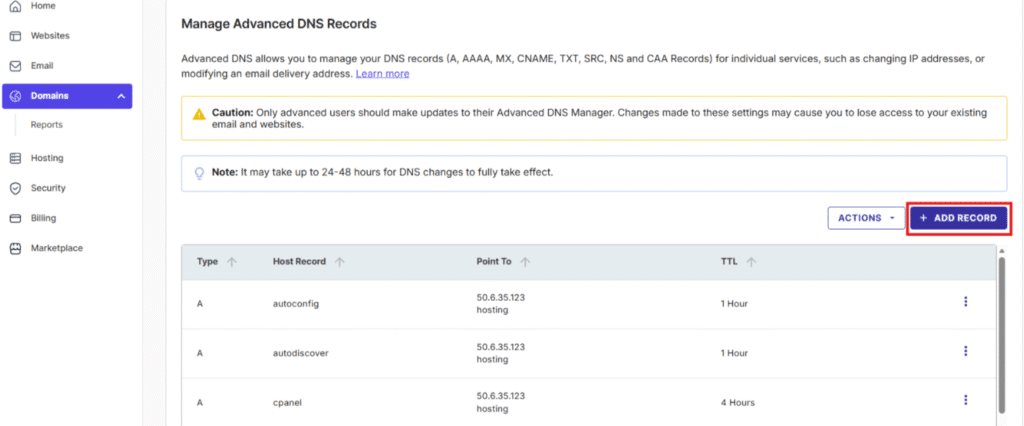
- In the ‘Domains‘ tab, scroll down to ‘Manage Advanced DNS Records‘.
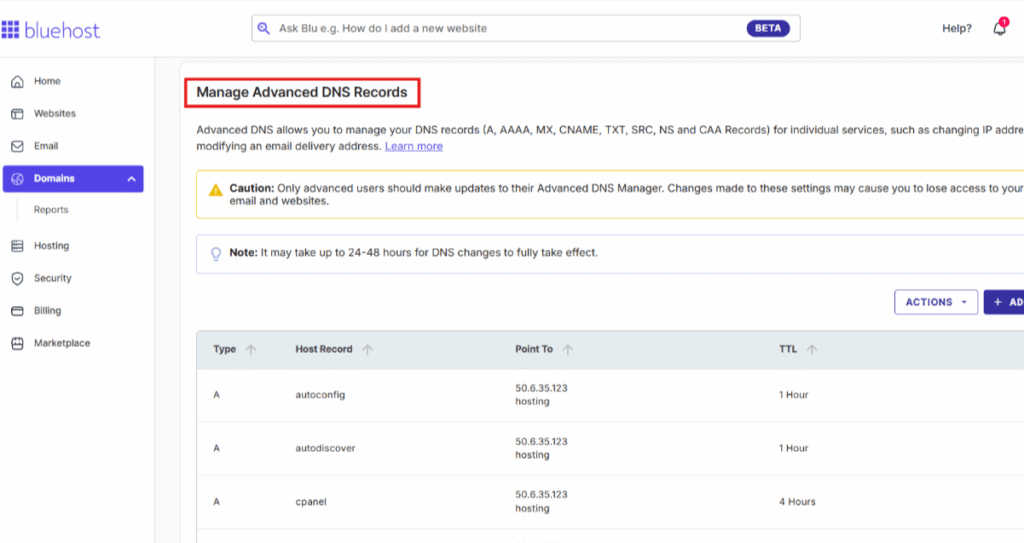
- Click the ellipses (⋮) next to the record you want to edit.
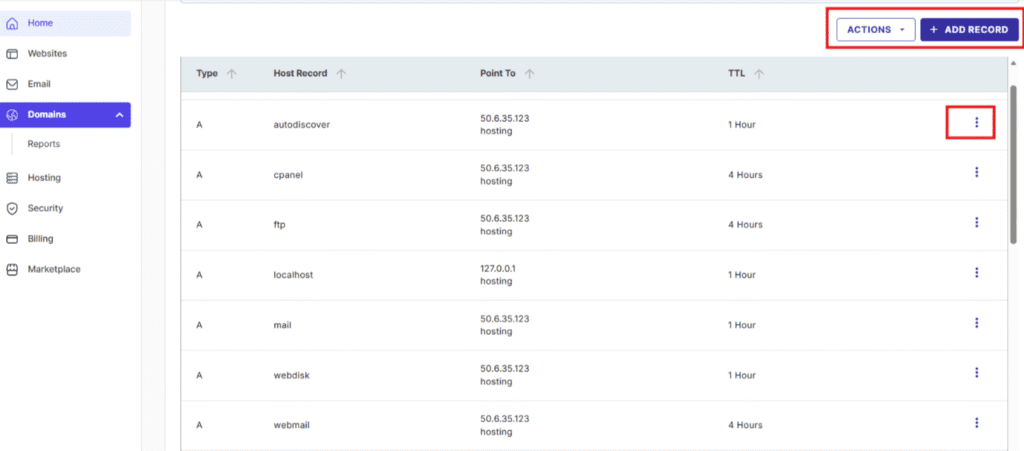
- Click ‘Edit‘.
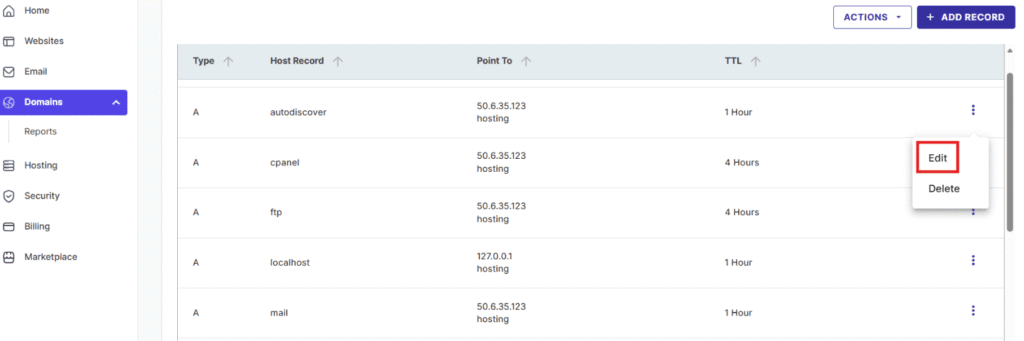
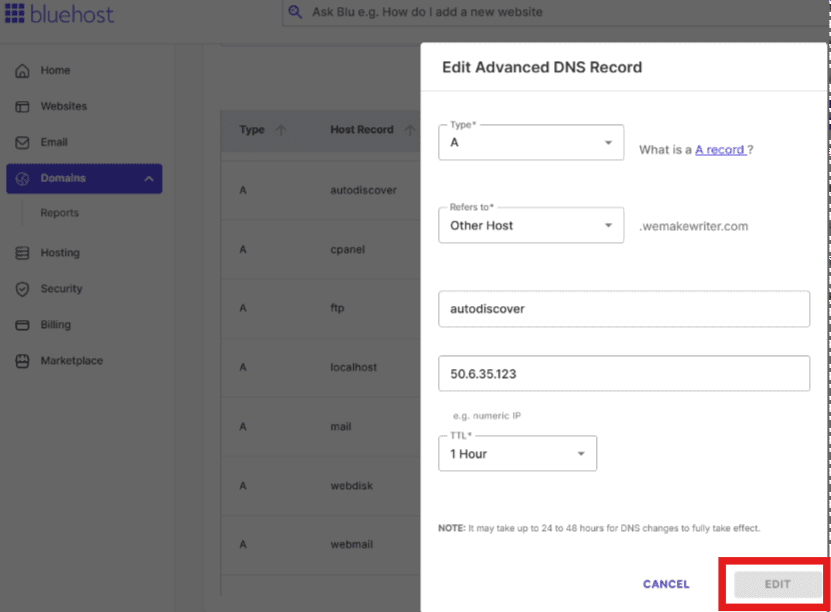
- Update the required fields for that record.
- Click ‘Edit’ again to save your changes.
How to add a DNS record?
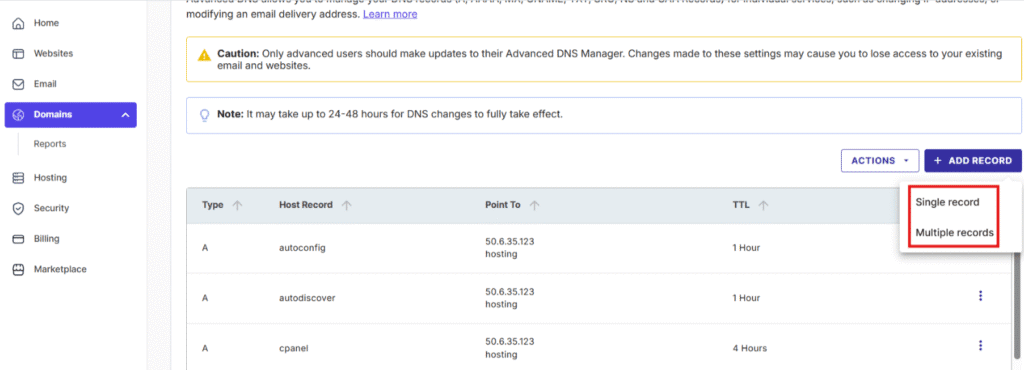
- In the ‘Domains’ tab, click the ‘+ ADD RECORD‘ button.
- Choose the record type in the pop-up.
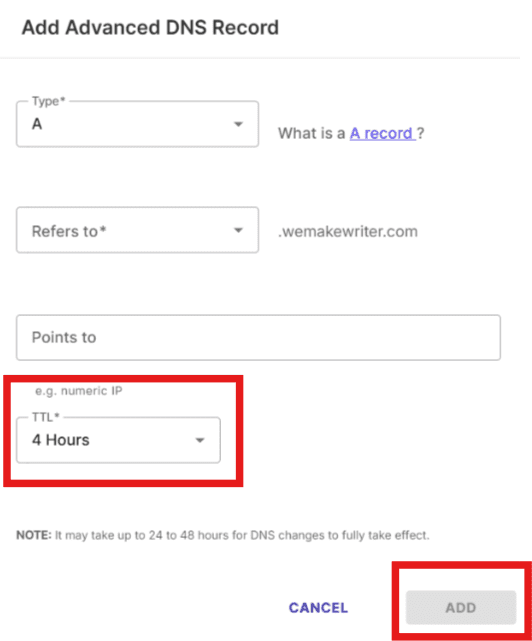
- Set the ‘TTL’ to ‘4 hours‘.
- Fill in the other fields as instructed by your DNS record provider.
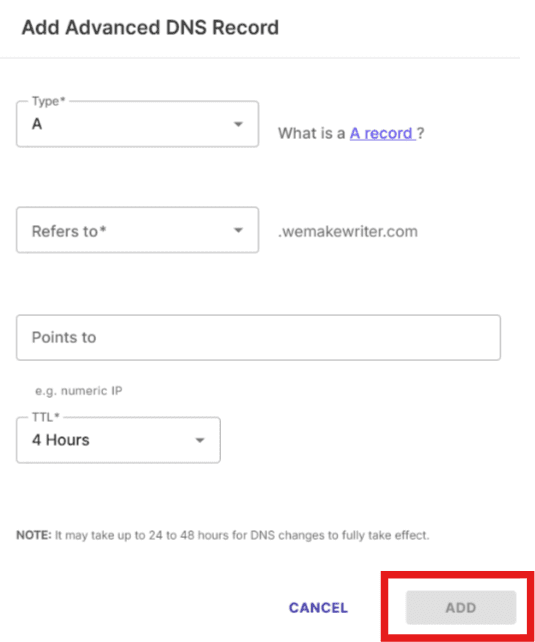
- Click ‘Add’ to create the new record.
How to delete a DNS record?
- Go to ‘Manage Advanced DNS Records‘.
- Click the ellipses (⋮) next to the record you want to remove.
- Click ‘Delete’.
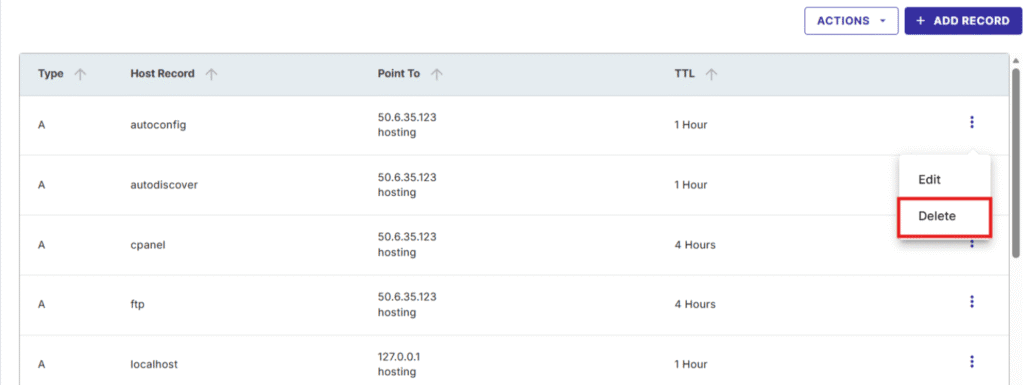
- Once again, click ‘DELETE’ in the confirmation window to confirm.
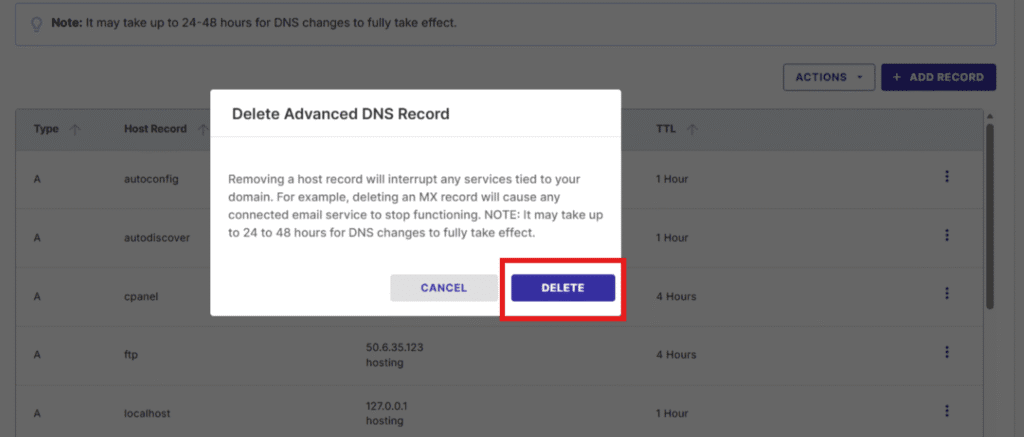
Method 2: Through cPanel (Zone Editor)
This method uses the standard cPanel Zone Editor, where you can view and manage all DNS records for your domain in one place.
It’s a good option if you’re already comfortable working inside cPanel and prefer that interface.
From the Bluehost hosting dashboard
- Log in to your Bluehost Account Manager,
- Go to the ‘Hosting’ tab (or ‘Websites’, depending on your interface).
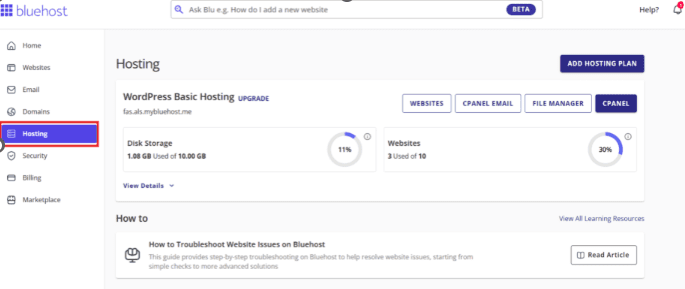
- Scroll down and navigate ‘cPanel’ on the right side.
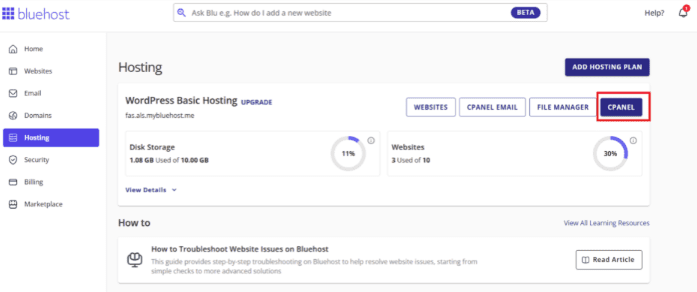
- Under the ‘Domains’ section, click ‘Zone Editor’.

- Here, you choose from your preferred domain, and click “Manage”.
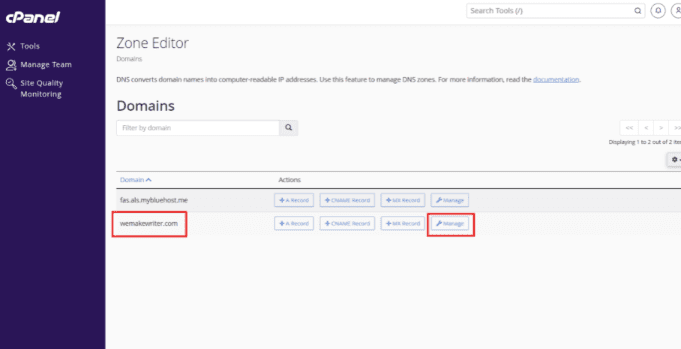
- From here, you can ‘edit’, ‘add’ or ‘delete’ DNS records as described in the sections above.
Also watch: Mastering DNS Record Editing: A Step-by-Step Guide
How to edit an existing DNS record?
- Choose the domain and click ‘MANAGE’.
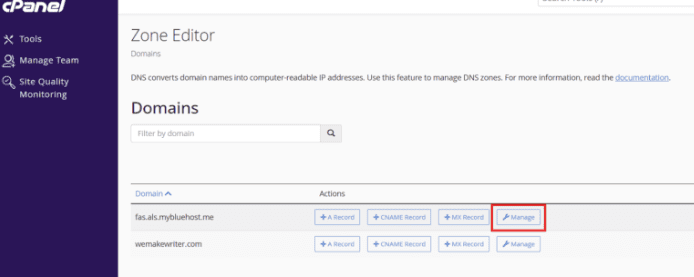
- Use the Filter to find the DNS record you want to change.
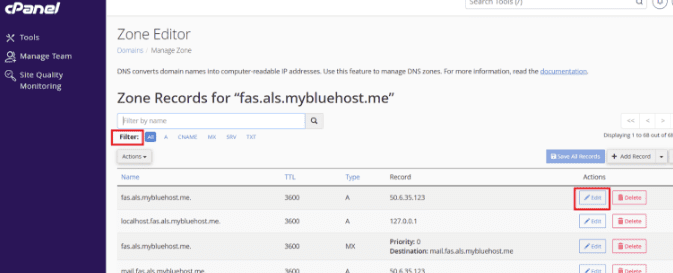
- Click ‘Edit’ next to that record.
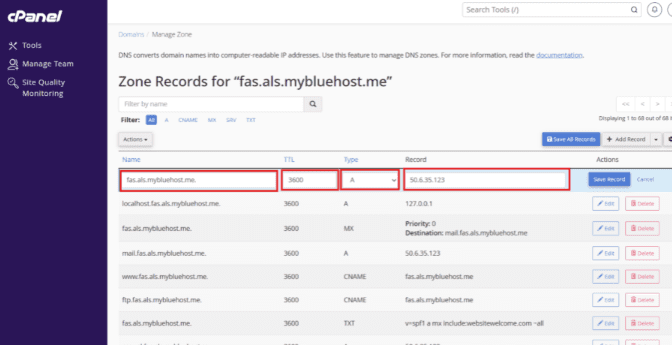
- Enter the new values for the record.
- Click ‘Save Record‘ to apply the change.
How to add a DNS record?
- Click the ‘+ Add Record‘ button.
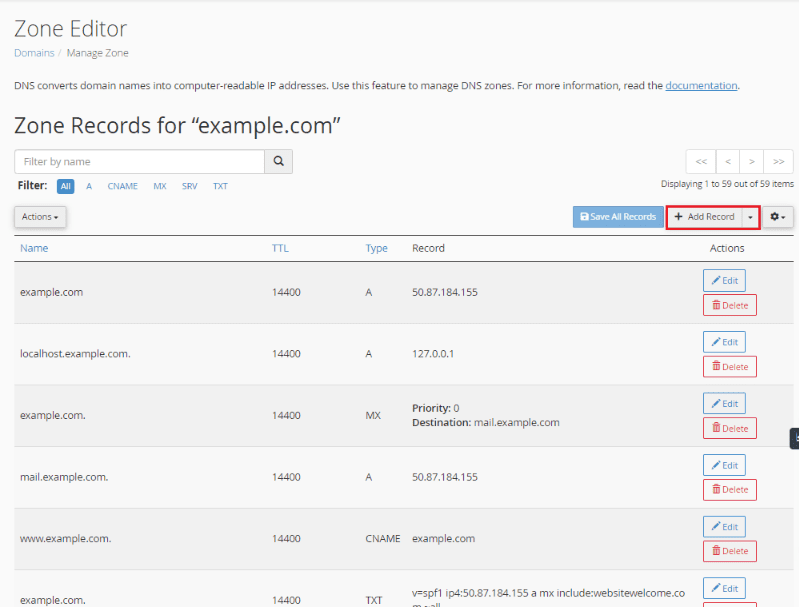
- Fill in the required fields for the new record.
- Click ‘Save Record‘ when you are done.
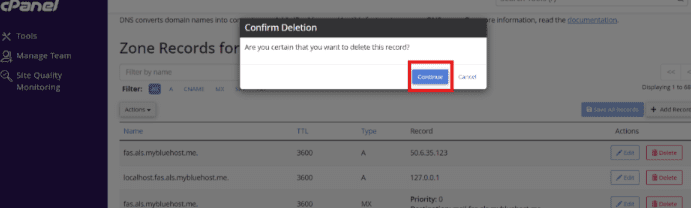
How to delete a DNS record?
- Find the record you want to delete.
- Click ‘Delete’ next to that record.
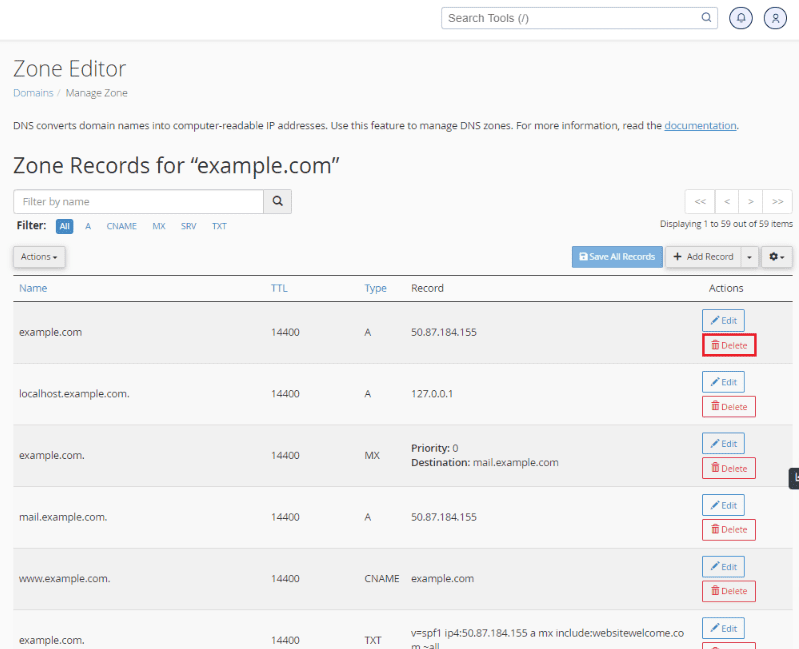
- Click ‘Continue’ in the confirmation window.
Please note: DNS changes can take up to 24–48 hours to take effect across the internet. Also, DNS changes can take 24–48 hours to reflect in the DNS editor.
What are some common DNS errors and how to fix them?
Even with proper setup, DNS records can occasionally break due to typos, outdated entries or incorrect configurations.
These errors can affect how your domain name system (DNS) connects users to your website, mail servers or other services.
Understanding common issues and how to fix them helps maintain a healthy DNS infrastructure.
1. Fix NXDOMAIN from missing or mistyped records
An NXDOMAIN error means the DNS server couldn’t find the requested domain name.
It usually occurs when an A record or CNAME record is missing, deleted or incorrectly entered.
NXDOMAIN can also appear when there is a delegation problem, such as missing or incorrect NS records at the parent zone. So, the resolver never reaches the correct authoritative server.
How to fix it:
- Log in to your DNS provider dashboard.
- Check that your A record points to the correct IP address.
- Confirm the domain name is active and matches your root domain.
- Review your zone files for any missing or duplicated entries.
If the issue persists, clear DNS cache locally or through your browser to force a fresh lookup.
2. Resolve SERVFAIL and REFUSED at resolvers or upstream
SERVFAIL or REFUSED errors usually occur when the DNS server can’t validate a query response.
This may occur due to firewall restrictions, DNSSEC issues or resolver-level problems.
A common cause of SERVFAIL is DNSSEC misconfiguration, such as expired signatures, mismatched DNSKEY records or missing DS records in the parent zone.
How to fix it:
- Test your DNS servers using a tool like dig or nslookup.
- Verify DNSSEC records and the resource record signature are valid.
- Check your firewall settings to allow UDP and TCP port 53 traffic.
- If using Dynamic Host Configuration Protocol (DHCP), ensure your resolver settings are updated automatically.
Keeping DNSSEC properly configured ensures every response is authenticated, protecting against tampering or false data.
3. Repair nameserver and delegation mismatches (NS, glue)
A delegation mismatch happens when your NS records and the parent registry don’t match.
This can stop users from reaching your specific domain or any of its subdomains.
How to fix it:
- Compare your NS records with the registrar’s records.
- Update both to point to the same authoritative DNS servers.
- Confirm that all the subdomains are properly delegated.
- Ensure your Fully Qualified Domain Name (FQDN) resolves to the correct target.
Accurate delegation keeps your domain owners in control and guarantees fast, reliable resolutions.
4. Correct email failures from MX, SPF, DKIM and DMARC
Email issues often arise when MX records or authentication protocols such as Sender Policy Framework (SPF), DomainKeys Identified Mail (DKIM) or DMARC are misconfigured.
How to fix it:
- Verify your MX records point to the right mail exchanger.
- Confirm your SPF record includes valid sending IPs and address ranges.
- Ensure DKIM is enabled and linked to the right canonical domain.
- Check that your DMARC policy aligns with SPF and DKIM results.
A properly configured email setup helps prevent spoofing, improve deliverability and secure your communications.
5. Address DNSSEC validation errors and rollback safely
If your DNSSEC chain fails validation, users might be unable to access websites securely.
These issues occur when signatures expire, keys aren’t updated or the DNSKEY record doesn’t match.
How to fix it:
- Confirm all DNSSEC keys are valid and not expired.
- Verify the Resource Record Signature (RRSIG) for each protected zone.
- Update or reissue DNSKEY records if mismatched.
- If needed, disable DNSSEC temporarily and re-enable after renewal.
Using DNS makes your data integrity stronger by confirming every lookup is legitimate. Proper key rotation also prevents security vulnerabilities.
Most DNS providers offer diagnostic tools to automatically detect errors in DNS syntax or invalid record entries.
Reviewing various DNS record types and updating outdated configurations regularly helps ensure a stable connection between your machine-readable IP addresses and human-readable domain names.
What are some of the best practices for DNS management?
Managing DNS records efficiently helps your website stay reliable, secure and fast.
Whether you’re learning what are DNS records or configuring types of DNS records for your hosting, applying consistent best practices ensures stronger performance, fewer errors and better visibility across the web.
1. Keep records minimal, consistent and well-named
A well-structured DNS setup makes it easier to manage and troubleshoot.
Avoid creating unnecessary entries or duplicate records, they can cause conflicts and slow propagation when you update DNS records.
Best practices:
- Keep your zone files tidy by removing unused or outdated records.
- Use clear naming for all DNS record types to simplify management.
- Document changes made to your specific domain or root domain for quick reference.
Maintaining a minimal, consistent DNS structure helps domain owners manage human-readable domain names that always resolve correctly to machine-readable IP addresses.
2. Use smart TTL strategies for stability and fast updates
Time-to-Live (TTL) values determine how long DNS data remains cached before it is refreshed.
Setting smart TTLs ensures your records are stable yet easy to update.
Best practices:
- Lower TTL values before making major updates to DNS records.
- Raise TTL afterward to improve caching and reduce DNS server load.
- Test propagation to confirm the domain name system refreshes accurately.
Smart TTL planning helps users consistently access websites even during migrations or hosting transitions.
3. Secure your zone with DNSSEC and CAA enforcement
Security is vital when protecting your domain and its connected services.
DNS Security Extensions (DNSSEC) verify data authenticity, while CAA records define which certificate authorities can issue certificates for your site.
Best practices:
- Enable DNSSEC to add a resource record signature (RRSIG) to your records.
- Set CAA records to prevent unauthorized SSL issuance.
- Audit your DNS infrastructure and encryption keys regularly.
With Bluehost WordPress hosting, you can pair these DNS-level protections with free SSL certificates and SiteLock website security, so your domain, DNS and WordPress site are all protected under one integrated setup.
These measures protect your canonical domain and ensure secure communication between servers and visitors.
4. Control access with least privilege and change logs
Unauthorized access can lead to misconfigurations or security breaches.
Limit control of your DNS dashboard and record all changes made to your particular domain.
Best practices:
- Grant access only to trusted administrators or verified team members.
- Keep detailed logs of every update to your zone files.
- Review and revoke old credentials regularly for added security.
Maintaining strict access policies strengthens accountability and protects sensitive data stored within your DNS.
5. Monitor DNS health and set automated alerts
Regular monitoring ensures that your DNS makes data accurate, secure and consistently available.
Tracking health metrics lets you identify and fix issues before they affect performance.
Best practices:
- Use automated tools to monitor uptime, latency and IP addresses.
- Set alerts for DNS failures or expired records across all the subdomains.
- Verify only the A record and other DNS record types resolve correctly after updates.
Proactive monitoring guarantees your Fully Qualified Domain Name (FQDN) and mail exchanger entries work flawlessly across networks and devices.
By following these best practices for DNS management, you ensure stability, security and speed for your domain name system.
Regular audits, secure configurations and clear documentation help your website perform reliably, no matter how complex your setup becomes.
Final thoughts
Understanding what are DNS records is key to managing your website’s stability, security and overall performance.
These records form the backbone of the domain name system, translating human-friendly names into machine-readable IP addresses so users can effortlessly access websites worldwide.
Each record, from A records to TXT, MX and CAA, serves a unique purpose. Together, these types of DNS records make sure your emails are delivered securely, your site loads correctly and your online services connect without fail.
Choose Bluehost WordPress hosting to simplify DNS management, enhance site speed and receive expert support. We offer one-click DNS control, free domain setup, automatic updates and 24/7 support to keep your website secure and stable.
Get started with Bluehost WordPress hosting and easily manage DNS, launch confidently and rely on trusted support!
FAQs
A common example of a DNS record is the A record, which connects a domain name to its IP address. It’s one of the common DNS record types that allows users to map domain names to their corresponding servers under the Internet Protocol (IP) framework.
You should only delete DNS records if you’re certain they’re unnecessary. Removing active ones can break your site or email. Always back up before updating DNS records or deleting entries to ensure domain functionality remains safe.
Yes, you need DNS records for your website and email services to function. These records map domain names to machine-readable IP addresses, enabling your site and email client to communicate smoothly with servers.
The eight essential types of DNS records include A, AAAA, CNAME, MX, TXT, NS, SOA and PTR. These several DNS records manage everything from web traffic and email routing to authentication and administrative details.
Most updates appear within minutes to a few hours, depending on TTL and caching; allow up to 24–48 hours in edge cases. The timing depends on caching, TTL values and the speed of DNS server propagation.
The four key types of DNS servers are Recursive Resolvers, Root Servers, TLD Servers and Authoritative Servers. Together, they process queries, map domain names to IPs and ensure users reach your site quickly via the Internet Protocol.
Besides the main ones, other DNS record types include SRV, CAA, NAPTR and DS records. These advanced records enhance automation, add security layers and store admin information vital for domain integrity and encrypted communication.
SPF records (Sender Policy Framework) specify which mail servers can send emails for your domain. When an email client receives a message, it checks the SPF record to confirm it’s from an authorized source, preventing spoofing and improving email trustworthiness.
At minimum, you need an A record (or AAAA) to point your domain to a server and NS records to define the authoritative DNS host. If you use email, you also need MX, SPF, DKIM and DMARC for secure delivery.
Incorrect DNS records can cause your website to go offline, email to fail or services like SSL verification to break. Fixing the wrong record restores connectivity immediately after propagation.
DNS lookup time affects initial load time. Efficient records, optimized TTLs and reliable DNS hosting (like Bluehost) improve DNS resolution speed.
A DNS zone is the file that stores all DNS records for a domain, including A, CNAME, MX, NS and TXT records. It defines how your domain is routed on the internet.
DNSSEC protects your domain from DNS spoofing and cache-poisoning attacks by verifying DNS responses. It is recommended but requires correct key management.
Use tools like dig, nslookup or online checkers such as DNSChecker.org or WhatsMyDNS.



Write A Comment