



Key highlights
- Know the exact Yoast SEO premium price for 2026 and what features you get for every dollar you spend.
- Understand the core differences between Yoast SEO free vs premium so you can choose the right version for your website’s needs.
- Learn what powerful features unlock when you upgrade to Yoast SEO premium and whether the investment makes sense for your goals.
- Explore how Yoast SEO plugin pricing stacks up against other SEO tools so you can make a confident, budget-smart decision.
- Uncover the practical steps to buy Yoast SEO premium and get it set up quickly on your WordPress site.
If you run a WordPress website, you have probably heard of Yoast SEO. It is one of the most widely used SEO plugins in the world, trusted by millions of site owners to help their content rank higher in search engines. But before you decide whether to stick with the free version or pay for the premium plan, you need to understand exactly what you are getting at each price point.
This guide breaks down Yoast SEO pricing in 2026, compares the free and premium plans, and helps you figure out which option makes sense for your website and your budget.
What is Yoast SEO and why does it matter?

Yoast SEO is a WordPress plugin built by Yoast, a company that has spent years developing tools to make search engine optimization accessible to everyone. It is one of the most number on WordPress SEO plugin, used by millions of website owners to help their content rank better in search results.
The plugin works by analyzing your pages and posts, flagging issues with keyword usage, readability and technical structure so you can fix them before you hit publish. For website owners who are not SEO experts, this kind of live guidance removes the guesswork from optimization.
Bluehost offers Yoast SEO Premium as an integrated SEO solution for its hosting customers. If your site is on Bluehost, you can add Yoast SEO Premium directly from your dashboard, making it one of the easiest ways to get a professional-grade SEO setup without any technical complexity.
Now, the big question: how much does it actually cost?
Yoast SEO pricing in 2026: The quick answer
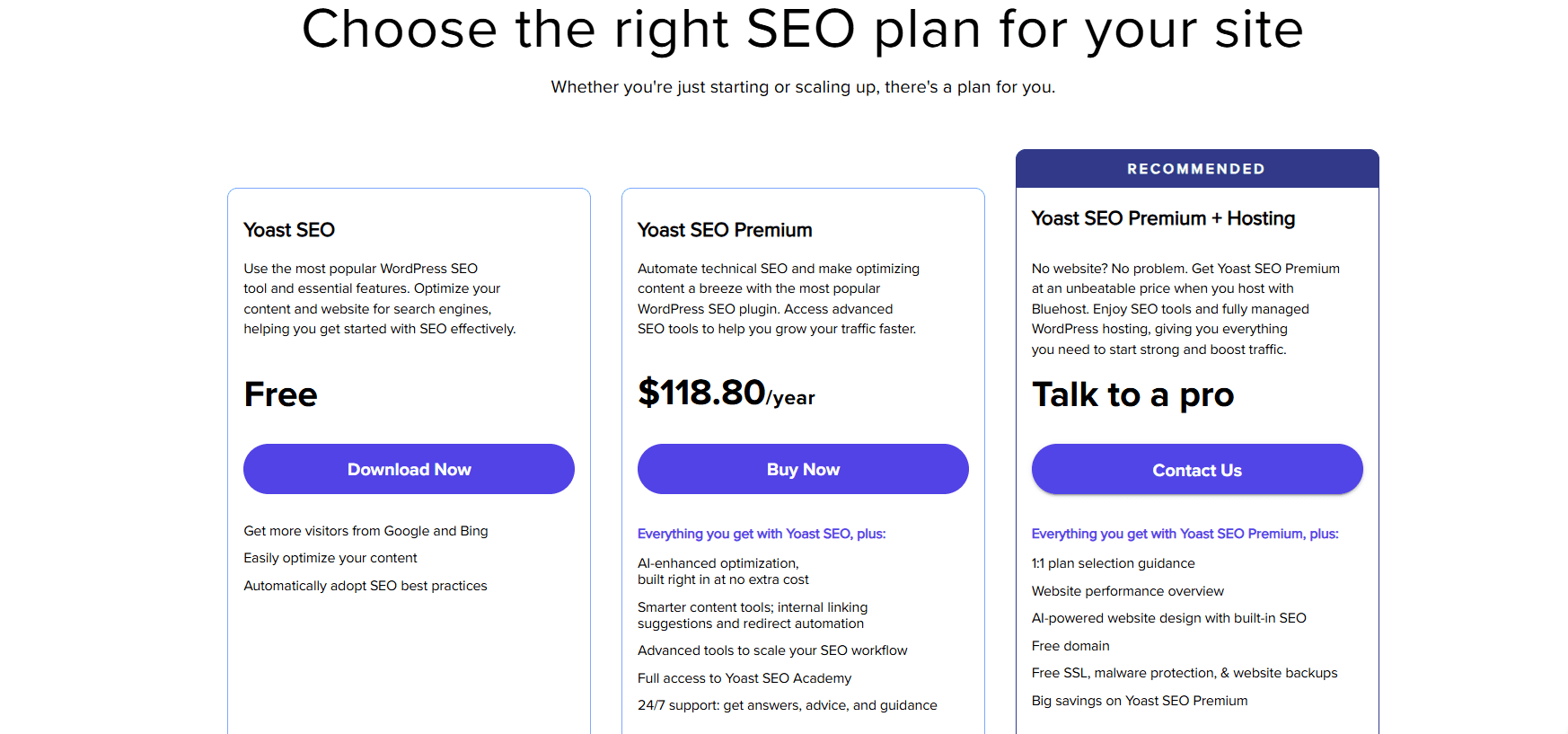
Yoast SEO comes in two main versions:
- Yoast SEO Free: Available at no cost from the WordPress plugin directory
- Yoast SEO Premium: Available as an integrated SEO solution on Bluehost, starting at $118.80/year
The intro price for Yoast SEO Premium on Bluehost is $118.80/year. That is a reasonable investment when you consider everything you get with the premium plan. If you want to start from scratch and have no website, get Yoast SEO Premium + hosting.
Let us look at both versions in more detail so you can understand what you are actually paying for.
Yoast SEO Free vs Premium: What is the difference?
The free version of Yoast SEO is genuinely useful for getting started with on-page optimization. It helps you set a focus keyword, write a meta description, check your readability score and make sure your title tags are properly formatted. For a brand-new website just getting off the ground, it covers the basics fairly well.
But once your website starts growing and you want to compete seriously in search rankings, the free version starts to show its limits. That is where Yoast SEO Premium comes in.
| Feature | Yoast SEO free | Yoast SEO premium |
| SEO content analysis | Basic | Advanced |
| Focus keywords per page | 1 | Multiple |
| AI tools (generate, optimize, summarize) | No | Yes |
| Internal linking suggestions | No | Yes |
| Redirect manager | No | Yes |
| Google docs integration | No | Yes |
| Social previews | No | Yes |
| SEO workouts & training | No | Yes |
| Multilingual support (20+ languages) | Limited | Full |
| News SEO / Local SEO / video SEO | No | Yes |
| Front-end SEO inspector | No | Yes |
| Bot blocker | No | Yes |
| llms.txt support | No | Yes |
| 24/7 support | No | Yes |
| Sitemaps | Basic | Full |
Now, let’s explore these features in more depth.
- Multi-keyword optimization
One of the biggest limitations of the free plugin is that you can only optimize each page or post for a single focus keyword. In reality, most pages rank for several related search terms. With Yoast SEO Premium, you can add multiple keywords to a single page and get analysis for all of them. This alone can make a significant difference to your traffic over time.
2. AI-powered tools
Yoast SEO Premium includes AI tools under the names Yoast AI Generate, Yoast AI Optimize and Yoast AI Summarize. These tools help you create better meta descriptions and titles faster, suggest improvements to your existing content and pull together summaries that make your pages more useful to both readers and search engines. The free version does not include any of these AI features.
3. Redirect manager
When you change a URL on your website, whether you are renaming a post, restructuring your site architecture or deleting old content, you create a broken link. Broken links are bad for user experience and can hurt your SEO. The redirect manager in Yoast SEO Premium automatically handles these redirects for you, so visitors and search engine crawlers are always sent to the right place. This feature alone saves a lot of manual work.
4. Internal linking suggestions
Internal links help search engines understand how your content is related and pass authority from one page to another. They also keep visitors on your site longer. Yoast SEO Premium scans your content and suggests relevant internal links as you write, making it much easier to build a solid linking structure without having to remember every page on your site.
5. SEO workouts and training
Beyond real-time analysis, Yoast SEO Premium includes structured SEO workouts that guide you through specific optimization tasks. These are especially helpful if you are still learning SEO or if you want to systematically improve different areas of your site over time. The free version does not include this kind of guided training.
6. Multilingual support
If your website targets audiences in multiple countries or languages, Yoast SEO Premium’s multilingual capabilities are a major advantage. The premium plugin recognizes different word forms, plurals and synonyms across more than 20 languages. This means your content gets properly analyzed regardless of whether you are writing in English, Spanish, French, German or dozens of other languages.
7. Extensions for local, video and news SEO
Yoast SEO Premium also includes support for specialized SEO needs. The Local SEO extension helps businesses that depend on geographic search traffic to appear in local results. The Video SEO extension helps your videos show up in video carousels and search results. And the News SEO extension is built for publishers who want their articles indexed quickly by Google News.
8. 24/7 support
When you hit a technical problem or need guidance on a specific SEO challenge, having access to expert support makes a real difference. Yoast SEO Premium includes around-the-clock support, which the free version simply does not offer.
Also read: How to Choose Between Yoast Premium vs Free for SEO?
Is Yoast SEO Premium worth the price?
At $118.80/year for new users, the answer for most growing websites is yes. Here is how to think about it.
If you are running a hobby blog with minimal traffic goals, the free version might be enough to get you started. But if your website is tied to any kind of business goal, whether that is generating leads, selling products, building an audience or monetizing content, then the premium features quickly justify the cost.
Consider how much time you spend manually creating redirects when you restructure your content. Or how long it takes to research and link to related posts from memory. Or how often you publish content that is only optimized for one keyword when it could realistically rank for five or six. Yoast SEO Premium handles all of that more efficiently, and that efficiency translates to better rankings and more traffic over time.
Also read: SEO Basics: Complete Beginner’s Guide to Organic Growth
Is Yoast SEO pricing worth it? Common objections to upgrading and why they don’t hold up
Even with a price as low as a few dollars a month, some website owners are reluctant to move from free to paid. Here are the most common objections and why they usually do not hold up under scrutiny.
- “I Already Use the Free Version and It Works Fine”
The free version is a solid starting point. But fine is different from optimized. If your site is growing and you want to compete more aggressively for search traffic, the gap between what the free version offers and what the premium version provides is significant. Multi-keyword support, AI tools and the redirect manager alone represent a meaningful upgrade in capability.
2. “Other Free Tools Can Do the Same Thing”
Free SEO tools do exist, and some of them are genuinely useful. But they typically require you to jump between multiple platforms, manually track issues and figure out how to connect different pieces of information. Yoast SEO Premium integrates all of these functions directly into your WordPress editor, giving you real-time feedback in the same place where you write your content. That kind of integration is hard to replicate with a patchwork of free tools.
3. “I Am a Small Business and Cannot Justify the Expense”
This is worth flipping around. Small businesses have more to gain from efficient SEO than large enterprises with dedicated marketing teams. If you are running a small business, every hour you spend manually fixing redirects or guessing at keyword optimization is an hour you are not spending on your actual business. Yoast SEO Premium saves that time and helps you build search visibility faster.
How Yoast SEO Premium compares to competitors?
There are other SEO plugins and tools available, so it is worth understanding where Yoast SEO Premium stands in the broader market.
Some hosting providers bundle basic SEO tools into their plans, but these are generally generic features that lack the depth and flexibility of a dedicated SEO plugin. The difference between a checkbox feature and a real optimization engine becomes apparent once you start trying to do anything beyond the basics.
Yoast SEO has been in the market for years and is trusted by millions of websites. The plugin has an established track record of keeping up with Google algorithm changes, adding AI-powered features and delivering consistent improvements to help users maintain their rankings. That combination of depth, reliability and ongoing development is something that bundled or generic tools rarely match.
From a pricing perspective, Yoast SEO Premium as offered on Bluehost is transparent and straightforward. You see exactly what you are paying and what you are getting. There are no hidden tiers or surprise upsells once you get started.
| Feature | Yoast SEO Premium (on Bluehost) | Rank Math Pro | All in One SEO Pack | Generic hosting SEO tools |
|---|---|---|---|---|
| Real-Time SEO & readability analysis | Yes | Yes | Yes | No |
| AI-Powered content tools | Yes | Limited | No | No |
| Multi-keyword optimization (up to 5) | Yes | Yes | Limited | No |
| Redirect manager | Yes | Yes | Yes | No |
| Internal linking suggestions | Yes | No | No | No |
| Google docs integration | Yes | No | No | No |
| Social previews | Yes | Yes | Limited | No |
| SEO workouts & guided training | Yes | No | No | No |
| Local / video / News SEO extensions | Yes | Limited | Limited | No |
| Multilingual support (20+ languages) | Yes | Limited | Limited | No |
| llms.txt support | Yes | No | No | No |
| Front-end SEO inspector | Yes | No | No | No |
| Bot blocker | Yes | No | No | No |
| 24/7 expert support | Yes | Limited | Limited | Varies |
| Transparent standalone pricing | Yes | Yes | Yes | Bundled/hidden |
Also read: Yoast vs Surfer SEO: Full Comparison to Boost Rankings
Who should buy Yoast SEO Premium?
Yoast SEO Premium is the right choice if any of the following apply to you:
- You want to rank for multiple keywords on the same page
- You regularly update or restructure your URLs and need automatic redirects
- You want AI assistance for writing meta descriptions and optimizing content
- You run a multilingual website and need accurate SEO analysis across languages
- You want guided SEO training built into your workflow
- You need specialized SEO for local business listings, videos or news content
- You want expert support available whenever you need it
If you are just setting up your first WordPress site and have minimal traffic goals right now, starting with the free version is a perfectly reasonable approach. But as soon as you start treating your website as a serious channel for growth, upgrading to Yoast SEO Premium becomes a logical next step.
How to upgrade to Yoast SEO Premium?
If you are already on Bluehost, upgrading to Yoast SEO Premium takes just a few clicks. Bluehost users can purchase and activate Yoast SEO products directly from within the Bluehost Portal, without needing to visit any third-party site or manage a separate account.
There are two ways to do it depending on where you prefer to start.
Method 1: Via the Marketplace tab
- Log in to your Bluehost Portal.
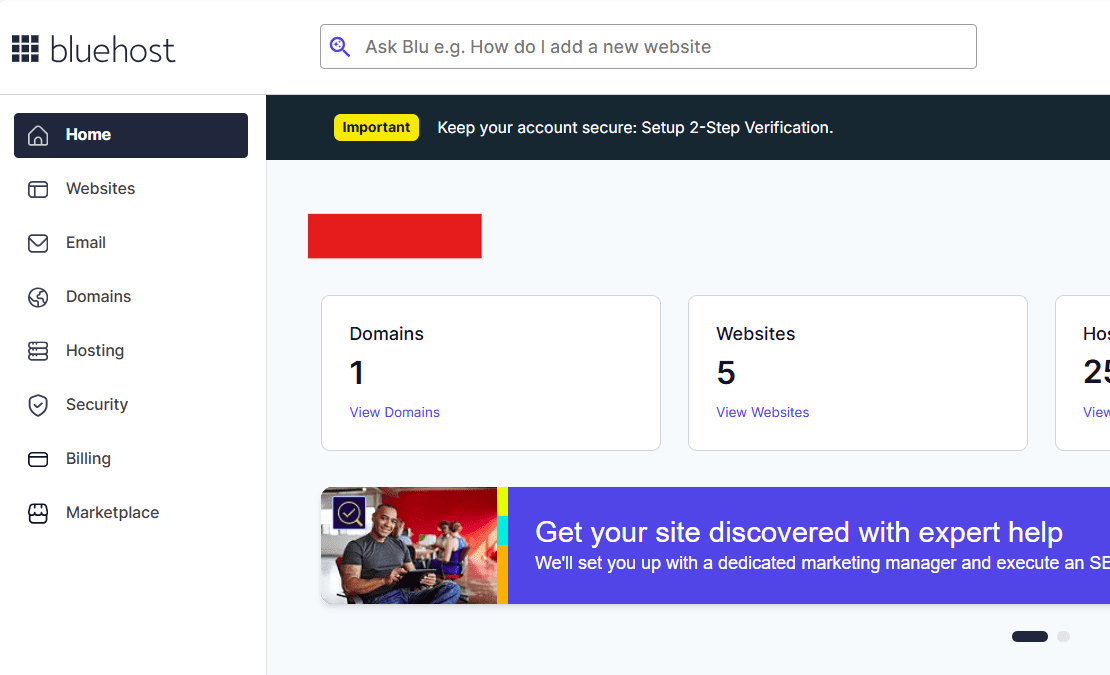
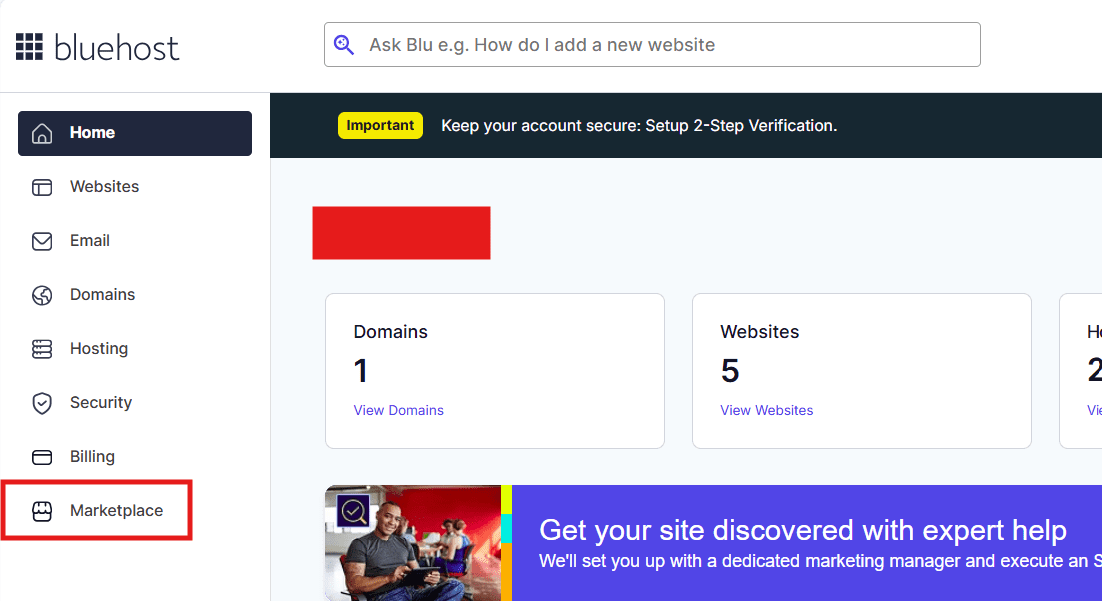
2. Click Marketplace on the left-side menu.
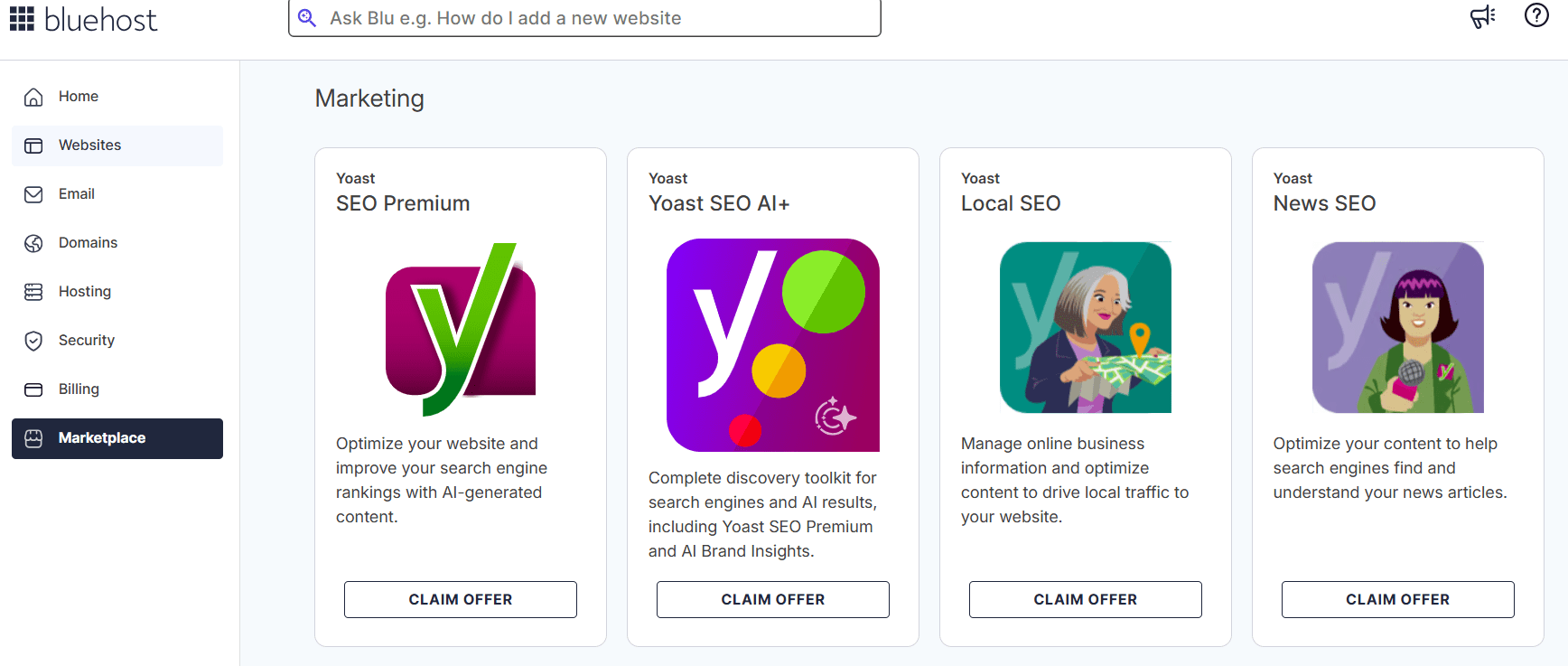
3. Scroll down to the Marketing section, choose the Yoast SEO product you want and click Claim Offer.
4. In the pop-up, select your website from the dropdown menu.
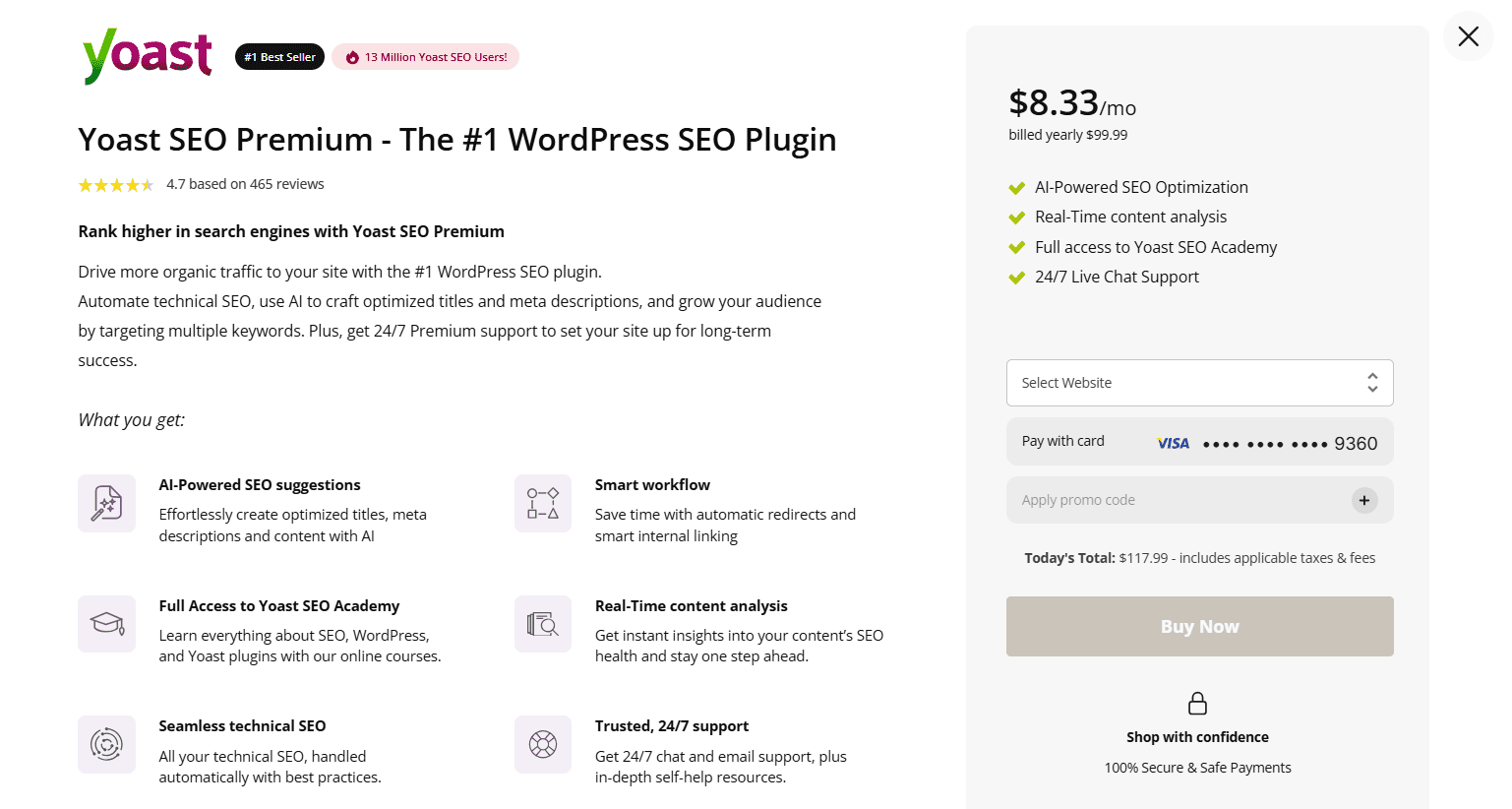
5. Make sure you have a payment method on file. Enter a promo code if you have one.
6. Click Buy Now to confirm your purchase.
7. Complete the payment and the plugin will be activated on your site automatically.
Method 2: Via the Websites Tab
- Log in to your Bluehost Portal.
2. In the left-hand menu, click Websites.
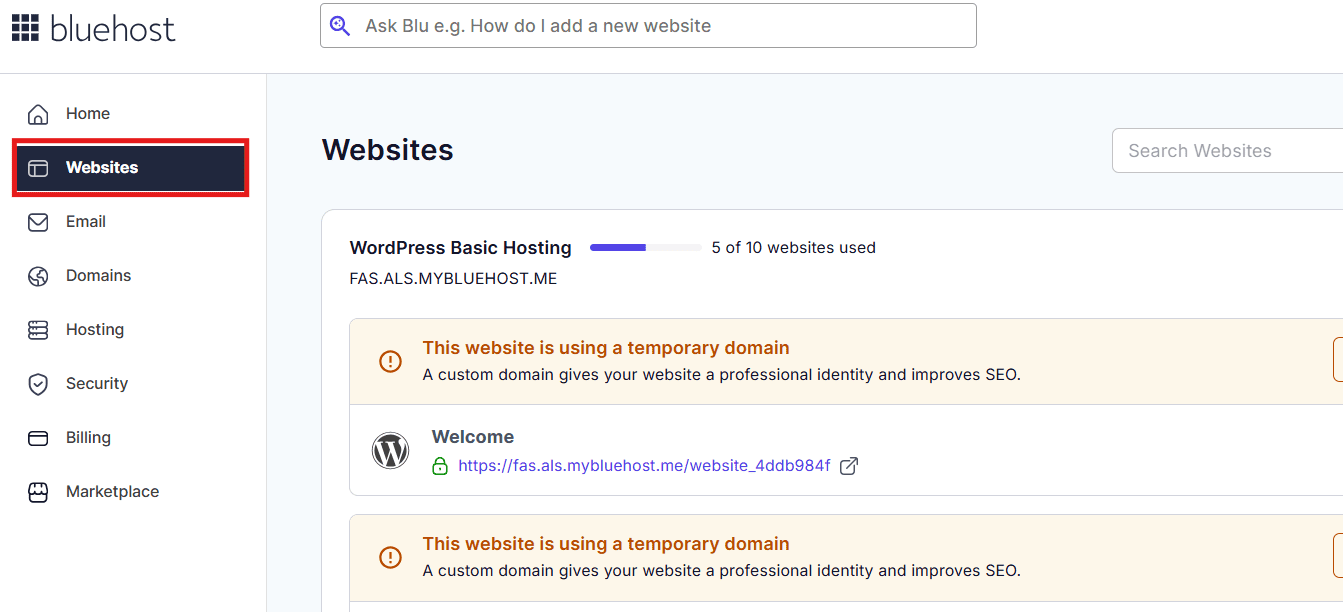
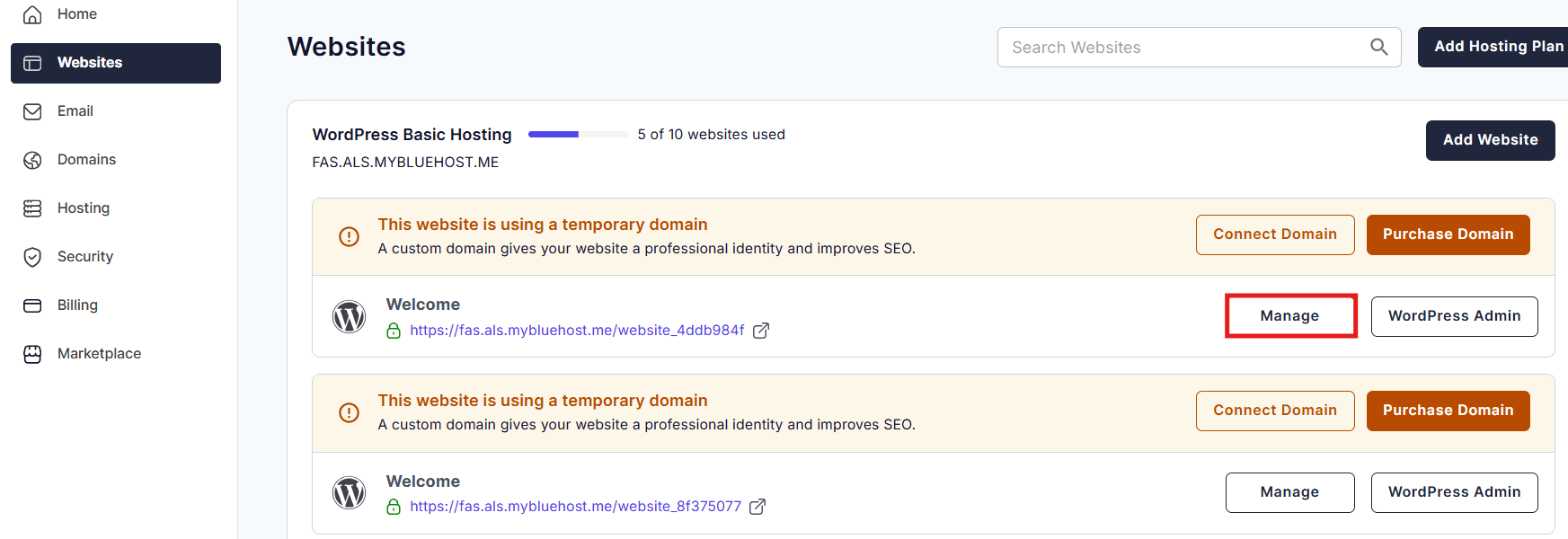
3. Click the Manage button next to the website you want to upgrade.
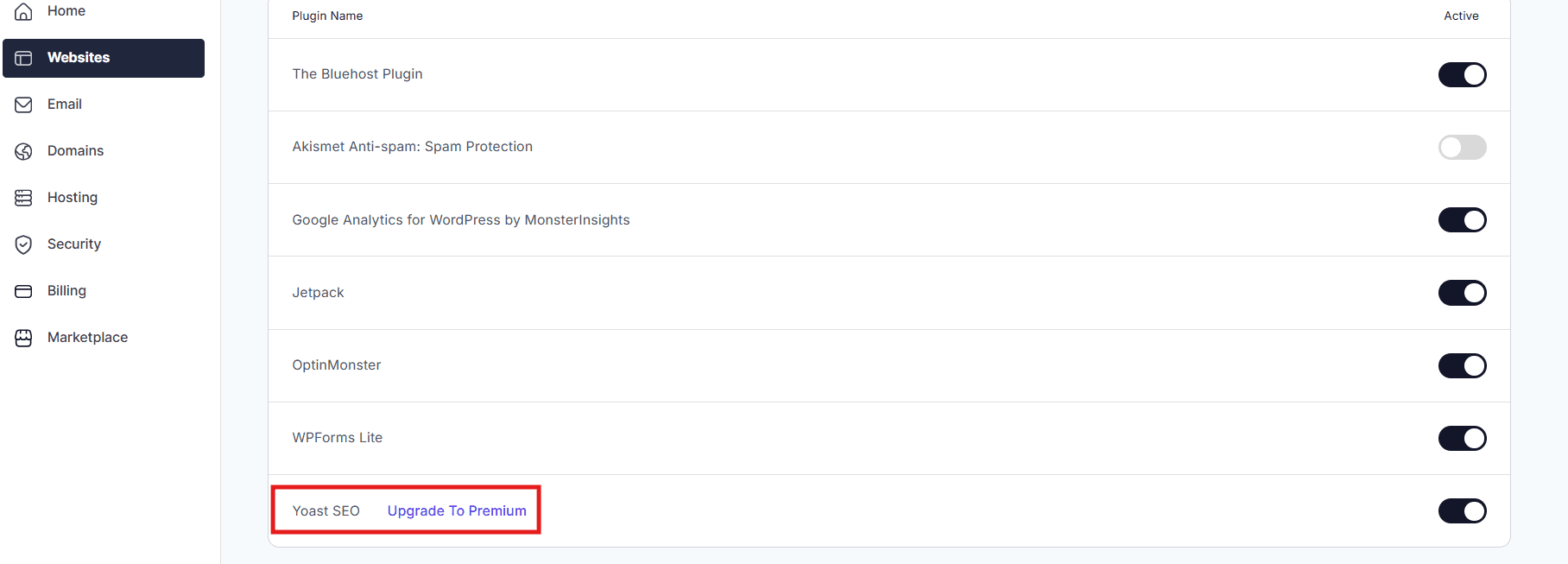
4. In the website details page, click the Plugins button.
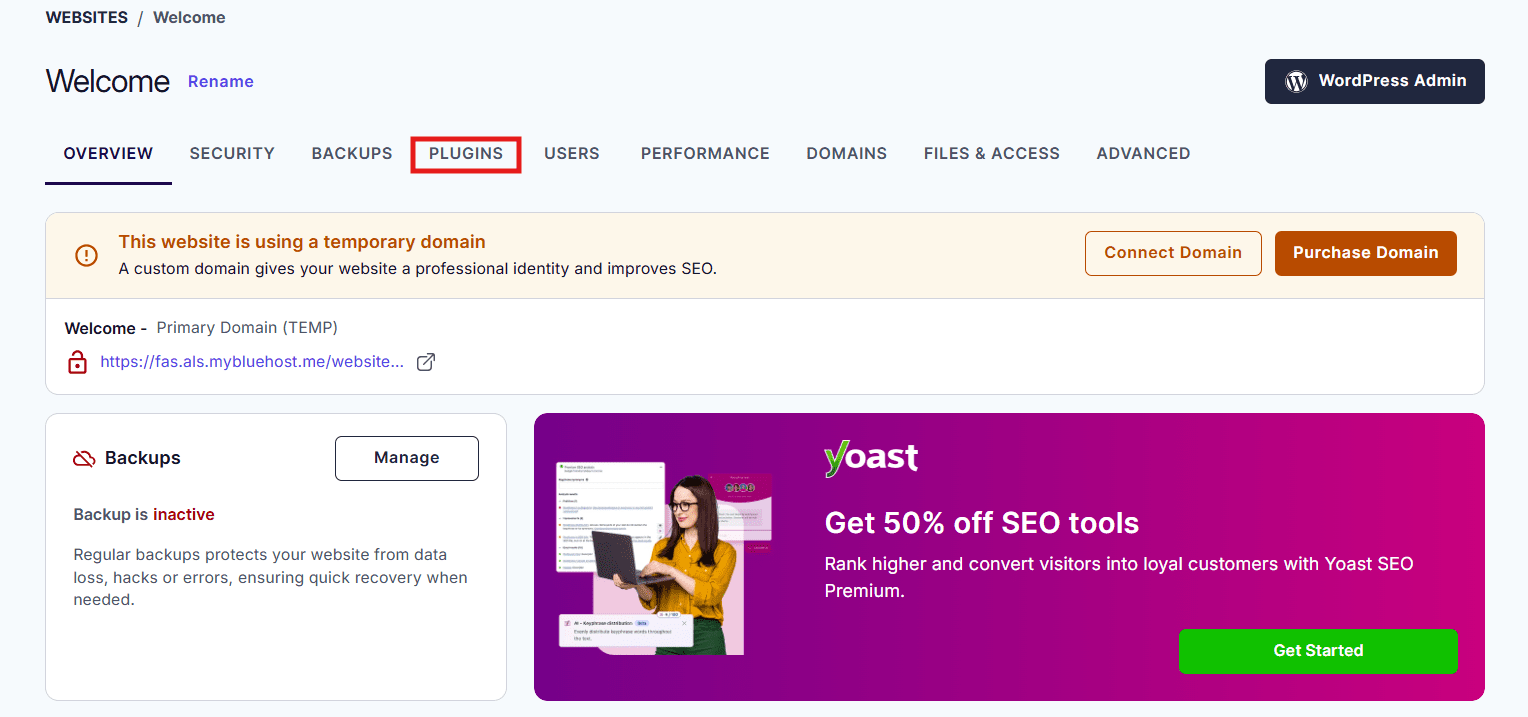
5. Look for the Yoast SEO plugin and click Upgrade To Premium.
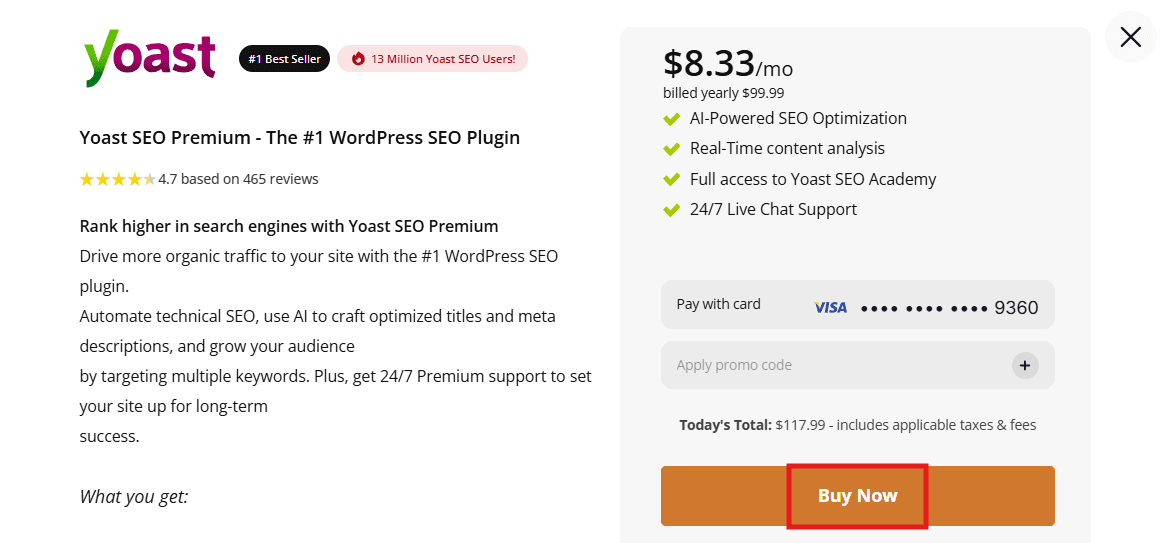
6. A pop-up window will appear. Click Buy Now to complete the payment and activate the premium plugin.
Both methods give you instant access to all Yoast SEO Premium features the moment your payment is confirmed. No manual installation or license key setup required. If you run into any issues, Bluehost’s 24/7 support team is available via chat on bluehost.com
Final thoughts
Yoast SEO pricing in 2026 is straightforward. The free version gives you a solid foundation for basic on-page SEO. Yoast SEO Premium, available as an integrated SEO solution through Bluehost starting at $118.80/year, unlocks a significantly more powerful set of tools including AI features, multi-keyword support, redirect management, internal linking suggestions and around-the-clock expert support.
For most website owners who are serious about building organic traffic, the upgrade to Yoast SEO Premium is worth the investment. The features it provides directly address the most common barriers to better search rankings and technical issues that go unnoticed until they cause real problems.
Ready to upgrade your SEO game? Bluehost offers Yoast SEO Premium as part of its WordPress SEO tools. Get started today and start driving more traffic to your site.
FAQs
The Yoast SEO premium price is $99 USD per year for one website license. This annual subscription includes all advanced features, 24/7 support and regular updates for your site.
The main difference between Yoast SEO free vs premium is that the paid version includes redirect management, internal linking suggestions and multi-keyword optimization. It automates several technical tasks.
Yes. You should upgrade to Yoast SEO premium for advanced features like the redirect manager and AI content tools. These additions save time and significantly improve your site’s search performance.
Standard Yoast SEO plugin pricing covers one site, but multi-site discounts are available. You can purchase bundled licenses at a lower per-site rate for larger networks and multiple installations.
You can buy Yoast SEO premium through the official Yoast website. Choose your plan, complete the payment, then download and install the premium plugin version on your WordPress dashboard. If you are existing Bluehost WordPress hosting user, you can buy Yoast SEO Premium directly from Bluehost account.



Write A Comment