



Key highlights
- Boost sales through targeted, behavior-based WooCommerce discounts with smart coupons.
- Simplify creating email-triggered and auto-apply WooCommerce coupons with YITH plugin.
- Leverage BOGO, store credits and free gifts to attract buyers.
- Track coupon performance and optimize strategies for maximum engagement.
- Promote coupons with email, pop-ups and social media integration.
A flat 10% discount rarely excites today’s shoppers. What does work? Offers that feel timely, relevant and personal.
That’s where WooCommerce smart coupons come in. Instead of basic codes, they let you trigger discounts based on behavior, purchase history and customer intent. With the right coupon plugin WooCommerce, you can automate rewards, launch BOGO deals and send targeted offers that actually convert.
In this guide, you’ll learn how to create WooCommerce smart coupons, choose the right plugins and turn discounts into high-performing sales tools without overcomplicating your setup.
Let’s get started!
How to create WooCommerce smart coupons? A step-by-step guide
Setting up smart coupons in WooCommerce is easier than it sounds when you follow the right process. Let’s walk through the step-by-step method to create and configure them for your store.
Step 1: Define your coupon goals
Before creating a coupon, identify what you aim to achieve:
- New user acquisition: Attract first-time shoppers with welcome discounts.
- Loyalty rewards: Offer exclusive deals to repeat customers.
- Cart abandonment recovery: Re-engage customers who left without purchasing.
- Increase average order value: Encourage larger purchases with tiered discounts.
Step 2: Choose the right plugin based on goals
Select a plugin that aligns with your objectives. The YITH WooCommerce Coupon Email System is a top choice. It has smart coupon features, email integration and advanced customization.
Step 3: Install and activate your chosen plugin
- Navigate to Plugins in your WordPress dashboard.
- Tap on “Add New” and search for your chosen plugin.
- Click “Install Now”, then “Activate”.
Step 4: Configure plugin settings
- Access the plugin settings via the WordPress dashboard.
- Customize global settings like coupon appearance, email templates and default behaviors.
- Set up any necessary integrations, such as email marketing platforms.
Step 5: Create different types of smart coupons
- Go to WooCommerce > Coupons > Add New.
- Choose the coupon type: Select from options like percentage discounts, fixed cart discounts or free gifts.
- Set coupon data: Define discount amounts, usage limits and applicable products or categories.
- Add restrictions: Limit usage to specific user roles, purchase history or cart contents.
Step 6: Schedule and automate coupons
- Set a coupon start date and expiry date: Create urgency and control the promotion period.
- Automate Coupons: Use triggers like customer sign-up, birthdays or purchase milestones to automatically issue coupons.
Step 7: Promote your smart coupons
- Display coupons on the checkout page: Encourage last-minute additions to the cart.
- Use coupon URLs: Share special links via email or social media that auto-apply discounts.
- Add banners or pop-ups: Highlight active promotions on your website.
Step 8: Monitor and analyzing coupon performance
- Track coupon usage: Monitor redemption rates and sales generated.
- Adjust strategies: Use data insights to refine your coupon campaigns for better results.
Creating WooCommerce smart coupons turns basic discounts into high-impact promotions. With the right setup, you can boost sales, increase order value and improve customer engagement.
Once your smart coupons are set up, the next step is ensuring your store has the performance and tools to support them at scale.
Power your WooCommerce smart coupons with Bluehost WooCommerce hosting
Creating high-impact WooCommerce smart coupons isn’t just about plugins. It’s about having the right hosting foundation to support automation, performance and scale. That’s where Bluehost WooCommerce hosting gives you a clear advantage.
With Bluehost WooCommerce hosting, you get built-in tools to amplify smart coupons:
Our WooCommerce hosting plans are designed to support advanced promotions, plugin-heavy stores and high-conversion campaigns.
With our WooCommerce hosting, customers get:
- Access to advanced coupon plugins: Use powerful tools like YITH Smart Coupons to create gift cards, store credits, BOGO deals and automated discounts that drive repeat purchases.
- Optimized performance for dynamic promotions: Fast page loads and stable checkout experiences, even when running multiple coupon rules and campaigns.
- Subscription and membership integrations: Create exclusive coupons for subscribers or members to boost renewals, upsells and long-term customer value.
- Loyalty and rewards enablement: Reward repeat buyers with points-based coupons and incentives that increase retention and lifetime value.
- Advanced coupon logic and control: Run product-based, cart-based and condition-driven coupons without slowing down your store.
- SEO-ready foundation: Built-in Yoast SEO tools help attract organic traffic to coupon-driven campaigns and promotional content.
Choose the Bluehost WooCommerce plan that fits your growth stage
Every store grows at a different pace and your hosting should grow with it. Choose the Bluehost WooCommerce plan that matches your business growth stage.
We offer:
Best for new and growing stores running basic to mid-level promotions.
- Core WooCommerce tools
- Smart coupon plugin support
- Secure checkout and payment processing
- Optimized performance for sales campaigns
Start building smarter discounts with eCommerce Essentials.
Ideal for scaling stores running advanced, multi-channel promotions.
- Advanced coupon and loyalty tools
- Subscriptions and memberships support
- Multichannel selling and campaign syncing
- Enhanced performance and scalability
Unlock advanced smart coupon strategies with eCommerce Premium.
Why does hosting matter for smart coupons?
Smart coupons rely on automation, conditional logic and real-time data. Without optimized hosting, even the best coupon strategy can fall flat due to slow checkouts or failed triggers. Bluehost WooCommerce hosting ensures your promotions run smoothly from first click to final checkout.
Ready to turn smart coupons into real sales growth?
Explore Bluehost WooCommerce hosting and choose the plan that powers your promotional strategy with confidence.
With the right hosting foundation in place, let’s look at the key benefits smart coupons bring to your WooCommerce store.
What are the benefits of using smart coupons for WooCommerce?
Smart coupons for WooCommerce offer a strategic way to boost sales and strengthen customer relationships.
Suppose Jane, a WooCommerce store owner, wants to encourage her customers to try out her new skincare line. Instead of a basic 10% discount code, she uses a WooCommerce smart coupon with a free sample of the skincare product added to the cart when customers spend $50 or more. This not only encourages customers to try the new line but also encourages them to spend more to qualify for the freebie.
Let’s look at few notable benefits of using smart coupons for WooCommerce:
- Boost sales: Encourage customers to make a purchase by offering compelling deals.
- Increase average order value: Incentivize larger purchases through tiered discounts or free shipping thresholds.
- Enhance customer loyalty: Reward repeat customers with exclusive offers, fostering long-term relationships.
- Run targeted promotions: Personalize coupons based on customer preferences or purchase history.
- Reduce cart abandonment: Re-engage customers who left items in their cart with timely discounts.
Smart coupons do more than increase short-term sales. They help build long-term customer value. By combining personalization, incentives and automation, they turn discounts into strategic growth tools. Used correctly, smart coupons can drive higher conversions while strengthening customer loyalty.
Now that you’ve seen how smart coupons benefit your store, the next step is understanding the different formats available. Let’s explore the various types of smart coupons you can use.
What are the different types of smart coupons?
WooCommerce smart coupons come in multiple formats, each designed to support different promotional goals. Choosing the right type allows store owners to tailor discounts based on customer actions and campaign objectives.
- Coupon codes: Traditional codes that customers can enter at checkout for a discount.
- Auto-apply coupons: Discounts that automatically apply based on predefined conditions.
- URL coupons: Special links that apply discounts when visited, ideal for email marketing.
- BOGO coupons: Buy-One-Get-One deals that encourage additional purchases.
- Free gift coupons: Offers that add a free product to the cart when conditions are met.
- Store credits and gift cards: Monetary credits that customers can use for future purchases.
By leveraging different smart coupon types, WooCommerce store owners can create targeted, high-impact promotions. Mixing and matching these options helps maximize engagement, boost revenue and deliver a more personalized shopping experience.
While different smart coupon types give you flexibility in running promotions, their full potential depends on how you implement them. Let’s look at why plugins are essential for enabling these advanced coupon features in WooCommerce.
Why do you need plugins for WooCommerce smart coupons?
Imagine Sarah, a loyal customer, who has been shopping at your WooCommerce store for over a year. She often adds items to her cart but leaves without completing the purchase. By setting up a cart abandonment coupon with a small discount or a free gift offer using a plugin, you can encourage Sarah to complete her purchase. This type of targeted approach makes smart coupons valuable tools for growing your business.
WooCommerce includes basic coupon features, but modern promotions often demand more flexibility than the core system provides. That’s where plugins step in.
With the right plugin, you can:
- Create rule-based offers: Trigger discounts based on cart behavior, products or customer segments.
- Automate promotions: Apply deals instantly without manual code entry.
- Design complex offers: Run BOGO, tiered discounts and conditional freebies smoothly.
- Control campaign logic: Manage stacking rules, expiry, limits and restrictions.
- Scale marketing efforts: Support advanced campaigns without technical custom coding.
Plugins bridge the gap between simple coupons and fully dynamic promotional strategies.
Now that you understand why plugins are essential for advanced coupon functionality, let’s explore the best tools available. Here are the top plugins you can use to create WooCommerce smart coupons.
Top 5 plugins to create WooCommerce smart coupons
To unlock advanced coupon features, choosing the right plugin is key. Here are the top tools that help you create powerful WooCommerce smart coupons with ease.
1. YITH WooCommerce Coupon Email System

The YITH is a robust WooCommerce smart coupons plugin that enables you to create and send strategic coupons based on specific customer events or behaviors. Whether it’s a customer’s birthday, their first purchase or a period of inactivity, this plugin helps you re-engage and reward your customers effectively.
Key features
- Automated email coupons: Send coupons automatically via email for events like birthdays, first purchases or after a period of inactivity.
- Customizable email templates: Choose from four different templates and customize them to match your branding.
- Targeted promotions: Create coupons based on customers’ total spending, number of orders or purchased products.
- Store credits: Offer store credits that customers can use for future purchases, increasing the likelihood of repeat business.
- Integration compatibility: Works seamlessly with other YITH plugins and supports multilingual setups with WPML and other translation plugins.
Benefits
- Enhanced customer engagement: Personalized coupons make customers feel valued and encourage them to return.
- Increased sales: Strategic discounts can boost conversions and average order values.
Example: Suppose a customer hasn’t shopped with you in 90 days. The plugin can automatically send them a personalized email with a unique coupon code offering 15% off their next purchase, enticing them to come back.
2. Advanced Coupons for WooCommerce
Advanced Coupons adds powerful features to your WooCommerce store, enabling you to create complex and flexible coupon rules.

Key features
- BOGO deals: Easily set up Buy-One-Get-One promotions.
- Cart conditions: Apply coupons based on cart contents, user roles or purchase history.
- Scheduling coupons: Activate or deactivate coupons automatically based on dates.
- Auto apply coupons: Automatically apply coupons when conditions are met.
Benefits
- Flexible promotions: Tailor your discounts to fit various marketing strategies.
- Improved user experience: Simplify the checkout process with auto-applied discount coupons.
3. Smart Coupons for WooCommerce
An official extension by WooCommerce, Smart Coupons offers a comprehensive solution for managing coupons, credits and gift certificates.

Key features
- Bulk coupon creation: Generate thousands of coupons at once for large campaigns.
- Gift certificates: Allow customers to purchase and gift store credits.
- Subscription discounts: Apply coupons to subscription products or recurring payments.
- Import coupons: Easily import or export coupons via CSV files.
Benefits
- Seamless integration: Being an official WooCommerce plugin ensures compatibility and reliability.
- Versatile promotions: Supports a wide range of discount types and scenarios.
4. Add Coupon by Link for WooCommerce
Add Coupon by Link for WooCommerce serves as one of the most useful plugins. This plugin focuses on creating URL coupons that apply discounts when a customer visits a specific link.

Key features
- URL coupons: Generate unique URLs that automatically apply a coupon when clicked.
- Custom landing pages: Redirect customers to specific pages after applying the coupon.
- Social media integration: Share URL coupons easily on social platforms.
Benefits
- Simplified redemption: Customers don’t need to remember or enter coupon codes.
- Effective marketing: Great for email campaigns and social media promotions.
5. Discount Rules for WooCommerce
Discount Rules for WooCommerce allows you to create dynamic pricing and discount strategies based on a variety of conditions.

Key features
- Bulk discounts: Offer percentage or fixed discounts based on quantity purchased.
- Purchase history-based coupons: Reward customers based on their previous purchases.
- Role-based pricing: Set different discounts for different customer groups.
- Category discounts: Apply discounts to entire product categories.
Benefits
- Increased average order value: Encourage customers to buy more with bulk discounts.
- Targeted promotions: Personalize offers to specific customer segments.
The right plugin can transform your promotional strategy from basic discounts to dynamic, high-converting offers. Choose the one that best fits your store goals, budget and campaign complexity.
Now that you’ve seen the best plugin options available, let’s look at how this works in practice. Here’s a step-by-step guide to creating smart coupons using YITH WooCommerce Coupon Email System.
Steps to create smart coupons with YITH WooCommerce Coupon Email System
Creating smart coupons with the YITH plugin is straightforward. Here’s how to do it:
Step 1: Install and activate the plugin
- Download the YITH WooCommerce Coupon Email System plugin.
- In your WordPress dashboard, navigate to Plugins > Add New.
- Upload the plugin file, install and activate it.
Step 2: Access the plugin settings
- Go to YITH > Coupon Email System in your dashboard.
- Configure the general settings according to your preferences.
Step 3: Create a new coupon
- Navigate to WooCommerce > Coupons.
- Click on Add Coupon to create a new coupon code.
Step 4: Add coupon details
- Coupon code: Enter a unique code or click Generate Coupon Code.
- Description: Add a description for internal reference.
- Discount type: Choose between fixed cart discount, percentage discount, etc.
- Coupon amount: Specify the discount value.
- Usage restrictions: Define conditions like minimum spend, specific products or categories.
- Usage limits: Limit the coupon’s usage per user or overall.
Step 5: Configure email settings
In the Email Settings section, customize the email template:
- Subject: Set the email subject line.
- Email body: Craft a personalized message.
- Templates: Choose from four different templates and customize them.
- Use placeholders like {customer_name} to personalize the email.
Step 6: Set up event triggers
Determine when the coupon should be sent:
- First purchase: Reward customers after their first order.
- Birthday: Send a coupon on the customer’s birthday.
- Inactivity: Re-engage customers who haven’t purchased in a while.
- Total spend: Reward customers who have spent a certain amount.
Step 7: Save and test
- Save your settings and test the coupon by simulating the trigger event.
- Ensure the coupon applies correctly and the email is received as intended.
By following these steps, you can quickly set up targeted coupon campaigns that reach customers at the right moment. YITH WooCommerce Coupon Email System makes it easier to automate discounts and drive timely conversions.
Once your coupons are in place, strategy matters most. Here’s what you can achieve with YITH-powered smart coupons.
What can you accomplish using smart coupons with YITH WooCommerce Coupon Email System?
To harness the full potential of smart coupons, it’s essential to experiment with different types and see what resonates best with your audience. One of the best ways to do this is by using specialized plugins like the YITH WooCommerce Coupon Email System.
This plugin simplifies the process of creating and managing smart coupons, allowing you to focus on growing your business.
Let’s say you want to reward customers on their birthday:
- Event trigger: Customer’s birthday.
- Coupon details: 20% off on their next purchase.
- Email message: “Happy Birthday, {customer_name}! Celebrate with 20% off on us. Use code BDAY20 at checkout.”
- Outcome: The customer feels appreciated and is more likely to make a purchase, boosting sales and fostering loyalty.
With the right strategy and automation, smart coupons through YITH turn timely offers into stronger engagement, repeat purchases and long-term customer loyalty.
Once you understand the outcomes smart coupons can deliver, the next step is applying smart coupons strategically. Let’s explore the targeting and promotion strategies that maximize their impact.
How to do smart coupon targeting? 5 promotion strategies
Smart coupons deliver better results when paired with the right targeting and marketing approach. Strategic promotion ensures your offers reach the right audience at the right time.
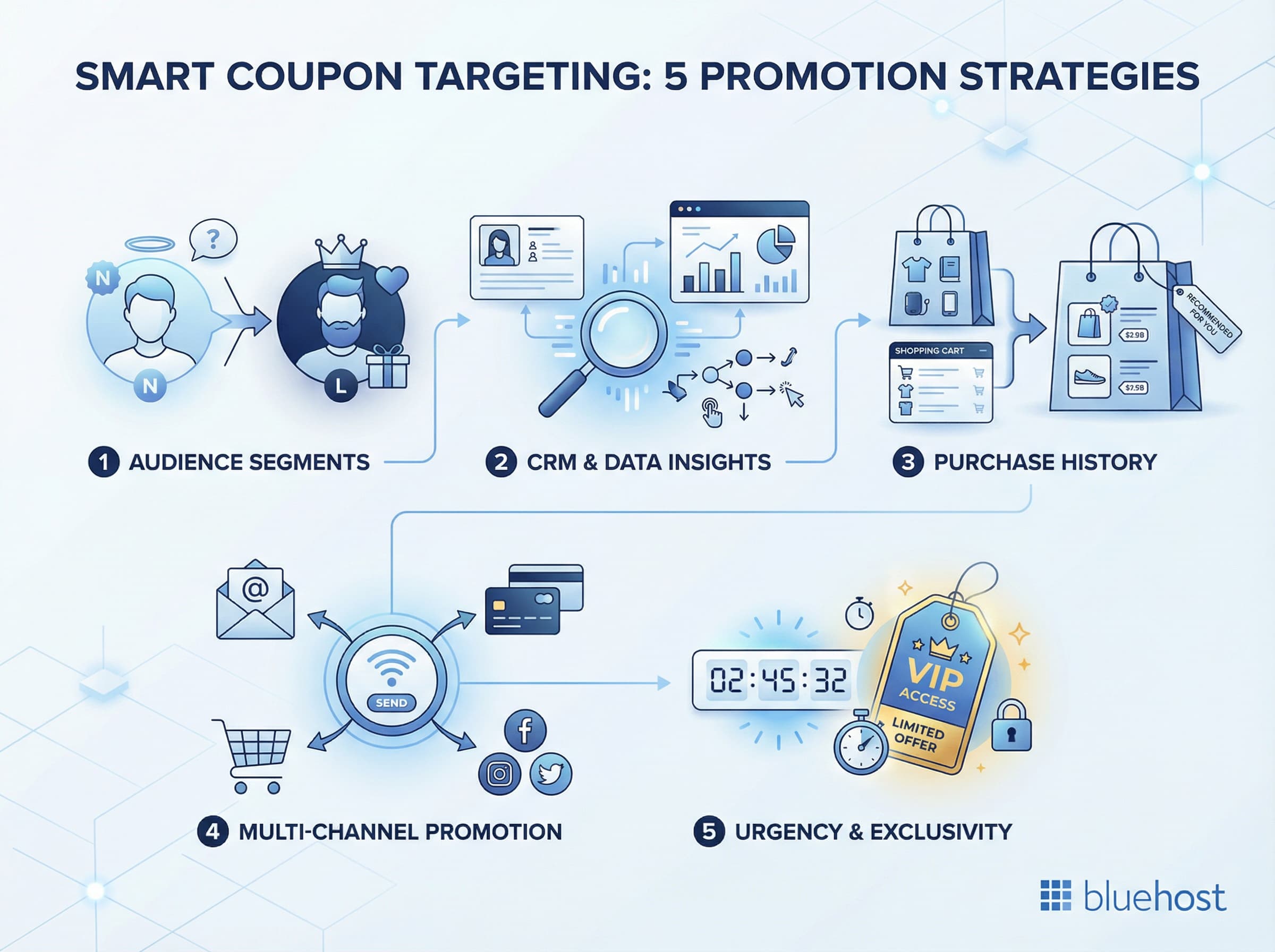
1. Segment your audience
You can boost coupon effectiveness by tailoring offers to specific audience segments.
- Reward loyal customers: Offer exclusive discounts or store credits to repeat buyers.
- Encourage new customers: Provide a percentage discount on first purchases to entice new shoppers.
2. Integrate with CRM systems
Use customer data to personalize coupons, increasing their effectiveness.
- Customer value segmentation: Offer special incentives to high-value customers while nurturing low-frequency buyers.
- Behavior-based targeting: Trigger coupons based on browsing activity, cart behavior or engagement history.
- Lifecycle campaigns: Send tailored offers to customers at different stages like onboarding, retention or reactivation.
3. Leverage purchase history
- Personalize offers: Recommend products or offer discounts based on past purchases.
- Adjust strategies: Use purchase trends to refine your coupon campaigns.
4. Combine coupons with other marketing strategies
- Display on checkout page: Highlight available coupons to reduce cart abandonment.
- Email marketing: Send targeted coupon codes to subscribers.
- Social media promotion: Share URL coupons on social platforms to reach a wider audience.
5. Use urgency and exclusivity triggers
- Limited-time offers: Set short expiry windows to drive faster decisions.
- Exclusive access: Provide early or private deals for members or subscribers.
- Countdown messaging: Reinforce urgency through emails or on-site banners.
Blending targeting, data and promotion channels turns smart coupons into precision marketing tools. A strategic mix ensures higher engagement, better conversions and sustained growth.
Now that you know how to target and promote smart coupons strategically, let’s look at the best practices to ensure they perform at their highest potential.
7 best practices for creating effective smart coupons
Smart coupons work best when they’re planned with clear goals and customer intent in mind. A thoughtful strategy ensures your offers drive action, not just attention. Let’s take a look at the best practices for creating effective smart coupons:
- Track and analyze coupon performance: Use analytics to monitor which coupons are performing well and adjust your strategies accordingly.
- Avoid overuse of coupons: Limit too many discount coupons as it may devalue your products and hurt profit margins.
- Set maximum discount values: Cap discounts to protect your bottom line while still offering attractive deals.
- Use clear expiry dates: Create a sense of urgency and encourage immediate action by specifying when the coupon expires.
- Promote your coupons visually: Use banners and pop-ups to highlight deals and grab customer attention.
- Create shareable deals: Encourage customers to share coupons with friends and family, expanding your reach.
- Run newsletter/email marketing campaigns: Send personalized coupons to subscribers to drive repeat purchases.
When aligned with customer behavior and business objectives, smart coupons become powerful growth tools. Small optimizations can lead to stronger engagement and better returns.
Even the best strategies can fall short if a few key details are overlooked. Before wrapping up, let’s look at common mistakes to avoid when creating WordPress smart coupons.
6 common mistakes to avoid while creating WordPress smart coupons
While smart coupons can be powerful, poor setup can reduce their impact or even hurt conversions. Avoiding common errors helps your promotions stay effective and profitable.
- Overcomplicating coupon terms: Keep the conditions straightforward to prevent customer confusion.
- Ignoring mobile users: Ensure coupons are mobile-friendly since a significant number of shoppers use mobile devices.
- Neglecting to promote coupons effectively: Simply creating a coupon isn’t enough; you need to actively promote it through various channels.
- Coupons not applying correctly: Regularly test your coupons to ensure they work as intended.
- Plugin conflicts: Using multiple plugins can cause compatibility issues. Stick to reputable plugins like YITH WooCommerce Coupon Email System to minimize risks.
- Failing to track performance: Without monitoring, you won’t know what’s working and what’s not, making it hard to optimize your strategies.
Being mindful of these mistakes keeps your campaigns smooth and results-focused. A well-structured coupon strategy protects margins while maximizing performance.
Final thoughts
Smart discounts aren’t random, they’re strategic.
Once you understand how to create WooCommerce smart coupons, you move from offering deals to building revenue engines powered by behavior, timing and personalization.
The right coupon plugin WooCommerce setup lets you automate engagement, reward loyalty and turn every interaction into a growth opportunity. But strategy only performs when your store can handle traffic, automation and real-time rules without slowing down.
That’s where infrastructure matters.
If you’re ready to run smarter promotions at scale, it’s time to pair your strategy with performance.
Launch, optimize and grow with Bluehost WooCommerce hosting – built for stores that sell smarter.
FAQs
Smart coupons are advanced discount solutions designed to offer more than just a price cut. They can automatically apply discounts, provide free gifts, offer store credits and even create buy-one-get-one (BOGO) deals. These coupons adapt to various conditions and customer behaviors, making them a versatile tool for targeted promotions.
Navigate to WooCommerce, select Coupons, then click Add Coupon. Enter your coupon code, set discount type (percentage or fixed), define usage restrictions and configure expiration dates. Save your coupon to make it active for customers.
Yes, using coupon plugins like Smart Coupons, you can generate thousands of unique coupon codes simultaneously. This feature is perfect for email campaigns, influencer partnerships or promotional events requiring individual tracking codes.
In the coupon editor, locate the Coupon Data section and find the Expiry Date field. Click the calendar icon, select your desired end date and save. The coupon automatically becomes invalid after this date.
WooCommerce supports percentage discounts, fixed cart discounts, fixed product discounts, store credits, free shipping, BOGO offers and category-specific deals. Smart coupon plugins extend these options with gift certificates and advanced conditional rules.
The YITH WooCommerce Coupon Email System is a top choice due to its versatility and ease of use, making it ideal for creating a variety of smart coupons and targeted promotions.
Yes, many WooCommerce coupon plugins offer compatibility with subscriptions, allowing you to apply discounts on recurring orders or offer subscription-based incentives.
BOGO (Buy-One-Get-One) coupons allow customers to get a free or discounted product when they purchase another item. Plugins like Advanced Coupons make it easy to set up these deals.

Write A Comment