


Key highlights
- Learn how n8n AI agents work by understanding the core components, including triggers, nodes and large language model integrations, that allow them to reason, decide and act without manual intervention at every step.
- Explore a wide range of n8n AI agent use cases across customer support, data enrichment, content publishing and internal operations so you can identify where autonomous workflows will save your team the most time.
- Understand how to build AI agents in n8n through a clear, step-by-step process that covers setting up your environment, connecting tools and configuring agent logic, even if you have no prior automation experience.
- Know how to design and manage n8n AI agent workflows that scale reliably, with practical guidance on error handling, looping logic and multi-agent coordination for more complex, real-world tasks.
- Uncover proven n8n workflow automation strategies that reduce repetitive manual work, keep processes running around the clock and free up your team to focus on higher-value work.
n8n AI agent workflows combine automation logic with large language model reasoning, which means your workflow can do more than follow a fixed path. Instead of just moving data from one app to another, an agent can interpret a request, choose a tool, use memory and decide what to do next based on context.
That shift matters for teams that want smarter automation without building a full custom AI platform. Whether you are a marketer, developer, founder or operations lead, learning how n8n AI agents work can help you automate research, ticket routing, content generation, database actions and many other repetitive tasks.
In this guide, you will learn what n8n AI agent workflows are, how to install and configure n8n, how to build AI agents in n8n step by step, how to choose the right model backend and how to host and secure your workflows for production use. You will also see practical n8n AI agent use cases so you can move from theory to execution quickly.
What are n8n AI agent workflows?
n8n AI agent workflows are automations that combine n8n’s node-based workflow engine with a language model, tools and optional memory. The result is a workflow that can interpret tasks and generate next actions, decide which action to take and adapt its behavior based on the input it receives.
In standard automation, every branch is manually defined in advance. In an agent workflow, the model helps determine the next step. That makes the workflow more flexible for tasks like classifying support requests, summarizing documents, extracting data from messy text or calling multiple APIs based on a user’s request.
The key difference is autonomy. A normal n8n flow says, “If X happens, do Y.” An AI agent says, “Here is the goal, here are the tools, now decide the best sequence of actions within these rules.”
How an AI agent workflow runs in n8n
An n8n AI agent workflow takes a user request, interprets the goal and dynamically decides how to complete it using a language model, connected tools and optional memory.
Instead of following a fixed path, the workflow adapts its actions during execution. It can retrieve data, call APIs, process information and return a response or complete a task based on the input it receives.
What are n8n AI agent workflows?
n8n AI agent workflows are automations that combine n8n’s node-based workflow engine with a language model, tools and optional memory. The result is a workflow that can reason through a task, decide which action to take and adapt its behavior based on the input it receives.
In a standard automation, every branch is manually defined in advance. In an agent workflow, the model helps determine the next step. That makes the workflow more flexible for tasks like classifying support requests, summarizing documents, extracting data from messy text or calling multiple APIs based on a user’s request.
The key difference is autonomy. A normal n8n flow says, “If X happens, do Y.” An AI agent says, “Here is the goal, here are the tools, now decide the best sequence of actions within these rules.”
Core workflow logic
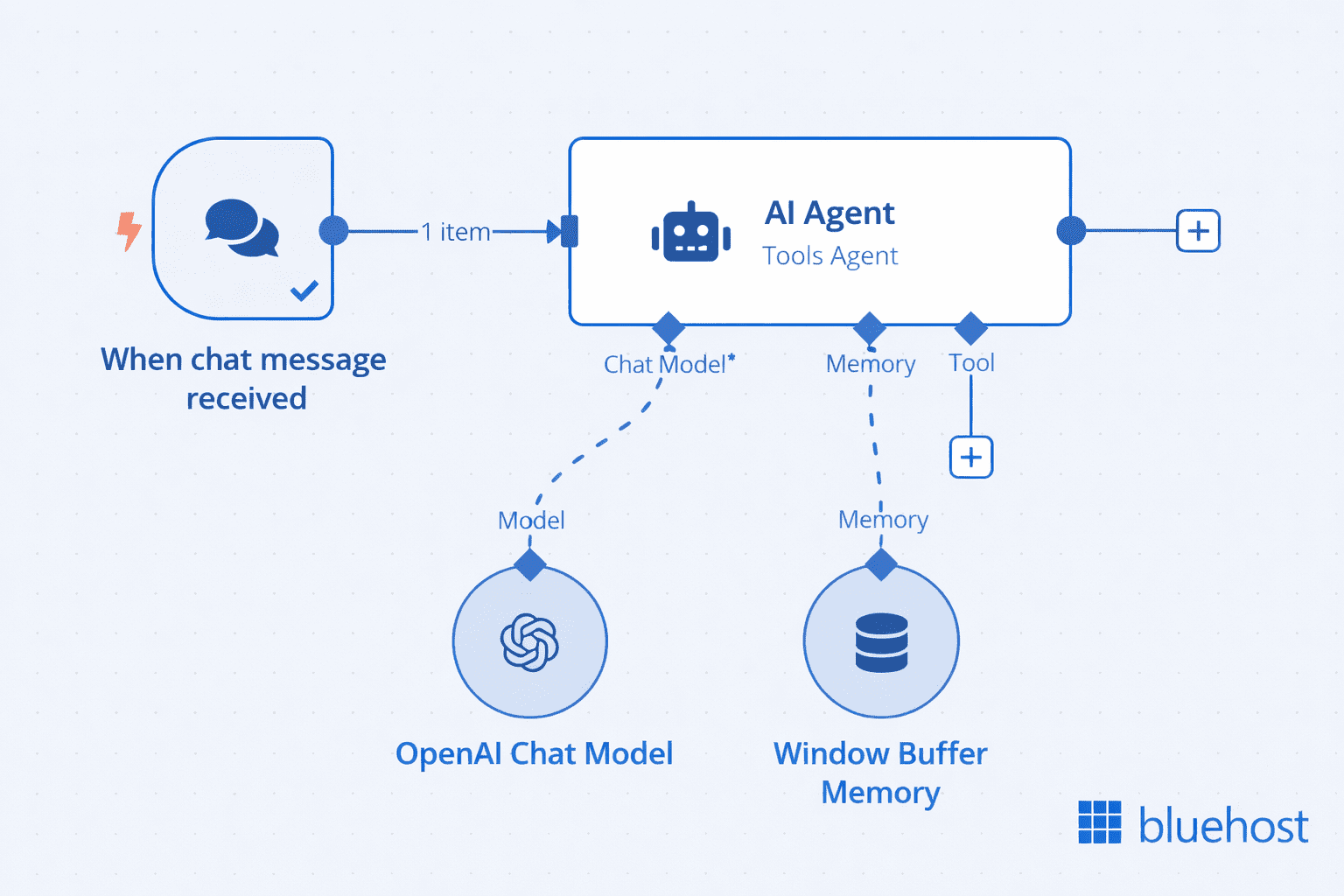
At a high level, an AI agent workflow in n8n follows this execution pattern:
- At a high level, this n8n AI agent workflow follows a simple execution pattern:
- A trigger starts the workflow when a chat message is received
- The AI Agent node processes the input and interprets the user’s request
- The agent uses a connected chat model to generate responses
- Optional memory (such as window buffer memory) supplies conversational context
- Based on the input and available context, the agent generates a response
- The workflow returns that response to the user
In more advanced setups, the agent can also connect to external tools and repeat steps in a loop to complete multi-step tasks.
Also read: N8N Workflows Guide: How to Build and Automate Workflows
Prerequisites for building n8n AI agent workflows
Before you start an n8n AI agent node beginner guide project, make sure you have the basics in place:
- Basic n8n knowledge: You should understand triggers, nodes, credentials and execution history
- API keys: Most hosted models require credentials from providers such as OpenAI or Google Gemini
- Workflow logic: It helps to know how data passes between nodes and how to map fields
- Testing mindset: Agents are probabilistic, so iteration, logging and prompt refinement matter
You do not need to be a machine learning engineer to succeed. You do need clear instructions, good tool design and a strong understanding of the task you want to automate.
How to set up your n8n account
If you are wondering how to get started with n8n, the simplest path is to choose between n8n Cloud and a self-hosted setup. n8n Cloud is faster for beginners because the environment is already managed. Self-hosting gives you more control over infrastructure, privacy and model access.
After creating an account or local instance, you will typically do three things first: create credentials for the services you want to connect, build a simple test workflow and confirm your execution logs are visible. That foundation makes it much easier to debug your first agent later.
How to install n8n locally: Docker and npm setup guide
If you want to install n8n locally or self-host n8n, Docker is usually the best option for reliability and repeatability. npm can be useful for quick testing or development environments.
Installing n8n using Docker
Docker is ideal when you want a clean, portable setup. A common pattern is to create persistent storage and then run the official container.
- Create a Docker volume for your n8n data
- Run the n8n container and map port 5678
- Mount the persistent volume so workflows and credentials survive restarts
- Open your browser and access the local instance
A typical command looks like this: docker run -it –rm –name n8n -p 5678:5678 -v n8n_data:/homen8n docker.n8n.io8nio8n. For production use, most teams move to Docker Compose, a reverse proxy and SSL.
Also read: How do I run n8n on Docker?
Installing n8n using npm
npm installation is straightforward if you already have Node.js installed. Run npm install n8n -g, then start the app with n8n. This method is good for development and learning, but it usually needs more manual care around process management, updates and persistence.
When to choose local vs cloud setup
- Choose cloud: When you want the fastest setup and less infrastructure work
- Choose local or self-hosted: When you need more control, custom networking, stricter data handling or local model access
- Choose Docker: When you want consistent deployment across environments
- Choose npm: When you want to experiment quickly on a developer machine
For many businesses, local development plus a hosted production environment is the best balance.
How n8n AI agent workflows work
At a high level, as explained above, n8n AI agent workflows work by taking an input, passing it to an agent, allowing the agent to use connected tools, optionally storing or retrieving memory and then returning an output. That is the core n8n AI agent node architecture.
1. The anatomy of an n8n AI agent workflow
Most agent workflows follow this pattern: input → agent → tools → memory → output.
- Input: A webhook, chat message, form submission, scheduled trigger or app event
- Agent: The reasoning layer that interprets the task
- Tools: APIs, databases, search functions, code nodes, CRMs or internal services
- Memory: Context that helps the agent maintain continuity
- Output: A response, action, update, report or decision
The design goal is not to give the agent unlimited freedom. It is to give it a controlled environment where it can make useful decisions safely.
2. The n8n AI agent node explained
The n8n AI agent node guide starts with understanding three behaviors: prompt handling, tool calling and execution loops.
Prompt handling: The node combines your system instructions, user input and sometimes workflow data into a message the model can interpret. Clear prompts improve consistency and reduce unwanted actions.
Tool calling behavior: If the model determines that a tool is needed, it can call one based on the tool descriptions you provide. The quality of those descriptions has a direct impact on performance.
Execution loop: The agent may call one tool, review the result, then call another. This loop continues until it can produce a final answer or hits a limit you define.
This is one reason people ask how n8n AI agents work: they are not simply generating text. They are evaluating available actions and deciding when to use them.
3. Memory management for persistent context in n8n
n8n AI agent memory helps an agent stay context-aware across turns or executions. Without memory, each run behaves like a new conversation. With memory, the workflow can remember user preferences, previous actions or a running task history.
Short-term memory: Window buffer
Short-term memory stores a limited recent context window. This is useful for chat-style interactions, multi-step form assistance or any task where the agent only needs the latest exchanges. It is lighter and cheaper than storing everything long-term.
Long-term memory: External database storage
Long-term memory stores context outside the current run, usually in a database or vector store. This is useful when you want persistent customer context, recurring support history, project state or reusable knowledge. The tradeoff is added complexity around retrieval, privacy and data governance.
4. Tools and skills in n8n AI agent workflows
n8n AI tools integration is where agent workflows become practical. Tools can include HTTP request nodes, database queries, spreadsheet actions, search endpoints, JavaScript functions, image generation APIs or internal business systems.
To help the agent choose correctly, write tool descriptions like brief contracts:
- State exactly what the tool does
- Describe when it should be used
- Describe required inputs clearly
- Explain important limits or side effects
For example, “Search CRM contact by email and return record ID” is far better than “CRM tool.” Clear naming reduces hallucinated tool use and improves routing accuracy.
How to build your first n8n AI agent workflow: Step-by-step from setup to execution
If you are looking for an n8n workflow automation tutorial that explains how to build AI agents in n8n, start with a small goal. A support triage bot or content brief generator is better than trying to automate an entire business process on day one.
Step 1: Add the AI agent node
Create a new workflow and start with a trigger such as a chat input, webhook or manual trigger. Add the AI Agent node after the trigger so it receives the incoming request and relevant metadata.
Step 2: Configure your LLM
Select the model provider and add the required credentials. Start with a reliable hosted model if speed matters. If privacy or local control matters more, choose a self-hosted endpoint. Keep the model choice simple at first so you can focus on workflow design.
Step 3: Define system prompt and instructions
This is the control center for your agent. Tell it who it is, what task it should perform, which tools it can use, what it should never do and what output format you expect.
A strong system prompt usually includes:
- The agent’s role
- The business goal
- Tool usage rules
- Output formatting instructions
- Fallback behavior for uncertainty
For example, you might instruct the agent to classify support tickets into billing, technical or sales, then call the appropriate routing tool only once and return a JSON object with confidence level.
Step 4: Add tools: API, database, functions
Connect the tools your agent needs. In n8n, tools are not just “connected”; they are defined through nodes and then exposed to the agent with clear descriptions.
Tools are exposed to the agent through connected nodes and clear descriptions that define when they should be used.
This ensures the agent can understand what each tool does and choose the right one during execution.
Useful starter tools include:
- An HTTP request node to call an external API
- A database node to read or update records
- A code node for formatting or validation
- An email or Slack node for notifications
When designing tools, ask one question: can the agent tell the difference between them easily? If the answer is no, refine the descriptions.
Step 5: Configure memory
Add short-term memory if the interaction spans multiple turns. Add long-term memory only if the workflow truly benefits from persistence. Many early builds do not need full memory, and removing unnecessary memory reduces complexity.
In n8n, memory is implemented through dedicated memory nodes rather than being built into the agent itself.
To attach memory:
- Add a memory node (such as Window Buffer Memory)
- Connect it directly to the AI Agent node
This connection is what allows the agent to retain and use context during execution.
- Short-term memory helps the agent remember recent interactions within the same session
- Long-term memory allows persistence across sessions, such as saving user data or history
Start simple. If your workflow works without memory, keep it that way. Add memory only when the use case clearly requires context retention.
How the agent loop works
This is where AI agent workflows fundamentally differ from traditional n8n workflows.
A standard workflow follows a fixed path. An AI agent workflow does not.
Once triggered, the AI Agent enters a decision loop where it continuously evaluates what to do next:
- It interprets the incoming request and context
- It decides the next best action based on instructions and available tools
- It either calls a tool or generates a response
- It evaluates the result of that action
- It repeats the process if the task is not complete
This loop continues until a stopping condition is met, such as:
- The task is successfully completed
- A final response is generated
- A defined limit or rule is reached
This looping behavior allows the agent to handle dynamic, non-linear problems. Instead of executing a predefined sequence, it adapts step by step based on results.
In practice, this also means your workflow design must focus on:
- Clear tool definitions
- Strong instructions
- Controlled stopping conditions
Because once the loop starts, the agent is effectively driving the execution.
Step 6: Test and run your workflow
Run the workflow with realistic inputs, not ideal ones. Try vague requests, incomplete requests and edge cases. Review execution logs to see whether the agent selected the right tools, repeated steps or ignored instructions.
When testing how to build n8n AI agents, validate these points:
- Did the agent call the correct tool?
- Did it stop at the right time?
- Did it return the required format?
- Did it fail safely when data was missing?
Your first n8n AI agent workflow should be:
- Narrow in scope
- Easy to observe
- Simple to debug
- Built with clearly defined tools and connections
The key difference from standard workflows is this: You are not designing a fixed sequence of steps. You are designing a system that can decide its own steps within controlled boundaries.
Also read: How to Build an AI Agent with n8n: Step-by-Step Guide to Scalable Automation
Choosing an LLM backend for your n8n AI agent workflow
The model you choose affects quality, cost, privacy and latency. There is no single best option for every n8n AI workflow.
1. Hosted models for quick setup: OpenAI and Gemini
Hosted models are the fastest path to production. They offer strong general reasoning, easier credential management and fewer infrastructure tasks. This makes them ideal for prototypes, content workflows and support automation where fast iteration matters.
2. Self-hosted models for privacy and control (OpenClaw and Ollama)
Self-hosted models like Ollama and OpenClaw allow you to run LLMs within your own environment, giving you full control over data processing and system behavior. This approach is well suited for workflows that require privacy, compliance or internal data handling. However, it requires more setup and ongoing maintenance compared to hosted APIs.
3. How model choice affects cost, latency and performance
- Cost: Larger hosted models can become expensive with long prompts or high-volume workflows
- Latency: A slower model can make agent loops feel sluggish, especially when tools are called multiple times
- Performance: Stronger reasoning models usually handle multi-step tasks and tool use more reliably
- Privacy: Self-hosted models provide more control but require more operational effort
Choose based on the business requirement, not hype. A lightweight model may be enough for extraction or classification, while a more capable model may be needed for planning-heavy tasks.
Hosting, scaling and securing n8n AI agent workflows
Once your workflow is working, production readiness becomes the next challenge. n8n hosting should balance reliability, privacy, performance and operational simplicity.
1. Deployment options: n8n cloud vs self-hosted VPS
Managed hosting is best when your team wants less server administration and faster deployment. Self-hosting is best when you need deeper control over networking, data residency, local models or integration with private systems.
As the workload grows, pay attention to worker separation, queue handling, database performance, backups and execution history retention. Agent workflows can generate more processing overhead than simple automations because they often involve multiple API calls per run.
2. How to host n8n on Bluehost
If you want to self-host n8n, you can deploy n8n on a Bluehost VPS environment. We built it for technical operators who need control, flexibility and predictable infrastructure costs.
Instead of relying on SaaS automation tools, we give you the ability to run n8n on your own infrastructure, so you stay in control of your workflows, integrations and data.
Why we built Bluehost VPS for n8n
We designed our VPS platform to help you move beyond the limits of SaaS automation and treat automation as a core part of your system.
With Bluehost VPS, we provide:
- Dedicated resources (CPU, RAM, NVMe storage) for consistent performance
- Predictable pricing without per-task or execution fees
- Full control over your workflows and data
- Self-hosted deployment so you own your automation environment
- Scalable infrastructure as your workflows grow
We believe in automation ownership, not automation rental.
How we recommend deploying n8n
When you launch n8n on our VPS, we suggest a setup that balances simplicity and production readiness:
- Provision a Linux VPS: Start with a clean, optimized server environment.
- Deploy n8n with Docker or One-Click setup: We support containerized deployments for consistency and speed.
- Configure persistent storage: We ensure your workflows and execution data remain persistent across restarts.
- Set up a reverse proxy (Nginx): We help you securely expose n8n via your domain.
- Enable SSL (HTTPS): We include free SSL to secure your data in transit.
- Connect a database (optional): You can integrate MySQL, PostgreSQL or external databases as needed.
- Add monitoring and backups: We recommend maintaining uptime visibility and protecting your data.
How we support production-ready automation
As your workflows start powering real business operations, we encourage a secure and scalable setup:
- Role-based access control (RBAC): We support structured access so your team can collaborate safely
- Encrypted communication (HTTPS): We ensure secure data transfer across systems
- Regular updates and maintenance: We recommend keeping your stack updated for performance and security
- Execution monitoring and logs: We help you maintain visibility into workflow performance
This is important because n8n often becomes a core backend automation layer across your systems.
3. Data privacy and secure workflow design
Security starts with the workflow itself. Only pass the data the agent truly needs. Mask or omit sensitive fields when possible. Store credentials in n8n’s secure credential system rather than hardcoding them in prompts or code nodes.
Strong practices include API key rotation, least-privilege access, HTTPS everywhere, audit logging and careful review of what memory stores over time. If you are using external model providers, define which data is allowed to leave your environment.
4. Error handling and resilient workflow design
Reliable AI automation depends on graceful failure handling. Build fallback routes for empty responses, malformed outputs, rate limits and third-party outages. Add retry logic only when a second attempt is likely to succeed. For persistent failures, route the job to a queue or human reviewer instead of repeating the same action endlessly.
How to monitor and debug n8n AI agent workflows
Debugging is where most production readiness happens. Agent workflows fail in different ways than rule-based automations, so you need clear logs, limits and fallback paths.
1. Why agents fail to call tools
Common causes include vague tool descriptions, conflicting prompts, poor input formatting or giving the agent too many similar tools. If a tool is rarely selected, simplify its purpose and make the expected trigger more explicit in the prompt.
2. Fixing infinite loops in AI workflows
Loops usually happen when the agent keeps it needs more information or repeatedly retries a failing tool. Prevent this by setting iteration limits, restricting tool retries and instructing the agent when to stop and ask for human review.
3. Handling inconsistent outputs
If you need structured output, say so clearly and validate the response before passing it downstream. A code node can enforce schema checks, normalize fields or reject malformed responses before they reach a CRM, email platform or database.
4. Setting iteration limits and fallback logic
Good agent design assumes failure will happen sometimes. Add controls such as:
- Maximum tool-call count per execution
- Timeout limits for slow APIs
- Fallback branches to human review
- Default responses when confidence is low
These safeguards turn experimental workflows into dependable business systems.
Also read: n8n AI Agent Node Guide: Build Smarter Automations in 2026
High-impact use cases for n8n AI agent workflows
The best n8n AI workflow examples solve tasks that require judgment plus action. Below are four high-value n8n AI agent use cases that map well to real operations.
1. Digital marketing and SEO content generation
An agent can take a keyword brief, research search intent, create an outline, pull product or brand context from a database and draft content in a defined format. It can also classify keywords, cluster topics, generate meta descriptions and prepare internal linking suggestions. Human review is still essential for facts, brand tone and final editing.
2. Automated image generation and editing workflows
For creative operations, an agent can receive a prompt, decide which image model or editing API to use, generate variations, resize assets and store results in cloud storage. This is especially useful for social media content pipelines or eCommerce catalog updates.
3. Customer support ticket triage and automation
This is one of the strongest early wins. The agent can read incoming tickets, detect urgency, classify intent, check CRM records and route the case to the right queue. In lower-risk scenarios, it can draft replies or ask clarifying questions before a human takes over.
4. Web scraping and intelligent data structuring
An agent can support scraping workflows by interpreting unstructured page content, extracting named entities, categorizing records and converting messy text into structured fields. Combined with validation rules, this can turn raw web data into research-ready datasets much faster than manual cleanup alone.
Also read: The Complete N8N Templates Guide for Workflow Automation
Start small, then scale your n8n AI agent workflows
High-performance n8n AI agent workflows thrive on precise parameters, think rigid boundaries, sharp prompting and resilient fallback logic. Once the mechanics click, you move beyond simple triggers into systems that evaluate and execute independently. This offloads the heavy lifting from staff to your automation architecture.
When starting out, don’t tackle your most convoluted operation first. Choose a single use case with predictable inputs and low risk. Master that. Refine prompts, sharpen tools and introduce memory only when strictly necessary. As volume increases, ensure your observability scales accordingly.
Scaling requires total control. For production-level n8n AI agent workflows, Bluehost self-managed VPS hosting for self-hosted n8n offers the necessary stability. Owning your infrastructure is the best way to ensure your automation scales without compromise.
FAQs
AI automation in n8n is the use of language models, tools and workflow logic to automate tasks that require interpretation or decision-making. Instead of using only fixed if-then rules, the workflow can evaluate context and choose the next action dynamically.
Real examples include support ticket routing, sales lead qualification, document summarization, SEO content brief creation, meeting note extraction, CRM updates, image generation pipelines and data enrichment from external APIs.
Yes. n8n can connect to many hosted and self-hosted AI services through native nodes, HTTP requests, database connectors and custom functions. That flexibility is one reason n8n AI agent workflows are popular with teams that want to combine existing systems instead of replacing them.
Start with one narrow use case, choose a single model provider, define a clear system prompt, add only a few tools and test with real-world inputs. If you are new to the platform, begin with a simple n8n workflow automation tutorial before adding memory and advanced tool orchestration.

Write A Comment