


Key highlights
- Understand what the n8n automation platform is and how it connects systems and APIs.
- Learn how n8n enables workflow automation using a visual and extensible architecture.
- Explore core platform features like integrations, webhooks and custom logic.
- Discover why teams prefer self-hosted automation over SaaS tools.
- Uncover how n8n supports scalable automation with infrastructure control.
What if your automation could run on infrastructure you control instead of relying on SaaS platforms? As automation becomes critical to modern systems, many teams look for tools that offer flexibility, customization and cost predictability.
This is where the n8n automation platform comes in. It allows developers and technical teams to connect APIs, apps and internal systems through structured automation. In this what is n8n automation platform guide, you will learn how n8n works, what features it offers and why teams are shifting toward self-hosted automation for greater control and scalability.
What is the n8n automation platform?
The n8n automation platform is a workflow automation tool that allows teams to connect APIs, applications and internal systems to automate processes. It provides a flexible environment where automation runs through structured workflows instead of manual steps or isolated scripts.
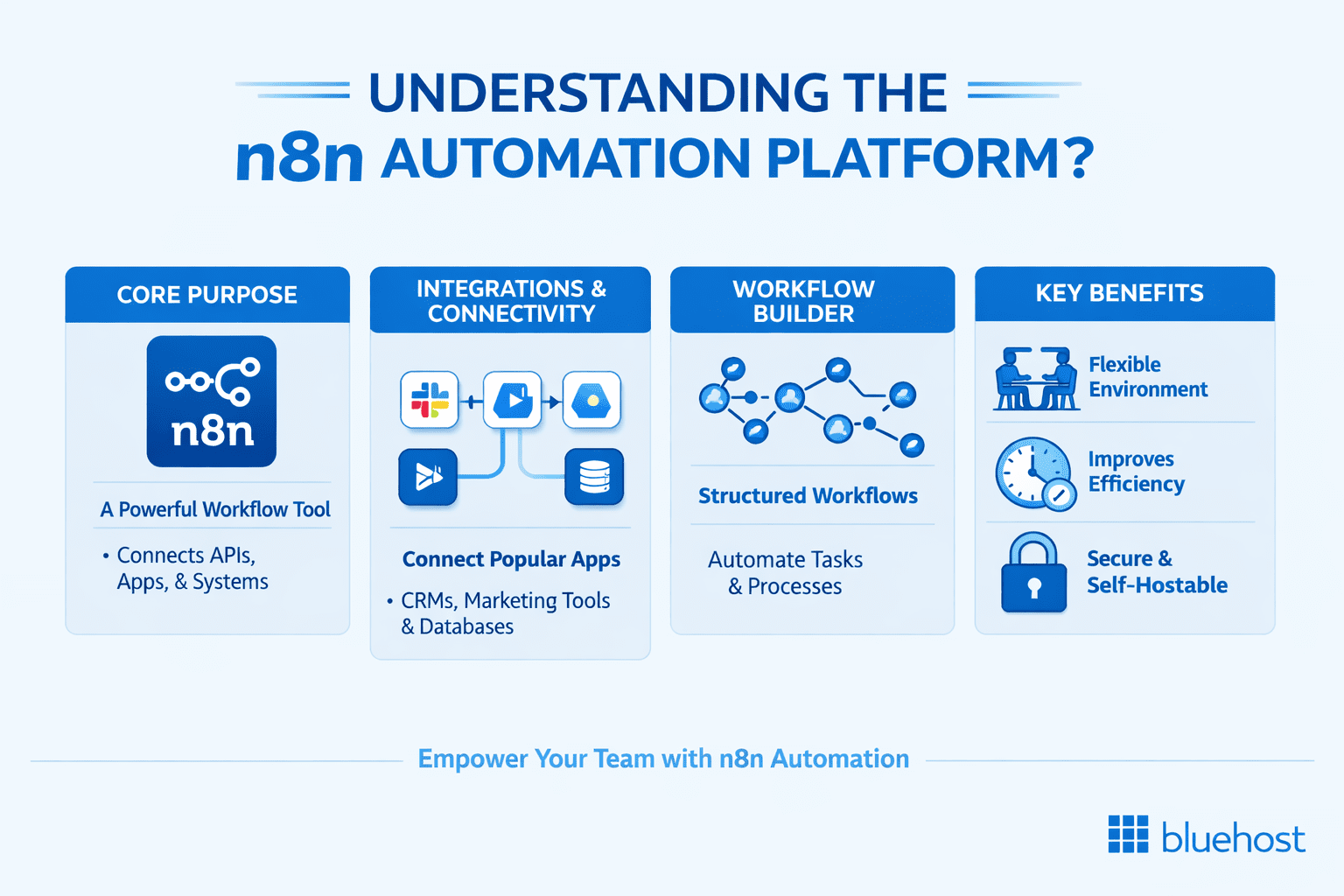
At its core, n8n acts as an automation layer between systems. It enables data to move across tools, trigger actions and execute processes without requiring constant human intervention.
Unlike many SaaS automation tools, n8n is designed for extensibility and control. Teams can use a visual interface to design automation while also adding custom logic when needed. This makes it suitable for both standard integrations and more complex automation use cases.
The platform supports a wide range of integrations, including APIs, databases and external services. It also allows teams to build automation that connects internal systems with third-party tools in a single workflow.
Another key aspect of the n8n automation platform is its support for self-hosting. Teams can run automation on their own infrastructure, giving them full control over execution, data and system behavior.
In simple terms, n8n is not just a tool for automating tasks. It is a platform that helps teams build, manage and scale automation across their systems. To understand how this platform operates in practice, the next section explains how n8n works as an automation platform.
How does n8n work as an automation platform?
The n8n automation platform works by connecting systems through structured automation that runs based on events and data flow. Instead of isolated scripts, n8n provides a unified layer where automation is defined, executed and managed.
At a platform level, n8n follows a model built on workflows, APIs and extensibility.
1. Workflow-based automation model
n8n organizes automation into workflows that define how processes run across systems. Each workflow acts as a sequence of steps that execute when a specific event occurs.
These workflows are event-driven, meaning automation starts when triggered by actions such as incoming data, scheduled tasks or system events. This allows teams to automate both real-time processes and background operations.
Workflows serve as the core execution unit of the platform, enabling automation to run consistently across connected systems.
2. API-first architecture
The n8n automation platform is built to work with APIs and webhooks. This allows it to connect with almost any external service or internal system.
Through API integrations, n8n can:
- Send and receive data between systems
- Trigger actions in external services
- Orchestrate processes across multiple tools
This API-first approach makes the platform highly adaptable for developers and technical teams working with modern software systems.
3. Extensible automation layer
n8n provides flexibility beyond standard integrations by allowing custom logic within workflows. Teams can extend automation using code to handle complex scenarios or specific requirements.
This extensibility enables:
- custom data processing
- advanced decision-making logic
- integration with systems that do not have native connectors
As a result, the n8n automation platform supports both simple automation and advanced use cases without requiring separate backend services.
Together, these elements allow n8n to function as a centralized automation layer across systems and services. Next, let’s look at the core features that make this platform suitable for modern automation needs.
Also read: N8N Workflows Guide: How to Build and Automate Workflows
What are the key features of n8n?
The n8n automation platform offers a set of features that allow teams to build and manage automation across systems. These features focus on flexibility, integration and control rather than limiting automation to predefined use cases.
Below are the core capabilities that define the platform.
| Feature | What it does | Why it matters |
|---|---|---|
| Visual workflow builder | Design automation using connected nodes | Makes workflows easy to build and understand |
| 400+ integrations | Connect apps, tools and services | Reduces setup time across your stack |
| Webhook and API support | Connect any system via APIs | Enables automation beyond native integrations |
| Custom code execution | Add JavaScript inside workflows | Provides flexibility for advanced use cases |
| Database integrations | Read and write data across databases | Supports backend automation and internal tools |
| Scheduled and event-driven automation | Run workflows on triggers or schedules | Automates both real-time and recurring tasks |
| AI and LLM integration support | Process and generate data using AI models | Extends automation into AI-powered use cases |
1. Visual workflow builder
n8n provides a visual interface where automation is designed using connected nodes. This makes it easier to map processes and understand how data flows across systems. Teams can quickly create automation without building every integration from scratch, while still maintaining full visibility into workflow logic.
2. 400+ integrations
The platform supports hundreds of native integrations across common tools, databases and services. These integrations allow teams to connect their existing stack without additional setup. For systems that are not supported natively, n8n can still connect through APIs.
3. Webhook and API support
The n8n automation platform is built around APIs and webhooks. This allows workflows to interact with almost any system that can send or receive data. Teams can trigger automation from external events or connect internal systems through custom endpoints.
4. Custom code execution
n8n supports custom logic within workflows using JavaScript. This enables teams to handle complex scenarios, transform data or extend automation beyond standard integrations. This feature makes the platform suitable for developers who need deeper control over automation behavior.
5. Database integrations
The platform can connect directly to databases for reading and writing data. This allows workflows to function as part of backend systems or internal tools. Teams can use n8n to automate data movement, synchronization and storage processes.
6. Scheduled and event-driven automation
n8n supports both scheduled workflows and real-time event-driven automation. This allows teams to automate recurring tasks as well as respond instantly to system events. This flexibility makes it suitable for a wide range of automation needs.
7. AI and LLM integration support
n8n supports integration with AI services through API-based connections and pre-built nodes such as OpenAI. Teams can use these integrations to process, classify or generate data within workflows.
These features make n8n a flexible automation platform that can adapt to different systems, use cases and operational requirements. Now that you understand what the platform offers, the next step is to explore what teams can build using n8n.
What can you do with the n8n automation platform?
The n8n automation platform allows teams to automate processes, connect systems and build operational logic across tools. Instead of handling tasks manually or writing separate scripts, teams can manage automation through a single platform.
Below are the common ways teams use n8n at a platform level.
1. Automate business processes
Teams use n8n to automate repetitive tasks across systems. This includes moving data between tools, triggering actions and reducing manual work. Automation helps improve efficiency while ensuring processes run consistently.
Example: Automatically send new form submissions to a CRM and notify the sales team in Slack.
2. Connect APIs and services
Modern systems rely on multiple tools and services. The n8n automation platform acts as a bridge between these systems by enabling API-based communication. Teams can connect external services and internal tools without building custom integrations for each connection.
Example: Sync customer data between a billing system and an internal database using API calls.
3. Build internal automation systems
n8n can function as a lightweight automation layer for internal operations. Teams use it to manage processes such as data updates, notifications and system coordination. This allows organizations to centralize automation instead of spreading logic across multiple tools.
Example: Trigger internal alerts when system errors occur and log them in a monitoring dashboard.
4. Create data pipelines
The platform can move and transform data across systems. Teams can collect data from APIs, process it and store it in databases or other services. This makes n8n useful for building data pipelines that support reporting, analytics or application workflows.
Example: Fetch data from an external API, transform it and store it in a database for reporting.
5. Enable AI-powered automation
The n8n automation platform supports integration with AI models. Teams can use it to process data, generate content or automate decision-making tasks. This allows automation to extend beyond rule-based logic into more advanced, AI-driven processes.
Example: Analyze incoming support tickets using an AI model and categorize them automatically.
These capabilities show how n8n functions as a platform for building and managing automation across systems. Next, let’s understand why many teams prefer n8n over traditional SaaS automation tools.
Is n8n open-source and self-hosted?
The n8n automation platform follows a fair-code model. This means the source code is available and can be self-hosted, but certain commercial use cases may be subject to licensing terms.
For most teams, self-hosting n8n allows full access to core features without per-task pricing. However, it is important to review n8n’s official licensing documentation to understand usage rights and restrictions.
1. Self-hosted deployment
One of the key advantages of n8n is the ability to run it on your own infrastructure. Teams can deploy the platform on servers, virtual machines or cloud environments based on their requirements.
Self-hosting allows teams to:
- Control where automation runs
- Manage data within their own systems
- Configure environments based on workload needs
This level of control is important for teams building automation that integrates with internal systems or handles sensitive data.
2. Control over workflows and data
When using the n8n automation platform in a self-hosted setup, teams maintain full ownership of their workflows and execution logic. This means automation runs within their environment rather than on an external platform. Teams can monitor how workflows operate, adjust configurations and manage integrations without relying on third-party restrictions.
3. Flexible usage model
The fair-code approach allows teams to start with n8n and scale its usage based on their needs. Whether running small automation tasks or larger operational workflows, teams can adapt the platform to their infrastructure. This flexibility makes n8n suitable for a wide range of use cases, from simple integrations to more complex automation systems.
Understanding the self-hosted nature of n8n helps explain how teams maintain control over their automation. The next step is to explore where the platform can run in real-world environments.
Where can you run the n8n automation platform?
The n8n automation platform can run in different environments depending on how teams use automation. While it is flexible enough for local testing, production automation requires a stable and reliable setup.
1. Local development environment
Many teams start by running n8n locally. This setup is useful for testing workflows, experimenting with integrations and validating automation logic. Local environments help developers build and refine automation before moving it into production.
2. Cloud and server environments
For production use, the n8n automation platform is typically deployed on servers or cloud infrastructure. This ensures workflows run continuously and can handle real-time events, API calls and scheduled automation tasks.
Running n8n in a server environment allows teams to:
- Maintain consistent workflow execution
- Handle multiple integrations and processes
- Support automation across systems
3. VPS infrastructure for production automation
As automation grows, teams often choose VPS infrastructure to run n8n workflows reliably. A VPS provides dedicated resources and an isolated environment, which helps ensure consistent performance.
With VPS deployment, teams can:
- Control system configuration
- Manage resource allocation
- Scale automation based on workload
At Bluehost, we provide self-managed VPS hosting designed for developers and automation workloads. Our platform allows you to run the n8n automation platform on infrastructure you control, scalable performance and predictable resource usage.
Running n8n on our VPS environment helps teams manage automation as part of their own systems rather than relying on external platforms. Now that you understand where n8n can run, the next step is identifying who should use the platform based on their needs and technical requirements.
Who should use n8n?
The n8n automation platform is designed for technical users who need flexibility, control and extensibility in their automation. It is best suited for teams that work with APIs, systems integration and backend processes.
1. Developers
Developers use n8n to connect APIs, automate backend tasks and manage data flows between systems. The platform allows them to build automation without writing full services from scratch. It also supports custom logic, making it useful for handling complex workflows and integrations.
2. DevOps engineers
DevOps teams use the n8n automation platform to automate operational processes such as monitoring, alerts and system coordination. It helps streamline infrastructure-related tasks and reduces manual intervention in repetitive processes.
3. Automation engineers
Automation engineers use n8n to design and manage workflows across tools and services. The platform allows them to centralize automation and maintain visibility across systems. This is especially useful for managing integrations between multiple platforms.
4. Technical operators and product teams
Teams that manage internal systems or build automation into products can use n8n as an automation layer. It allows them to connect services, process data and trigger actions within their own infrastructure. These teams benefit from the ability to control how automation runs and how systems interact.
The n8n automation platform is most valuable for users who need more than basic automation. It is built for those who want to design, manage and scale automation across systems with full control. Now that you know who n8n is for, the next step is understanding when it is the right choice for your automation needs.
When should you use n8n?
The n8n automation platform is best used when teams need flexibility, control and scalability in their automation. It is not limited to simple task automation and is designed for systems that require deeper integration and customization.
1. When you need custom automation
Use n8n when your automation requires more than predefined templates. If your processes involve custom logic, multiple systems or complex data handling, n8n provides the flexibility to design automation that fits your requirements.
2. When you work with APIs and integrations
If your systems rely on APIs, the n8n automation platform allows you to connect services without building custom integrations from scratch. It works well for teams managing multiple tools that need to exchange data.
3. When you want control over automation
n8n is a strong choice when you want automation to run within your own environment. This is important for teams that need visibility into execution, control over data and the ability to customize workflows without platform restrictions.
4. When you want to avoid SaaS limitations
Many SaaS automation tools impose limits on usage, customization and pricing. n8n helps overcome these constraints by allowing teams to run automation on infrastructure they control. This makes it easier to scale automation without increasing dependency on external platforms.
5. When automation becomes part of your system architecture
As automation grows, it often becomes part of core system operations. The n8n automation platform can act as an automation layer that connects services, processes data and supports internal workflows. This makes it suitable for teams building automation as part of their long-term infrastructure.
Understanding when to use n8n helps teams make better decisions about their automation strategy. The next step is to compare n8n with other automation platforms to see how it differs in approach and capabilities.
How to get started with n8n?
Teams can start using n8n by deploying it locally or on a server environment.
Common setup options include:
- Running n8n using Docker
- Deploying on a virtual machine or VPS
- Connecting APIs and testing workflows in a development environment
For production use, refer to official n8n deployment documentation to ensure proper configuration, security and performance.
Is n8n better than other automation platforms?
The n8n automation platform is not necessarily better for every use case, but it is better suited for teams that need control, flexibility and scalability in their automation. Unlike many SaaS automation tools, n8n is designed for customization and infrastructure ownership, which makes it a strong choice for technical teams.
1. Flexibility and customization
n8n allows teams to build automation with custom logic, API integrations and data processing. This makes it suitable for workflows that go beyond simple task automation. In comparison, SaaS tools like Zapier and Make often limit customization to predefined actions and templates.
2. Control over execution
With the n8n automation platform, teams can run automation on infrastructure they control. This provides full visibility into how workflows execute and how data flows between systems. SaaS platforms typically run automation on their own infrastructure, which limits control and transparency.
3. Cost structure
SaaS automation tools usually charge based on usage, such as the number of tasks or executions. As automation grows, costs can increase significantly. n8n, when self-hosted, allows teams to run automation on infrastructure with predictable costs, making it easier to scale.
When n8n is the better choice
n8n is a better option when:
- you need custom automation logic
- you work extensively with APIs and internal systems
- you want full control over automation execution
- you want to avoid usage-based pricing models
For simple, no-code automation tasks, SaaS tools may still be sufficient. However, for teams building automation as part of their systems, the n8n automation platform provides greater flexibility and control. With this comparison in mind, let’s summarize what makes n8n a valuable automation platform and how teams can use it effectively.
Final thoughts
Automation is no longer just about saving time. It has become a core part of how modern systems operate. This guide explained how the n8n automation platform connects APIs, applications and internal systems through structured automation.
You learned how n8n works as a platform, what features it offers and why teams choose it over traditional SaaS automation tools. Its flexibility, extensibility and support for self-hosting make it a strong choice for teams that need more control over their automation.
As automation grows, running it on reliable infrastructure becomes essential. At Bluehost, we provide VPS hosting that allows you to run the one-click n8n automation platform with full control, resources that you can configure based on your workload requirements.
If you are building automation as part of your systems, n8n combined with the right infrastructure helps you manage and scale automation with confidence.
Sources
- n8n official documentation (workflows, nodes, deployment): https://docs.n8n.io/
- n8n integrations directory: https://n8n.io/integrations/
- n8n licensing (fair-code model): https://docs.n8n.io/reference/license/
- Zapier pricing: https://zapier.com/pricing
- Make pricing: https://www.make.com/en/pricing
FAQs
The n8n automation platform is used to automate processes across APIs, applications and internal systems. Teams use it to connect tools, move data and trigger actions without manual effort. It helps streamline operations by running automation as part of system workflows.
Yes, the n8n automation platform offers a fair-code model. You can self-host n8n and use its core features without paying per task or execution. However, infrastructure costs may apply if you run it on a VPS or cloud server.
Yes, the n8n automation platform can be fully self-hosted. Teams can deploy it on servers, virtual machines or cloud environments. Self-hosting allows full control over workflows, execution logic and data.
The n8n automation platform differs from Zapier by offering more flexibility and control. n8n supports custom logic, API integrations and self-hosting. Zapier is a SaaS tool with predefined workflows and usage-based pricing.
The n8n automation platform is best suited for developers, DevOps engineers and technical teams. It is ideal for users who need custom automation, API integrations and control over execution.
Teams typically run the n8n automation platform on server or VPS infrastructure for production use. This ensures workflows run reliably and can handle continuous automation tasks. At Bluehost, our VPS hosting platform allows teams to deploy n8n with full control, scalable resources and consistent performance.

Write A Comment