



Key highlights
- Understand the distinct functions of SPF, DKIM and DMARC and how they contribute to your overall email security posture.
- Learn how to configure these protocols step-by-step to prevent domain spoofing and protect your brand reputation.
- Explore the technical differences between IP-based validation and cryptographic signatures for verifying sender identity.
- Uncover how DMARC reporting provides complete visibility and control over who is sending mail on behalf of your domain.
- Know the best practices for layering these authentication methods to ensure your legitimate emails always reach the recipient’s inbox.
Every day, billions of emails are sent across the internet — and not all of them are legitimate. According to the Anti-Phishing Working Group, phishing attacks remain one of the most persistent threats facing businesses of every size, with email spoofing at the center of most campaigns. If you manage a website or business domain, understanding SPF vs DKIM vs DMARC is no longer optional. It is essential.
These three email authentication protocols work together to verify that your emails are genuinely coming from you, not from a bad actor impersonating your domain. Whether your goal is to protect customers from phishing attempts, improve deliverability or build trust with inbox providers, mastering SPF, DKIM and DMARC is one of the most impactful steps you can take toward stronger email security.
In this guide, you will learn exactly what each protocol does, how they differ and how to implement email security best practices that protect your domain for the long term.
TL;DR: SPF vs DKIM vs DMARC
- SPF (Sender Policy Framework) verifies authorized IP addresses and servers allowed to send email from your domain.
- DKIM (DomainKeys Identified Mail) adds a cryptographic digital signature to verify that the email content remains untampered.
- DMARC (Domain-based Message Authentication, Reporting and Conformance) provide instructions for handling emails that fail SPF or DKIM checks.
- Together, these protocols prevent domain spoofing, protect brand reputation and significantly improve overall email deliverability rates.
What is SPF in email?
SPF or Sender Policy Framework, is an email authentication protocol that specifies which mail servers are authorized to send email on behalf of your domain. It works by publishing a DNS TXT record that receiving mail servers can check when a message arrives claiming to originate from your domain.
In simple terms: SPF creates an approved sender list for your domain at the DNS level and receiving servers consult that list before accepting your messages.
How does SPF work?
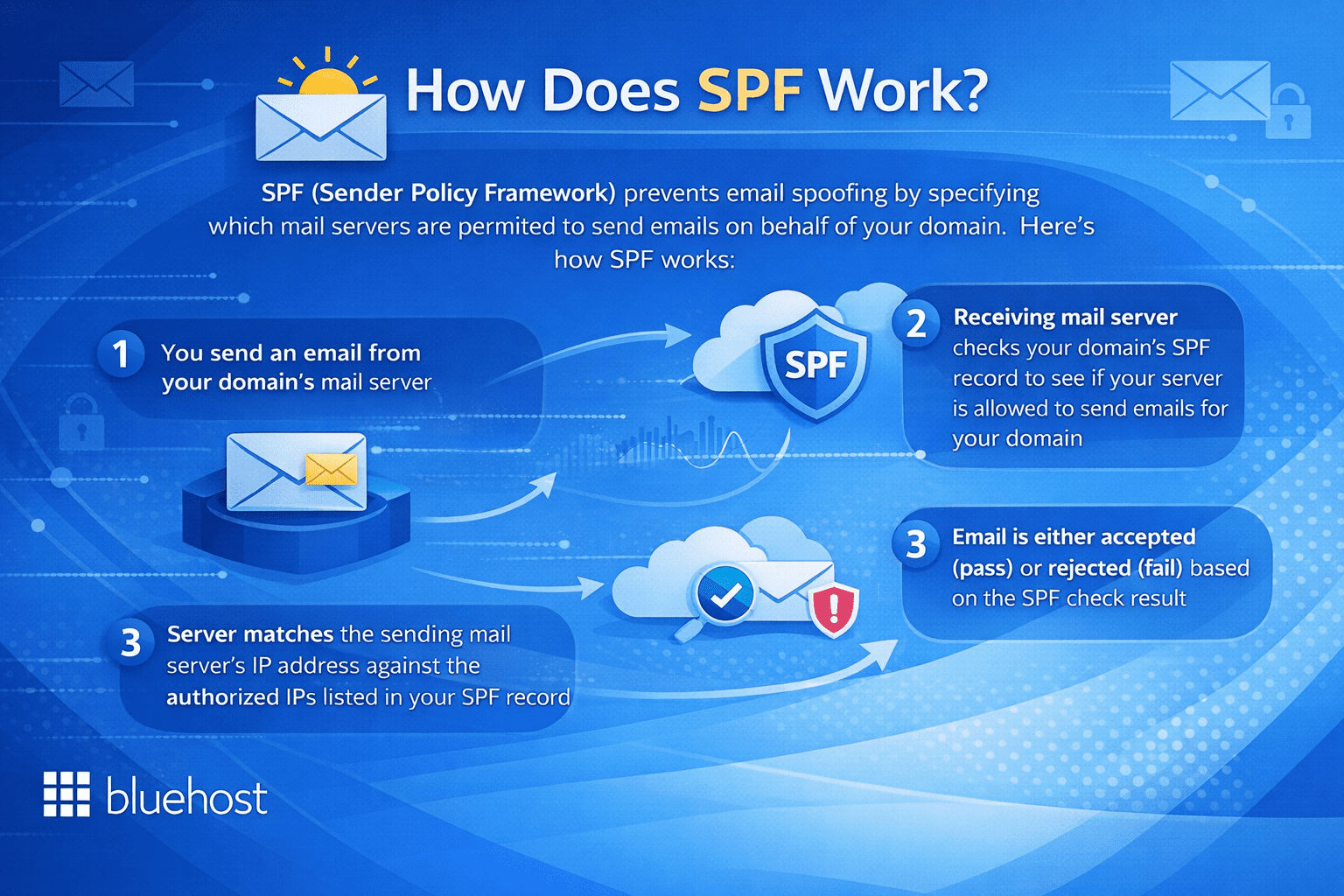
When an email is sent using your domain, the receiving server looks up your DNS records and checks for an SPF entry. That record contains a list of authorized IP addresses and mail servers. If the sending server’s IP address matches an entry on that list, the email passes SPF authentication. If it does not match, the email may be flagged or rejected depending on your configuration.
A basic SPF record looks like this:
v=spf1 include:mailserver.com -all
The -all tag at the end is a hard fail, meaning any server not listed is explicitly unauthorized. Using ~all instead creates a soft fail, which flags unauthorized senders without outright rejecting them — useful during testing but less secure in production.
SPF is a critical first layer of defense, but it has an important limitation: it only verifies the sending server’s IP address, not the message content or the visible “From” address your recipients see. That gap is where DKIM becomes necessary.
What is DKIM in email?
DKIM or DomainKeys Identified Mail, adds a cryptographic digital signature to every email your server sends. This signature allows receiving mail servers to confirm that the message genuinely originated from your domain and that its content was not altered in transit.
Where SPF checks who sent the message, DKIM verifies that the message itself has not been tampered with — a fundamentally different and complementary function.
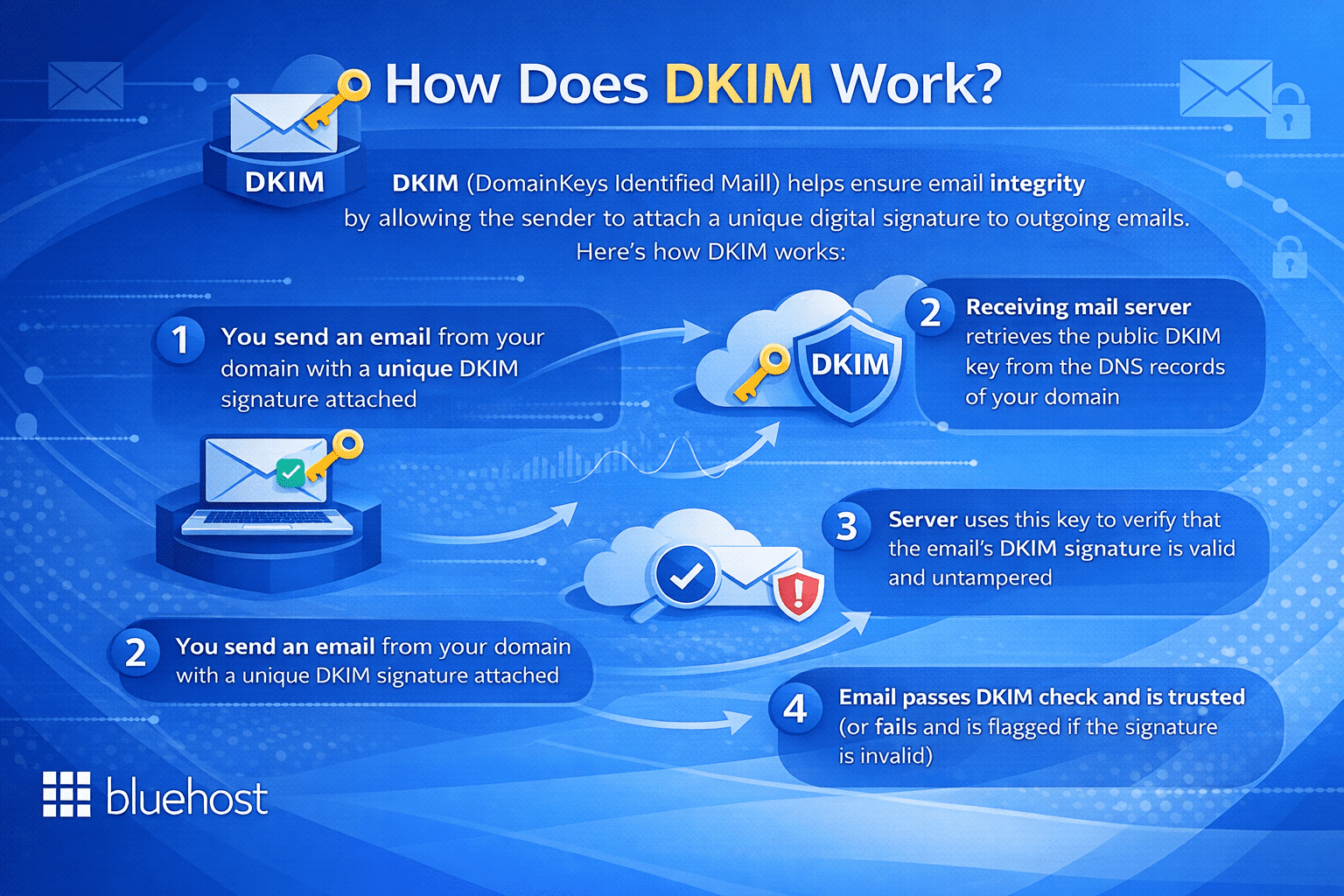
How DKIM signatures protect your email?
DKIM uses a pair of cryptographic keys. A private key is stored securely on your sending mail server, while a corresponding public key is published in your domain’s DNS records. When you send an email, your server signs it using the private key. When the receiving server gets the message, it retrieves your public key from DNS and uses it to verify the signature.
If the signature matches, it confirms two things: the email came from an authorized source associated with your domain and the message content was not modified during delivery. Here is why that matters for your overall email security:
- It protects the integrity of your email content from interception and manipulation
- It adds a verifiable identity layer that SPF alone cannot provide
- It helps inbox providers like Gmail and Outlook assign a positive reputation to your messages
- It reduces the likelihood of legitimate emails being filtered into spam folders
However, DKIM on its own does not instruct receiving servers on what action to take when verification fails. That is precisely the role of the third protocol in the SPF vs DKIM vs DMARC framework.
What is DMARC in email?
DMARC or Domain-based Message Authentication, Reporting and Conformance, is the policy layer that ties SPF and DKIM together. It tells receiving mail servers what to do when an email fails authentication checks and provides a reporting mechanism so domain owners can monitor who is sending email in their name.
DMARC transforms authentication from a passive check into an enforceable policy — making it the most powerful of the three standards.
Understanding DMARC policy levels
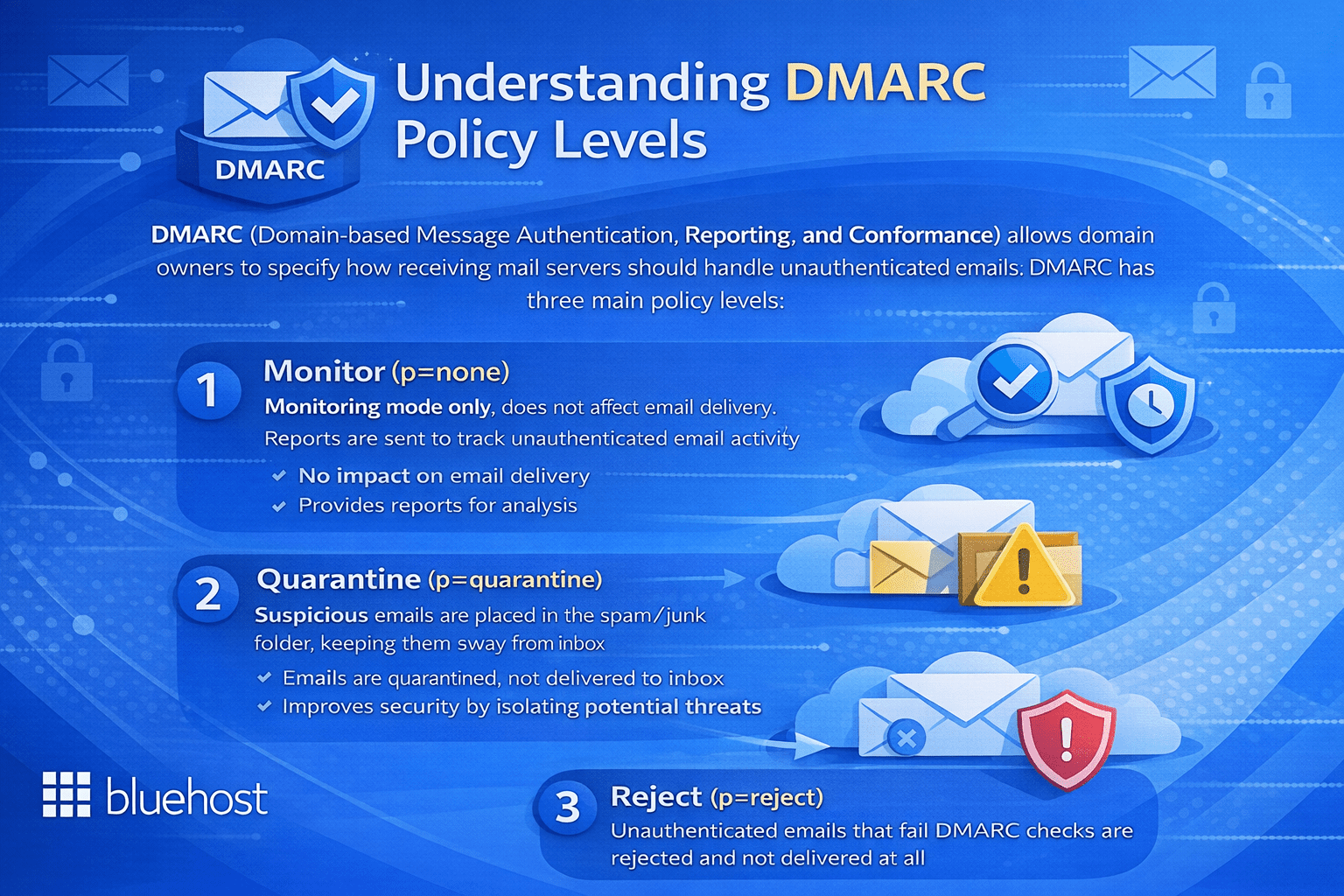
DMARC operates through three policy levels that you define within your DNS records:
- None (p=none): The receiving server takes no blocking action but sends reports to you. This is the recommended starting point for monitoring email activity without disrupting delivery.
- Quarantine (p=quarantine): Emails that fail DMARC checks are sent to the recipient’s spam or junk folder rather than the inbox.
- Reject (p=reject): Emails that fail DMARC are blocked entirely and never reach the recipient. This is the most secure policy level.
A basic DMARC DNS record looks like this:
v=DMARC1; p=reject; rua=mailto:reports@[yourdomain].com
The rua tag specifies the email address where aggregate reports are delivered. These reports give you ongoing visibility into who is sending email claiming to be from your domain — including unauthorized senders you may not be aware of.
DMARC also enforces “alignment,” requiring that the domain in the visible “From” header matches the domain authenticated by SPF or DKIM. This closes a critical loophole that both protocols leave open when used independently.
SPF vs DKIM vs DMARC: key differences and how they work together?
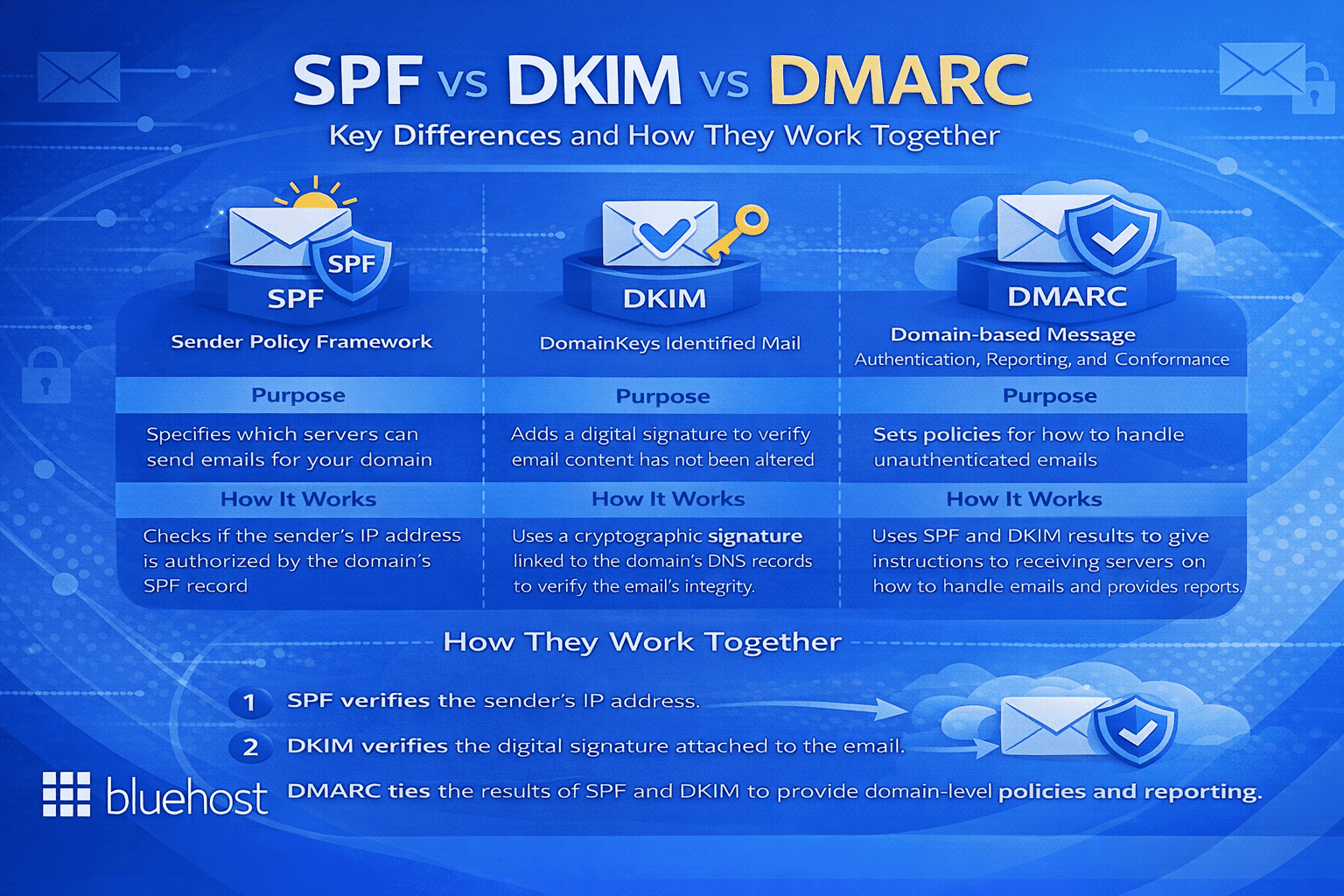
Understanding each protocol individually is valuable, but the real question is how SPF vs DKIM vs DMARC relate to each other — and whether you truly need all three. The answer is yes and here is why each one addresses a distinct vulnerability.
| Protocol | What it verifies | What it protects against |
|---|---|---|
| SPF | Authorized sending servers via IP address | IP-based spoofing and unauthorized sending infrastructure |
| DKIM | Message integrity via cryptographic signature | Content tampering and message forgery in transit |
| DMARC | Policy enforcement and domain alignment | Domain impersonation and visible “From” address spoofing |
Think of it this way: SPF is the guest list at the door — only approved servers are permitted to send. DKIM is the tamper-evident seal on a letter — it proves the content has not been changed since it left your hands. DMARC is the security manager — it decides what happens when either check fails and keeps you informed through regular reports.
Using SPF alone means a sender could still forge the visible “From” address your recipients see in their inbox. Using DKIM alone does not restrict which servers can send on your behalf. DMARC requires that at least one of SPF or DKIM passes and that the authenticated domain aligns with the “From” header — making spoofing significantly harder.
Major inbox providers including Google and Yahoo have made DMARC a formal requirement for bulk email senders. This reflects a broader industry shift toward treating all three protocols as the baseline standard for legitimate email communication.
Email security best practices every domain owner should follow
Knowing what is SPF in email, what is DKIM in email and what is DMARC in email is the first step. Implementing them correctly — and maintaining them over time — is where most domain owners encounter challenges. The following email security best practices will help you build a reliable and secure email authentication setup.
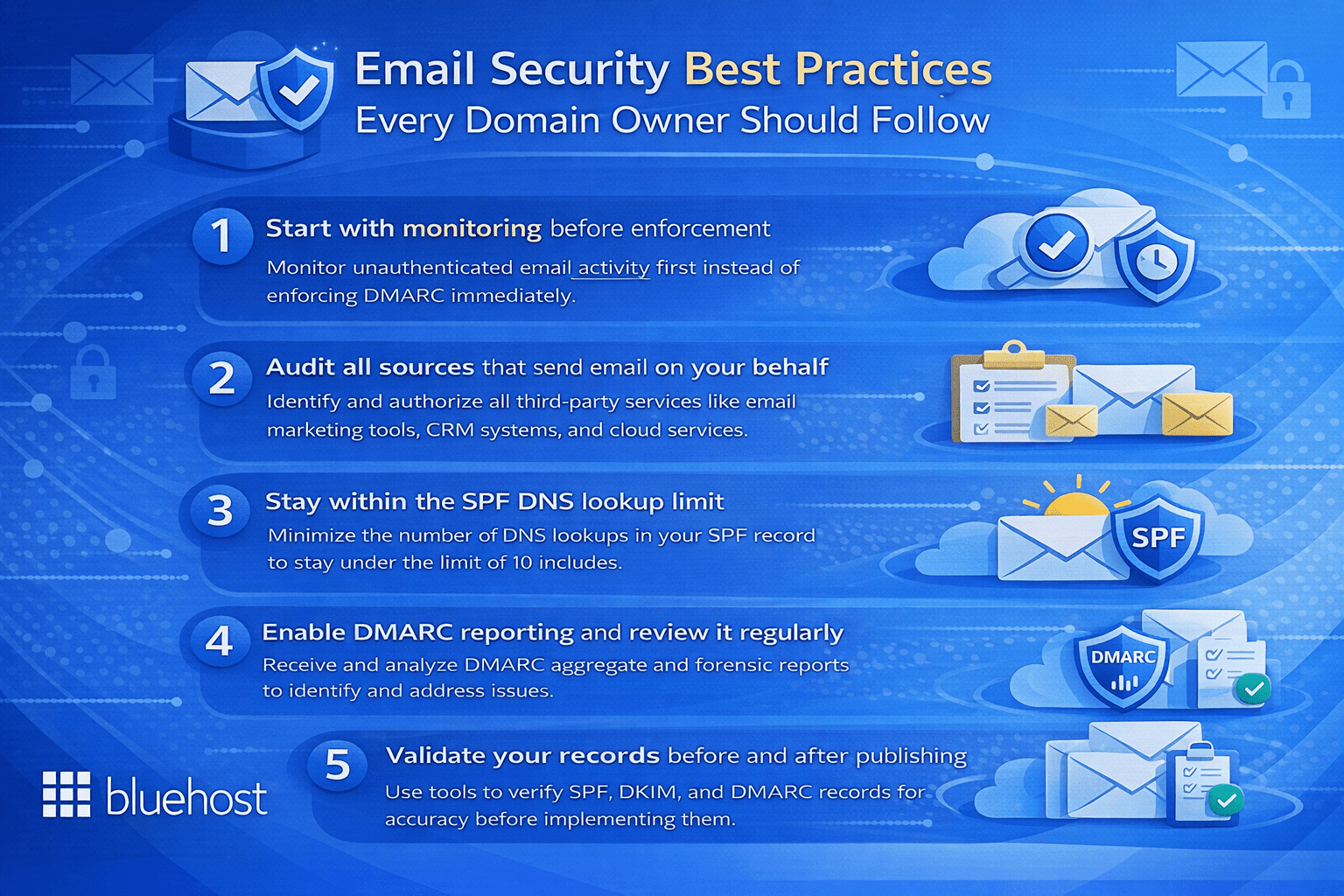
1. Start with monitoring before enforcement
When you deploy DMARC for the first time, set your policy to p=none. This lets you receive authentication reports without blocking any email. Monitor those reports for at least two to four weeks to understand your sending landscape before escalating to quarantine or reject.
2. Audit all sources that send email on your behalf
Before finalizing your SPF record, identify every service that sends email using your domain — including your hosting platform, email marketing tools, CRM systems and transactional email providers. Any legitimate sender not included in your SPF record may have their messages fail authentication.
3. Stay within the SPF DNS lookup limit
SPF records are limited to 10 DNS lookups. Exceeding this limit causes SPF to fail silently. Use SPF flattening tools to consolidate entries and keep your record within that boundary as your email infrastructure grows.
4. Enable DMARC reporting and review it regularly
Configure both aggregate (rua) and forensic (ruf) reporting in your DMARC record. Reviewing these reports regularly helps you detect unauthorized use of your domain early and identify configuration errors before they affect deliverability or your domain’s reputation.
5. Validate your records before and after publishing
Use tools such as MXToolbox or Google Admin Toolbox to test your SPF, DKIM and DMARC records both before publishing and after any changes. These tools surface misconfigurations that could silently undermine your entire email authentication setup.
Final thoughts
Understanding the full picture of SPF vs DKIM vs DMARC equips you to make informed decisions about how your domain communicates across the internet. SPF defines which servers can send on your behalf, DKIM signs your messages to confirm their authenticity and DMARC enforces policy while keeping you informed through actionable reports. Together, they form a layered defense against email spoofing, phishing and domain impersonation.
Following email security best practices, from careful initial configuration to ongoing monitoring and incremental policy enforcement, gives you greater control over your domain’s email reputation and the trust recipients place in your communications. Whether you are running a small business, managing a growing blog or operating a high-traffic eCommerce site, proper email authentication is a foundational investment in your brand’s credibility and your audience’s security.
Ready to professionalize your brand and secure your business communications? Choose professional email by Bluehost today and take the first step toward implementing robust SPF, DKIM and DMARC protections to keep your email delivery safe and authoritative.
FAQs
SPF confirms that the sending server’s IP is permitted, while DMARC enforces alignment to ensure the authenticated domain matches the visible “From” address. If a third-party service passes SPF for its own domain but sends emails on your behalf, DMARC will fail without proper alignment. To guarantee successful inbox delivery, your SPF record must authorize every sender and align accurately with your overall sending infrastructure.
DMARC serves as the policy and reporting framework built on the authentication pillars of SPF and DKIM. It tells receiving servers whether to allow, quarantine or reject messages when sender identity checks fail. Additionally, DMARC mandates domain alignment and produces reports to help you track all email traffic originating from your domain.
DMARC only needs either SPF or DKIM to pass with correct alignment, but implementing both is strongly advised for maximum deliverability. SPF can break during email forwarding because the sender’s IP changes, whereas DKIM’s cryptographic signature survives forwarding intact. Deploying both protocols gives your overall DMARC policy a robust fallback, ensuring legitimate messages aren’t mistakenly blocked.
Yes, DMARC can pass with only SPF as long as the envelope sender domain perfectly matches the “From” header domain shown to recipients. Relying entirely on SPF, however, frequently leads to DMARC failures when utilizing third-party marketing tools or when emails are forwarded. Due to these alignment vulnerabilities, combining DKIM with SPF is highly recommended for dependable message authentication.
These three email authentication records live as TXT records within your domain’s DNS settings (although DKIM is sometimes published as a CNAME). SPF is placed at your root domain, DKIM utilizes a specific selector at the _domainkey hostname and DMARC is published at the _dmarc hostname. You can seamlessly manage these entries through your domain registrar, hosting service or DNS provider.
You can verify authentication outcomes by opening a received message and inspecting the original email headers or full message source. Search for the “Authentication-Results” header within the source code to find the exact pass or fail status for SPF, DKIM and DMARC. For a clearer visual breakdown and simpler troubleshooting, you can also paste those headers into a trusted email analyzer tool.
A DKIM record is a DNS TXT entry that holds the public key used by your domain to validate cryptographic email signatures. This record relies on a selector assigned by your provider and outlines key tags for the version, key type and the public key itself. To ensure strong overall email security, keep your private key guarded on your mail server and routinely rotate your DKIM keys.
A DMARC record is a DNS TXT entry housed at the _dmarc hostname that tells receiving mail servers how to treat emails that fail SPF or DKIM evaluations. It includes specific tags that define your policy (none, quarantine or reject), destination addresses for reporting and alignment strictness. It’s best practice to begin with a monitoring policy to analyze reports before shifting to a stricter quarantine or reject stance.
To configure SPF, start by inventorying every service that sends email on your domain’s behalf, such as CRMs, transactional mailers and hosting platforms. Next, consolidate these approved senders into a single TXT record and add it to your root domain’s DNS. Remember that a domain can only have one SPF record and it must strictly adhere to the 10 DNS lookup limit to prevent silent delivery drops.
DMARC reviews the SPF and DKIM results of incoming emails to ensure the authenticated domain matches the visible “From” address perfectly. Depending on the policy you’ve published, it will simply monitor the message, send it to the spam folder or reject it outright if the authentication fails. DMARC also dispatches aggregate reports to your specified email address, offering ongoing insight into all services sending emails on behalf of your domain.
Configuring SPF is essential because it drastically lowers the risk of spoofing and stops your authentic emails from landing in the spam folder. By clearly authorizing distinct IP addresses, it prevents malicious senders from mimicking your brand to execute phishing scams. Keep in mind, though, that you must observe the 10 DNS lookup limit and implement DKIM as a backup, since SPF usually breaks when emails are forwarded.
DKIM setup begins by generating a private/public key pair within your email service provider’s admin console. You then take the public key and publish it as a DNS TXT record using the exact selector label provided. After DNS changes have propagated, activate DKIM signing inside your mailing platform and verify your configuration using a trusted third-party testing tool.
SPF acts as a DNS-based allowlist that receiving servers consult to verify if an email’s source IP is permitted to send for your organization. It checks the hidden envelope sender rather than the visible “From” address, which frequently leads to confusion when dealing with third-party email marketing platforms. For reliable deliverability, every valid sending source must be added to your single SPF record, ideally paired with a hardfail policy in production.
SPF, DKIM and DMARC are intertwined email authentication standards that collaborate to defend your domain from phishing and spoofing. SPF validates the sending IP address, DKIM confirms message integrity using cryptographic signatures and DMARC applies domain alignment rules based on those checks. Collectively, they enable you to enforce strict policies for failed messages while gathering rich data on your overall email traffic.
SPF operates via a DNS TXT record at your root domain that lists every IP address allowed to transmit emails for your brand. When an email is received, the destination server compares the envelope sender’s originating IP against this published list. Since SPF only authenticates the return path and ignores the visible “From” address, DMARC alignment is necessary to properly stop domain spoofing.
DMARC is a pivotal authentication protocol that tells receiving servers exactly what to do with emails that fail SPF or DKIM validation. It mandates that the authenticated domain aligns seamlessly with the “From” header, thereby closing the impersonation loopholes present in older protocols. Setting up DMARC halts spoofing attacks and yields critical aggregate reports to help you oversee your overall outbound email landscape.
DKIM safeguards the content of your outgoing emails by applying a secure cryptographic signature tied to a private key on your server. Receiving platforms pull the matching public key from your DNS to verify that the message remained unchanged during delivery. This tamper-proof authentication enhances inbox placement and offers a sturdy basis for DMARC alignment, particularly useful when messages get forwarded.
The primary best practice is to roll out all three protocols simultaneously, commencing with an accurate SPF record and a secure 2048-bit DKIM key. DMARC should first be configured with a monitoring policy before you gradually move toward quarantine or reject as legitimate mail is verified. Furthermore, ensure your SPF record stays below the 10 DNS lookup limit and consistently audit your DMARC reports to spot any unauthorized senders.
DMARC is an essential policy mechanism that gives domain owners the power to dictate how unauthenticated emails are treated by receiving servers. By requiring strict alignment between the authenticated domain and the user-facing “From” address, it thwarts advanced business email compromise (BEC) attacks. Moreover, DMARC’s reporting features provide organizations with unparalleled visibility into valid sending services and malicious impersonation efforts.
To achieve optimal overall email security, organizations need to deploy SPF, DKIM and DMARC together rather than viewing them as standalone tools. Start by publishing comprehensive SPF and DKIM records, then implement a DMARC policy set to “none” to collect data without disrupting your mail flow. Once you have verified that all approved senders are successfully authenticating, you can confidently upgrade your DMARC policy to reject fraudulent traffic.
SPF allows domain administrators to publish a DNS TXT record cataloging all the IPs allowed to send emails on their behalf. Upon receiving an email, the destination server checks the originating IP against this record to decide if the message passes or fails. Because SPF relies strictly on the sender’s IP, its authentication typically breaks during email forwarding, making DKIM an essential companion for robust email security.
DKIM defends outbound emails by attaching a cryptographic signature generated by a private key kept safely on your mail server. Receiving platforms pull the matching public key from your DNS to verify that the message actually came from your domain and wasn’t tampered with. Because DKIM signatures are integrated directly into the email headers, they easily survive forwarding mechanisms that typically cause standard SPF checks to fail.



Write A Comment