 ChatGPT,
 Claude,
 Gemini,
 Grok — all four for
When comparing hosting solutions, it’s easy to assume that all virtualized environments work the same way. After all, both VDS and virtual machine hosting run on virtual infrastructure, provide root access and offer more control than shared hosting. But the way resources are allocated behind the scenes can have a significant impact on performance, reliability and scalability.
The biggest difference comes down to resource allocation. Traditional virtual machine hosting often shares physical server resources among multiple users, while a Virtual Dedicated Server (VDS) reserves CPU, RAM and storage exclusively for a single instance. As workloads grow, that distinction can affect everything from application response times to overall system stability.
In this guide, we’ll compare VDS vs virtual machine hosting across performance, resource isolation, scalability, security and cost.
TL;DR: VDS vs Virtual Machine Hosting at a glance
| Factor | Virtual Machine Hosting | VDS |
| Resource allocation | Shared | Dedicated |
| Performance | Variable | Consistent |
| Isolation | Moderate | High |
| Cost | Lower | Higher |
| Best for | Testing, small sites | SaaS, eCommerce, AI |
What is Virtual Machine Hosting?
Virtual Machine Hosting is a broad hosting category where one physical server is divided into multiple isolated virtual environments. Each virtual machine runs its own operating system and receives allocated CPU, RAM and storage.
The important word is allocated. In many standard virtual machine hosting environments, those resources come from a shared hardware pool. This makes the setup flexible and cost-effective, but performance can vary when other users on the same server consume more resources.
There are two common approaches.
- With OS-level virtualization, multiple instances share the same host kernel and a common pool of hardware resources. This is how many standard VPS hosting environments work.
- With hypervisor-level virtualization, technologies such as KVM, Xen or Hyper-V map server resources directly to individual virtual machines. This allows CPU and RAM to be dedicated to a specific instance instead of being pooled across tenants.
In short, virtual machine hosting tells you that your server is virtualized. It does not always tell you whether your resources are shared or dedicated. That depends on the virtualization technology and hosting plan.
Now that we’ve covered virtual machine hosting, let’s look at where VDS fits within that ecosystem.
What is a VDS (Virtual Dedicated Server)?
A Virtual Dedicated Server (VDS) is a type of virtual machine hosting that reserves CPU, RAM and storage resources exclusively for a single user. Instead of drawing resources from a shared pool, a VDS locks those resources to your instance at the hypervisor level.
This difference becomes important as workloads grow. In shared virtual environments, providers may overcommit resources, meaning multiple users are allocated resources from the same physical hardware. Moreover, when demand spikes, performance can become less predictable.
A VDS eliminates this issue by dedicating resources to your environment. Other users on the same physical server cannot access or compete for your allocated vCPU, memory or storage resources.
As a result, a VDS delivers dedicated-server-like performance isolation while retaining the flexibility, scalability and faster provisioning associated with virtual machine hosting.
While both solutions use virtualization technology, the way they allocate resources creates meaningful differences in performance and isolation.
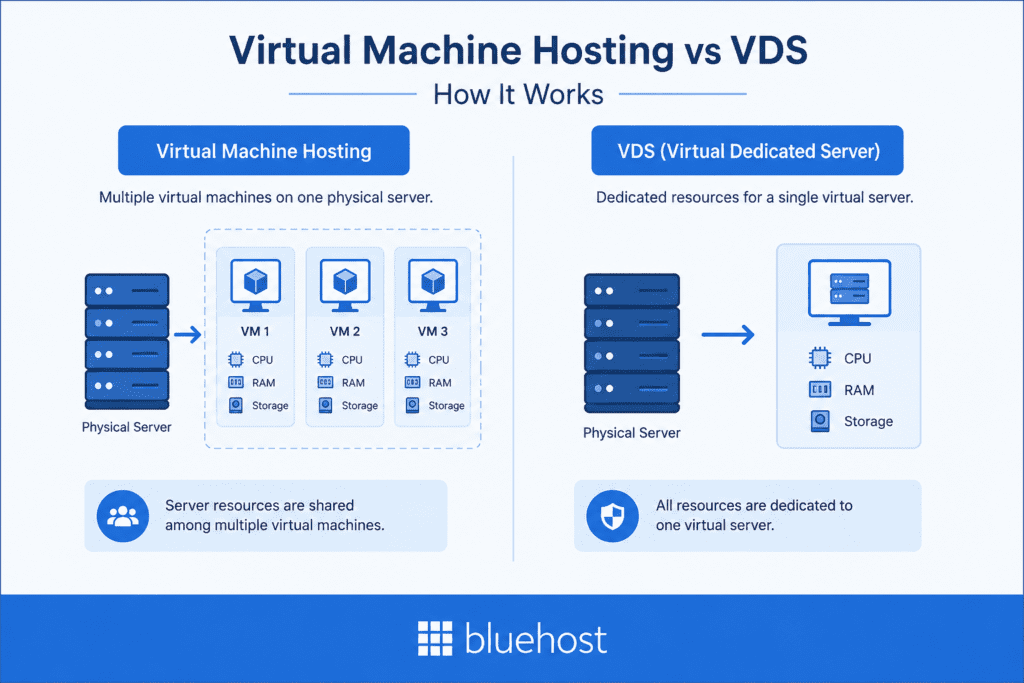
VDS vs Virtual Machine Hosting: Key differences at a glance
While both VDS and standard virtual machine hosting use virtualization technology, they differ significantly in how resources are allocated and managed. The table below summarizes the main differences to help you evaluate both hosting solutions.
| Feature | Standard virtual machine hosting | VDS hosting |
| Resource allocation | Shared resource pool | Dedicated resources |
| CPU allocation | May be shared or overcommitted | Reserved for one instance |
| RAM allocation | Shared allocation model | Dedicated allocation |
| Performance consistency | Can vary under load | More predictable |
| Noisy neighbor impact | Possible | Minimal |
| Scalability | High | High |
| Root access | Usually available | Usually available |
| Best for | Development, testing, small websites | Production workloads, SaaS, eCommerce, AI applications |
| Cost | Lower | Higher |
The biggest distinction comes down to resource isolation. Standard virtual machine hosting prioritizes affordability and flexibility by sharing underlying hardware resources, while VDS prioritizes consistent performance through dedicated resource allocation. The right choice depends on your workload, performance requirements and budget.
To better understand how these hosting environments perform in real-world scenarios, let’s break down each difference in more detail.
VDS vs Virtual Machine Hosting: Key differences explained
The comparison table above provides a quick overview, but understanding these differences in detail can help you choose the right environment for your workload.
1. Resource allocation
In standard virtual machine hosting, CPU, RAM and storage come from a shared pool. Providers may also overcommit resources, assuming not every user will use their full allocation at the same time.
With VDS, resources are reserved for one instance at the hypervisor level. Your vCPU, memory and storage are not shared with other users on the same physical server.
Verdict: Choose standard virtual machine hosting for cost efficiency. Choose VDS when your workload needs guaranteed resource availability.
2. Performance consistency
Performance in standard virtual machine hosting can fluctuate when multiple users compete for the same underlying hardware resources. While this may not affect low-traffic workloads, it can become noticeable during traffic spikes or resource-intensive operations.
A VDS delivers more consistent performance because dedicated resources remain available to your instance regardless of activity elsewhere on the server.
Verdict: If consistent performance is important, VDS has the advantage.
3. Workload interference
In standard virtual machine hosting, multiple users run workloads on the same physical server. If one workload suddenly uses more CPU, memory or storage I/O, it can affect the performance available to other virtual machines on that server.
A VDS reduces this risk by reserving resources for each instance. Your workload gets its own allocated CPU, RAM and storage, so activity from other users is less likely to affect performance.
Verdict: VDS offers stronger protection from performance issues caused by other workloads on the same server.
4. Scalability
Both VDS and standard virtual machine hosting are easier to scale than dedicated servers. Resources such as CPU, RAM and storage can typically be increased without migrating to new hardware.
The difference is that VDS maintains dedicated resource allocation as you scale, while standard virtual machine hosting continues to operate within a shared environment.
Verdict: Both scale well, but VDS provides greater resource predictability as workloads grow.
5. Security and isolation
Both hosting options provide isolated virtual environments and offer stronger separation than shared hosting. However, VDS adds another layer of separation through dedicated resource allocation.
This can be beneficial for businesses running sensitive applications or workloads with stricter performance and compliance requirements.
Verdict: Both are secure, but VDS provides stronger resource isolation.
6. Cost and value
Standard virtual machine hosting is generally more affordable because physical resources are shared among multiple users.
VDS costs more because you are paying for dedicated CPU, RAM and storage resources. For workloads where performance directly impacts revenue or user experience, that additional cost may be justified.
For example, a standard virtual machine hosting plan might cost $5–$15 per month, while a similarly sized VDS plan could range from $15–$40 per month due to dedicated resource allocation. Actual pricing varies by provider and infrastructure.
Verdict: Standard virtual machine hosting delivers better value for smaller projects, while VDS delivers better value for performance-critical workloads.
Overall, Standard virtual machine hosting is a cost-effective choice for development, testing and smaller websites. VDS is the better option for production workloads that require dedicated resources, predictable performance and stronger isolation.
Features matter, but the best hosting choice ultimately depends on what you’re planning to run.
Which option performs better for different workloads?
The best choice depends on how your application uses server resources. Standard virtual machine hosting works well for lighter projects, while VDS is better for workloads that need dedicated performance.
| Workload | Recommended option | Why it fits |
| High-traffic WooCommerce stores | VDS | Supports stores with heavy traffic, frequent database queries and checkout activity. |
| SaaS applications | VDS | Helps maintain consistent performance for applications, APIs and background processes. |
| AI workloads | VDS | Provides dedicated resources for inference, automation and compute-intensive tasks. |
| Development environments | Standard virtual machine hosting | Works well for testing, staging and smaller projects where lower cost is a priority. |
Overall, for personal websites and low-traffic business sites, standard virtual machine hosting is often enough. For production workloads, agencies and resource-heavy applications, VDS is usually the stronger choice.
Even if standard virtual machine hosting meets your needs today, growing workloads can eventually expose its limitations.
When should you upgrade from virtual machine hosting to VDS?
Not every workload needs a VDS from day one. Standard virtual machine hosting is often sufficient for smaller websites, development environments and early-stage applications. However, as resource demands increase, shared infrastructure can become a limitation.
You should consider upgrading to a VDS if:
- Your website or application experiences frequent traffic spikes.
- Performance becomes inconsistent during peak usage periods.
- CPU and memory utilization remain consistently high.
- Slowdowns begin affecting user experience or business operations.
- You run resource-intensive workloads such as SaaS applications, eCommerce platforms or AI workloads.
- You need stronger resource isolation for reliability or compliance requirements.
The decision ultimately comes down to workload demands. If occasional performance fluctuations are acceptable, standard virtual machine hosting may continue to meet your needs. If predictable performance and guaranteed resources become critical, upgrading to a VDS is often the next logical step.
After comparing resource allocation, performance and workload fit, the final decision becomes much easier.
VDS vs virtual machine hosting: which should you choose?
The right choice depends on your workload, performance requirements and budget.
Choose standard virtual machine hosting if you:
- Are running a personal website, blog or small business site.
- Need a development or testing environment.
- Want a lower-cost hosting solution.
- Can tolerate occasional performance fluctuations.
Choose VDS hosting if you:
- Run a production application or SaaS platform.
- Manage a high-traffic eCommerce store.
- Need dedicated CPU, RAM and storage resources.
- Require predictable performance under load.
- Run AI, automation or other resource-intensive workloads.
Ultimately, standard virtual machine hosting is a cost-effective starting point for many projects. A VDS becomes the better investment when workload demands, user expectations or business requirements make consistent performance a priority.
If you’ve decided that VDS is the right fit, evaluate the infrastructure behind the service before making your choice is the next step.
Why choose Bluehost for VDS hosting?
Choose Bluehost VDS Hosting when your applications need dedicated resources, predictable performance and the flexibility to scale as demand grows.
With Bluehost VDS Hosting, key features include:
- Dedicated resources: CPU, RAM and storage are reserved for your instance.
- DDR5 RAM and NVMe storage: Fast memory and solid-state storage help improve responsiveness.
- Hardware-level separation: Isolated server resources reduce noisy-neighbor performance issues.
- Full SSH and root access: Manage your server environment with complete control.
- Dedicated IPv4 address: Each machine includes a static IPv4 connection.
- Scalable resources: Expand your resources as your workload grows.
- Global data center options: Choose server locations closer to your primary traffic.
- One-click application deployment: Launch supported tools without complex manual setup.
Also read: Bluehost Virtual Dedicated Server (VDS) Hosting Overview
Together, these features make Bluehost VDS Hosting a strong option for businesses that need dedicated performance, control and scalability.
Making the right choice for your workload
When comparing VDS vs virtual machine hosting, there isn’t a one-size-fits-all answer. The right choice depends on how much performance, resource isolation and scalability your workload requires.
Standard virtual machine hosting remains a practical option for development environments, testing projects and smaller websites where affordability and flexibility are the priority. A VDS, on the other hand, delivers dedicated resources and consistent performance for demanding workloads.
Ultimately, the decision comes down to predictability. If occasional resource contention won’t impact your users or business goals, standard virtual machine hosting may be all you need. But if uptime, responsiveness and performance consistency are critical, investing in a VDS can provide the dedicated resources needed to support long-term growth.
Ready for dedicated resources without the complexity of a dedicated server? Explore Bluehost VDS Hosting to see how AMD EPYC processors, DDR5 RAM, NVMe SSD storage and full root access can help support your next stage of growth.
FAQs
Yes. A VDS runs as a virtual machine, but with dedicated resources locked at the hypervisor level. No other tenant on the same physical server can access or borrow your allocated vCPU, DDR5 RAM or NVMe storage.
No. A dedicated server gives you an entire physical machine with no virtualization layer. Conversely, a VDS gives you dedicated resources within a virtualized environment – faster provisioning, easier scaling and lower cost than bare metal. For most production teams, VDS delivers dedicated-level isolation without the operational complexity of a full dedicated server.
Yes. Because your vCPU and RAM are locked at the hypervisor level, traffic spikes draw only from your reserved resources. On a standard VPS, spikes are compounded by neighboring tenants hitting their limits at the same time. On VDS, that variable doesn’t exist.
Overcommitting is when a hosting provider sells more virtual resources than the physical hardware actually has, banking on users not maxing out simultaneously. It’s standard on most VPS platforms and fine for low-traffic workloads. For resource-intensive applications running consistently at high load, it’s the root cause of unpredictable slowdowns. VDS eliminates overcommitting entirely.
Yes, VDS is unmanaged, so you handle the OS, software stack and configuration via SSH. Moreover, Bluehost VDS includes one-click deployment templates for tools like n8n, Portainer and OpenClaw, which reduces setup time for common workflows.
VDS costs more per month than a standard VPS plan. However, the real comparison includes what poor performance on shared VM hosting actually costs – slower checkouts, failed builds, degraded APIs and engineering hours spent debugging infrastructure problems. For teams already troubleshooting VPS instability, the step up to VDS often pays for itself.
Yes. Latency is tied to physical distance between your server and your users. Bluehost VDS includes flexible regional placement across multiple data center locations – the same geographic options as our self-managed VPS plans, so you can position your server closer to your primary user base.
Bare metal is a physical server with no virtualization layer – the entire machine is yours, with no hypervisor and no shared components. On the other hand, a VDS is virtualized with dedicated resources locked exclusively to your instance. Bare metal offers the highest raw performance ceiling. VDS gives you dedicated-level isolation with faster provisioning, easier scaling, and lower cost. For more details, read our guide on VDS vs Bare Metal Server.

Write A Comment