 ChatGPT,
 Claude,
 Gemini,
 Grok — all four for
Key highlights
- Understand why business email has become more complex over the past decade.
- Learn how modern email standards impact your inbox placement and deliverability.
- Explore the behind-the-scenes challenges hosting providers face in managing business email.
- Know when basic hosting email is enough and when it’s time to upgrade to a managed business email solution.
- Discover how Bluehost’s Titan and Google Workspace help businesses communicate more securely and reliably.
Ten years ago, setting up a professional email address was almost an afterthought. You bought a hosting plan, clicked a few buttons and your inbox was ready before your website even finished loading. That simplicity is largely gone. Today, business owners run into authentication errors, spam folder issues and security warnings that didn’t exist a decade ago, which is exactly why business email has become so complex for anyone trying to keep a small operation running smoothly.
Modern email is no longer just about sending a message from point A to point B. It’s about proving who you are, protecting your sender reputation and satisfying security requirements that grow stricter every year. These shifts have changed how hosting providers manage email behind the scenes, and why so many businesses are now moving toward dedicated email platforms instead of relying on whatever came bundled with their hosting plan.
In this guide, we’ll explore what changed over the last decade, why it matters and how it impacts the way businesses manage email today.
TL;DR: Why email is harder to manage now?
Business email has become more complex because email providers now require authentication, encryption, sender reputation management and stronger security standards. What once worked automatically through basic hosting email now often requires dedicated business email platforms.
How business email worked 10 years ago?
In the early 2010s, setting up business email was straightforward. Most web hosting plans included email, and as long as your mail server was running, sending and receiving messages required very little maintenance. Email providers focused more on whether a message could be delivered than whether the sender could be trusted.
Here’s what business email looked like back then:
- IP reputation mattered most: If your mail server’s IP address had a good reputation, your emails were likely to reach the inbox.
- Minimal authentication requirements: Protocols like SPF, DKIM and DMARC existed but weren’t widely enforced.
- Basic spam filtering: Most providers relied on simpler spam detection methods, making email delivery more predictable.
- Limited security expectations: Encrypted email delivery was encouraged but not considered essential.
- Easy setup and management: Businesses could create a professional email address without worrying about complex authentication or deliverability issues.
Nearly every aspect of business email has changed since then. Let’s look at the biggest internet developments that transformed how email works.
Five internet changes that make email harder to manage in 2026
The internet didn’t stay small or forgiving. As it grew, so did the tools spammers used and the defenses email providers built to counter them. Here are the five shifts that changed email from a simple utility into something that requires ongoing attention.
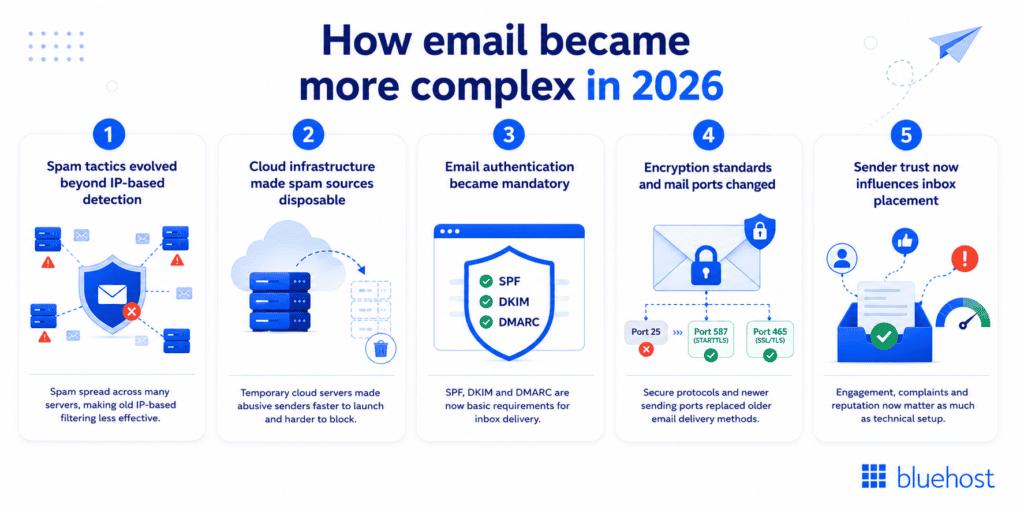
1. Affordable infrastructure and inconsistent authentication enforcement
For years, email providers relied on an IP address to determine whether a sender could be trusted. If an IP had a history of sending legitimate emails, its messages were more likely to reach the inbox.
That started to change as affordable hosting made it easier to create and discard mail servers. Spammers responded by distributing campaigns across multiple servers and IP addresses, a tactic known as snowshoe spam. Rather than sending large volumes of email from a single source, they spread messages across many systems, making spam much harder to detect and block.
At the same time, SPF and DKIM were widely implemented before they were consistently enforced. That gap allowed spoofing and reputation abuse to continue for years, until stricter authentication enforcement made older spam tactics less effective and pushed bad actors toward newer threats like spear phishing and smishing.
What this changed
- IP reputation alone was no longer enough to identify trusted senders.
- Email providers shifted more focus toward domain authentication and sender behavior.
- Businesses now need to establish trust through proper authentication and consistent sending practices.
- Stricter authentication enforcement made spoofing harder and changed how attackers approach email-based threats.
2. Cloud servers made spam sources harder to pin down
Platforms like Amazon Web Services and Google Cloud made it possible to spin up a server in seconds and shut it down just as fast. That flexibility is great for legitimate businesses, but it also gave spammers a way to launch a campaign from a temporary container and disappear before anyone could block the source.
For hosting providers, this meant reputation systems built around fixed IP addresses no longer worked the way they used to. A mail server’s history matters less when so much traffic now comes from infrastructure that didn’t exist yesterday and won’t exist tomorrow.
What this changed
- Spammers could quickly create and discard mail servers, making them harder to track.
- Blocking a single IP address became less effective because new servers could be created instantly.
- Hosting providers now need continuous monitoring to detect abuse and protect the reputation of their email infrastructure.
- A single compromised account or spam campaign can affect the reputation of shared infrastructure, impacting legitimate businesses using the same network.
3. Authentication is now a baseline requirement
Three technical standards, Sender Policy Framework (SPF), DomainKeys Identified Mail (DKIM) and Domain-based Message Authentication, Reporting and Conformance (DMARC), used to be something only larger companies bothered configuring. They work together to prove that an email genuinely came from the domain it claims to represent.
That changed in 2024 when Google and Yahoo began enforcing stricter authentication requirements for anyone sending bulk email to Gmail and Yahoo Mail addresses (Google, 2024). Messages lacking proper SPF, DKIM or DMARC records now risk being rejected outright or dropped straight into spam. It is now a baseline requirement for reaching a customer’s inbox at all.
What this changed
- Your domain needs correctly configured SPF, DKIM and DMARC records to improve email deliverability.
- Hosting providers now spend more time helping customers troubleshoot DNS and authentication issues.
- Even something as simple as a website contact form may stop delivering emails if authentication isn’t configured correctly.
4. Encryption became the standard, and the ports email runs on changed
As email threats grew more sophisticated, simply delivering a message was no longer enough. Email providers needed to ensure messages couldn’t be intercepted or altered in transit, which is why TLS became the industry standard for email transmission. Most major providers now expect encrypted connections as a baseline requirement, not an optional extra.
Alongside this, the port email travels on changed too. For decades, email routed through Port 25 by default. As spam abuse on that port became unmanageable, most ISPs and cloud providers blocked it entirely. Legitimate email now runs over Port 587 or Port 465, both of which require authentication and encryption to function.
For businesses still using cPanel email with older device configurations, the most common symptom is a multifunction printer, scanner or legacy application that used to send emails reliably and suddenly stops. Not because anything on your end broke, but because the underlying port it depended on is no longer open.
What this changed
- Encrypted email delivery is now an industry standard, not an optional feature.
- Hosting providers must maintain secure mail infrastructure that supports modern encryption protocols.
- Outdated or improperly configured mail servers are more likely to face delivery issues.
- Businesses using older hardware or software, including legacy cPanel email configurations, may need to update device settings to stay compatible with current standards.
5. Trust matters more than technical delivery
Meeting technical requirements is only part of the equation. Today, major email providers also consider whether recipients trust and interact with your emails.
For example, if your emails are frequently opened, replied to or marked as important, your domain builds a stronger sender reputation. On the other hand, if recipients ignore your emails or mark them as spam, your reputation can decline even if your SPF, DKIM and DMARC records are configured correctly.
Today, inbox placement depends on whether recipients trust and engage with your emails, not just whether the message passed technical checks
What this changed
- Hosting providers must help protect their email infrastructure while educating customers on responsible email practices.
- Passing authentication checks doesn’t guarantee inbox placement.
- Sender reputation is influenced by recipient engagement and spam complaints.
- Businesses need to follow email best practices to maintain strong deliverability.
Why managing cPanel email costs more than it used to?
Managing hosted email today involves responsibilities that simply didn’t exist a decade ago. Keeping a mail server reliable today involves far more than keeping the lights on.
- Monitoring server reputation continuously and responding quickly when it dips
- Preventing abuse from spam or compromised accounts before it damages shared infrastructure
- Running spam detection systems that adapt to new tactics like snowshoe campaigns
- Maintaining accurate DNS authentication records for every customer domain
- Keeping pace with security compliance standards set by major inbox providers
- Investing in infrastructure upgrades to support encryption and processing demands
- Supporting customers through authentication errors that most people never had to think about before
Each of these responsibilities requires genuine investment in infrastructure, monitoring systems, spam detection, security compliance and customer support. cPanel email was built and priced for a simpler internet. The environment it now operates in looks nothing like that. Maintaining reliable delivery today means running systems, configurations and safeguards that simply didn’t need to exist ten years ago.
Why managed business email makes sense today?
As business email has become more complex, many businesses are moving beyond basic hosting email to managed business email solutions. These services are designed to handle modern authentication, security and deliverability requirements, so businesses can focus on communicating with customers instead of managing technical configurations.
Bluehost offers two managed business email solutions to meet different business needs:
- Titan is ideal for small businesses looking for a professional email experience with productivity features like email scheduling, follow-up reminders, read receipts and templates, all within an easy-to-use interface.
- Google Workspace is designed for businesses that want professional email along with collaboration tools like Gmail, Google Drive, Docs, Meet and Calendar, making it easier for teams to work together.
Whether you’re running a solo business or managing a growing team, both solutions help simplify modern email management while supporting the security and reliability expected by today’s email providers.
Which email solution is right for your business?
Not every business needs the same email setup. A solo entrepreneur running a single-page website has very different needs than a growing team collaborating across departments. The table below breaks down which option tends to fit best depending on where your business stands.
| Business stage | Recommended email solution | Why it fits |
|---|---|---|
| Basic website or side project | cPanel email | Simple setup included with hosting, sufficient for light, low-volume use |
| Growing small business | Titan | Professional inbox experience with stronger deliverability support built in |
| Teams needing collaboration tools | Google Workspace | Combines email with shared calendars, documents and storage for teams working together |
As your business grows, it’s worth revisiting this choice rather than assuming your original setup will keep pace with new authentication and security demands.
Final thoughts
The internet didn’t make email easier over the past decade. It made email more secure, more accountable and more demanding of the infrastructure behind it. Snowshoe spam, temporary cloud servers, mandatory authentication and reputation-based trust systems all reflect a broader shift toward protecting inboxes from abuse and that shift is exactly why business email has become so complex for anyone still relying on outdated setups.
For business owners, that means reliable email now depends on much more than having a working mailbox. Choosing the right email solution helps you keep pace with modern security standards while keeping your messages actually reaching customers instead of disappearing into spam folders.
Get started with Bluehost today and explore our professional email plans to power your business with email built for how the internet works now.
FAQs
This usually happens when authentication records like SPF, DKIM or DMARC are missing or misconfigured. Also, when your sending domain hasn’t built enough reputation with major providers like Gmail or Yahoo. Reviewing your DNS authentication settings is typically the first step toward fixing it.
Yes. Since 2024, Gmail and Yahoo enforce these standards for any domain sending bulk email, regardless of business size (Google, 2024). Without them, your messages face a much higher risk of rejection or spam placement.
It depends on your needs beyond email. If you only need a professional inbox, Titan or cPanel email may be enough. If you also want document collaboration, cloud storage and productivity tools in one place, Google Workspace adds noticeable value even for solo operators.
Most migrations allow you to import existing mailboxes, though the process varies depending on your current setup and message volume. Checking with your hosting provider before switching helps you avoid any gaps in access to older messages.
A working mail server only proves you can technically send a message. Reputation determines whether major inbox providers actually trust and deliver that message, which is why two technically valid emails can have very different outcomes depending on the sender’s history.

Write A Comment