
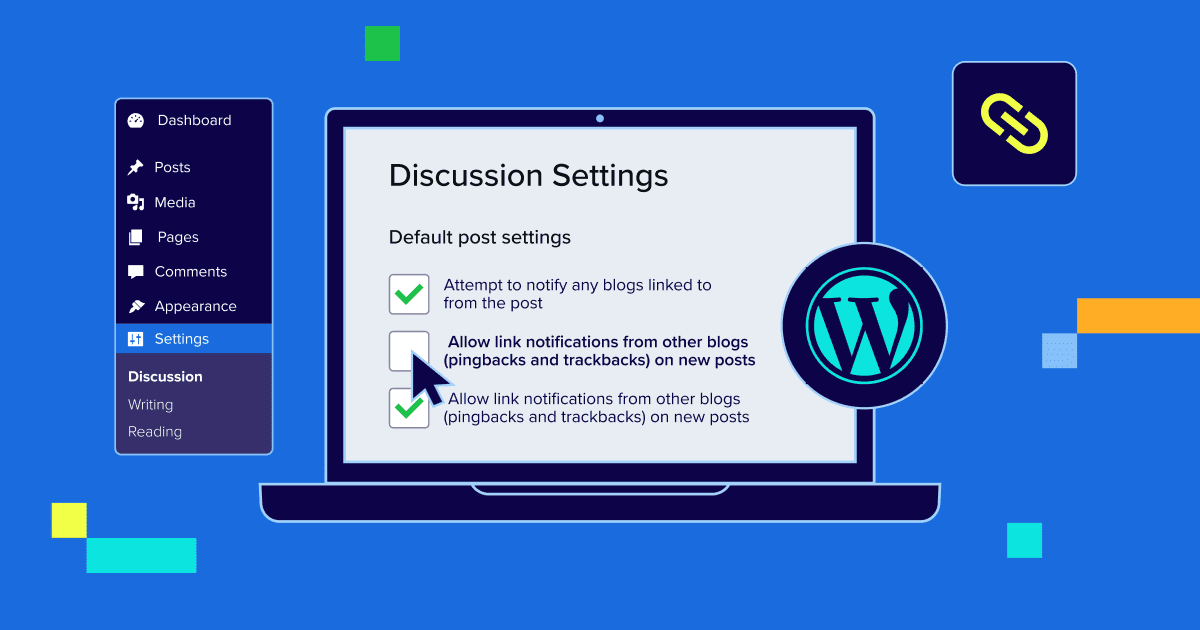


Key highlights
- Understand what WordPress pingbacks and trackbacks are and how they work.
- Compare pingbacks vs trackbacks to see key differences in setup and usage.
- Evaluate whether WordPress pingbacks and trackbacks are still relevant in 2026.
- Weigh the real-world pros and cons of using pingbacks and trackbacks.
- Decide between advanced management and complete disable based on your site goals.
- Discover how pingbacks and trackbacks affect SEO, security and performance.
- Get practical recommendations from Bluehost for managing these features.
WordPress pingbacks and trackbacks were once a simple way to see who was linking to your content. For early bloggers, these help surface mentions across the web and create a sense of connection between sites. Today, those same features often raise a different question. Are they still useful or just another source of noise?
Many website owners now see WordPress pingbacks and trackbacks filling dashboards with spam notifications or triggering concerns around performance and security. As WordPress has matured and better tools for tracking links have emerged, the role of WordPress pingbacks and WordPress trackbacks has started to feel less clear.
In this guide, we’ll look at how these features work, weigh their real-world pros and cons and help you decide whether to disable WordPress trackbacks or manage them strategically based on your website’s goals in 2026.
What are pingbacks vs what are trackbacks?
WordPress pingbacks and trackbacks are notification systems designed to alert you when another website links to your content. While they aim to solve the same problem, they function very differently and that difference plays a big role in whether they are still useful today.
Pingbacks vs trackbacks in WordPress
| Feature | WordPress pingbacks | WordPress trackbacks |
|---|---|---|
| How they work | Automatically generated when one WordPress site links to another | Manually sent by the linking website |
| Setup required | No manual setup from the linking site | Requires the author to send a trackback |
| Platform dependency | Mostly works between WordPress sites | Can work across different platforms |
| Spam risk | High due to automation and bot abuse | High due to manual spam submissions |
| Visibility in WordPress | Appears in the dashboard as a pingback entry | Appears in the dashboard as a trackback entry |
| Modern usage | Still enabled by default on many sites but rarely monitored | Largely outdated and rarely used |
| Common action today | Often disabled or restricted | Commonly disabled entirely |
Understanding how they work is only the first step. The more important question is whether they still serve a real purpose for modern websites.
That brings us to the next section, where we look at whether WordPress pingbacks and trackbacks are still relevant in 2026.
Are WordPress pingbacks and trackbacks still relevant for websites in 2026?
The relevance of WordPress pingbacks and trackbacks has declined as modern websites rely on better ways to discover links and mentions. What once helped bloggers track references is now rarely used in everyday site management, with even WordPress moving away from manual trackback features due to low adoption.
In practice, most pingbacks and trackbacks received today are spam rather than meaningful link notifications. This creates extra moderation work without delivering real value.
With backlink tracking now handled by analytics tools and content discovery driven by search engines and social platforms, WordPress pingbacks and trackbacks offer limited benefits for most websites in 2026. They are typically only useful for niche blogging communities that still rely on traditional cross-linking.
What are the pros and cons of using WordPress pingbacks and trackbacks?
WordPress pingbacks and trackbacks can still serve a purpose in limited scenarios, but they also introduce clear drawbacks for most modern websites.
Pros of using WordPress pingbacks and trackbacks are:
- Notifies you when another website links to your content.
- Helps surface connections between related blog posts.
- Useful in niche blogging communities that actively cross-link content.
Cons of using WordPress pingbacks and trackbacks are:
- Are frequently abused by spam bots and low-quality sites.
- Adds moderation overhead with little real value.
- Clutters the WordPress dashboard and database.
- Offers minimal SEO benefit compared to modern backlink tools.
- Creates unnecessary server requests that can impact performance.
For most site owners, the downsides outweigh the benefits. This is why many choose to disable WordPress trackbacks and pingbacks rather than manage them manually. Let’s see how you can disable them directly through WordPress.
How to disable WordPress Trackbacks and Pingbacks?
Disabling WordPress pingbacks and trackbacks can be done directly from your dashboard and does not require any plugins.
Disable pingbacks and trackbacks for new posts
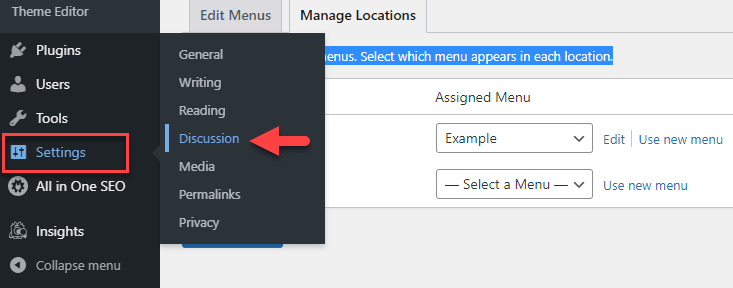
1.Log in to your WordPress dashboard. In the main menu, scroll over Settings, then select Discussion.
2. Under Default post settings, uncheck “Allow link notifications from other blogs (pingbacks and trackbacks) on new posts.”

3. Scroll to the bottom of the page and click Save Changes.
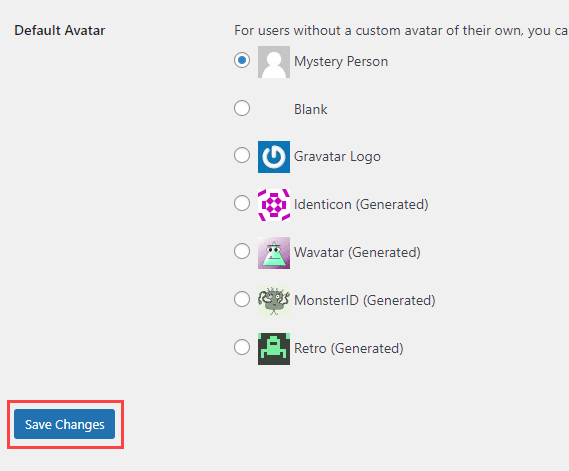
This will disable Trackbacks on all posts and pages you create from now on. However, any posts or pages you have already created may still have Trackbacks enabled.
Disable pingbacks and trackbacks on existing posts
1. Go to All Posts under Posts
2. Select the posts you want to update. To disable trackbacks on a previously created post or page, go to the editor for the post/page.
3. Once you open the post/page. From the right-hand side navigation, scroll down and navigate through Discussion and click the drop-down arrow.
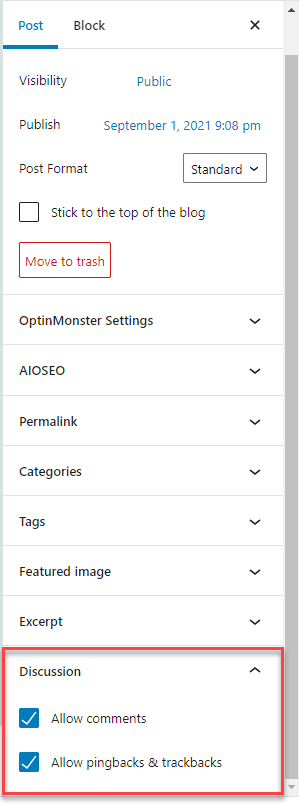
4. Uncheck the box to Allow trackbacks and pingbacks on this page.
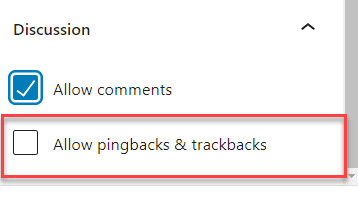
5. Click Update on the post/page to save your changes.

Once disabled, your site will no longer accept new WordPress pingbacks and trackbacks, helping reduce spam and unnecessary site activity. But disabling them is only part of the decision. The bigger question is whether you should turn them off completely or manage them more effectively. Let’s understand.
Managing WordPress pingbacks and trackbacks: Advanced control vs complete disable
Not every website needs to fully disable WordPress pingbacks and trackbacks. In some cases, smarter management can offer a middle ground between usefulness and control.
When to choose advanced management for WordPress pingbacks and trackbacks
Advanced management works best if you still want visibility into who links to your content.
You can choose to:
- Manually approve only legitimate pingbacks and trackbacks.
- Block self-pingbacks from your own internal links.
- Use security rules or plugins to filter spam requests.
- Hide pingbacks from public display while keeping them for reference.
This approach suits niche blogs and industry sites where genuine cross-linking still happens.
When Disabling WordPress Pingbacks and Trackbacks Is the Best Option
For most modern websites, disabling WordPress trackbacks and pingbacks entirely is the simpler and safer choice.
It makes sense to disable them if:
- You receive mostly spam pingbacks and trackbacks.
- You already track backlinks using SEO tools.
- You want to reduce server load and admin clutter.
- You prefer a low-maintenance website setup.
Bluehost’s recommended approach to managing WordPress pingbacks and trackbacks
For most websites, we recommend reviewing WordPress pingbacks and trackbacks based on your site’s goals and workflow. These features can help you stay aware of backlinks and site connections.
If you want a streamlined setup, disabling them is a simple way to manage notifications while keeping your site organized. On our WordPress hosting, you can still monitor backlinks using built-in tools, Google Search Console or SEO platforms.
Advanced management may suit niche blogs that actively cross-link content and want to monitor pingbacks and trackbacks manually. For other websites, adjusting settings can help maintain a clean and efficient WordPress environment on Bluehost.
Want a smoother WordPress experience with fewer spam headaches?
Get started with our optimized WordPress hosting and let us handle performance, security and reliability for you.
How WordPress pingbacks and trackbacks affect SEO, security and website performance
WordPress pingbacks and trackbacks can impact your website in several ways. Here’s a quick overview:
| Aspect | Impact of WordPress pingbacks and trackbacks |
|---|---|
| SEO | Rarely provide meaningful SEO value, often low-quality or spammy, can clutter your site and send weak trust signals |
| Security | Use XML-RPC which can be exploited for spam, brute-force attacks or malicious requests |
| Performance | Each incoming pingback creates a server request, which can increase load on busy sites and slow performance |
Overall, the risks to SEO, security and performance also suggest disabling WordPress pingbacks and trackbacks is the safer choice for most websites.
Final thoughts
WordPress pingbacks and trackbacks are features that notify you when other websites link to your content. How you use them depends on your website’s needs, workflow and goals. Some sites may monitor them for backlink awareness, while others adjust settings based on site activity and preferences. Understanding how these features work helps you make informed decisions and maintain a clean, organized WordPress environment.
At Bluehost, we make it easy to manage your WordPress site with optimized performance, security and reliability. Whether you choose to monitor pingbacks and trackbacks or adjust settings for your workflow, our hosting solutions help you focus on creating great content without worrying about site management.
Get started with Bluehost WordPress hosting today and streamline your site effortlessly.
FAQs
What are WordPress pingbacks and trackbacks?
Pingbacks and trackbacks notify you when another website links to your content. Pingbacks are automatic, while trackbacks must be sent manually.
Should I keep WordPress pingbacks and trackbacks enabled?
It depends on your website. Niche blogs may monitor them for backlink awareness, while most sites can manage or disable them to reduce spam and clutter.
Do pingbacks and trackbacks affect SEO?
Pingbacks and trackbacks offer minimal direct SEO value. Spammy notifications can appear in dashboards, but do not improve search rankings.
Can pingbacks and trackbacks create security risks?
Yes. Pingbacks use XML-RPC, which can be targeted for spam or attacks if not properly monitored or managed.
How do I disable WordPress pingbacks and trackbacks?
Go to Settings and select Discussion in the WordPress dashboard. Uncheck the pingbacks option for new posts or use bulk edit to update existing posts.
How does Bluehost help manage pingbacks and trackbacks?
With Bluehost WordPress hosting, you get optimized performance, security and tools to manage pingbacks and trackbacks efficiently while focusing on your content.


Write A Comment