


On December 2nd, WordPress made history in San Francisco. For the first time ever, a major version of WordPress was released to the world live on stage during State of the Word address when WordPress 6.9 “Gene” was published and announced in real-time.
WordPress co-founder Matt Mullenweg delivered his annual keynote alongside Mary Hubbard, who recently completed her first year as the Executive Director of the WordPress project.
Hubbard framed 6.9 as a release about polish and collaboration, not flashy redesigns. “It’s fast, it’s polished and it’s built for collaboration,” she said during the keynote. “The kind of progress you can feel when you publish, not just read it from a changelog.”
The message was clear: WordPress isn’t just maintaining its position as the web’s dominant platform. It’s accelerating.
Named after jazz pianist Gene Harris, the release introduced new collaboration tools, additions and refinements to the block editor and the foundational technical APIs that empower AI agents to work directly with WordPress without leaving the dashboard. Before leaving the stage, Matt shared an amazing update that over 700,000 sites had already updated to 6.9.
Here’s what Bluehost customers need to know about what shipped, what’s coming and why the platform you’re building on is stronger than ever.
Watch the full keynote:
You can watch the replay State of the Word 2025 keynote, including the live WordPress 6.9 release and Q&A from the audience, on the WordPress Project’s YouTube channel.
What’s included in WordPress 6.9?
So what are the new features that you can look for in your site after updating to 6.9?
Notes: Google docs-style feedback in the editor
One of the standout features of the release is Notes. You can now leave comments directly on individual blocks within the WordPress editor. Team members can reply in threads, resolve conversations and approve changes all without leaving the post editor.
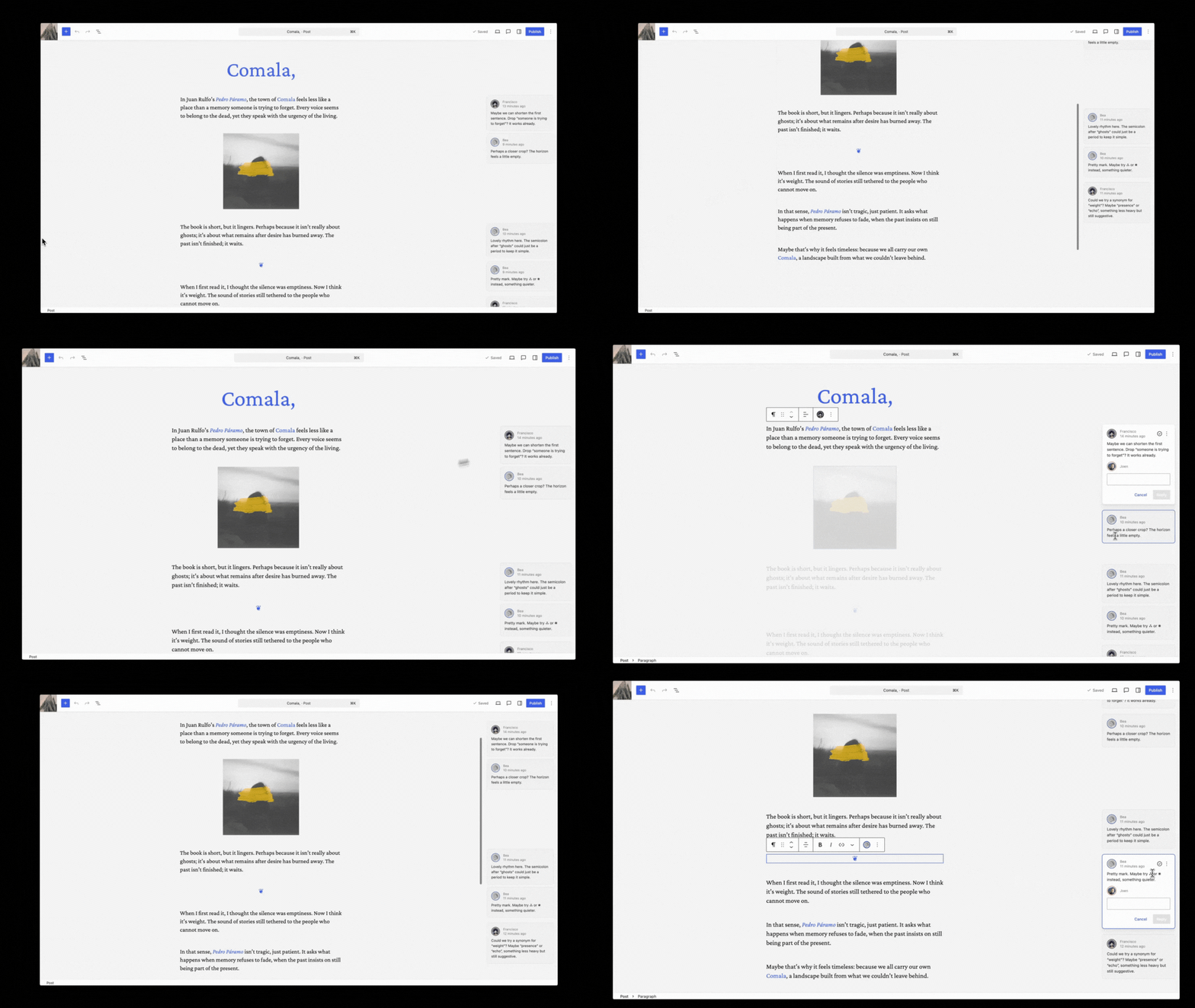
What this means for you: No more emailing Word documents back and forth or losing feedback in Slack threads. Content reviews, design tweaks and stakeholder approvals can now happen in one place, no matter what your editorial workflow looks like. If you manage a team or work with clients, this alone justifies the update.
New core blocks: Accordion, Math, Time to Read
WordPress 6.9 also added several utility blocks directly to core:
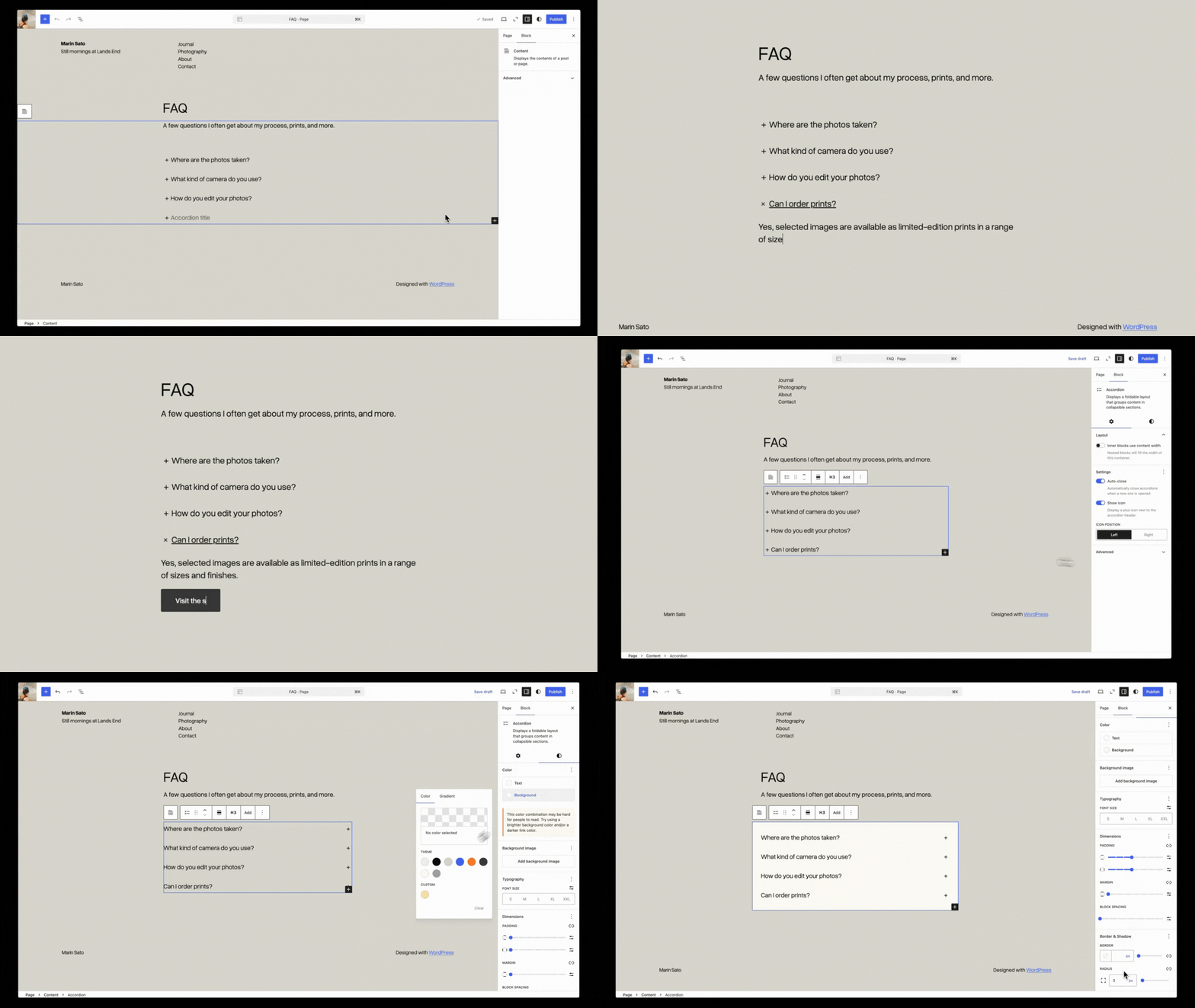
- Accordion Block: useful for collapsible FAQs and documentation
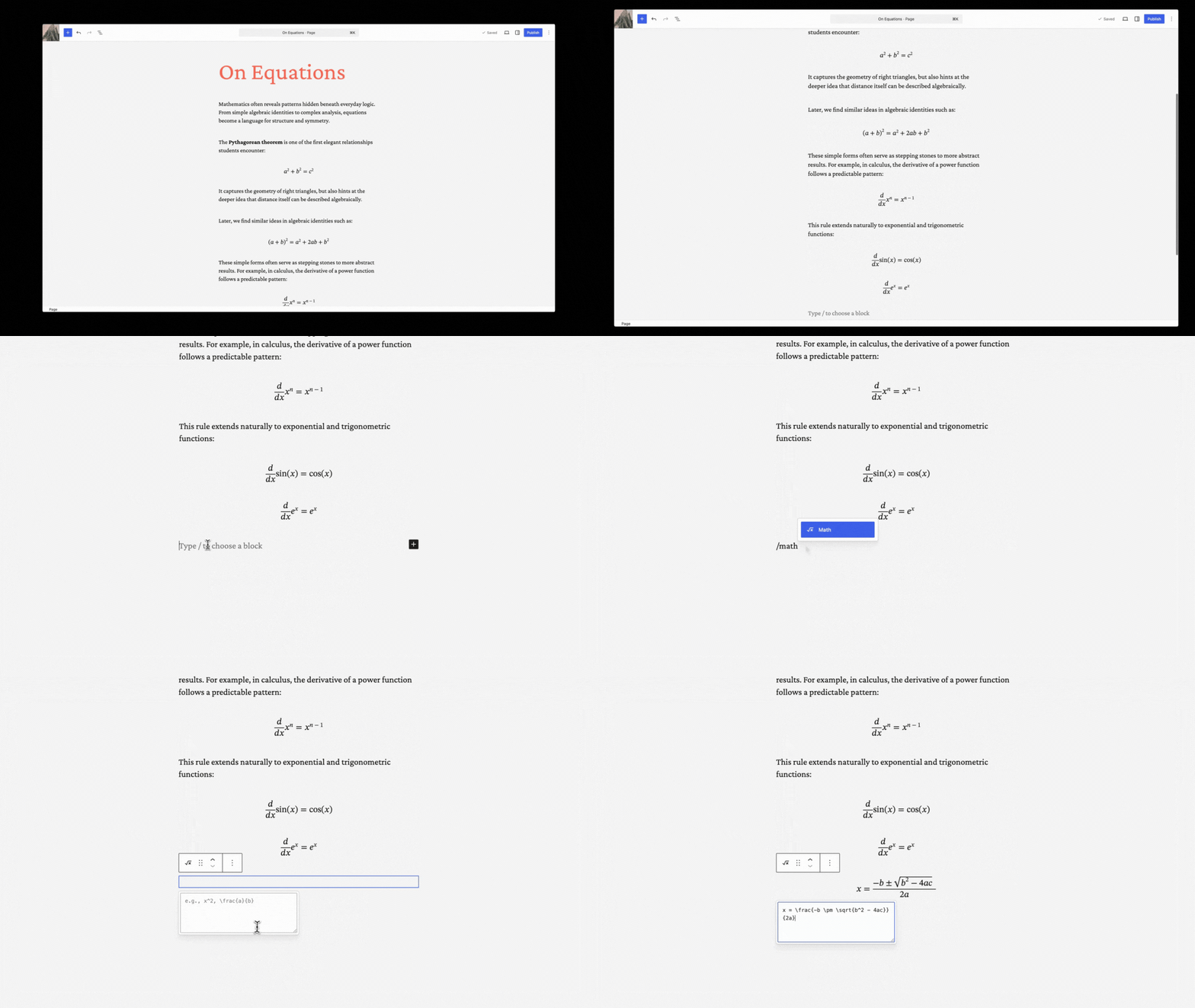
- Math Block: renders text in mathematical notation
- Post Time to Read Block: sets the expectation by showing site visitors the estimated reading time. Alternatively, a word count can be displayed.
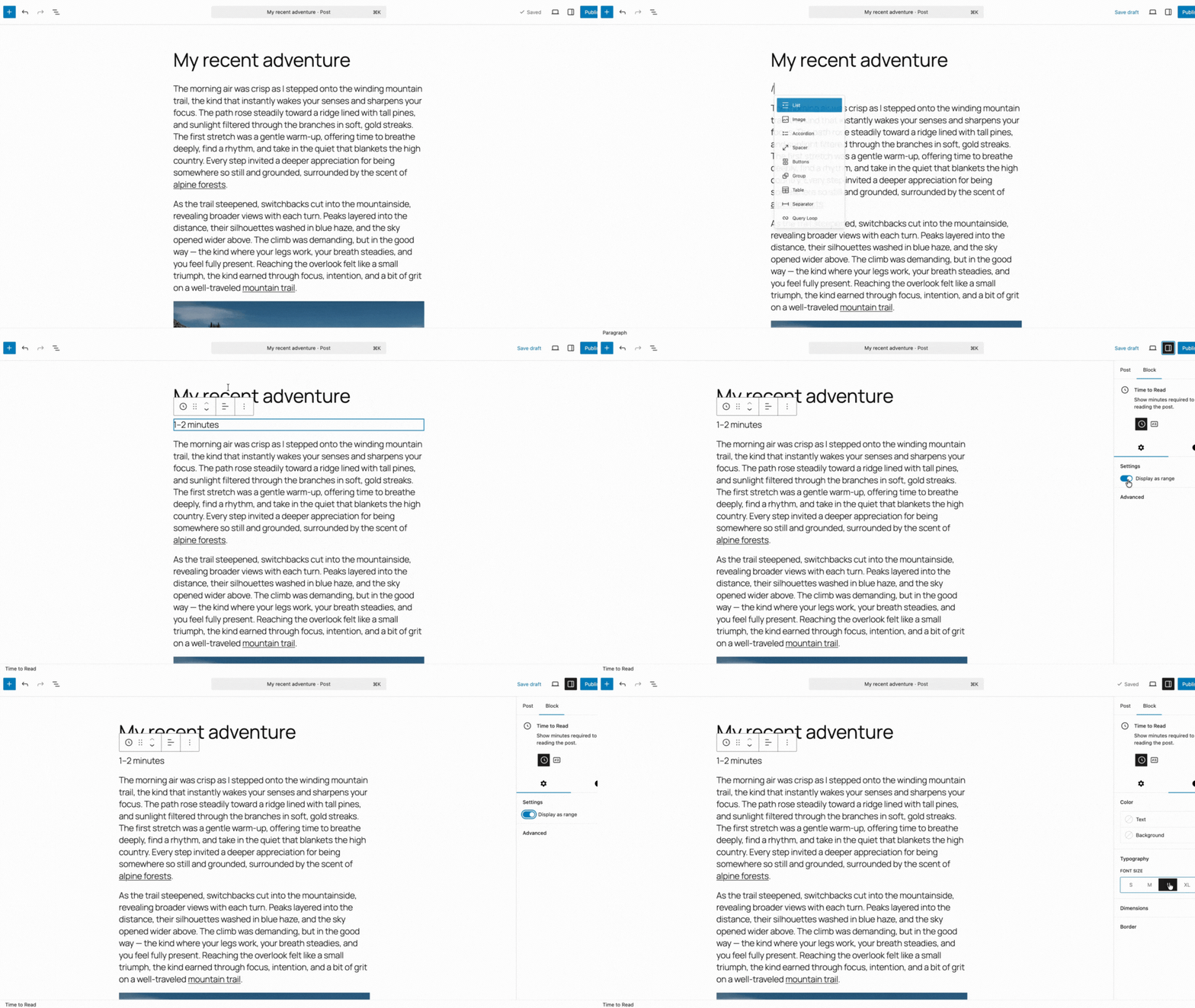
- Other blocks for displaying term names and term counts have also been added.
Now that they’re built-in to WordPress by default, a plugin is no longer needed for displaying this information within your content.
Hide blocks without deleting them
A new “Hide block” toggle lets you keep content in the editor but remove it from the published page. Perfect for seasonal sections or staging content for future campaigns without needing to delete anything.
Smoother drag-and-drop and command palette everywhere
The editor’s drag-and-drop behavior got tighter. Blocks move with clearer visual feedback, and insertion points are easier to predict when rearranging complex pages.
The Command Palette (Ctrl+K / Cmd+K) now works across the entire WordPress dashboard – not just the editor. Type “add post,” “view users” or any common action from anywhere in wp-admin. Power users will feel the speed boost immediately.
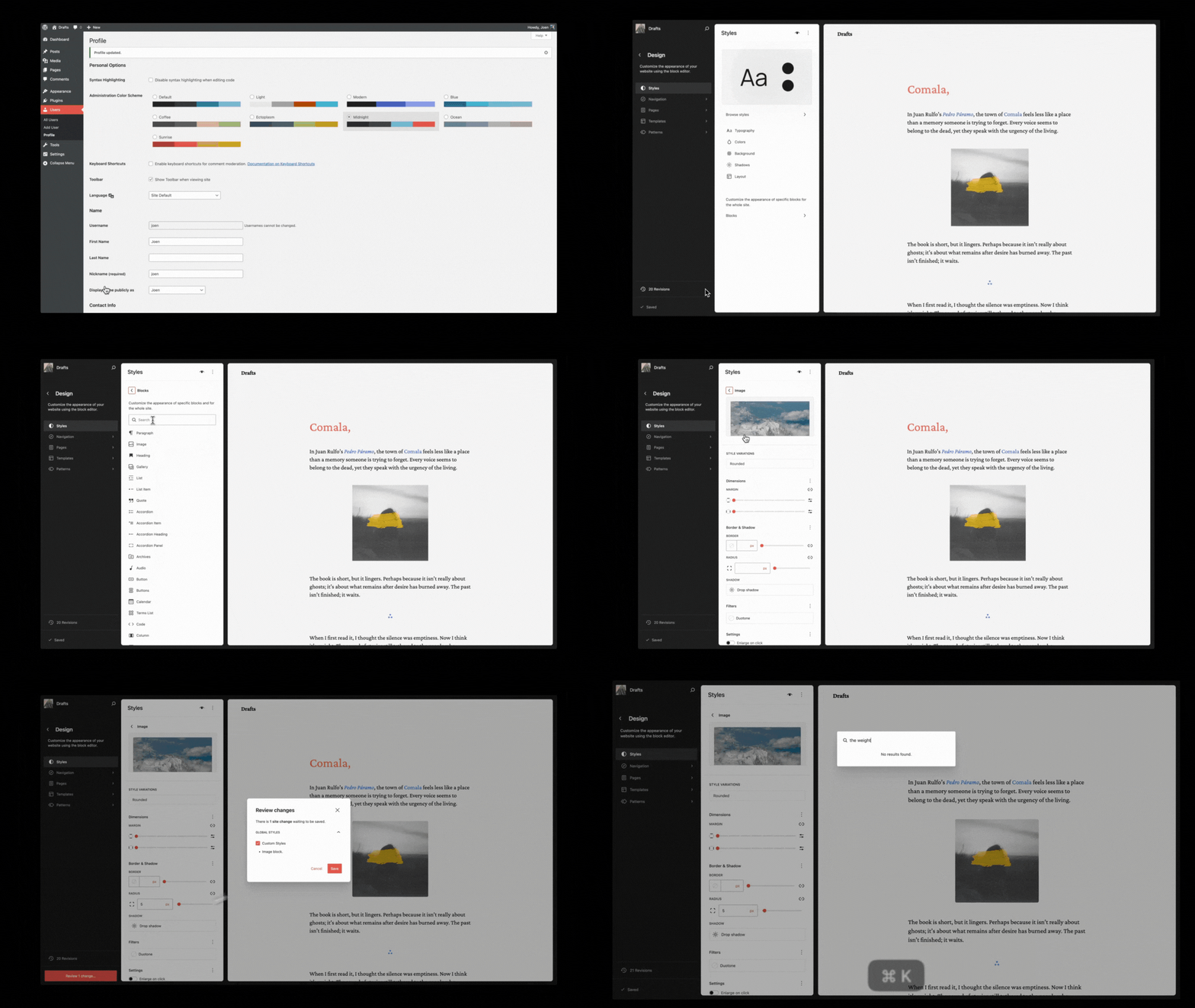
For a full breakdown of every technical change, check out our guide for everything you need to know about the WordPress 6.9 update.
The AI push: Making AI useful, not just hype
During the keynote, Matt introduced the WordPress AI team, a dedicated group formed earlier this year to build AI tools that support site builders, not replace them. Their first major work shipped in 6.9: the Abilities API.
What’s different about this AI approach?
Most “AI for WordPress” plugins just generate text or respond to a prompt. The AI team’s work goes deeper: they’re building a system where AI agents can discover what your site can do and execute tasks safely.
Matt and James LaPage explained it this way: Instead of an AI tool scraping your screen or guessing how plugins work, the Abilities API lets plugins declare their capabilities in a standardized format. Then AI assistants, whether that’s ChatGPT, Claude or a local model, can call those functions directly.
Real-world example: James LaPage described a scenario where an agent could execute a workflow: “When an email happens or when an order happens in WooCommerce, I’m going to send an email.” The agent strings these “abilities” together to automate the task inside WordPress.
The team also introduced the MCP Adapter, which connects WordPress to the Model Context Protocol. That’s the same standard tools like Claude Desktop use to talk to external systems.
Translation: AI tools can now work with WordPress sites as easily as they work with code repositories or cloud storage.
What this means for you: The “Wild West” era of conflicting AI plugins is ending. WordPress is standardizing AI integration at the platform level, so automation actually works and doesn’t break your site.
Plugins: Faster reviews, safer updates
The next portion of the event highlighted the momentum of the plugin team over the past year, specifically focusing on two major areas: improving the plugin submission and update processes.
Plugin directory improvements
While WordPress comes with many features and works great out of the box for some, most site owners rely on plugins to add functionality to their site. Behind the wordpress.org Plugin Directory is a team of contributors helping to manage and moderate the directory. Matt took some time to mention some notable changes related to this team’s work.
Faster plugin reviews & new plugin scanning requirements
By using the Plugin Check Plugin, the team was able to catch up on the backlog of plugin submissions. The plugin runs when a new plugin is submitted and flags potentially violations of the plugin directory’s rules, incompatibilities with WordPress and even possible security vulnerabilities. But historically, these scans have only been run once when the plugin is first submitted.
With the help of AI, the team has brought the wait time for review down to 7 business days. They’ve also added a passing plugin check scan as a requirement for all plugin updates pushed to the wordpress.org Plugin Directory, not just the initial one.
This not only shows that the ecosystem is stronger than ever with more plugins are being submitted to the directory than ever before, but also helps to raise the bar of quality for all of them even after their initial release.
24-hour safety window for auto-updates
WordPress.org has also introduced phased plugin releases. Updates now roll out to a small subset of sites requesting an update in the first 24 hours instead of every site all at once. This allows for a period of feedback to spot problems early and before every site is updated.
What this means for you: Your site is far less likely to break from a mistake in a plugin update. The ecosystem is expanding, but the safeguards are tightening at the same time.
Education: Building the next generation
Matt spent significant time on Campus Connect and WordPress Credits, two programs bringing WordPress training directly to universities.
Campus Connect runs hands-on workshops globally, with specific successes highlighted at Universidad Fidélitas in Costa Rica. Students build real projects with mentorship from experienced contributors.
WordPress Credits is a Foundation-backed internship program where computer science students fulfill academic requirements by contributing to WordPress core, documentation, design and community teams.
Why this matters: Agencies and SMBs will have access to a steady pipeline of early-career talent who already know Git workflows, block themes and modern WordPress development before they graduate.
Playground: Instant WordPress in your browser
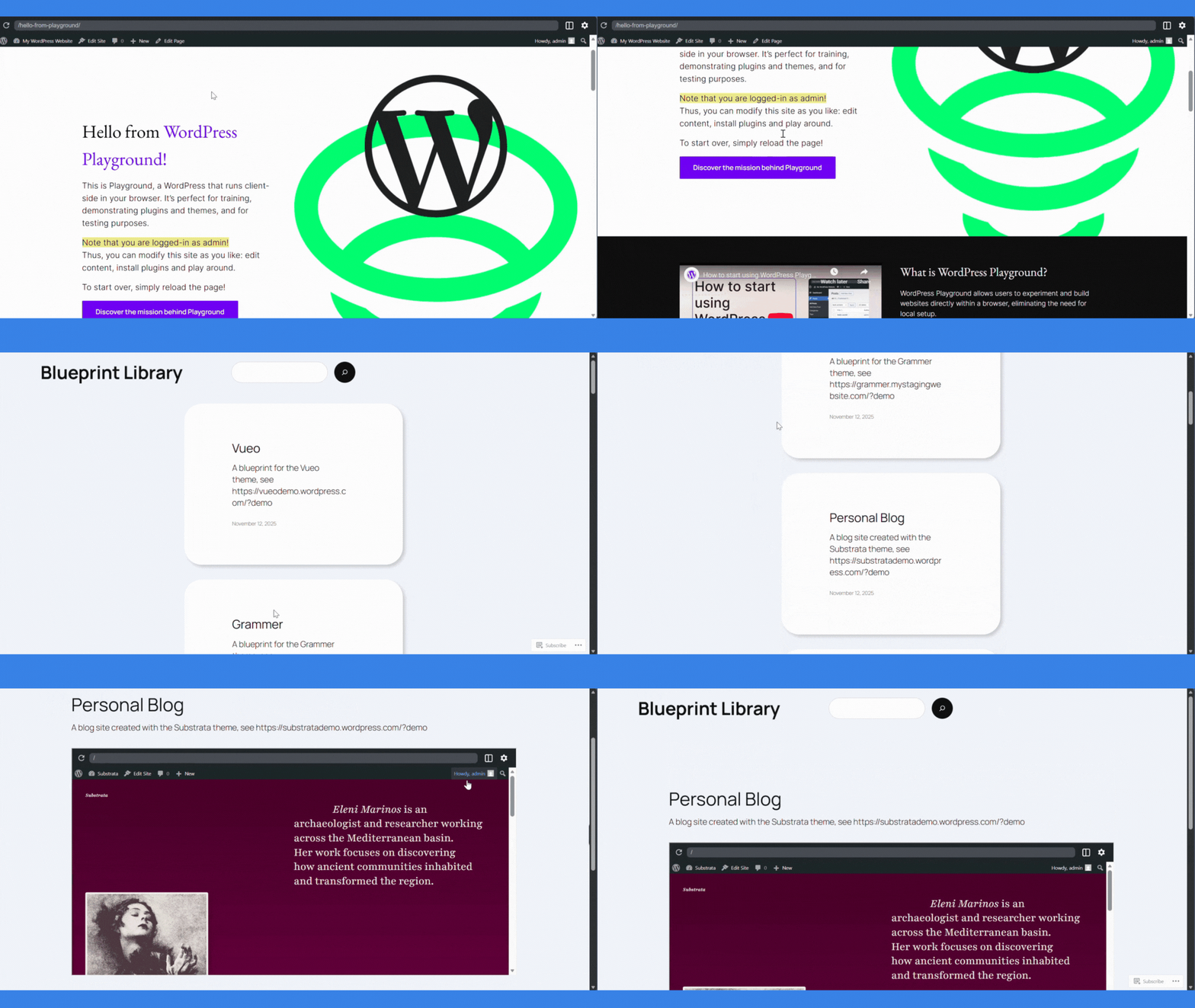
Matt also showcased WordPress Playground, a full WordPress environment that runs entirely in the browser, powered by WebAssembly. No hosting, no local PHP, no setup.
Recent updates let you save sessions, use a new file browser to edit files directly and run terminal commands directly in the browser. Instructors use it for workshops. Implementers use it to test plugins without risking production sites. Product teams use it to build interactive demos.
Blueprints take this further: you can save “recipes” that combine themes, plugins, content and settings into a single starting point.
- Agencies can create standard starter stacks.
- Educators can ensure that every student starts from the same environment.
- Product teams can drop customers straight into a demo store or membership site.
Looking ahead: WordPress 7.0 and 2026
Matt closed the keynote by teasing WordPress 7.0, expected to be released in early next year (2026). While he didn’t announce a specific date, the roadmap was clear.
Real-time collaboration
WordPress 6.9 brought asynchronous collaboration with Notes. WordPress 7.0 will introduce real-time multiplayer editing: Google Docs-style concurrent editing with live presence indicators and conflict resolution.
The goal: finish Gutenberg Phase 3 (Collaboration) and turn the WordPress editor into a true team workspace.
Workflows API: Chaining actions together
After introducing the Abilities API, the next step is to make use of these new abilities to unlock new potential workflows and more powerful ways to manage your site. These workflows can be triggered from the Command Palette, UI buttons or even external services such as AI agents.
Data liberation
WordPress continues to prioritize Data Liberation: making it easier to import content from proprietary platforms and export data out of WordPress in useful formats. The aim is to differentiate from SaaS walled gardens by ensuring you own your content, not just rent access to it.
Why does this matter for your site?
State of the Word 2025 reinforced what Bluehost customers already know: WordPress isn’t going anywhere and the community is as strong as ever.
With over 43% of all websites and 60% of the CMS using the software, WordPress holds steady despite billions in ad spend from proprietary competitors. The platform is shipping faster, listening better and building teams, not just solo publishers.
Mary framed it this way during his opening: “WordPress doesn’t run on servers.” It runs on people who show up. “The community showed up in 2025, and the results are clear: faster plugin reviews, collaboration tools in core, AI that works safely with WordPress and a roadmap that competes with closed platforms on ease of use while retaining open-source freedom.
What should you do next?
- Update to WordPress 6.9 (if you haven’t already Bluehost handles this automatically for many plans).
- Try Notes on your next high-value page if you work with a team.
- Explore the new Accordion and Stretchy Text blocks to reduce plugin bloat.
- Stay tuned for deeper dives into AI abilities, workflows and MCP integrations as they move from prototypes to everyday tools.
WordPress 7.0 is coming in 2026. Based on what shipped in 2025, it’s going to be worth the wait.
Final thoughts
State of the Word 2025 wasn’t just another annual recap – it was a statement of intent. WordPress is no longer content to be “just a CMS.” With 6.9 shipping collaboration tools, security safeguards and AI foundations all at once, the message is unmistakable: the platform is evolving faster than its competitors can keep up.
Your site is built on a platform that’s accelerating, not coasting. And that matters more in 2026 than it ever has.
Ready to get the most out of WordPress 6.9? Explore Bluehost WordPress hosting plans or upgrade your current plan to take full advantage of what WordPress 6.9 has to offer.

Write A Comment