



Key highlights
- Learn how Yoast SEO and Google Search Console serve different but complementary roles in your WordPress SEO strategy, so you can put both tools to work at the same time.
- Understand how to use Google Search Console for SEO to monitor your site’s search performance, resolve indexing issues and uncover keyword opportunities you may be missing.
- Know the core differences between the Yoast SEO plugin for WordPress and Google Search Console so you can choose the right tool for each stage of your optimization workflow.
- Uncover whether Yoast SEO Premium is worth it by weighing its advanced features against the free version and other best SEO tools for WordPress available today.
- Explore Yoast SEO plugin pricing tiers and find out which plan aligns with your site’s goals and budget before you commit to a purchase.
If you are frustrated by stagnant website traffic despite checking your stats daily, you might be confusing SEO measurement with active optimization. When comparing Yoast vs Google Search Console, the core difference is simple. Google Search Console (GSC) is a free monitoring tool provided by Google to track your search performance, while Yoast is a WordPress plugin used to actively optimize your on-page content.
Think of GSC as your website’s diagnostic monitor. Learning how to use Google Search Console for SEO means analyzing valuable data like keyword impressions, click-through rates and indexing errors. It tells you exactly how search engines view your site but it cannot rewrite your content or fix technical glitches for you. It simply provides the vital roadmap showing where you need to improve to capture more organic traffic.
The Yoast SEO plugin WordPress operates as the engine that drives those improvements. Living directly inside your website editor, it provides real-time feedback on readability, keyword density and meta tags before you hit publish. As your site scales, you might find Yoast SEO Premium worth it for advanced tools like redirect managers and multiple focus keyphrases. Comparing these platforms is not about choosing a winner. To build with confidence, you need both of these best SEO tools for WordPress to execute your strategy and measure your results.
The power duo: Yoast SEO explained
When you sit down to write, you want to know your content will reach your audience. That is exactly why the Yoast SEO plugin WordPress users rely on has built such a stellar reputation. It takes the guesswork out of SEO—Search Engine Optimization by acting as a real-time guide while you draft. Instead of hoping for the best, you get immediate feedback on keyword placement and content structure. This empowers you to build with confidence and ensures your website communicates clearly with search engines.
Yoast evaluates your text using a simple traffic light system that highlights areas for improvement before you ever hit publish. It analyzes sentence length, passive voice and overall readability to guarantee your message remains engaging. By handling complex technical requirements behind the scenes, it frees you to focus on creating. This intuitive feedback loop cements Yoast as one of the best SEO tools for WordPress.
What exactly are WordPress SEO plugins?
WordPress SEO plugins are specialized add-ons that act as your personal optimization assistant directly inside your website editor. They translate complex search engine requirements into simple, actionable steps so you can improve your site’s visibility without knowing how to write a single line of code.
While WordPress offers a solid foundation out of the box, it lacks the precise control needed to compete in crowded search results. The best SEO tools for WordPress bridge this gap by actively evaluating your content as you write. They help you craft perfect meta descriptions, structure your headers and ensure your keywords are placed naturally. By handling the technical heavy lifting behind the scenes, these plugins empower you to focus on creating great content that your audience actually wants to read.
How to use Google Search Console for beginners
Wondering why your website traffic is stuck? Before you can grow your audience, you need to ensure search engines actually see your pages. Learning how to use Google Search Console for SEO starts with a quick setup. This is an easy process with no coding necessary.
- Sign in: Use your existing Google account to log into the platform.
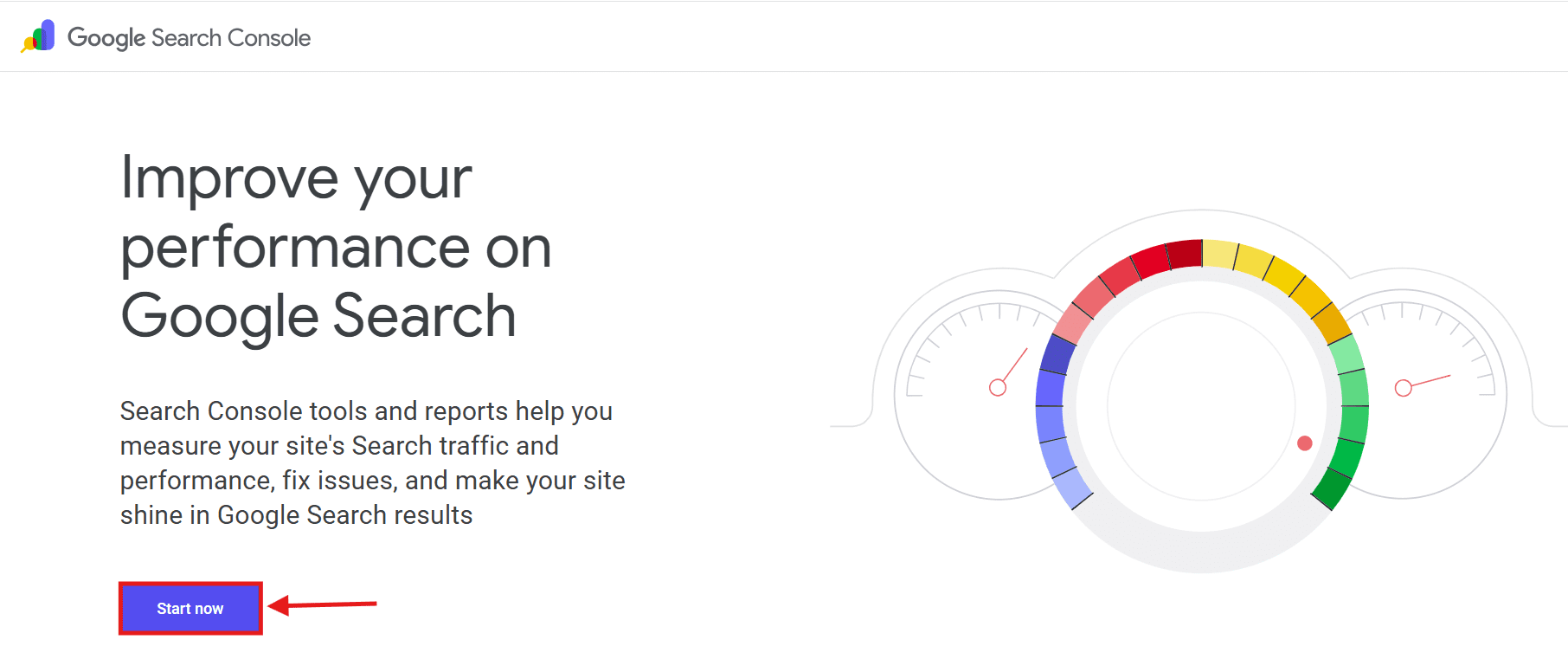
2. Add your property: Enter your exact website URL to create a new workspace.
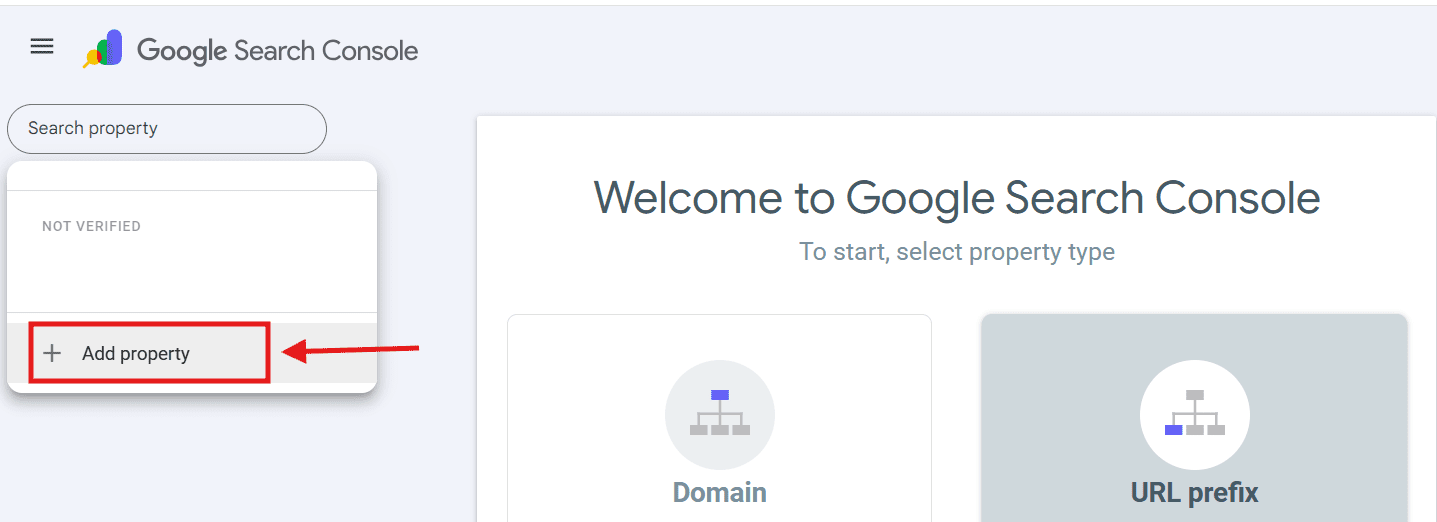
3. Verify ownership: Confirm you own the site using one of the best SEO tools for WordPress to handle verification instantly.
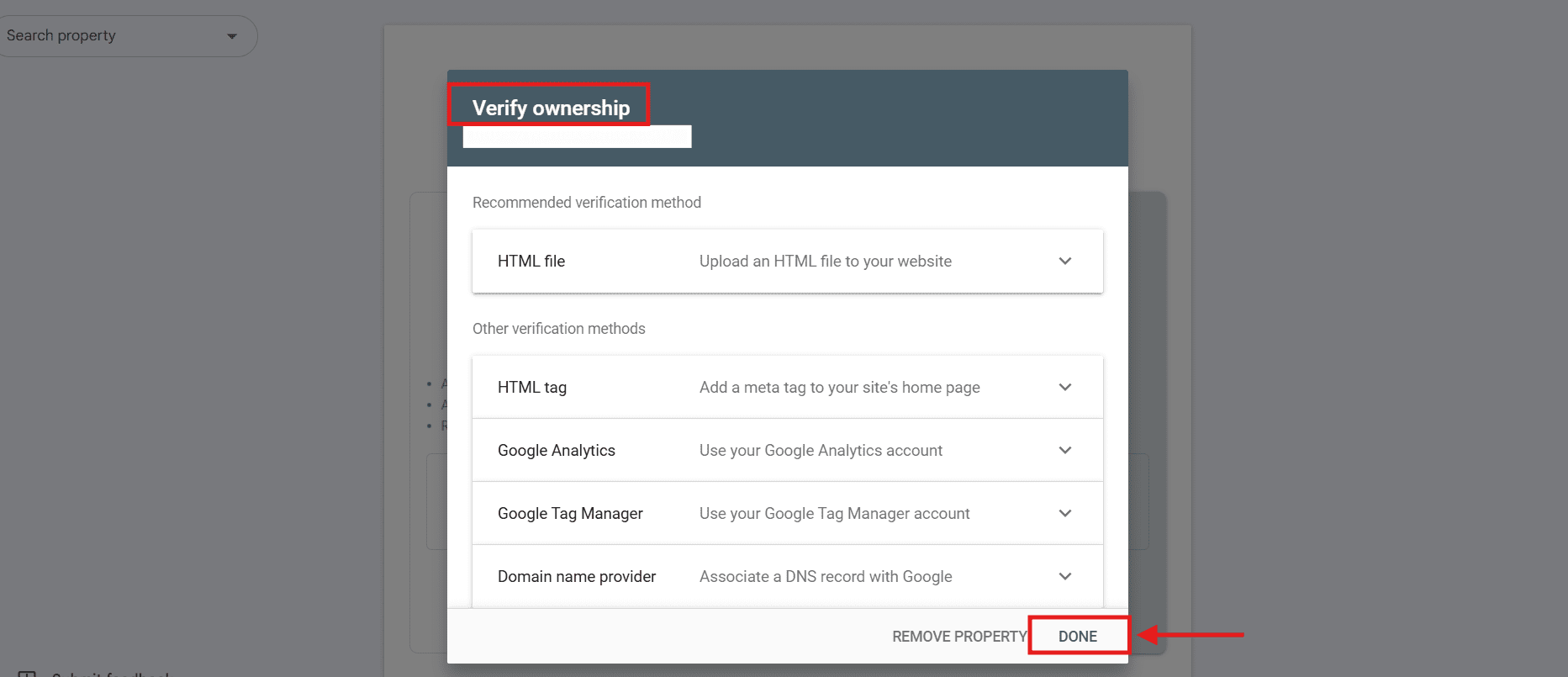
Once connected, you unlock vital performance data. Tracking your site indexing and keyword impressions matters for growth: it reveals exactly what your audience searches for, identifies hidden errors and highlights which pages need improvement to rank higher.
Why Yoast SEO and Google Search Console are better together
When looking at Yoast vs Google Search Console, you will quickly realize that combining them covers the entire SEO lifecycle. Yoast handles on-page creation and optimization while Google Search Console provides the essential measurement and performance tracking you need.
Using these platforms together creates a powerful feedback loop for your website. Through the Yoast SEO plugin WordPress integration, you can easily optimize your content before publishing. From there, learning how to use Google Search Console for SEO allows you to monitor exactly how those pages perform in real search results. Spotting errors early means faster issue resolution, which translates directly to happier customers and higher rankings.
If your tracking data reveals a drop in traffic, you can jump right back into your dashboard to make targeted improvements. When wondering is Yoast SEO Premium worth it, you will find that features like redirect managers and advanced keyword tracking make updating underperforming pages incredibly simple. You do not have to pick just one platform. By pairing one of the best SEO tools for WordPress with Google’s direct performance insights, you build a resilient strategy that drives continuous growth.
Integrating Yoast SEO and GSC: Practical steps
When learning how to use Google Search Console for SEO, connecting it to the Yoast SEO plugin for WordPress is your first crucial step. As two of the best SEO tools for WordPress, integrating them takes just minutes and requires zero technical experience.
- Create your property: Log into Google Search Console and add your website URL as a new property.
- Copy the tag: Select the HTML tag verification method and copy the provided meta tag code.
- Access Yoast: Navigate to your WordPress admin dashboard, click on Yoast SEO and open the Settings menu.
- Paste the code: Locate the Site connections tab, paste your verification code into the Google field and save your changes.
- Confirm connection: Return to your Google Search Console dashboard and click Verify to complete the setup.
Optimizing content with Yoast SEO for GSC success
Understanding how to use Google Search Console for SEO starts with creating strong content. This is exactly where the Yoast SEO plugin WordPress users rely on shines. The strategic reasoning behind this workflow is simple: active on-page optimization drives better performance measurement. When you use Yoast’s traffic light system to turn red and orange scoring indicators into green, you are actively crafting content that search engines understand and people want to read.
This upfront effort directly influences the metrics you will later monitor. Properly optimizing your meta descriptions and titles with Yoast leads to higher organic click-through rates. Refining your keyword density and readability boosts your average ranking positions over time. When comparing Yoast vs Google Search Console, remember they are two halves of a winning strategy that empowers you to build with confidence and predictably grow your organic traffic.
Leveraging GSC data to inform your Yoast SEO strategy
When comparing Yoast vs Google Search Console, their strategic relationship becomes clear: one provides the data and the other executes the solution. Learning how to use Google Search Console for SEO helps you pinpoint exactly which pages suffer from low keyword clicks or indexing errors. Analyzing this performance data reveals true search intent, empowering you to create content your audience actually wants.
Once you identify an underperforming page, you can make immediate on-page adjustments. Using one of the best SEO tools for WordPress, you can tweak meta descriptions or optimize keyword density to boost clicks without touching a single line of code. If GSC highlights broken links, you might find Yoast SEO Premium worth it simply to use its automatic redirect manager. Together, these platforms turn raw metrics into a confident growth strategy.
Best WordPress SEO plugin for the full SEO lifecycle
The SEO lifecycle spans five stages: plan, publish, index, measure and improve. No single tool handles all five because on-page optimization and performance measurement require fundamentally different capabilities. Closing that gap means fewer blind spots, faster fixes when something underperforms and more predictable ranking growth over time.
Yoast handles the creation side — refining titles, meta descriptions and readability directly inside WordPress before you publish. Google Search Console then validates whether those pages are indexed and surfaces the real queries and click-through rates driving your traffic. The feedback loop is straightforward: optimize your content in Yoast, review queries and CTR in GSC, update the title or meta description based on what the data shows, then resubmit your sitemap to prompt a fresh crawl. Repeating this cycle consistently is what separates sites that plateau from those that compound their rankings month over month.
How to use Google Search Console for SEO: Essential pro tips
Once your website is verified, mastering how to use Google Search Console for SEO transforms raw data into a clear roadmap for growth. Instead of guessing what your audience wants, you can leverage direct search insights to refine your strategy and capture more traffic.
- Find quick-win keyword opportunities: Navigate to the Performance report and filter by pages ranking in positions 11 through 20. By updating these specific pages with better content or new internal links, you can easily push them onto the first page of search results.
- Monitor and fix indexing errors: The Pages report acts as your technical health monitor. It highlights exactly which URLs Google cannot read due to 404 errors, broken redirects or server issues so you can fix them immediately.
- Submit your XML sitemap: While the best SEO tools for WordPress generate your sitemap automatically, submitting it directly in Search Console guarantees Google finds your new pages instantly.
- Analyze mobile usability: Google prioritizes mobile-friendly websites. The Core Web Vitals report shows you exactly where mobile users experience slow load times or layout shifts so you can deliver a seamless browsing experience.
When evaluating Yoast vs Google Search Console, remember that performance data is only valuable if you act on it. By turning these technical metrics into actionable website updates, you build a resilient foundation that continuously drives organic growth.
Should you use an SEO plugin for WordPress?
Yes, you absolutely should use an SEO plugin. While WordPress is inherently SEO-friendly out of the box, dedicated plugins provide the necessary granular control you need to compete effectively in search engine rankings.
Without the right additions your website relies purely on default settings that lack vital optimization features. Installing a dedicated Yoast SEO plugin WordPress extension gives you direct access to custom meta descriptions, dynamic sitemaps and advanced schema markup. These tactical advantages are exactly why many developers consider these extensions the best SEO tools for WordPress available today. They seamlessly bridge the gap between basic site creation and active search visibility.
When evaluating Yoast vs Google Search Console you will quickly realize that plugins handle the active on-page execution while Google measures the resulting performance. Understanding how to use Google Search Console for SEO is crucial but you cannot easily act on those performance insights without a user-friendly plugin interface. As your daily traffic scales you might even find yourself wondering is Yoast SEO Premium worth it for time-saving features like automatic redirects. Ultimately an SEO plugin empowers you to build with confidence and take complete control of your digital growth.
Yoast SEO vs top alternatives: WordPress optimization plugin comparison table
| Feature | Yoast SEO | Rank Math | All in One SEO |
|---|---|---|---|
| Keyword Optimization | Single Focus Keyword | Multiple Focus Keywords | Smart Keyword Analysis |
| Schema Markup | Standard Schema | Advanced Schema Generator | Rich Snippets Support |
| Internal Linking | Premium Feature | Free Suggestions | Link Assistant Pro |
| XML Sitemaps | Automated | Customizable | Automated |
- Beginner-friendly: Rank Math and All in One SEO offer guided setup wizards and intuitive dashboards that rival Yoast for ease of use.
- Technical SEO: SEOPress and The SEO Framework deliver lightweight code footprints well-suited for developers who prioritize page speed.
- Schema and rich results: Schema Pro simplifies structured data markup without requiring manual JSON-LD coding.
- Local SEO: WP Local SEO adds location-specific schema to help nearby customers discover your business in local search results.
- eCommerce: Yoast WooCommerce SEO automates product schema and breadcrumb configurations for online stores.
Before installing any plugin, verify its WordPress.org compatibility rating, active support responsiveness, update cadence and documented performance impact on page load times.
Best WordPress SEO plugin for speed and automation
The best WordPress SEO plugin for speed and automation carries a lightweight footprint, avoids unnecessary database bloat and handles critical tasks like sitemap generation, schema markup, redirects and metadata entry without manual effort. This reduces server overhead and keeps page speeds high — a direct ranking signal Google actively measures.
Use these checkpoints to evaluate any plugin against this standard:
- Minimal impact on page load time and server resources
- Automatic XML sitemap updates each time you publish
- Built-in schema markup without requiring a separate add-on
- Redirect management that prevents broken links automatically
- Metadata helpers or AI generation to remove repetitive manual entry
Among the plugins covered above, Rank Math is widely recognized for its lean codebase and strong automation depth at no cost. Yoast SEO Premium covers the same ground through its redirect manager and AI-powered metadata tools, making it competitive for sites already invested in its ecosystem.
Best WordPress SEO plugin with extensive free features and affordable scalability
The best free WordPress SEO plugin should cover core on-page analysis, automatic XML sitemaps, basic schema markup, breadcrumbs and social metadata (Open Graph tags). These essentials handle most optimization needs at zero cost. Affordable premium tiers then add automations, multiple focus keyphrases, internal linking suggestions, redirect management and priority support.
Use this quick checklist to decide when to stay free or upgrade:
- Stay free if you manage one or two sites with straightforward, single-keyword content and no URL restructuring needs.
- Upgrade when you need to target multiple keyphrases per page, automate redirects or generate AI-powered meta descriptions at scale.
- Upgrade when your site grows into product catalogs, multilingual pages or complex category architectures.
Whichever plugin you choose, knowing how to use Google Search Console for SEO remains essential. No plugin replaces its real-world performance data — your plugin optimizes the content while Google Search Console measures whether it actually ranks.
Integrations with other SEO tools
Connecting your SEO tools eliminates data silos that slow troubleshooting and distort reporting. When Yoast and Google Search Console operate in isolation, insights slip through the gaps. A well-integrated stack gives you a cleaner, more accurate picture of how your WordPress site actually performs across every channel.
Yoast operates natively inside your WordPress editor, making it the hub for on-page signals. Google Search Console connects outward to your broader reporting stack — including analytics platforms, tag managers, rank tracking dashboards, site audit crawlers and performance monitoring tools. Before linking any of these, confirm that data sources align, permissions are scoped to the minimum required access, overlapping metrics do not create duplicate tracking and any additional scripts do not inflate page load times. For editors adding integration links, internal links should open in the same tab while links to external tools should open in a new tab.
What are the benefits of Yoast SEO Premium?
The core benefits of Yoast SEO Premium include advanced tools like a robust redirect manager, the ability to target multiple focus keyphrases and automated internal linking suggestions. These features make it one of the best SEO tools for WordPress.
For web professionals and scaling businesses, these upgrades eliminate hours of tedious manual work. The redirect manager automatically creates safe detours when you delete or move pages, preventing dead ends that harm user experience and search rankings. Meanwhile, targeting multiple keyphrases ensures your content captures a wider net of search intent instead of being restricted to a single primary term.
Additionally, the automated internal linking suggestions help you build a solid site structure effortlessly. As you write, the tool scans your text and recommends relevant articles to link to, strengthening your contextual web. If you find yourself asking if Yoast SEO premium is worth it, consider the sheer volume of time saved when managing a complex site architecture. It elevates the foundational Yoast SEO plugin WordPress users rely on into a highly efficient workflow engine.
Yoast SEO Premium: AI-powered SEO for WordPress
If you are wondering what makes Yoast SEO Premium worth it, the AI-powered generation features alone secure its spot among the best SEO tools for WordPress. Yoast SEO Premium includes AI features that can generate multiple SEO title and meta description suggestions for you to choose from, helping you move faster without starting from a blank page.
This intelligent automation empowers you to build with confidence. Instead of agonizing over character limits and keyword placement, you can focus entirely on creating great content. With a single click, Yoast’s AI can generate multiple title and meta description options based on your content, giving you ready-to-edit suggestions you can refine for clarity and relevance.
Yoast WooCommerce SEO for advanced eCommerce stores
If you run an online shop, the Yoast WooCommerce SEO plugin is an essential addition to your toolkit. This powerful add-on transforms standard product pages into highly optimized listings that search engines easily understand. It adds WooCommerce-specific structured data that helps search engines understand your products better, including key product details, which can support eligibility for rich results when Google chooses to display them.
Beyond individual items, the tool enhances navigation by configuring clean breadcrumbs specifically tailored for online stores. Designed with a one-click store setup mentality, it removes technical complexity so you can focus on sales. When paired with reliable hosting, this seamless configuration supports high-availability outcomes, ensuring your storefront remains visible, fast and ready for customers at all times.
What extra features do you get in Yoast SEO Premium?
Yoast SEO Premium is built for content creators, business owners and agencies who need more than basic analysis. Its biggest upgrades eliminate manual bottlenecks — from broken link recovery to metadata creation — giving you automation that directly impacts crawlability, click-through rates and overall site health.
- Redirect manager: Automatically redirects old or renamed pages, preventing dead links and 404 errors that damage user experience and signal crawl issues to Google. This protects your hard-earned rankings every time you restructure your site.
- Multiple focus keyphrases: Yoast SEO Premium lets you optimize for related keyphrases and synonyms, and it recognizes different word forms. This widens your content’s search intent coverage beyond a single term.
- Internal linking suggestions: Get a list of relevant pages to link to, helping you create a stronger site structure without extra effort. Stronger internal links improve crawl depth and distribute page authority more effectively.
- AI title and meta description generation: Yoast’s AI helps you craft optimized SEO titles and meta descriptions for search and social, boosting your CTR while saving you time.
- 24/7 premium support and Yoast SEO Academy: Yoast’s support team is available 24/7 via live chat for Yoast SEO Premium and other paid Yoast products.
Yoast SEO free vs premium: What is the difference?
The main difference between Yoast SEO free and premium is automation. The free version provides essential on-page content analysis and basic XML sitemaps. Yoast SEO Premium unlocks advanced time-saving features like automatic redirect management and AI-powered metadata generation to accelerate your growth.
| Feature | Yoast SEO free | Yoast SEO premium |
|---|---|---|
| Content analysis | Basic traffic light system | Advanced with multiple keyphrases |
| Redirects | Manual setup required | Fully automatic manager |
| Metadata | Manual entry | AI-powered generation |
When evaluating yoast seo plugin pricing, these capabilities reveal exactly why many find yoast seo premium worth it. As one of the best seo tools for wordpress, the premium tier eliminates tedious manual work through powerful automation:
- Redirect manager: Automatically prevents broken links when you delete pages to protect your search rankings seamlessly.
- AI-powered metadata: Generates highly optimized titles and descriptions instantly.
While learning how to use google search console for seo helps you track your data, upgrading Yoast ensures you execute those optimizations effortlessly so you can focus on building your business.
Social share options: Comparing Google Search Console and Yoast
When evaluating Yoast vs Google Search Console, you will quickly discover they handle social media sharing entirely differently. Google Search Console is strictly built to monitor organic search data. While learning how to use Google Search Console for SEO is critical for tracking your indexing and keyword rankings, the platform does not manage social media previews or track social traffic. It operates exclusively as a measurement tool for Google search performance.
Conversely, the Yoast SEO plugin WordPress users rely on actively empowers you to control your social media presence. Yoast allows you to configure Open Graph tags directly within your post editor. This means you can actively set custom Facebook and X images and descriptions so your content looks exactly how you want it to. Instead of letting social networks pull a random image or confusing text from your webpage, you guarantee your content looks professional and highly clickable every time someone shares your link.
This clear division of labor is why using both platforms together gives you access to the best SEO tools for WordPress. While you might ask yourself is Yoast SEO Premium worth it just for the enhanced social preview features, even the free version provides the fundamental Open Graph control you need to ensure your brand stands out.
Power your optimization with Yoast SEO on Bluehost
You’ve seen how the Yoast SEO plugin actively optimizes your content while Google Search Console measures real-world performance. Now it’s time to turn that strategy into action.
With Yoast SEO on Bluehost, you don’t just monitor traffic — you build content that ranks from day one.
Yoast helps you get found on Google fast. No technical skills required.
Directly inside your WordPress editor, Yoast gives you:
- Smart AI tools to generate optimized meta titles and descriptions in seconds
- Real-time readability analysis to improve structure, transitions and keyword variety
- Redirect manager to automatically prevent 404 errors and protect rankings
- Internal linking suggestions to strengthen your site structure effortlessly
- Social previews so every post looks polished before it goes live
- Automatic XML sitemaps & structured data to help search engines understand your content
- llms.txt support to prepare your website for AI-driven search tools like ChatGPT and Gemini
Instead of guessing what might rank, you get instant feedback before you hit publish.
Choose the right Yoast plan for your growth
Whether you’re just starting your SEO journey or scaling a high-traffic site, there’s a plan built for you.
| Feature / benefits | Yoast SEO (free) | Yoast SEO premium — $118.80/year (recommended) |
|---|---|---|
| SEO content analysis | ✅ Improve content with real-time SEO analysis | ✅ Advanced SEO analysis with AI-enhanced optimization |
| SEO best practices | ✅ Automatically adopts SEO best practices | ✅ Includes all free features + advanced automation |
| XML sitemaps | ✅ Automatically generates XML sitemaps | ✅ Included |
| Search visibility | ✅ Helps boost visibility on Google and Bing | ✅ Optimized for stronger rankings and higher CTR |
| Multiple focus keyphrases | ❌ | ✅ Optimize for multiple keywords per page |
| Internal linking suggestions | ❌ | ✅ Smart internal linking tools |
| Redirect manager | ❌ | ✅ Automatic redirect management to prevent 404 errors |
| AI meta title & description generation | ❌ | ✅ AI-powered optimization built in |
| Yoast SEO Academy access | ❌ | ✅ Full access included |
| Support | Standard documentation | ✅ 24/7 expert support |
Best for:
- Yoast SEO (Free): Perfect if you’re learning how to use Google Search Console for SEO and want a strong optimization foundation.
- Yoast SEO Premium: Ideal for growing WordPress websites that want to save time, automate workflows and scale SEO efficiently.
The ultimate setup: Yoast SEO premium + Bluehost hosting
No website yet? No problem.
Get Yoast SEO Premium at an unbeatable value when you host with Bluehost — combining powerful SEO tools with fully managed WordPress hosting.
You’ll also get:
- 1:1 plan selection guidance
- Website performance overview
- AI-powered website design with built-in SEO
- Free domain
- Free SSL, malware protection and backups
- Big savings on Yoast SEO Premium
This pairing ensures your website is optimized both technically (speed, uptime, security) and strategically (content, keywords, structure).
How much does Yoast SEO Premium cost?
Yoast SEO Premium costs $118.80 per year for a single site license, covering advanced tools like the redirect manager, multiple focus keyphrases, AI-powered metadata generation and full access to Yoast SEO Academy. This complete automation layer is what separates it meaningfully from the free version.
Billing is annual only — no monthly payment option is available directly through Yoast. Each additional website requires a separate license, and renewals are charged at the standard yearly rate.
Final thoughts
Thinking about Yoast vs Google Search Console as an either-or choice is a bit of a mistake. Honestly? You need both. It’s like comparing a coach to a scoreboard—different roles, same goal.
Yoast acts as your onsite guide, constantly nudging you to sharpen your titles and ensuring those famous green lights are glowing before you ever hit publish. But Google Search Console? That’s where the truth lives.
It provides the raw, real-world data showing exactly what people typed into that search bar to find your site. In my experience, the magic happens when they work in tandem.
Get Yoast SEO Premium at an unbeatable price when you host with Bluehost. Enjoy powerful SEO tools plus fully managed WordPress hosting all in one place.
FAQs
Yes, using both is highly recommended. Yoast SEO helps you optimize content before publishing with real-time SEO and readability suggestions. Google Search Console then tracks how your site performs in search results, including impressions, clicks and indexing issues. Together, they help you optimize proactively and measure results effectively.
If you want to save time with advanced features like redirect managers and multiple focus keyphrases, the premium upgrade provides excellent value and scalability.
Yoast automatically generates an XML sitemap for your website, but it does not directly submit it to Google for you. You’ll need to copy the sitemap URL and manually submit it inside your Google Search Console dashboard. Once submitted, Google can crawl and index your pages more efficiently.
The main difference is that Google Search Console tracks your website’s search performance, while Yoast SEO focuses on optimizing your on-page content. Search Console acts as a diagnostic tool for indexing, impressions and errors, whereas the Yoast plugin for WordPress provides real-time feedback on readability and keyword usage before publishing.
You can easily connect the two platforms by pasting your Google Search Console HTML verification tag directly into Yoast’s settings. Learning how to use Google Search Console for SEO starts with adding your website URL as a new property to generate this specific meta tag. Next, navigate to your WordPress dashboard, open the Yoast SEO Site connections tab and paste the code into the Google field. Finally, return to Google’s platform to verify ownership instantly without needing any technical coding skills
Yes, Yoast SEO Premium is worth it because it provides automated features that save hours of tedious manual work as your site scales. The premium version includes an automatic redirect manager that prevents broken links when you delete or move pages, protecting your search rankings.
Yes, you absolutely need both platforms to cover the entire search engine optimization lifecycle effectively. The Yoast SEO plugin WordPress extension handles the active creation phase by optimizing your meta descriptions, readability and technical schema markup.
Google Search Console is a completely free tool provided by Google, while Yoast offers both a free version and a paid premium tier. The core Yoast SEO plugin WordPress users download is free and includes essential features like XML sitemaps and content analysis. However, Yoast SEO Premium costs $118.80 per year and unlocks advanced capabilities like the redirect manager, internal linking suggestions and AI generation tools. Investing in this premium tier is highly recommended if you want to automate time-consuming daily SEO tasks.



Write A Comment