 ChatGPT,
 Claude,
 Gemini,
 Grok — all four for

Key highlights
- Learn how a domain name checker helps you avoid legal issues, duplicate website names and branding conflicts.
- Understand how to use a domain name checker to find a strong domain that stands out and protects your brand.
- Explore what to do if your desired domain is taken, including options like other domains, country codes or other extensions.
- Uncover how the right domain choice can drive existing traffic and boost online visibility.
- Get started now—use Bluehost’s domain name checker to secure your domain and keep your home address private with domain privacy.
You’ve brainstormed, doodled ideas on napkins and finally landed on the perfect name for your brand. It feels right. It sounds awesome. You’re ready to build your website… but wait—is the domain name even available?
Before you fall in love with your idea, it’s smart to check domain availability first. Trust us, there’s nothing worse than building your whole brand around a name, only to find out someone else already owns the web address.
Thankfully, tools like a domain name checker or a simple domain search tool make this super easy. Just type your desired domain name into a domain finder, hit search and boom—you’ll know instantly whether it’s up for grabs.
Let’s walk through how to use a domain search tool, what to do if your desired domain is already taken and how to pick the right option to match your brand identity.
Why you need a domain name?
You might ask, “Do I really need my own domain name to launch a site?” Technically, no. Free platforms let you build a website with a subdomain, but it’ll look like [yourname.platform].[ca]—not exactly professional.
With a subdomain, you’re tied to the platform. If it shuts down, your site vanishes. Worse, you can’t take that name with you.
Owning your own domain gives you full control. You can move it anywhere, use it for branded email, connect Google Workspace and keep your business looking legit.
Just run a quick domain name search with a domain name checker or domain name search tool to check if a domain is available. You’ll see a full TLD list, other TLD options and even whether the current owner is selling. When you register for a domain, be sure to add privacy protection to keep your contact details safe.
In short? The right domain name gives you security, flexibility and a brand that truly means business.
Why is it important to check domain name availability?
Checking if a domain name is available isn’t just a checkbox—it’s a vital step in building a strong and secure online presence. Here’s why you should run a domain name search before committing to any name:
1. Avoid legal issues and trademark conflicts
Choosing a name without checking can land you in hot water if it’s already trademarked. Legal disputes over domain registration can be costly and time-consuming. A quick domain name search using a domain name checker or domain finder helps you steer clear of potential problems.
2. Brand identity and uniqueness
Your custom domain is part of your brand—it should be unique, memorable and easy to share. If your desired domain is taken, it could force you to rethink your entire business or project name. By checking early, you’ll have time to explore new domain extensions, premium domains or alternate names that still match your brand.
3. Avoiding delays in launching your website
Finding out too late that your domain is unavailable can delay your website’s launch. Whether you decide to tweak your name or negotiate with the current owner, the delay could affect your timeline. Use a domain name checker to check domain availability and lock in your name early.
4. Discover better domain options
A domain search often reveals creative opportunities—like premium domain names, different top-level domain choices or the chance to grab multiple domains for brand protection. You can also look into features like domain forwarding or domain privacy protection during the domain registration process to get the most value from your name.
Steps to check domain name availability
So, you’ve got an awesome idea for your website, but before you get too attached to that perfect name, you need to make sure it’s available. Don’t worry, checking if a domain name is up for grabs using a domain checker isn’t as complicated as it might sound. Let’s walk through the process step-by-step.
Step 1: Brainstorm domain name ideas
Before diving into the search, spend some time brainstorming. You want a custom domain name that’s unique, memorable and reflects your brand. It’s like naming a business—something that’ll stick in people’s minds.
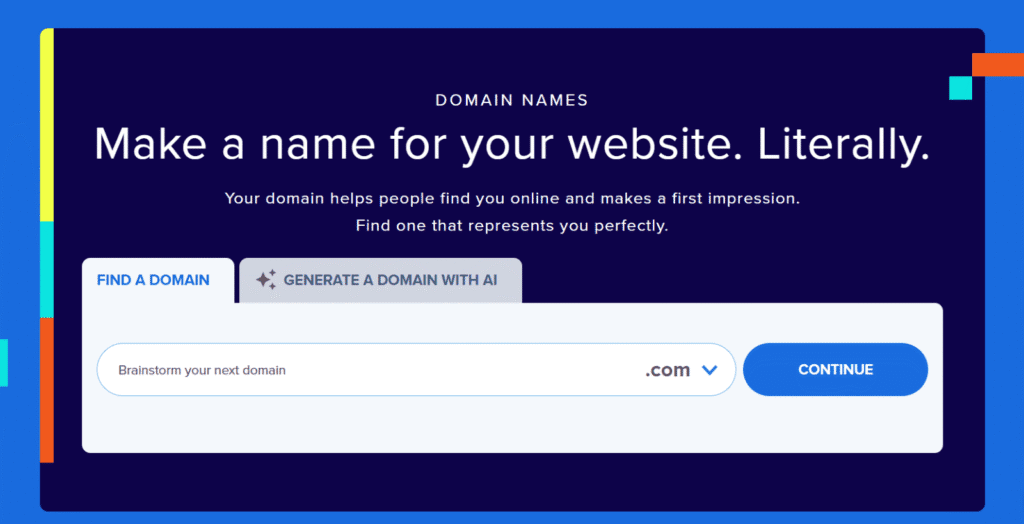
If you’re stuck or short on ideas, you can use Bluehost domain name generator. It uses AI to help you find the perfect name. Simply describe your website idea and the tool will suggest creative, available domain options.
- Keep it simple: Short and sweet is the way to go. The easier it is to spell and type, the better.
- Use keywords that matter: If possible, include a word that relates to your business or niche.
- Get creative: Combine words or invent something completely new if it fits your brand vibe.
Don’t put all your eggs in one basket. Have a couple of backup names ready just in case your first choice is taken.
Step 2: Use domain name search tools
Now that you have a few ideas, it’s time to see if those names are available. There are plenty of easy-to-use website domain search tools out there that let you search for domain names, popular ones include Bluehost.
Here’s what you do:
- Go to domain search tool and enter your desired domain name. The tool will tell you if the name is available or already taken.
- If it’s available—great! You can snap it up on the spot.
If your ideal name is taken, most tools will suggest alternatives or other available extensions. But no worries—we’ll get into those next.
Step 3: Check for domain extensions
You’ve probably noticed that websites can end in things like [.ca], [.com], [.net] or [.org]. These are called domain extensions and choosing the right one can make a difference.
- [.com] is the gold standard—it’s what most people expect and you will get many premium domain names under this.
- [.net] and [.org] are also common but often used by tech companies or nonprofits.
- There are newer extensions like [.co] or [.shop], which might be perfect depending on your business.
- Local extensions like [.ca] for Canada helps build trust with local audiences and show regional relevance.
Pro tip: It’s a good idea to check availability across multiple extensions. If [.com] (global extension) isn’t an option, another extension could still work well for you.
Step 4: Verify social media handle availability
After you check your domain, take a second to see if your preferred social media handles are available too.
There are handy tools like, Namechk or you can just go straight to platforms like Instagram or Twitter and search for the handles you want. Keeping everything consistent makes your brand look professional, easy to find and trustworthy.
Step 5: Consider similar or misspelled domains
Imagine this: You’ve got your domain, but someone grabs a similar one with a slight misspelling. This could confuse customers and might even steal traffic from you. To prevent that, check for similar domains or common misspellings of your name and consider snagging those too.
For example, if your domain is [mybrand].[ca], you might also want to secure [my-brand].[ca] or [mybrand].[net]. This helps protect your brand and prevents anyone else from taking advantage of your hard-earned traffic.
By following these steps, you’ll be well-prepared to find the perfect domain name for your website.
But what if you’ve come up with the perfect domain name, only to find out someone else beat you to it. Don’t worry—you’ve still got plenty of options. Let’s explore what you can do when your first choice isn’t available.
What to do if your domain name is taken?
If your domain name is taken, don’t worry—you’ve got options. You can try to buy the domain name from the current owner or tweak your business name slightly. Run a new domain search, explore different TLDs, including country codes or popular extensions and avoid hyphens for clarity.
Just simply type your new idea into the search bar and you might even find a free domain name when you register with Bluehost.
There are other options as well which are worth exploring:
Option 1: Reach out to the current owner
If you really like that domain name, you can always try contacting the current owner. Here’s how to do it:
- Look up the owner: Use a tool like WHOIS Lookup to find out who owns the domain. For Canadian domains ending with .ca, ownership information is maintained by CIRA (Canadian Internet Registration Authority). You can visit CIRA’s WHOIS tool to check domain status and, in some cases, find registrant details—though contact privacy may apply.
- Make an offer: If they’re not actively using the domain, they might be willing to sell it. Just be ready to negotiate—the price could range from something small to something pretty steep, depending on the value of the domain.
- Consider a domain broker: Not sure how to handle the negotiation yourself? No problem. A domain broker can help you communicate with the owner and get the best deal possible.
Reaching out can work, but it’s not always guaranteed. And sometimes, the price might not fit into your budget, so it’s good to have a backup plan.
Option 2: Go for an alternative domain
If buying the domain from the current owner isn’t feasible, it’s time to get creative and come up with an alternative. Here’s what you can do:
- Switch up the domain extension: If the [.com] version is taken, try something like [.net], [.co], [.ca] (local extension for Canada) or even newer options like [.shop] or [.online]. These can still make your site look professional and might give your brand a fresh twist.
- Add a keyword: If [mybrand].[ca] is taken, why not try something like [mybrandstore].[ca] or [shopmybrand].[ca]? Adding a relevant keyword can keep the domain unique while still staying true to your brand.
- Use a domain generator: Bluehost offers a powerful domain name generator tool that takes your original idea and gives you plenty of creative alternatives. It’s a quick and easy way to explore available options and find the perfect domain name for your brand.
Sometimes, the backup plan turns out even better than your first choice. You might end up loving your new domain name even more!
How to Register Your Domain Name
Domain registration process is super simple, and let’s walk you through the process step by step.
Step 1: Pick a domain registrar
First things first—you need to choose a company to register your domain with. This is where your domain will “live.” Some of the most popular and trusted options include Bluehost. Each domain registrar offers different perks, but if you’re planning to host your website with Bluehost, it’s smart to keep everything in one place.
Bluehost not only makes domain name registration process easy, but they also bundle it with hosting, which means fewer headaches down the road. Plus, Bluehost offers a free domain for the first year with its web hosting plans. This helps lower your initial website setup costs.
Step 2: Search for your domain name
Next, head over to your chosen registrar’s website and search for your domain name to double-check domain availability. Since you’ve already brainstormed your options, this part should be quick. If your first choice is taken, most registrars will suggest similar alternatives, so you’ll still have a chance to find something that fits your brand.
Step 3: Add it to your cart
Once you find your domain name through a domain name checker, go ahead and add it to your cart. You’ll probably see some additional options pop up, like domain privacy protection.
Why is privacy so crucial? When you register a domain, your personal contact information—like your name, address and phone number—goes into a public database called WHOIS. Without privacy protection, anyone can access this information. That could lead to unwanted spam, targeted ads or even identity theft. By adding domain privacy protection, you keep your personal details hidden, which helps protect you from these risks.
Other options might include things like extra security or email forwarding. Choose what works best for you, but don’t feel pressured to add everything.
Step 4: Choose your registration period
Now, you’ll need to decide how long you want to register your domain. Most registrars offer anywhere from one to ten years of domain name registrations. If you’re committed to your website, longer is better—it’ll save you from having to remember to renew every year. You can always set up auto-renewal too, so you won’t have to worry about losing your domain by accident.
Step 5: Buy a domain name
You’re almost there! Now, just enter your payment details and buy a domain name! Once the payment goes through, the domain is officially yours!
Ready to claim your name? Register your domain with Bluehost and launch your website today!
Step 6: Link your domain to your hosting plan
If you’ve got your domain and hosting with Bluehost, this part is super easy—they’ll link it for you automatically. But if you’re using a different host, you need to update your DNS server settings. (usually, registrars provide clear instructions to set up DNS settings).
Want a simpler setup? Get Bluehost hosting and enjoy automatic domain connection, free domain and 24/7 support—perfect for beginners and pros alike.
Final thoughts
Choosing the right domain name is one of the most important steps when starting your website. It’s not just a label—it’s how people discover, remember and trust your brand. By taking a moment to check if a domain is available, you’re avoiding legal issues, brand confusion and unnecessary delays.
Once you’ve narrowed down your domain ideas, it’s time to lock it in. With Bluehost, you can quickly run a domain search, explore top-level domain options, get a free domain for 1 year and even secure a premium domain if needed.
Need to switch providers? Bluehost also supports domain transfers and makes it easy to manage both standard and generic top-level domain registrations from one dashboard.
Your perfect domain is just a few clicks away. Check domain availability with Bluehost and launch your business site with confidence.
Frequently asked questions:
It’s crucial to check domain availability early to avoid legal issues, branding conflicts or delays. You don’t want to invest time building a site, only to discover someone else already owns the domain. A quick search upfront saves you from potential headaches later on.
If your preferred domain is taken, you have a couple of options. You can contact the current owner to see if they’re willing to sell it. If not, try creative alternatives like using a different extension (e.g., [.net], [.ca], [.co]) or adding a relevant keyword to your domain name (for example, [shopmybrand].[ca]).
Registering a domain is easy. Search for your desired domain and if it’s available, add it to your cart. Select how long you want to register the domain for, complete your purchase and the domain is yours.
Owning your domain gives you full control over your online identity. With free services, your site will be a subdomain (for example, [yoursite.hostname].[ca]) and if the platform shuts down, your site disappears. A personal domain ensures your brand stays secure and professional, no matter what hosting service you choose.
A domain name search tool helps you instantly check if a domain is available before you register it. It’s the first step to secure a unique online identity and avoid duplicate names.
Yes! Domain forwarding lets you automatically send visitors from one domain to another. It’s ideal when rebranding or merging multiple web addresses under one brand.
Choosing the right domain name builds trust, supports branding and improves search visibility. It’s a digital first impression that can influence clicks, traffic and customer perception.
Search results can display domains with similar names but different extensions or slight spelling differences. This shows that the name you want might be competitive or partially taken.
A great domain is short, memorable and relevant to your niche. Avoid numbers or dashes and aim for something easy to type and pronounce for better word-of-mouth marketing.
Use domain generators or play around with synonyms, prefixes or suffixes. Exploring different TLDs (like [.co], [.store] [.ca] or [.online]) can also help you discover unique available domains.
A TLD list shows all the available domain extensions, like [.com], [.org] [.ca] or [.tech]. Your choice of TLD should align with your industry, brand identity and target audience expectations.

Write A Comment