 ChatGPT,
 Claude,
 Gemini,
 Grok — all four for
Key highlights
- Discover how a Plesk VPS provides powerful dedicated resources with an intuitive, beginner-friendly interface.
- Learn the key differences between Plesk and cPanel to determine the best control panel for your business.
- Explore practical steps for managing websites, email accounts and automated backups through Plesk.
- Understand how to secure and monitor your virtual private server without needing a dedicated IT team.
Managing a VPS is powerful, but it is not always simple. If you have ever looked at a command-line interface and wondered where to start, you are not alone. This is exactly the gap Plesk is designed to fill.
Plesk turns complex server management into a visual, easy-to-use experience. Instead of writing commands, you can manage websites, email accounts, databases and security settings from a single dashboard. It is built for business owners who want control without the technical overhead.
Whether you are running multiple websites or scaling an online store, Plesk helps you stay organized, save time and avoid costly mistakes.
In this guide, we will show you how Plesk works on a VPS, how it compares to cPanel and how you can use it to manage your entire hosting environment with confidence.
What is a VPS with Plesk?
A VPS with Plesk is simply a virtual private server that comes with a graphical control panel to manage it easily.
Plesk is a web-based control panel that lets you manage your server, websites, email accounts and databases from a single dashboard. Instead of using command-line instructions, you can perform most tasks with just a few clicks.
Your VPS still gives you dedicated CPU, RAM and storage, so performance remains strong and consistent. Plesk just makes that power easier to use.
For small businesses, this means you get full control over your hosting environment without needing advanced technical skills.
Understanding virtual private servers and control panels
A VPS gives you dedicated resources, so your website stays fast and stable without being affected by other users.
The challenge is managing that server. A raw VPS usually requires command-line knowledge, which can be difficult if you are not technical.
This is where a control panel helps. It replaces complex commands with a simple dashboard where you can:
- Add domains
- Create email accounts
- Install applications
- Manage databases
In short, a control panel like Plesk makes your VPS easier to use without reducing its power.
How does Plesk compare to cPanel for business owners?
If you are choosing a control panel for your VPS, you will most likely compare Plesk and cPanel. Both help you manage your server, but they are designed for different types of users.
Here is a quick comparison:
| Feature | Plesk | cPanel |
|---|---|---|
| Operating system | Windows and Linux | Linux only |
| Interface | Clean, task-focused layout | Dense, tool-based layout |
| User focus | SMBs, agencies, general users | Developers and system admins |
| Multisite management | Centralized dashboard | Requires WHM |
Verdict: Plesk is a better fit for most business owners. It is easier to use and supports both Windows and Linux environments.
Also read: cPanel Overview for Beginners: How to Manage Web Hosting
To understand this better, let’s look at the two biggest differences that impact day-to-day usage.
1. User interface and ease of use
Plesk is designed around tasks, not tools. You can quickly find what you need, whether it is setting up a website or managing email. The interface feels modern and familiar, especially if you have used WordPress.
cPanel takes a different approach. It shows a grid of technical tools grouped by function. While powerful, it can feel overwhelming if you do not have a technical background.
If ease of use matters, Plesk helps you get things done faster with less confusion.
2. Operating system compatibility
Your choice may also depend on the software you use.
cPanel only works on Linux servers. Plesk supports both Windows and Linux, which gives you more flexibility.
If your business relies on Windows-based technologies like ASP.NET or MSSQL, Plesk is the clear choice.
How to manage your VPS easily with the Plesk control panel?
Managing a VPS does not have to be technical or time-consuming. Plesk brings everything into one dashboard, so you can handle daily operations without relying on developers or support.

What makes Plesk stand out is that it is designed for different types of users. Whether you are a small business owner, developer or agency, the platform adapts to your workflow.
- For business owners: Manage websites, emails and backups without technical knowledge
- For developers: Use tools like Git, Docker and staging environments
- For agencies: Manage multiple client websites from a centralized dashboard
This flexibility makes Plesk a practical choice as your needs grow.
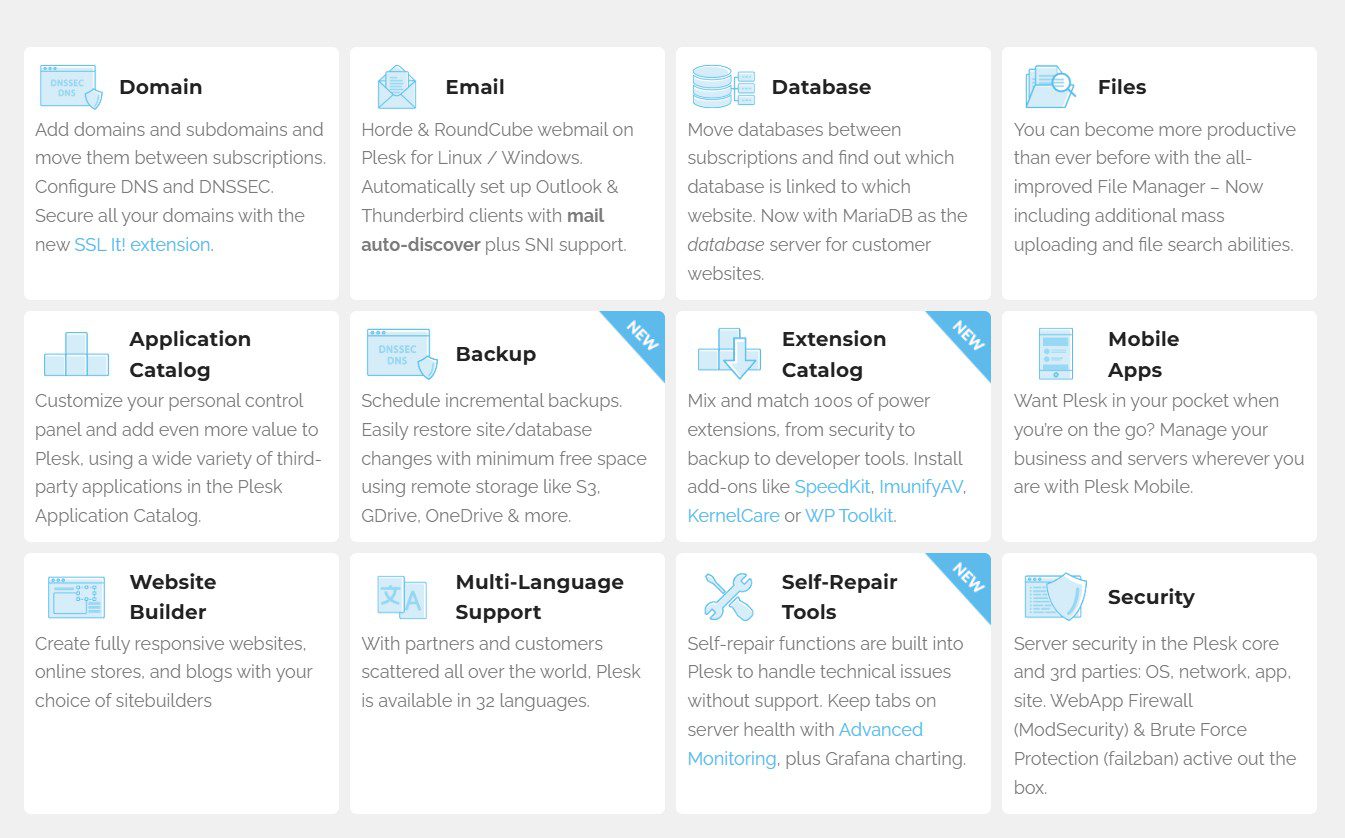
Here is what you can manage with Plesk:
1. Manage websites, domains and applications
Plesk gives you full control over your websites from a single interface.
- Add and manage domains and subdomains
- Configure DNS settings and domain security
- Install web applications with one click
- Upload and manage files using a built-in file manager
Everything is organized in one place, so you do not need to switch between tools.
2. Manage email accounts and communication
You can set up and control business email directly from Plesk.
- Create email accounts for your team
- Set passwords and mailbox limits
- Configure spam filters and email settings
- Manage mail servers without external tools
This makes it easy to keep all communication tied to your domain.
3. Monitor performance and server health
Plesk helps you stay on top of your server performance with built-in monitoring tools.
- Track CPU, RAM and disk usage
- Monitor website uptime and traffic
- View server processes and performance data
This helps you identify issues early and keep your site running smoothly.
4. Manage databases and development tools
You can handle databases and development workflows without using the command line.
- Create and manage MySQL or MSSQL databases
- Access databases through a visual interface
- Use tools like Git, Docker and staging environments
Plesk also supports modern development stacks, making it useful for both beginners and developers.
5. Manage WordPress and websites at scale
The built-in WordPress Toolkit is one of Plesk’s strongest features.
- Install WordPress in one click
- Manage plugins and themes across multiple sites
- Clone, stage and update websites safely
- Scan for vulnerabilities and apply fixes
This is especially useful if you manage multiple websites or client projects.
6. Automate backups and recovery
Plesk simplifies backup and disaster recovery.
- Schedule automatic backups daily or weekly
- Store backups locally or on cloud services
- Restore your site or server with one click
This reduces downtime and protects your business from data loss.
How to secure and optimize your Plesk VPS?
Security can feel complex, but Plesk simplifies it with built-in tools that protect your server without extra effort.
Here is what you get:
- Web Application Firewall (WAF): Blocks harmful traffic before it reaches your site
- Fail2Ban: Prevents repeated login attempts and brute-force attacks
- Manage SSL certificates: Secure your website and protect customer data in a few clicks
You do not need advanced technical knowledge to keep your server secure.
Quick tip: Monitor your server during peak traffic periods, not just average usage. This helps you avoid slowdowns during busy times like sales or campaigns.
Final thoughts
If you are already using a VPS, adding Plesk simply makes life easier. You keep all the power and performance, but remove the complexity that usually comes with managing a server.
Instead of dealing with technical commands, you get a clean dashboard where everything just makes sense. From websites to email to security, it is all in one place and easy to manage.
Plesk is especially useful if you want control without spending hours figuring things out. It is also the right choice if you prefer a simpler interface or need support for Windows-based applications.
At the end of the day, the goal is not to manage servers. It is to run and grow your business.
If you are planning to upgrade, choosing a reliable VPS provider is just as important. Bluehost VPS hosting gives you the performance, scalability and dedicated resources you need to run your websites smoothly.
Explore Bluehost VPS hosting plans and choose the right setup for your business.
FAQs
Plesk makes server management simple with a visual dashboard. You can manage websites, email accounts and databases without using command-line instructions. This saves time and reduces technical complexity.
Plesk is not completely free. It is a licensed control panel, so you usually need to purchase a subscription. However, some hosting providers include Plesk in their plans, and free trials or limited editions may be available.
Not always. Some hosting providers include Plesk, while others require you to install it separately. It depends on the hosting plan you choose.
Yes, you can install Plesk on most VPS environments. If your server provides root access, you can install Plesk or any other control panel based on your needs.
Plesk offers a cleaner, task-based interface and supports both Windows and Linux. cPanel is Linux-only and uses a more technical, tool-based layout. Plesk is generally easier for beginners, while cPanel is often preferred by developers.
Plesk works well on both operating systems. However, it is the standard choice for Windows VPS because cPanel does not support Windows environments.
Yes, Plesk supports free SSL certificates through Let’s Encrypt. You can install and renew them automatically to secure your website without extra cost.

Write A Comment